Global Samsung Cloud Platform provides a 1:1 virtual circuit service based on the line bandwidth between regions or customer bases.
This is the multi-page printable view of this section. Click here to print.
Cloud Virtual Circuit
- 1: Overview
- 2: How-to guides
- 3: Release Note
1 - Overview
Service Overview
becomes Cloud Virtual Circuit service is a service that provides a 1:1 virtual circuit based on circuit bandwidth between global Samsung Cloud Platform regions or customer bases.
Key Features
Cloud Virtual Circuit provides the following functions and features.
- Mesh-type one-to-one connection: The Samsung Cloud Platform infrastructure is connected between all global regions, so you can use one-to-one virtual circuit services from anywhere to anywhere.
- Non-contract short-term line service: Unlike existing network line services, it provides a non-contract rate system, allowing for cost-effective use when short-term line service is needed.
- Special feature provision: It provides a special feature that can divide a single virtual circuit into multiple logical circuits for different purposes and use them.
Service Composition Diagram
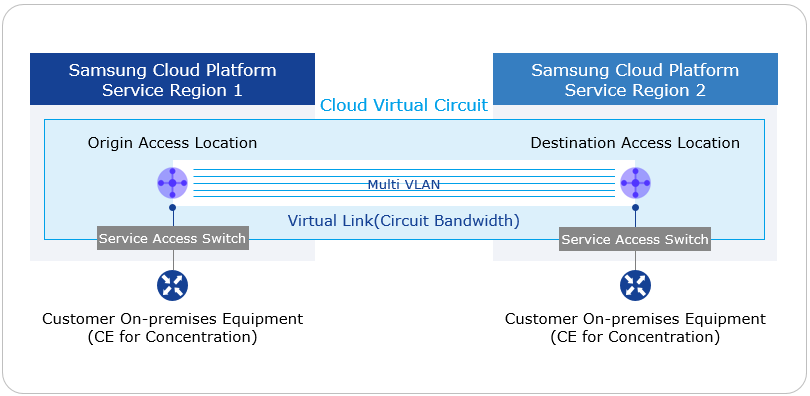
Provided Function
Cloud Virtual Circuit service provides the following functions.
- Korean and global service provision
- Korea: Suwon, Sangam, Chuncheon, Gumi, Nonhyeon
- Global: New Jersey, San Jose, Sao Paulo, London, Frankfurt, Hong Kong, Singapore, Delhi, Dubai, Tokyo
- Global region-to-region one-to-one virtual circuit service (based on L2VPN) provided
- You can select departure and destination access locations in all service areas.
- A single cloud virtual circuit consists of up to two virtual links for redundancy.
- Provided circuit bandwidth: * 10, 20, 50, 100, 200, 300, 400, 500, 600, 700, 800, 900 Mbps * 1, 2, 3, 4, 5, 6, 7, 8, 9, 10 Gbps
Reference
The maximum circuit bandwidth within the country is 10 Gbps, and the maximum circuit bandwidth between Korea-Global and Global-Global is 1 Gbps.
- Logical circuit separation function (Multi VLAN): Up to 5 individual VLANs can be used with a single cloud virtual circuit.
Components
Cloud Virtual Circuit provides a 1:1 virtual backbone line between global bases. The components are as follows, and you can create resources with related self-service through the user Console.
| Division | Content |
|---|---|
| Cloud Virtual Circuit | virtual resource that accommodates up to two Virtual Links for the same 1:1 point |
| Starting Point Access Location | 1:1 virtual circuit starting point Access Location information |
| Destination Access Location | 1:1 virtual circuit’s destination Access Location information |
| Multi VLAN | a function that separates one Virtual Link into multiple logical lines and provides them |
| Virtual Link | Cloud Virtual Circuit with virtual circuit based on dedicated line bandwidth (line bandwidth, contract period, transmission path level option selection) |
| CE equipment | network equipment that receives a dedicated line for the customer’s business site (Customer Edge) |
Fig. Cloud Virtual Circuit Components
Limitations
Cloud Virtual Circuit has the following restrictions.
- For one Cloud Virtual Circuit, you can create up to 2 Virtual Links.
- Multi VLAN feature can create up to 5 per one Cloud Virtual Circuit.
Regional provision status
Cloud Virtual Circuit service is available in the following environment.
| Region | Availability |
|---|---|
| Korea West 1(kr-west1) | Provided |
| Korea East 1 (kr-east1) | Not Provided |
| South Korea 1(kr-south1) | Not provided |
| South Korea 2(kr-south2) | Not provided |
| Korea South 3(kr-south3) | Not Provided |
Table. Cloud Virtual Circuit Service Availability by Region
Preceding service
There are no services that must be pre-configured before creating this service.
2 - How-to guides
The user can apply for the Cloud Virtual Circuit service through the service request of the Samsung Cloud Platform Console.
Cloud Virtual Circuit application
You can apply for Cloud Virtual Circuit through the Support Center of the Samsung Cloud Platform Console.
To apply for Cloud Virtual Circuit, follow the following procedure.
All services > Networking > Cloud Virtual Circuit menu is clicked. It moves to the Service Home page of Cloud Virtual Circuit.
Service Home page, click the Cloud Virtual Circuit service request button. It moves to the Service Request page of the Support Center.
Cloud Virtual Circuit application requires information to be selected and entered.
Classification NecessityDetailed Description title required title for service request - use Hangul, English, numbers, special characters (
+=,.@-_) to enter within 64 characters
Region Required Select the region to request the service Service Required Networking service group’s Cloud Virtual Circuit service selection job classification required Cloud Virtual Circuit new application selection Content Required Information input for Cloud Virtual Circuit application Table. Cloud Virtual Circuit Service Request Items- use Hangul, English, numbers, special characters (
Check the input information and click the request button.
Guidance
- After requesting the service, you cannot modify or delete the written content.
- After requesting a service, you can check the details of the request on the Service Request List page of the Support Center. Please refer to Checking Service Request Details for more information.
Cloud Virtual Circuit cancellation
You can request to cancel the Cloud Virtual Circuit in the Support Center of the Samsung Cloud Platform Console.
To apply for Cloud Virtual Circuit, follow the following procedure.
All services > Management > Support Center menu should be clicked. It moves to the Service Home page.
Service Home page, click the Cloud Virtual Circuit service request menu. It moves to the service request page.
Cloud Virtual Circuit cancellation requires information to be selected and entered.
Classification NecessityDetailed Description title required title for service request - use hangul, english, numbers, special characters (
+=,.@-_) to input within 64 characters
Region Required Select the region to request service cancellation Service Required Networking service group’s Cloud Virtual Circuit service selection job classification required Cloud Virtual Circuit cancellation application optional Content Required Information input for Cloud Virtual Circuit cancellation application Table. Cloud Virtual Circuit service cancellation request items- use hangul, english, numbers, special characters (
Check the input information and click the request button.
Guidance
- After requesting the service, you cannot modify or delete the written content.
- After requesting a service, you can check the details of the request on the Service Request List page in the Support Center. Please refer to Checking Service Request Details for more information.
3 - Release Note
Cloud Virtual Circuit
2025.09.08
NEW
Cloud Virtual Circuit Service Official Version Release- Cloud Virtual Circuit service has been officially launched.
- The user can apply for a 1:1 virtual circuit based on the line bandwidth between the Global Samsung Cloud Platform region or the customer’s hub.