This is the multi-page printable view of this section. Click here to print.
Cloud Last Mile
- 1: Overview
- 2: How-to guides
- 2.1: Circuit and Edge
- 3: Release Note
1 - Overview
Service Overview
Cloud Last Mile is a service that provides Last Mile lines for network connectivity from the customer’s site to the Samsung Cloud Platform region, as well as Customer Edge resources within the customer’s site. Resources installed and operated at the customer’s site can be easily requested through a service request in the Samsung Cloud Platform user console.
Features
- Provision of Circuits and Edge Packages: We provide Last Mile circuits and Edge resources in a package format, combining optimal equipment that matches the application types primarily used by the customer, for connecting the customer’s site to external networks.
- Provide various Edge connection types: You can choose virtual resources or physical equipment types, and select from a variety of functions required for network connections such as routers, SD-WAN, WAN accelerators, firewalls, etc.
- Provision of Last Mile line monitoring service: The connection status and traffic usage information of Last Mile lines connected to network equipment within a Samsung Cloud Platform region can be conveniently viewed using the monitoring service. * The monitoring service is offered using NiO, Samsung SDS’s in‑house developed platform.
Service architecture diagram
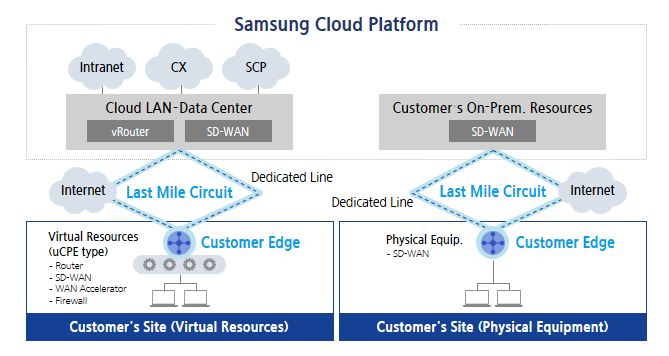
Provided features
The Cloud Last Mile service provides the following features.
- Last Mile Line
- Connecting Samsung SDS POP to customer sites
- Line provision type: dedicated line or Internet, MPLS
- Upstream connection type: On-Premise equipment within Samsung SDS POP, Cloud LAN - Data Center
- Customer Edge Resource
- Network equipment for line connections within the customer’s site
- Resource provision type: uCPE or physical equipment (SD-WAN)
- uCPE: A format that deploys routers, SD-WAN, WAN accelerators, firewalls, etc., as VNF (Virtual Network Function).
- Last Mile line monitoring service
- Last Mile line up/down status and traffic usage monitoring
Constraints
The constraints of the Cloud Last Mile service are as follows.
- Since it is offered only as a package of the line and Edge equipment, providing the line or equipment separately is not possible.
- Depending on the upstream country’s connection method, it may be necessary to deploy customer-specific equipment within the Samsung Cloud Platform POP.
- When connecting to shared equipment in the upstream country, port fees may be incurred depending on the associated product.
Provision status
Cloud Last Mile can connect with SDS domestic/overseas POPs worldwide.
Preceding Service
Cloud Last Mile does not have a preceding service.
2 - How-to guides
Users can create the Cloud Last Mile service by entering the required information and selecting detailed options through the Samsung Cloud Platform Console.
Create Cloud Last Mile
You can create and use the Cloud Last Mile service in the Samsung Cloud Platform Console.
To request the creation of a Cloud Last Mile service, follow these steps.
Click the All Services > Networking > Cloud Last Mile menu. You will be taken to the Service Home page of Cloud Last Mile.
Click the Create Cloud Last Mile button on the Service Home page. You will be taken to the Create Cloud Last Mile page.
Enter the information required to create the service on the Cloud Last Mile Creation page.
- Enter the required information in the Service Information Input area.
Category Required statusDetailed description Cloud Last Mile name Required Enter the Cloud Last Mile name the user will use - using English letters and numbers, 3-20 characters
Installation area Required Select installation region for Cloud Last Mile Installation address Required Enter Cloud Last Mile installation address Contract period Required Select contract period for Cloud Last Mile service Installation request date Required Select Cloud Last Mile installation request date - Select a date at least two months after today in the calendar
Other requests Option Enter request details when applying for Cloud Last Mile service Table. Cloud Last Mile service information entry items
- Enter the required information in the Service Information Input area.
Check the detailed information created in the summary panel and click the Create button.
- When creation is complete, check the created resource on the Resource List page.
Check detailed information of Cloud Last Mile
The Cloud Last Mile service allows you to view and edit the full resource list and detailed information from the Cloud Last Mile menu. The Cloud Last Mile Details page consists of Details, Connected Resources, and Task History tabs.
To view detailed information about Cloud Last Mile, follow these steps.
- Click the All Services > Networking > Cloud Last Mile menu. You will be taken to the Service Home page of Cloud Last Mile.
- From the Service Home page, click the Cloud Last Mile menu. You will be taken to the Cloud Last Mile List page.
- Cloud Last Mile List page, click the resource to view detailed information. You will be taken to the Cloud Last Mile Detail page.
- Cloud Last Mile Details page displays status information and additional feature information, and consists of Details, Connected Resources, Operation History tabs.
Category Detailed description status Current service status - Request: Service request in progress
- Creating: Service registration completed
- Active: Service approved and successfully created
Service termination Cancel Service button Table. Cloud Last Mile status information and additional feature items
- Cloud Last Mile Details page displays status information and additional feature information, and consists of Details, Connected Resources, Operation History tabs.
Detailed Information
In the Detailed Information tab, you can view the detailed information of the selected Cloud Last Mile.
| Category | Detailed description |
|---|---|
| Service | Service name |
| Resource Type | Resource Type (Cloud Last Mile) |
| SRN | Unique resource ID in Samsung Cloud Platform |
| Resource name | Resource Name |
| Resource ID | Unique resource ID in the service |
| Constructor | User requesting service creation |
| Creation date and time | Service creation date and time |
| Editor | Service modification request user |
| Modification date and time | Service modification date and time |
| Service Details | Service detailed configuration information
|
Connected resources
In the Connected Resources tab, you can view the Circuit and Edge information linked to the selected Cloud Last Mile.
| Category | Detailed description |
|---|---|
| Circuit and Edge ID | Circuit and Edge ID Information
|
| Resource type | Circuit and Edge resource type |
| Connection type | Circuit and Edge connection type |
| Resource Details | Circuit and Edge resource detailed configuration information |
Job History
In the Work History tab, you can view the operation history of the selected resource.
| Category | Detailed description |
|---|---|
| Task History List | Resource Change History
|
Terminate Cloud Last Mile
If you cancel the unused Cloud Last Mile, you can reduce operating costs.
To cancel Cloud Last Mile, follow these steps.
- Click the All Services > Networking > Cloud Last Mile menu. You will be taken to the Service Home page of Cloud Last Mile.
- On the Service Home page, click the Cloud Last Mile menu. You will be taken to the Cloud Last Mile list page.
- On the Cloud Last Mile List page, click the resource to be terminated. Proceed to the Cloud Last Mile Details page.
- Click the Cancel Service button on the Cloud Last Mile Details page.
- After termination is complete, check the resource termination status in the Cloud Last Mile list.
2.1 - Circuit and Edge
Users can create the service by entering the required information for the Circuit and Edge service through the Samsung Cloud Platform Console.
Create Circuit and Edge
You can create and use the Circuit and Edge service in the Samsung Cloud Platform Console.
To request the creation of a Circuit and Edge service, follow the steps below.
Click the All Services > Networking > Cloud Last Mile menu. Navigate to the Service Home page of Cloud Last Mile.
On the Service Home page, click the Create Circuit and Edge button. You will be taken to the Create Circuit and Edge page.
On the Circuit and Edge Creation page, enter the information required to create a service.
- Enter the required information in the Service Information Input area.
Category RequiredDetailed description Cloud Last Mile name Required Select the Cloud Last Mile service to use - + New click to create a Cloud Last Mile service and then select it
Resource type Required Select resource type to use Resource Type > Circuit Required Select the connection type of the circuit - SD-WAN: Select the license to use
- VPN: Choose the line type and enter the line bandwidth
- Enter the line bandwidth within 1-1,000
Resource Type > Customer Edge Required Select usage type for Customer Edge - Physical equipment: Select the manufacturer and performance of the physical equipment to use
- Virtual resources: Enter the Customer Edge name and select the type
- Select cCPE specifications
- Select use with up to three VNF functions, and choose the manufacturer and performance for each item
Table. Input fields for Circuit and Edge service information
- Enter the required information in the Service Information Input area.
Check the detailed information generated in the summary panel, and click the Create button.
- After creation is complete, check the created resource on the Resource List page.
Check detailed information for Circuit and Edge
The Circuit and Edge service allows you to view and edit the full resource list and detailed information from the Circuit and Edge menu. The Circuit and Edge Details page consists of Details, Activity Log tabs.
To view detailed information of Circuit and Edge, follow the steps below.
- Click the All Services > Networking > Cloud Last Mile menu. You will be taken to the Service Home page of Cloud Last Mile.
- On the Service Home page, click the Circuit and Edge menu. You will be taken to the Circuit and Edge list page.
- Circuit and Edge List Click the resource to view detailed information on the page. Circuit and Edge Details page will be opened.
- Circuit and Edge Details page displays status information and additional feature information, and consists of Details, Activity Log tabs.
Category Detailed description status Current service status - Request: Service request in progress
- Creating: Service registration completed
- Active: Service approved and successfully created
- Deleting: Service termination request in progress
Previous state change Previous state change button - In Creating, Active, Deleting states, you can revert to the previous state
Delete Circuit and Edge Cancel Service button Table. Circuit and Edge status information and additional feature items
- Circuit and Edge Details page displays status information and additional feature information, and consists of Details, Activity Log tabs.
Detailed Information
Detailed Information tab allows you to view the detailed information of the selected Circuit and Edge.
| Category | Detailed description |
|---|---|
| service | Service name |
| Resource Type | Resource Type (Circuit and Edge) |
| SRN | Unique resource ID in Samsung Cloud Platform |
| Resource name | Resource Name |
| Resource ID | Unique resource ID in the service |
| Constructor | User requesting service creation |
| Creation date and time | Service creation date and time |
| Editor | User requesting service modification |
| Modification date and time | Service modification date and time |
| Service Details | Service detailed configuration information
|
Job History
In the Work History tab, you can view the operation history of the selected resource.
| Category | Detailed description |
|---|---|
| Task History List | Resource Change History
|
Terminate Circuit and Edge
If you cancel unused Circuit and Edge, you can reduce operating costs.
To cancel Circuit and Edge, follow the steps below.
- Click the All Services > Networking > Cloud Last Mile menu. You will be taken to the Service Home page of Cloud Last Mile.
- On the Service Home page, click the Circuit and Edge menu. You will be taken to the Circuit and Edge list page.
- On the Circuit and Edge List page, click the resource to cancel. You will be taken to the Circuit and Edge Details page.
- Circuit and Edge Details page, click the Circuit and Edge Delete button.
- When termination is complete, check the resource termination status in the Circuit and Edge list.
3 - Release Note
Cloud Last Mile
- The automatic ledger creation feature via the Samsung Cloud Platform user console has been added.
- We have launched the Cloud Last Mile service, which provides a Last Mile line for network connectivity from the customer’s site to the Samsung Cloud Platform region and Customer Edge resources within the customer’s site.