This is the multi-page printable view of this section. Click here to print.
Cloud Last Mile
- 1: Overview
- 2: How-to guides
- 3: Release Note
1 - Overview
Service Overview
Cloud Last Mile is a service that provides Last Mile lines for network connection from the customer’s business site to the Samsung Cloud Platform region, and Customer Edge resources within the customer’s business site. Resources installed and operated in the customer’s business site can be easily applied for through a service request on the Samsung Cloud Platform user console.
Features
- Circuit and Edge Package Offering: The Last Mile circuit and Edge resources for connecting customer business sites and external networks are provided in a package format, combining the optimal equipment for the type of application that customers mainly use.
- Various Edge connection types provided: You can select virtual resources, physical device types, and use various functions required for network connection such as router/SD-WAN/WAN accelerator/Firewall.
- Last Mile Line Monitoring Service: The connection status and traffic usage of the Last Mile line connected to the network equipment in the Samsung Cloud Platform region can be easily checked using the monitoring service. The monitoring service is provided using NiO Tool, a self-developed platform by SamsungSDS.
Service Composition Diagram
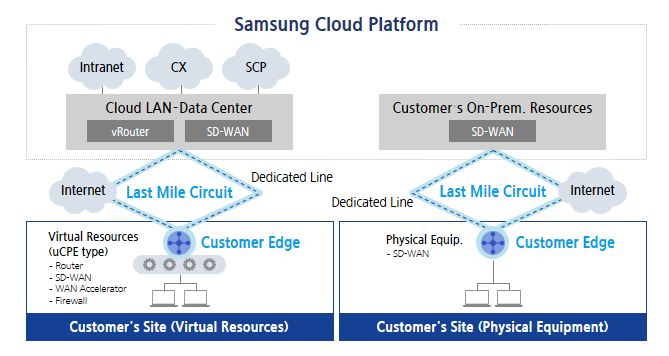
Provided Features
Cloud Last Mile service provides the following features.
- Last Mile circuit
- Line provision type: Dedicated line or Internet
- Upper-level country connection type: Cloud LAN - Data Center, Cloud WAN, On-Premise equipment inside Samsung SDS Data Center
- Customer Edge Resource Provisioning Type
- uCPE(VNF: Virtual Network Function): router, SD-WAN, WAN accelerator, firewall
- Physical equipment: SD-WAN
- Last Mile Line Monitoring Service
- Last Mile line up/down status and traffic usage monitoring
Constraints
The limitations of the Cloud Last Mile service are as follows.
- Only circuit and Edge equipment package forms are provided, so it is not possible to provide circuits or equipment alone.
- Depending on the method of connecting to the upper country, it may be necessary to build a dedicated device for customers within the Samsung Cloud Platform region. When connecting to the upper country’s public equipment, port costs may be incurred depending on the linked product.
Regional Provision Status
Cloud Last Mile can be provided in the following environments.
| Region | Availability |
|---|---|
| Western Korea(kr-west1) | Provided |
| Korea East(kr-east1) | Not provided |
| South Korea southern region 1(kr-south1) | Not provided |
| South Korea 2(kr-south2) | Not provided |
| South Korea, southern region 3(kr-south3) | Not provided |
Preceding service
Cloud Last Mile has no preceding service.
2 - How-to guides
The user can input the essential information of the Cloud Last Mile service and create the service by selecting detailed options through the Samsung Cloud Platform Console.
Cloud Last Mile creation
You can create and use the Cloud Last Mile service in the Samsung Cloud Platform Console.
To request the creation of Cloud Last Mile service, follow the procedure below.
Click All services > Networking > Cloud Last Mile menu. It moves to the Service Home page of Cloud Last Mile.
On the Service Home page, click the Cloud Last Mile service request button. It moves to the Support Center > Service Request List > Service Request page.
Service Request page, enter or select the corresponding information in the required input area.
GuideIn the task division, select Cloud Last Mile service creation.Input Item Detailed Description Title Enter the title of the service request content - Example: Cloud Last Mile service creation request
Region Select the location of Samsung Cloud Platform - Automatically entered as the region of the project
Service Select service group and service. If you press the Cloud Last Mile service request button, it is automatically entered - Service group: Networking
- Service: Cloud Last Mile
Work Division Select the work you want to request - Cloud Last Mile service creation: Select if you are newly requesting the service
Content Enter detailed information required to create Cloud Last Mile service - Customer Information (Name/ E-Mail/ Phone Number): Enter user information
- Content: Enter detailed application content
Attachments If you have additional files you want to share, please upload them - Attached files can be up to 5MB each, with a maximum of 5 files
- Only doc, docx, xls, xlsx, ppt, ppts, hwp, txt, pdf, jpg, jpeg, png, gif, tif files can be attached
Table. Cloud Last Mile Service Creation Request ItemsCheck the required information entered on the Service Request page and click the Request button.
- Cloud Last Mile service creation work will proceed after confirmation by the person in charge, and it is expected to take around 5-7 business days.
Cloud Last Mile application history check
You can check the detailed information and processing procedure after applying for the Cloud Last Mile service.
To check the Cloud Last Mile service application history, follow the procedure below.
- Click all services > Support Center menu. It moves to the Service Home page of Support Center.
- On the Service Home page, click the Service Request menu. It moves to the Service Request List page.
- On the Service Request List page, select the application item. It moves to the Service Request Details page.
- Service Request Details page to check the detailed information and processing procedure.
Cloud Last Mile cancellation
You can cancel through the Cloud Last Mile service request on the Samsung Cloud Platform Console.
To request the cancellation of Cloud Last Mile service, follow the procedure below.
Click All services > Networking > Cloud Last Mile menu. It moves to the Service Home page of Cloud Last Mile.
On the Service Home page, click the Cloud Last Mile service request button. It moves to the Support Center > Service Request List > Service Request page.
Service Request page, enter or select the corresponding information in the required input area.
GuideIn the job classification, select Cloud Last Mile service cancellation.Input Item Detailed Description Title Enter the title of the service request content - Example: Cloud Last Mile service cancellation request
Region Select the location of Samsung Cloud Platform - Automatically entered as the region of the project
Service Select service group and service. If you click the Cloud Last Mile service request button, it is automatically entered - Service group: Networking
- Service: Cloud Last Mile
Work classification Select the work you want to request - Cloud Last Mile service cancellation: Select if you want to request service cancellation
Content Detailed information required for Cloud Last Mile service cancellation - Customer Information (Name/ E-Mail/ Phone Number): Enter user information
- Content: Enter detailed application content
Attachments If you have additional files you want to share, upload them - Attached files can be up to 5MB each, with a maximum of 5 files
- Only doc, docx, xls, xlsx, ppt, ppts, hwp, txt, pdf, jpg, jpeg, png, gif, tif files can be attached
Table. Cloud Last Mile Service Cancellation Request ItemsCheck the required information entered on the Service Request page and click the Request button. The Cloud Last Mile service cancellation process will proceed after confirmation by the person in charge, and it is expected to take around 5-7 business days.
3 - Release Note
Cloud Last Mile
- We launched the Cloud Last Mile service, which provides the Last Mile line for network connection from the customer’s business site to the Samsung Cloud Platform region and the Customer Edge resource within the customer’s business site.