The page has been translated by Gen AI.
Overview
Service Overview
Resource Optimizer is a service that analyzes the configuration status and utilization metrics of resources used in Samsung Cloud Platform, provides Rightsizing recommendations, and identifies idle resources.
Service diagram
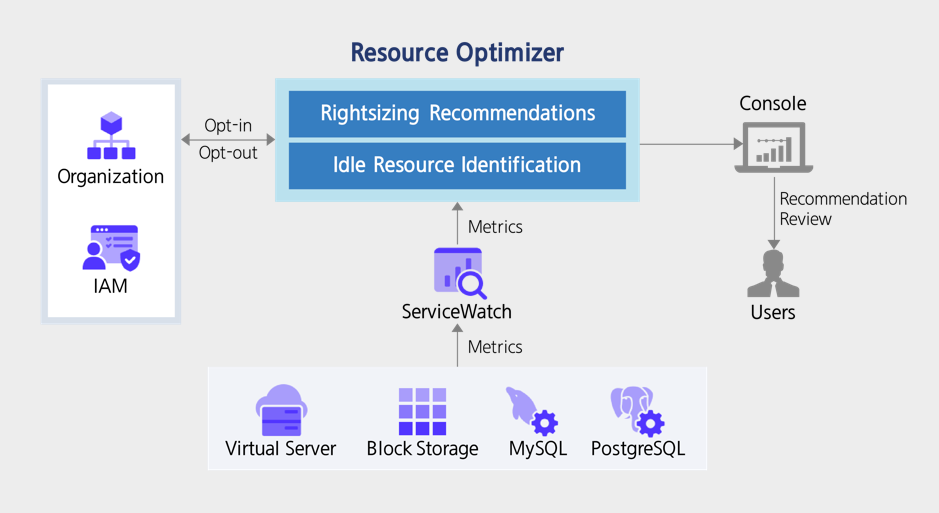
Supported resources
Resource Optimizer provides recommendations for the following resources.
- Virtual Server Instance
- PostgreSQL(DBaaS), MySQL(DBaaS) instances
- Block Storage Volume (only applicable to SSD_Provisioned type)
Provided features
Resource Optimizer provides the following features.
Service Opt-in Management
- You can enable or disable the service for an individual Account or for all Member Accounts within an organization.
- You can delegate administrator privileges to a Member Account within the organization.
- Opt-in instantly analyzes ServiceWatch’s resource usage metrics and generates recommendations.
- When you opt out, all recommendations and metric analysis data for that account will be deleted.
Rightsizing analysis criteria setting
- Depending on the characteristics and needs of the customer’s workload (cost reduction priority, stability priority), you can set the lookback period and resource performance criteria for Rightsizing analysis differently by region and resource type.
- It can be set independently at the organization level and the account level, and is applied according to the hierarchy priority (with lower levels taking precedence). * If no separate criteria are set, the default criteria of the Resource Optimizer will be applied.
Provide Rightsizing Recommendations
- Determines the Rightsizing status of the current resource.
- For over-provisioned or under-provisioned resources, we provide recommendations for server type and storage capacity.
Idle Resource Identification
- We recommend identifying idle resources and reviewing their deletion.
Dashboard
- Provides a dashboard showing resource optimization status by resource type and idle resource status.
Preliminary Service
This is a list of services that must be pre-configured before creating the service. Please refer to the guide provided for each service and prepare in advance.
| Service Category | Service | Detailed description |
|---|---|---|
| Management | ServiceWatch | A service that collects and analyzes resource usage metrics and logs, and provides alerts. |
Table. Resource Optimizer Preliminary Service