Service Overview
ID Center is a service that enables easy centralized management of access permissions for resources by account on the Samsung Cloud Platform. You can create permission policies for each service and assign accounts and policies linked to the Organization service to users, enabling management of tasks according to each user’s permissions.
Features
- Easy Access Permission Management: Through SAML (Security Assertion Markup Language) based credential authentication, you can receive authentication and authorization from Samsung Cloud Platform and access resources of multiple accounts within the organization.
- Efficient Account Management: By integrating with the Organization service, you can centrally manage the costs and resource usage incurred by all Accounts within the organization.
- Account Security Enhancement: Instead of the Samsung Cloud Platform Console, you can strengthen security by using the separately provided Access Portal so that only authorized ID Center users can access. Through the Access Portal, you can fundamentally prevent users outside the customer organization from accessing the Account.
Configuration
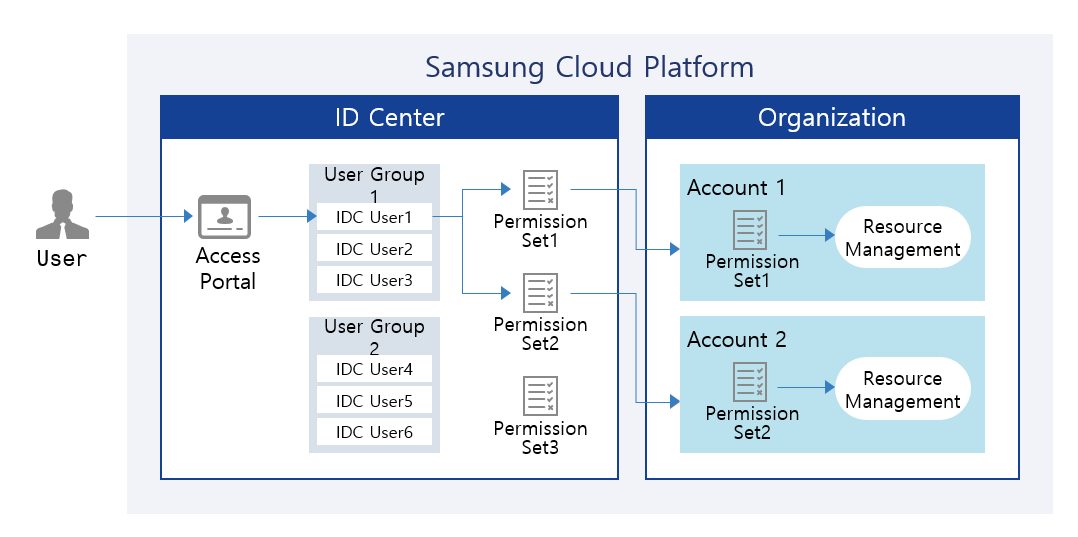
Provided features
ID Center provides the following functions.
- User and User Group Management: You can create users and user groups and configure service-specific permission management policies. Users are required to have MFA (Multi-Factor Authentication) applied, strengthening the management of Account access.
- Account Allocation Management: You can assign and manage Accounts corresponding to each user’s tasks.
- Permission Set Management: You can create and manage permission sets by using the default policies or custom policies that exist in each Account, or by configuring policies directly.
- Access Portal Provision: Provides an Access Portal that can be used instead of the Samsung Cloud Platform Console, allowing only ID Center users to access it.
Component
User
Administrators can create users and add them to user groups. They can generate passwords automatically or manually, and provide users with Access Portal login information. Additionally, users can be assigned to accounts according to their respective tasks.
User Group
You can link users and Accounts through user groups. You can create user groups appropriate for each task, register users, and assign them to Accounts.
Permission Set
You can create permission sets by using the default policies and custom policies that exist in the Account, or by configuring policies directly.
Provision status by region
ID Center is available in the environments below.
| Region | Whether provided |
|---|---|
| Korea West (kr-west1) | Provide |
| Korea East (kr-east1) | Provide |
| South Korea South 1 (kr-south1) | Provide |
| South Korea South 2 (kr-south2) | Provide |
| South Korea 3 (kr-south3) | Not provided |
Preceding Service
This is a list of services that must be pre-configured before creating the service. Please refer to the guide provided for each service for details and prepare in advance.
| Service Category | Service | Detailed description |
|---|---|---|
| Management | Organization | A service that organizes accounts by organizational units, manages them hierarchically, and controls resource access permissions. |