Overview
Service Overview
ID Center is a service that allows you to easily manage access permissions for account-based resources on the Samsung Cloud Platform from a central location. You can manage to perform tasks according to user permissions by creating authority policies for each service and assigning accounts and policies associated with the Organization service to users.
Features
- Easy Access Control: Through SAML (Security Assertion Markup Language) based qualification authentication, it is possible to access the resources of multiple accounts within the organization by granting authentication and authorization from the Samsung Cloud Platform.
- Efficient Account Management: Integrated management of costs and resource usage from all accounts owned by the organization is possible by linking with the Organization service.
- Account Security Enhancement: Security can be enhanced by allowing only authorized ID Center users to access through the Access Portal, which is provided separately from the Samsung Cloud Platform Console. Through the Access Portal, it is possible to prevent other users outside the customer organization from accessing the account in the first place.
Composition
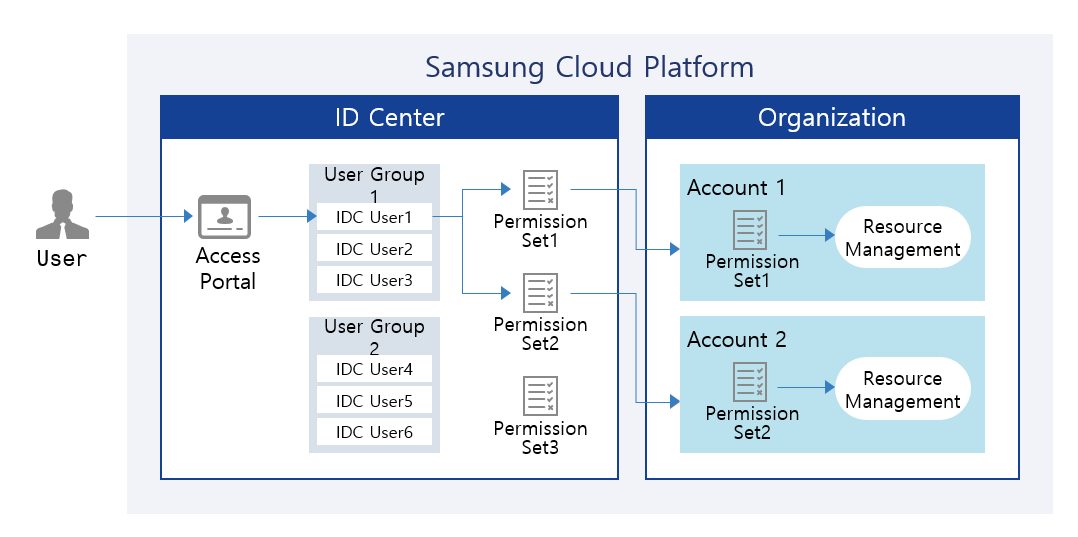
Provided Features
ID Center provides the following functions.
- User and User Group Management: User and user group management can be created and service-specific authority management policies can be configured. Users must have MFA (Multi-Factor Authentication) applied to strengthen account access management.
- Account Assignment Management: You can assign and manage accounts corresponding to each user’s task.
- Permission Set Management: You can create and manage permission sets using default policies or custom policies for each account, or by configuring policies directly.
- Access Portal Provided: An Access Portal is provided instead of Samsung Cloud Platform Console, allowing only ID Center users to access.
Components
User
The administrator can create users and add them to user groups. The administrator can automatically generate or manually create user passwords and provide users with Access Portal connection information. Additionally, administrators can assign users to accounts that match each task.
User Group
You can link users and accounts through user groups. You can configure user groups suitable for each task and register users to assign them to accounts.
Permission Set
You can create a set of permissions by utilizing the default policies and custom policies existing in the Account or by directly composing a policy.
Regional Provision Status
ID Center can be provided in the following environment.
| Region | Availability |
|---|---|
| Western Korea(kr-west1) | Provided |
| Korea East(kr-east1) | Provided |
| South Korea (kr-south1) | Provided |
| South Korea (kr-south2) | Provided |
| South Korea, southern region 3(kr-south3) | Not provided |
Preceding Service
This is a list of services that must be pre-configured before creating this service. Please refer to the guide provided for each service and prepare in advance.
| Service Category | Service | Detailed Description |
|---|---|---|
| Management | Organization | A service that organizes accounts by organizational unit, manages them hierarchically, and controls resource access permissions |