JSON Writing Guide
Policies are divided into credential-based policies and resource-based policies.
- Credential-based policy: a policy assigned to the principal (the entity performing actions) such as users, groups, or roles.
- Resource-based policy: a policy granted to a resource that decides whether to allow or deny (Effect) an action (Action) on a specific resource (Resource) only for a principal (Principal).
Resource-based policy
A resource-based policy is a policy that grants the specified principal (requester) permission to perform specific actions on the resource. Therefore, a resource-based policy is attached directly to the resource, only the users defined in the policy can enforce it, and the user to whom the policy is assigned becomes the security principal.
{
  "Version": "2024-07-01"
  "Statement": [
        {
            "Sid": "statement1"
            "Action": ["object-store:UploadObject"],
            "Principal": {
                "scp":"srn:e::1234:::scp-iam:user/abc3d3442"
            },
            "Effect": "Allow"
            "Resource": "srn:e:::::object-store:bucket/foo"
        }
    ]
}
{
"Version": "2024-07-01"
"Statement": [
{
"Sid": "statement1"
"Action": ["object-store:UploadObject"],
"Principal": {
"scp":"srn:e::1234:::scp-iam:user/abc3d3442"
},
"Effect": "Allow"
"Resource": "srn:e:::::object-store:bucket/foo"
}
]
}Resource-Based Policy Structure
The syntax structure and item-by-item description of resource-based policies are as follows.
{
  "Version": "2024-07-01",                                 # Policy grammar version (fixed to 2024-07-01)
  "Statement": [
    {
      "Sid": "statement1",                                 # policy element ID
      "Effect": "Allow",                                   # Policy effect
      "Action": ["iam:showUser"],                          # Action defined in the policy
      "Principal": {
          "scp":"srn:e::1234:::iam:user/ROOT"              # the entity that is the target of the policy
      }
      "Resource": "srn:e::kr-west1:::scp-iam:group/foo",   # resource for which the policy action is allowed
      "Condition": {                                       # policy condition
          "StringEquals": {
            "iam:userName": [
              scp_test_user
              ]
          }
        }
    }
  ]
}
{
"Version": "2024-07-01", # Policy grammar version (fixed to 2024-07-01)
"Statement": [
{
"Sid": "statement1", # policy element ID
"Effect": "Allow", # Policy effect
"Action": ["iam:showUser"], # Action defined in the policy
"Principal": {
"scp":"srn:e::1234:::iam:user/ROOT" # the entity that is the target of the policy
}
"Resource": "srn:e::kr-west1:::scp-iam:group/foo", # resource for which the policy action is allowed
"Condition": { # policy condition
"StringEquals": {
"iam:userName": [
scp_test_user
]
}
}
}
]
}| Item | description | Required |
|---|---|---|
| Version |
| Required |
| Statement | Information on the key elements of the policy | Required |
| Statement.Sid | Policy element ID (unique ID for elements within the same policy) | Select |
| Statement.Effect | Policy application effect ( Allow : Allow / Deny : Deny ) | Required |
| Statement.Principal | Security Principal | Required |
| Statement.Action | Policy target action (must specify either Action or NotAction) | Select |
| Statement.Resource | List of resources subject to policy evaluation | Required |
| Statement.Condition | Policy decision condition information | Selection |
Version
Version is used with a different meaning from the policy version, and the current version is “2024-07-01”.
{
   "Version" : "2024-07-01"
}
Statement
Statement is information about the main elements of a policy and can be defined as a single element or an array of individual elements.
"Statement" : [{statement}]
"Statement" : [{statement}, {statement}, {statement}]
OR.Statement.Effect
Statement.Effect defines whether the policy action is allowed.
"Effect" : "Allow" # 허용
"Effect" : "Deny"  # 거부
Statement.Principal
Statement.Principal specifies the entity that is allowed or denied access to a resource in a resource-based policy.The subjects that can be specified in the Principal element are as follows.
- root user
- IAM user
- IAM role
- service account
- Principal can have one or more values, and when there are multiple, write them as an array.
- Principal cannot use wildcard(*).
"Principal" : { "scp": "srn:e::1234:::iam:user/root_user_id" }

"Principal" : {
    "scp": [
        "srn:e::1234:::iam:user/abc33333",
        "srn:e::1234:::iam:user/kef12344"
    ]
}

"Principal": {
    "Service": [
      "apigateway.samsungsdscloud.com"
    ]
}
Statement.Action
Statement.Action은 정책 검사에 평가될 액션을 정의합니다.
- 대소문자를 구분하여 작성하세요.
- 액션은 action definition에 정의되어 있는 액션 이름의 형식대로 작성하세요.
"Action" : ["{action_expression}"]                               # single action
"Action" : ["{action_expression}", "{action_expression}", ... ]  # multiple actions
Statement.Resource
Statement.Resource는 정책이 적용되는 특정 리소스 또는 리소스 집합을 지정하는 SRN을 정의합니다.
- 대소문자를 구분하여 작성하세요.
resource_expression은 와일드 카드("*") 또는 SRN 형식으로 작성하세요.
- 리소스 기반 정책이 부여된 자원의 SRN이 반드시 포함되어야 하며, 해당 자원의 하위 자원이 있는 경우에는 하위 자원을 포함하여 작성할 수 있습니다.
- 정책에 정의된 액션 정의(Action definition)에 기술된 자원에 한하여 Resources에 작성할 수 있으며, 정의되지 않은 자원의 경우에는 정책 평가 시 무시됩니다.
- 하위 자원에도 와일드 카드(*)를 사용할 수 있습니다.
"Resource" : ["{resource_expression}"]                                 # single resource
"Resource" : ["{resource_expression}", "{resource_expression}", ... ]  # multiple resources
resource_expression에선 SRN 각 요소에서도 wildcard 형태로 표시할 수 있으며, 요소의 종류에 따라 지원 형태가 달라집니다.
- wildcard 미지원 SRN 요소 SRN 요소 중 offering, account_id, service-type은 wildcard를 지원하지 않습니다.
"Resource" : ["srn:*::9b7653f6f47a42e38055934a0575a813:kr-west1::scp-compute:instance/d12937a6db0940499fdb0e18ad57b101"]   # offering wildcard notation (X)
"Resource" : ["srn:e::*:kr-west1::scp-compute:instance/d12937a6db0940499fdb0e18ad57b101"]                                  # account wildcard notation (X)
"Resource" : ["srn:e::9b7653f6f47a42e38055934a0575a813:kr-west1::*:instance/d12937a6db0940499fdb0e18ad57b101"]   # service type notation (X)
- wildcard 지원 SRN 요소
- SRN 요소 중 resource-type, resource-identifier, region은 전체 또는 부분에 대한 wildcard를 지원합니다.
- 부분 wildcard의 경우에는 “foo , foo*, foo, fo” 와 같은 표현식으로 작성 할 수 있습니다.
# region
"Resource" : ["srn:e::9b7653f6f47a42e38055934a0575a813:*::scp-compute:instance/d12937a6db0940499fdb0e18ad57b101"]     # All (O)
"Resource" : ["srn:e::9b7653f6f47a42e38055934a0575a813:kr-*::scp-compute:instance/d12937a6db0940499fdb0e18ad57b101"]  # part (O)

# resource-type
"Resource" : ["srn:e::9b7653f6f47a42e38055934a0575a813:kr-west1::scp-compute:*/d12937a6db0940499fdb0e18ad57b101"]     # All (O)
"Resource" : ["srn:e::9b7653f6f47a42e38055934a0575a813:kr-west1::scp-compute:ins*/d12937a6db0940499fdb0e18ad57b101"]  # part (O)

# resource-identifier
"Resource" : ["srn:e::9b7653f6f47a42e38055934a0575a813:kr-west1::scp-compute:instance/*"]                             # All (O)
"Resource" : ["srn:e::9b7653f6f47a42e38055934a0575a813:kr-west1::scp-compute:instance/d12*101"]                       # part (O)
단일 자원일 경우, user 조회에 대한 action_definition resources 정의 형태
kind: scp-iam:action-definition
service: iam
paths:
  /v1/users/{user_id}:
    get:
      resources:
      - "iam:user":
           resource_id: "path['user_id']"  # 사용자 조회 액션에서 지원되는 자원의 범위
kind: scp-iam:action-definition
service: iam
paths:
/v1/users/{user_id}:
get:
resources:
- "iam:user":
resource_id: "path['user_id']" # 사용자 조회 액션에서 지원되는 자원의 범위{
"Version": "2024-07-01",
"Statement": [
{
"Sid": "statement1",
"Action": ["iam:showUser"],
"Effect": "Allow",
"Resource": [
"*", # 전체 자원에 대한 표현,
"srn:e:::::scp-iam:user/94c2ae8e7d5d471683a6135446183a12", # 특정 사용자 자원에 대한 표현
"srn:e:::::scp-iam:policy/c23fb561c689455993874fa5d5ed4a2f" # 특정 정책 자원에 대한 표현 -> 사용자 조회 액션에서 해당 자원을 기술 할 경우 작성된 내용은 정책 평가 시 무시 된다.
]
}
]
}{
"Version": "2024-07-01",
"Statement": [
{
"Sid": "statement1",
"Action": ["iam:showUser"],
"Effect": "Allow",
"Resource": [
"*", # 전체 자원에 대한 표현,
"srn:e:::::scp-iam:user/94c2ae8e7d5d471683a6135446183a12", # 특정 사용자 자원에 대한 표현
"srn:e:::::scp-iam:policy/c23fb561c689455993874fa5d5ed4a2f" # 특정 정책 자원에 대한 표현 -> 사용자 조회 액션에서 해당 자원을 기술 할 경우 작성된 내용은 정책 평가 시 무시 된다.
]
}
]
}여러 자원일 경우, user 정책 조회에 대한 action_definition resources 정의 형태
서로 다른 여러 자원을 정의할 경우, 정책에 작성된 자원 유형을 정의하세요.
- 정책 판단 시 액션 정의 파일에 정의된 자원을 기준으로 정책에 작성된 내용이 조건에 만족한 경우에만 성공으로 판단합니다.
- 액션 정의 파일에 정의된 모든 자원이 정책에 작성되어 있지 않은 경우, 정책 조건에 맞지 않음으로 판단합니다.
kind: scp-iam:action-definition
service: iam
paths:
  /v1/user/{user_id}/policy/{policy_id}
    get:
      resources:
      - "iam:user"
         resource_id : "path['user_id']"
      - "iam:policy"
         resource_id : "path['policy_id']"
- 정상: 특정 사용자의 특정 policy 예시
{
  "Version": "2024-07-01",
  "Statement": [
        {
            "Sid": "statement1",
            "Action": ["iam:ShowUserPolicy"],
            "Effect": "Allow",
            "Resource": [
                    "srn:e:::::iam:user/94c2ae8e7d5d471683a6135446183a12",  # 특정 사용자 자원에 대한 표현
                    "srn:e:::::iam:policy/c23fb561c689455993874fa5d5ed4a2f" # 특정 정책 자원에 대한 표현
             ]
        }
    ]
}
{
"Version": "2024-07-01",
"Statement": [
{
"Sid": "statement1",
"Action": ["iam:ShowUserPolicy"],
"Effect": "Allow",
"Resource": [
"srn:e:::::iam:user/94c2ae8e7d5d471683a6135446183a12", # 특정 사용자 자원에 대한 표현
"srn:e:::::iam:policy/c23fb561c689455993874fa5d5ed4a2f" # 특정 정책 자원에 대한 표현
]
}
]
}정상: 모든 사용자의 특정 policy 예시
Color mode{ "Version": "2024-07-01", "Statement": [ { "Sid": "statement1", "Action": ["iam:ShowUserPolicy"], "Effect": "Allow", "Resource": [ "srn:e:::::iam:user/*", # 모든 사용자 자원에 대한 표현 "srn:e:::::iam:policy/c23fb561c689455993874fa5d5ed4a2f" # 특정 정책 자원에 대한 표현 ] } ] }{ "Version": "2024-07-01", "Statement": [ { "Sid": "statement1", "Action": ["iam:ShowUserPolicy"], "Effect": "Allow", "Resource": [ "srn:e:::::iam:user/*", # 모든 사용자 자원에 대한 표현 "srn:e:::::iam:policy/c23fb561c689455993874fa5d5ed4a2f" # 특정 정책 자원에 대한 표현 ] } ] }Normal: Example of a specific policy for all users 비정상: user 자원 미기술 예시
Color mode{ "Version": "2024-07-01", "Statement": [ { "Sid": "statement1", "Action": ["iam:ShowUserPolicy"], "Effect": "Allow", "Resource": [ "srn:e:::::iam:policy/c23fb561c689455993874fa5d5ed4a2f" # 특정 정책 자원에 대한 표현 ] } ] }{ "Version": "2024-07-01", "Statement": [ { "Sid": "statement1", "Action": ["iam:ShowUserPolicy"], "Effect": "Allow", "Resource": [ "srn:e:::::iam:policy/c23fb561c689455993874fa5d5ed4a2f" # 특정 정책 자원에 대한 표현 ] } ] }Abnormal: user resource not specified example
Statement.Condition
Statement.Condition은 정책 내에서 정책이 적용될 특정 대상에 대한 적용 조건을 정의합니다.
- 대소문자를 구분하여 작성하세요.
- 조건 연산자를 사용하여 정책에 정의된 자원의 속성 조건 키(또는 글로벌 조건 키), 값이 실제 요청(또는 자원의 속성)값과 비교하기 위한 조건 표현식을 작성하세요.
"Condition" : {
	"{qualifier:}{operator}" : {
    	"{condition-key}" : ["{condition-value}"],
	    "{condition-key2}" : ["{condition-value}"]
	}
}
| Item | Required or not | Case-sensitive | Explanation |
|---|---|---|---|
| operator | Required | O | Conditional operator
|
| condition-key | Required | X | Policy condition key (global condition key, resource attribute condition key)
|
| condition-value | Required | Depends on the operator. | policy condition value |
| qualifier | Select | O |
|
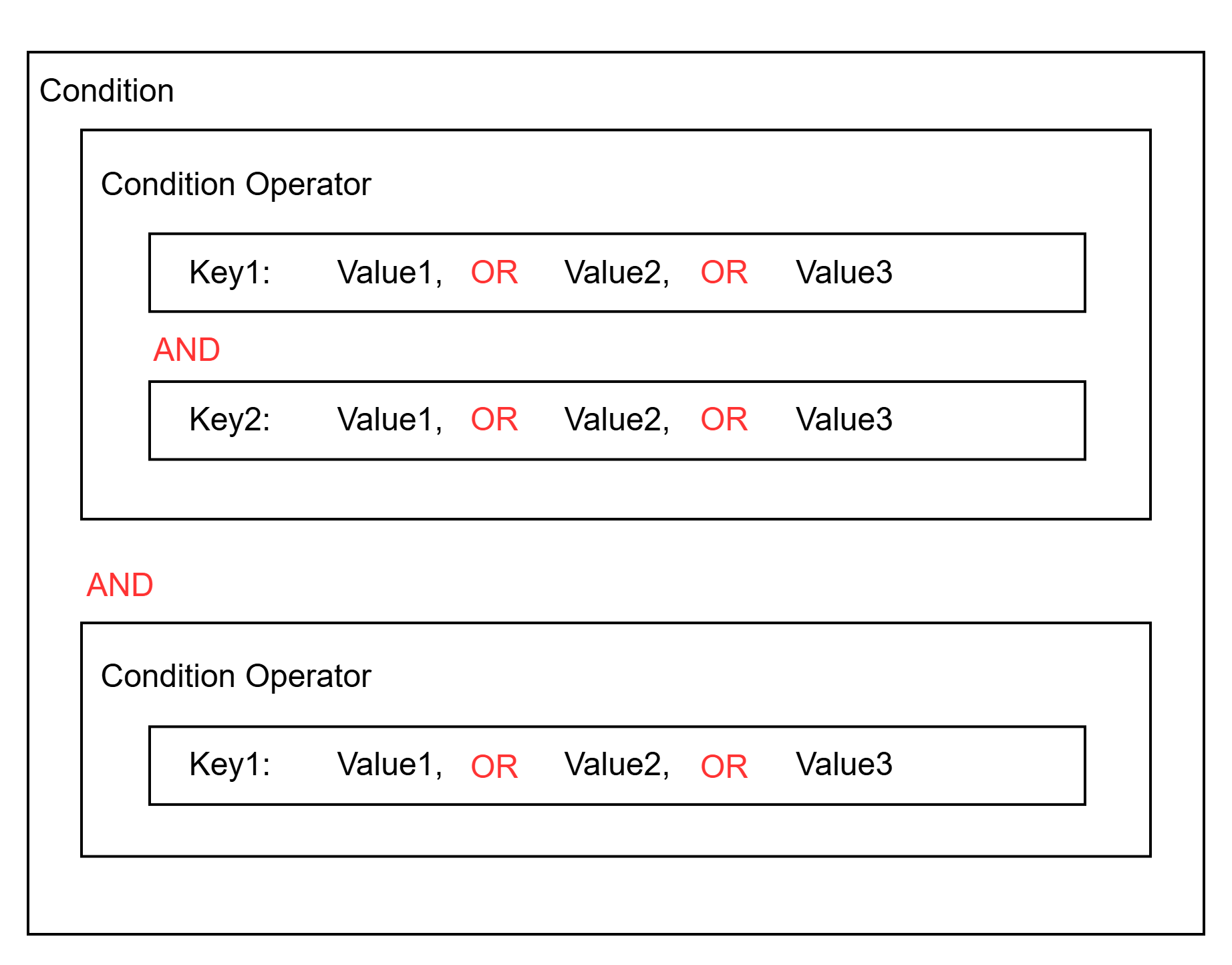
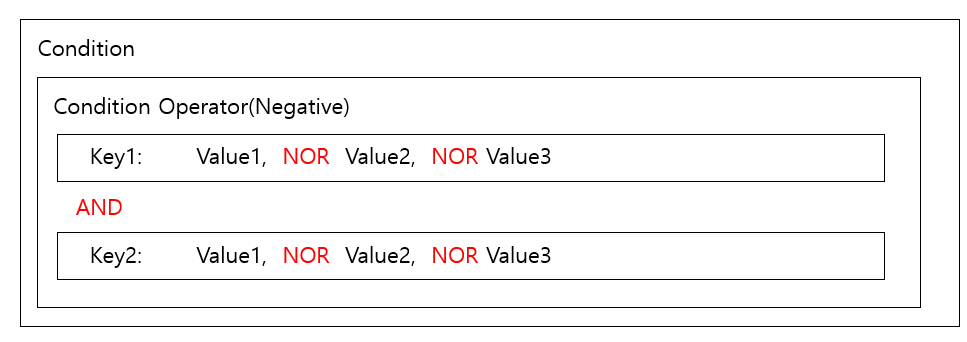
동일한 Condition Operator의 Condition Key에 Value가 2개 이상 정의된 경우, Value간 판단은 OR로 동작합니다. 단, Operator가 부정 연산자(Negative Operator) 유형인 경우에는 연산이 OR가 아닌 NOR로 동작합니다.
- 긍정 연산자(Positive Operator) 유형 및 예시(userName이 “foo” 또는 “bar"이고 company가 “Samsung"인 경우)
"Condition": {
   "StringEquals": {
      "iam:userName": [  # When the user's name is foo or bar
          "foo", "bar"
      ],
      "iam:userCompany": [  # when the user's company is Samsung
          Samsung
      ]
   }
 }
- 부정 연산자(Negative Operator) 유형 및 예시(IP가 1.1.1.1/24 와 2.2.2.2/24가 대역이 아닌 모든 IP)
"Condition": {
   "NotIpAddress": {
      "scp:SourceIp": [  # when the request IP is neither 1.1.1.1 nor 2.2.2.2
          "1.1.1.1/24", "2.2.2.0/24"
      ]
   }
 }
조건 연산자(operator)
조건 연산자는 7가지(문자열, 숫자, 날짜, Bool, IP, SRN, Null) 연산자를 제공합니다.
문자열 연산자
conditional operator Operator type Explanation StringEquals positive operator Exact match, case-sensitive StringNotEquals negation operator mismatch StringEqualsIsIgnoreCase positive operator Exact match, case insensitive StringNotEqualsIsIgnoreCase negation operator Mismatch, case-insensitive StringLike positive operator Case-sensitive matching; multiple-character string matching (*) wildcard can be included in the value. StringNotLike negation operator Case sensitivity mismatch, wildcard that matches multiple characters (*) can be included in values Table. String operators숫자 연산자
conditional operator Operator Types description NumericEquals positive operator Match NumericNotEquals negation operator mismatch NumericLessThan positive operator Match less than NumericLessThanEquals positive operator as follows NumericGreaterThan positive operator overmatch NumericGreaterThanEquals positive operator Match above Table. Numeric operators날짜 연산자
conditional operator Operator type description DateEquals positive operator Match specific date DateNotEquals negation operator mismatch DateLessThan positive operator Match before a specific date/time DateLessThanEquals positive operator Match on a specific date/time or earlier DateGreaterThan positive operator Match after a specific date/time DateGreaterThanEquals positive operator Match on a specific date/time or later Table. Date operatorsBool 연산자
conditional operator Operator Types description Bool positive operator True, False match Table. Bool operatorIP 연산자
conditional operator Operator type description IpAddress positive operator specified IP address or range NotIpAddress negation operator All IP addresses except the specified IP address or range Table. IP operatorSRN 연산자
conditional operator Operator Types description SrnEquals, SrnLike positive operator SRN match SrnNotEquals, SrnNotLike negation operator SRN mismatch Table. SRN operatorNull 연산자
conditional operator Operator type description Null positive operator - If the key is missing or the value is null \→ True
- If the key exists and the value is not null \→ False
Table. Null operator
조건 키(condition-key)
조건 키는 전역 조건 키과 자원 속성 키로 구분됩니다.
전역 조건 키(Global condition key)
Samsung Cloud Platform에 사전 정의된 조건 키로써 요청 정보, 자원 공통 정보(ex-tag), 네트워크 정보 등의 데이터를 정의합니다.
| condition key | Data type | singular/plural | description | example |
|---|---|---|---|---|
| scp:UserId | string | single | request user id | “scp:UserId” : [“efda56a968cd45b2873d9bf5fab58e95”] |
| scp:UserName | string | single | Request user name | “scp:UserName” : [“foo”] |
| scp:MultiFactorAuthPresent | bool | string | Request via MFA authentication | “scp:MultiFactorAuthPresent” : [“True”] |
| scp:RequestedRegion | string | single | request region | “scp:RequestedRegion” : [“kr-west1”] |
| scp:RequestAttribute/{AttributeKey} | string | single | request attribute value(AttributeKey)
| “scp:RequestAttribute/body[‘foo’]” : [“true”] |
| scp:TagKeys | string | single / multiple | request tag key | “scp:TagKeys” : [“tag-key”] |
| scp:RequestTag | string | single | Request tag key value | “scp:RequestTag/tag-key” : [“tag-value”] |
| scp:ResourceTag/{TagKey} | string | single | Resource tag key value | “scp:ResourceTag/foo” : [“bab”] |
| scp:SourceIp | ip_address | single | IP of the current requesting entity | “scp:SourceIp” : [“1.1.1.1/24”] |
| scp:CurrentTime | datetime | single | Request time (UTC, ISO 8601 format) | “scp:CurrentTime” : [“2025-11-06T16:10:38Z”] |
자원 속성 키(Resource attribute key)
고유 자원에 대한 속성 키로써 자원의 속성값을 기준으로 조건값을 검사할 때 사용합니다.
{service}:{resource_type}{attribute_name}
Resource definition에서 정의된 attributes에 abac:true인 대상의 속성에 한해서만 정의할 수 있으며 정의되지 않은 속성값을 입력할 경우, 해당 condition 정책은 무시됩니다(Not found).- 자원 속성명 사용 예시
"iam:userLastname"  (O) # attribute name defined in the resource (service: iam, resource: user, attribute_name : lastname)
"iam:userLASTNAME"  (O) # Property name defined in the resource (case-insensitive)
"iam:userLast_name" (X) # When it is not an attribute name defined in the resource ㅎ
"iam:userEmail"     (X) # when abac is false
"iam:state"         (X) # when the abac field is not defined
kind: scp-resourcemanager:resource-definition
service_type: scp-iam
name: scp-iam:user
resources_uri: /v1/users
resource_type: user
display_name:
  ko: '사용자'
  en: 'User'
product_id: IAM
attributes:
  state:
    type: string
    uri: /v1/users/{resource_id}
    method: GET
    jsonpath: $.state
  firstname:
    type: string
    uri: /v1/users/{resource_id}
    method: GET
    jsonpath: $.first_name
    abac: true
  lastname:
    type: string
    uri: /v1/users/{resource_id}
    method: GET
    jsonpath: $.last_name
    abac: true
  email:
    type: string
    uri: /v1/users/{resource_id}
    method: GET
    jsonpath: $.email
    abac: false
kind: scp-resourcemanager:resource-definition
service_type: scp-iam
name: scp-iam:user
resources_uri: /v1/users
resource_type: user
display_name:
ko: '사용자'
en: 'User'
product_id: IAM
attributes:
state:
type: string
uri: /v1/users/{resource_id}
method: GET
jsonpath: $.state
firstname:
type: string
uri: /v1/users/{resource_id}
method: GET
jsonpath: $.first_name
abac: true
lastname:
type: string
uri: /v1/users/{resource_id}
method: GET
jsonpath: $.last_name
abac: true
email:
type: string
uri: /v1/users/{resource_id}
method: GET
jsonpath: $.email
abac: false- 자원의 속성명은
Resource definition에서 정의된attributes에 정의된 속성 데이터를 사용합니다. - Resource definition에 대한 자세한 내용은 Resource Definition 가이드를 참고하세요.
Condition Key 정의 예시
- 전역 조건 키(Global condition key) 예시: 특정 정책 자원 태그의 키(Environment)의 값이 “Local” 또는 “Dev"인 경우에만 그룹 상세 조회를 허용하는 정책
{
  "Version": "2024-07-01",
  "Statement": [
    {
      "Sid": "statement1",
      "Action": ["iam:showPolicy"],
      "Effect": "Allow",
      "Resource": ["*"],
      "Condition": {
          "StringEquals": {
            "scp:ResourceTag/Environment": [  # 전역 조건 키(scp:ResourceTag)를 사용한 정의 형태
              "Local", "Dev"
            ]
          }
      }
    }
  ]
}
{
"Version": "2024-07-01",
"Statement": [
{
"Sid": "statement1",
"Action": ["iam:showPolicy"],
"Effect": "Allow",
"Resource": ["*"],
"Condition": {
"StringEquals": {
"scp:ResourceTag/Environment": [ # 전역 조건 키(scp:ResourceTag)를 사용한 정의 형태
"Local", "Dev"
]
}
}
}
]
}- 자원 속성 키(Resource attribute key) 예시Color mode
{
  "Version": "2024-07-01",
  "Statement": [
    {
      "Sid": "statement1",
      "Action": ["server:showInstance"],
      "Effect": "Allow",
      "Resource": ["*"],
      "Condition" : {
           "StringEquals" : {
               "virtual-servers:instanceFlavor" : ["m1.small"] # virtual-servers 서비스의 intance 리소스의 flavor 속성이 "m1.small"인 경우
            }
       }
    }
  ]
}
{ "Version": "2024-07-01", "Statement": [ { "Sid": "statement1", "Action": ["server:showInstance"], "Effect": "Allow", "Resource": ["*"], "Condition" : { "StringEquals" : { "virtual-servers:instanceFlavor" : ["m1.small"] # virtual-servers 서비스의 intance 리소스의 flavor 속성이 "m1.small"인 경우 } } } ] }Resource attribute key example
정책 조건값(condition-value)
조건 키에 대한 값을 정의합니다.
"Condition" :  {
   "StringEquals" : {
        "scp:resourceTag/key1": ["value1", "value2", "value3"]    # If the resource's tag key is key1 and the value is value1, value2, or value3
 }
한정자(quailfier)
Condition key로부터 추출된 요청 컨텍스트값이 여러 개의 값을 가진인 경우에 동작 방법을 정의합니다.(요청 컨텍스트값이 1개일 경우에는 생략)한정자는 ForAnyValue, ForAllValues로 구분되며 한정자를 작성하지 않을 경우, ForAnyValue가 기본값으로 정의됩니다.
ForAnyValue: 요청 컨텍스트에 추출된 값들이 Condition에 정의된 Operand와 1개 이상 일치할 경우 TrueForAllValues: 요청 컨텍스트에 추출된 값들이 Condition에 정의된 Operand 리스트의 하위 집합일 경우 True
{

  "Condition" :  {
       "ForAllValues:StringEquals" : {
            "scp:TagKeys": ["key1", "key2", "key3"]
        }
  }
}
한정자 동작 예시
“scp:TagKeys”로 부터 추출되는 요청값이 1개인 경우: 한정자와 관계없이 Operand별로 OR로 동작“scp:TagKeys”로 부터 추출되는 요청값이 2개 이상인 경우: 한정자에 따라 결과 차이
# 추출되는 요청 컨텍스트값이 ["key1", "key2", "key4"] 인 경우
Operand: ["key1", "key2", "key3"]
   # 요청 컨텍스트값 중 key1는 Operand에 포함되므로 True
   # 요청 컨텍스트값 중 key2는 Operand에 포함되므로 True
   # 요청 컨텍스트값 중 key4는 Operand에 포함되지 않으므로 False

ForAnyValue는 3개의 요청 컨텍스트 값 중 1개라도 일치할 경우엔 True로 판단
ForAllValues는 3개의 요청 컨텍스트 값이 모두 True 일 경우에만 최종 True로 판단
# 추출되는 요청 컨텍스트값이 ["key1", "key2", "key4"] 인 경우
Operand: ["key1", "key2", "key3"]
# 요청 컨텍스트값 중 key1는 Operand에 포함되므로 True
# 요청 컨텍스트값 중 key2는 Operand에 포함되므로 True
# 요청 컨텍스트값 중 key4는 Operand에 포함되지 않으므로 False
ForAnyValue는 3개의 요청 컨텍스트 값 중 1개라도 일치할 경우엔 True로 판단
ForAllValues는 3개의 요청 컨텍스트 값이 모두 True 일 경우에만 최종 True로 판단