This is the multi-page printable view of this section. Click here to print.
Dedicated Cloud
- 1: Overview
- 2: How-to guides
- 3: Release Note
1 - Overview
Service Overview
The Dedicated Cloud service is a service that builds a cloud infrastructure exclusively for the customer at the customer’s own facilities, using the cloud services provided by Samsung Cloud Platform. It is a service that configures both the cloud management area and the customer resource area on-premises, making it suitable for customers who require a high level of security control and regulatory compliance.
- When using the Dedicated Cloud air-gap service, some products and features may be limited, and a dedicated operations service is required.
- Dedicated Cloud service cannot be configured on customer equipment because SDS builds the infrastructure directly.
Key Features
- Customer‑Dedicated Cloud Environment Setup: We provide cloud services by building a customer‑dedicated infrastructure in the customer‑specified facility (on‑premises) with the same architecture as the Samsung Cloud Platform. * Depending on the customer’s security requirements, the cloud management platform can be offered as a dedicated environment for the client and can address regulatory and security constraints.
- The customer provides the floor space, power, and network connectivity required for cloud infrastructure setup at the designated facility, and SDS builds the Samsung Cloud Platform, including hardware and software, to deliver a fully managed service.
- Providing Dedicated Cloud Air-Gap Service When data sovereignty and high-level regulatory requirements require complete isolation from external networks (the Internet and Samsung Cloud Platform), you can build a Dedicated Cloud service by applying an Air‑gap option that does not need a connection to external (SDS, Internet). At this point, dedicated operational staff are dispatched to support operations within the client’s organization.
- Service Operation and Operational Support System Integration: To ensure continuous maintenance and upgrades of cloud services, SDS operations staff operate by continuously monitoring the infrastructure and services deployed at the customer’s facilities.
Service architecture diagram
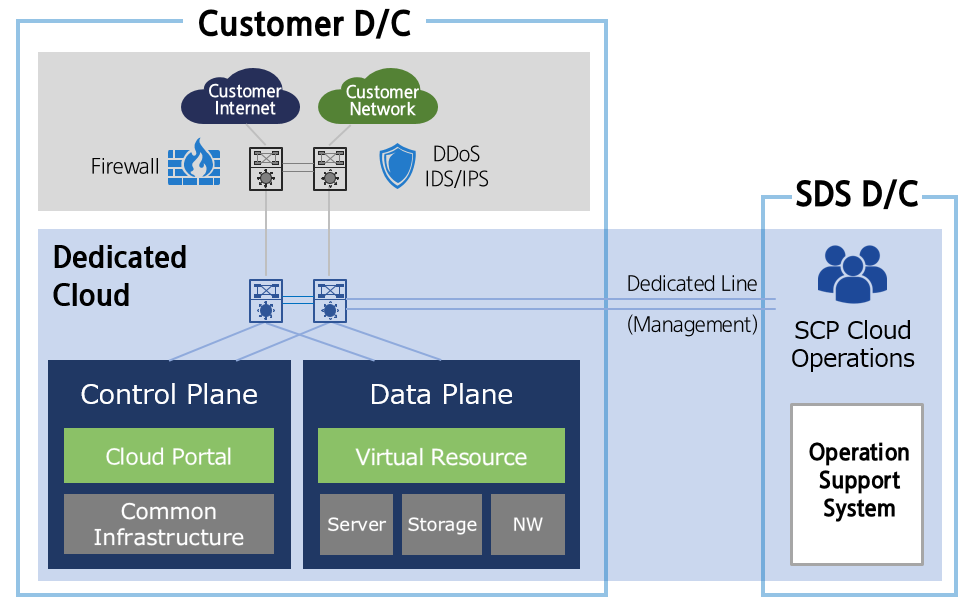
Provided Functions
Dedicated Cloud provides the following features.
- Dedicated Physical Resource Provision: We configure and provide the cloud management domain (console and shared infrastructure) and the customer resource domain (servers, storage, NW, etc., infrastructure for deploying virtual resources) exclusively for each client.
- Dedicated Internet and Customer Network Connection: It can connect to the internet and internal network of the customer environment where Dedicated Cloud is installed.
- Cloud Platform Operations and Upgrades: Regular feature upgrades and patches for services provided by Samsung Cloud Platform are offered. * However, a management line connection is required for platform operation, upgrades, and patches, and additional costs will be incurred.
- Resource provisioning and management: Virtual servers, storage, network, etc., provide CRUD functions for creating, modifying, deleting, and retrieving cloud resources via API or console.
- Resource Central Management: Virtual instances (Virtual Server), virtual networks (VPC), databases, storage (Block Storage, Object Storage, etc.) are deployed and configured centrally.
- User Authentication, Authorization Management: Provides authentication (Authentication), authorization (Authorization), and access control (Access Control) functions for users and services.
- Centralized Security Policy Management: Manages security-related policies such as network security, data encryption, and vulnerability management centrally.
- Automation and Orchestration: Provides users by automating complex tasks such as resource deployment, scaling, shrinking, and updates.
- Supports infrastructure and cloud service lifecycle management and workflow orchestration.
- Provides automation and management functions for IaaS services, PaaS services (DB, Container, security, etc.), and platform common services.
- Monitoring and Performance Management: Collects the status, performance, logs, and usage of cloud resources in real time for monitoring and provides alerts to users. * Provides operational visibility such as event management and operational status dashboards.
- Policy and Governance: Provides cost management, tagging, alerts, usage tracking, and other cost and resource governance features. * You can manage users by organization and centrally configure and apply security, compliance, and risk management policies in bulk.
- User and Service Interface Provision: We support users in managing cloud resources directly through various interfaces such as self-service portal, API, and CLI.
Component
Dedicated Cloud consists of the cloud management area (Control Plane) and the customer resource area (Data Plane).
Cloud Management Plane (Control Plane)
It is a core area responsible for centralized management and control of cloud infrastructure and services, handling virtual resource provisioning and automation, user authentication and authorization, monitoring, and policy configuration. The cloud management domain is physically separated from the customer resource domain and operates independently.
- The cloud infrastructure of Dedicated Cloud is installed separately at the client site, but it is connected via a dedicated line to the SDS Center for common service maintenance and integrated management (however, it is not connected in the case of Dedicated Cloud air-gap).
- Users can deploy resources to the customer resource area and store user data using the various services and features provided by the Samsung Cloud Platform through the Console.
- Even if an issue occurs in the cloud management domain, resources and data deployed in the customer resource domain are not affected, but for some services provided in the cloud management domain, constraints may arise.
Customer Resource Area (Data Plane)
This is the area where virtual resources (virtual servers, virtual networks, storage, databases, etc.) required to configure the customer’s system are created and customer data is stored.
- Compute: Virtual Server, Bare Metal Server(option), GPU Server(option) etc.
- Stroage: Block Storage, File Storage, Object Storage, Backup, etc.
- Network: VPC, Security Group, Load Balancer, Firewall, etc.
- Database: PostgreSQL, MySQL, MariaDB, EPAS, etc.
- By default, this is the area where IaaS and PaaS services are created and deployed, and to use certain specialized services (GPU Server, Multi-node GPU Cluster, high-performance File Storage, etc.), you must select the expansion option.
- In the public version, some Network services may not be available.
Rack configuration
The Dedicated Cloud service consists of a cloud management area and a customer resource area, and each area requires 11 dedicated racks.
| Category | Rack configuration | Power capacity per rack |
|---|---|---|
| Cloud Management Area | 7 items |
|
| Customer Resource Area | 4
|
|
- When configuring GPU servers and large‑capacity VMs, the power capacity per rack may vary, and separate consultation is required.
Provided specifications
During the consultation process for adopting Dedicated Cloud, resources can be configured according to the customer’s desired setup, and the default specifications are listed below. (Additional configuration options require discussion)
| Category | Basic specifications | Explanation |
|---|---|---|
| Computing(Total vCPU) |
|
|
| Bare Metal Server | Additional configuration | Configure the Bare Metal Server by selecting the required detailed specifications and quantity according to the customer’s requirements. |
| GPU Server | Additional configuration | GPU Server can be configured by selecting GPU specifications (H100/B300) and the number of servers according to the customer’s requirements
|
| Block Storage | 60 TB | SSD is provided as standard, and capacity can be added in 20 TB increments (up to 500 TB for the default rack configuration). |
| File Storage | 15 TB | Provided as an HDD type, capacity can be added in 15 TB increments (up to 285 TB). |
| Object Storage | 1,300 TB | Provided as an HDD type, capacity can be added in 350 TB increments (up to 2,700 TB) |
| Backup | - | Backup service needed |
Provision status by region
Dedicated Cloud is available in the environments below.
| Region | Provision status |
|---|---|
| Korea West (kr-west1) | Provide |
| Korea East (kr-east1) | Provide |
| South Korea 1 (kr-south1) | Not provided |
| South Korea South 2 (kr-south2) | Not provided |
| South Korea South 3 (kr-south3) | Not provided |
Since the Samsung Cloud Platform continuously upgrades its services and features, the regulations and requirements for platform deployment and service maintenance must be met to keep the service running smoothly.
- For the Dedicated Cloud air-gap option service, a deployment system configuration and dedicated operations staff service are required for service maintenance and upgrades.
- The infrastructure for floor space, power and HVAC, and customer network connectivity required for Dedicated Cloud installation must be provided by the customer according to the specified specifications.
- Platform updates and upgrades
- Software upgrades for Dedicated Cloud and Dedicated Cloud Air-gap services include the entire stack, encompassing related device drivers, firmware, operating system, platform software, cloud service additions, and feature upgrades.
- To use the added services and features, additional hardware and software may be required beyond the existing installed infrastructure, and additional costs may be incurred at that time.
- Upgrades and patches for the Samsung Cloud Platform are a shared responsibility between cloud service operators and users.
- Dedicated resources configured for the client must be connected to the SDS Center via a dedicated line for service delivery and operational management (the dedicated line cost is billed separately).
- If external connections are not possible due to security and regulatory requirements, you can select the Air-gap option, but in this case some services and features are limited (metering/billing, SMS sending, etc.).
Preceding Service
There are no services that need to be pre-configured before creating this service.
2 - How-to guides
Users can enter the required information to apply for Dedicated Cloud services through the Samsung Cloud Platform Console, select detailed options, and use the service.
Apply for Dedicated Cloud
You can apply for Dedicated Cloud services from the Samsung Cloud Platform Console. To apply for Dedicated Cloud, follow the steps below.
Click the All Services > Hybrid Cloud > Dedicated Cloud menu. 1. Navigate to the Service Home page of Dedicated Cloud.
On the Service Home page, click the Dedicated Cloud Request button. 2. Dedicated Cloud Application page will be opened.
Dedicated Cloud Application page: enter the information required to request the service.
- Enter the required information in the Basic Information Input area.
Category Required statusDetailed description Offering type Required Select the offering type of Dedicated Cloud - Dedicated Cloud connected: Operated and managed by connecting to the SDS center via a dedicated line to provide Samsung Cloud Platform services
- Dedicated Cloud air-gap: Operated and managed without connection to external systems
- Selected when external connections are not possible to meet the customer’s security and regulatory requirements
- Dedicated operational services are required for service monitoring, operation, and maintenance
- Some services and features provided through connection to the SDS center are limited (metering/billing, SMS sending, etc.)
Service type Required Select the service type of Dedicated Cloud - General: Standard Samsung Cloud Platform service provided for typical cases
- Public: Samsung Cloud Platform service that complies with the requirements (security suitability verification) needed when governments and public institutions adopt cloud.
Service delivery method - Service delivery method Rack configuration - Rack configuration count and option information Dedicated Cloud name Required Enter the name of Dedicated Cloud - using English letters, numbers, spaces, and special characters, within 40 characters
Region name Required Enter the name of the region created when configuring Dedicated Cloud - Enter using lowercase English letters, numbers, and special characters, within 20 characters
- Example input: kr-west1, kr-east1
Installation location (address) Required Enter the address of the location where the Dedicated Cloud will be built - After building the Dedicated Cloud, a circuit connection between that location and the SDS center is required
Service start date Required Select Dedicated Cloud service start date Contract period Required Select service contract term - You can choose 1 year, 3 years, 5 years
Table. Dedicated Cloud Basic Information Input ItemsReference- For the public Dedicated Cloud, the services provided may differ because some equipment and configurations differ from the standard type.
- In the case of Dedicated Cloud, equipment purchase and installation are carried out according to the customer’s requested resources, so it takes several months until the service becomes actually available.
- Enter the required information in the Compute Information Input area.
Category Required statusDetailed description Total vCPU Selection Total vCPU amount for configuring Dedicated Cloud - Basic: 300 vCorev, 4 TB Memory provided by default
- Additional: vCPU is calculated as the total required across all services provided on virtual server bases such as Virtual Server, Database, Kubernetes Worker Node, etc., and entered
- One physical host provides 150 vCore and 2 TB Memory
- Maximum capacity per default rack: Standard type 2,400 vCore, Public type 3,000 vCore
- If the maximum capacity is exceeded, additional racks must be configured
Bare Metal Server Selection Whether to use and specification settings of the Bare Metal Server (physical server) provided by Samsung Cloud Platform - When using a Bare Metal Server, you can set the server type and the number of servers
- Refer to the detailed specifications of the Bare Metal Server in Bare Metal Server server type
GPU Server Selection Set the usage and specifications of the physical server that can create a GPU Server - When using a GPU Server, you can set the server type (H100, B300) and the number of servers
- Refer to the detailed specifications of the GPU Server in GPU Server server type
Table. Dedicated Cloud Compute information input itemsReference- GPU Server is provided based on a physical server equipped with eight units.
- If you use a GPU server, an additional rack is required. * Since a large power capacity is required, it is necessary to verify the customer’s environment.
- Enter the required information in the Storage Information Input area.
Category Required statusDetailed description Block Storage(SSD) Selection Enter the capacity of Block Storage (SSD type) that composes the Dedicated Cloud - Default: 60 TB provided by default
- Additional: Can be added in 20 TB increments
- Maximum capacity per default rack: 500 TB
- If the maximum capacity is exceeded, additional rack configuration is required
File Storage(HDD) Selection Enter the capacity of File Storage (HDD type) that composes the Dedicated Cloud - Basic: 15 TB provided by default
- Additional: Can be added in 15 TB increments
- Maximum capacity of a standard rack: 285 TB
- If the maximum capacity is exceeded, additional rack configuration is required
Object Storage(HDD) Selection Enter the Object Storage(HDD type) capacity for configuring Dedicated Cloud - Default: 1,300 TB provided by default
- Additional: Can be added in increments of 350 TB
- Maximum capacity per default rack: 2,700 TB
- If the maximum capacity is exceeded, additional rack configuration is required
- >Object Storage(HDD) capacity is applied after excluding the Backup service usage from the total capacity
Backup service Selection Select whether to use the Backup service and enter the usage amount - When using the Backup service, capacity can be added in 10 TB increments
- The usage amount can be set within the capacity of Object Storage (HDD)
Table. Dedicated Cloud Storage information entry fields - In the Additional Information Input area, enter or select the required information.
Category Required statusDetailed description tag Selection Add Tag - Up to 50 per resource can be added
- After clicking the Add Tag button, enter or select Key, Value values
Table. Dedicated Cloud additional information input items
- Enter the required information in the Basic Information Input area.
Verify the detailed information and estimated charges generated in the summary panel, and click the Create button.
- Dedicated Cloud Details page lets you view the requested items and their progress status.
- Once the service application is completed, we review the requested information and then the sales representative contacts the customer directly to discuss the details (within one week of the application).
- The configuration may change depending on the customer’s installation environment and the resource scale required for the system setup during client consultation.
- After the customer consultation is completed and the customer’s service request is finally confirmed, equipment ordering will be carried out. * After the equipment is received and the client’s installation and configuration steps are completed, you can use the service (up to 6 months).
View Dedicated Cloud detailed information
Dedicated Cloud Details page allows you to view detailed information, tags, and operation history of Dedicated Cloud. To view detailed information about Dedicated Cloud, follow these steps.
Click the All Services > Hybrid Cloud > Dedicated Cloud menu. 1. Navigate to the Service Home page of Dedicated Cloud.
Click the Dedicated Cloud menu on the Service Home page. 2. Navigate to the Dedicated Cloud List page.
Category Detailed description Region name Explanation Offering type Dedicated Cloud offering types Service type Dedicated Cloud service types Status Current status of Dedicated Cloud - Requesting: Service request completed (sales notification processed)
- Verifying: Sales representative is confirming and reviewing the submitted information
- Verified: After the sales representative conducts customer discussions, awaiting confirmation of the customer’s service configuration
- After confirming the customer’s service configuration, confirmation is required
- Rejected: Service request denied
- Confirmed: Customer’s service configuration confirmed
- In the Confirmed state, service cancellation is not allowed
- In Production: Equipment ordered for service configuration
- Active: Service available
- Billing starts
- Terminated: Service usage terminated
Service request Dedicated Cloud - when the button is clicked, navigate to the Dedicated Cloud Apply page
- For more details, see Apply for Dedicated Cloud
Table. Dedicated Cloud list information itemsDedicated Cloud List Click the resource to view detailed information on the page. 3. Dedicated Cloud Details Navigate to the page.
- Dedicated Cloud Detailed page consists of Basic Information, Tags, Operation History tabs.
Basic Information
You can view the basic information of the selected resource on the Dedicated Cloud List page.
| Category | Detailed description |
|---|---|
| service | Service Name |
| Resource Type | Resource Type (Oracle Services) |
| SRN | Unique Resource ID in Samsung Cloud Platform |
| Resource name | Resource name |
| Resource ID | Unique resource ID in the service |
| Constructor | User requesting service creation |
| Creation timestamp | Service creation date and time |
| Modifier | Service Modification Request User |
| Modification date and time | Service modification timestamp |
| Offering type | Dedicated Cloud offering types |
| Service type | Service types of Dedicated Cloud
|
| Dedicated Cloud name | Dedicated Cloud name |
| Region name | Name of the region where Dedicated Cloud is deployed |
| Installation location (address) | Address of the location where the Dedicated Cloud will be built |
| Service start date | Dedicated Cloud Service Start Date |
| Contract period | Dedicated Cloud service contract period |
| Compute |
|
| Storage |
|
| SDS manager | Dedicated Cloud application processing manager
|
| Service URL | Dedicated Cloud service URL address
|
| Edit application information | Dedicated Cloud request information change
|
tag
Dedicated Cloud List page lets you view the tag information of the selected resource, and you can add, modify, or delete it.
| Category | Detailed description |
|---|---|
| Tag List | Tag list
|
Job History
Dedicated Cloud List page allows you to view the operation history of the selected resource.
| Category | Detailed description |
|---|---|
| Task History List | Resource Change History
|