Overview
Service Overview
DevOps Service is a service that provides standardized development tools, code‑framework‑based development templates, and integrated management functions for application and system development, deployment, and operation through the DevOps Console. This enables fast and reliable software development, deployment, and operation, and allows convenient integrated management of Samsung Cloud Platform resources and CI/CD tools within the DevOps Workflow.
Features
- Convenient Code Management and Deployment: Users can conveniently manage everything from source code management to build and deployment via a web-based console. It also supports integration with various tools to analyze source code and improve quality.
- Flexible Deployment Options: Minimize user service downtime and provide deployment environment configurations for k8s clusters or Virtual Machines, allowing users to configure deployments that fit their services and offering flexible deployment methods.
- Repository for Deployment Management: Provides a repository that can manage source code, libraries, application artifacts, container images, and other assets for the deployment management of user services.
Service Architecture Diagram
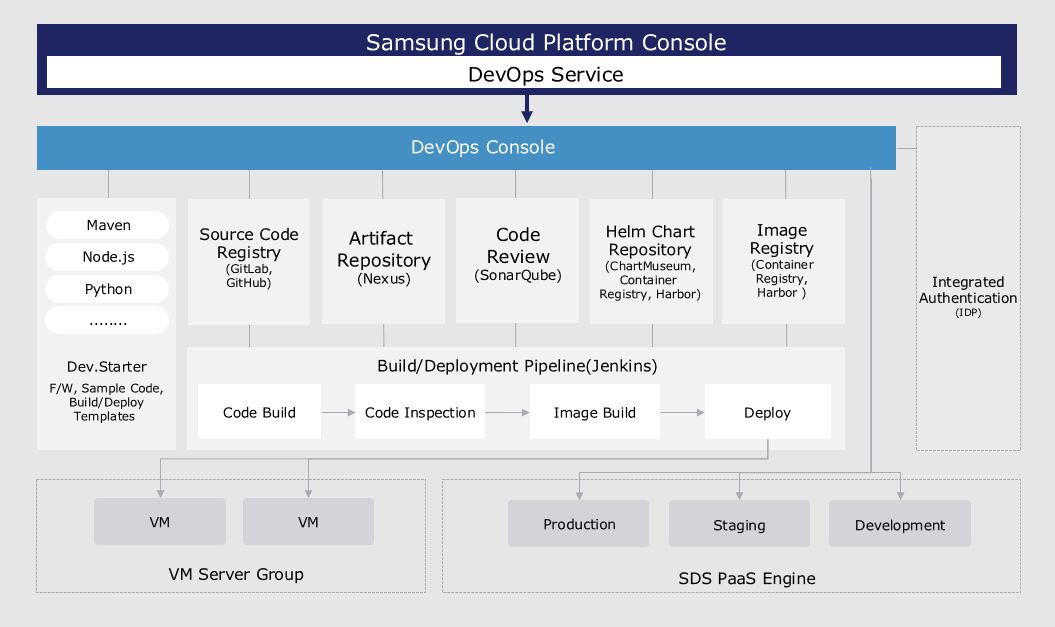
Provided features
DevOps Service integrates standard development tools to easily set up the development environment and provides convenience for build/deployment, offering the following features.
- Continuous Integration and Deployment (CI/CD Continuous Integration/Continuous Deployment): Users can access tools responsible for source code repositories, artifact repositories, code analysis, image registries, and build/deployment with a single login.
- Application template-based project configuration: Users can easily set up a project using a wizard approach with a template that reflects development standards.
- Major Development Languages and Frameworks Provided: Users can select the development languages (Java, C#, Python, Ruby, etc.) and frameworks (SpringBoot, Vue.js, .Net, etc.) required for application development to configure a project for building/deployment.
- Automated Build/Deployment Pipeline Configuration: Users can automatically generate pipeline scripts using the build/deployment pipeline template included in the application template, or configure each stage of the pipeline through a GUI-based interface.
- Support for Various Deployment Strategies and Rollback: Users can use deployment strategies (RollingUpdate, Blue-Green) to minimize downtime of running applications, and can roll back to the desired version with a single click. If a user wants to use a Virtual Server as the deployment environment, they can deploy to the Virtual Server as a packaged file or a Docker image.
- Custom Release Process Support: Users can define and repeatedly execute various release processes, taking into account the type of application changes.
Components
Users can easily use the DevOps Service through the Samsung Cloud Platform DevOps Console.
DevOps Console
DevOps Console provides integrated support for the tools required for application development and build/deployment, allowing easy management of project configuration and build/deployment.
- Dev.Starter: An application template that provides integrated templates required for build and deployment, as well as sample code reflecting development standards.
- Source Code Repository (Source Code Repository): Supports integration with source code configuration management tools. Can be linked with Git Repository.
- Artifact Repository (Artifact Repository): Supports integration with an artifact repository for storing libraries needed for application builds and application artifacts.
- Code Quality (Code Review): Supports integration with code quality tools that can measure and manage source code quality through static code analysis.
- Helm Chart Repository (Helm Chart Repository): In Kubernetes, Helm charts are used to install and upgrade software easily. To install software, users must create Helm charts themselves. ChartMuseum is provided as the default repository for managing Helm charts. Integration with other chart repository tools is also supported.
- Image Registry: Supports integration with an image registry for storing container images.
- VM server group: a collection of Virtual Servers that serve as the deployment target for an application. Users can register Virtual Servers in the DevOps Console and designate them as deployment targets.
- Kubernetes Cluster: The cluster that serves as the deployment target for applications. Users can register a Kubernetes Cluster in the DevOps Console and designate it as a deployment target.
Provision status by region
The DevOps Service is available in the environments below.
| region | Provision status |
|---|---|
| Korea West (kr-west1) | Provide |
| Korea East (kr-east1) | Provide |
| South Korea South 1 (kr-south1) | Provide |
| South Korea South 2 (kr-south2) | Provide |
| South Korea 3 (kr-south3) | Provide |
Preliminary Service
The DevOps Service has no prerequisite services.