Overview
Service Overview
DevOps Service is a service that provides standardized development tools and code framework-based development templates and integrated management functions for application and system development/deployment/operation through the DevOps Console, allowing for fast and stable software development/deployment/operation, and convenient integrated management of Samsung Cloud Platform resources and CI/CD Tools within the DevOps Workflow.
Features
- Convenient code management and deployment: Users can easily manage source code, build, and deploy through a web-based console, and also support various tool integrations to improve quality by analyzing source code.
- Flexible deployment methods: It provides minimal downtime for user services and offers deployment environment configurations for k8s clusters or Virtual Machines, allowing users to configure flexible deployment methods that suit their services.
- Repository provision for deployment management: Provides a repository that can manage source code, library and application artifacts, container images, etc. for deployment management of user services.
Service Composition Diagram
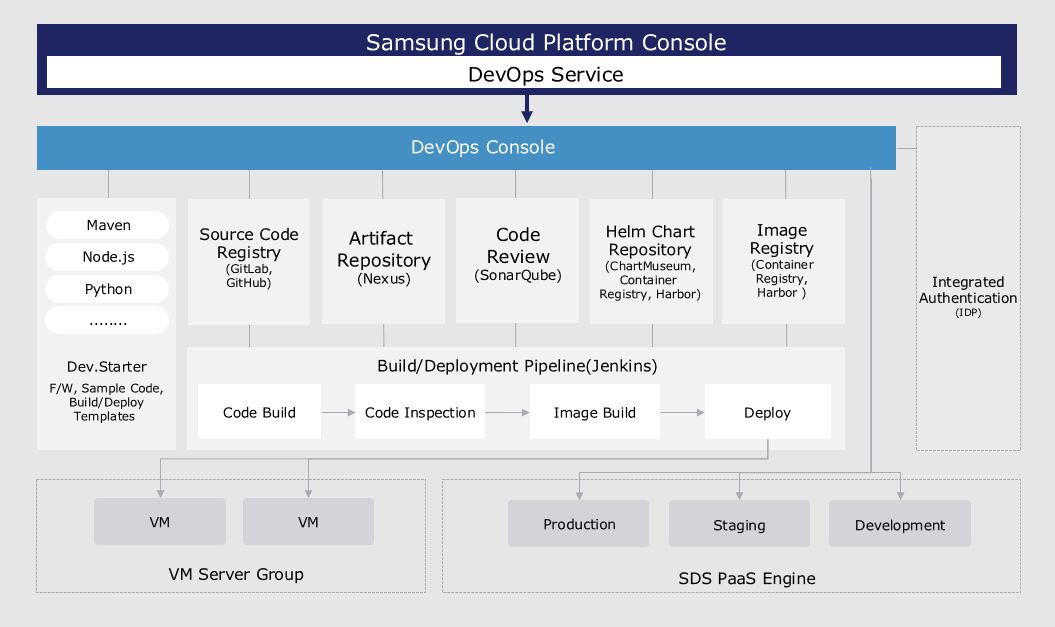
Provided Function
DevOps Service is a service that provides convenience for building/deployment by integrating standard development tools to easily configure the development environment, and provides the following functions:
- Continuous Integration/Continuous Deployment (CI/CD): users can access tools responsible for source code repository, artifact repository, code analysis, image repository, build/deployment with a single login.
- Application template-based project composition: Users can easily compose a project using a template that reflects development standards in a wizard-style manner.
- Key development languages and frameworks provided: Users can choose the development languages (Java, C#, Python, Ruby, etc.) and frameworks (SpringBoot, Vue.js, .Net, etc.) needed for application development to configure a project for build/deployment.
- Build/Deployment Pipeline Auto Configuration: The user can automatically configure the pipeline script using the build/deployment pipeline template included in the application template, or configure each stage of the pipeline based on GUI.
- Support for various deployment methods and rollback support: Users can use deployment methods (RollingUpdate, Blue-Green) to minimize downtime of operating applications, and can roll back to the desired version with one click. If the user wants to use a Virtual Server as a deployment environment, they can deploy it to a Virtual Server in the form of a packaged file or a Docker image.
- Customizable release process support: users can define and repeatedly execute various release processes considering the type of application changes.
Components
The user can easily use the DevOps Service through the Samsung Cloud Platform DevOps Console.
DevOps Console
DevOps Console supports the tools necessary for application development and build/deployment in an integrated manner, allowing for easy management of project configuration and build/deployment.
- Dev.Starter: An application template that provides not only sample code reflecting development standards but also templates necessary for build/deployment.
- Source Code Repository: It supports linkage with source code configuration management tools. It can be linked with Git Repository.
- Artifact Repository: It supports linkage with the artifact repository for storing libraries and application artifacts required for application build.
- Code Quality (Code Review): It supports linkage with code quality tools that can measure and manage the quality of source code through code static analysis.
- Helm Chart Repository: Kubernetes uses Helm Charts to easily install and upgrade software. To install software, users must write the Helm Chart directly. It provides ChartMuseum as a repository for managing Helm Charts, and also supports linking with other chart storage tools.
- Image Registry: Supports linking with an image registry for storing container images.
- VM Server Group: a collection of Virtual Servers that are the deployment target of an application. Users can register and specify Virtual Servers as deployment targets in the DevOps Console.
- Kubernetes Cluster: the cluster that is the deployment target of the application. The user can register and specify the Kubernetes Cluster as the deployment target in the DevOps Console.
Regional Provision Status
DevOps Service is available in the following environments.
| Region | Availability |
|---|---|
| Korean West(kr-west1) | Provided |
| Korean East(kr-east1) | Provided |
| South Korea 1(kr-south1) | Provided |
| South Korea 2(kr-south2) | Provided |
| South Korea South 3 | Provided |
Preceding service
DevOps Service does not have a preceding service.