Stage
The user can check the description of stage types and each stage item.
You can set up a stage in Add Build Pipeline or Modify Build Pipeline.
Common Items
The Stage Setting page is composed as follows.
| Item | Description |
|---|---|
| Tools | Used to select and use specific tools other than the default tools set in the stage
|
| Stage Type | Select the required stage from the list and enter the necessary information. |
| Stage Name | Enter the stage name. |
Checkout
This stage performs the checkout command in the Git repository registered in the code repository.
Select Checkout as the stage type.
| Item | Description |
|---|---|
| URL | Select the code repository to perform the checkout command. |
| Branch Name | Enter the branch name to checkout. |
Build
This stage executes the command to build the application.
Select Build as the stage type.
| Item | Description |
|---|---|
| Language | Select the programming language used by the application. |
| Build Tool | Select the build tool used to build the application. A basic shell command is provided depending on the selected build tool. |
| Shell Command | Enter the command to use for building the application. All commands available in the shell can be used. |
Docker Build
This stage builds a Docker image.
Select Docker Build as the stage type.
Item | Description | Example |
|---|---|---|
Registry URL (docker push) | Select the image repository where the completed Docker build result image will be pushed. | |
| ID | ID value of the account to be used in the image repository | |
| Image Tag Pattern | The Docker image tag will be automatically generated based on the selected pattern.
|
|
| Add Base Image Repository | The Add Base Image Repository popup window will open.
| |
Registry URL (docker pull) | If the image repository providing the base image (Dockerfile’s FROM clause, docker pull) used in the Dockerfile and the image repository of the Registry URL (docker push) are different, select the image repository for docker pull. | |
| Image Build Tool | Displays the image build tool. | |
| Pre-build Command | If there are commands that must be executed before building the Docker image, write them in Shell command format. | cp target/*.jar docker/ |
| Image Build Folder | If the Docker image build needs to be executed in a specific folder, select the checkbox and enter the folder path. | docker |
| Dockerfile | Enter the Dockerfile file name. | Dockerfile |
| Image Build Options | If additional options are required for the image build tool, enter them. | --no-cache |
| Build Command | Displays the actual image build command to be executed. | |
| Post-build Command | If there are commands that must be executed after building the Docker image, write them in Shell command format. | rm -rf docker/*.jar |
Example Script
The resulting build pipeline script from the example is as follows.
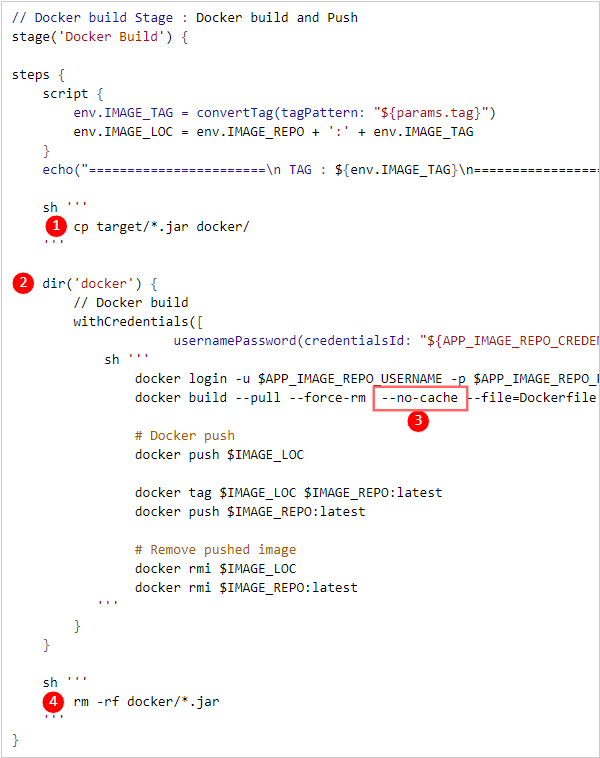
| Item | Description |
|---|---|
➊ | Pre-build command |
➋ | Image build folder |
➌ | Image build option |
➍ | Post-build command |
Deploy to K8S
This stage deploys to Kubernetes.
Select Deploy to K8S as the stage type.
Item | Description |
|---|---|
| Type | Select deployment type
|
| K8S Cluster | Select K8S cluster
|
| Namespace | Select namespace. |
| Helm Release | Select Helm release. |
| Deployment Method | Select deployment method
|
| Registry URL | Select the image repository where the image to be deployed to Kubernetes is docker pushed. |
| Secret | Select secret information input method
|
Deploy to VM
This stage deploys to a VM.
Select Deploy to VM as the stage type.
| Item | Description |
|---|---|
| Deployment Configuration | Select the deployment configuration method
|
| Deployment Group | Select the deployment group
|
| Deployment Information | Contents saved in the deployment group are automatically set. |
| Manual Deployment | Select the default value for manual deployment
|
Trigger Build
This stage remotely executes a pipeline.
Select Trigger Build as the stage type.
| Item | Description |
|---|---|
| Target Pipeline | Select the target pipeline to execute remotely. The available items vary depending on the development/operation distinction of the pipeline. |
| Parameter Information | Exposed depending on the parameter setting of the target pipeline. The parameter information entered at the time of pipeline execution is used. |
Remote Execution Information Check
Remote execution information (upper/lower pipeline) through the Trigger Build stage can be checked on the Build Details View screen.
Other Stages
| Item | Description |
|---|---|
| Archive | Archives the application build result. The archived file can be downloaded from Jenkins. |
| Code Quality | Stage for executing the Code Quality step. |
| Custom | The user writes the pipeline script directly in the desired format. |