Docs mcp server
MCP Server User Guide
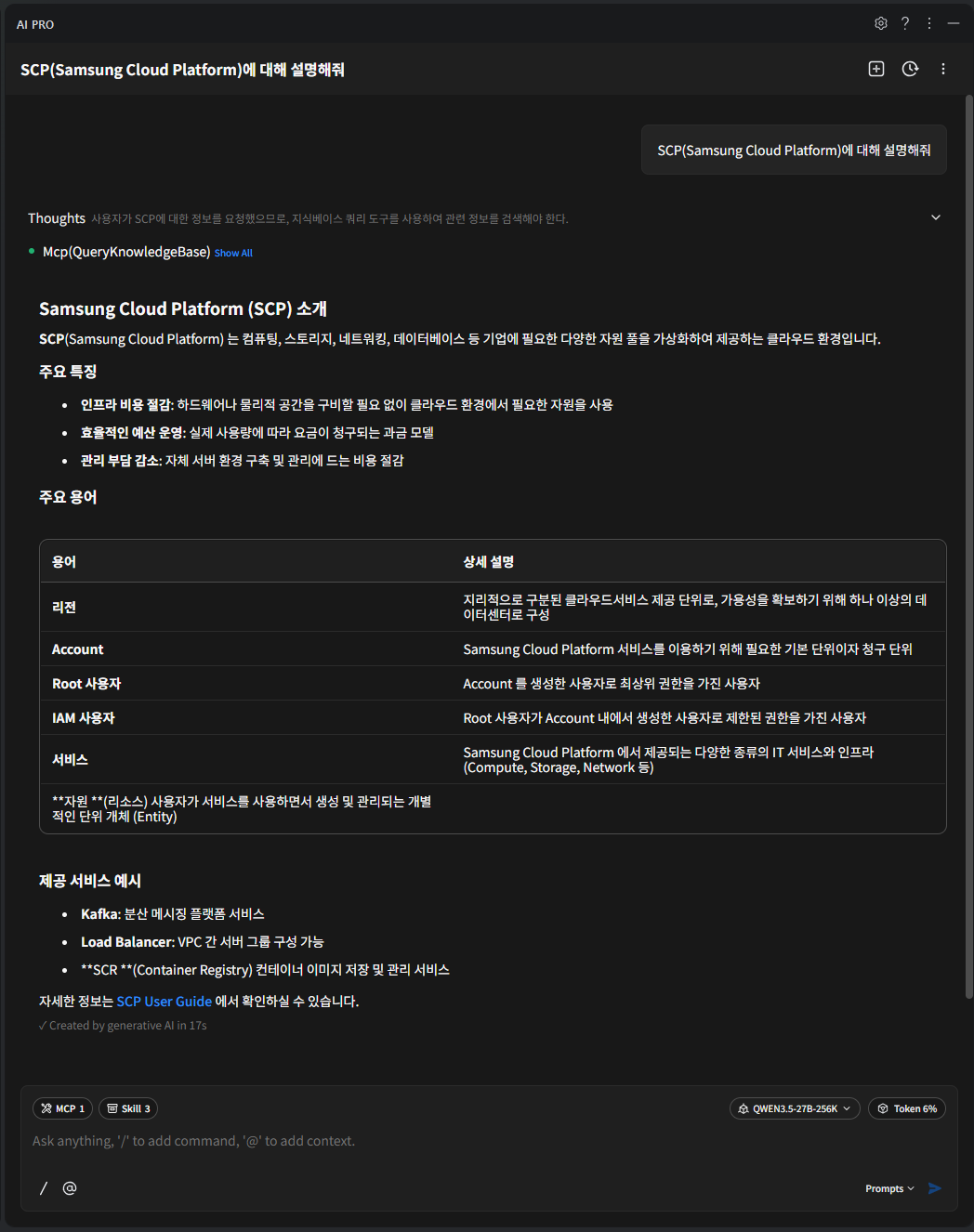
Using a tool based on MCP (Model Context Protocol), it searches for and invokes MCP server tools based on the documentation managed by SCP.
Search the documents below and provide the data.
User Guide : https://docs.e.samsungsdscloud.com/userguide/
Architecture Center : https://docs.e.samsungsdscloud.com/arch_cent/
Knowledge Center : https://docs.e.samsungsdscloud.com/knowledge_cent/
FAQ(Service Portal) : https://cloud.samsungsds.com/serviceportal/support/faq.html
Documentation MCP Server Integration Guide
MCP Server Settings : streamable http type
{
  "mcpServers": {
    "scp-knowledge-mcp-server": {
      "type": "http",
      "url": "https://scp-docs-mcp.kr-west1.e.samsungsdscloud.com/mcp"
    }
  }
}
Tools
Documentation MCP Server provides a document search Tool and an OpenAPI/CLI Spec lookup Tool. All Tools operate in read-only (Read-only) mode and do not directly create or modify SCP resources.
Document Search
| Tool | Detailed description |
|---|---|
| QueryKnowledgeBase | Respond with the appropriate document from SCP’s documentation (User Guide, Architecture Center, Knowledge Center, FAQ) based on the user’s query. |
- Key parameters
| parameter | Detailed description |
|---|---|
| query | (Required) Natural language query to search in the Knowledge Base |
| language | Query language
|
| top_k | Number of returned documents with high relevance
|
- Response example
[{
	"content" : "Samsung Cloud Platform은 컴퓨팅, 스토리지, 네트워킹, 데이터베이스 등 기업에 필요한 다양한 자원 풀을 가상화하여 제공하는 클라우드 환경입니다.",
	"metadata" : {
      "source" : "https://docs.e.samsungsdscloud.com/userguide/scp_common/overview/#samsung-cloud-platfo",
      "label" : "Samsung Cloud Platform"
	}
}]
OpenAPI Spec View
Retrieve the required endpoint information and request specifications before calling the SCP OpenAPI.
| Tool | Detailed description |
|---|---|
| list_available_regions | Returns the Regions that can be used for the OpenAPI request URL and the default Region. |
| list_available_services | Returns the list of Services with loaded OpenAPI Specs and the number of Endpoints per Service. |
| search_by_api_path | Search for endpoints across all services using API Path, HTTP Method, and Korean/English keywords. |
| get_openapi_spec_endpoints | Returns a concise list of endpoint candidates for a specific Service. |
| get_openapi_spec_details | Returns the detailed execution Spec of the selected endpoint (request parameters, required headers, response schema, etc.). |
- search_by_api_path response example
{
  "result": {
    "total": 15,
    "returned": 1,
    "truncated": true,
    "guidance": "결과가 잘렸습니다. service_name/method 필터를 지정하거나 path_pattern·keyword를 더 구체화하세요.",
    "endpoints": [{
      "service_name": "virtualserver",
      "operationId": "listServerTypes",
      "method": "GET",
      "path": "/v1/server-types",
      "endpoint": "GET /v1/server-types",
      "summary": "List Server Types",
      "base_url": "https://virtualserver.kr-west1.e.samsungsdscloud.com"
    }]
  }
}
- get_openapi_spec_details Response example (partial omitted)
{
  "requested": 1,
  "returned": 1,
  "max_batch_size": 5,
  "details": [{
    "found": true,
    "type": "openapi",
    "service_name": "virtualserver",
    "operationId": "listServerTypes",
    "method": "GET",
    "path": "/v1/server-types",
    "target_region": "kr-west1",
    "url_template": "https://virtualserver.kr-west1.e.samsungsdscloud.com/v1/server-types",
    "request": {
      "query_parameters": [
        { "Name": "limit", "Description": "Page size of items", "Schema": "integer", "Required": "false", "Example": "20" }
      ],
      "required_headers": [
        { "Name": "Scp-Accesskey", "Description": "SCP access key for authentication", "Required": "true" },
        { "Name": "Scp-Signature", "Description": "Request signature for authentication", "Required": "true" },
        { "Name": "Scp-Timestamp", "Description": "Request timestamp in UTC milliseconds", "Required": "true" },
        { "Name": "Scp-ClientType", "Description": "Client type for API calls", "Required": "true" }
      ]
    },
    "responses": [
      { "HTTP Code": "200", "Description": "OK", "Schema": "ServerTypeListResponseV1Dot4" }
    ],
    "executor_hints": {
      "side_effect_level": "read",
      "confirmation_required": false
    }
  }]
}
CLI Spec Lookup
Before executing the SCP CLI command, retrieve the required command name and parameters.
| Tool | Detailed description |
|---|---|
| list_available_cli_services | Returns the list of Services with loaded CLI Specs and the number of Commands per Service. |
| search_cli_by_command | Search commands across all services using CLI commands, HTTP methods, and Korean/English keywords. |
| get_cli_spec_endpoints | Returns a concise list of CLI command candidates for a specific Service. |
| get_cli_command_details | Returns the parameters, response fields, and execution safety hints of the selected CLI command. |
- get_cli_command_details response example (partial)
{
  "requested": 1,
  "returned": 1,
  "max_batch_size": 5,
  "details": [{
    "found": true,
    "type": "cli",
    "service_name": "virtualserver",
    "cli_command": "listVirtualServers",
    "http_method": "GET",
    "description": "List Virtual Servers",
    "example": "scp-cli virtualserver server list --name servername --state ACTIVE --limit 20",
    "parameters": [
      { "Name": "name", "Required": false, "Type": "STRING", "Description": "Server name", "Example": "servername" },
      { "Name": "state", "Required": false, "Type": "STRING", "Description": "Server state", "Example": "ACTIVE" }
    ],
    "executor_hints": {
      "side_effect_level": "read",
      "confirmation_required": false
    }
  }]
}
Tool usage order
It is recommended to use the tool in the following order.
- For document-based questions such as SCP features, billing, and operational procedures, use QueryKnowledgeBase.
- When preparing to run an API or CLI, use the sequence list retrieval → search → detailed retrieval.
- OpenAPI : list_available_services → search_by_api_path or get_openapi_spec_endpoints → get_openapi_spec_details
- CLI : list_available_cli_services → search_cli_by_command or get_cli_spec_endpoints → get_cli_command_details
- If the OpenAPI request URL requires a Region, first check the available Regions with
list_available_regions, then pass it to thetarget_regionofget_openapi_spec_details.
The executor_hints in the detailed query response indicate the execution impact of the corresponding API or CLI command.
- side_effect_level : execution impact (read, write, delete, etc.)
- confirmation_required : whether user confirmation is required before execution
For the create, update, and delete APIs, please check the confirmation_required value before deciding whether to execute.
Example usage
Example of Documentation Server configuration
Color mode{ "mcpServers": { "scp-knowledge-mcp-server": { "type": "http", "url": "https://scp-docs-mcp.kr-west1.e.samsungscloud.com/mcp" } } }{ "mcpServers": { "scp-knowledge-mcp-server": { "type": "http", "url": "https://scp-docs-mcp.kr-west1.e.samsungscloud.com/mcp" } } }Code block. Example of task execution Documentation Server configuration example result