This is the multi-page printable view of this section. Click here to print.

Return to the regular view of this page.

Overview

Service Overview

PostgreSQL (DBaaS) is an open-source relational database management system (RDBMS). Samsung Cloud Platform provides an environment that automates PostgreSQL installation through a web-based console and performs management functions for operation.

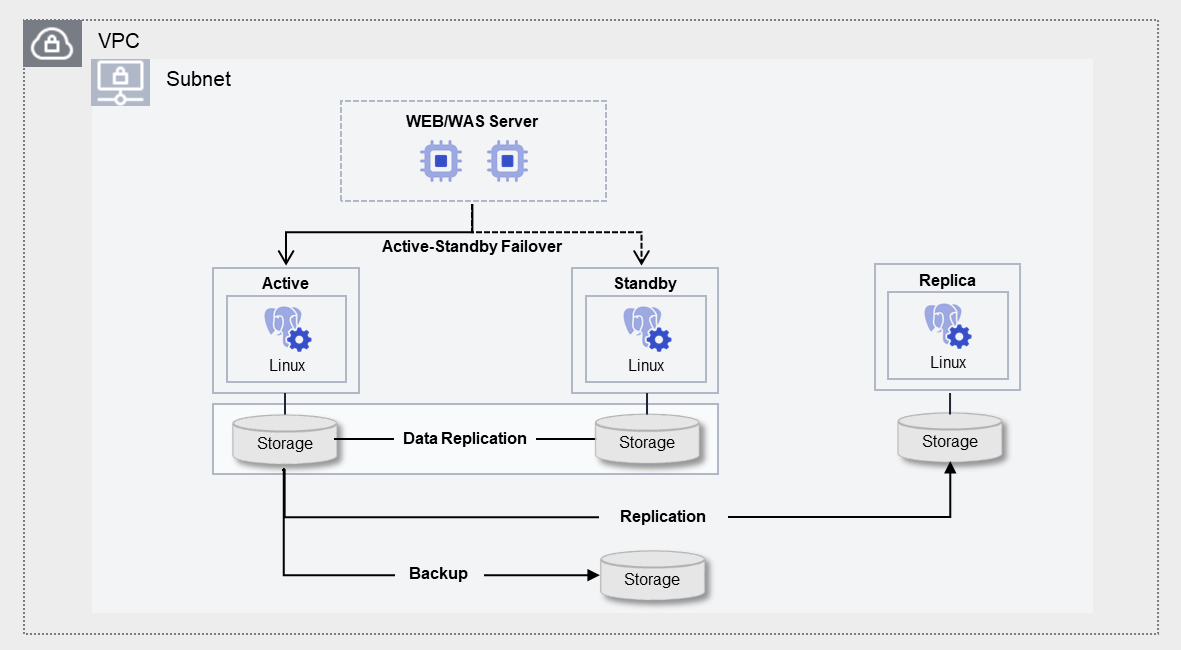
PostgreSQL (DBaaS) is designed as a high‑availability architecture that performs storage‑based data replication and minimizes failover time. To prevent data loss, when the contents of the Active server change, they are synchronously replicated to the Standby server, and up to five read‑only Replica servers for read load balancing and disaster recovery (DR) are provided. Additionally, to prepare for potential issues with the DB server or data, we provide a feature that automatically backs up at a user-specified time, enabling recovery of data at the desired point.

Architecture
Figure. PostgreSQL (DBaaS) Architecture

Provided Features

PostgreSQL (DBaaS) provides the following features.

  • Auto Provisioning: UI allows installation and configuration of Database (DB), and provides an Active‑standby redundancy configuration built on storage replication. * When the active server fails, it automatically fails over to standby.
  • Operation Control Management: Provides a function to control the status of running servers. * In addition to start and stop, you can restart if there is a DB issue or to apply configuration changes. * When high availability (HA) is configured, the user can manually perform node switching between Active and Standby via a switch‑over.
  • Backup and Recovery: Provides data backup functionality based on its own backup commands. * The backup schedule and retention policy can be set by the user, and additional fees apply based on the backup size. * It also provides a recovery function for backed‑up data, so when the user performs a recovery, a separate database is created and the recovery proceeds to the point in time selected by the user (the backup save point or a user‑specified point). * When restoring to a user-specified point in time, the restore point can be set up to 5 minutes, 10 minutes, 30 minutes, or 1 hour earlier, based on the stored backup files and archive files.
  • Version Management: Provides version upgrade (Minor) functionality due to certain feature improvements and security patches. * Whether to perform a backup for a version upgrade can be selected by the user, and if a backup is performed, the data is backed up before applying the patch, after which the DB engine is updated.
  • Replica configuration: For load balancing reads and disaster recovery (DR), up to five Read Replicas can be configured in the same or different regions.
  • Audit Settings: Supports audit (Audit) functionality for key activities within the database.
  • Parameter management: You can modify DB configuration parameters related to performance improvement and security.
  • Service Status Query: Retrieves the final status of the current DB service.
  • Monitoring: CPU, memory, and DB performance monitoring information can be accessed through the Cloud Monitoring service.
  • DB User Management: Query and manage the DB account (user) information registered in the DB.
  • DB Access Control Management: Based on DB accounts registered in the DB, you can register and revoke allowed IPs for access.
  • Archive Management: You can set the retention period (1 to 35 days) for Archive files on the DB server and configure the Archive mode (On/Off).
  • Export DB Log: You can export stored logs to the user’s Object Storage through Audit settings.
  • Migration: Synchronize data in real time with the operational database and support migration using replication without service interruption.
  • OS kernel upgrade: The OS Kernel can be upgraded to apply certain feature improvements and security patches.

Component

PostgreSQL(DBaaS) provides pre‑validated engine versions and various server types in accordance with the open‑source support policy. Users can select and use it according to the scale of the service they wish to configure.

Engine version

The engine versions supported by PostgreSQL (DBaaS) are as follows.

Technical support can be used until the supplier’s EoTS (End of Technical Service) date, and the EOS date when new creation is stopped is set to six months before the EoTS date.

Since the EOS and EoTS dates may change according to the supplier’s policy, please refer to the supplier’s license management policy page for details.

Provided versionEOS Date (Samsung Cloud Platform new creation stop date)EoTS Date (Community Technical Support End Date)
14.172026-05-202026-11-12
14.182026-05-202026-11-12
14.192026-05-202026-11-12
15.122027-06 (planned)2027-11-11
15.132027-06 (planned)2027-11-11
15.142027-06 (planned)2027-11-11
16.82028-06 (planned)2028-11-09
16.92028-06 (planned)2028-11-09
16.102028-06 (planned)2028-11-09
17.62029-06 (planned)2029-11-08
Table. PostgreSQL (DBaaS) engine versions offered
information

The next version of PostgreSQL is scheduled to be available after July 2026. The actual service delivery schedule is subject to change.

  • PostgreSQL 15.15
  • PostgreSQL 16.11
  • PostgreSQL 17.17

Server type

The server types supported by PostgreSQL (DBaaS) are as follows.

For detailed information about the server types offered by PostgreSQL(DBaaS), see PostgreSQL(DBaaS) Server Types.

Standard db1v2m4
CategoryExampleDetailed description
Server typeStandardProvided server types
  • Standard: Commonly used standard specifications (vCPU, Memory) configuration
  • High Capacity: Large server specifications of 24 vCores or more
Server specificationsdb1Provided server specifications
  • db1: Standard specifications (vCPU, Memory) commonly used
  • dbh2: Large-scale server specifications
    • Provides servers with 24 vCores or more
Server specificationsv2Number of vCores
  • v2: 2 virtual cores
Server specificationsm4Memory capacity
  • m4: 4GB Memory
Table. PostgreSQL (DBaaS) server type components

Preceding Service

This is a list of services that must be pre-configured before creating the service. Please refer to the guide provided for each service and prepare in advance.

Service CategoryserviceDetailed description
NetworkingVPCA service that provides an isolated virtual network in a cloud environment
Table. PostgreSQL (DBaaS) Preliminary Service

1 - Server Types

PostgreSQL(DBaaS) server type

PostgreSQL (DBaaS) offers server types composed of various combinations of CPU, Memory, and Network Bandwidth. When creating PostgreSQL(DBaaS), the Database Engine is installed based on the server type chosen for the intended use.

The server types supported by PostgreSQL (DBaaS) are as follows.

Standard db1v2m4
Category
exampleDetailed description
Server typeStandardProvided server type classifications
  • Standard: Configured with the commonly used standard specifications (vCPU, Memory)
  • High Capacity: Large-capacity server specifications exceeding Standard
Server specificationsdb1Provided server type classification and generation
  • db: denotes a standard specification, and 1 indicates the generation
  • dbh: h denotes a high-capacity server specification, and 2 indicates the generation
Server specificationsv2Number of vCores
  • v2: 2 virtual cores
Server specificationsm4Memory capacity
  • m4: 4GB Memory
Table. PostgreSQL (DBaaS) server type format

db1 server type

The db1 server type of PostgreSQL (DBaaS) is offered with standard specifications (vCPU, Memory) and is suitable for various database workloads.

  • Intel 3rd‑generation (Ice Lake) Xeon Gold 6342 Processor up to 3.3 GHz
  • Supports up to 16 vCPUs and 256 GB of memory
  • Maximum networking speed of 12.5 Gbps
CategoryServer typevCPUMemoryNetwork Bandwidth
Standarddb1v2m42 vCore4 GBUp to 10 Gbps
Standarddb1v2m82 vCore8 GBUp to 10 Gbps
Standarddb1v2m162 vCore16 GBUp to 10 Gbps
Standarddb1v2m242 vCore24 GBUp to 10 Gbps
Standarddb1v2m322 vCore32 GBUp to 10 Gbps
Standarddb1v4m84 vCore8 GBUp to 10 Gbps
Standarddb1v4m164 vCore16 GBUp to 10 Gbps
Standarddb1v4m324 vCore32 GBUp to 10 Gbps
Standarddb1v4m484 vCore48 GBUp to 10 Gbps
Standarddb1v4m644 vCore64 GBUp to 10 Gbps
Standarddb1v6m126 vCore12 GBUp to 10 Gbps
Standarddb1v6m246 vCore24 GBUp to 10 Gbps
Standarddb1v6m486 vCore48 GBUp to 10 Gbps
Standarddb1v6m726 vCore72 GBUp to 10 Gbps
Standarddb1v6m966 vCore96 GBUp to 10 Gbps
Standarddb1v8m168 vCore16 GBUp to 10 Gbps
Standarddb1v8m328 vCore32 GBUp to 10 Gbps
Standarddb1v8m648 vCore64 GBUp to 10 Gbps
Standarddb1v8m968 vCore96 GBUp to 10 Gbps
Standarddb1v8m1288 vCore128 GBUp to 10 Gbps
Standarddb1v10m2010 vCore20 GBUp to 10 Gbps
Standarddb1v10m4010 vCore40 GBUp to 10 Gbps
Standarddb1v10m8010 vCore80 GBUp to 10 Gbps
Standarddb1v10m12010 vCore120 GBUp to 10 Gbps
Standarddb1v10m16010 vCore160 GBUp to 10 Gbps
Standarddb1v12m2412 vCore24 GBUp to 12.5 Gbps
Standarddb1v12m4812 vCore48 GBUp to 12.5 Gbps
Standarddb1v12m9612 vCore96 GBUp to 12.5 Gbps
Standarddb1v12m14412 vCore144 GBUp to 12.5 Gbps
Standarddb1v12m19212 vCore192 GBUp to 12.5 Gbps
Standarddb1v14m2814 vCore28 GBUp to 12.5 Gbps
Standarddb1v14m5614 vCore56 GBUp to 12.5 Gbps
Standarddb1v14m11214 vCore112 GBUp to 12.5 Gbps
Standarddb1v14m16814 vCore168 GBUp to 12.5 Gbps
Standarddb1v14m22414 vCore224 GBUp to 12.5 Gbps
Standarddb1v16m3216 vCore32 GBUp to 12.5 Gbps
Standarddb1v16m6416 vCore64 GBUp to 12.5 Gbps
Standarddb1v16m12816 vCore128 GBUp to 12.5 Gbps
Standarddb1v16m19216 vCore192 GBUp to 12.5 Gbps
Standarddb1v16m25616 vCore256 GBUp to 12.5 Gbps
Table. PostgreSQL (DBaaS) server type specifications - db1 server type

db2 server type

The db2 server type of PostgreSQL (DBaaS) is offered with standard specifications (vCPU, Memory) and is suitable for various database workloads.

  • Intel 4th‑generation (Sapphire Rapids) Xeon Gold 6448H Processor up to 3.2 GHz
  • Supports up to 16 vCPUs and 256 GB of memory
  • Maximum networking speed of 12.5 Gbps
CategoryServer typevCPUMemoryNetwork Bandwidth
Standarddb2v2m42 vCore4 GBUp to 10 Gbps
Standarddb2v2m82 vCore8 GBUp to 10 Gbps
Standarddb2v2m162 vCore16 GBUp to 10 Gbps
Standarddb2v2m242 vCore24 GBUp to 10 Gbps
Standarddb2v2m322 vCore32 GBUp to 10 Gbps
Standarddb2v4m84 vCore8 GBUp to 10 Gbps
Standarddb2v4m164 vCore16 GBUp to 10 Gbps
Standarddb2v4m324 vCore32 GBUp to 10 Gbps
Standarddb2v4m484 vCore48 GBUp to 10 Gbps
Standarddb2v4m644 vCore64 GBUp to 10 Gbps
Standarddb2v6m126 vCore12 GBUp to 10 Gbps
Standarddb2v6m246 vCore24 GBUp to 10 Gbps
Standarddb2v6m486 vCore48 GBUp to 10 Gbps
Standarddb2v6m726 vCore72 GBUp to 10 Gbps
Standarddb2v6m966 vCore96 GBUp to 10 Gbps
Standarddb2v8m168 vCore16 GBUp to 10 Gbps
Standarddb2v8m328 vCore32 GBUp to 10 Gbps
Standarddb2v8m648 vCore64 GBUp to 10 Gbps
Standarddb2v8m968 vCore96 GBUp to 10 Gbps
Standarddb2v8m1288 vCore128 GBUp to 10 Gbps
Standarddb2v10m2010 vCore20 GBUp to 10 Gbps
Standarddb2v10m4010 vCore40 GBUp to 10 Gbps
Standarddb2v10m8010 vCore80 GBUp to 10 Gbps
Standarddb2v10m12010 vCore120 GBUp to 10 Gbps
Standarddb2v10m16010 vCore160 GBUp to 10 Gbps
Standarddb2v12m2412 vCore24 GBUp to 12.5 Gbps
Standarddb2v12m4812 vCore48 GBUp to 12.5 Gbps
Standarddb2v12m9612 vCore96 GBUp to 12.5 Gbps
Standarddb2v12m14412 vCore144 GBUp to 12.5 Gbps
Standarddb2v12m19212 vCore192 GBUp to 12.5 Gbps
Standarddb2v14m2814 vCore28 GBUp to 12.5 Gbps
Standarddb2v14m5614 vCore56 GBUp to 12.5 Gbps
Standarddb2v14m11214 vCore112 GBUp to 12.5 Gbps
Standarddb2v14m16814 vCore168 GBUp to 12.5 Gbps
Standarddb2v14m22414 vCore224 GBUp to 12.5 Gbps
Standarddb2v16m3216 vCore32 GBUp to 12.5 Gbps
Standarddb2v16m6416 vCore64 GBUp to 12.5 Gbps
Standarddb2v16m12816 vCore128 GBUp to 12.5 Gbps
Standarddb2v16m19216 vCore192 GBUp to 12.5 Gbps
Standarddb2v16m25616 vCore256 GBUp to 12.5 Gbps
Table. PostgreSQL (DBaaS) server type specifications - db2 server type

dbh2 server type

The dbh2 server type of PostgreSQL (DBaaS) is provided with high-capacity server specifications and is suitable for database workloads that require large-scale data processing.

  • Intel 4th‑generation (Sapphire Rapids) Xeon Gold 6448H Processor up to 3.2 GHz
  • Supports up to 128 vCPUs and 1,536 GB of memory
  • Networking speed up to 25 Gbps
CategoryServer typevCPUMemoryNetwork Bandwidth
High Capacitydbh2v24m4824 vCore48 GBUp to 25 Gbps
High Capacitydbh2v24m9624 vCore96 GBMaximum 25 Gbps
High Capacitydbh2v24m19224 vCore192 GBMaximum 25 Gbps
High Capacitydbh2v24m28824 vCore288 GBMaximum 25 Gbps
High Capacitydbh2v32m6432 vCore64 GBMaximum 25 Gbps
High Capacitydbh2v32m12832 vCore128 GBMaximum 25 Gbps
High Capacitydbh2v32m25632 vCore256 GBUp to 25 Gbps
High Capacitydbh2v32m38432 vCore384 GBMaximum 25 Gbps
High Capacitydbh2v48m19248 vCore192 GBUp to 25 Gbps
High Capacitydbh2v48m57648 vCore576 GBMaximum 25 Gbps
High Capacitydbh2v64m25664 vCore256 GBMaximum 25 Gbps
High Capacitydbh2v64m76864 vCore768 GBMaximum 25 Gbps
High Capacitydbh2v72m28872 vCore288 GBMaximum 25 Gbps
High Capacitydbh2v72m86472 vCore864 GBMaximum 25 Gbps
High Capacitydbh2v96m38496 vCore384 GBMaximum 25 Gbps
High Capacitydbh2v96m115296 vCore1152 GBMaximum 25 Gbps
High Capacitydbh2v128m512128 vCore512 GBMaximum 25 Gbps
High Capacitydbh2v128m1536128 vCore1536 GBMaximum 25 Gbps
Table. PostgreSQL (DBaaS) server type specifications - dbh2 server type

2 - Monitoring metrics

Cloud Monitoring Service Termination Notice

According to Samsung Cloud Platform’s policy, the Cloud Monitoring service is scheduled to be terminated.

Accordingly, services whose monitoring metrics are linked in Cloud Monitoring will no longer be able to monitor resources through Cloud Monitoring after the service improvement work in November 2026.
After that, resource monitoring can be continuously performed through the ServiceWatch service released in October 2025.

To ensure smooth service usage, proceed with the migration work according to the service termination schedule below.

  1. Guide to Applying Monitoring Service per Resource

    • New Resources: Resources created after the service improvement work in July 2026 are monitored by default using the ServiceWatch service.
    • Existing resources: After the service improvement work in September 2026 We provide concurrent monitoring via Cloud Monitoring and ServiceWatch services.
    • During the parallel operation period, we must prepare for the Servicewatch transition. *
      Performance and log data backup, user-configured settings linked with existing Cloud Monitoring (e.g. You must verify items such as event policies and perform tasks such as resetting the ServiceWatch service, then complete them.
  2. Cloud Monitoring Service Phased Termination Schedule Notice

    • Console menu termination (September 2026 service improvement work)
      • You cannot access the Cloud Monitoring Console through the Console menu; you can only connect via the separate URLs for each region listed below.
  • Service termination (service improvement work in November 2026)
    • All services of Cloud Monitoring, including the API, will be permanently discontinued.
      • After the service ends in November, you will not be able to view Cloud Monitoring data. * Be sure to complete the ServiceWatch migration within the parallel operation period.**

Detailed information about ServiceWatch can be found in the ServiceWatch 개요.

PostgreSQL(DBaaS) Monitoring Metrics

The table below shows performance monitoring metrics for PostgreSQL (DBaaS) that can be viewed through Cloud Monitoring. For detailed usage of Cloud Monitoring, refer to the Cloud Monitoring guide.

For PostgreSQL (DBaaS), refer to the Virtual Server Monitoring Metrics guide.

Performance itemsDetailed descriptionunit
Active LocksNumber of Active Lockscnt
Active Locks [Access Exclusive]Number of Access Exclusive Lockscnt
Active Locks [Access Share]Number of Access Share Lockscnt
Active Locks [Total]Total number of active lockscnt
Active SessionsNumber of Sessions in Active statecnt
Active Sessions [Total]Total number of Sessions in Active statecnt
Apply Lag TimeApply lag timemin
Check No ReplicationCheck No Replication valuecnt
Check ReplicationCheck Replication Status valuestatus
Connection UsageDB connection usage rate (%)%
Connection Usage [Total]DB connection usage rate (%)%
DB Age MaxDatabase age (frozen XID) valueage
Exclusive LocksNumber of Exclusive Lockscnt
Idle In Transaction SessionsNumber of sessions in idle-in-transaction statecnt
Idle In Transaction Sessions [Total]Total number of sessions in Idle in transaction statecnt
Idle SessionsNumber of idle sessionscnt
Idle Sessions [Total]Total number of sessions in Idle statecnt
Row Exclusive LocksNumber of Row Exclusive Lockscnt
Row Share LocksRow Share Locks countcnt
Share LocksNumber of Share Lockscnt
Share Row Exclusive LocksNumber of Share Row Exclusive Lockscnt
Share Update Exclusive LocksNumber of Share Update Exclusive Lockscnt
SlowqueriesNumber of SQL queries running for a long time (over 5 minutes)cnt
Tablespace UsedTable space sizebytes
Tablespace Used [Total]Table space sizebytes
Tablespace Used Bytes [MB]File system directory usage (MB)MB
Tablespaces [Total]File system directory usage (MB)MB
Transaction Time Max [Long]Long-running Transaction time (minutes)min
Transaction Time Max Total [Long]Long-running Transaction time (minutes)min
Wait LocksNumber of lock-waiting sessions (by DB)cnt
Wait Locks [Long Total]Number of lock‑waiting sessions lasting 300 secondscnt
Wait Locks [Long]Number of sessions waiting due to lock occurrencecnt
Wait Locks [Total]Total number of sessions waiting due to lock occurrencecnt
Waiting SessionsNumber of Sessions in Waiting statecnt
Waiting Sessions [Total]Total number of Sessions in Waiting statecnt
Table. PostgreSQL (DBaaS) Monitoring Metrics