Overview
Service Overview
EPAS(DBaaS) is a relational database management system (RDBMS) with high compatibility with Oracle databases. Samsung Cloud Platform provides an environment that automates EPAS installation and performs management functions for operation through a web-based Console.
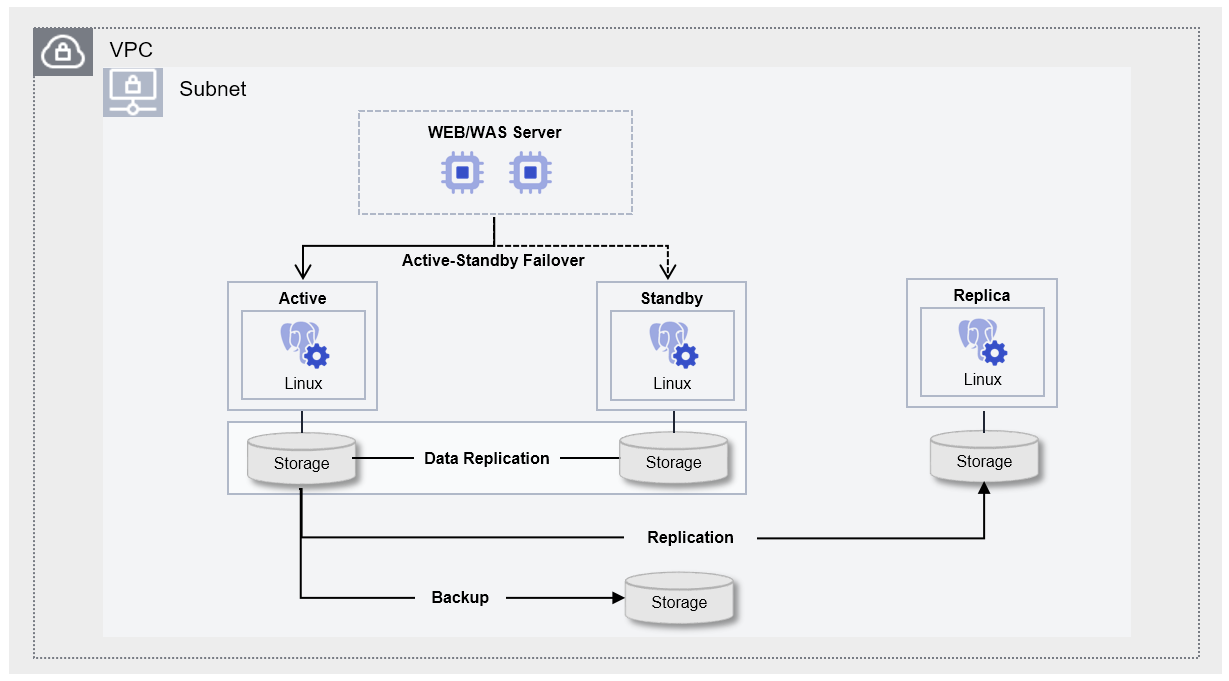
EPAS (DBaaS) is designed as a high‑availability architecture that performs storage‑based data replication and minimizes failover time. To prevent data loss, when the contents of the Active server change, they are synchronously replicated to the Standby server, and up to five read‑only Replica servers for read load balancing and disaster recovery (DR) are provided. Additionally, to prepare for potential issues with the DB server or data, we provide an automatic backup feature that runs at a user-specified time, enabling data recovery at the desired point in time.
Provided features
EPAS(DBaaS) provides the following features.
- Auto Provisioning (Auto Provisioning): UI allows installation and configuration of Database (DB), and provides an Active‑standby redundancy configuration built on storage replication. * When the active server fails, it automatically fails over to standby.
- Operation Control Management: Provides a function to control the status of running servers. * In addition to start and stop, you can restart if there is a DB issue or to apply configuration changes. * When high availability (HA) is configured, the user can manually perform node switching between Active-Standby via a switch-over.
- Backup and Recovery: Provides data backup functionality based on its own backup commands. * Backup time slots and storage locations can be set by the user, and additional fees may apply based on backup size. * It also provides a recovery feature for backed‑up data, so when the user performs a recovery, a separate database is created and the recovery proceeds to the point in time selected by the user (the backup save point, a user‑specified point). * When restoring to a user-specified point in time, you can set the restore point to up to 5 minutes, 10 minutes, 30 minutes, or 1 hour before the stored backup and archive files.
- Version Management: Provides Minor version upgrade functionality based on some feature improvements and security patches. * Whether to perform a backup for a version upgrade can be selected by the user, and if a backup is performed, the data is backed up before applying the patch, after which the DB engine is updated.
- Replica configuration: For load balancing reads and disaster recovery (DR), up to five Read Replicas can be configured in the same or different regions.
- Audit Settings: Provides an Audit Settings feature that can monitor users’ DB access and the results of DDL (Data Definition Language)/DML (Data Manipulation Language) operations.
- Parameter Management: Performance improvement and security-related DB configuration parameters can be modified.
- Service Status Query: Retrieves the final status of the current DB service.
- Monitoring: CPU, memory, and performance monitoring information can be viewed through Cloud Monitoring and Servicewatch.
- DB User Management: View and manage DB account (user) information registered in the DB.
- DB Access Control Management: Based on DB accounts registered in the DB, you can register and revoke allowed IPs for access.
- Archive Management: You can set the retention period for Archive files on the DB server (1~35 days) and configure the Archive mode (On/Off).
- Export DB Log: You can export stored logs to the user’s Object Storage through Audit settings.
- Migration: Synchronize data in real time with the operational database and support migration using replication without service interruption.
- OS Kernel Upgrade: You can upgrade the OS Kernel to apply some feature improvements and security patches.
Component
EPAS (DBaaS) provides pre-validated engine versions and a variety of server types. Users can select and use it according to the scale of the service they wish to configure.
Engine version
The engine versions supported by EPAS (DBaaS) are as follows.
Technical support is available until the supplier’s EoTS (End of Technical Service) date, and the EOS date when new creation is halted is set to six months before the EoTS date.
The EOS and EoTS dates may change according to the supplier’s policy, so please refer to the supplier’s license management policy page for details.
| Provided version | EOS Date (Samsung Cloud Platform new creation stop date) | EoTS Date (Community Technical Support End Date) |
|---|---|---|
| 14.17 | 2026-05-20 | 2026-12-01 |
| 14.18 | 2026-05-20 | 2026-12-01 |
| 14.19 | 2026-05-20 | 2026-12-01 |
| 15.12 | 2027-09 (planned) | 2028-02-13 |
| 15.13 | 2027-09 (planned) | 2028-02-13 |
| 15.14 | 2027-09 (planned) | 2028-02-13 |
| 15.15 | 2027-09 (planned) | 2028-02-13 |
| 15.17 | 2027-09 (planned) | 2028-02-13 |
| 16.8 | 2028-06 (planned) | 2028-11-09 |
| 16.9 | 2028-06 (planned) | 2028-11-09 |
| 16.10 | 2028-06 (planned) | 2028-11-09 |
| 16.11 | 2028-06 (planned) | 2028-11-09 |
| 16.13 | 2028-06 (planned) | 2028-11-09 |
| 17.6 | 2029-06 (planned) | 2029-11-08 |
| 17.7 | 2029-06 (planned) | 2029-11-21 |
| 17.9 | 2029-06 (planned) | 2029-11-21 |
The next version of EPAS is scheduled to be available after November 2026. The actual service delivery schedule is subject to change.
- EPAS 15.18
- EPAS 16.14
- EPAS 17.10
Server type
The server types supported by EPAS (DBaaS) are as follows.
For detailed information about the server types provided by EPAS (DBaaS), please refer to EPAS(DBaaS) Server Types.
Standard db1v2m4
| Category | example | Detailed description |
|---|---|---|
| Server type | Standard | Provided server types
|
| Server specifications | db1 | Provided server specifications
|
| Server specifications | v2 | Number of vCores
|
| Server specifications | m4 | Memory capacity
|
Preceding Service
This is a list of services that must be pre-configured before creating the service. Please refer to the guide provided for each service for detailed information and prepare in advance.
| Service Category | service | Detailed description |
|---|---|---|
| Networking | VPC | A service that provides an isolated virtual network in a cloud environment |