This is the multi-page printable view of this section. Click here to print.

Return to the regular view of this page.

Overview

Service Overview

CacheStore(DBaaS) is a service that provides the in-memory data stores Redis OSS and Valkey. Samsung Cloud Platform provides an environment that automates the installation of Redis OSS and valkey through a web-based console and performs management functions for operation.

CacheStore (DBaaS) provides a Sentinel architecture consisting of a Master server that performs read/write operations and read‑only Replica servers that replicate the Master data. Sentinel checks the status of DB servers with the engine installed, and when a failure occurs on the Master server, it automatically fails over the Replica servers to the Master server. Additionally, to prepare for potential issues with the DB server or data, we provide a feature that automatically backs up at a user-specified time, enabling data recovery based on the backup point.
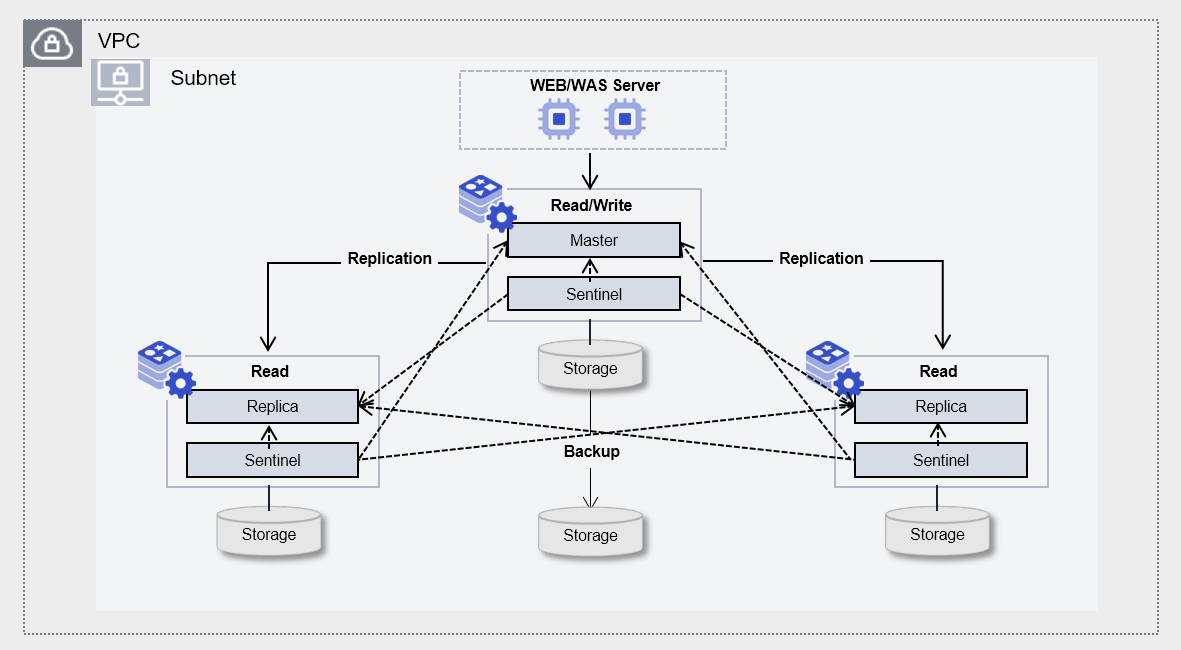
Architecture
Figure. CacheStore(DBaaS) Architecture

Provided Features

CacheStore(DBaaS) provides the following features.

  • Auto Provisioning(Auto Provisioning): It is possible to install and configure the Database (DB) via the UI, and a redundant configuration can be set up with a Sentinel-based Single Master server and Replica servers (1 or 2).
  • Operation Control Feature: Provides a function to control the status of running servers. * In addition to start and stop, you can restart if there is a DB issue or to apply configuration changes. * When configured for high availability (HA), you can switch the Active-Standby servers via a switch-over.
  • Backup and Recovery: Provides data backup functionality based on its own backup commands. * Backup time windows and storage locations can be set by the user, and additional fees apply based on backup size. * It also provides a recovery function for backed‑up data, so when the user performs a recovery, a separate database is created and the recovery proceeds to the point in time selected by the user.
  • Parameter Management: Performance improvement and security-related DB configuration parameters can be modified.
  • Service Status Query: Retrieves the final status of the current DB service.
  • Monitoring: CPU, memory, and DB performance monitoring information can be viewed through the Cloud Monitoring service.
  • Minor version upgrade: To apply some feature improvements and security patches, you can perform a Minor version upgrade within the same Major version.

Component

CacheStore (DBaaS) provides pre‑validated engine versions and various server types in accordance with its open‑source support policy. Users can select and use it according to the scale of the service they wish to configure.

Engine version

The engine versions supported by CacheStore (DBaaS) are as follows.

Technical support can be used until the supplier’s EoTS (End of Technical Service) date, and the EOS date when new creation is stopped is set to six months before the EoTS date.

Since the EOS and EoTS dates may change according to the supplier’s policy, please refer to the supplier’s license management policy page for details.

imageProvided versionEoS DateEoTS Date
Redis OSS Sentinel7.2.112029-06 (planned)2029-12-01
valkey Sentinel8.1.4TBDTBD
Table. CacheStore (DBaaS) provided engine versions
information

The next version of CacehStore is scheduled to be offered after July 2026. The actual service delivery schedule is subject to change.

  • Redis OSS Sentienl 7.2.14
  • Valkey Sentienl 8.1.7

Server type

The server types supported by CacheStore (DBaaS) are as follows.

For detailed information about the server types provided by CacheStore(DBaaS), see CacheStore(DBaaS) Server Types.

Standard redis1v2m4
CategoryexampleDetailed description
Server typeStandardProvided server type
  • Standard: commonly used standard specifications (vCPU, Memory) configuration
Server specificationsredis1Provided server specifications
  • redis1: Standard specifications (vCPU, Memory) commonly used
Server specificationsv2Number of vCores
  • v2: 2 virtual cores
Server specificationsm4Memory capacity
  • m4: 4GB Memory
Table. CacheStore (DBaaS) server type components

Preceding Service

This is a list of services that must be pre-configured before creating the service. Please refer to the guide provided for each service and prepare in advance.

Service CategoryserviceDetailed description
NetworkingVPCA service that provides an isolated virtual network in a cloud environment
Table. CacheStore (DBaaS) Preceding Service

1 - Server Types

CacheStore(DBaaS) server type

CacheStore(DBaaS) offers server types composed of various combinations such as CPU, Memory, and Network Bandwidth. When creating a CacheStore (DBaaS), Redis is installed according to the server type selected for the intended use.

The server types supported by CacheStore(DBaaS) are as follows.

Standard redis1v2m4
Category
exampleDetailed description
Server typeStandardProvided server type classification
  • Standard: Configured with the commonly used standard specifications (vCPU, Memory)
Server specificationsredis1Provided server type classification and generation
  • redis: means standard specifications, and 1 indicates the generation
Server specificationsv2Number of vCores
  • v2: 2 virtual cores
Server specificationsm4Memory capacity
  • m4: 4GB Memory
Table. CacheStore (DBaaS) server type format

redis1 server type

The redis1 server type of CacheStore (DBaaS) is offered with standard specifications (vCPU, Memory) and is suitable for various database workloads.

  • Intel 3rd‑generation (Ice Lake) Xeon Gold 6342 Processor up to 3.3 GHz
  • Supports up to 16 vCPUs and 256 GB of memory
  • Maximum networking speed of 12.5 Gbps
CategoryServer typevCPUMemoryNetwork Bandwidth
Standardredis1v1m21 vCore2 GBUp to 10 Gbps
Standardredis1v2m42 vCore4 GBUp to 10 Gbps
Standardredis1v2m82 vCore8 GBUp to 10 Gbps
Standardredis1v2m162 vCore16 GBUp to 10 Gbps
Standardredis1v2m242 vCore24 GBUp to 10 Gbps
Standardredis1v4m84 vCore8 GBUp to 10 Gbps
Standardredis1v4m164 vCore16 GBUp to 10 Gbps
Standardredis1v4m324 vCore32 GBUp to 10 Gbps
Standardredis1v4m484 vCore48 GBUp to 10 Gbps
Standardredis1v4m644 vCore64 GBUp to 10 Gbps
Standardredis1v6m726 vCore72 GBUp to 10 Gbps
Standardredis1v6m966 vCore96 GBUp to 10 Gbps
Standardredis1v8m1288 vCore128 GBUp to 10 Gbps
Standardredis1v10m16010 vCore160 GBUp to 10 Gbps
Standardredis1v12m19212 vCore192 GBUp to 12.5 Gbps
Standardredis1v14m22414 vCore224 GBUp to 12.5 Gbps
Standardredis1v16m25616 vCore256 GBUp to 12.5 Gbps
Table. CacheStore (DBaaS) server type specifications - redis1 server type

css1 server type

The css1 server type of CacheStore (DBaaS) is provided with standard specifications (vCPU, Memory) and is suitable for various database workloads.

  • Intel 3rd‑generation (Ice Lake) Xeon Gold 6342 Processor up to 3.3 GHz
  • Supports up to 16 vCPUs and 256 GB of memory
  • Maximum networking speed of 12.5 Gbps
CategoryServer typevCPUMemoryNetwork Bandwidth
Standardcss1v1m21 vCore2 GBUp to 10 Gbps
Standardcss1v2m42 vCore4 GBUp to 10 Gbps
Standardcss1v2m82 vCore8 GBUp to 10 Gbps
Standardcss1v2m162 vCore16 GBUp to 10 Gbps
Standardcss1v2m242 vCore24 GBUp to 10 Gbps
Standardcss1v4m84 vCore8 GBUp to 10 Gbps
Standardcss1v4m164 vCore16 GBUp to 10 Gbps
Standardcss1v4m324 vCore32 GBUp to 10 Gbps
Standardcss1v4m484 vCore48 GBUp to 10 Gbps
Standardcss1v4m644 vCore64 GBUp to 10 Gbps
Standardcss1v6m726 vCore72 GBUp to 10 Gbps
Standardcss1v6m966 vCore96 GBUp to 10 Gbps
Standardcss1v8m1288 vCore128 GBUp to 10 Gbps
Standardcss1v10m16010 vCore160 GBUp to 10 Gbps
Standardcss1v12m19212 vCore192 GBUp to 12.5 Gbps
Standardcss1v14m22414 vCore224 GBUp to 12.5 Gbps
Standardcss1v16m25616 vCore256 GBUp to 12.5 Gbps
Table. CacheStore (DBaaS) server type specifications - css1 server type

2 - Monitoring metrics

Cloud Monitoring Service Termination Notice

According to the policy of Samsung Cloud Platform, the Cloud Monitoring service is scheduled to be terminated.

Accordingly, services whose monitoring metrics are linked in Cloud Monitoring will no longer be able to monitor resources through Cloud Monitoring after the service improvement work in November 2026.
After that, resource monitoring can be continuously performed through the ServiceWatch service released in October 2025.

To ensure smooth service usage, proceed with the migration work according to the service termination schedule below.

  1. Guide to Applying Monitoring Services by Resource

    • New Resources: Resources created after the service improvement work in July 2026 are monitored by default using the ServiceWatch service.
    • Existing resources: After the service improvement work in September 2026 We provide concurrent monitoring through Cloud Monitoring and ServiceWatch services.
    • During the parallel operation period, we must prepare for the Servicewatch transition. *
      Performance and log data backup, user-configured settings integrated with existing Cloud Monitoring (e. You need to review the event policies, etc., perform tasks such as resetting the ServiceWatch service, and complete them.
  2. Cloud Monitoring Service Phased Termination Schedule Notice

    • Console menu termination (September 2026 service improvement work)
      • You cannot access the Cloud Monitoring Console through the Console menu; you can only connect via the separate URLs for each region listed below.
  • Service termination (service improvement work in November 2026)
    • All services of Cloud Monitoring, including the API, will be permanently discontinued.
      • After the service ends in November, Cloud Monitoring data cannot be accessed. * Be sure to complete the ServiceWatch migration within the parallel operation period**.

Detailed information about ServiceWatch can be found in the ServiceWatch 개요.

CacheStore(DBaaS) Monitoring Metrics

The table below shows the performance monitoring metrics for CacheStore (DBaaS) that can be viewed through Cloud Monitoring. For detailed usage of Cloud Monitoring, refer to the Cloud Monitoring guide.

For CacheStore (DBaaS) server monitoring metrics, refer to the Virtual Server Monitoring Metrics guide.

Performance itemsDetailed descriptionunit
Active Defragmentation Keys [Hits]Number of keys after defragmentationcnt
Active Defragmentation Keys [Miss]Number of keys skipped in the active defragmentation removal processcnt
Active Defragmentationd [Hits]Number of value reallocations performed by the active defragmentation removal processcnt
Active Defragmentations [Miss]Count of value reallocations interrupted by the active defragmentation removal processcnt
Allocated Bytes [OS]Number of bytes allocated by CacheStore (DBaaS) and recognized by the operating system (resident set size)bytes
Allocated Bytes [Redis]Total bytes allocated by CacheStore (DBaaS)bytes
AOF Buffer SizeAOF buffer sizebytes
AOF File Size [Current]AOF current file sizebytes
AOF File Size [Lastest Startup]AOF file size on recent start or rewritebytes
AOF Rewrite Buffer SizeAOF rewrite buffer sizebytes
AOF Rewrite Current TimeIf applicable, the time of the ongoing AOF rewrite operationsec
AOF Rewrite Last TimeFinal AOF rewrite timesec
CallsNumber of calls that reached command execution (not rejected)cnt
Changes [Last Saved]Number of changes after the final dumpcnt
Client Output Buffer [MAX]Longest output list among current client connectionscnt
Clients [Sentinel]Number of client connections (Sentinel)cnt
Connected SlavesNumber of connected slavescnt
Connections [Blocked]Number of clients pending on blocking calls (BLPOP, BRPOP, BRPOPLPUSH)cnt
Connections [Current]Number of client connections (excluding slave connections)cnt
Copy On Write Allocated Size [AOF]COW allocation size during final RBD save operationbytes
Copy On Write Allocated Size [RDB]COW allocation size during the final RBD save operationbytes
CPU Time [Average]Average CPU time used per command executioncnt
CPU Time [Total]Total CPU time used by these commandsusec
CPU Usage [System Process]System CPU usage by background processes%
CPU Usage [System]System CPU usage on the CacheStore (DBaaS) server%
CPU Usage [User Process]User CPU usage used by background processes%
CPU Usage [User]System CPU usage by background processes%
Dataset UsedDataset sizebytes
Disk Useddatadir usageMB
Evicted KeysNumber of evicted keys caused by the maxmemory limitcnt
Fsyncs [Delayed]Delayed fsync countercnt
Fsyncs [Pending]Number of pending fsync operations in the background I/O queuecnt
Full ResyncsNumber of full resynchronizations with the slavecnt
Keys [Expired]Total number of key expiration eventscnt
Keys [Keyspace]Number of keys in the key spacecnt
Lastest Fork Duration TimeRecent fork (fork) operation timeusec
Lookup Keys [Hit]Number of successful key lookups in the dictionarycnt
Lookup Keys [Miss]Number of failed key lookups in the main dictionarycnt
Lua Engine Memory UsedMemory used by the Lua enginebytes
Master Last Interaction Time AgoTime elapsed since the final interaction with the mastersec
Master Last Interaction Time Ago [Sync]Time elapsed since the final interaction with the mastersec
Master OffsetCurrent replication offset of the serverpid
Master Second OffsetOffset until the replication ID is acceptedpid
Master Sync Left BytesRemaining bytes before synchronization completesbytes
Memory Fragmentation RateRatio of used_memory_rss to used_memory%
Memory Fragmentation Rate [Allocator]Fragmentation ratio%
Memory Fragmentation UsedBytes between used_memory_rss and used_memorybytes
Memory Fragmentation Used [Allocator]resident bytebytes
Memory Max ValueMemory limitbytes
Memory Resident [Allocator]resident memorybytes
Memory RSS Rate [Allocator]Resident ratio%
Memory Used [Active]Active memorybytes
Memory Used [Allocated]Allocated memorybytes
Memory Used [Resident]Resident bytebytes
Network In Bytes [Total]Total network input (bytes)bytes
Network Out Bytes [Total]Total network output (bytes)bytes
Network Read RateNetwork read speed (KB/sec)cnt
Network Write RateNetwork write speed (KB/sec)cnt
Partial Resync Requests [Accepted]Number of accepted partial resynchronization requestscnt
Partial Resync Requests [Denied]Number of rejected partial resynchronization requestscnt
Peak Memory ConsumedMaximum memory used by CacheStore (DBaaS)bytes
Processed CommandsNumber of commands processed per secondcnt
Processed Commands [Total]Total number of processed commandscnt
Pub/Sub ChannelsGlobal count of pub/sub channels with client subscriptionscnt
Pub/Sub PatternsGlobal count of publish/subscribe patterns with client subscriptionscnt
RDB Saved Duration Time [Current]If applicable, the time of the ongoing RDB save operationsec
RDB Saved Duration Time [Last]Final RDB save operation timesec
Received Connections [Total]Total number of received connectionscnt
Rejected Connections [Total]Total number of rejected connectionscnt
Replication Backlog Actove CountReplication backlog activation flagcnt
Replication Backlog Master OffsetMaster offset of the replication backlog buffercnt
Replication Backlog SizeData size of the replication backlog bufferbytes
Replication Backlog Size [Total]Total size of the replication backlog bufferbytes
Slave PriorityServer priority as a fault remediation targetcnt
Slave Replication OffsetReplication offset of the slave serverpid
Slow OperationsNumber of slow taskscnt
Sockets [MIGRATE]Number of sockets opened for migrationcnt
Tracked Keys [Expiry]Number of keys tracked for expiration (applicable only to writable slaves)cnt
Instance Status [PID]redis-server process PIDpid
Sentinel Status [PID]sentinel process PIDpid
Table. CacheStore (DBaaS) Monitoring Metrics