This is the multi-page printable view of this section. Click here to print.

Return to the regular view of this page.

Overview

Service Overview

Kubernetes Engine is a service that provides lightweight virtual computing and containers, as well as a Kubernetes cluster to manage them. Users can utilize the Kubernetes environment without complex preparation by installing, operating, and maintaining the Kubernetes Control Plane.

Features

  • Standard Kubernetes Environment Configuration: The standard Kubernetes environment can be used without separate configuration through the default Kubernetes Control Plane provided. It is compatible with applications in other standard Kubernetes environments, so you can use standard Kubernetes applications without modifying the code.

  • Easy Kubernetes Deployment: Provides secure communication between worker nodes and managed control planes, and quickly provisions worker nodes, allowing users to focus on building applications on the provided container environment.

  • Convenient Kubernetes Management: Provides various management features to conveniently use the created Kubernetes cluster, such as cluster information inquiry and cluster management, namespace management, and workload management through the dashboard for enterprise environments.

Service Composition Diagram
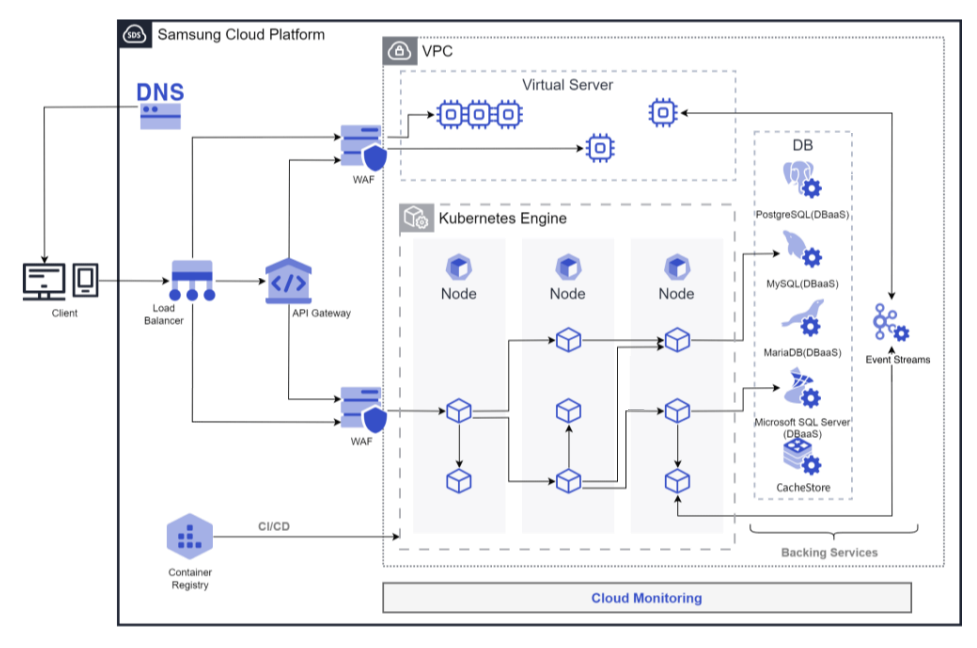
Configuration Diagram
Figure. K8s Engine Configuration Diagram

Provided Features

Kubernetes Engine provides the following features.

  • Cluster Management: You can create and manage clusters to use the Kubernetes Engine service. After creating a cluster, you can add services necessary for operation, such as nodes, namespaces, and workloads.
  • Node Management: A node is a set of machines that run containerized applications. Every cluster must have at least one worker node to deploy applications. Nodes can be defined and used by defining a node pool. Nodes belonging to a node pool must have the same server type, size, and OS image, and multiple node pools can be created to establish a flexible deployment strategy.
  • Namespace Management: Namespace is a logical separation unit within a Kubernetes cluster, and is used to specify access permissions or resource usage limits by namespace.
  • Workload Management: Workload is an application running on Kubernetes Engine. You can create a namespace, then add or delete workloads. Workloads are created and managed item by item, such as deployments, pods, stateful sets, daemon sets, jobs, and cron jobs.
  • Service and Ingress Management: Service is an abstraction method that exposes applications running in a set of pods as a network service, and Ingress is used to expose HTTP and HTTPS paths from outside the cluster to the inside. After creating a namespace, you can create or delete services, endpoints, ingresses, and ingress classes.
  • Storage Management: When using Kubernetes Engine, you can create and manage the storage to be used. Storage is created and managed by items such as PVC, PV, and storage class.
  • Configuration Management: When there is a need to manage values that change inside a container according to multiple environments such as Dev/Prod, managing them with separate images due to environment variables is inconvenient and causes significant cost waste. In Kubernetes, you can manage environment variables or configuration values as variables from the outside so that they can be inserted when a Pod is created, and at this time, ConfigMap and Secret can be used.
  • Access Control: In cases where multiple users access a Kubernetes cluster, you can grant permissions for specific APIs or namespaces to restrict access. You can apply Kubernetes’ role-based access control (RBAC) feature to set permissions for clusters or namespaces. You can create and manage cluster roles, cluster role bindings, roles, and role bindings.

Component

Control Plane

The Control Plane is the master node role in the Kubernetes Engine service. The master node is the management node of the cluster, and it plays a role in managing other nodes in the cluster. The cluster is the basic creation unit of the Kubernetes Engine service, and it is used to manage node pools, objects, controllers, and other components within it. Users set up the cluster name, control plane, network, File Storage, and other settings, and then create a node pool within the cluster to use it. The master node assigns tasks to the cluster, monitors the status of the nodes, and plays a role in data communication between nodes.

The cluster name creation rule is as follows.

  • It starts with English and can be set within 3-30 characters using English, numbers, and special characters (-).
  • The cluster name must not be duplicated with the existing one.

Worker Node

The Worker Node is a work node in the cluster, playing a role in performing the cluster’s tasks. The Worker Node receives tasks from the cluster’s master node, performs them, and reports the task results to the cluster’s master node. All nodes created within the node pool and namespace play the role of a worker node.

The creation rule of the node pool, which is a collection of worker nodes, is as follows.

  • A node pool must have at least one node to be created for application deployment to be possible.
  • Up to 100 nodes can be created in a node pool.
  • Since the maximum number of nodes is 100, if there are 100 node pools, 1 node per node pool, and if there are 50 node pools, 2 nodes per node pool, the total number of nodes can be created freely within 100 nodes.
  • It is possible to set up Block Storage connected to the node pool.
  • It is possible to set the server type, size, and OS image for nodes belonging to the node pool, and all must be the same.
  • Auto-Scaling service allows you to set automatic node pool expansion/reduction according to the requirements of the deployed application.

Preceding Service

This is a list of services that must be pre-configured before creating this service. Please refer to the guide provided for each service and prepare in advance for more details.

Service CategoryServiceDetailed Description
NetworkingVPCA service that provides an independent virtual network in a cloud environment
NetworkingSecurity GroupA virtual firewall that controls the server’s traffic
StorageFile StorageA storage that allows multiple clients to share files over the network
  • Used as a Persistant Volume
Fig. Preceding services of Kubernetes Engine

1 - Monitoring Metrics

Kubernetes Engine Monitoring Metrics

The following table shows the monitoring metrics of Kubernetes Engine that can be checked through Cloud Monitoring. For detailed instructions on using Cloud Monitoring, refer to the Cloud Monitoring guide.

Performance ItemDetailed DescriptionUnit
Cluster Namespaces [Active]Number of active namespacescnt
Cluster Namespaces [Total]Total number of namespaces in the clustercnt
Cluster Nodes [Ready]Number of nodes in READY statecnt
Cluster Nodes [Total]Total number of nodes in the clustercnt
Cluster Pods [Failed]Number of failed pods in the clustercnt
Cluster Pods [Pending]Number of pending pods in the clustercnt
Cluster Pods [Running]Number of running pods in the clustercnt
Cluster Pods [Succeeded]Number of succeeded pods in the clustercnt
Cluster Pods [Unknown]Number of unknown pods in the clustercnt
Instance StatusCluster statusstatus
Namespace Pods [Failed]Number of failed pods in the namespacecnt
Namespace Pods [Pending]Number of pending pods in the namespacecnt
Namespace Pods [Running]Number of running pods in the namespacecnt
Namespace Pods [Succeeded]Number of succeeded pods in the namespacecnt
Namespace Pods [Unknown]Number of unknown pods in the namespacecnt
Namespace GPU Clock FrequencySM clock frequency in the namespaceMHz
Namespace GPU Memory UsageMemory utilization in the namespace%
Namespace GPU UsageGPU utilization in the namespace%
Node CPU Size [Allocatable]Allocatable CPU in the nodecnt
Node CPU Size [Capacity]CPU capacity in the nodecnt
Node CPU UsageCPU usage in the node%
Node CPU Usage [Request]CPU request ratio in the node%
Node CPU UsedCPU utilization in the nodestatus
Node Filesystem UsageFilesystem usage in the node%
Node Memory Size [Allocatable]Allocatable memory in the nodebytes
Node Memory Size [Capacity]Memory capacity in the nodebytes
Node Memory UsageMemory utilization in the node%
Node Memory Usage [Request]Memory request ratio in the node%
Node Memory WorkingsetMemory working set in the nodebytes
Node Network In BytesNode network received bytesbytes
Node Network Out BytesNode network transmitted bytesbytes
Node Network Total BytesNode network total bytesbytes
Node Pods [Failed]Number of failed pods in the nodecnt
Node Pods [Pending]Number of pending pods in the nodecnt
Node Pods [Running]Number of running pods in the nodecnt
Node Pods [Succeeded]Number of succeeded pods in the nodecnt
Node Pods [Unknown]Number of unknown pods in the nodecnt
Pod CPU Usage [Limit]CPU usage limit ratio in the pod%
Pod CPU Usage [Request]CPU request ratio in the pod%
Pod CPU UsageCPU usage in the pod%
Pod GPU Clock FrequencySM clock frequency in the podMHz
Pod GPU Memory UsageMemory utilization in the pod%
Pod GPU UsageGPU utilization in the pod%
Pod Memory Usage [Limit]Memory usage limit ratio in the pod%
Pod Memory Usage [Request]Memory request ratio in the pod%
Pod Memory UsageMemory usage in the podbytes
Pod Network In BytesPod network received bytesbytes
Pod Network Out BytesPod network transmitted bytesbytes
Pod Network Total BytesPod network total bytesbytes
Pod Restart ContainersContainer restart count in the podcnt
Workload Pods [Running]-cnt
Table. Kubernetes Engine Monitoring Metrics

2 - ServiceWatch metric

Kubernetes Engine sends metrics to ServiceWatch. The metrics provided by default monitoring are data collected at a 1‑minute interval.

Reference
To check metrics in ServiceWatch, refer to the ServiceWatch guide.

Basic Indicators

The following are the basic metrics for the namespace Kubernetes Engine.

Indicator nameDetailed descriptionUnitMeaningful statistics
cluster_upCluster upCount
  • Total
cluster_node_countCluster node countCount
  • Sum
cluster_failed_node_countCluster failed node countCount
  • Total
cluster_namespace_phase_countCluster Namespace Phase CountCount
  • Total
cluster_pod_phase_countCluster pod phase countCount
  • Total
node_cpu_allocatableNode CPU allocatable-
  • Total
node_cpu_capacityNode CPU capacity-
  • Total
node_cpu_usageNode CPU usage-
  • Total
node_cpu_utilizationNode CPU Utilization-
  • Total
node_memory_allocatableNode memory allocatableBytes
  • Total
node_memory_capacityNode memory capacityBytes
  • Total
node_memory_usageNode memory usageBytes
  • Total
node_memory_utilizationNode Memory Utilization-
  • Total
node_network_rx_bytesNode Network Receive BytesBytes/Second
  • Total
node_network_tx_bytesNode network transmission bytesBytes/Second
  • Total
node_network_total_bytesNode Network Total BytesBytes/Second
  • Total
node_number_of_running_podsNode Running Pod CountCount
  • Total
namespace_number_of_running_podsNamespace running pod countCount
  • Total
namespace_deployment_pod_countNamespace deployment pod countCount
  • Total
namespace_statefulset_pod_countNamespace StatefulSet Pod CountCount
  • Total
namespace_daemonset_pod_countNamespace DaemonSet Pod CountCount
  • Total
namespace_job_active_countNamespace job active countCount
  • Total
namespace_cronjob_active_countNamespace CronJob Active CountCount
  • Total
pod_cpu_usagePod CPU usage-
  • Total
pod_memory_usagePod memory usageBytes
  • Total
pod_network_rx_bytesPod network receive bytesBytes/Second
  • Total
pod_network_tx_bytesPod network transmission bytesBytes/Second
  • Total
pod_network_total_bytesPod network total bytesCount
  • Total
container_cpu_usageContainer CPU usage-
  • Total
container_cpu_limitContainer CPU limit-
  • Total
container_cpu_utilizationContainer CPU Utilization-
  • Total
container_memory_usagecontainer memory usageBytes
  • total
container_memory_limitcontainer memory limitBytes
  • Total
container_memory_utilizationcontainer memory utilization-
  • Total
node_gpu_countNode GPU countCount
  • Total
gpu_tempGPU Temperature-
  • Total
gpu_power_usageGPU power usage-
  • Total
gpu_utilGPU utilizationPercent
  • Total
gpu_sm_clockGPU SM Clock-
  • Total
gpu_fb_usedGPU FB usageMegabytes
  • Total
gpu_tensor_activeGPU Tensor Activation Rate-
  • Total
pod_gpu_utilPod GPU Usage RatePercent
  • Total
pod_gpu_tensor_activePod GPU Tensor Activation Rate-
  • Total
Table. Kubernetes Engine Basic Metrics