This is the multi-page printable view of this section. Click here to print.

Return to the regular view of this page.

Overview

Service Overview

Container Registry is a service that provides a registry for storing and managing container images and OCI (Open Container Initiative) standard artifacts. Users can easily store, manage, and share images using the Docker CLI.

Features

  • Simple registry management and image distribution: You can easily create a container registry for your project on Samsung Cloud Platform. By using the standard Docker CLI, you can easily pull images for deployment from the Container Registry, streamlining development and service deployment workflows.
  • Efficient Container Image Storage: You can easily store container images anytime, anywhere. By integrating with Object Storage, you can store and retrieve images, enabling efficient image management. It also supports the Docker Registry V2 API specification for convenient use.
  • Enhanced Security Registry Management: You can securely store and use images using Container Registry. Container Registry encrypts images stored in Object Storage and transfers images via HTTPS. Use resource-based IAM policies of Samsung Cloud Platform to set repository-specific access permissions, and you can use images according to the configured permissions.
  • Container Image Vulnerability Analysis: Container Registry provides a feature that analyzes security vulnerabilities in stored container images. Users can view vulnerability results through a simple process of selecting and scanning an image, and can identify and remediate vulnerabilities based on the analysis results.

Service Architecture Diagram
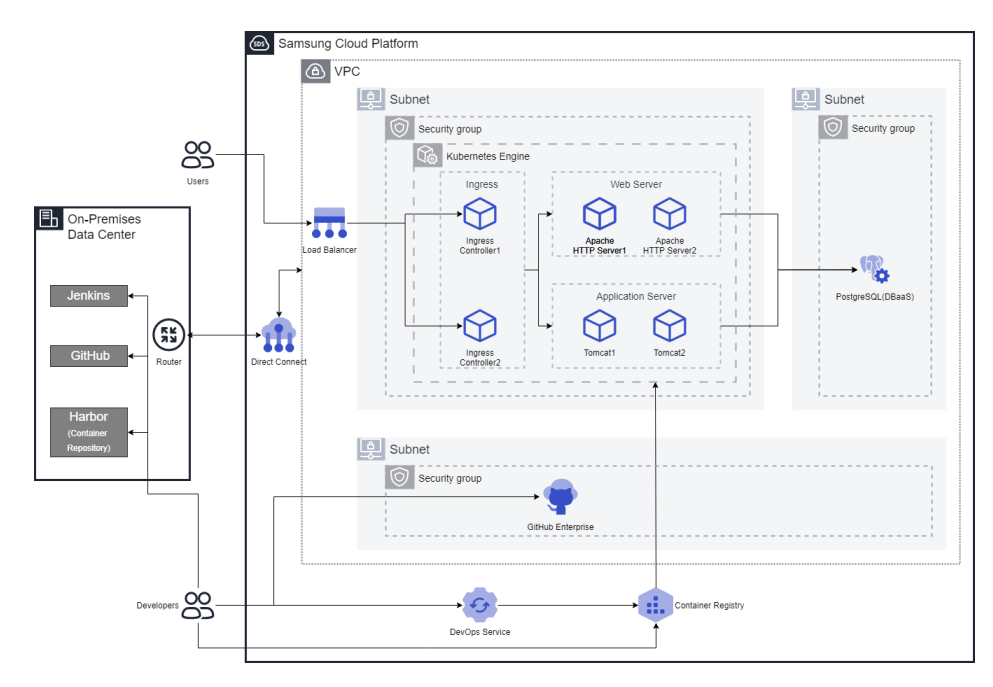
Diagram
Figure. Container Registry diagram

Provided features

Container Registry provides the following features.

  • Registry Management: Provides Container Registry creation, deletion, registry access control management (private), and visibility features.
  • Repository Management: It is created under the Container Registry and provides functions to create, view, delete repositories, and set security policies.
  • Image Management: Container images stored in the repository, providing image Push, image Pull, view, delete, applied tag management, and security policy configuration functions.
  • Image Vulnerability Assessment: You can manually or automatically scan OS packages and language packages for security vulnerabilities, as well as secrets embedded in images stored in the Container Registry. Based on the scan results, users can identify and remove known vulnerabilities (CVE) and secrets to prevent the use of insecure images.

Component

Registry

The registry is a repository or collection of repositories used to store, access, and manage container images. Container registries can often support container‑based application development as part of the development and operations process. They can connect directly to container orchestration platforms such as Docker and Kubernetes. A registry acts as an intermediary that shares container images between systems, saving developers time in creating and delivering cloud‑native applications. In the case of Samsung Cloud Platform, it is provided in conjunction with Object Storage and transfers images over HTTPS.

repository

A repository is a logical management unit for image tags. Using a repository allows efficient management of image tags. A repository is a centralized virtual storage that developers use to modify and manage application source code. When developing applications, if there is a need to store and share various types of documents and source code, it enables developers to easily collaborate within the same account, edit simultaneously, and track/manage changes.

image

An image refers to something that includes all files and configuration values required to run a container. An image acts like a class that creates containers, and a container can be seen as the program or process that runs the image. For example, an Ubuntu image contains all files needed to run Ubuntu, and a MySQL image contains all files, IDs, passwords, port information, etc., required to run MySQL.

Preliminary Service

Container Registry has no prerequisite services.

1 - Monitoring Metrics

Cloud Monitoring service termination notice

According to Samsung Cloud Platform’s policy, the Cloud Monitoring service is scheduled to be discontinued in September 2026.
Accordingly, after the September 2026 release, resource monitoring of the Samsung Cloud Platform via Cloud Monitoring will no longer be possible.

With the new alternative service, you can continuously perform resource monitoring by leveraging ServiceWatch released in October 2025.
ServiceWatch provides more modern and powerful features, replacing Cloud Monitoring to deliver a smooth monitoring environment.

Detailed information about ServiceWatch can be found in the ServiceWatch Overview.

Container Registry monitoring metrics

The table below shows the monitoring metrics for Container Registry that can be viewed through Cloud Monitoring. For detailed usage of Cloud Monitoring, see the Cloud Monitoring guide.

Performance itemsDetailed descriptionunit
container.registry.status.aliveRegistry statusstatus
containerregistry.statics.image.pull.countAllowed Image Tag (digest) Pull Countcnt
containerregistry.statics.image.denied_pull.countNumber of rejected Image Tag (digest) Pullscnt
containerregistry.statics.image.push.countAllowed Image Tag (digest) Push countcnt
containerregistry.statics.image.denied_push.countNumber of rejected Image Tag (digest) pushescnt
containerregistry.statics.image.scan.countAllowed Image Tag (digest) Scan countcnt
containerregistry.statics.image.denied_scan.countNumber of rejected Image Tag (digest) scanscnt
containerregistry.statics.tag.deleted.countNumber of deleted Image Tags (digest)cnt
containerregistry.statics.image.created.countNumber of generated imagescnt
containerregistry.statics.image.deleted.countNumber of deleted imagescnt
containerregistry.statics.login.countAllowed Registry Login countcnt
containerregistry.statics.denied_login.countNumber of denied registry loginscnt
containerregistry.statics.repository.created.countNumber of generated repositoriescnt
containerregistry.statics.repository.deleted.countNumber of deleted repositoriescnt
Table. Container Registry monitoring metrics

2 - ServiceWatch Metrics

Container Registry sends metrics to ServiceWatch. The metrics provided by default monitoring are data collected at a 1‑minute interval.

Reference
For how to view metrics in ServiceWatch, refer to the ServiceWatch guide.

Basic Metrics

The following are the basic metrics for the Container Registry namespace.

The indicators whose names are shown in bold below are the indicators selected as key metrics among the default metrics provided by Container Registry. Key metrics are used to compose the service dashboards that ServiceWatch automatically builds for each service.

Each metric guides users via the user guide on which statistical values are meaningful when viewing that metric, and among the meaningful statistics, the values displayed in bold are the primary statistics. In the service dashboard, you can view key metrics using the primary statistical values.

Indicator NameDetailed descriptionunitmeaningful statistics
Image Pull Count [Allowed]Allowed Image Tag (digest) Pull CountCount/Minute
  • Total
  • Average
  • Maximum
Image Push Count [Denied]Number of rejected Image Tag (digest) pushesCount/Minute
  • Total
  • Average
  • Maximum
Repository Count [Deleted]Number of Deleted RepositoriesCount/Minute
  • Total
  • Average
  • Maximum
Repository Count [Created]Number of created repositoriesCount/Minute
  • Total
  • Average
  • Maximum
Registry Login Count [Allowed]Number of allowed Registry LoginsCount/Minute
  • Total
  • Average
  • Maximum
Image Scan Count [Denied]Number of rejected Image Tag (digest) scansCount/Minute
  • Total
  • Average
  • Maximum
Image Pull Count [Denied]Number of rejected Image Tag (digest) PullsCount/Minute
  • Total
  • Average
  • Maximum
Registry Login Count [Denied]Number of denied Registry LoginsCount/Minute
  • Total
  • Average
  • Maximum
Image Push Count [Allowed]Allowed Image Tag (digest) Push countCount/Minute
  • Total
  • Average
  • Maximum
Image Scan Count [Allowed]Allowed Image Tag (digest) Scan countCount/Minute
  • Total
  • Average
  • Maximum
Image Count [Deleted]Number of deleted imagesCount/Minute
  • Total
  • Average
  • Maximum
Image Count [Created]Number of generated imagesCount/Minute
  • Total
  • Average
  • Maximum
Image Tag Count [Deleted]Number of deleted Image Tag (digest)Count/Minute
  • Total
  • Average
  • Maximum
Table. Container Registry Basic Metrics