Service Overview
Container Registry is a service that provides a registry for storing and managing container images and OCI (Open Container Initiative) standard artifacts. Users can easily store, manage, and share images using the Docker CLI.
Features
- Easy Registry Management and Image Deployment: You can easily create a container registry for your project in Samsung Cloud Platform. By utilizing the standard Docker CLI, you can easily retrieve images from Container Registry for deployment, simplifying the development and service deployment flow.
- Efficient Container Image Storage: Container image storage is possible anywhere, anytime. It can store and retrieve images in conjunction with Object Storage, making efficient image management possible. Additionally, it supports the Docker Registry V2 API specification, making it convenient to use.
- Enhanced security with registry management: You can safely store and use images using the Container Registry. The Container Registry stores images encrypted in Object Storage and transmits them via HTTPS. You can set repository-based access permissions using the IAM resource-based policies of the Samsung Cloud Platform, and use images according to the set permissions.
- Container Image Vulnerability Analysis: Container Registry provides a feature to analyze security vulnerabilities in stored container images. Users can select an image and scan it in a simple way to check the vulnerability results, and identify and remove vulnerabilities based on the analysis results.
Service Composition Diagram
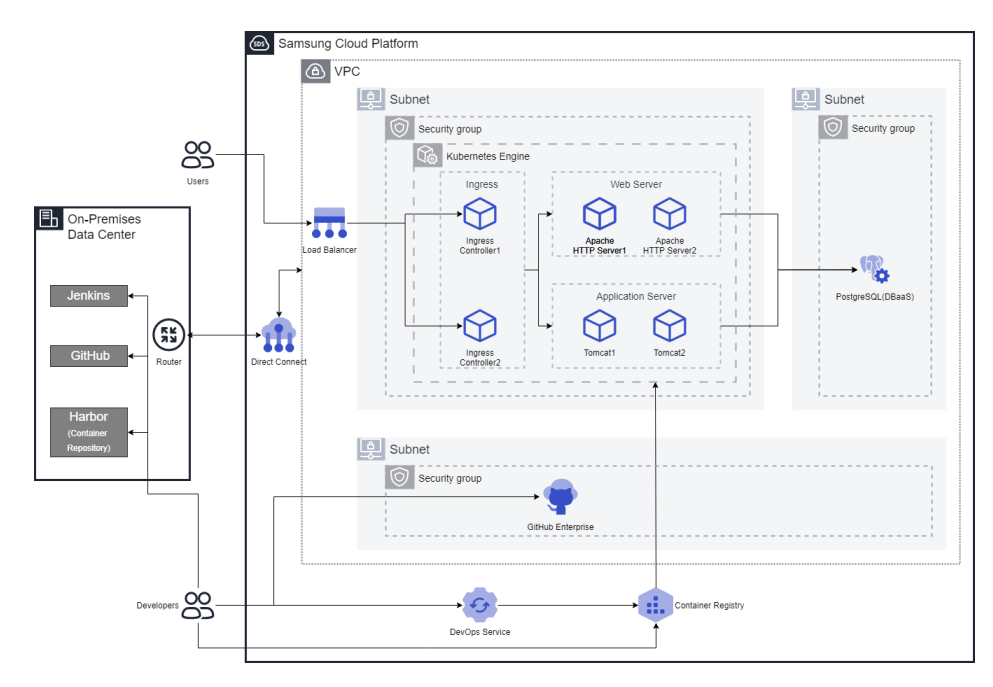
Provided Features
Container Registry provides the following features.
- Registry Management: Provides Container Registry creation, deletion, registry access control management (private), and visibility features.
- Repository Management: It is created under Container Registry and provides functions such as repository creation, inquiry, deletion, and security policy setting.
- Image Management: These are Container Images stored in the Repository, and provide functions such as image push, image pull, inquiry, deletion, applied tag management, and security policy setting.
- Image Vulnerability Check: You can manually or automatically check the security vulnerabilities of OS packages and language packages of images stored in the Container Registry, as well as secrets included in the images. Users can identify and remove known vulnerabilities (CVE) and secrets based on the check results to prevent the use of unsafe images.
Component
Registry
The registry (Registry) is a repository or collection of repositories used to store, access, and manage container images. Container registries can often support the development of container-based applications as part of development and operational processes. It can be directly connected to container orchestration platforms such as Docker and Kubernetes. The registry acts as an intermediary for sharing container images between systems, saving developers time in creating and providing cloud-native applications. In the case of the Samsung Cloud Platform, it is provided in conjunction with Object Storage and images are transmitted via HTTPS.
Repository
The Repository is a logical management unit of image tags. Using the repository, you can efficiently manage image tags. The repository is a centralized virtual storage used by developers to change and manage application source code. When developing an application, various types of documents and source code need to be stored and shared, allowing developers to easily collaborate and edit simultaneously within the same account, and track/manage changes.
Image
An image means a container that contains all the files and settings required for container execution. The image plays a role similar to a class that creates a container, and the container can be seen as a program or process that runs the image. For example, the Ubuntu image contains all the files necessary to run Ubuntu, and the MySQL image contains all the files, IDs, passwords, and port information necessary to run MySQL.
Preceding service
Container Registry has no preceding services.