This is the multi-page printable view of this section. Click here to print.

Return to the regular view of this page.

Overview

Service Overview

Virtual Server is a virtual server optimized for cloud computing that allows you to freely allocate and use as much as you need at the necessary time without purchasing infrastructure resources such as CPU, Memory, etc. provided by the server individually. You can use resources with optimized performance according to your computing usage purposes such as development, testing, and application execution in a cloud environment.

Key Features

  • Easy and convenient computing environment configuration: Through the web-based Console, users can easily use Self Service from Virtual Server provisioning to resource management and cost management. If you need to change the capacity of major resources such as CPU or Memory while using Virtual Server, you can easily expand or reduce without operator intervention.

  • Provision of various types of services: Provides virtualized vCore/Memory resources according to predefined server types (1~128 vCore).

    • General Virtual Server: Provides Computing Specs generally used (maximum 16vCore, 256GB)
    • High Capacity Virtual Server: Provides when large capacity resources larger than General Virtual Server Spec are needed
  • Strong security application: Protects servers safely by controlling Inbound/Outbound traffic communicating with external internet or other VPC (Virtual Private Cloud) through Security Group service. In addition, you can stably operate computing resources through real-time monitoring.

Service Architecture

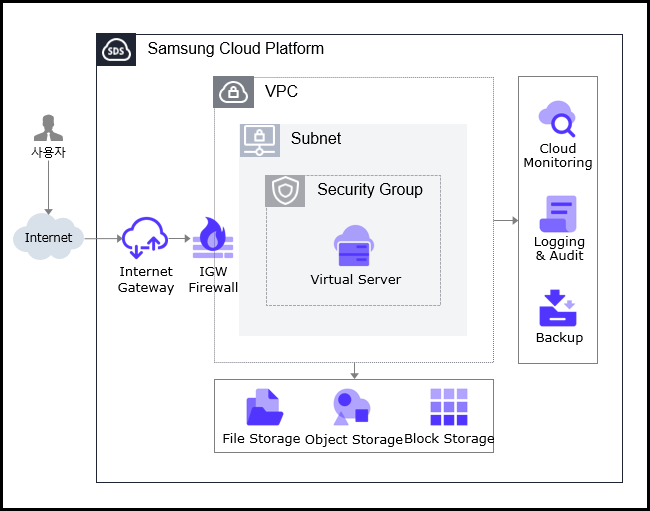
Architecture
Figure. Virtual Server Architecture

Provided Functions

Virtual Server provides the following functions.

  • Automatic Provisioning and Management: Provides functions from Virtual Server provisioning to resource management and cost management through web-based Console. If you need to change the capacity of major resources such as CPU or Memory while using Virtual Server, you can change immediately using the server type modification function.
  • Standard server type and Image provision: Provides virtualized vCore/Memory resources according to standard server types, and provides standard OS Image.
  • Storage connection: Provides additional connection storage in addition to OS disk. You can use by additionally connecting Block Storage, File Storage, and Object Storage.
  • Network connection: You can connect Virtual Server’s general subnet/IP and Public NAT IP. Provides local subnet connection for communication between servers. This task can be modified on the detail page.
  • Security Group application: Protects servers safely by controlling Inbound/Outbound traffic communicating with external internet or other VPC through Security Group service.
  • Monitoring: You can check monitoring information such as CPU, Memory, Disk, etc. corresponding to computing resources through Cloud Monitoring service.
  • Backup and recovery: You can backup and recover Virtual Server Image through Backup service.
  • Cost management: You can create, stop, and terminate servers as needed, and since billing is based on actual usage time, you can check costs according to usage.
  • ServiceWatch service integration provision: You can monitor data through ServiceWatch service.

Components

Virtual Server provides standard server types and standard OS Image. Users can select and use them according to the desired service scale.

Image

You can create and manage Image. Main functions are as follows.

  • Image creation: You can create the configuration of the Virtual Server in use as an Image, and you can create an Image by uploading the user’s Image file to Object Storage.
  • Shared Image creation: You can create a Shared Image that can be shared from an Image with Private Visibility.
  • Share to other Account: You can share an Image to another Account.
  • For Image creation and usage methods, refer to How-to guides > Image document.

Keypair

To provide more secure OS access, we strengthen security by providing Key Pair instead of ID/Password input method. Main functions are as follows.

  • Keypair creation: Creates user authentication for connecting to Virtual Server.
  • Import public key: You can import a public key by file upload or direct input of public key.
  • For Keypair creation and usage methods, refer to How-to guides > Keypair document.

Server Group

Through Server Group settings, you can place Virtual Server and Block Storage added when creating Virtual Server close to or distributed across racks and hosts. Main functions are as follows.

  • Server Group creation: You can set Virtual Servers belonging to the same Server Group as Anti-Affinity (distributed placement), Affinity (close placement), Partition (Virtual Server and Block Storage distributed placement).
  • For Server Group creation and usage methods, refer to How-to guides > Server Group document.

OS Image Provided Versions

The OS Images provided by Virtual Server are as follows

OS Image VersionEoS Date
Alma Linux 8.102029-05-31
Alma Linux 9.62025-11-17
Oracle Linux 8.102029-07-31
Oracle Linux 9.62025-11-25
RHEL 8.102029-05-31
RHEL 9.42026-04-30
RHEL 9.62027-05-31
Rocky Linux 8.102029-05-31
Rocky Linux 9.62025-11-30
Ubuntu 22.042027-06-30
Ubuntu 24.042029-06-30
Windows 20192029-01-09
Windows 20222031-10-14
Windows 20162027-01-12
Table. Virtual Server Provided OS Image Versions
Reference
  • Linux operating systems such as Alma Linux and Rocky Linux only provide even Minor versions, except for the last release version of the Major version. This is a policy to ensure the stability and consistency of the SCP system. Please check the EOS (End of Support) and EOL (End of Life) dates of the operating system and apply new or additional individual packages as needed to maintain a stable environment.

Server Type

The server types supported by Virtual Server are as follows. For details on server types, refer to Virtual Server Server Type.

Standard s1v2m4
Category
ExampleDetailed Description
Server TypeStandardClassification of provided server types
  • Standard: Composed of standard specs (vCPU, Memory) generally used
  • High Capacity: Specs of large capacity server larger than Standard
Server Specs1Classification of provided server types and generation
  • s1: s means standard spec, 1 means generation provided in Samsung Cloud Platform v2
  • s2: s means standard spec, 2 means generation provided in Samsung Cloud Platform v2
  • h2: h means large capacity server spec, 2 means generation provided in Samsung Cloud Platform v2
Server Specv2Number of vCores
  • v2: 2 virtual cores
Server Specm4Memory capacity
  • m4: 4GB Memory
Table. Virtual Server Server Type

Constraints

Reference
  • If you create Virtual Server with Rocky Linux or Oracle Linux, additional settings are required for time synchronization (NTP: Network Time Protocol). For other Images, it is automatically set and no separate settings are required.
    For details, refer to Configure Linux NTP.
  • If you create RHEL and Windows Server before August 2025, you need to modify RHEL Repository and WKMS (Windows Key Management Service) settings.
    For details, refer to Configure RHEL Repo and WKMS.

Prerequisite Services

This is a list of services that need to be configured in advance before creating this service. For details, please prepare in advance by referring to the guide provided for each service.

Service CategoryServiceDetailed Description
NetworkingVPCService that provides independent virtual network in cloud environment
NetworkingSecurity GroupVirtual firewall that controls server traffic
Table. Virtual Server Prerequisite Services

1 - Server Type

Virtual Server server type

Virtual Server provides a server type suitable for the purpose of use. The server type consists of various combinations such as CPU, Memory, Network Bandwidth, etc. The host server used by the Virtual Server is determined by the server type selected when creating the Virtual Server. Please select a server type according to the specifications of the application you want to run on the Virtual Server.

The server types supported by Virtual Server are as follows.

Standard s1v2m4
Classification
ExampleDetailed Description
Server TypeStandardProvided server type distinction
  • Standard: Composed of standard specifications (vCPU, Memory) commonly used
  • High Capacity: Server specifications with higher capacity than Standard
Server Specifications1Type of server provided and generation distinction
  • s1: s means general specification, and 1 means the generation provided by Samsung Cloud Platform v2
  • s2: s means general specification, and 2 means the generation provided by Samsung Cloud Platform v2
  • h2: h means large-capacity server specification, and 2 means the generation provided by Samsung Cloud Platform v2
Server Specificationv2Number of vCores
  • v2: 2 virtual cores
Server Specificationm4Memory Capacity
  • m4: 4GB Memory
Table. Virtual Server server type format

s1 server type

The s1 server type of Virtual Server is provided with standard specifications (vCPU, Memory) and is suitable for various applications.

  • Samsung Cloud Platform v2’s 1st generation: up to 3.3Ghz Intel 3rd generation (Ice Lake) Xeon Gold 6342 Processor
  • Supports up to 16 vCPUs and 256 GB of memory
  • Up to 12.5 Gbps networking speed
DivisionServer TypevCPUMemoryNetwork Bandwidth
Standards1v1m21 vCore2 GBup to 10 Gbps
Standards1v2m42 vCore4 GBUp to 10 Gbps
Standards1v2m82 vCore8 GBUp to 10 Gbps
Standards1v2m162 vCore16 GBUp to 10 Gbps
Standards1v2m242 vCore24 GBUp to 10 Gbps
Standards1v2m322 vCore32 GBUp to 10 Gbps
Standards1v4m84 vCore8 GBUp to 10 Gbps
Standards1v4m164 vCore16 GBUp to 10 Gbps
Standards1v4m324 vCore32 GBUp to 10 Gbps
Standards1v4m484 vCore48 GBUp to 10 Gbps
Standards1v4m644 vCore64 GBUp to 10 Gbps
Standards1v6m126 vCore12 GBUp to 10 Gbps
Standards1v6m246 vCore24 GBUp to 10 Gbps
Standards1v6m486 vCore48 GBUp to 10 Gbps
Standards1v6m726 vCore72 GBUp to 10 Gbps
Standards1v6m966 vCore96 GBUp to 10 Gbps
Standards1v8m168 vCore16 GBUp to 10 Gbps
Standards1v8m328 vCore32 GBUp to 10 Gbps
Standards1v8m648 vCore64 GBUp to 10 Gbps
Standards1v8m968 vCore96 GBUp to 10 Gbps
Standards1v8m1288 vCore128 GBUp to 10 Gbps
Standards1v10m2010 vCore20 GBup to 10 Gbps
Standards1v10m4010 vCore40 GBUp to 10 Gbps
Standards1v10m8010 vCore80 GBup to 10 Gbps
Standards1v10m12010 vCore120 GBup to 10 Gbps
Standards1v10m16010 vCore160 GBUp to 10 Gbps
Standards1v12m2412 vCore24 GBUp to 12.5 Gbps
Standards1v12m4812 vCore48 GBUp to 12.5 Gbps
Standards1v12m9612 vCore96 GBUp to 12.5 Gbps
Standards1v12m14412 vCore144 GBUp to 12.5 Gbps
Standards1v12m19212 vCore192 GBup to 12.5 Gbps
Standards1v14m2814 vCore28 GBUp to 12.5 Gbps
Standards1v14m5614 vCore56 GBUp to 12.5 Gbps
Standards1v14m11214 vCore112 GBUp to 12.5 Gbps
Standards1v14m16814 vCore168 GBUp to 12.5 Gbps
Standards1v14m22414 vCore224 GBUp to 12.5 Gbps
Standards1v16m3216 vCore32 GBup to 12.5 Gbps
Standards1v16m6416 vCore64 GBUp to 12.5 Gbps
Standards1v16m12816 vCore128 GBup to 12.5 Gbps
Standards1v16m19216 vCore192 GBUp to 12.5 Gbps
Standards1v16m25616 vCore256 GBup to 12.5 Gbps
Table. Virtual Server server type specifications - s1 server type

S2 Server Type

Virtual Server s2 server type is provided with standard specifications (vCPU, Memory) and is suitable for various applications.

  • Samsung Cloud Platform v2’s 2nd generation: up to 3.2GHz Intel 4th generation (Sapphire Rapids) Xeon Gold 6448H Processor
  • Supports up to 16 vCPUs and 256 GB of memory
  • Up to 12.5 Gbps networking speed
ClassificationServer TypeCPU vCoreMemoryNetwork Bandwidth(Gbps)
Standards2v1m21 vCore2 GBUp to 10 Gbps
Standards2v2m42 vCore4 GBUp to 10 Gbps
Standards2v2m82 vCore8 GBUp to 10 Gbps
Standards2v2m162 vCore16 GBUp to 10 Gbps
Standards2v2m242 vCore24 GBUp to 10 Gbps
Standards2v2m322 vCore32 GBUp to 10 Gbps
Standards2v4m84 vCore8 GBUp to 10 Gbps
Standards2v4m164 vCore16 GBUp to 10 Gbps
Standards2v4m324 vCore32 GBUp to 10 Gbps
Standards2v4m484 vCore48 GBUp to 10 Gbps
Standards2v4m644 vCore64 GBUp to 10 Gbps
Standards2v6m126 vCore12 GBUp to 10 Gbps
Standards2v6m246 vCore24 GBUp to 10 Gbps
Standards2v6m486 vCore48 GBUp to 10 Gbps
Standards2v6m726 vCore72 GBUp to 10 Gbps
Standards2v6m966 vCore96 GBUp to 10 Gbps
Standards2v8m168 vCore16 GBUp to 10 Gbps
Standards2v8m328 vCore32 GBUp to 10 Gbps
Standards2v8m648 vCore64 GBUp to 10 Gbps
Standards2v8m968 vCore96 GBUp to 10 Gbps
Standards2v8m1288 vCore128 GBUp to 10 Gbps
Standards2v10m2010 vCore20 GBUp to 10 Gbps
Standards2v10m4010 vCore40 GBUp to 10 Gbps
Standards2v10m8010 vCore80 GBUp to 10 Gbps
Standards2v10m12010 vCore120 GBUp to 10 Gbps
Standards2v10m16010 vCore160 GBUp to 10 Gbps
Standards2v12m2412 vCore24 GBUp to 12.5 Gbps
Standards2v12m4812 vCore48 GBUp to 12.5 Gbps
Standards2v12m9612 vCore96 GBUp to 12.5 Gbps
Standards2v12m14412 vCore144 GBUp to 12.5 Gbps
Standards2v12m19212 vCore192 GBUp to 12.5 Gbps
Standards2v14m2814 vCore28 GBUp to 12.5 Gbps
Standards2v14m5614 vCore56 GBUp to 12.5 Gbps
Standards2v14m11214 vCore112 GBUp to 12.5 Gbps
Standards2v14m16814 vCore168 GBup to 12.5 Gbps
Standards2v14m22414 vCore224 GBUp to 12.5 Gbps
Standards2v16m3216 vCore32 GBup to 12.5 Gbps
Standards2v16m6416 vCore64 GBUp to 12.5 Gbps
Standards2v16m12816 vCore128 GBup to 12.5 Gbps
Standards2v16m19216 vCore192 GBup to 12.5 Gbps
Standards2v16m25616 vCore256 GBup to 12.5 Gbps
Table. Virtual Server server type specifications - s2 server type

h2 Server Type

The h2 server type of Virtual Server is provided with large-capacity server specifications and is suitable for applications for large-scale data processing.

  • Samsung Cloud Platform v2’s 2nd generation: up to 3.2GHz Intel 4th generation (Sapphire Rapids) Xeon Gold 6448H Processor Supports up to 128 vCPUs and 1,536 GB of memory
  • up to 25Gbps networking speed
DivisionServer TypevCPUMemoryNetwork Bandwidth
High Capacityh2v24m4824 vCore48 GBUp to 25 Gbps
High Capacityh2v24m9624 vCore96 GBUp to 25 Gbps
High Capacityh2v24m19224 vCore192 GBUp to 25 Gbps
High Capacityh2v24m28824 vCore288 GBUp to 25 Gbps
High Capacityh2v32m6432 vCore64 GBUp to 25 Gbps
High Capacityh2v32m12832 vCore128 GBUp to 25 Gbps
High Capacityh2v32m25632 vCore256 GBUp to 25 Gbps
High Capacityh2v32m38432 vCore384 GBUp to 25 Gbps
High Capacityh2v48m9648 vCore96 GBup to 25 Gbps
High Capacityh2v48m19248 vCore192 GBUp to 25 Gbps
High Capacityh2v48m38448 vCore384 GBUp to 25 Gbps
High Capacityh2v48m57648 vCore576 GBUp to 25 Gbps
High Capacityh2v64m12864 vCore128 GBUp to 25 Gbps
High Capacityh2v64m25664 vCore256 GBUp to 25 Gbps
High Capacityh2v64m51264 vCore512 GBUp to 25 Gbps
High Capacityh2v64m76864 vCore768 GBUp to 25 Gbps
High Capacityh2v72m14472 vCore144 GBUp to 25 Gbps
High Capacityh2v72m28872 vCore288 GBUp to 25 Gbps
High Capacityh2v72m57672 vCore576 GBUp to 25 Gbps
High Capacityh2v72m86472 vCore864 GBUp to 25 Gbps
High Capacityh2v96m19296 vCore192 GBUp to 25 Gbps
High Capacityh2v96m38496 vCore384 GBUp to 25 Gbps
High Capacityh2v96m76896 vCore768 GBUp to 25 Gbps
High Capacityh2v96m115296 vCore1152 GBUp to 25 Gbps
High Capacityh2v128m256128 vCore256 GBUp to 25 Gbps
High Capacityh2v128m512128 vCore512 GBUp to 25 Gbps
High Capacityh2v128m1024128 vCore1024 GBUp to 25 Gbps
High Capacityh2v128m1536128 vCore1536 GBUp to 25 Gbps
Table. Virtual Server server type specifications - h2 server type

2 - Monitoring Metrics

Virtual Server monitoring metrics

The following table shows the monitoring metrics of Virtual Server that can be checked through Cloud Monitoring. For more information on how to use Cloud Monitoring, please refer to the Cloud Monitoring guide.

You can get basic monitoring metrics without installing Agent, and please check the metrics below in Table. Virtual Server Monitoring Metrics (Basic). In addition, you can check the metrics that can be retrieved by installing Agent in Table. Virtual Server Additional Monitoring Metrics (Agent Installation Required).

For Windows OS, memory-related metrics can only be retrieved if the Agent is installed.

Performance ItemDetailed DescriptionUnit
Memory Total [Basic]Available memory bytesbytes
Memory Used [Basic]Currently used memory bytesbytes
Memory Swap In [Basic]Swapped memory bytesbytes
Memory Swap Out [Basic]bytes of swapped memorybytes
Memory Free [Basic]Unused memory bytesbytes
Disk Read Bytes [Basic]Read bytesbytes
Disk Read Requests [Basic]Number of Read Requestscnt
Disk Write Bytes [Basic]Write bytesbytes
Disk Write Requests [Basic]Number of Write Requestscnt
CPU Usage [Basic]1-minute average system CPU usage rate%
Instance State [Basic]Instance Statusstate
Network In Bytes [Basic]Received bytesbytes
Network In Dropped [Basic]Receive Packet Dropcnt
Network In Packets [Basic]Received Packet Countcnt
Network Out Bytes [Basic]Transmission bytesbytes
Network Out Dropped [Basic]Transmission Packet Dropcnt
Network Out Packets [Basic]Transmission packet countcnt
Fig. Virtual Server Monitoring Metrics (Default Provided)
Performance ItemDetailed DescriptionUnit
Core Usage [IO Wait]The ratio of CPU time spent in waiting state (disk waiting)%
Core Usage [System]The ratio of CPU time spent in kernel space%
Core Usage [User]The ratio of CPU time spent in user space%
CPU CoresThe number of CPU cores on the hostcnt
CPU Usage [Active]Idle and IOWait status excluding the percentage of CPU time used%
CPU Usage [Idle]The ratio of CPU time spent in idle state.%
CPU Usage [IO Wait]the ratio of CPU time spent in a waiting state (disk waiting)%
CPU Usage [System]The percentage of CPU time used by the kernel%
CPU Usage [User]The percentage of CPU time used in the user area%
CPU Usage/Core [Active]Idle and IOWait status excluding the percentage of CPU time used%
CPU Usage/Core [Idle]The ratio of CPU time spent in idle state.%
CPU Usage/Core [IO Wait]the ratio of CPU time spent in waiting state (disk waiting)%
CPU Usage/Core [System]The percentage of CPU time used by the kernel%
CPU Usage/Core [User]The percentage of CPU time used in the user area%
DiskCPU Usage [IO Request]The ratio of CPU time spent executing input/output requests for the device%
Disk Queue Size [Avg]The average queue length of requests executed for the device.num
Disk Read BytesThe number of bytes read from the device per second.bytes  
Disk Read Bytes [Delta Avg]Average of system.diskio.read.bytes_delta for each Diskbytes
Disk Read Bytes [Delta Max]Individual Disks’ system.diskio.read.bytes_delta maximumbytes
Disk Read Bytes [Delta Min]Individual Disks’ system.diskio.read.bytes_delta minimumbytes
Disk Read Bytes [Delta Sum]Individual Disks’ sum of system.diskio.read.bytes_deltabytes
Disk Read Bytes [Delta]Individual Disk’s system.diskio.read.bytes value deltabytes
Disk Read Bytes [Success]Total bytes read successfullybytes
Disk Read RequestsNumber of read requests for the disk device during 1 secondcnt
Disk Read Requests [Delta Avg]Individual Disks’ average of system.diskio.read.count_deltacnt
Disk Read Requests [Delta Max]Individual Disks’ system.diskio.read.count_delta maximumcnt
Disk Read Requests [Delta Min]Individual Disks’ minimum of system.diskio.read.count_deltacnt
Disk Read Requests [Delta Sum]The sum of system.diskio.read.count_delta of individual Diskscnt
Disk Read Requests [Success Delta]Individual Disk’s system.diskio.read.count deltacnt
Disk Read Requests [Success]Successfully completed total read countcnt
Disk Request Size [Avg]The average size of requests executed for the device (unit: sector)num
Disk Service Time [Avg]The average service time (in milliseconds) for the input requests executed on the device.ms
Disk Wait Time [Avg]The average time spent on requests executed for supported devices.ms
Disk Wait Time [Read]Disk Average Wait Timems
Disk Wait Time [Write]Disk Average Wait Timems
Disk Write Bytes [Delta Avg]Individual Disks’ average of system.diskio.write.bytes_deltabytes
Disk Write Bytes [Delta Max]Individual Disks’ system.diskio.write.bytes_delta maximumbytes
Disk Write Bytes [Delta Min]Individual Disks’ system.diskio.write.bytes_delta minimumbytes
Disk Write Bytes [Delta Sum]Individual Disks’ sum of system.diskio.write.bytes_deltabytes
Disk Write Bytes [Delta]Individual Disk’s system.diskio.write.bytes value deltabytes
Disk Write Bytes [Success]Total bytes written successfullybytes
Disk Write RequestsNumber of write requests to the disk device for 1 secondcnt
Disk Write Requests [Delta Avg]Individual Disks’ average of system.diskio.write.count_deltacnt
Disk Write Requests [Delta Max]Individual Disks’ system.diskio.write.count_delta maximumcnt
Disk Write Requests [Delta Min]Minimum of system.diskio.write.count_delta for each Diskcnt
Disk Write Requests [Delta Sum]Sum of system.diskio.write.count_delta of individual Diskscnt
Disk Write Requests [Success Delta]Individual Disk’s system.diskio.write.count Deltacnt
Disk Write Requests [Success]Total number of writes completed successfullycnt
Disk Writes BytesThe number of bytes written to the device per secondbytes  
Filesystem Hang Checkfilesystem(local/NFS) hang check(Normal:1, Abnormal:0)status  
Filesystem NodesThe total number of file nodes in the file system.cnt
Filesystem Nodes [Free]The total number of available file nodes in the file system.cnt
Filesystem Size [Available]Disk space (bytes) available for use by unauthorized usersbytes
Filesystem Size [Free]Available disk space(bytes)bytes  
Filesystem Size [Total]Total disk space (bytes)bytes  
Filesystem UsageUsed disk space percentage%
Filesystem Usage [Avg]Average of individual filesystem.used.pct%
Filesystem Usage [Inode]iNode usage rate%
Filesystem Usage [Max]Individual filesystem used percentage Max%
Filesystem Usage [Min]Individual minimum of filesystem.used.pct%
Filesystem Usage [Total]-%
Filesystem UsedUsed Disk Space (bytes)bytes  
Filesystem Used [Inode]iNode usagebytes
Memory FreeTotal available memory amount (bytes)bytes
Memory Free [Actual]Actually available Memory(bytes)bytes
Memory Free [Swap]Available Swap memorybytes
Memory TotalTotal Memorybytes
Memory Total [Swap]Total Swap memory.bytes
Memory Usageused Memory percentage%
Memory Usage [Actual]Actual used Memory percentage%
Memory Usage [Cache Swap]cached swap usage rate%
Memory Usage [Swap]Used Swap memory percentage%
Memory UsedUsed Memorybytes
Memory Used [Actual]Actually used Memory(bytes)bytes
Memory Used [Swap]Used Swap memorybytes
CollisionsNetwork Collisioncnt
Network In BytesReceived byte countbytes
Network In Bytes [Delta Avg]Individual Networks’ average of system.network.in.bytes_deltabytes
Network In Bytes [Delta Max]Individual Network’s system.network.in.bytes_delta maximumbytes
Network In Bytes [Delta Min]Individual Networks’ system.network.in.bytes_delta minimum valuesbytes
Network In Bytes [Delta Sum]Individual networks’ sum of system.network.in.bytes_deltabytes
Network In Bytes [Delta]Received byte count deltabytes
Network In DroppedNumber of packets dropped among incoming packetscnt
Network In ErrorsNumber of errors during receptioncnt
Network In PacketsReceived packet countcnt
Network In Packets [Delta Avg]Individual Networks’ average of system.network.in.packets_deltacnt
Network In Packets [Delta Max]Individual Network’s system.network.in.packets_delta maximum valuecnt
Network In Packets [Delta Min]Individual Network’s system.network.in.packets_delta minimum valuecnt
Network In Packets [Delta Sum]The sum of system.network.in.packets_delta of individual Networkscnt
Network In Packets [Delta]Received packet count deltacnt
Network Out BytesSent byte countbytes
Network Out Bytes [Delta Avg]Individual Networks’ average of system.network.out.bytes_deltabytes
Network Out Bytes [Delta Max]Individual Networks’ system.network.out.bytes_delta maximumbytes
Network Out Bytes [Delta Min]Individual Networks’ system.network.out.bytes_delta minimum valuebytes
Network Out Bytes [Delta Sum]Individual Network’s system.network.out.bytes_delta sumbytes
Network Out Bytes [Delta]Sent byte count deltabytes
Network Out Droppednumber of packets dropped among outgoing packetscnt
Network Out ErrorsNumber of errors during transmissioncnt
Network Out PacketsTransmitted packet countcnt
Network Out Packets [Delta Avg]Average of system.network.out.packets_delta for individual Networkscnt
Network Out Packets [Delta Max]Individual Networks’ system.network.out.packets_delta maximum valuescnt
Network Out Packets [Delta Min]Individual Network’s system.network.out.packets_delta minimum valuecnt
Network Out Packets [Delta Sum]The sum of system.network.out.packets_delta of individual Networkscnt
Network Out Packets [Delta]Sent packet count deltacnt
Open Connections [TCP]All open TCP connectionscnt
Open Connections [UDP]All open UDP connectionscnt
Port UsageAccessible port usage rate%
SYN Sent SocketsNumber of sockets in SYN_SENT state (when connecting from local to remote)cnt
Kernel PID Maxkernel.pid_max valuecount
Kernel Thread Maxkernel threads maximum valuecount
Process CPU UsageThe percentage of CPU time consumed by the process after the last update%
Process CPU Usage/CoreThe percentage of CPU time used by the process since the last event%
Process Memory Usagemain memory(RAM) where the process occupies a ratio%
Process Memory UsedResident Set size. The amount of memory a process occupies in RAMbytes
Process PIDProcess pidpid  
Process PPIDParent process’s pidpid
Processes [Dead]number of dead processescnt
Processes [Idle]idle Number of Processescnt
Processes [Running]running Number of Processescount
Processes [Sleeping]sleeping processes countcnt
Processes [Stopped]stopped processes countcnt
Processes [Total]Total number of processescnt
Processes [Unknown]The status cannot be searched or the number of unknown processescnt  
Processes [Zombie]Number of zombie processescnt
Running Process UsageProcess Usage Rate%
Running Processesnumber of running processescount
Running Thread Usagethread usage rate%
Running Threadsrunning processes where the total number of threads being executedcnt
Context Switchesnumber of context switches (per second)cnt
Load/Core [1 min]The value divided by the number of cores for the last 1 minute loadcnt
Load/Core [15 min]The value of load divided by the number of cores for the last 15 minutescnt
Load/Core [5 min]The value divided by the number of cores for the last 5 minutescnt
Multipaths [Active]External storage connection path status = active countcnt
Multipaths [Failed]External storage connection path status = failed countcnt
Multipaths [Faulty]External storage connection path status = faulty countcnt
NTP Offset lastsample’s measured offset (time difference between NTP server and local environment)num
Run Queue LengthExecution Waiting Queue Lengthnum
UptimeOS operation time(uptime) (milliseconds)ms
Context Switchies CPUnumber of context switches (per second)cnt
Disk Read Bytes [Sec]bytes read from the Windows logical disk in 1 second
  • Windows only
cnt
Disk Read Time [Avg]Data Read Average Time (sec)
  • Windows only
sec
Disk Transfer Time [Avg]Disk average wait time (seconds)
  • Windows only
sec
Disk Write Bytes [Sec]The number of bytes written to the Windows logical disk in 1 second
  • Windows only
cnt
Disk Write Time [Avg]Data write average time (seconds)
  • Windows only
sec
Pagingfile UsagePaging file usage rate
  • Windows only
%
Pool Used [Non Paged]_KERNEL MEMORY among Nonpaged Pool usage
  • Windows only
bytes
Pool Used [Paged]Kernel memory Paged Pool usage among kernel memory
  • Windows only
bytes
Process [Running]The number of processes currently running
  • Windows only
cnt
Threads [Running]The number of threads currently running
  • Windows only
cnt
Threads [Waiting]The number of threads waiting for processor time
  • Windows only
cnt
Fig. Virtual Server Additional Monitoring Metrics (Agent Installation Required)

3 - ServiceWatch Metrics

Virtual Server sends metrics to ServiceWatch. The metrics provided by basic monitoring are data collected at 5-minute intervals. When detailed monitoring is enabled, you can view data collected at 1-minute intervals.

Reference
To view metrics in ServiceWatch, refer to the ServiceWatch guide.

For information on how to enable detailed monitoring for Virtual Server, refer to How-to guides > Enable ServiceWatch detailed monitoring.

Basic Metrics

The following are basic metrics for the namespace Virtual Server.

In the table below, metrics with metric names marked in bold are selected as key metrics among the basic metrics provided by Virtual Server. Key metrics are used to configure service dashboards that are automatically built for each service in ServiceWatch. You can also check key metrics on the monitoring tab of the Virtual Server detail page.

Each metric guides you on which statistic value is meaningful when querying that metric through the user guide, and the statistic value marked in bold among the meaningful statistics is the key statistic value. In the service dashboard or monitoring tab, you can view key metrics through key statistic values.

Performance Item (Metric Name)Detailed DescriptionUnitMeaningful Statistics
Instance StateInstance state display
  • 1 - Active
  • 0 - Off
None
  • Sum
CPU UsageCPU usagePercent
  • Average
  • Maximum
  • Minimum
Disk Read BytesAmount read from block device (bytes)Bytes
  • Sum
  • Average
  • Maximum
  • Minimum
Disk Read RequestsNumber of read requests from block deviceCount
  • Sum
  • Average
  • Maximum
  • Minimum
Disk Write BytesAmount written to block device (bytes)Bytes
  • Sum
  • Average
  • Maximum
  • Minimum
Disk Write RequestsNumber of write requests to block deviceCount
  • Sum
  • Average
  • Maximum
  • Minimum
Network In BytesAmount received on network interface (bytes)Bytes
  • Sum
  • Average
  • Maximum
  • Minimum
Network In DroppedNumber of received packets dropped on network interfaceCount
  • Sum
  • Average
  • Maximum
  • Minimum
Network In PacketsNumber of received packets on network interfaceCount
  • Sum
  • Average
  • Maximum
  • Minimum
Network Out BytesAmount transmitted on network interface (bytes)Bytes
  • Sum
  • Average
  • Maximum
  • Minimum
Network Out DroppedNumber of transmitted packets dropped on network interfaceCount
  • Sum
  • Average
  • Maximum
  • Minimum
Network Out PacketsNumber of transmitted packets on network interfaceCount
  • Sum
  • Average
  • Maximum
  • Minimum
Table. Virtual Server Basic Metrics
Reference
For information on how to collect metrics using ServiceWatch Agent, refer to the ServiceWatch Agent guide.