Overview
Service Overview
Virtual Server does not require individual purchase of infrastructure resources such as CPU and Memory provided by the server; it can be freely allocated and used as needed at the required time, serving as a cloud computing-optimized virtual server. In a cloud environment, you can use resources with optimized performance according to the user’s computing purposes such as development, testing, and application execution.
Features
Easy and convenient computing environment setup: Through a web-based Console, users can easily perform everything from Virtual Server provisioning to resource management and cost management via Self Service. * When using a Virtual Server, if you need to change the capacity of major resources such as CPU or Memory, you can easily scale up or down without operator intervention.
Providing Various Types of Services: Provides virtualized vCore/Memory resources according to predefined server types (1~128 vCore).
- General Virtual Server: Provides commonly used Computing Spec (up to 16vCore, 256GB)
- Large-scale Virtual Server: Provided when large resources exceeding the standard Virtual Server specifications are needed.
Strong Security Implementation: By using the Security Group service, control inbound/outbound traffic communicating with the external Internet or other VPC (Virtual Private Cloud) to securely protect the server. * Additionally, real-time monitoring enables stable operation of computing resources.
Service diagram
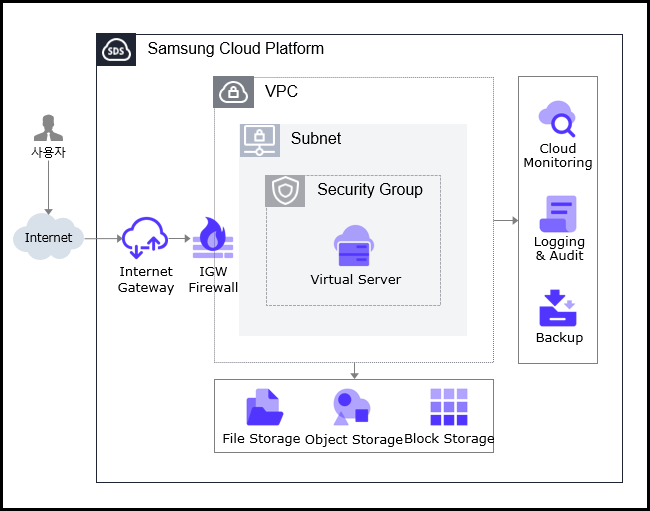
Provided features
Virtual Server provides the following features.
- Auto Provisioning and Management: Provides Virtual Server provisioning, resource management, and cost management functions through a web-based Console. * If you need to change the capacity of major resources such as CPU or Memory while using a Virtual Server, you can modify it immediately using the server type edit function.
- Standard Server Types and Image Provision: Provides virtualized vCore/Memory resources according to standard server types, and offers standard OS Images.
- Storage Connection: Provides additional attached storage besides the OS disk. * Block Storage, File Storage, and Object Storage can be added and used together.
- Network Connection: You can connect the Virtual Server’s standard subnet/IP settings and Public NAT IP. * Provides a local subnet connection for communication between servers. * This task can be edited on the detail page.
- Security Group applied: By using the Security Group service, you control inbound/outbound traffic communicating with external internet or other VPCs, thereby securely protecting the server.
- Monitoring: You can view monitoring information for computing resources such as CPU, Memory, and Disk through the Cloud Monitoring service.
- Backup and Recovery: You can back up and restore Virtual Server Image using the Backup service.
- Cost Management: You can create, stop, or terminate servers as needed, and since billing is based on actual usage time, you can monitor costs according to usage.
- ServiceWatch Service Integration Offering: You can monitor data through the ServiceWatch service.
Component
Virtual Server provides standard server types and standard OS images. Users can select and use it according to the desired service scale.
Image
You can create and manage images. The main features are as follows.
- Image creation: You can create an Image from the configuration of the Virtual Server you are using, and you can also create an Image by uploading your Image file to Object Storage.
- Create Shared Image: You can create a Shared Image from an Image with Visibility set to Private, making it shareable.
- Share with another Account: You can share the Image with another Account.
- For instructions on creating and using images, refer to the How-to guides > Image document.
Keypair
To ensure more secure OS access, we strengthen security by providing a Key Pair instead of the ID/Password entry method. The main features are as follows.
- Keypair creation: Generate a user credential for connecting to the Virtual Server.
- Retrieve Public Key: You can retrieve the public key by loading a file or by directly entering the public key.
- Refer to the How-to guides > Keypair document for creating and using keypairs.
Server Group
Through Server Group settings, the Block Storage added when creating a Virtual Server can be placed near or distributed across racks and hosts. The main features are as follows.
- Server Group Creation: Virtual Servers belonging to the same Server Group can be set as Anti-Affinity(distributed placement), Affinity(proximate placement), Partition(Virtual Server and Block Storage distributed placement).
- Refer to the How-to guides > Server Group document for creating and using Server Groups.
OS Image provided version
The OS images provided by Virtual Server are as follows
| OS Image version | EoS Date |
|---|---|
| Alma Linux 8.10 | 2029-05-31 |
| Alma Linux 9.6 | 2025-11-17 |
| Oracle Linux 8.10 | 2029-07-31 |
| Oracle Linux 9.6 | 2025-11-25 |
| RHEL 8.10 | 2029-05-31 |
| RHEL 9.4 | 2026-04-30 |
| RHEL 9.6 | 2027-05-31 |
| Rocky Linux 8.10 | 2029-05-31 |
| Rocky Linux 9.6 | 2025-11-30 |
| Ubuntu 22.04 | 2027-06-30 |
| Ubuntu 24.04 | 2029-06-30 |
| Windows 2016 | 2027-01-12 |
| Windows 2019 | 2029-01-09 |
| Windows 2022 | 2031-10-14 |
| Windows 2025 | 2034-11-14 |
- Linux operating systems such as Alma Linux and Rocky Linux provide only even Minor versions, except for the final release of a Major version. * This is a policy to ensure the stability and consistency of the SCP system. We recommend checking the EOS (End of Support) and EOL (End of Life) dates for the operating system, and, if necessary, applying new or additional individual packages to maintain a stable environment.
Server type
The server types supported by Virtual Server are as follows. For detailed information about server types, please refer to Virtual Server 서버 타입.
Standard s1v2m4
Category | Example | Detailed description |
|---|---|---|
| Server type | Standard | Provided server type categories
|
| Server specifications | s1 | Provided server type categories and generations
|
| Server specifications | v2 | vCore count
|
| Server specifications | m4 | Memory capacity
|
Constraints
- If you create a Virtual Server with Rocky Linux or Oracle Linux, additional configuration is required for time synchronization (NTP:Network Time Protocol). * If created with a different image, it is set automatically and no additional configuration is required.
For more details, refer to Linux NTP 설정하기. - If RHEL and Windows Server were created before August 2025, the RHEL Repository and WKMS (Windows Key Management Service) settings need to be modified.
For more details, please refer to RHEL Repo and WKMS Setup.
Preceding Service
This is a list of services that must be pre-configured before creating the service. Please refer to the guide provided for each service and prepare in advance.
| Service Category | service | Detailed description |
|---|---|---|
| Networking | VPC | A service that provides an isolated virtual network in a cloud environment |
| Networking | Security Group | Virtual firewall that controls server traffic |