Configure RHEL Repo and WKMS
- If a user creates RHEL and Windows Server prior to August 2025 via the Samsung Cloud Platform Console, they need to modify the RHEL Repository and WKMS (Windows Key Management Service) settings.
- The SCP RHEL Repository is a repository provided by SCP to support user environments such as VPC Private Subnets where external access is restricted.
Since the SCP RHEL Repository synchronizes with each Region Local Repository according to an internal schedule, it is recommended to switch to an external public mirror site to apply the latest patches quickly.
RHEL Repository Configuration Guide
In Samsung Cloud Platform, when using RHEL, you can install and download the same packages as the official RHEL Repository by using the RHEL Repository provided by SCP.
SCP provides the latest repository for the given major version by default. To configure the RHEL repository, follow the steps below.
As the root user on the Virtual Server, use the cat command to verify the
/etc/yum.repos.d/scp.rhel8.repoor/etc/yum.repos.d/scp.rhel9.reposettings.Color modecat /etc/yum.repos.d/scp.rhel8.repocat /etc/yum.repos.d/scp.rhel8.repoCode block. Verify repo configuration (RHEL8) Color modecat /etc/yum.repos.d/scp.rhel9.repocat /etc/yum.repos.d/scp.rhel9.repoCode block. Verify repo configuration (RHEL9) - When checking the configuration file, the following result is displayed.Color mode
[rhel-8-baseos] name=rhel-8-baseos gpgcheck=0 enabled=1 baseurl=http://scp-rhel8-ip/rhel/8/baseos [rhel-8-baseos-debug] name=rhel-8-baseos-debug gpgcheck=0 enabled=1 baseurl=http://scp-rhel8-ip/rhel/8/baseos-debug [rhel-8-appstream] name=rhel-8-appstream gpgcheck=0 enabled=1 baseurl=http://scp-rhel8-ip/rhel/8/appstream[rhel-8-baseos] name=rhel-8-baseos gpgcheck=0 enabled=1 baseurl=http://scp-rhel8-ip/rhel/8/baseos [rhel-8-baseos-debug] name=rhel-8-baseos-debug gpgcheck=0 enabled=1 baseurl=http://scp-rhel8-ip/rhel/8/baseos-debug [rhel-8-appstream] name=rhel-8-appstream gpgcheck=0 enabled=1 baseurl=http://scp-rhel8-ip/rhel/8/appstreamCode block. Verify repo configuration (RHEL8) Color mode[rhel-9-for-x86_64-baseos-rpms] name=rhel-9-for-x86_64-baseos-rpms baseurl=http://scp-rhel9-ip/rhel/$releasever/x86_64/baseos gpgcheck=0 enabled=1 [rhel-9-for-x86_64-appstream-rpms] name=rhel-9-for-x86_64-appstream-rpms baseurl=http://scp-rhel9-ip/rhel/$releasever/x86_64/appstream gpgcheck=0 enabled=1 [codeready-builder-for-rhel-9-x86_64-rpms] name=codeready-builder-for-rhel-9-x86_64-rpms baseurl=http://scp-rhel9-ip/rhel/$releasever/x86_64/codeready-builder gpgcheck=0 enabled=1 [rhel-9-for-x86_64-highavailability-rpms] name=rhel-9-for-x86_64-highavailability-rpms baseurl=http://scp-rhel9-ip/rhel/$releasever/x86_64/ha gpgcheck=0 enabled=1 [rhel-9-for-x86_64-supplementary-rpms] name=rhel-9-for-x86_64-supplementary-rpms baseurl=http://scp-rhel9-ip/rhel/$releasever/x86_64/supplementary gpgcheck=0 enabled=1[rhel-9-for-x86_64-baseos-rpms] name=rhel-9-for-x86_64-baseos-rpms baseurl=http://scp-rhel9-ip/rhel/$releasever/x86_64/baseos gpgcheck=0 enabled=1 [rhel-9-for-x86_64-appstream-rpms] name=rhel-9-for-x86_64-appstream-rpms baseurl=http://scp-rhel9-ip/rhel/$releasever/x86_64/appstream gpgcheck=0 enabled=1 [codeready-builder-for-rhel-9-x86_64-rpms] name=codeready-builder-for-rhel-9-x86_64-rpms baseurl=http://scp-rhel9-ip/rhel/$releasever/x86_64/codeready-builder gpgcheck=0 enabled=1 [rhel-9-for-x86_64-highavailability-rpms] name=rhel-9-for-x86_64-highavailability-rpms baseurl=http://scp-rhel9-ip/rhel/$releasever/x86_64/ha gpgcheck=0 enabled=1 [rhel-9-for-x86_64-supplementary-rpms] name=rhel-9-for-x86_64-supplementary-rpms baseurl=http://scp-rhel9-ip/rhel/$releasever/x86_64/supplementary gpgcheck=0 enabled=1Code block. Check repo configuration (RHEL9)
- When checking the configuration file, the following result is displayed.
Use a text editor (e.g., vim) to open the
/etc/hostsfile.Modify the
/etc/hostsfile with the following content and save it.Color mode198.19.2.13 scp-rhel8-ip scp-rhel9-ip scp-rhel-ip198.19.2.13 scp-rhel8-ip scp-rhel9-ip scp-rhel-ipcode block. Change /etc/hosts file settings Use the yum command to verify the RHEL repository connection configured on the server.
Color modeyum repolist –vyum repolist –vCode block. Verify repository connection settings - If the RHEL repository is successfully connected, you can view the repository list.Color mode
Repo-id            : rhel-8-appstream
Repo-name          : rhel-8-appstream
Repo-revision      : 1718903734
Repo-updated       : Fri 21 Jun 2024 02:15:34 AM KST
Repo-pkgs          : 38,260
Repo-available-pkgs: 25,799
Repo-size          : 122 G
Repo-baseurl       : http://scp-rhel8-ip/rhel/8/appstream
Repo-expire        : 172,800 second(s) (last: Thu 08 Aug 2024 07:27:57 AM KST)
Repo-filename      : /etc/yum.repos.d/scp.rhel8.repo

Repo-id            : rhel-8-baseos
Repo-name          : rhel-8-baseos
Repo-revision      : 1718029433
Repo-updated       : Mon 10 Jun 2024 11:23:52 PM KST
Repo-pkgs          : 17,487
Repo-available-pkgs: 17,487
Repo-size          : 32 G
Repo-baseurl       : http://scp-rhel8-ip/rhel/8/baseos
Repo-expire        : 172,800 second(s) (last: Thu 08 Aug 2024 07:27:57 AM KST)
Repo-filename      : /etc/yum.repos.d/scp.rhel8.repo

Repo-id            : rhel-8-baseos-debug
Repo-name          : rhel-8-baseos-debug
Repo-revision      : 1717662461
Repo-updated       : Thu 06 Jun 2024 05:27:41 PM KST
Repo-pkgs          : 17,078
Repo-available-pkgs: 17,078
Repo-size          : 100 G
Repo-baseurl       : http://scp-rhel8-ip/rhel/8/baseos-debug
Repo-expire        : 172,800 second(s) (last: Thu 08 Aug 2024 07:27:57 AM KST)
Repo-filename      : /etc/yum.repos.d/scp.rhel8.repo
Repo-id : rhel-8-appstream Repo-name : rhel-8-appstream Repo-revision : 1718903734 Repo-updated : Fri 21 Jun 2024 02:15:34 AM KST Repo-pkgs : 38,260 Repo-available-pkgs: 25,799 Repo-size : 122 G Repo-baseurl : http://scp-rhel8-ip/rhel/8/appstream Repo-expire : 172,800 second(s) (last: Thu 08 Aug 2024 07:27:57 AM KST) Repo-filename : /etc/yum.repos.d/scp.rhel8.repo Repo-id : rhel-8-baseos Repo-name : rhel-8-baseos Repo-revision : 1718029433 Repo-updated : Mon 10 Jun 2024 11:23:52 PM KST Repo-pkgs : 17,487 Repo-available-pkgs: 17,487 Repo-size : 32 G Repo-baseurl : http://scp-rhel8-ip/rhel/8/baseos Repo-expire : 172,800 second(s) (last: Thu 08 Aug 2024 07:27:57 AM KST) Repo-filename : /etc/yum.repos.d/scp.rhel8.repo Repo-id : rhel-8-baseos-debug Repo-name : rhel-8-baseos-debug Repo-revision : 1717662461 Repo-updated : Thu 06 Jun 2024 05:27:41 PM KST Repo-pkgs : 17,078 Repo-available-pkgs: 17,078 Repo-size : 100 G Repo-baseurl : http://scp-rhel8-ip/rhel/8/baseos-debug Repo-expire : 172,800 second(s) (last: Thu 08 Aug 2024 07:27:57 AM KST) Repo-filename : /etc/yum.repos.d/scp.rhel8.repoCode block. Check repository list
- If the RHEL repository is successfully connected, you can view the repository list.
Windows Key Management Service Configuration Guide
In Samsung Cloud Platform, when using Windows Server, you can activate genuine licensing by utilizing the Key Management Service provided by SCP. Follow the steps below.
Right-click the Windows Start icon, then run cmd from Windows PowerShell (Administrator) or the Windows Run menu.
In Windows PowerShell (Administrator) or cmd, please register the KMS Server by running the command below.
Color modeslmgr /skms 198.19.2.23:1688slmgr /skms 198.19.2.23:1688Code block. WKMS configuration After executing the KMS Server registration command, confirm the notification popup indicating successful registration, then click OK.
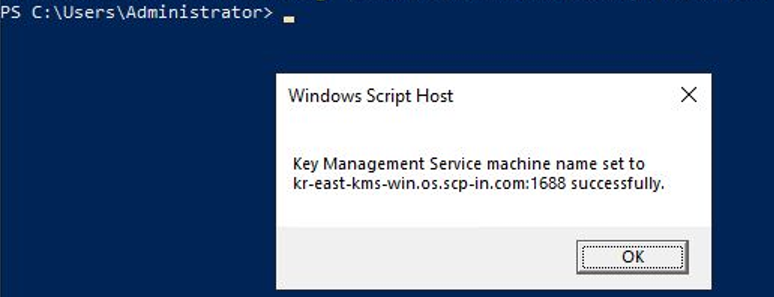
Figure. Verify WKMS settings In Windows PowerShell (Administrator) or cmd, run the command below to activate the product.
Color modeslmgr /atoslmgr /atoCode block. Windows Server activation settings After confirming the notification popup that the product activation was completed successfully, click OK.
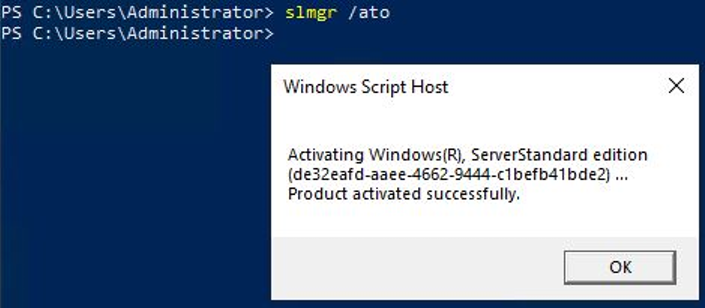
Figure. Verify Windows Server activation Please run the command below in Windows PowerShell (Administrator) or cmd to verify that activation has been completed.
Color modeslmgr /dlvslmgr /dlvCode block. Verify Windows Server activation After confirming the notification popup that the product activation was completed successfully, click OK.
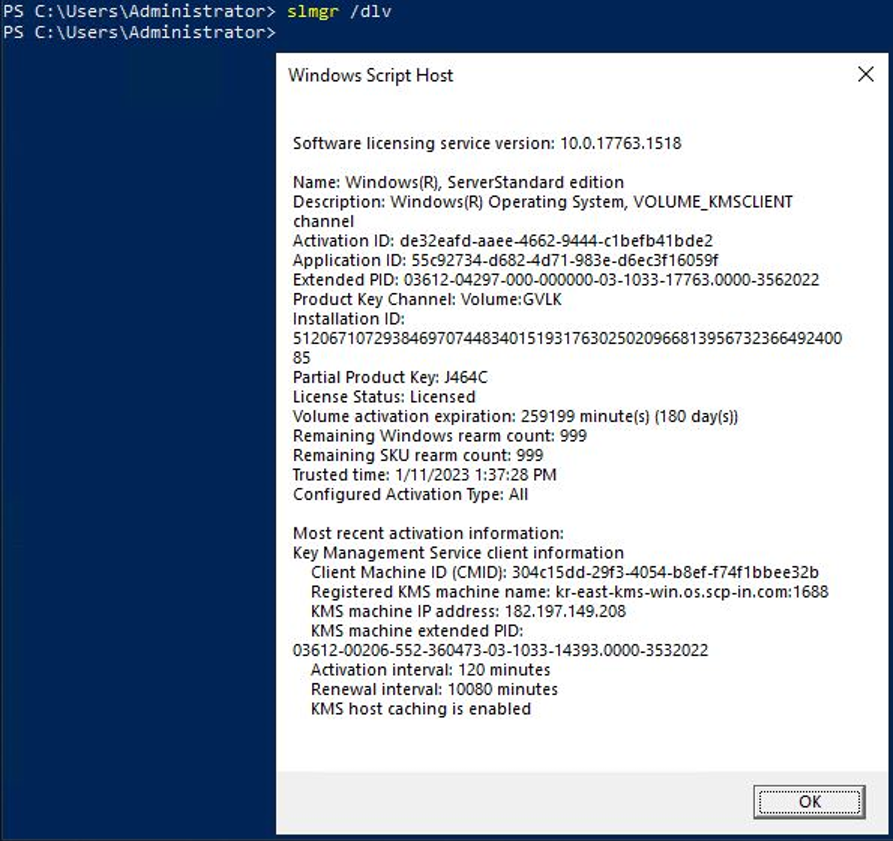
Figure. Windows Server genuine activation verification