Setting up RHEL Repo and WKMS
- If the user created RHEL and Windows Server prior to August 2025 via the Samsung Cloud Platform Console, they need to modify the RHEL Repository and WKMS (Windows Key Management Service) settings.
- The SCP RHEL Repository is a repository provided by SCP to support user environments such as VPC Private Subnet where external access is restricted.
Since the SCP RHEL Repository synchronizes with each Region Local Repository according to the internal schedule, it is recommended to switch to an external Public Mirror site to quickly apply the latest patches.
RHEL Repository Configuration Guide
In Samsung Cloud Platform, when using RHEL, you can install and download the same packages as the official RHEL Repository by utilizing the RHEL Repository provided by SCP.
SCP provides the latest version of the repository for the given major version by default. To set up the RHEL repository, follow the steps below.
Using the root user of the Virtual Server’s OS, use the cat command to check the
/etc/yum.repos.d/scp.rhel8.repoor/etc/yum.repos.d/scp.rhel9.reposettings.Color modecat /etc/yum.repos.d/scp.rhel8.repocat /etc/yum.repos.d/scp.rhel8.repoCode block. repo configuration check (RHEL8) Color modecat /etc/yum.repos.d/scp.rhel9.repocat /etc/yum.repos.d/scp.rhel9.repoCode block. repo configuration check (RHEL9) - When checking the configuration file, the following result is displayed.Color mode
[rhel-8-baseos] name=rhel-8-baseos gpgcheck=0 enabled=1 baseurl=http://scp-rhel8-ip/rhel/8/baseos [rhel-8-baseos-debug] name=rhel-8-baseos-debug gpgcheck=0 enabled=1 baseurl=http://scp-rhel8-ip/rhel/8/baseos-debug [rhel-8-appstream] name=rhel-8-appstream gpgcheck=0 enabled=1 baseurl=http://scp-rhel8-ip/rhel/8/appstream[rhel-8-baseos] name=rhel-8-baseos gpgcheck=0 enabled=1 baseurl=http://scp-rhel8-ip/rhel/8/baseos [rhel-8-baseos-debug] name=rhel-8-baseos-debug gpgcheck=0 enabled=1 baseurl=http://scp-rhel8-ip/rhel/8/baseos-debug [rhel-8-appstream] name=rhel-8-appstream gpgcheck=0 enabled=1 baseurl=http://scp-rhel8-ip/rhel/8/appstreamCode block. Check repo settings (RHEL8) Color mode[rhel-9-for-x86_64-baseos-rpms] name=rhel-9-for-x86_64-baseos-rpms baseurl=http://scp-rhel9-ip/rhel/$releasever/x86_64/baseos gpgcheck=0 enabled=1 [rhel-9-for-x86_64-appstream-rpms] name=rhel-9-for-x86_64-appstream-rpms baseurl=http://scp-rhel9-ip/rhel/$releasever/x86_64/appstream gpgcheck=0 enabled=1 [codeready-builder-for-rhel-9-x86_64-rpms] name=codeready-builder-for-rhel-9-x86_64-rpms baseurl=http://scp-rhel9-ip/rhel/$releasever/x86_64/codeready-builder gpgcheck=0 enabled=1 [rhel-9-for-x86_64-highavailability-rpms] name=rhel-9-for-x86_64-highavailability-rpms baseurl=http://scp-rhel9-ip/rhel/$releasever/x86_64/ha gpgcheck=0 enabled=1 [rhel-9-for-x86_64-supplementary-rpms] name=rhel-9-for-x86_64-supplementary-rpms baseurl=http://scp-rhel9-ip/rhel/$releasever/x86_64/supplementary gpgcheck=0 enabled=1[rhel-9-for-x86_64-baseos-rpms] name=rhel-9-for-x86_64-baseos-rpms baseurl=http://scp-rhel9-ip/rhel/$releasever/x86_64/baseos gpgcheck=0 enabled=1 [rhel-9-for-x86_64-appstream-rpms] name=rhel-9-for-x86_64-appstream-rpms baseurl=http://scp-rhel9-ip/rhel/$releasever/x86_64/appstream gpgcheck=0 enabled=1 [codeready-builder-for-rhel-9-x86_64-rpms] name=codeready-builder-for-rhel-9-x86_64-rpms baseurl=http://scp-rhel9-ip/rhel/$releasever/x86_64/codeready-builder gpgcheck=0 enabled=1 [rhel-9-for-x86_64-highavailability-rpms] name=rhel-9-for-x86_64-highavailability-rpms baseurl=http://scp-rhel9-ip/rhel/$releasever/x86_64/ha gpgcheck=0 enabled=1 [rhel-9-for-x86_64-supplementary-rpms] name=rhel-9-for-x86_64-supplementary-rpms baseurl=http://scp-rhel9-ip/rhel/$releasever/x86_64/supplementary gpgcheck=0 enabled=1Code block. Check repo settings (RHEL9)
- When checking the configuration file, the following result is displayed.
Use a text editor (e.g., vim) to open the
/etc/hostsfile./etc/hostsModify the file with the content below and save.Color mode198.19.2.13 scp-rhel8-ip scp-rhel9-ip scp-rhel-ip198.19.2.13 scp-rhel8-ip scp-rhel9-ip scp-rhel-ipCode block. /etc/hosts file setting change Verify the RHEL Repository connection configured on the server using the yum command.
Color modeyum repolist –vyum repolist –vCode block. repository connection settings check - If the RHEL Repository is successfully connected, you can check the Repository list.Color mode
Repo-id            : rhel-8-appstream
Repo-name          : rhel-8-appstream
Repo-revision      : 1718903734
Repo-updated       : Fri 21 Jun 2024 02:15:34 AM KST
Repo-pkgs          : 38,260
Repo-available-pkgs: 25,799
Repo-size          : 122 G
Repo-baseurl       : http://scp-rhel8-ip/rhel/8/appstream
Repo-expire        : 172,800 second(s) (last: Thu 08 Aug 2024 07:27:57 AM KST)
Repo-filename      : /etc/yum.repos.d/scp.rhel8.repo

Repo-id            : rhel-8-baseos
Repo-name          : rhel-8-baseos
Repo-revision      : 1718029433
Repo-updated       : Mon 10 Jun 2024 11:23:52 PM KST
Repo-pkgs          : 17,487
Repo-available-pkgs: 17,487
Repo-size          : 32 G
Repo-baseurl       : http://scp-rhel8-ip/rhel/8/baseos
Repo-expire        : 172,800 second(s) (last: Thu 08 Aug 2024 07:27:57 AM KST)
Repo-filename      : /etc/yum.repos.d/scp.rhel8.repo

Repo-id            : rhel-8-baseos-debug
Repo-name          : rhel-8-baseos-debug
Repo-revision      : 1717662461
Repo-updated       : Thu 06 Jun 2024 05:27:41 PM KST
Repo-pkgs          : 17,078
Repo-available-pkgs: 17,078
Repo-size          : 100 G
Repo-baseurl       : http://scp-rhel8-ip/rhel/8/baseos-debug
Repo-expire        : 172,800 second(s) (last: Thu 08 Aug 2024 07:27:57 AM KST)
Repo-filename      : /etc/yum.repos.d/scp.rhel8.repo
Repo-id : rhel-8-appstream Repo-name : rhel-8-appstream Repo-revision : 1718903734 Repo-updated : Fri 21 Jun 2024 02:15:34 AM KST Repo-pkgs : 38,260 Repo-available-pkgs: 25,799 Repo-size : 122 G Repo-baseurl : http://scp-rhel8-ip/rhel/8/appstream Repo-expire : 172,800 second(s) (last: Thu 08 Aug 2024 07:27:57 AM KST) Repo-filename : /etc/yum.repos.d/scp.rhel8.repo Repo-id : rhel-8-baseos Repo-name : rhel-8-baseos Repo-revision : 1718029433 Repo-updated : Mon 10 Jun 2024 11:23:52 PM KST Repo-pkgs : 17,487 Repo-available-pkgs: 17,487 Repo-size : 32 G Repo-baseurl : http://scp-rhel8-ip/rhel/8/baseos Repo-expire : 172,800 second(s) (last: Thu 08 Aug 2024 07:27:57 AM KST) Repo-filename : /etc/yum.repos.d/scp.rhel8.repo Repo-id : rhel-8-baseos-debug Repo-name : rhel-8-baseos-debug Repo-revision : 1717662461 Repo-updated : Thu 06 Jun 2024 05:27:41 PM KST Repo-pkgs : 17,078 Repo-available-pkgs: 17,078 Repo-size : 100 G Repo-baseurl : http://scp-rhel8-ip/rhel/8/baseos-debug Repo-expire : 172,800 second(s) (last: Thu 08 Aug 2024 07:27:57 AM KST) Repo-filename : /etc/yum.repos.d/scp.rhel8.repoCode block. Repository list check
- If the RHEL Repository is successfully connected, you can check the Repository list.
Windows Key Management Service Configuration Guide
In Samsung Cloud Platform, when using Windows Server, you can authenticate genuine products by using the Key Management Service provided by SCP. Follow the steps below.
After right-clicking the Windows Start icon, please run cmd from Windows PowerShell (Administrator) or the Windows Run menu.
Windows PowerShell (administrator) or in cmd, please run the command below to register the KMS Server.
Color modeslmgr /skms 198.19.2.23:1688slmgr /skms 198.19.2.23:1688Code block. WKMS Settings After executing the KMS Server registration command, check the notification popup indicating successful registration, then click OK.
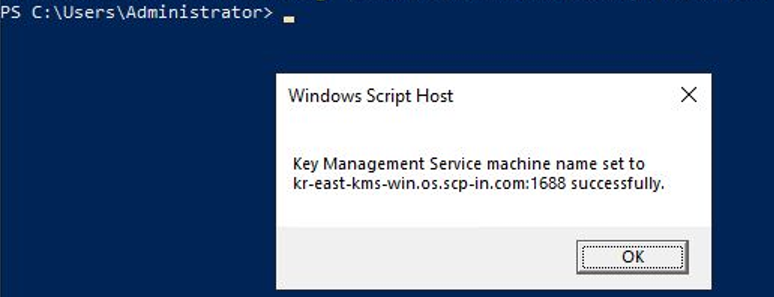
Figure. WKMS setting check Windows PowerShell (Administrator) or in cmd, please execute the command below to perform product activation.
Color modeslmgr /atoslmgr /atoCode block. Windows Server activation settings After confirming the notification popup that the product activation was successful, click OK.
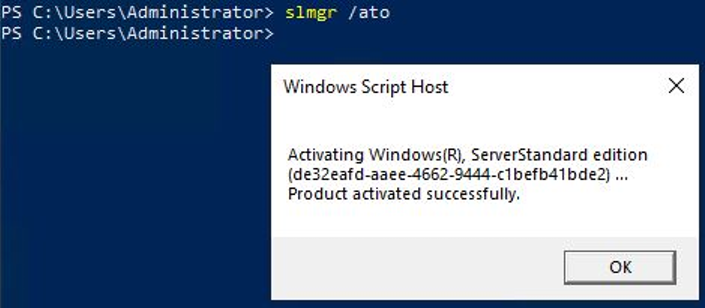
Figure. Windows Server genuine activation verification Windows PowerShell (Administrator) or cmd, run the command below to check if it has been activated.
Color modeslmgr /dlvslmgr /dlvCode block. Windows Server genuine activation verification After confirming the notification popup that the product activation was successfully performed, click OK.
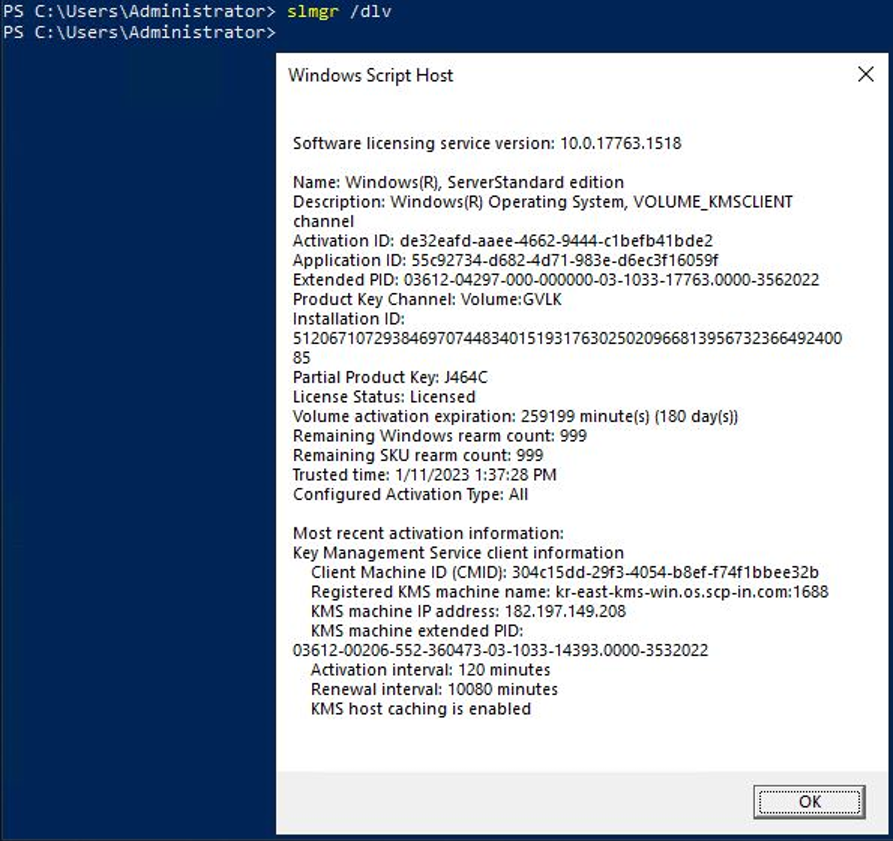
Figure. Windows Server genuine activation verification