Overview
Service Overview
Block Storage is a high-performance storage that stores data in block units sorted by a certain size and arrangement.
It is suitable for large-scale, high-performance requirements such as databases and mail servers, and users can directly allocate volumes on the server for use.
Features
- Large volume provision: OS configuration volumes are created with at least the minimum size per image and can be expanded up to 12TB, and data storage volumes outside the OS can be created and expanded from a minimum of 8GB to a maximum of 12TB. Volume expansion is performed reliably while online.
- Providing high performance based on Full SSD: Provides high durability and availability based on redundant Controller and Disk Array Raid. Since Full SSD disks are provided by default, it is suitable for high-speed data processing tasks such as database workloads.
- Snapshot Backup: Through the image snapshot feature, recovery of changed and deleted data is possible. Users select a snapshot created at the point in time they wish to recover from the list and perform the recovery.
Service Architecture Diagram
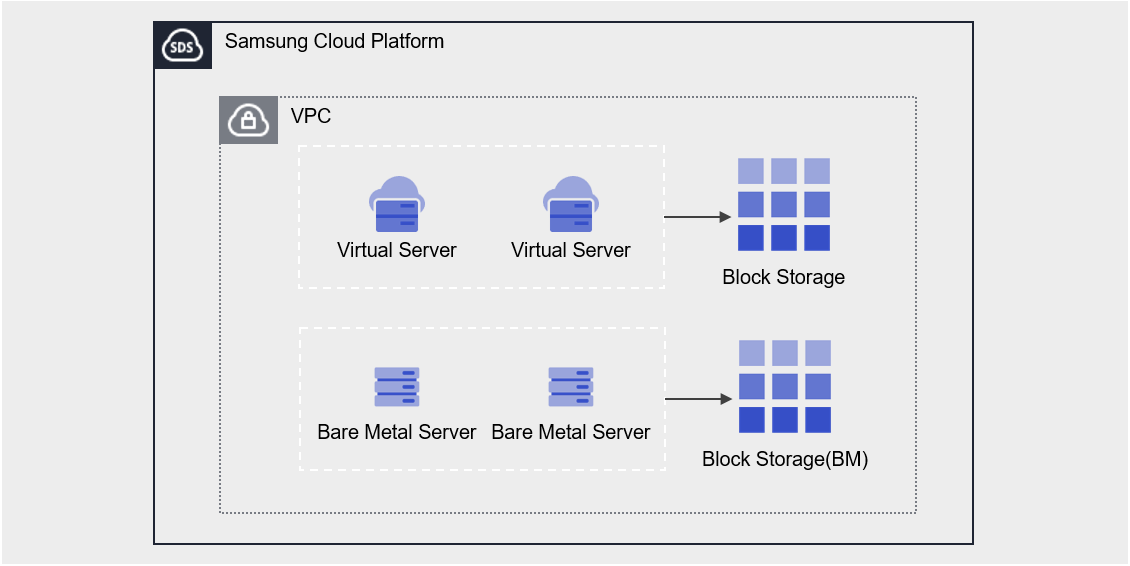
Provided Features
Block Storage provides the following features.
- Volume Name: Users can set or edit names for each volume.
- Capacity: Volumes can be created with capacities ranging from a minimum of 8 GB up to a maximum of 12 TB, and can be expanded during use. The OS default volume can be created with at least the minimum capacity for each image.
- Connection Server: You can select a Virtual Server to connect or disconnect.
- Multi-Server Connection (Multi Attach): Connect to two or more servers, no limit on the number of servers per volume, and a Virtual Server can connect up to 26 volumes
- Encryption: All volumes of Block Storage have AES-256 algorithm encryption applied by default, and if the volume is HDD/SSD_KMS disk type, it additionally provides transmission encryption for the Block Storage segment connected to the instance and the instance.
- Snapshot: Through the image snapshot feature, recovery of changed and deleted data is possible. Users select a snapshot created at the point in time they wish to recover from the list and recover it.
- Volume Transfer: Through the volume transfer feature, you can transfer the volume to another Account.
- Monitoring: IOPS, Latency, Throughput, usage, etc. Monitoring information can be checked through the Cloud Monitoring service.
Components
You can enter the capacity and select the disk type to create a volume according to the user’s service scale and performance requirements. When using the snapshot feature, you can restore data to the point in time you want to recover.
Volume
Volume (Volume) is the basic creation unit of the Block Storage service and is used as data storage space. Users select name, capacity, and disk type to create a volume, then attach it to a Virtual Server for use.
The volume name creation rules are as follows.
-, _) and enter within 255 characters.Snapshot
A snapshot is an image backup of a volume at a specific point in time. Users can view the snapshot name and creation date in the snapshot list to select the snapshot they want to restore, and can recover data that was changed or deleted using that snapshot.
The notes for using snapshots are as follows.
- The snapshot creation time is based on Asia/Seoul (GMT +09:00).
- Select the snapshot recovery button to restore the Block Storage volume to the latest snapshot.
- If you select a specific snapshot from the snapshot list, you can recover by creating a new volume based on the snapshot.
- Snapshots are charged based on the size of the original Block Storage, so please delete unnecessary snapshots.
Preceding Service
This is a list of services that must be pre-configured before creating the service. For details, refer to the guide provided for each service and prepare in advance.
| Service Category | Service | Detailed Description |
|---|---|---|
| Compute | Virtual Server | Virtual server optimized for cloud computing |