This is the multi-page printable view of this section. Click here to print.

Return to the regular view of this page.

Overview

Service Overview

Bare Metal Server does not use virtualization technology and is a high-performance cloud computing service that can allocate and use physically separated computing resources such as CPU and memory exclusively. It is not affected by other cloud users, allowing you to reliably operate performance-sensitive services.

Features

  • Easy and convenient computing environment setup: Through the web-based Console, you can easily handle everything from Bare Metal Server provisioning to resource management and cost management. You can receive a server with standard specs (CPU, Memory, Disk) allocated exclusively and use it immediately.

  • Providing High-Performance Computing Environment: We provide servers suitable for workloads that require large capacity and high performance—such as real-time (Real-Time) systems, HPC (High Performance Computing), and servers that demand excessive I/O usage—in a physically isolated environment.

  • Efficient Service Delivery: Ensure performance and stability through optimal server selection and in-house testing. Customers can choose the optimal resources that fit their service environment from the various specifications of Bare Metal Servers offered by Samsung Cloud Platform.

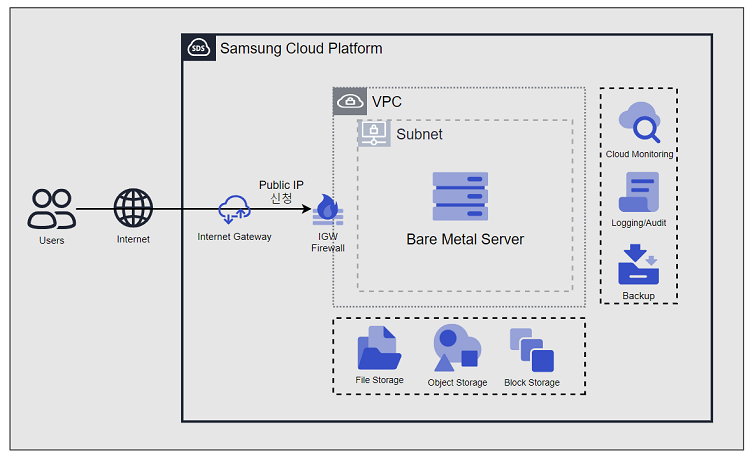
Service Architecture Diagram

Diagram
Figure. Bare Metal Server Diagram

Provided features

Bare Metal Server provides the following features.

  • Auto Provisioning (Auto Provisioning) and Management: Through the web-based Console, you can easily provision Bare Metal Servers, manage resources, and control costs.
  • Providing various types of server types and OS images: Provides CPU, Memory, and Disk resources of standard server types, and offers a variety of standard OS images.
  • Storage Connection: Provides additional attached storage beyond the OS disk. You can connect and use Block Storage, File Storage, and Object Storage.
  • Network Connection: You can connect the standard subnet/IP settings of a Bare Metal Server and a Public NAT IP. Provides a local subnet connection for inter-server communication. This can be modified on the detail page.
  • Monitoring: You can view monitoring information such as CPU, Memory, and Disk, which are computing resources, through Cloud Monitoring. To use the Cloud Monitoring service for Bare Metal Server, you must install the Agent. Please be sure to install the Agent for stable Bare Metal Server service usage. For more details, see Bare Metal Server Monitoring Metrics.
  • Backup and Recovery: You can back up and restore the Bare Metal Server’s filesystem using the Backup service.
  • Efficient Cost Management: You can easily create or terminate servers as needed, and because billing is based on actual usage time, you can use it cost‑effectively in various unpredictable situations.
  • Local disk partition creation You can create and use up to 10 local disk partitions.
  • Terraform Provisioning: Provides an IaC environment using Terraform.

Components

Bare Metal Server provides various standard OS images and standard server types. Users can select and use them according to the scale of the service they want to configure.

OS Image provided version

The OS images supported by Bare Metal Server are as follows

OS Image versionEoS Date
Oracle Linux 9.62032-06-30
RHEL 8.102029-05-31
RHEL 9.42026-04-30
RHEL 9.62027-05-31
Rocky Linux 8.102029-05-31
Rocky Linux 9.62025-11-30
Ubuntu 22.042027-06-30
Ubuntu 24.042029-06-30
Windows 20192029-01-09
Windows 20222031-10-14
Table. Bare Metal Server provided OS Image version
Reference
  • Oracle Linux, RHEL, and Rocky Linux only provide even-numbered minor versions. Check the OS Image’s EOS (End of Support)/EOL (End of Life) Date.
  • To ensure stable OS operation, apply new or additional individual packages yourself.

Server type

The server types supported by Bare Metal Server are as follows. For detailed information about the server types supported by Bare Metal Server, see Bare Metal Server Server Types.

s3v16m64_metal
CategoryexampleDetailed description
Server generations3Provided server categories and generations
  • s3: s means the standard, commonly used standard specification (vCPU, Memory) configuration, and 1 denotes the generation
CPU vCorev16Number of vCores
  • v16: Allocated vCores are twice the number of physical cores
    • 16 vCores correspond to 8 physical cores
    • Provided with Hyperthreading enabled by default, which can be disabled when creating a service
Memorym64Memory capacity
  • m64: 64GB Memory
Table. Bare Metal Server server type

Preceding Service

This is a list of services that must be pre-configured before creating the service. Please refer to the guide provided for each service and prepare in advance.

Service CategoryserviceDetailed description
NetworkingVPCA service that provides an isolated virtual network in a cloud environment
Table. Bare Metal Server Pre-service

1 - Server Type

Bare Metal Server server type

Bare Metal Server provides server types that suit the intended use. Server types are composed of various combinations such as CPU and Memory. The server used for a Bare Metal Server is determined by the server type selected when creating the Bare Metal Server. Please select a server type based on the specifications of the application you intend to run on the Bare Metal Server.

The server types supported by Bare Metal Server are as follows.

s3v16m64_metal
Category
exampleDetailed description
Server generations3Provided server categories and generations
  • s3
    • s means standard specification
    • 3 means generation
  • h3
    • h means high-capacity server specification
    • 3 means generation
CPU vCorev16Number of vCores
  • v16: Allocated vCores are twice the number of physical cores
    • 16 vCores correspond to 8 physical cores
    • Hyper-Threading is enabled by default, and can be disabled when creating a service
Memorym64Memory Capacity
  • m64: 64GB Memory
Table. Bare Metal Server Server Type format

s4/h4 server type

The Bare Metal Server s4 server type is offered with standard specifications (vCPU, Memory) and, because it receives physically isolated resources, it is suitable for high-performance applications. Additionally, the Bare Metal Server h4 server type is offered with high-capacity specifications and is suitable for high-performance applications that require large-scale data processing.

  • Supports a total of five vCPU options (16, 32, 64, 96, 128 vCore)
    • Intel 6th Generation (Granite Rapids) Processor
  • Supports up to 64 physical cores, 128 vCPUs, and 2,048 GB of memory
  • Provides two internal disks up to 1.92 TB each (for OS use)
Server typePhysical CPUvCPUMemoryCPU TypeInternal Disk(OS)
s4v16m64_metal8 Core16 vCore64 GBIntel Xeon 6507P up to 4.3 GHz480GB * 2EA
s4v16m128_metal8 Core16 vCore128 GBIntel Xeon 6507P up to 4.3 GHz480GB * 2EA
s4v16m256_metal8 Core16 vCore256 GBIntel Xeon 6507P with a maximum frequency of 4.3 GHz480GB * 2EA
h4v32m128_metal16 Core32 vCore128 GBIntel Xeon 6517P up to 4.0 GHz960GB * 2EA
h4v32m256_metal16 Core32 vCore256 GBIntel Xeon 6517P up to 4.0 GHz960GB * 2EA
h4v32m512_metal16 Core32 vCore512 GBIntel Xeon 6517P up to 4.0 GHz960GB * 2EA
h4v64m256_metal32 Core64 vCore256 GBIntel Xeon 6737P up to 4.0 GHz1.92TB * 2EA
h4v64m512_metal32 Core64 vCore512 GBIntel Xeon 6737P up to 4.0 GHz1.92TB * 2EA
h4v64m1024_metal32 Core64 vCore1024 GBIntel Xeon 6737P up to 4.0 GHz1.92TB * 2EA
h4v96m512_metal48 Core96 vCore512 GBIntel Xeon 6520P up to 3.4 GHz1.92TB * 2EA
h4v96m768_metal48 Core96 vCore768 GBIntel Xeon 6520P with a maximum frequency of 3.4 GHz1.92TB * 2EA
h4v96m2048_metal48 Core96 vCore2048 GBIntel Xeon 6520P up to 3.4 GHz1.92TB * 2EA
h4v128m512_metal64 Core128 vCore512 GBIntel Xeon 6737P up to 4.0 GHz1.92TB * 2EA
h4v128m1024_metal64 Core128 vCore1024 GBIntel Xeon 6737P up to 4.0 GHz1.92TB * 2EA
h4v128m2048_metal64 Core128 vCore2048 GBIntel Xeon 6737P up to 4.0 GHz1.92TB * 2EA
Table. Bare Metal Server Server Type specifications > s4/h4 server type

s3/h3 server type

The Bare Metal Server s3 server type is offered with standard specifications (vCPU, Memory) and is suitable for high‑performance applications because it receives physically isolated resources. Additionally, the Bare Metal Server h3 server type is offered with high-capacity specifications and is suitable for high-performance applications that require large-scale data processing.

  • Supports a total of five vCPU options (16, 32, 64, 96, 128 vCore)
    • Intel 4th Generation (Sapphire Rapids) Processor
  • Supports up to 64 physical cores, 128 vCPUs, and 2,048 GB of memory.
  • Provides two internal disks up to 1.92 TB (for OS use)
Server typePhysical CPUvCPUMemoryCPU TypeInternal Disk(OS)
s3v16m64_metal8 Core16 vCore64 GBIntel Xeon Gold 6434 up to 4.1 GHz480 GB * 2EA
s3v16m128_metal8 Core16 vCore128 GBIntel Xeon Gold 6434 up to 4.1 GHz480 GB * 2EA
s3v16m256_metal8 Core16 vCore256 GBIntel Xeon Gold 6434 up to 4.1 GHz480 GB * 2EA
h3v32m128_metal16 Core32 vCore128 GBIntel Xeon Gold 6444Y up to 4.0 GHz960 GB * 2EA
h3v32m256_metal16 Core32 vCore256 GBIntel Xeon Gold 6444Y up to 4.0 GHz960 GB * 2EA
h3v32m512_metal16 Core32 vCore512 GBIntel Xeon Gold 6444Y up to 4.0 GHz960 GB * 2EA
h3v64m256_metal32 Core64 vCore256 GBIntel Xeon Gold 6448H up to 3.2 GHz1.92 TB * 2EA
h3v64m512_metal32 Core64 vCore512 GBIntel Xeon Gold 6448H up to 3.2 GHz1.92 TB * 2EA
h3v64m1024_metal32 Core64 vCore1024 GBIntel Xeon Gold 6448H up to 3.2 GHz1.92 TB * 2EA
h3v96m384_metal48 Core96 vCore384 GBIntel Xeon Gold 6442Y, up to 3.3 GHz1.92 TB * 2EA
h3v96m768_metal48 Core96 vCore768 GBIntel Xeon Gold 6442Y up to 3.3 GHz1.92 TB * 2EA
h3v96m1536_metal48 Core96 vCore1536 GBIntel Xeon Gold 6442Y, up to 3.3 GHz1.92 TB * 2EA
h3v128m512_metal64 Core128 vCore512 GBIntel Xeon Gold 6448H up to 3.2 GHz1.92 TB * 2EA
h3v128m1024_metal64 Core128 vCore1024 GBIntel Xeon Gold 6448H up to 3.2 GHz1.92 TB * 2EA
h3v128m2048_metal64 Core128 vCore2048 GBIntel Xeon Gold 6448H up to 3.2 GHz1.92 TB * 2EA
Table. Bare Metal Server Server Type specifications > s3/h3 server type

s2/h2 server type

Notice
s2/h2 Server Type has been discontinued for new applications. It does not affect the services you are currently using.

The Bare Metal Server s2 server type is offered with standard specifications (vCPU, Memory) and, because it receives physically isolated resources, it is suitable for high-performance applications.

Additionally, the Bare Metal Server h2 server type is offered with high-capacity specifications and is suitable for high-performance applications that require large-scale data processing.

  • Supports five vCPU options (16, 24, 32, 72, 96 vCore)
    • Intel 3rd‑Generation (Ice Lake) Processor
  • Supports up to 48 physical cores, 96 vCPUs, and 1,024 GB of memory.
  • Provides two internal disks up to 1.92 TB for OS use
Server typePhysical CPUvCPUMemoryCPU TypeInternal Disk(OS)
s2v16m64_metal8 Core16 vCore64 GBIntel Xeon Gold 6334 with a maximum frequency of 3.6 GHz480 GB * 2EA
s2v16m128_metal8 Core16 vCore128 GBIntel Xeon Gold 6334 with a maximum frequency of 3.6 GHz480 GB * 2EA
s2v16m256_metal8 Core16 vCore256 GBIntel Xeon Gold 6334 with a maximum frequency of 3.6 GHz480 GB * 2EA
h2v24m96_metal12 Core24 vCore96 GBIntel Xeon Gold 5317 up to 3.4 GHz960 GB * 2EA
h2v24m192_metal12 Core24 vCore192 GBIntel Xeon Gold 5317 up to 3.4 GHz960 GB * 2EA
h2v24m384_metal12 Core24 vCore384 GBIntel Xeon Gold 5317 up to 3.4 GHz960 GB * 2EA
h2v32m128_metal16 Core32 vCore128 GBIntel Xeon Gold 6346 with a maximum frequency of 3.6 GHz960 GB * 2EA
h2v32m256_metal16 Core32 vCore256 GBIntel Xeon Gold 6346 up to 3.6 GHz960 GB * 2EA
h2v32m512_metal16 Core32 vCore512 GBIntel Xeon Gold 6346 up to 3.6 GHz960 GB * 2EA
h2v72m256_metal36 Core72 vCore256 GBIntel Xeon Gold 6354, up to 3.6 GHz1.92 TB * 2EA
h2v72m512_metal36 Core72 vCore512 GBIntel Xeon Gold 6354 with a maximum frequency of 3.6 GHz1.92 TB * 2EA
h2v72m1024_metal36 Core72 vCore1024 GBIntel Xeon Gold 6354 with a maximum frequency of 3.6 GHz1.92 TB * 2EA
h2v96m384_metal48 Core96 vCore384 GBIntel Xeon Gold 6342 up to 3.3 GHz1.92 TB * 2EA
h2v96m768_metal48 Core96 vCore768 GBIntel Xeon Gold 6342 up to 3.3 GHz1.92 TB * 2EA
Table. Bare Metal Server Server Type specifications > s2/h2 server type

2 - Monitoring Metrics

Cloud Monitoring service termination notice

According to Samsung Cloud Platform’s policy, the Cloud Monitoring service is scheduled to be discontinued in September 2026.
Accordingly, after the September 2026 release, resource monitoring of the Samsung Cloud Platform via Cloud Monitoring will no longer be possible.

With the new alternative service, you can continuously perform resource monitoring by leveraging ServiceWatch released in October 2025.
ServiceWatch provides more modern and powerful features, replacing Cloud Monitoring to deliver a seamless monitoring environment.

If you are collecting metrics and logs through the Cloud Monitoring Agent, you need to switch to the ServiceWatch Agent.

For detailed information about ServiceWatch, please refer to ServiceWatch Overview.
Detailed information about ServiceWatch Agent can be found in the ServiceWatch Agent.

Bare Metal Server Monitoring Metrics

The table below shows the monitoring metrics of Bare Metal Server that can be viewed through Cloud Monitoring.

Guide
Bare Metal Server requires the user to install the Agent through the guide in order to view monitoring metrics. Before using the reliable Bare Metal Server service, please be sure to install the Agent. For instructions on installing the Agent and detailed usage of Cloud Monitoring, refer to the Cloud Monitoring guide.
Performance itemsDetailed descriptionunit
Core Usage [IO Wait]Ratio of CPU time spent in wait state (disk wait)%
Core Usage [System]Proportion of CPU time spent in kernel space%
Core Usage [User]Proportion of CPU time spent in user space%
CPU CoresNumber of CPU cores on the hostcnt
CPU Usage [Active]Percentage of CPU time used, excluding Idle and IOWait states%
CPU Usage [Idle]It is the proportion of CPU time spent in idle state.%
CPU Usage [IO Wait]Ratio of CPU time spent in wait state (disk wait)%
CPU Usage [System]Percentage of CPU time used by the kernel%
CPU Usage [User]Percentage of CPU time used in user space%
CPU Usage/Core [Active]Percentage of CPU time used other than Idle and IOWait states%
CPU Usage/Core [Idle]Ratio of CPU time spent in idle state%
CPU Usage/Core [IO Wait]Ratio of CPU time spent in wait state (disk wait)%
CPU Usage/Core [System]Percentage of CPU time used by the kernel%
CPU Usage/Core [User]Percentage of CPU time used in user space%
Disk CPU Usage [IO Request]Proportion of CPU time during which I/O requests to the device were executed%
Disk Queue Size [Avg]Average queue length of requests executed for the devicenum
Disk Read BytesBytes per second read from the devicebytes
Disk Read Bytes [Delta Avg]Average of system.diskio.read.bytes_delta for individual disksbytes
Disk Read Bytes [Delta Max]Maximum system.diskio.read.bytes_delta of individual disksbytes
Disk Read Bytes [Delta Min]minimum system.diskio.read.bytes_delta of individual disksbytes
Disk Read Bytes [Delta Sum]Sum of system.diskio.read.bytes_delta of individual disksbytes
Disk Read Bytes [Delta]Delta of the system.diskio.read.bytes value for each Diskbytes
Disk Read Bytes [Success]Total bytes successfully readbytes
Disk Read RequestsNumber of read requests to the disk device per secondcnt
Disk Read Requests [Delta Avg]Average of system.diskio.read.count_delta for individual diskscnt
Disk Read Requests [Delta Max]Maximum system.diskio.read.count_delta for individual diskscnt
Disk Read Requests [Delta Min]Minimum of individual Disks’ system.diskio.read.count_deltacnt
Disk Read Requests [Delta Sum]Sum of system.diskio.read.count_delta for individual diskscnt
Disk Read Requests [Success Delta]Delta of system.diskio.read.count for each Diskcnt
Disk Read Requests [Success]Total number of successful readscnt
Disk Request Size [Avg]Average size of requests executed on the device (unit: sectors)num
Disk Service Time [Avg]Average service time (ms) of input requests executed on the devicems
Disk Wait Time [Avg]Average time taken for requests executed on the device to be supportedms
Disk Wait Time [Read]Average disk wait timems
Disk Wait Time [Write]Disk average wait timems
Disk Write Bytes [Delta Avg]Average of system.diskio.write.bytes_delta for individual disksbytes
Disk Write Bytes [Delta Max]Maximum system.diskio.write.bytes_delta of individual disksbytes
Disk Write Bytes [Delta Min]Minimum of system.diskio.write.bytes_delta for individual disksbytes
Disk Write Bytes [Delta Sum]Sum of system.diskio.write.bytes_delta of individual disksbytes
Disk Write Bytes [Delta]individual Disk’s system.diskio.write.bytes value deltabytes
Disk Write Bytes [Success]Total bytes successfully writtenbytes
Disk Write RequestsNumber of write requests to the disk device per secondcnt
Disk Write Requests [Delta Avg]Average of system.diskio.write.count_delta for individual diskscnt
Disk Write Requests [Delta Max]Maximum system.diskio.write.count_delta of individual diskscnt
Disk Write Requests [Delta Min]Minimum of system.diskio.write.count_delta for individual diskscnt
Disk Write Requests [Delta Sum]Sum of system.diskio.write.count_delta of individual diskscnt
Disk Write Requests [Success Delta]Delta of system.diskio.write.count for each Diskcnt
Disk Write Requests [Success]Total number of successful writescnt
Disk Writes BytesBytes per second written to the devicebytes
Filesystem Hang Checkfilesystem(local/NFS) hang check (normal:1, abnormal:0)status
Filesystem NodesTotal number of file nodes in the file systemcnt
Filesystem Nodes [Free]Total number of available file nodes in the file systemcnt
Filesystem Size [Available]Disk space (bytes) available to unauthorized usersbytes
Filesystem Size [Free]Available disk space (bytes)bytes
Filesystem Size [Total]Total disk space (bytes)bytes
Filesystem UsageUsed disk space percentage%
Filesystem Usage [Avg]Average of individual filesystem.used.pct%
Filesystem Usage [Inode]inode usage%
Filesystem Usage [Max]Maximum among individual filesystem.used.pct%
Filesystem Usage [Min]minimum among individual filesystem.used.pct%
Filesystem Usage [Total]Total filesystem usage%
Filesystem UsedUsed disk space (bytes)bytes
Filesystem Used [Inode]inode usagebytes
Memory FreeTotal amount of available memory (bytes). Memory used by system cache and buffers is not included.bytes
Memory Free [Actual]Actual usable memory (bytes).bytes
Memory Free [Swap]Available swap memory.bytes
Memory Totaltotal memorybytes
Memory Total [Swap]Total swap memory.bytes
Memory UsagePercentage of used memory%
Memory Usage [Actual]Percentage of memory actually used%
Memory Usage [Cache Swap]cached swap usage%
Memory Usage [Swap]Percentage of used swap memory%
Memory Usedused memorybytes
Memory Used [Actual]Actual used memory (bytes). The value obtained by subtracting used memory from total memory.bytes
Memory Used [Swap]Used swap memorybytes
CollisionsNetwork collisioncnt
Network In BytesNumber of received bytesbytes
Network In Bytes [Delta Avg]Average of system.network.in.bytes_delta for each networkbytes
Network In Bytes [Delta Max]Maximum of system.network.in.bytes_delta for each networkbytes
Network In Bytes [Delta Min]Minimum of system.network.in.bytes_delta for each networkbytes
Network In Bytes [Delta Sum]Sum of system.network.in.bytes_delta for individual networksbytes
Network In Bytes [Delta]Delta of received byte countbytes
Network In DroppedNumber of deleted packets among incoming packetscnt
Network In ErrorsNumber of errors during receptioncnt
Network In PacketsNumber of received packetscnt
Network In Packets [Delta Avg]Average of system.network.in.packets_delta for each networkcnt
Network In Packets [Delta Max]Maximum of system.network.in.packets_delta for each networkcnt
Network In Packets [Delta Min]Minimum of system.network.in.packets_delta for each networkcnt
Network In Packets [Delta Sum]Sum of system.network.in.packets_delta for individual networkscnt
Network In Packets [Delta]Delta of received packet countcnt
Network Out BytesNumber of transmitted bytesbytes
Network Out Bytes [Delta Avg]Average of system.network.out.bytes_delta for each networkbytes
Network Out Bytes [Delta Max]Maximum of system.network.out.bytes_delta for individual networksbytes
Network Out Bytes [Delta Min]Minimum of system.network.out.bytes_delta for individual networksbytes
Network Out Bytes [Delta Sum]Sum of system.network.out.bytes_delta for individual networksbytes
Network Out Bytes [Delta]Delta of transmitted byte countbytes
Network Out DroppedNumber of deleted packets among outgoing packetscnt
Network Out ErrorsNumber of errors during transmissioncnt
Network Out PacketsNumber of transmitted packetscnt
Network Out Packets [Delta Avg]Average of system.network.out.packets_delta for each networkcnt
Network Out Packets [Delta Max]Maximum of system.network.out.packets_delta for each networkcnt
Network Out Packets [Delta Min]Minimum of system.network.out.packets_delta for each networkcnt
Network Out Packets [Delta Sum]Sum of system.network.out.packets_delta for individual networkscnt
Network Out Packets [Delta]Delta of transmitted packet countcnt
Open Connections [TCP]All open TCP connectionscnt
Open Connections [UDP]All open UDP connectionscnt
Port UsageAvailable port usage rate%
SYN Sent SocketsNumber of sockets in SYN_SENT state (when connecting from local to remote)cnt
Kernel PID Maxkernel.pid_max valuecnt
Kernel Thread Maxkernel.threads-max valuecnt
Process CPU UsagePercentage of CPU time consumed by the process since the last update%
Process CPU Usage/CorePercentage of CPU time used by the process since the last event%
Process Memory UsageThe proportion of main memory (RAM) occupied by a process%
Process Memory UsedResident Set size. The amount of memory a process occupies in RAM.bytes
Process PIDprocess pidpid
Process PPIDParent process PIDpid
Processes [Dead]Number of dead processescnt
Processes [Idle]Number of idle processescnt
Processes [Running]Number of running processescnt
Processes [Sleeping]sleeping processes countcnt
Processes [Stopped]number of stopped processescnt
Processes [Total]Total number of processescnt
Processes [Unknown]Number of processes with an unknown or unsearchable statuscnt
Processes [Zombie]zombie processes countcnt
Running Process Usageprocess usage%
Running ProcessesNumber of running processescnt
Running Thread UsageThread usage%
Running ThreadsTotal number of threads running in running processescnt
Context Switchescontext switch count (per second)cnt
Load/Core [1 min]The load over the last 1 minute divided by the number of corescnt
Load/Core [15 min]The load over the last 15 minutes divided by the number of corescnt
Load/Core [5 min]The load over the last 5 minutes divided by the number of corescnt
Multipaths [Active]External storage connection path status = active countcnt
Multipaths [Failed]External storage connection path status = failed countcnt
Multipaths [Faulty]External storage connection path status = faulty countcnt
NTP Offsetmeasured offset of the last sample (the time difference between the NTP server and the local environment)num
Run Queue LengthExecution queue lengthnum
UptimeOS uptime (uptime). (milliseconds)ms
Context SwitchiesCPU context switch count (per second)cnt
Disk Read Bytes [Sec]Bytes read per second from the Windows logical diskcnt
Disk Read Time [Avg]Average data read time (seconds)sec
Disk Transfer Time [Avg]Disk average wait timesec
Disk UsageDisk usage%
Disk Write Bytes [Sec]Number of bytes written in one second on a Windows logical diskcnt
Disk Write Time [Avg]Average data write time (seconds)sec
Pagingfile UsagePaging file usage%
Pool Used [Non Paged]Nonpaged Pool usage in kernel memorybytes
Pool Used [Paged]Paged Pool usage in kernel memorybytes
Process [Running]Number of currently running processescnt
Threads [Running]Current number of running threadscnt
Threads [Waiting]Number of threads waiting for processor timecnt
Table. Bare Metal Server monitoring metrics (available when the Agent is installed)