Overview
Service Overview
Virtual Server Auto-Scaling is a service that automatically scales resources up or down according to demand. You can add or terminate the number of servers running the application according to predefined conditions or schedule.
Auto-Scaling Group uses a pre-created Launch Configuration as a pre-configuration template to create servers, and can adjust and manage the number of servers. It adjusts so that the number does not fall below the specified minimum number of servers or exceed the maximum number of servers.
If you register a schedule with Auto-Scaling Group, you can set the number of servers according to the predetermined schedule. If you register a policy, you can increase or decrease the number of servers based on predefined conditions.
Features
Easy and convenient computing environment configuration: Through the web-based Console, users can easily configure the required computing environment themselves via Self Service, from creating Launch Configurations to creating/modifying/deleting Auto-Scaling Groups.
Elastic Resource Usage: You can elastically use computing resources according to the service’s load and usage. Users can schedule resource usage for predictable specific time periods, and can adjust resource usage to prepare for temporary connections from an unspecified large number of users.
Availability Improvement: Virtual Server Auto-Scaling adjusts resources to match variable demand so that the traffic required by the user can always be processed. Through this, users can achieve improved application performance and availability.
Maximizing Cost Reduction Effect: By using resources only as needed according to demand fluctuations, unnecessary costs can be reduced. Through flexible resource usage according to traffic increases or decreases at specific times such as night, weekends, and month-end, the cost reduction effect can be maximized.
Service Architecture Diagram
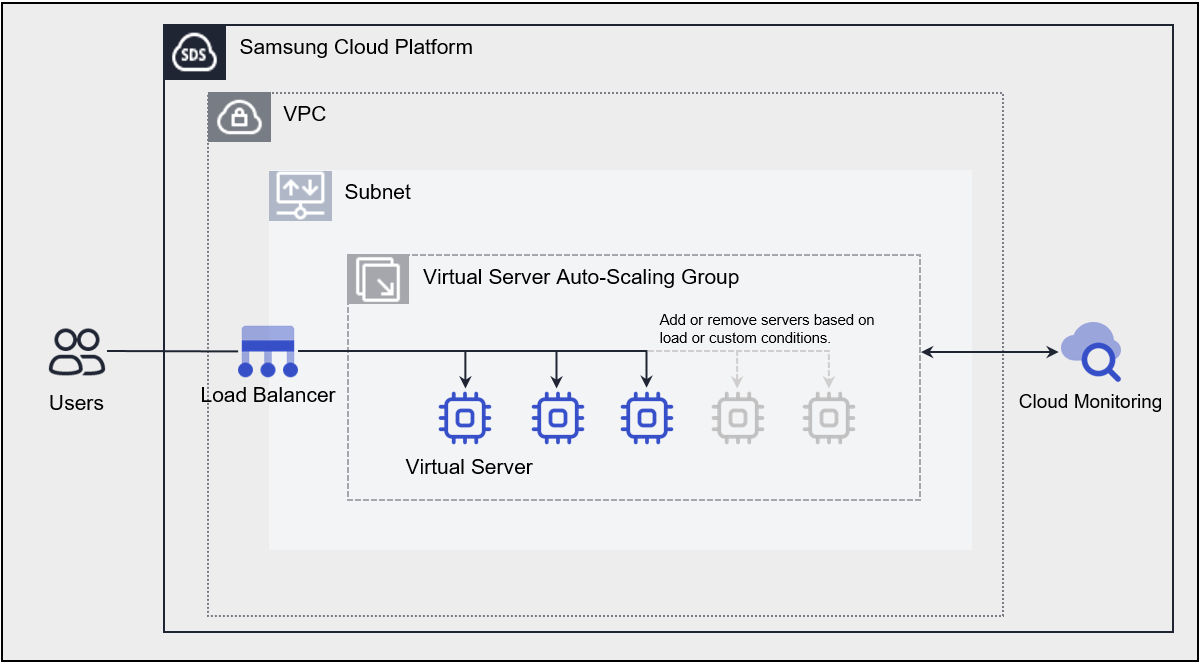
Provided Features
Virtual Server Auto-Scaling provides the following features.
- Launch Configuration: It is a configuration template used to create a Virtual Server in an Auto-Scaling Group. When creating a Launch Configuration, you set information about the Virtual Server such as image, server type, key pair, block storage, etc.
- Server Count Adjustment: Provides several ways to adjust the number of servers. Using policies, you can add a Virtual Server when the load exceeds a threshold and release the Virtual Server when demand is low, maintaining application availability and reducing costs. You can add and release Virtual Servers according to a schedule, and you can also manually adjust the number of servers in an Auto-Scaling Group as needed.
- Load Balancer integration: You can use a Load Balancer to evenly distribute application traffic to Virtual Server. Whenever a Virtual Server is added or removed, it is automatically registered and deregistered with the Load Balancer.
- Network Connection: You can connect the general subnet of the Auto-Scaling Group, automatic IP allocation, and a Public NAT IP. It provides a local subnet connection for inter-server communication.
- Security Group applied: Security Group is a virtual logical firewall that controls inbound/outbound traffic generated on a Virtual Server. Inbound rules control incoming traffic to the Virtual Server, and Outbound rules control outgoing traffic from the Virtual Server.
- Monitoring: You can view monitoring information such as CPU, Memory, Disk of Virtual Servers created in the Auto-Scaling Group through the Cloud Monitoring service. Based on the monitoring information, you can use Auto-Scaling policies to set thresholds for load, and when the threshold is exceeded, you can add or remove servers.
Components
Virtual Server Auto-Scaling creates an Auto-Scaling Group through Launch Configuration and checks and manages the server.
Launch Configuration
This is a Configuration template used to create a Virtual Server in an Auto-Scaling Group. The main features are as follows.
- Image: Provides OS standard images and user-created custom images. Users can select and use them according to the service they want to configure.
- Keypair: Provides the Keypair method for a secure OS access method.
- Init script: The user can define a script to be executed when the Virtual Server starts.
- For more details, please refer to Launch Configuration Creating.
Auto-Scaling Group
Use Launch Configuration as a pre-configuration template for server creation. You can create an Auto-Scaling Group to adjust and manage the number of servers. The main features are as follows.
- Launch Configuration: It is a configuration template used to create a Virtual Server in an Auto-Scaling Group.
- Server Count Settings: Virtual Server Auto-Scaling provides several ways to adjust the number of servers in an Auto-Scaling Group.
- Fixed Server Count Method: When creating an Auto-Scaling Group, this method keeps the default settings by maintaining the configured number of servers without any added schedules or policies. Refer to Create Auto-Scaling Group and set the Min, Desired, Max server counts.
- Manual Server Count Adjustment Method: In an Auto-Scaling Group, this method increases or decreases the number of servers by modifying the server count to the desired amount. You can choose whether to manually set the desired number of servers. Refer to Modify Server Count.
- Schedule Reservation Method: You can schedule daily, weekly, monthly, or one-time, and set the desired number of servers at a specified time. This is useful when you can predict when to reduce or increase the number of servers. If you use the schedule method, refer to Manage Schedule to add and manage schedules.
- Policy Method: You can use a policy as a way to dynamically adjust servers. When the set threshold based on monitoring metrics is exceeded, it adjusts the number of servers. At this time, you can choose one of three ways to adjust the server count. Increase or decrease the number of servers by a specified number, increase or decrease by a specified ratio, or fix the number of servers to an entered value. When servers start and terminate due to the policy, the monitoring metric CPU usage may temporarily exceed the threshold registered in the policy. However, because this is a temporary moment, a cooldown period is set to avoid judging it as an abnormal situation. If you want to use the policy method, refer to Manage Policies.
- Load Balancer: Whenever a Virtual Server is added or terminated, it automatically connects to and disconnects from the Load Balancer registered in the Auto-Scaling Group.
- Auto-Scaling Group’s Load Balancer related detailed information, please refer to Check Auto-Scaling Group detailed information.
Constraints
The constraints of Virtual Server Auto-Scaling are as follows.
| Category | Description |
|---|---|
| Number of Virtual Servers per Auto-Scaling Group | 50 or less |
| Number of policies per Auto-Scaling Group | 12 or fewer |
| Number of schedules per Auto-Scaling Group | 20 or fewer |
| Number of LB server groups and ports per Auto-Scaling Group | 3 or less |
- If the Image you are using is a discontinued standard Image, Scale-out will not work.
If the Image you are using is a Custom Image, Scale out will continue to work properly even after the version is no longer provided. - Before the end of support for the Image you are using, we recommend replacing the Launch Configuration with the latest version of the Image or a Custom Image.
- For detailed information about the OS Image provided by Virtual Server, see OS Image Provided Versions.
Preliminary Service
This is a list of services that must be pre-configured before creating the service. Please refer to the guide provided for each service for details and prepare in advance.
| Service Category | Service | Detailed Description |
|---|---|---|
| Networking | VPC | A service that provides an independent virtual network in a cloud environment |
| Networking | Security Group | Virtual firewall that controls server traffic |