Service Overview
Queue Service efficiently manages and delivers messages or tasks, supporting message transmission between systems.
This service facilitates the data flow between a Producer that generates messages and a Consumer that receives them, and provides a FIFO (First-In-First-Out) feature that guarantees message order. By doing so, it distributes system load caused by messages, enabling efficient message management in microservice architectures or event-driven systems.
Features
- Efficient Message Processing : Allows efficient handling and management of large volumes of messages sent and received simultaneously, enabling the user system’s message processing tasks to be performed efficiently.
- Fast Service Processing : Producer and Consumer operate independently, allowing improved responsiveness and processing speed.
- Message Order Guarantee : Ensures the order of received messages to maintain data consistency.
- Strong security and reliability : It protects sensitive information by encrypting messages during transmission and storage, and provides reliable message management.
Service Architecture Diagram
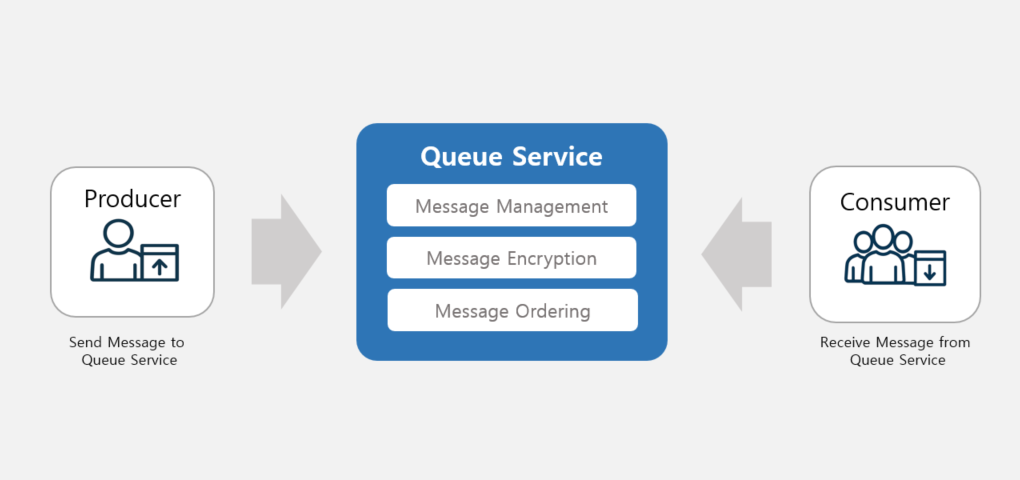
Provided features
The Queue Service provides the following features.
- Queue creation: Depending on the message reception handling method, create a basic or FIFO type Queue that guarantees message order.
- When using the FIFO type, the Queue Service orders messages in the order they were received.
- Message Transmission: Producer sends the message intended for Consumer to the Queue.
- Message Reception: Consumer receives the Producer’s message from the Queue.
- Message Management: Check and manage messages stored in the Queue.
- Message Encryption: Encrypt messages within the Queue by integrating with the KMS service.
- We support blocking message exposure through message encryption settings.
- ServiceWatch service integration provided: You can monitor data through the ServiceWatch service.
Component
Producer
Create and send messages using the Queue Service.
Consumer
Receive and process messages from the Queue Service.
Message Manager
You can view the loaded messages in the Queue Service and manage them, such as deleting them.
Provision status by region
The Queue Service is available in the following environments.
| region | Provision status |
|---|---|
| Korea West 1 (kr-west1) | Provide |
| Korea East 1 (kr-east1) | Provide |
| South Korea South 1 (kr-south1) | Not provided |
| South Korea South 2 (kr-south2) | Not provided |
| South Korea 3 (kr-south3) | Not provided |
Preliminary Service
The Queue Service has no preceding service.