Overview
Service Overview
API Gateway is a service that easily creates, manages, and monitors APIs. Define API-related resources and methods in a consistent format, and apply built-in secure access. Additionally, you can easily and conveniently monitor API usage status and performance metrics.
Features
- Convenient API Management: You can conveniently register and manage APIs through the console, and it provides JWT (Json Web Token) for access permission management. * Additionally, it can invoke Cloud Functions through API Gateway when integrated with SCP Cloud Functions.
- Stable traffic handling: API Gateway can manage backend system traffic through usage plans. * Usage plans allow you to set the maximum number of calls per hour (hour/day/month), and this helps prevent excessive traffic from entering, enabling stable service usage.
- Easy and convenient monitoring: Provides a dashboard that lets you track API usage and includes various management features such as API version management that links different deployment versions per stage. * This allows you to quickly and easily identify performance metrics for API calls, response times, and error occurrences.
Service diagram
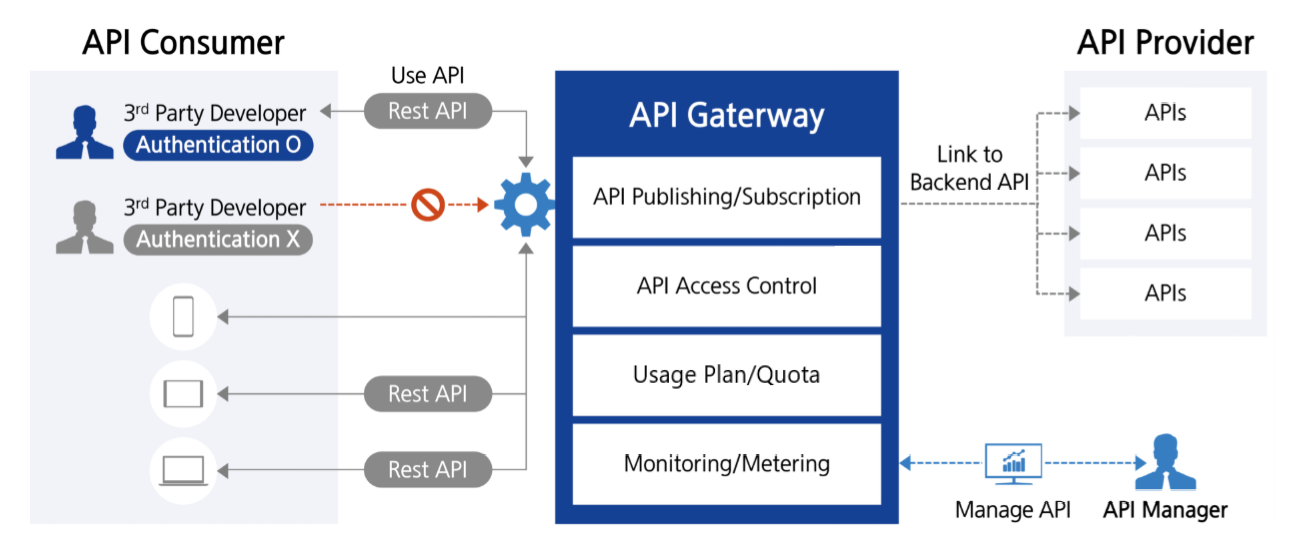
- A developer (3rd party Developer) can access various backend services via a single endpoint (API Gateway) using Rest API.
- API Gateway can route the request to the appropriate backend service or Cloud Function.
- When authentication and authorization are required, the user is verified with JWT.
- Request data may be transformed as needed, and responses from multiple services are aggregated into a single response via the API Gateway.
- When traffic is high, you can improve service stability by applying load balancing and rate limiting.
- Supports web clients in calling APIs from other domains via CORS configuration.
- All requests and responses are logged and monitored by the API Gateway service, enabling rapid detection of failures and anomalies.
- You can separate stages by environment—development, testing, and production—to manage API versions and use the required version. * API management, security policy enforcement, and other tasks can be handled consistently from a central point through the API Gateway service.
Provided Features
API Gateway provides the following features.
API Management and Operations
- Custom domain name: Connect a custom domain to the API to provide a unique URL for the user
- REST API Creation and Management: Define resources and methods (GET, POST, etc.) and configure authentication.
- API Version and Stage Management: Operate the same API in multiple versions simultaneously and manage changes
- Routing: Directing requests to various backend services based on URI path or request header.
- Monitoring and Logging: API performance monitoring and log recording possible (available December 2025)
API security
- IP ACL Settings: Control access so that only specific IPs can connect, enhancing security.
- Cloud Functions Integration: Execute business logic by integrating with serverless computing in response to external requests
- CORS Support: Configure Cross-Origin Resource Sharing (CORS) to allow access to resources from other domains
Component
API
An API is a collection of resources and methods integrated with backend HTTP endpoints, Cloud Functions, or other SCP services. The API provides a logical interface to the actual service and can be deployed across multiple stages for use in various environments (development, production, etc.).
Resource
Resources are logical units that represent specific endpoints (URI paths) within an API. Each resource can be organized in a tree structure and can have multiple HTTP methods. For example,
/users
,
/orders
become individual resources.
Method
Methods define the HTTP actions (e.g., GET, POST, PUT, DELETE, etc.) that can be performed on each resource. Each method integrates with a specific backend to process real data or execute functionality.
Stage
A stage is a named reference to a specific point in time (snapshot) of an API deployment, distinguishing environments in the API lifecycle such as development (dev), testing (test), and production (prod). Each stage has its own URL, and you can configure separate settings per environment such as caching, logging, throttling, stage variables, and more. Stages support various operational scenarios, including environment-specific configurations and traffic segregation.
Endpoint
An endpoint is the unique URL address that a client uses to access an API. A separate endpoint is created for each stage.
Integration
Integration defines how the API method connects to the actual backend (HTTP endpoint, Function). You can finely control integration with the backend through request and response data transformation, authentication, mapping templates, and similar mechanisms.
JWT (Json Web Token)
It is a token-based web standard (RFC 7519) used for authentication and authorization. JWT consists of three parts (Header, Payload, Signature) as a JSON object encoded in Base64 URL‑safe format, and it uses a secret key or public key to digitally sign, preventing tampering. When securely exchanging authentication information and permissions between a server and client, or between services, it is used by placing them in HTTP headers, allowing stateless (Stateless) authentication without session storage.
CORS (Cross-Origin Resource Sharing)
It is a mechanism that bypasses the Same-Origin Policy applied in web browsers for security reasons, allowing resource sharing between servers of different origins (when the protocol, domain, or port differs). The server specifies which origins are allowed via HTTP response headers (e.g., Access-Control-Allow-Origin, etc.), enabling the client (browser) to safely perform cross-origin requests. If CORS is not properly configured, the browser blocks requests for resources from other origins, which is a web-standard security policy that must be considered when using various resources such as external API calls, fonts, images, and videos.
Provision status by region
API Gateway is available in the environments below.
| Region | Provision status |
|---|---|
| Korea West 1 (kr-west1) | Provide |
| Korea East1(kr-east1) | Provide |
| South Korea 1 (kr-south1) | Not provided |
| South Korea South 2 (kr-south2) | Not provided |
| South Korea South 3 (kr-south3) | Not provided |
Preceding Service
This is a list of services that can be optionally configured before creating the service. Please refer to the guide provided for each service and prepare in advance.
| Service Category | Service | Detailed description |
|---|---|---|
| Compute | Cloud Functions | A service that runs application code in a serverless computing environment
|