This is the multi-page printable view of this section. Click here to print.

Return to the regular view of this page.

Overview

Service Overview

Vertica(DBaaS) is a high-availability enterprise database built on a Data Warehouse for large-scale data analysis and processing. Through a single engine, it serves as a data analytics platform that can perform basic analyses such as querying data from various sources without moving them, as well as AI analyses like machine learning. In the Samsung Cloud Platform, DB management functions such as high‑availability configuration, backup/recovery, patching, parameter management, and monitoring are added to ensure stable management of single instances or critical data, enabling automation of tasks throughout the database lifecycle. Additionally, it provides an automatic backup feature at user‑specified times to support data recovery at the desired point in case of DB server or data issues.

Service Architecture Diagram
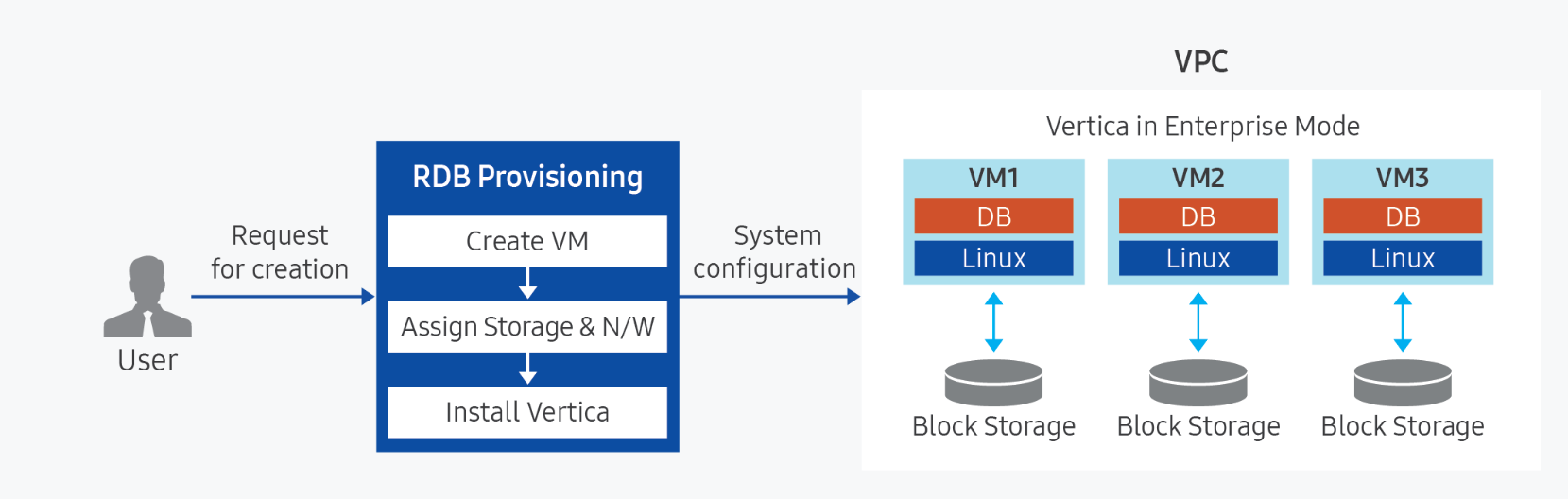
Diagram
Figure. Vertica diagram

Provided features

Vertica(DBaaS) provides the following features.

  • Auto Provisioning (Auto Provisioning): Automatically installs the standard version of the Samsung Cloud Platform database based on Virtual Servers of various specifications.
  • Cluster Configuration: Provides a self-high-availability architecture in a masterless form.
  • Operation Control Management: Provides functionality to control the status of running servers. You can start or stop a server, and it can be restarted if there is a database issue or to apply configuration changes.
  • Backup and Recovery: Provides data backup functionality based on proprietary backup commands. Users can set the backup retention period and start time, and additional fees apply based on backup size. It also offers a recovery feature for backed‑up data; when a user initiates recovery, a separate database is created and restored to the point selected by the user (backup creation time or a custom point). For database recovery, you can choose to install the Management Console for use.
  • Service Status Query: You can view the final status of the current DB service.
  • Monitoring: CPU, memory, DB performance monitoring information can be accessed through the Cloud Monitoring service.
  • High-Performance Processing of Large-Scale Data: It guarantees stable performance in a Mixed Workload environment of massive parallel processing (MPP, Massively Parallel Processing) and SQL queries. Vertica processes queries through distributed processing and is designed so that queries can be initiated from any node, eliminating a Single Point of Failure where queries would not execute if a specific node fails.

Component

Vertica(DBaaS) provides pre‑validated engine versions and various server types. Users can select and use them according to the scale of the service they wish to configure.

Engine version

The engine versions supported by Vertica (DBaaS) are as follows.

Technical support can be used until the supplier’s EoTS (End of Technical Service) date, and the EOS date when new creation is halted is set to six months before the EoTS date.

The EOS and EoTS dates may change according to the supplier’s policy, so please refer to the supplier’s license management policy page for details.

Provided versionEOS date (Samsung Cloud Platform new creation stop date)EoTS date (supplier technical support end date)
24.2.0-22026-09 (planned)2027-04-30
Table. Vertica (DBaaS) service engine version

Server type

The server types supported by Vertica (DBaaS) are as follows.

For detailed information about the server types provided by Vertica (DBaaS), see Vertica Server Types.

CategoryexampleDetailed description
Server typeStandardProvided server types
  • Standard: Standard configuration (vCPU, Memory) commonly used
  • High Capacity: Large server specifications with 24 vCores or more
Server specificationsDb1Provided server specifications
  • db1: Standard specifications (vCPU, Memory) commonly used
  • dbh2: Large-capacity server specifications
    • Provides servers with 24 vCores or more
Server specificationsV2Number of vCores
  • v2: 2 virtual cores
Server specificationsM4Memory capacity
  • m4: 4GB Memory
Table. Vertica (DBaaS) server type components

Preliminary Service

This is a list of services that must be pre-configured before creating the service. Please refer to the guide provided for each service and prepare in advance.

Service CategoryserviceDetailed description
NetworkingVPCA service that provides an isolated virtual network in a cloud environment
Table. Vertica (DBaaS) Preliminary Service

1 - Server type

Vertica(DBaaS) server type

Vertica (DBaaS) provides server types composed of various combinations of CPU, memory, and network bandwidth. When creating Vertica(DBaaS), the Database Engine is installed based on the server type chosen for the intended use.

Reference
The server types available may vary depending on the region and AZ.

The server types supported by Vertica (DBaaS) are as follows.

Standard db1v2m4
Category
ExampleDetailed description
Server typeStandardProvided server type categories
  • Standard: Configured with the commonly used standard specifications (vCPU, Memory)
  • High Capacity: Large-capacity server specifications exceeding Standard
Server specificationsdb1Provided server type classification and generation
  • db: means standard specification, and 1 indicates the generation
  • dbh: h indicates large-capacity server specification, and 2 indicates the generation
서버 사양v2Number of vCores
  • v2: 2 virtual cores
Server specificationsm4Memory capacity
  • m4: 4GB Memory
Table. Vertica(DBaaS) server type format

db1 server type

The db1 server type of Vertica (DBaaS) is offered with standard specifications (vCPU, Memory) and is suitable for various database workloads.

  • Intel 3rd Generation (Ice Lake) Xeon Gold 6342 Processor up to 3.3 GHz
  • Supports up to 16 vCPUs and 256 GB of memory
  • Maximum networking speed of 12.5 Gbps
CategoryServer typevCPUMemoryNetwork Bandwidth
Standarddb1v1m21 vCore2 GBUp to 10 Gbps
Standarddb1v2m42 vCore4 GBUp to 10 Gbps
Standarddb1v2m82 vCore8 GBUp to 10 Gbps
Standarddb1v2m162 vCore16 GBUp to 10 Gbps
Standarddb1v2m242 vCore24 GBUp to 10 Gbps
Standarddb1v2m322 vCore32 GBUp to 10 Gbps
Standarddb1v4m84 vCore8 GBUp to 10 Gbps
Standarddb1v4m164 vCore16 GBUp to 10 Gbps
Standarddb1v4m324 vCore32 GBUp to 10 Gbps
Standarddb1v4m484 vCore48 GBUp to 10 Gbps
Standarddb1v4m644 vCore64 GBUp to 10 Gbps
Standarddb1v6m126 vCore12 GBUp to 10 Gbps
Standarddb1v6m246 vCore24 GBMaximum 10 Gbps
Standarddb1v6m486 vCore48 GBUp to 10 Gbps
Standarddb1v6m726 vCore72 GBUp to 10 Gbps
Standarddb1v6m966 vCore96 GBUp to 10 Gbps
Standarddb1v8m168 vCore16 GBUp to 10 Gbps
Standarddb1v8m328 vCore32 GBUp to 10 Gbps
Standarddb1v8m648 vCore64 GBUp to 10 Gbps
Standarddb1v8m968 vCore96 GBUp to 10 Gbps
Standarddb1v8m1288 vCore128 GBUp to 10 Gbps
Standarddb1v10m2010 vCore20 GBUp to 10 Gbps
Standarddb1v10m4010 vCore40 GBUp to 10 Gbps
Standarddb1v10m8010 vCore80 GBUp to 10 Gbps
Standarddb1v10m12010 vCore120 GBUp to 10 Gbps
Standarddb1v10m16010 vCore160 GBUp to 10 Gbps
Standarddb1v12m2412 vCore24 GBUp to 12.5 Gbps
Standarddb1v12m4812 vCore48 GBUp to 12.5 Gbps
Standarddb1v12m9612 vCore96 GBUp to 12.5 Gbps
Standarddb1v12m14412 vCore144 GBUp to 12.5 Gbps
Standarddb1v12m19212 vCore192 GBMaximum 12.5 Gbps
Standarddb1v14m2814 vCore28 GBUp to 12.5 Gbps
Standarddb1v14m5614 vCore56 GBUp to 12.5 Gbps
Standarddb1v14m11214 vCore112 GBUp to 12.5 Gbps
Standarddb1v14m16814 vCore168 GBUp to 12.5 Gbps
Standarddb1v14m22414 vCore224 GBUp to 12.5 Gbps
Standarddb1v16m3216 vCore32 GBUp to 12.5 Gbps
Standarddb1v16m6416 vCore64 GBUp to 12.5 Gbps
Standarddb1v16m12816 vCore128 GBUp to 12.5 Gbps
Standarddb1v16m19216 vCore192 GBUp to 12.5 Gbps
Standarddb1v16m25616 vCore256 GBUp to 12.5 Gbps
Table. Vertica(DBaaS) server type specifications - db1 server type

db2 server type

Vertica(DBaaS) provides the db2 server type with standard specifications (vCPU, Memory) and is suitable for various database workloads.

  • Intel 4th‑generation (Sapphire Rapids) Xeon Gold 6448H Processor up to 3.2 GHz
  • Supports up to 16 vCPUs and 256 GB of memory
  • Maximum networking speed of 12.5 Gbps
CategoryServer typevCPUMemoryNetwork Bandwidth
Standarddb2v1m21 vCore2 GBMaximum 10 Gbps
Standarddb2v2m42 vCore4 GBUp to 10 Gbps
Standarddb2v2m82 vCore8 GBUp to 10 Gbps
Standarddb2v2m162 vCore16 GBUp to 10 Gbps
Standarddb2v2m242 vCore24 GBUp to 10 Gbps
Standarddb2v32m322 vCore32 GBMaximum 10 Gbps
Standarddb2v4m84 vCore8 GBUp to 10 Gbps
Standarddb2v4m164 vCore16 GBUp to 10 Gbps
Standarddb2v4m324 vCore32 GBUp to 10 Gbps
Standarddb2v4m484 vCore48 GBUp to 10 Gbps
Standarddb2v4m644 vCore64 GBUp to 10 Gbps
Standarddb2v6m126 vCore12 GBUp to 10 Gbps
Standarddb2v6m246 vCore24 GBUp to 10 Gbps
Standarddb2v6m486 vCore48 GBUp to 10 Gbps
Standarddb2v6m726 vCore72 GBUp to 10 Gbps
Standarddb2v6m966 vCore96 GBUp to 10 Gbps
Standarddb2v8m168 vCore16 GBUp to 10 Gbps
Standarddb2v8m328 vCore32 GBUp to 10 Gbps
Standarddb2v8m648 vCore64 GBUp to 10 Gbps
Standarddb2v8m968 vCore96 GBUp to 10 Gbps
Standarddb2v8m1288 vCore128 GBUp to 10 Gbps
Standarddb2v10m2010 vCore20 GBUp to 10 Gbps
Standarddb2v10m4010 vCore40 GBUp to 10 Gbps
Standarddb2v10m8010 vCore80 GBUp to 10 Gbps
Standarddb2v10m12010 vCore120 GBUp to 10 Gbps
Standarddb2v10m16010 vCore160 GBUp to 10 Gbps
Standarddb2v12m2412 vCore24 GBUp to 12.5 Gbps
Standarddb2v12m4812 vCore48 GBUp to 12.5 Gbps
Standarddb2v12m9612 vCore96 GBUp to 12.5 Gbps
Standarddb2v12m14412 vCore144 GBUp to 12.5 Gbps
Standarddb2v12m19212 vCore192 GBUp to 12.5 Gbps
Standarddb2v14m2814 vCore28 GBUp to 12.5 Gbps
Standarddb2v14m5614 vCore56 GBUp to 12.5 Gbps
Standarddb2v14m11214 vCore112 GBUp to 12.5 Gbps
Standarddb2v14m16814 vCore168 GBUp to 12.5 Gbps
Standarddb2v14m22414 vCore224 GBUp to 12.5 Gbps
Standarddb2v16m3216 vCore32 GBUp to 12.5 Gbps
Standarddb2v16m6416 vCore64 GBUp to 12.5 Gbps
Standarddb2v16m12816 vCore128 GBUp to 12.5 Gbps
Standarddb2v16m19216 vCore192 GBUp to 12.5 Gbps
Standarddb2v16m25616 vCore256 GBUp to 12.5 Gbps
Table. Vertica (DBaaS) server type specifications - db2 server type

dbh2 server type

The dbh2 server type of Vertica (DBaaS) is provided with high-capacity server specifications and is suitable for database workloads that require large-scale data processing.

  • Intel 4th‑generation (Sapphire Rapids) Xeon Gold 6448H Processor up to 3.2 GHz
  • Supports up to 128 vCPUs and 1,536 GB of memory
  • Maximum networking speed of 25 Gbps
Server typevCPUMemoryNetwork Bandwidth
High Capacitydbh2v24m4824 vCore48 GBMaximum 25 Gbps
High Capacitydbh2v24m9624 vCore96 GBMaximum 25 Gbps
High Capacitydbh2v24m19224 vCore192 GBMaximum 25 Gbps
High Capacitydbh2v24m28824 vCore288 GBMaximum 25 Gbps
High Capacitydbh2v32m6432 vCore64 GBMaximum 25 Gbps
High Capacitydbh2v32m12832 vCore128 GBMaximum 25 Gbps
High Capacitydbh2v32m25632 vCore256 GBMaximum 25 Gbps
High Capacitydbh2v32m38432 vCore384 GBMaximum 25 Gbps
High Capacitydbh2v48m19248 vCore192 GBMaximum 25 Gbps
High Capacitydbh2v48m57648 vCore576 GBMaximum 25 Gbps
High Capacitydbh2v64m25664 vCore256 GBMaximum 25 Gbps
High Capacitydbh2v64m76864 vCore768 GBMaximum 25 Gbps
High Capacitydbh2v72m28872 vCore288 GBMaximum 25 Gbps
High Capacitydbh2v72m86472 vCore864 GBMaximum 25 Gbps
High Capacitydbh2v96m38496 vCore384 GBMaximum 25 Gbps
High Capacitydbh2v96m115296 vCore1152 GBMaximum 25 Gbps
High Capacitydbh2v128m512128 vCore512 GBMaximum 25 Gbps
High Capacitydbh2v128m1536128 vCore1536 GBMaximum 25 Gbps
Table. Vertica(DBaaS) server type specifications - dbh2 server type

db3 server type

The db3 server type of Vertica (DBaaS) is offered with standard specifications (vCPU, Memory) and is suitable for various database workloads.

  • Intel 6th‑generation (Granite Rapids) Xeon 6737P Processor up to 4.0 GHz
  • Supports up to 16 vCPUs and 256 GB of memory
  • Maximum networking speed of 12.5 Gbps
Server typevCPUMemoryNetwork Bandwidth
Standarddb3v2m42 vCore4 GBUp to 10 Gbps
Standarddb3v2m82 vCore8 GBUp to 10 Gbps
Standarddb3v2m162 vCore16 GBUp to 10 Gbps
Standarddb3v242 vCore24 GBUp to 10 Gbps
Standarddb3v2m322 vCore32 GBUp to 10 Gbps
Standarddb3v4m84 vCore8 GBUp to 10 Gbps
Standarddb3v4m164 vCore16 GBUp to 10 Gbps
Standarddb3v4m324 vCore32 GBUp to 10 Gbps
Standarddb3v4m484 vCore48 GBUp to 10 Gbps
Standarddb3v4m644 vCore64 GBUp to 10 Gbps
Standarddb3v6m126 vCore12 GBUp to 10 Gbps
Standarddb3v6m246 vCore24 GBUp to 10 Gbps
Standarddb3v6m486 vCore48 GBUp to 10 Gbps
Standarddb3v6m726 vCore72 GBUp to 10 Gbps
Standarddb3v6m966 vCore96 GBUp to 10 Gbps
Standarddb3v8m168 vCore16 GBUp to 10 Gbps
Standarddb3v8m328 vCore32 GBUp to 10 Gbps
Standarddb3v8m648 vCore64 GBUp to 10 Gbps
Standarddb3v8m968 vCore96 GBMaximum 10 Gbps
Standarddb3v8m1288 vCore128 GBUp to 10 Gbps
Standarddb3v10m2010 vCore20 GBMaximum 10 Gbps
Standarddb3v10m4010 vCore40 GBUp to 10 Gbps
Standarddb3v10m8010 vCore80 GBUp to 10 Gbps
Standarddb3v10m12010 vCore120 GBUp to 10 Gbps
Standarddb3v10m16010 vCore160 GBUp to 10 Gbps
Standarddb3v12m2412 vCore24 GBUp to 12.5 Gbps
Standarddb3v12m4812 vCore48 GBUp to 12.5 Gbps
Standarddb3v12m9612 vCore96 GBUp to 12.5 Gbps
Standarddb3v12m14412 vCore144 GBUp to 12.5 Gbps
Standarddb3v12m19212 vCore192 GBUp to 12.5 Gbps
Standarddb3v14m2814 vCore28 GBUp to 12.5 Gbps
Standarddb3v14m5614 vCore56 GBUp to 12.5 Gbps
Standarddb3v14m11214 vCore112 GBUp to 12.5 Gbps
Standarddb3v14m16814 vCore168 GBUp to 12.5 Gbps
Standarddb3v14m22414 vCore224 GBUp to 12.5 Gbps
Standarddb3v16m3216 vCore32 GBUp to 12.5 Gbps
Standarddb3v16m6416 vCore64 GBUp to 12.5 Gbps
Standarddb3v16m12816 vCore128 GBUp to 12.5 Gbps
Standarddb3v16m19216 vCore192 GBUp to 12.5 Gbps
Standarddb3v16m25616 vCore256 GBUp to 12.5 Gbps
Table. Vertica(DBaaS) server type specifications - db3 server type

dbh3 server type

The dbh3 server type of Vertica (DBaaS) is provided with high-capacity server specifications and is suitable for database workloads that require large-scale data processing.

  • Intel 6th‑generation (Granite Rapids) Xeon 6738P Processor up to 4.1 GHz
  • Supports up to 96 vCPUs and 1,152 GB of memory
  • Maximum networking speed of 25 Gbps
CategoryServer typevCPUMemoryNetwork Bandwidth
High Capacitydbh3v24m4824 vCore48 GBMaximum 25 Gbps
High Capacitydbh3v24m9624 vCore96 GBMaximum 25 Gbps
High Capacitydbh3v24m19224 vCore192 GBMaximum 25 Gbps
High Capacitydbh3v24m28824 vCore288 GBMaximum 25 Gbps
High Capacitydbh3v32m6432 vCore64 GBMaximum 25 Gbps
High Capacitydbh3v32m12832 vCore128 GBMaximum 25 Gbps
High Capacitydbh3v32m25632 vCore256 GBMaximum 25 Gbps
High Capacitydbh3v32m38432 vCore384 GBMaximum 25 Gbps
High Capacitydbh3v48m19248 vCore192 GBMaximum 25 Gbps
High Capacitydbh3v48m57648 vCore576 GBMaximum 25 Gbps
High Capacitydbh3v64m25664 vCore256 GBMaximum 25 Gbps
High Capacitydbh3v64m76864 vCore768 GBMaximum 25 Gbps
High Capacitydbh3v72m28872 vCore288 GBMaximum 25 Gbps
High Capacitydbh3v72m86472 vCore864 GBMaximum 25 Gbps
High Capacitydbh3v96m38496 vCore384 GBMaximum 25 Gbps
High Capacitydbh3v96m115296 vCore1152 GBMaximum 25 Gbps
Table. Vertica (DBaaS) server type specifications - dbh3 server type

2 - Monitoring metrics

Cloud Monitoring Service Termination Notice

According to Samsung Cloud Platform’s policy, the Cloud Monitoring service is scheduled to be terminated.

Accordingly, services whose monitoring metrics are linked in Cloud Monitoring will no longer be able to monitor resources through Cloud Monitoring after the service improvement work in November 2026.
After that, resource monitoring can be continuously performed through the ServiceWatch service released in October 2025.

To ensure smooth service usage, proceed with the migration work according to the service termination schedule below.

  1. Guide to Applying Monitoring Services by Resource

    • New Resources: Resources created after the service improvement work in July 2026 are monitored by default using the ServiceWatch service.
    • Existing resources: After the service improvement work in September 2026 We provide concurrent monitoring through Cloud Monitoring and ServiceWatch services.
    • During the parallel operation period, we must prepare for the Servicewatch transition. *
      Performance and log data backup, user-configured settings integrated with existing Cloud Monitoring (e. You must verify items such as event policies and perform tasks such as resetting the ServiceWatch service, then complete them.
  2. Notice of the phased termination schedule for the Cloud Monitoring service

    • Console menu termination (September 2026 service improvement work)
      • You cannot access the Cloud Monitoring Console through the Console menu; you can only connect via the separate URLs for each region listed below.
  • Service termination (service improvement work in November 2026)
    • All services of Cloud Monitoring, including the API, will be permanently discontinued.
      • After the service ends in November, Cloud Monitoring data cannot be accessed. * Be sure to complete the ServiceWatch migration work within the parallel operation period**.

Detailed information about ServiceWatch can be found in the ServiceWatch 개요.

Vertica(DBaaS) Monitoring Metrics

The table below shows the performance monitoring metrics for Vertica (DBaaS) that can be viewed through Cloud Monitoring. For detailed Cloud Monitoring usage, see the Cloud Monitoring guide.

The server monitoring metrics for Vertica (DBaaS) are described in the Virtual Server Monitoring Metrics guide.

Performance itemsDetailed descriptionunit
Active LocksNumber of Active Lockscnt
Active SessionsTotal number of Sessions in Active statecnt
Instance StatusNode alive statusstatus
Tablespace UsedTablespace usagebytes
Table. Vertica (DBaaS) Monitoring Metrics

3 - ServiceWatch metric

Vertica sends metrics to ServiceWatch. The metrics provided by basic monitoring are data collected at 1‑minute intervals.

Reference
For how to view metrics in ServiceWatch, refer to the ServiceWatch guide.

Basic Metrics

The following are the basic metrics for the Vertica(DBaaS) namespace.

The indicators whose names are shown in bold below are the key indicators selected from the basic indicators provided by Vertica(DBaaS). The key metrics are used to build service dashboards that are automatically created for each service in ServiceWatch.

Each metric provides guidance in the user guide on which statistical values are meaningful when viewing that metric, and among the meaningful statistics, the values shown in bold are the primary statistics. In the service dashboard, you can view key metrics through primary statistical values.

OS Basic Metrics

Classification
Performance itemsunitDetailed descriptionmeaningful statistics
CPUCPU UsagePercentCPU usage
  • Total
  • Average
  • Maximum
  • Minimum
DiskDisk UsagePercentDisk usage
  • Total
  • Average
  • Maximum
  • Minimum
DiskDisk Write BytesBytes/SecondWrite capacity (bytes/second) of block device
  • Total
  • Average
  • Maximum
  • Minimum
DiskDisk Read BytesBytes/SecondRead throughput (bytes/second) from block device
  • Total
  • Average
  • Maximum
  • Minimum
DiskDisk Write RequestsCount/SecondNumber of write requests on block device (requests per second)
  • Total
  • Average
  • Maximum
  • Minimum
DiskDisk Read RequestsCount/SecondNumber of read requests on block device (requests per second)
  • Total
  • Average
  • Maximum
  • Minimum
DiskAverage Disk I/O Queue SizeNoneAverage queue length of requests issued to the block device
  • Total
  • Average
  • Maximum
  • Minimum
DiskDisk I/O UtilizationPercentThe proportion of time the block device actually spent processing I/O operations.
  • Total
  • Average
  • Maximum
  • Minimum
MemoryMemory UsagePercentMemory usage
  • Total
  • Average
  • Maximum
  • Minimum
MemorySwap Out BytesBytes/SecondAmount of data transferred from memory to swap area (bytes/second)
  • Total
  • Average
  • Maximum
  • Minimum
MemorySwap Used BytesBytesSize of the currently used swap space
  • Total
  • Average
  • Maximum
  • Minimum
MemorySwap Cached UsagePercentCached swap usage rate
  • Total
  • Average
  • Maximum
  • Minimum
MemorySwap Total BytesBytesTotal swap space size configured on the system
  • Total
  • Average
  • Maximum
  • Minimum
MemorySwap In BytesBytes/SecondAmount read from swap area into memory (bytes/second)
  • Total
  • Average
  • Maximum
  • Minimum
MemorySwap UsagePercentCurrent usage ratio relative to total swap space
  • Total
  • Average
  • Maximum
  • Minimum
MemorySwap Cached BytesBytesSize of pages that have been restored to memory but still have a copy in the swap area
  • Total
  • Average
  • Maximum
  • Minimum
MemorySwap Free BytesBytesSize of swap space that remains unused
  • Total
  • Average
  • Maximum
  • Minimum
NetworkNetwork In BytesBytes/SecondReceived capacity (bytes/second) on the network interface
  • Total
  • Average
  • Maximum
  • Minimum
NetworkNetwork Out BytesBytes/SecondTransmitted capacity (bytes/second) on the network interface
  • Total
  • Average
  • Maximum
  • Minimum
NetworkTCP ConnectionsCount/SecondTotal number of TCP connections currently established correctly
  • Total
  • Average
  • Maximum
  • Minimum
NetworkNetwork In PacketsCountNumber of packets received on the network interface
  • Total
  • Average
  • Maximum
  • Minimum
NetworkNetwork Out PacketsCountNumber of packets transmitted on the network interface
  • Total
  • Average
  • Maximum
  • Minimum
NetworkNetwork In DroppedCountNumber of packet drops received on the network interface
  • Total
  • Average
  • Maximum
  • Minimum
NetworkNetwork Out DroppedCountNumber of packet drops transmitted from the network interface
  • Total
  • Average
  • Maximum
  • Minimum
NetworkNetwork In ErrorsCountNumber of packet errors received on the network interface
  • Total
  • Average
  • Maximum
  • Minimum
NetworkNetwork Out ErrorsCountNumber of packet errors transmitted from the network interface
  • Total
  • Average
  • Maximum
  • Minimum
OSOS UptimeSecondsTime elapsed (seconds) since the system was last booted
  • Total
  • Average
  • Maximum
  • Minimum
Table. OS basic metrics

Vertica(DBaaS) Basic Metrics

Classification
Performance itemsunitDetailed descriptionmeaningful statistics
Locks & LatchesActive locksCountNumber of Active Locks
  • Total
  • Average
  • Maximum
  • Minimum
SessionsActive sessionsCountNumber of active sessions
  • Total
  • Average
  • Maximum
  • Minimum
StateInstance stateNoneDB operational status
  • up: 1
  • down: 0
  • Total
  • Average
  • Maximum
  • Minimum
TablespaceData Tablespace UsedGigabytesData / Temp Tablespace usage
  • Total
  • Average
  • Maximum
  • Minimum
TablespaceCatalog Tablespace UsedGigabytesCatalog Tablespace usage
  • Total
  • Average
  • Maximum
  • Minimum
Table. Vertica (DBaaS) basic metrics