Service Overview
Quick Query is an interactive query service that allows you to analyze large amounts of data quickly and easily using standard SQL. It is automatically installed on a standard Kubernetes cluster and provides easy and fast access to various data sources such as Cloud Hadoop, Object Storage, and RDB, enabling data retrieval and processing.
Key Features
- Easy and Fast Data Retrieval: After defining a schema for data stored in Object Storage, you can easily and quickly retrieve data using standard SQL. Any user who can handle SQL can easily analyze large datasets without being a professional analyst.
- Rapid Parallel Distributed Processing: Using the Trino engine, which supports parallel distributed processing, queries are automatically divided and processed in parallel on multiple nodes, allowing you to quickly retrieve query results even for large amounts of data.
- Various Service Structures: It provides a shared fixed resource mode, a shared resource expansion mode, and a personal resource expansion mode. The shared fixed resource mode supports a stable response speed for large data queries, while the shared resource expansion mode allows for more affordable use in cases of irregular usage. Additionally, the personal resource expansion mode supports each user’s independent analysis work, enabling the use of Quick Query with a structure that meets user demands.
Service Composition Diagram
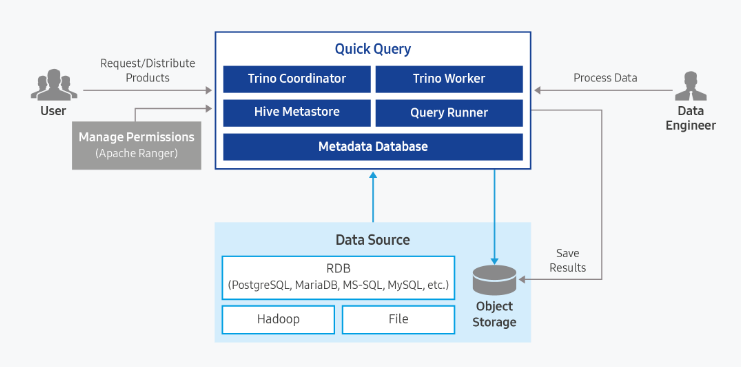
Provided Functions
Quick Query provides the following functions:
- Single Access Support for Various Data Sources (Supporting 11 Data Sources)
- Automatic Storage Function for Result Data in Object Storage
- Reuse Function for Query Results
- Access Control Function through Ranger Integration
- Data Usage Control Function
| Category | Type | Note |
|---|---|---|
| Cloud Hadoop | hive_on_cloud_hadoop iceberg_on_cloud_hadoop | Using Cloud Hadoop’s Hive Metastore |
| Object Storage | hive_on_object_storage iceberg_on_object_storage | Deploying Hive Metastore in Quick Query |
| RDB | postgresql mariadb sqlserver oracle mysql | JDBC Driver Upload required (licensed) |
| TPCDS | tpcds | Built-in Data Source provided by Quick Query |
| TPCH | tpch | Built-in Data Source provided by Quick Query |
| Type | select | insert | update | delete | create | drop | alter | analyze | call |
|---|---|---|---|---|---|---|---|---|---|
| hive_on_cloud_hadoop | O | O | O | O | O | O | O | O | O |
| iceberg_on_cloud_hadoop | O | O | O | O | O | O | O | O | O |
| hive_on_object_storage | O | O | O | O | O | O | O | O | O |
| iceberg_on_object_storage | O | O | O | O | O | O | O | O | O |
| postgresql | O | O | O | O | O | O | |||
| mariadb | O | O | O | O | O | O | |||
| sqlserver | O | O | O | O | O | O | |||
| greenplum | O | O | O | O | O | O | |||
| oracle | O | O | O | O | O | O | |||
| mysql | O | O | O | O | O | O | |||
| tpcds | O | ||||||||
| tpch | O |
Components
Query Engine Type: Shared
The query engine is a structure that is shared by multiple users when one is running.
Fixed Resource Mode (No Auto Scaling): When Auto Scaling is not used, the query engine runs with fixed resources according to the user’s selection. Since the query engine always runs with the same resources, it can guarantee consistent query performance.
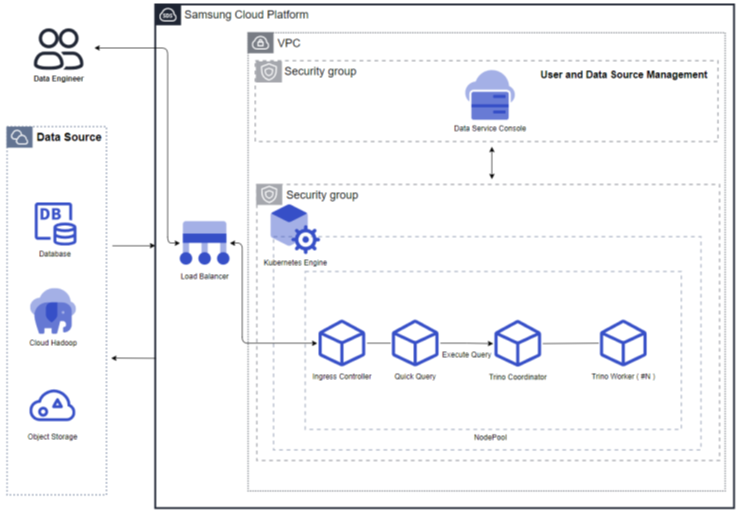
Figure. Fixed Resource Mode (No Auto Scaling) Resource Expansion Mode (Using Auto Scaling): When Auto Scaling is used, the query engine’s worker nodes automatically scale in/out according to the processing volume. When the processing volume is low, the worker nodes decrease to one, and when the processing volume increases, the worker nodes increase. Additionally, resources can be adjusted according to the cluster size.
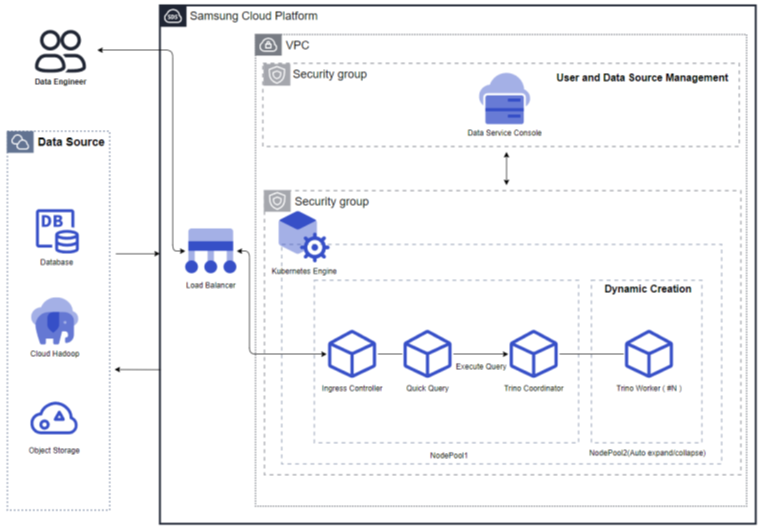
Figure. Resource Expansion Mode (Using Auto Scaling)
Query Engine Type: Personal
Resource Expansion Mode (Using Auto Scaling): The personal query engine type is a structure where the query engine runs separately for each user. Each query engine supports Auto Scale in/out and automatically stops when not used for an extended period. When used again, the query engine automatically restarts. The worker nodes decrease to one when the processing volume is low and increase when the processing volume increases. Additionally, resources can be adjusted according to the cluster size.
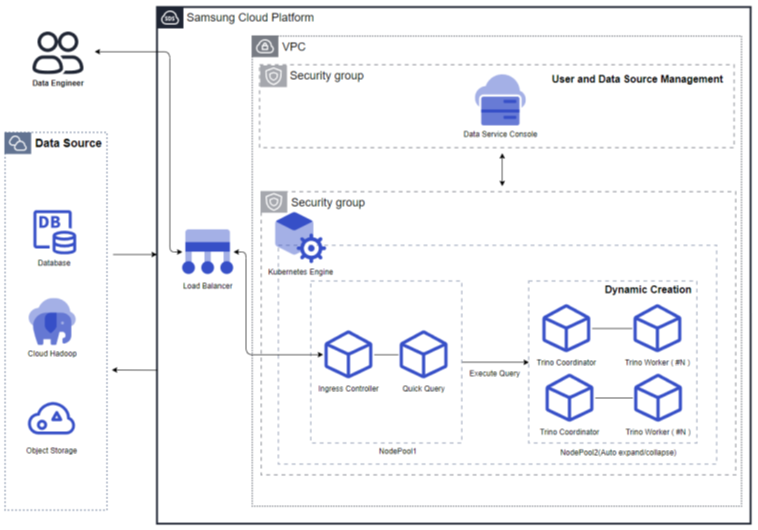
Figure. Resource Expansion Mode (Using Auto Scaling)
Server Type
The server types supported by Quick Query are as follows:
| Classification | Example | Detailed Description |
|---|---|---|
| Server Type | Standard | Provided server types
|
| Server Size | s1v2m4 | Provided server specifications
|
The minimum specifications required to use Quick Query are as follows:
| Classification | Details | Cluster Size (User Input Value) | Fixed Node Pool | Auto-Scaling Node Pool |
|---|---|---|---|---|
| Shared | Fixed Resource Mode (No Auto Scaling) | Replica: 1 CPU: 4 Core Memory: 8GB | 8 Core, 16GB * 4 | N/A |
| Shared | Resource Expansion Mode (Using Auto Scaling) | Small(1 Core, 4GB) | 8 Core, 16GB * 3 | 8 Core, 16GB * 1 |
| Personal | Resource Expansion Mode (Using Auto Scaling) | Small(1 Core, 4GB) | 8 Core, 16GB * 3 | 8 Core, 32GB * 2 |
Region-Based Provisioning Status
Quick Query is available in the following environments:
| Region | Availability |
|---|---|
| Korea West (kr-west1) | Available |
| Korea East (kr-east1) | Available |
| Korea South 1 (kr-south1) | Not Available |
| Korea South 2 (kr-south2) | Not Available |
| Korea South 3 (kr-south3) | Not Available |
Preceding Services
The following services must be configured before creating Quick Query. Please refer to the guides provided for each service to prepare them in advance.
| Service Category | Service | Detailed Description |
|---|---|---|
| Networking | VPC | A service that provides an independent virtual network in a cloud environment |
| Networking | Security Group | A virtual firewall that controls server traffic |
| Storage | File Storage | A storage that allows multiple client servers to share files through network connections |