Overview
Service Overview
Data Ops is a managed workflow orchestration service based on Apache Airflow that creates workflows for data processing tasks that occur periodically or repeatedly and automates job scheduling. Users can automate the process of delivering useful data to the right place at the required time and monitor the configuration and progress of data pipelines.
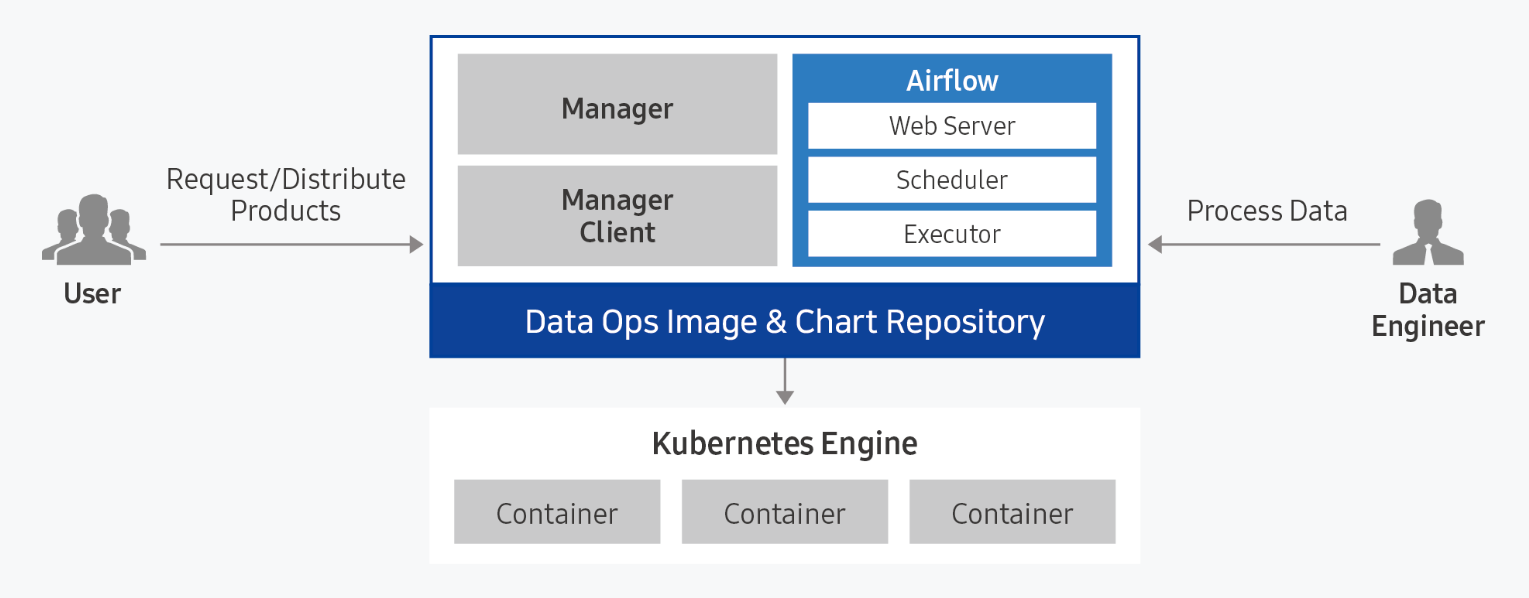
Provided features
Data Ops provides the following features.
- Convenient Installation and Management: Data Ops can be easily installed through a web-based Console in a standard Kubernetes cluster environment. * Apache Airflow and the management module are installed automatically, and integrated monitoring of the web server and scheduler execution status is available through the unified dashboard.
- Dynamic pipeline configuration: Pipeline configuration for data tasks is possible based on Python code. * Since tasks are generated dynamically in conjunction with data job scheduling, you can freely configure the desired workflow structure and scheduling.
- Convenient workflow management: DAG (Direct Acyclic Graph: directed acyclic graph) configuration is visualized and managed through a web-based UI, allowing easy understanding of the sequence and parallel relationships of data flow. * You can also easily manage each task’s timeout, retry count, and priority definitions.
Component
Data Ops is composed of Manager and Service modules, and provides Apache Airflow as a packaged solution.
Data Ops Manager
Data Ops Manager provides various managing features to enable more efficient use of Airflow.
- You can upload Plugin Files, Shared Files, and Python Library Files for use in Ops Service through Ops Manager.
- You can easily provision configuration information for Airflow components within the cluster.
- You can manage other service configuration information within the Airflow cluster and provision it easily.
Data Ops Service
- We provide a managed workflow orchestration service based on Apache Airflow.
- When providing Airflow, you can set Description, required resource size, DAGs GitSync, and Host Alias.
- After creating the service, you can modify the Description, resource size used, DAGs GitSync, and Host Alias to reflect changes to the service.
Server spec type
When creating a Data Ops service, check the following.
- Recommended Service Installation Specifications: CPU KubernetesExecutor 43 cores, CPU CeleryExecutor 25 cores, Memory 50 GB, storage at least 100 GB
Provision status by region
Data Ops is available in the environments below.
| Region | Provision status |
|---|---|
| Korea West (kr-west1) | Provide |
| Korea East (kr-east1) | Provide |
| South Korea South 1 (kr-south1) | Not provided |
| South Korea 2 (kr-south2) | Not provided |
| South Korea South 3 (kr-south3) | Not provided |
Preliminary Service
This is a list of services that must be pre‑configured before creating the service. Please refer to the guide provided for each service and prepare in advance.
| Service Category | Service | Details |
|---|---|---|
| Storage | File Storage | Storage where multiple client servers share files via a network connection |
| Container | Kubernetes Engine | Kubernetes container orchestration service |