This is the multi-page printable view of this section. Click here to print.
Data Ops
1 - Overview
Service Overview
Data Ops is a managed workflow orchestration service based on Apache Airflow that creates workflows for data processing tasks that occur periodically or repeatedly and automates task scheduling. Users can automate the process of delivering useful data to the right place at the required time and monitor the configuration and progress of data pipelines.
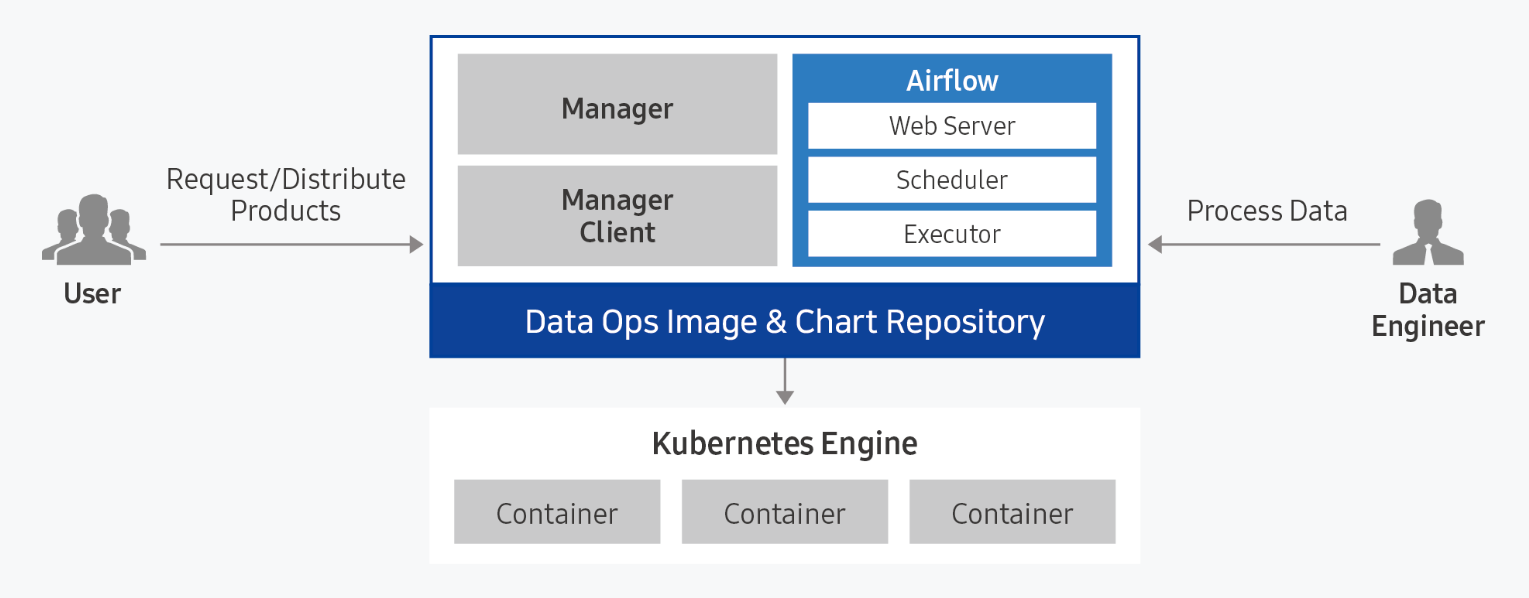
Provided features
Data Ops provides the following features.
- Convenient Installation and Management: Data Ops can be easily installed via a web-based Console in a standard Kubernetes cluster environment. Apache Airflow and management modules are installed automatically, and the integrated dashboard provides unified monitoring of the web server and scheduler execution status.
- Dynamic Pipeline Configuration: You can configure pipelines for data tasks based on Python code. Because it integrates with data task scheduling and creates tasks dynamically, you can freely design the desired workflow shape and scheduling.
- Convenient workflow management: DAG (Direct Acyclic Graph: directed acyclic graph) configuration is visualized and managed through a web-based UI, allowing you to easily understand the sequence and parallel relationships of data flow. Additionally, you can easily manage each task’s timeout, retry count, and priority definitions.
Component
Data Ops consists of Manager and Service modules and provides a packaged Apache Airflow.
Data Ops Manager
Data Ops Manager provides various managing features to enable more efficient use of Airflow.
- Through Ops Manager, you can upload Plugin File, Shared File, and Python Library File for use in Ops Service.
- You can easily provision configuration information for Airflow components within the cluster.
- You can manage configuration information for other services within the Airflow cluster and provision it easily.
Data Ops Service
- We provide a managed workflow orchestration service based on Apache Airflow.
- When providing Airflow, you can set the Description, required resource size, DAGs GitSync, and Host Alias.
- After creating the service, you can modify the Description, resource size, DAGs GitSync, and Host Alias to apply changes to the service.
Server spec type
When creating a Data Ops service, check the following.
- Recommended Service Installation Specifications: CPU KubernetesExecutor 43 core, CPU CeleryExecutor 25 core, Memory 50 GB, Storage 100 GB or more
- Before creating the Data Ops service, you need to install the Ingress Controller.
- Only one Ingress Controller can be installed in a Kubernetes cluster.
- For more details, refer to Ingress Controller Installation.
Provision status by region
Data Ops is available in the environments below.
| region | Provision status |
|---|---|
| Korea West (kr-west1) | Provide |
| Korea East (kr-east1) | Provide |
| South Korea South 1 (kr-south1) | Not provided |
| South Korea South 2 (kr-south2) | Not provided |
| Korea South 3 (kr-south3) | Not provided |
Pre-service
This is a list of services that must be pre-configured before creating the service. Please refer to the guide provided for each service for details and prepare them in advance.
| Service Category | service | Detailed description |
|---|---|---|
| Storage | File Storage | Storage that enables multiple client servers to share files over a network connection. |
| Container | Kubernetes Engine | Kubernetes container orchestration service |
1.1 - ServiceWatch metric
In ServiceWatch, you can view Kubernetes Engine metrics for the Kubernetes Engine created by Data Ops. As with Kubernetes Engine, the metrics provided by default monitoring are data collected at one‑minute intervals.
Basic Metrics
The following are the default metrics for the Kubernetes Engine namespace.
The metrics whose names are displayed in bold below are the key metrics selected from the default metrics provided by Kubernetes Engine. Key metrics are used to build service dashboards that are automatically created for each service in ServiceWatch.
Each metric provides guidance in the user guide on which statistical values are meaningful when querying that metric, and among the meaningful statistics, the values shown in bold are the primary statistics. In the service dashboard, you can view key metrics using primary statistical values.
| Indicator name | Detailed description | unit | meaningful statistics |
|---|---|---|---|
| cluster_up | Cluster up | Count |
|
| cluster_node_count | Number of cluster nodes | Count |
|
| cluster_failed_node_count | Number of failed nodes in the cluster | Count |
|
| cluster_namespace_phase_count | Number of cluster namespace phases | Count |
|
| cluster_pod_phase_count | Cluster pod phase count | Count |
|
| node_cpu_allocatable | Node CPU allocatable amount | - |
|
| node_cpu_capacity | Node CPU capacity | - |
|
| node_cpu_usage | Node CPU usage | - |
|
| node_cpu_utilization | Node CPU usage | - |
|
| node_memory_allocatable | Node memory allocatable amount | Bytes |
|
| node_memory_capacity | Node memory capacity | Bytes |
|
| node_memory_usage | Node memory usage | Bytes |
|
| node_memory_utilization | Node memory utilization | - |
|
| node_network_rx_bytes | Node network received bytes | Bytes/Second |
|
| node_network_tx_bytes | Node network transmitted bytes | Bytes/Second |
|
| node_network_total_bytes | Total bytes of the node network | Bytes/Second |
|
| node_number_of_running_pods | Number of pods running on the node | Count |
|
| namespace_number_of_running_pods | Number of running pods in the namespace | Count |
|
| namespace_deployment_pod_count | Namespace deployment pod count | Count |
|
| namespace_statefulset_pod_count | Namespace StatefulSet pod count | Count |
|
| namespace_daemonset_pod_count | Namespace daemonset pod count | Count |
|
| namespace_job_active_count | Active namespace job count | Count |
|
| namespace_cronjob_active_count | Number of active namespace cronjobs | Count |
|
| pod_cpu_usage | Pod CPU usage | - |
|
| pod_memory_usage | Pod memory usage | Bytes |
|
| pod_network_rx_bytes | Pod network received bytes | Bytes/Second |
|
| pod_network_tx_bytes | Pod network transmitted bytes | Bytes/Second |
|
| pod_network_total_bytes | Pod network total bytes | Count |
|
| container_cpu_usage | Container CPU usage | - |
|
| container_cpu_limit | Container CPU limit | - |
|
| container_cpu_utilization | Container CPU usage | - |
|
| container_memory_usage | Container memory usage | Bytes |
|
| container_memory_limit | Container memory limit | Bytes |
|
| container_memory_utilization | Container memory usage | - |
|
| node_gpu_count | Node GPU count | Count |
|
| gpu_temp | GPU temperature | - |
|
| gpu_power_usage | GPU power usage | - |
|
| gpu_util | GPU utilization | Percent |
|
| gpu_sm_clock | GPU SM clock | - |
|
| gpu_fb_used | GPU FB usage | Megabytes |
|
| gpu_tensor_active | GPU Tensor Utilization | - |
|
| pod_gpu_util | Pod GPU utilization | Percent |
|
| pod_gpu_tensor_active | Pod GPU Tensor Utilization Rate | - |
|
2 - How-to guides
Users can create the service by entering the required Data Ops information and selecting detailed options through the Samsung Cloud Platform Console.
Create Data Ops
You can create and use the Data Ops service in the Samsung Cloud Platform Console.
To create a Data Ops, follow the steps below.
Click the All Services > Data Analytics > Data Ops menu. Navigate to the Service Home page of Data Ops.
On the Service Home page, click the Create Data Ops button. You will be taken to the Create Data Ops page.
On the Data Ops Creation page, enter the information required to create the service and select detailed options.
- Select the required information in the Version selection area.
Category RequiredDetailed description Data Ops version Required Select version of the selected image - Provide a list of versions for the provided server image
Table. Data Ops version selection item - Enter or select the required information in the Cluster Selection area. To install Data Ops, you must first create nodes for the Kubernetes cluster and the work environment.
Category RequiredDetailed description Cluster name Required Select the cluster to use Ingress Controller Required Select the Ingress Controller installed in the cluster Table. Data Ops cluster selection options - Enter or select the required information in the Service Information Input area.
Category Required statusDetailed description Data Ops name Required Enter Data Ops name - Start with a lowercase English letter and ensure it does not end with a special character (
-), using lowercase letters, numbers, and special characters (-) to enter 3 to 30 characters
Storage Class Required Select the storage class used by the selected cluster description Select Enter additional information or description about Data Ops within 150 characters. Domain Settings Required Enter Data Ops domain - Enter 3 to 50 characters, starting with a lowercase English letter and not ending with a special character (
-), using lowercase letters, numbers, and special characters (-)
- {Data Ops name}.{configured domain} becomes the Data Ops access URL.
Node Selector Required To install on a specific node, enter a distinguishable label among the node’s labels - If you enter an incorrect node label, installation errors may occur, so verify the node label in advance
- Node labels can be found in the node’s yaml file
account Required Enter Data Ops Manager account - ID: Start with a lowercase English letter and use lowercase letters and numbers, entering a value between 6 and 30 characters
- Password: Include uppercase (English), lowercase (English), numbers, and special characters (
!@#$%^&*) and enter 8 to 50 characters
- Password Confirmation: Enter the same password again
Host Alias Selection Add host information to be linked with Data Ops (up to 20 total, including defaults) - Select Use, then click the + button
- Hostname: Enter the host name or domain format using lowercase letters, numbers, and special characters (
-) with a length of 3 to 63 characters
- IP: Enter in IP format
- Click the X button to delete
- The firewall between the cluster and the server must be open for the added host information to be usable
Table. Data Ops Service Information Input Items - Start with a lowercase English letter and ensure it does not end with a special character (
- In the Additional Information Input area, enter or select the required information.
Category RequiredDetailed description tag Selection Add Tag - Add Tag Click the button to create and add a tag, or add an existing tag.
- You can add up to 50 tags.
- The newly added tags will be applied after the service creation is completed.
Table. Data Ops additional information input fields
- Select the required information in the Version selection area.
In the Summary panel, verify the detailed information and estimated billing amount, then click the Complete button.
- Once creation is complete, check the created resources on the Data Ops List page.
Check detailed information for Data Ops
You can view and edit the full list of Data Ops resources and detailed information. The Data Ops Details page consists of Details, Tags, Activity History tabs.
To view detailed information about Data Ops, follow these steps.
- Click the All Services > Data Analytics > Data Ops menu. Navigate to the Service Home page of Data Ops.
- On the Service Home page, click the Data Ops menu. You will be taken to the Data Ops List page.
- On the Data Ops List page, click the resource to view detailed information. You will be taken to the Data Ops Detail page.
- Data Ops Details At the top of the page, status information and details about additional features are displayed.
Category Detailed description Status indicator Data Ops status - Creating: Creating
- Running: Running, Data Ops Services are in a creatable state
- Updating: Updating settings
- Terminating: Terminating service
- Error: Error: error occurred during creation or service abnormal state
Hosts file configuration information Button to view and copy the host file information for accessing Data Ops Service termination Button to cancel the service Table. Data Ops status information and additional features
- Data Ops Details At the top of the page, status information and details about additional features are displayed.
Detailed Information
On the Data Ops List page, you can view detailed information of the selected resource and edit the information if needed.
| Category | Detailed description |
|---|---|
| service | Service name |
| Resource Type | Resource Type |
| SRN | Unique resource ID in Samsung Cloud Platform
|
| Resource name | Resource name
|
| Resource ID | Unique resource ID in the service |
| constructor | User who created the service |
| Creation date and time | Service creation date and time |
| editor | User who edited the service information |
| Modification date | Date and time the service information was modified |
| Cluster name | Cluster name of the configured servers |
| Storage Class | Storage class used by the selected cluster |
| description | Additional information or explanation about Data Ops |
| Domain Settings | Data Ops domain name |
| Node Selector | Node Label |
| Web Url | Data Ops URL |
| account | Data Ops Manager account |
| Host Alias | Host information to be connected to Data Ops |
tag
Data Ops list page lets you view the tag information of the selected resource, and you can add, modify, or delete it.
| Category | Detailed description |
|---|---|
| Tag list | Tag list
|
Job History
On the Data Ops List page, you can view the operation history of the selected resource.
| Category | Detailed description |
|---|---|
| Task History List | Resource Change History
|
Terminate Data Ops
You can cancel unused Data Ops to reduce operating costs. However, if you cancel the service, the running service may be terminated immediately, so you should thoroughly consider the impact of service interruption before proceeding with the cancellation.
To terminate Data Ops, follow the steps below.
- Click the All Services > Data Analytics > Data Ops menu. Go to the Service Home page of Data Ops.
- On the Service Home page, click the Data Ops menu. You will be taken to the Data Ops List page.
- On the Data Ops List page, select the resource to cancel, and click the Cancel Service button.
- When termination is complete, verify on the Data Ops List page whether the resource has been terminated.
2.1 - Data Ops Services
Users can create the service by entering the required information for Data Ops Services within the Data Ops service through the Samsung Cloud Platform Console and selecting detailed options.
Create Data Ops Services
Users can add a service by selecting detailed options of Data Ops or by entering configuration values.
To create Data Ops Services, follow these steps.
Click the All Services > Data Analytics > Data Ops menu. Navigate to the Service Home page of Data Ops.
On the Service Home page, click Data Ops Servies. You will be taken to the Data Ops Services list page.
On the Data Ops Services List page, click the Create Data Ops Services button. You will be taken to the Create Data Ops Services page.
On the Data Ops Services Creation page, enter the information required to create the service and select detailed options.
- Enter or select the required information in the Service Information Input area.
Category Required statusDetailed description Data Ops name Required Select Data Ops Ops Service name Required Enter the Data Ops Services name - starting with a lowercase English letter and not ending with a special character (
-), using lowercase letters, numbers, and special characters (-) for 3 to 30 characters
Storage Class Required Select the storage class used by the selected cluster Explanation Selection Enter additional information or description about Data Ops Services within 150 characters. Domain Settings Required Data Ops Services domain entry - Enter 3 to 50 characters, starting with a lowercase English letter, not ending with special characters (
-), using lowercase letters, numbers, and special characters (-)
- {Data Ops Services name}.{configured domain} becomes the Data Ops Services access address.
Node Selector Required To install on a specific node, enter a distinguishable label among the node’s Labels - If you enter an incorrect node label, installation errors may occur, so verify the node label in advance
- The node label can be checked in the node’s yaml file
Service Workload Required - Web Server: Provides visualization of DAG components and status, and serves as the Airflow configuration management module
- Scheculer: Manages DAG scheduling and execution to orchestrate various DAGs and their tasks
- Worker: Executes actual orchestration and data processing tasks
- Worker(Kubernetes): When the Worker operates, pods are dynamically created, allowing efficient resource usage. When Kubernetes is selected, the Replica text box is disabled.
- Worker(Celery): When the Worker operates, a static pod is created and maintained, enabling faster handling of a large number of requests. When Celery is selected, the Replica text box is enabled and user input is allowed.
- The selected executor type cannot be changed once chosen
account Required Airflow account input - ID: Start with a lowercase English letter and use lowercase letters and numbers, entering a value between 6 and 30 characters
- Password: Include uppercase (English), lowercase (English), numbers, and special characters (
!@#$%^&*) and enter 8 to 50 characters
- Confirm Password: Re-enter the password identically
Table. Data Ops Services service information input items - starting with a lowercase English letter and not ending with a special character (
- Additional Information Input area, enter or select the required information.
Category required or notDetailed description Host Alias Select Add host information to be linked with Data Ops (up to 20 total, including defaults) - Select Use, then click the + button
- Hostname: Enter the host name or domain format using lowercase letters, numbers, and special characters (
-) with a length of 3 to 63 characters
- IP: Enter in IP format
- Click the X button to delete
- The firewall between the cluster and the server must be open to use the added host information
tag Selection Add Tag - Add Tag Click the button to create and add a tag, or add an existing tag.
- You can add up to 50 tags.
- The newly added tags will be applied after the service creation is completed.
Table. Data Ops additional information input fields
- Enter or select the required information in the Service Information Input area.
Summary Check the detailed information and estimated billing amount generated in the panel, and click the Complete button.
- Once creation is complete, check the created resources on the Data Ops Services List page.
Data Ops Services View detailed information
You can view and edit the full list of resources and detailed information for Data Ops Services. The Data Ops Services Details page consists of Details, Tags, Activity History tabs.
Follow these steps to view detailed information about Data Ops Services.
- Click the All Services > Data Analytics > Data Ops menu. You will be taken to the Service Home page of Data Ops.
- On the Service Home page, click the Data Ops Services menu. You will be taken to the Data Ops Services list page.
- On the Data Ops Services List page, click the resource to view detailed information. You will be taken to the Data Ops Services Details page.
- Data Ops Services Details At the top of the page, status information and additional feature information are displayed.
Category Detailed description Status display Data Ops Services status - Creating: Creating
- Running: Running
- Updating: Updating configuration
- Terminating: Terminating service
- Error: Creation failed or service unavailable
Hosts file configuration information Button to view and copy host file information for accessing Data Ops Services Delete Data Ops Services Cancel service button Table. Data Ops Services status information and additional features
- Data Ops Services Details At the top of the page, status information and additional feature information are displayed.
Detailed Information
Data Ops Services List page lets you view detailed information of the selected resource and modify the information if necessary.
| Category | Detailed description |
|---|---|
| service | Service name |
| Resource Type | Resource Type |
| SRN | Unique resource ID in Samsung Cloud Platform
|
| Resource name | Resource name
|
| Resource ID | Unique resource ID in the service |
| constructor | User who created the service |
| Creation date and time | Service creation date and time |
| editor | User who edited the service information |
| Modification date | Date and time the service information was modified |
| Data Ops name | Data Ops name |
| Storage Class | Storage class used by the selected cluster |
| description | Additional information or explanation about Data Ops Services |
| Domain Settings | Data Ops Services domain name |
| Node Selector | Node Lable |
| Web Url | Data Ops Services URL |
| account | Airflow account |
| Host Alias | Host information to be connected to Data Ops Services |
tag
Data Ops Services List page allows you to view the tag information of the selected resource, and to add, modify, or delete it.
| Category | Detailed description |
|---|---|
| Tag list | Tag list
|
Job History
You can view the operation history of the selected resource on the Data Ops Services List page.
| Category | Detailed description |
|---|---|
| Task History List | Resource Change History
|
Data Ops Services Terminate
You can cancel unused Data Ops Services to reduce operating costs. However, canceling a service may cause the running service to stop immediately, so you should fully consider the impact of any service interruption before proceeding with the cancellation.
To cancel Data Ops Services, follow the steps below.
- Click the All Services > Data Analytics > Data Ops menu. Go to the Service Home page of Data Ops.
- From the Service Home page, click the Data Ops Services menu. You will be taken to the Data Ops Services list page.
- On the Data Ops Services List page, select the resource to cancel and click the Data Ops Services Delete button.
- When termination is complete, verify on the Data Ops Services List page whether the resource has been terminated.
2.2 - Installing Ingress Controller
The user must install an Ingress Controller before creating a Data Ops service. Only one Ingress Controller should be installed in the Kubernetes cluster.
Installing Ingress Controller using Container Registry
Follow these steps to install the Ingress Controller using the Container Registry.
- After checking the service domain, you can locate the corresponding Ingress Controller image file and copy or download it.Table. Yaml file by domain
- Click the All Services > Container > Kubernetes Engine > Workloads > Pods menu. You will be taken to the Pod List page.
- Click the Create Object button. The Create Object popup opens.
- After selecting the cluster where you will install Data Ops, copy and paste the contents of the Yaml file.
- Click the Confirm button to complete the installation. The installed Ingress Controller can be viewed in the list.
IngressController For Enterprise (KR-WEST1)
apiVersion: v1
kind: Namespace
metadata:
labels:
app.kubernetes.io/instance: dss-ingress
app.kubernetes.io/name: dss-ingress
name: dss-ingress
---
apiVersion: v1
automountServiceAccountToken: true
kind: ServiceAccount
metadata:
labels:
app.kubernetes.io/component: controller
app.kubernetes.io/instance: dss-ingress
app.kubernetes.io/name: dss-ingress
app.kubernetes.io/part-of: dss-ingress
app.kubernetes.io/version: 1.12.3
name: dss-ingress
namespace: dss-ingress
---
apiVersion: rbac.authorization.k8s.io/v1
kind: Role
metadata:
labels:
app.kubernetes.io/component: controller
app.kubernetes.io/instance: dss-ingress
app.kubernetes.io/name: dss-ingress
app.kubernetes.io/part-of: dss-ingress
app.kubernetes.io/version: 1.12.3
name: dss-ingress
namespace: dss-ingress
rules:
- apiGroups:
-
resources:
- namespaces
verbs:
- get
- apiGroups:
-
resources:
- configmaps
- pods
- secrets
- endpoints
verbs:
- get
- list
- watch
- apiGroups:
-
resources:
- services
verbs:
- get
- list
- watch
- apiGroups:
- networking.k8s.io
resources:
- ingresses
verbs:
- get
- list
- watch
- apiGroups:
- networking.k8s.io
resources:
- ingresses/status
verbs:
- update
- apiGroups:
- networking.k8s.io
resources:
- ingressclasses
verbs:
- get
- list
- watch
- apiGroups:
- coordination.k8s.io
resourceNames:
- dss-ingress-nginx-leader
resources:
- leases
verbs:
- get
- update
- apiGroups:
- coordination.k8s.io
resources:
- leases
verbs:
- create
- apiGroups:
-
resources:
- events
verbs:
- create
- patch
- apiGroups:
- discovery.k8s.io
resources:
- endpointslices
verbs:
- list
- watch
- get
---
apiVersion: rbac.authorization.k8s.io/v1
kind: ClusterRole
metadata:
labels:
app.kubernetes.io/instance: dss-ingress
app.kubernetes.io/name: dss-ingress
app.kubernetes.io/part-of: dss-ingress
app.kubernetes.io/version: 1.12.3
name: dss-ingress
rules:
- apiGroups:
- ""
resources:
- configmaps
- endpoints
- nodes
- pods
- secrets
- namespaces
verbs:
- list
- watch
- apiGroups:
- coordination.k8s.io
resources:
- leases
verbs:
- list
- watch
- apiGroups:
- ""
resources:
- nodes
verbs:
- get
- apiGroups:
- ""
resources:
- services
verbs:
- get
- list
- watch
- apiGroups:
- networking.k8s.io
resources:
- ingresses
verbs:
- get
- list
- watch
- apiGroups:
- ""
resources:
- events
verbs:
- create
- patch
- apiGroups:
- networking.k8s.io
resources:
- ingresses/status
verbs:
- update
- apiGroups:
- networking.k8s.io
resources:
- ingressclasses
verbs:
- get
- list
- watch
- apiGroups:
- discovery.k8s.io
resources:
- endpointslices
verbs:
- list
- watch
- get
---
apiVersion: rbac.authorization.k8s.io/v1
kind: RoleBinding
metadata:
labels:
app.kubernetes.io/component: controller
app.kubernetes.io/instance: dss-ingress
app.kubernetes.io/name: dss-ingress
app.kubernetes.io/part-of: dss-ingress
app.kubernetes.io/version: 1.12.3
name: dss-ingress
namespace: dss-ingress
roleRef:
apiGroup: rbac.authorization.k8s.io
kind: Role
name: dss-ingress
subjects:
- kind: ServiceAccount
name: dss-ingress
namespace: dss-ingress
---
apiVersion: rbac.authorization.k8s.io/v1
kind: ClusterRoleBinding
metadata:
labels:
app.kubernetes.io/instance: dss-ingress
app.kubernetes.io/name: dss-ingress
app.kubernetes.io/part-of: dss-ingress
app.kubernetes.io/version: 1.12.3
name: dss-ingress
roleRef:
apiGroup: rbac.authorization.k8s.io
kind: ClusterRole
name: dss-ingress
subjects:
- kind: ServiceAccount
name: dss-ingress
namespace: dss-ingress
---
apiVersion: v1
data:
allow-snippet-annotations: "true"
annotations-risk-level: Critical
kind: ConfigMap
metadata:
labels:
app: ingress-controller
app.kubernetes.io/component: controller
app.kubernetes.io/instance: dss-ingress
app.kubernetes.io/name: dss-ingress
app.kubernetes.io/part-of: dss-ingress
app.kubernetes.io/version: 1.12.3
name: dss-ingress-controller
namespace: dss-ingress
---
apiVersion: v1
kind: Service
metadata:
labels:
app: ingress-controller
app.kubernetes.io/component: controller
app.kubernetes.io/instance: dss-ingress
app.kubernetes.io/name: dss-ingress
app.kubernetes.io/part-of: dss-ingress
app.kubernetes.io/version: 1.12.3
name: dss-ingress-controller
namespace: dss-ingress
spec:
externalTrafficPolicy: Cluster
ipFamilies:
- IPv4
ipFamilyPolicy: SingleStack
ports:
- appProtocol: http
name: http
nodePort: 30708
port: 80
protocol: TCP
targetPort: http
- appProtocol: https
name: https
nodePort: 31416
port: 443
protocol: TCP
targetPort: https
selector:
app.kubernetes.io/component: controller
app.kubernetes.io/instance: dss-ingress
app.kubernetes.io/name: dss-ingress
type: NodePort
---
apiVersion: apps/v1
kind: Deployment
metadata:
labels:
app: ingress-controller
app.kubernetes.io/component: controller
app.kubernetes.io/instance: dss-ingress
app.kubernetes.io/name: dss-ingress
app.kubernetes.io/part-of: dss-ingress
app.kubernetes.io/version: 1.12.3
name: dss-ingress-controller
namespace: dss-ingress
spec:
minReadySeconds: 0
revisionHistoryLimit: 10
selector:
matchLabels:
app.kubernetes.io/component: controller
app.kubernetes.io/instance: dss-ingress
app.kubernetes.io/name: dss-ingress
strategy:
rollingUpdate:
maxUnavailable: 1
type: RollingUpdate
template:
metadata:
labels:
app.kubernetes.io/component: controller
app.kubernetes.io/instance: dss-ingress
app.kubernetes.io/name: dss-ingress
app.kubernetes.io/part-of: dss-ingress
app.kubernetes.io/version: 1.12.3
spec:
containers:
- args:
- /nginx-ingress-controller
- --publish-service=$(POD_NAMESPACE)/dss-ingress-controller
- --election-id=dss-ingress-nginx-leader
- --controller-class=k8s.io/dss-ingress-controller
- --ingress-class=dss-nginx
- --configmap=$(POD_NAMESPACE)/dss-ingress-controller
env:
- name: POD_NAME
valueFrom:
fieldRef:
fieldPath: metadata.name
- name: POD_NAMESPACE
valueFrom:
fieldRef:
fieldPath: metadata.namespace
- name: LD_PRELOAD
value: /usr/local/lib/libmimalloc.so
image: brightixscr.scr.private.kr-west1.e.samsungsdscloud.com/brightics-df/nginx-ingress-controller:v1.12.3
imagePullPolicy: IfNotPresent
lifecycle:
preStop:
exec:
command:
- /wait-shutdown
livenessProbe:
failureThreshold: 5
httpGet:
path: /healthz
port: 10254
scheme: HTTP
initialDelaySeconds: 10
periodSeconds: 10
successThreshold: 1
timeoutSeconds: 1
name: controller
ports:
- containerPort: 80
name: http
protocol: TCP
- containerPort: 443
name: https
protocol: TCP
readinessProbe:
failureThreshold: 3
httpGet:
path: /healthz
port: 10254
scheme: HTTP
initialDelaySeconds: 10
periodSeconds: 10
successThreshold: 1
timeoutSeconds: 1
resources:
requests:
cpu: 100m
memory: 90Mi
securityContext:
allowPrivilegeEscalation: false
capabilities:
add:
- NET_BIND_SERVICE
drop:
- ALL
readOnlyRootFilesystem: false
runAsGroup: 82
runAsNonRoot: true
runAsUser: 101
seccompProfile:
type: RuntimeDefault
dnsPolicy: ClusterFirst
nodeSelector:
kubernetes.io/os: linux
serviceAccountName: dss-ingress
terminationGracePeriodSeconds: 300
---
apiVersion: networking.k8s.io/v1
kind: IngressClass
metadata:
annotations:
ingressclass.kubernetes.io/is-default-class: "true"
labels:
app: ingress-controller
app.kubernetes.io/component: controller
app.kubernetes.io/instance: dss-ingress
app.kubernetes.io/name: dss-ingress
app.kubernetes.io/part-of: dss-ingress
app.kubernetes.io/version: 1.12.3
name: dss-nginx
spec:
controller: k8s.io/dss-ingress-controllerapiVersion: v1
kind: Namespace
metadata:
labels:
app.kubernetes.io/instance: dss-ingress
app.kubernetes.io/name: dss-ingress
name: dss-ingress
---
apiVersion: v1
automountServiceAccountToken: true
kind: ServiceAccount
metadata:
labels:
app.kubernetes.io/component: controller
app.kubernetes.io/instance: dss-ingress
app.kubernetes.io/name: dss-ingress
app.kubernetes.io/part-of: dss-ingress
app.kubernetes.io/version: 1.12.3
name: dss-ingress
namespace: dss-ingress
---
apiVersion: rbac.authorization.k8s.io/v1
kind: Role
metadata:
labels:
app.kubernetes.io/component: controller
app.kubernetes.io/instance: dss-ingress
app.kubernetes.io/name: dss-ingress
app.kubernetes.io/part-of: dss-ingress
app.kubernetes.io/version: 1.12.3
name: dss-ingress
namespace: dss-ingress
rules:
- apiGroups:
-
resources:
- namespaces
verbs:
- get
- apiGroups:
-
resources:
- configmaps
- pods
- secrets
- endpoints
verbs:
- get
- list
- watch
- apiGroups:
-
resources:
- services
verbs:
- get
- list
- watch
- apiGroups:
- networking.k8s.io
resources:
- ingresses
verbs:
- get
- list
- watch
- apiGroups:
- networking.k8s.io
resources:
- ingresses/status
verbs:
- update
- apiGroups:
- networking.k8s.io
resources:
- ingressclasses
verbs:
- get
- list
- watch
- apiGroups:
- coordination.k8s.io
resourceNames:
- dss-ingress-nginx-leader
resources:
- leases
verbs:
- get
- update
- apiGroups:
- coordination.k8s.io
resources:
- leases
verbs:
- create
- apiGroups:
-
resources:
- events
verbs:
- create
- patch
- apiGroups:
- discovery.k8s.io
resources:
- endpointslices
verbs:
- list
- watch
- get
---
apiVersion: rbac.authorization.k8s.io/v1
kind: ClusterRole
metadata:
labels:
app.kubernetes.io/instance: dss-ingress
app.kubernetes.io/name: dss-ingress
app.kubernetes.io/part-of: dss-ingress
app.kubernetes.io/version: 1.12.3
name: dss-ingress
rules:
- apiGroups:
- ""
resources:
- configmaps
- endpoints
- nodes
- pods
- secrets
- namespaces
verbs:
- list
- watch
- apiGroups:
- coordination.k8s.io
resources:
- leases
verbs:
- list
- watch
- apiGroups:
- ""
resources:
- nodes
verbs:
- get
- apiGroups:
- ""
resources:
- services
verbs:
- get
- list
- watch
- apiGroups:
- networking.k8s.io
resources:
- ingresses
verbs:
- get
- list
- watch
- apiGroups:
- ""
resources:
- events
verbs:
- create
- patch
- apiGroups:
- networking.k8s.io
resources:
- ingresses/status
verbs:
- update
- apiGroups:
- networking.k8s.io
resources:
- ingressclasses
verbs:
- get
- list
- watch
- apiGroups:
- discovery.k8s.io
resources:
- endpointslices
verbs:
- list
- watch
- get
---
apiVersion: rbac.authorization.k8s.io/v1
kind: RoleBinding
metadata:
labels:
app.kubernetes.io/component: controller
app.kubernetes.io/instance: dss-ingress
app.kubernetes.io/name: dss-ingress
app.kubernetes.io/part-of: dss-ingress
app.kubernetes.io/version: 1.12.3
name: dss-ingress
namespace: dss-ingress
roleRef:
apiGroup: rbac.authorization.k8s.io
kind: Role
name: dss-ingress
subjects:
- kind: ServiceAccount
name: dss-ingress
namespace: dss-ingress
---
apiVersion: rbac.authorization.k8s.io/v1
kind: ClusterRoleBinding
metadata:
labels:
app.kubernetes.io/instance: dss-ingress
app.kubernetes.io/name: dss-ingress
app.kubernetes.io/part-of: dss-ingress
app.kubernetes.io/version: 1.12.3
name: dss-ingress
roleRef:
apiGroup: rbac.authorization.k8s.io
kind: ClusterRole
name: dss-ingress
subjects:
- kind: ServiceAccount
name: dss-ingress
namespace: dss-ingress
---
apiVersion: v1
data:
allow-snippet-annotations: "true"
annotations-risk-level: Critical
kind: ConfigMap
metadata:
labels:
app: ingress-controller
app.kubernetes.io/component: controller
app.kubernetes.io/instance: dss-ingress
app.kubernetes.io/name: dss-ingress
app.kubernetes.io/part-of: dss-ingress
app.kubernetes.io/version: 1.12.3
name: dss-ingress-controller
namespace: dss-ingress
---
apiVersion: v1
kind: Service
metadata:
labels:
app: ingress-controller
app.kubernetes.io/component: controller
app.kubernetes.io/instance: dss-ingress
app.kubernetes.io/name: dss-ingress
app.kubernetes.io/part-of: dss-ingress
app.kubernetes.io/version: 1.12.3
name: dss-ingress-controller
namespace: dss-ingress
spec:
externalTrafficPolicy: Cluster
ipFamilies:
- IPv4
ipFamilyPolicy: SingleStack
ports:
- appProtocol: http
name: http
nodePort: 30708
port: 80
protocol: TCP
targetPort: http
- appProtocol: https
name: https
nodePort: 31416
port: 443
protocol: TCP
targetPort: https
selector:
app.kubernetes.io/component: controller
app.kubernetes.io/instance: dss-ingress
app.kubernetes.io/name: dss-ingress
type: NodePort
---
apiVersion: apps/v1
kind: Deployment
metadata:
labels:
app: ingress-controller
app.kubernetes.io/component: controller
app.kubernetes.io/instance: dss-ingress
app.kubernetes.io/name: dss-ingress
app.kubernetes.io/part-of: dss-ingress
app.kubernetes.io/version: 1.12.3
name: dss-ingress-controller
namespace: dss-ingress
spec:
minReadySeconds: 0
revisionHistoryLimit: 10
selector:
matchLabels:
app.kubernetes.io/component: controller
app.kubernetes.io/instance: dss-ingress
app.kubernetes.io/name: dss-ingress
strategy:
rollingUpdate:
maxUnavailable: 1
type: RollingUpdate
template:
metadata:
labels:
app.kubernetes.io/component: controller
app.kubernetes.io/instance: dss-ingress
app.kubernetes.io/name: dss-ingress
app.kubernetes.io/part-of: dss-ingress
app.kubernetes.io/version: 1.12.3
spec:
containers:
- args:
- /nginx-ingress-controller
- --publish-service=$(POD_NAMESPACE)/dss-ingress-controller
- --election-id=dss-ingress-nginx-leader
- --controller-class=k8s.io/dss-ingress-controller
- --ingress-class=dss-nginx
- --configmap=$(POD_NAMESPACE)/dss-ingress-controller
env:
- name: POD_NAME
valueFrom:
fieldRef:
fieldPath: metadata.name
- name: POD_NAMESPACE
valueFrom:
fieldRef:
fieldPath: metadata.namespace
- name: LD_PRELOAD
value: /usr/local/lib/libmimalloc.so
image: brightixscr.scr.private.kr-west1.e.samsungsdscloud.com/brightics-df/nginx-ingress-controller:v1.12.3
imagePullPolicy: IfNotPresent
lifecycle:
preStop:
exec:
command:
- /wait-shutdown
livenessProbe:
failureThreshold: 5
httpGet:
path: /healthz
port: 10254
scheme: HTTP
initialDelaySeconds: 10
periodSeconds: 10
successThreshold: 1
timeoutSeconds: 1
name: controller
ports:
- containerPort: 80
name: http
protocol: TCP
- containerPort: 443
name: https
protocol: TCP
readinessProbe:
failureThreshold: 3
httpGet:
path: /healthz
port: 10254
scheme: HTTP
initialDelaySeconds: 10
periodSeconds: 10
successThreshold: 1
timeoutSeconds: 1
resources:
requests:
cpu: 100m
memory: 90Mi
securityContext:
allowPrivilegeEscalation: false
capabilities:
add:
- NET_BIND_SERVICE
drop:
- ALL
readOnlyRootFilesystem: false
runAsGroup: 82
runAsNonRoot: true
runAsUser: 101
seccompProfile:
type: RuntimeDefault
dnsPolicy: ClusterFirst
nodeSelector:
kubernetes.io/os: linux
serviceAccountName: dss-ingress
terminationGracePeriodSeconds: 300
---
apiVersion: networking.k8s.io/v1
kind: IngressClass
metadata:
annotations:
ingressclass.kubernetes.io/is-default-class: "true"
labels:
app: ingress-controller
app.kubernetes.io/component: controller
app.kubernetes.io/instance: dss-ingress
app.kubernetes.io/name: dss-ingress
app.kubernetes.io/part-of: dss-ingress
app.kubernetes.io/version: 1.12.3
name: dss-nginx
spec:
controller: k8s.io/dss-ingress-controllerIngressController For Enterprise (KR-EAST1)
apiVersion: v1
kind: Namespace
metadata:
labels:
app.kubernetes.io/instance: dss-ingress
app.kubernetes.io/name: dss-ingress
name: dss-ingress
---
apiVersion: v1
automountServiceAccountToken: true
kind: ServiceAccount
metadata:
labels:
app.kubernetes.io/component: controller
app.kubernetes.io/instance: dss-ingress
app.kubernetes.io/name: dss-ingress
app.kubernetes.io/part-of: dss-ingress
app.kubernetes.io/version: 1.12.3
name: dss-ingress
namespace: dss-ingress
---
apiVersion: rbac.authorization.k8s.io/v1
kind: Role
metadata:
labels:
app.kubernetes.io/component: controller
app.kubernetes.io/instance: dss-ingress
app.kubernetes.io/name: dss-ingress
app.kubernetes.io/part-of: dss-ingress
app.kubernetes.io/version: 1.12.3
name: dss-ingress
namespace: dss-ingress
rules:
- apiGroups:
- ""
resources:
- namespaces
verbs:
- get
- apiGroups:
- ""
resources:
- configmaps
- pods
- secrets
- endpoints
verbs:
- get
- list
- watch
- apiGroups:
- ""
resources:
- services
verbs:
- get
- list
- watch
- apiGroups:
- networking.k8s.io
resources:
- ingresses
verbs:
- get
- list
- watch
- apiGroups:
- networking.k8s.io
resources:
- ingresses/status
verbs:
- update
- apiGroups:
- networking.k8s.io
resources:
- ingressclasses
verbs:
- get
- list
- watch
- apiGroups:
- coordination.k8s.io
resourceNames:
- dss-ingress-nginx-leader
resources:
- leases
verbs:
- get
- update
- apiGroups:
- coordination.k8s.io
resources:
- leases
verbs:
- create
- apiGroups:
- ""
resources:
- events
verbs:
- create
- patch
- apiGroups:
- discovery.k8s.io
resources:
- endpointslices
verbs:
- list
- watch
- get
---
apiVersion: rbac.authorization.k8s.io/v1
kind: ClusterRole
metadata:
labels:
app.kubernetes.io/instance: dss-ingress
app.kubernetes.io/name: dss-ingress
app.kubernetes.io/part-of: dss-ingress
app.kubernetes.io/version: 1.12.3
name: dss-ingress
rules:
- apiGroups:
-
resources:
- configmaps
- endpoints
- nodes
- pods
- secrets
- namespaces
verbs:
- list
- watch
- apiGroups:
- coordination.k8s.io
resources:
- leases
verbs:
- list
- watch
- apiGroups:
-
resources:
- nodes
verbs:
- get
- apiGroups:
-
resources:
- services
verbs:
- get
- list
- watch
- apiGroups:
- networking.k8s.io
resources:
- ingresses
verbs:
- get
- list
- watch
- apiGroups:
-
resources:
- events
verbs:
- create
- patch
- apiGroups:
- networking.k8s.io
resources:
- ingresses/status
verbs:
- update
- apiGroups:
- networking.k8s.io
resources:
- ingressclasses
verbs:
- get
- list
- watch
- apiGroups:
- discovery.k8s.io
resources:
- endpointslices
verbs:
- list
- watch
- get
---
apiVersion: rbac.authorization.k8s.io/v1
kind: RoleBinding
metadata:
labels:
app.kubernetes.io/component: controller
app.kubernetes.io/instance: dss-ingress
app.kubernetes.io/name: dss-ingress
app.kubernetes.io/part-of: dss-ingress
app.kubernetes.io/version: 1.12.3
name: dss-ingress
namespace: dss-ingress
roleRef:
apiGroup: rbac.authorization.k8s.io
kind: Role
name: dss-ingress
subjects:
- kind: ServiceAccount
name: dss-ingress
namespace: dss-ingress
---
apiVersion: rbac.authorization.k8s.io/v1
kind: ClusterRoleBinding
metadata:
labels:
app.kubernetes.io/instance: dss-ingress
app.kubernetes.io/name: dss-ingress
app.kubernetes.io/part-of: dss-ingress
app.kubernetes.io/version: 1.12.3
name: dss-ingress
roleRef:
apiGroup: rbac.authorization.k8s.io
kind: ClusterRole
name: dss-ingress
subjects:
- kind: ServiceAccount
name: dss-ingress
namespace: dss-ingress
---
apiVersion: v1
data:
allow-snippet-annotations: "true"
annotations-risk-level: Critical
kind: ConfigMap
metadata:
labels:
app: ingress-controller
app.kubernetes.io/component: controller
app.kubernetes.io/instance: dss-ingress
app.kubernetes.io/name: dss-ingress
app.kubernetes.io/part-of: dss-ingress
app.kubernetes.io/version: 1.12.3
name: dss-ingress-controller
namespace: dss-ingress
---
apiVersion: v1
kind: Service
metadata:
labels:
app: ingress-controller
app.kubernetes.io/component: controller
app.kubernetes.io/instance: dss-ingress
app.kubernetes.io/name: dss-ingress
app.kubernetes.io/part-of: dss-ingress
app.kubernetes.io/version: 1.12.3
name: dss-ingress-controller
namespace: dss-ingress
spec:
externalTrafficPolicy: Cluster
ipFamilies:
- IPv4
ipFamilyPolicy: SingleStack
ports:
- appProtocol: http
name: http
nodePort: 30708
port: 80
protocol: TCP
targetPort: http
- appProtocol: https
name: https
nodePort: 31416
port: 443
protocol: TCP
targetPort: https
selector:
app.kubernetes.io/component: controller
app.kubernetes.io/instance: dss-ingress
app.kubernetes.io/name: dss-ingress
type: NodePort
---
apiVersion: apps/v1
kind: Deployment
metadata:
labels:
app: ingress-controller
app.kubernetes.io/component: controller
app.kubernetes.io/instance: dss-ingress
app.kubernetes.io/name: dss-ingress
app.kubernetes.io/part-of: dss-ingress
app.kubernetes.io/version: 1.12.3
name: dss-ingress-controller
namespace: dss-ingress
spec:
minReadySeconds: 0
revisionHistoryLimit: 10
selector:
matchLabels:
app.kubernetes.io/component: controller
app.kubernetes.io/instance: dss-ingress
app.kubernetes.io/name: dss-ingress
strategy:
rollingUpdate:
maxUnavailable: 1
type: RollingUpdate
template:
metadata:
labels:
app.kubernetes.io/component: controller
app.kubernetes.io/instance: dss-ingress
app.kubernetes.io/name: dss-ingress
app.kubernetes.io/part-of: dss-ingress
app.kubernetes.io/version: 1.12.3
spec:
containers:
- args:
- /nginx-ingress-controller
- --publish-service=$(POD_NAMESPACE)/dss-ingress-controller
- --election-id=dss-ingress-nginx-leader
- --controller-class=k8s.io/dss-ingress-controller
- --ingress-class=dss-nginx
- --configmap=$(POD_NAMESPACE)/dss-ingress-controller
env:
- name: POD_NAME
valueFrom:
fieldRef:
fieldPath: metadata.name
- name: POD_NAMESPACE
valueFrom:
fieldRef:
fieldPath: metadata.namespace
- name: LD_PRELOAD
value: /usr/local/lib/libmimalloc.so
image: brightixscr.scr.private.kr-east1.e.samsungsdscloud.com/brightics-df/nginx-ingress-controller:v1.12.3
imagePullPolicy: IfNotPresent
lifecycle:
preStop:
exec:
command:
- /wait-shutdown
livenessProbe:
failureThreshold: 5
httpGet:
path: /healthz
port: 10254
scheme: HTTP
initialDelaySeconds: 10
periodSeconds: 10
successThreshold: 1
timeoutSeconds: 1
name: controller
ports:
- containerPort: 80
name: http
protocol: TCP
- containerPort: 443
name: https
protocol: TCP
readinessProbe:
failureThreshold: 3
httpGet:
path: /healthz
port: 10254
scheme: HTTP
initialDelaySeconds: 10
periodSeconds: 10
successThreshold: 1
timeoutSeconds: 1
resources:
requests:
cpu: 100m
memory: 90Mi
securityContext:
allowPrivilegeEscalation: false
capabilities:
add:
- NET_BIND_SERVICE
drop:
- ALL
readOnlyRootFilesystem: false
runAsGroup: 82
runAsNonRoot: true
runAsUser: 101
seccompProfile:
type: RuntimeDefault
dnsPolicy: ClusterFirst
nodeSelector:
kubernetes.io/os: linux
serviceAccountName: dss-ingress
terminationGracePeriodSeconds: 300
---
apiVersion: networking.k8s.io/v1
kind: IngressClass
metadata:
annotations:
ingressclass.kubernetes.io/is-default-class: "true"
labels:
app: ingress-controller
app.kubernetes.io/component: controller
app.kubernetes.io/instance: dss-ingress
app.kubernetes.io/name: dss-ingress
app.kubernetes.io/part-of: dss-ingress
app.kubernetes.io/version: 1.12.3
name: dss-nginx
spec:
controller: k8s.io/dss-ingress-controllerapiVersion: v1
kind: Namespace
metadata:
labels:
app.kubernetes.io/instance: dss-ingress
app.kubernetes.io/name: dss-ingress
name: dss-ingress
---
apiVersion: v1
automountServiceAccountToken: true
kind: ServiceAccount
metadata:
labels:
app.kubernetes.io/component: controller
app.kubernetes.io/instance: dss-ingress
app.kubernetes.io/name: dss-ingress
app.kubernetes.io/part-of: dss-ingress
app.kubernetes.io/version: 1.12.3
name: dss-ingress
namespace: dss-ingress
---
apiVersion: rbac.authorization.k8s.io/v1
kind: Role
metadata:
labels:
app.kubernetes.io/component: controller
app.kubernetes.io/instance: dss-ingress
app.kubernetes.io/name: dss-ingress
app.kubernetes.io/part-of: dss-ingress
app.kubernetes.io/version: 1.12.3
name: dss-ingress
namespace: dss-ingress
rules:
- apiGroups:
- ""
resources:
- namespaces
verbs:
- get
- apiGroups:
- ""
resources:
- configmaps
- pods
- secrets
- endpoints
verbs:
- get
- list
- watch
- apiGroups:
- ""
resources:
- services
verbs:
- get
- list
- watch
- apiGroups:
- networking.k8s.io
resources:
- ingresses
verbs:
- get
- list
- watch
- apiGroups:
- networking.k8s.io
resources:
- ingresses/status
verbs:
- update
- apiGroups:
- networking.k8s.io
resources:
- ingressclasses
verbs:
- get
- list
- watch
- apiGroups:
- coordination.k8s.io
resourceNames:
- dss-ingress-nginx-leader
resources:
- leases
verbs:
- get
- update
- apiGroups:
- coordination.k8s.io
resources:
- leases
verbs:
- create
- apiGroups:
- ""
resources:
- events
verbs:
- create
- patch
- apiGroups:
- discovery.k8s.io
resources:
- endpointslices
verbs:
- list
- watch
- get
---
apiVersion: rbac.authorization.k8s.io/v1
kind: ClusterRole
metadata:
labels:
app.kubernetes.io/instance: dss-ingress
app.kubernetes.io/name: dss-ingress
app.kubernetes.io/part-of: dss-ingress
app.kubernetes.io/version: 1.12.3
name: dss-ingress
rules:
- apiGroups:
-
resources:
- configmaps
- endpoints
- nodes
- pods
- secrets
- namespaces
verbs:
- list
- watch
- apiGroups:
- coordination.k8s.io
resources:
- leases
verbs:
- list
- watch
- apiGroups:
-
resources:
- nodes
verbs:
- get
- apiGroups:
-
resources:
- services
verbs:
- get
- list
- watch
- apiGroups:
- networking.k8s.io
resources:
- ingresses
verbs:
- get
- list
- watch
- apiGroups:
-
resources:
- events
verbs:
- create
- patch
- apiGroups:
- networking.k8s.io
resources:
- ingresses/status
verbs:
- update
- apiGroups:
- networking.k8s.io
resources:
- ingressclasses
verbs:
- get
- list
- watch
- apiGroups:
- discovery.k8s.io
resources:
- endpointslices
verbs:
- list
- watch
- get
---
apiVersion: rbac.authorization.k8s.io/v1
kind: RoleBinding
metadata:
labels:
app.kubernetes.io/component: controller
app.kubernetes.io/instance: dss-ingress
app.kubernetes.io/name: dss-ingress
app.kubernetes.io/part-of: dss-ingress
app.kubernetes.io/version: 1.12.3
name: dss-ingress
namespace: dss-ingress
roleRef:
apiGroup: rbac.authorization.k8s.io
kind: Role
name: dss-ingress
subjects:
- kind: ServiceAccount
name: dss-ingress
namespace: dss-ingress
---
apiVersion: rbac.authorization.k8s.io/v1
kind: ClusterRoleBinding
metadata:
labels:
app.kubernetes.io/instance: dss-ingress
app.kubernetes.io/name: dss-ingress
app.kubernetes.io/part-of: dss-ingress
app.kubernetes.io/version: 1.12.3
name: dss-ingress
roleRef:
apiGroup: rbac.authorization.k8s.io
kind: ClusterRole
name: dss-ingress
subjects:
- kind: ServiceAccount
name: dss-ingress
namespace: dss-ingress
---
apiVersion: v1
data:
allow-snippet-annotations: "true"
annotations-risk-level: Critical
kind: ConfigMap
metadata:
labels:
app: ingress-controller
app.kubernetes.io/component: controller
app.kubernetes.io/instance: dss-ingress
app.kubernetes.io/name: dss-ingress
app.kubernetes.io/part-of: dss-ingress
app.kubernetes.io/version: 1.12.3
name: dss-ingress-controller
namespace: dss-ingress
---
apiVersion: v1
kind: Service
metadata:
labels:
app: ingress-controller
app.kubernetes.io/component: controller
app.kubernetes.io/instance: dss-ingress
app.kubernetes.io/name: dss-ingress
app.kubernetes.io/part-of: dss-ingress
app.kubernetes.io/version: 1.12.3
name: dss-ingress-controller
namespace: dss-ingress
spec:
externalTrafficPolicy: Cluster
ipFamilies:
- IPv4
ipFamilyPolicy: SingleStack
ports:
- appProtocol: http
name: http
nodePort: 30708
port: 80
protocol: TCP
targetPort: http
- appProtocol: https
name: https
nodePort: 31416
port: 443
protocol: TCP
targetPort: https
selector:
app.kubernetes.io/component: controller
app.kubernetes.io/instance: dss-ingress
app.kubernetes.io/name: dss-ingress
type: NodePort
---
apiVersion: apps/v1
kind: Deployment
metadata:
labels:
app: ingress-controller
app.kubernetes.io/component: controller
app.kubernetes.io/instance: dss-ingress
app.kubernetes.io/name: dss-ingress
app.kubernetes.io/part-of: dss-ingress
app.kubernetes.io/version: 1.12.3
name: dss-ingress-controller
namespace: dss-ingress
spec:
minReadySeconds: 0
revisionHistoryLimit: 10
selector:
matchLabels:
app.kubernetes.io/component: controller
app.kubernetes.io/instance: dss-ingress
app.kubernetes.io/name: dss-ingress
strategy:
rollingUpdate:
maxUnavailable: 1
type: RollingUpdate
template:
metadata:
labels:
app.kubernetes.io/component: controller
app.kubernetes.io/instance: dss-ingress
app.kubernetes.io/name: dss-ingress
app.kubernetes.io/part-of: dss-ingress
app.kubernetes.io/version: 1.12.3
spec:
containers:
- args:
- /nginx-ingress-controller
- --publish-service=$(POD_NAMESPACE)/dss-ingress-controller
- --election-id=dss-ingress-nginx-leader
- --controller-class=k8s.io/dss-ingress-controller
- --ingress-class=dss-nginx
- --configmap=$(POD_NAMESPACE)/dss-ingress-controller
env:
- name: POD_NAME
valueFrom:
fieldRef:
fieldPath: metadata.name
- name: POD_NAMESPACE
valueFrom:
fieldRef:
fieldPath: metadata.namespace
- name: LD_PRELOAD
value: /usr/local/lib/libmimalloc.so
image: brightixscr.scr.private.kr-east1.e.samsungsdscloud.com/brightics-df/nginx-ingress-controller:v1.12.3
imagePullPolicy: IfNotPresent
lifecycle:
preStop:
exec:
command:
- /wait-shutdown
livenessProbe:
failureThreshold: 5
httpGet:
path: /healthz
port: 10254
scheme: HTTP
initialDelaySeconds: 10
periodSeconds: 10
successThreshold: 1
timeoutSeconds: 1
name: controller
ports:
- containerPort: 80
name: http
protocol: TCP
- containerPort: 443
name: https
protocol: TCP
readinessProbe:
failureThreshold: 3
httpGet:
path: /healthz
port: 10254
scheme: HTTP
initialDelaySeconds: 10
periodSeconds: 10
successThreshold: 1
timeoutSeconds: 1
resources:
requests:
cpu: 100m
memory: 90Mi
securityContext:
allowPrivilegeEscalation: false
capabilities:
add:
- NET_BIND_SERVICE
drop:
- ALL
readOnlyRootFilesystem: false
runAsGroup: 82
runAsNonRoot: true
runAsUser: 101
seccompProfile:
type: RuntimeDefault
dnsPolicy: ClusterFirst
nodeSelector:
kubernetes.io/os: linux
serviceAccountName: dss-ingress
terminationGracePeriodSeconds: 300
---
apiVersion: networking.k8s.io/v1
kind: IngressClass
metadata:
annotations:
ingressclass.kubernetes.io/is-default-class: "true"
labels:
app: ingress-controller
app.kubernetes.io/component: controller
app.kubernetes.io/instance: dss-ingress
app.kubernetes.io/name: dss-ingress
app.kubernetes.io/part-of: dss-ingress
app.kubernetes.io/version: 1.12.3
name: dss-nginx
spec:
controller: k8s.io/dss-ingress-controllerIngressController For Samsung (KR-WEST1)
apiVersion: v1
kind: Namespace
metadata:
labels:
app.kubernetes.io/instance: dss-ingress
app.kubernetes.io/name: dss-ingress
name: dss-ingress
---
apiVersion: v1
automountServiceAccountToken: true
kind: ServiceAccount
metadata:
labels:
app.kubernetes.io/component: controller
app.kubernetes.io/instance: dss-ingress
app.kubernetes.io/name: dss-ingress
app.kubernetes.io/part-of: dss-ingress
app.kubernetes.io/version: 1.12.3
name: dss-ingress
namespace: dss-ingress
---
apiVersion: rbac.authorization.k8s.io/v1
kind: Role
metadata:
labels:
app.kubernetes.io/component: controller
app.kubernetes.io/instance: dss-ingress
app.kubernetes.io/name: dss-ingress
app.kubernetes.io/part-of: dss-ingress
app.kubernetes.io/version: 1.12.3
name: dss-ingress
namespace: dss-ingress
rules:
- apiGroups:
-
resources:
- namespaces
verbs:
- get
- apiGroups:
-
resources:
- configmaps
- pods
- secrets
- endpoints
verbs:
- get
- list
- watch
- apiGroups:
-
resources:
- services
verbs:
- get
- list
- watch
- apiGroups:
- networking.k8s.io
resources:
- ingresses
verbs:
- get
- list
- watch
- apiGroups:
- networking.k8s.io
resources:
- ingresses/status
verbs:
- update
- apiGroups:
- networking.k8s.io
resources:
- ingressclasses
verbs:
- get
- list
- watch
- apiGroups:
- coordination.k8s.io
resourceNames:
- dss-ingress-nginx-leader
resources:
- leases
verbs:
- get
- update
- apiGroups:
- coordination.k8s.io
resources:
- leases
verbs:
- create
- apiGroups:
-
resources:
- events
verbs:
- create
- patch
- apiGroups:
- discovery.k8s.io
resources:
- endpointslices
verbs:
- list
- watch
- get
---
apiVersion: rbac.authorization.k8s.io/v1
kind: ClusterRole
metadata:
labels:
app.kubernetes.io/instance: dss-ingress
app.kubernetes.io/name: dss-ingress
app.kubernetes.io/part-of: dss-ingress
app.kubernetes.io/version: 1.12.3
name: dss-ingress
rules:
- apiGroups:
- ""
resources:
- configmaps
- endpoints
- nodes
- pods
- secrets
- namespaces
verbs:
- list
- watch
- apiGroups:
- coordination.k8s.io
resources:
- leases
verbs:
- list
- watch
- apiGroups:
- ""
resources:
- nodes
verbs:
- get
- apiGroups:
- ""
resources:
- services
verbs:
- get
- list
- watch
- apiGroups:
- networking.k8s.io
resources:
- ingresses
verbs:
- get
- list
- watch
- apiGroups:
- ""
resources:
- events
verbs:
- create
- patch
- apiGroups:
- networking.k8s.io
resources:
- ingresses/status
verbs:
- update
- apiGroups:
- networking.k8s.io
resources:
- ingressclasses
verbs:
- get
- list
- watch
- apiGroups:
- discovery.k8s.io
resources:
- endpointslices
verbs:
- list
- watch
- get
---
apiVersion: rbac.authorization.k8s.io/v1
kind: RoleBinding
metadata:
labels:
app.kubernetes.io/component: controller
app.kubernetes.io/instance: dss-ingress
app.kubernetes.io/name: dss-ingress
app.kubernetes.io/part-of: dss-ingress
app.kubernetes.io/version: 1.12.3
name: dss-ingress
namespace: dss-ingress
roleRef:
apiGroup: rbac.authorization.k8s.io
kind: Role
name: dss-ingress
subjects:
- kind: ServiceAccount
name: dss-ingress
namespace: dss-ingress
---
apiVersion: rbac.authorization.k8s.io/v1
kind: ClusterRoleBinding
metadata:
labels:
app.kubernetes.io/instance: dss-ingress
app.kubernetes.io/name: dss-ingress
app.kubernetes.io/part-of: dss-ingress
app.kubernetes.io/version: 1.12.3
name: dss-ingress
roleRef:
apiGroup: rbac.authorization.k8s.io
kind: ClusterRole
name: dss-ingress
subjects:
- kind: ServiceAccount
name: dss-ingress
namespace: dss-ingress
---
apiVersion: v1
data:
allow-snippet-annotations: "true"
annotations-risk-level: Critical
kind: ConfigMap
metadata:
labels:
app: ingress-controller
app.kubernetes.io/component: controller
app.kubernetes.io/instance: dss-ingress
app.kubernetes.io/name: dss-ingress
app.kubernetes.io/part-of: dss-ingress
app.kubernetes.io/version: 1.12.3
name: dss-ingress-controller
namespace: dss-ingress
---
apiVersion: v1
kind: Service
metadata:
labels:
app: ingress-controller
app.kubernetes.io/component: controller
app.kubernetes.io/instance: dss-ingress
app.kubernetes.io/name: dss-ingress
app.kubernetes.io/part-of: dss-ingress
app.kubernetes.io/version: 1.12.3
name: dss-ingress-controller
namespace: dss-ingress
spec:
externalTrafficPolicy: Cluster
ipFamilies:
- IPv4
ipFamilyPolicy: SingleStack
ports:
- appProtocol: http
name: http
nodePort: 30708
port: 80
protocol: TCP
targetPort: http
- appProtocol: https
name: https
nodePort: 31416
port: 443
protocol: TCP
targetPort: https
selector:
app.kubernetes.io/component: controller
app.kubernetes.io/instance: dss-ingress
app.kubernetes.io/name: dss-ingress
type: NodePort
---
apiVersion: apps/v1
kind: Deployment
metadata:
labels:
app: ingress-controller
app.kubernetes.io/component: controller
app.kubernetes.io/instance: dss-ingress
app.kubernetes.io/name: dss-ingress
app.kubernetes.io/part-of: dss-ingress
app.kubernetes.io/version: 1.12.3
name: dss-ingress-controller
namespace: dss-ingress
spec:
minReadySeconds: 0
revisionHistoryLimit: 10
selector:
matchLabels:
app.kubernetes.io/component: controller
app.kubernetes.io/instance: dss-ingress
app.kubernetes.io/name: dss-ingress
strategy:
rollingUpdate:
maxUnavailable: 1
type: RollingUpdate
template:
metadata:
labels:
app.kubernetes.io/component: controller
app.kubernetes.io/instance: dss-ingress
app.kubernetes.io/name: dss-ingress
app.kubernetes.io/part-of: dss-ingress
app.kubernetes.io/version: 1.12.3
spec:
containers:
- args:
- /nginx-ingress-controller
- --publish-service=$(POD_NAMESPACE)/dss-ingress-controller
- --election-id=dss-ingress-nginx-leader
- --controller-class=k8s.io/dss-ingress-controller
- --ingress-class=dss-nginx
- --configmap=$(POD_NAMESPACE)/dss-ingress-controller
env:
- name: POD_NAME
valueFrom:
fieldRef:
fieldPath: metadata.name
- name: POD_NAMESPACE
valueFrom:
fieldRef:
fieldPath: metadata.namespace
- name: LD_PRELOAD
value: /usr/local/lib/libmimalloc.so
image: brightixscr.scr.private.kr-west1.s.samsungsdscloud.com/brightics-df/nginx-ingress-controller:v1.12.3
imagePullPolicy: IfNotPresent
lifecycle:
preStop:
exec:
command:
- /wait-shutdown
livenessProbe:
failureThreshold: 5
httpGet:
path: /healthz
port: 10254
scheme: HTTP
initialDelaySeconds: 10
periodSeconds: 10
successThreshold: 1
timeoutSeconds: 1
name: controller
ports:
- containerPort: 80
name: http
protocol: TCP
- containerPort: 443
name: https
protocol: TCP
readinessProbe:
failureThreshold: 3
httpGet:
path: /healthz
port: 10254
scheme: HTTP
initialDelaySeconds: 10
periodSeconds: 10
successThreshold: 1
timeoutSeconds: 1
resources:
requests:
cpu: 100m
memory: 90Mi
securityContext:
allowPrivilegeEscalation: false
capabilities:
add:
- NET_BIND_SERVICE
drop:
- ALL
readOnlyRootFilesystem: false
runAsGroup: 82
runAsNonRoot: true
runAsUser: 101
seccompProfile:
type: RuntimeDefault
dnsPolicy: ClusterFirst
nodeSelector:
kubernetes.io/os: linux
serviceAccountName: dss-ingress
terminationGracePeriodSeconds: 300
---
apiVersion: networking.k8s.io/v1
kind: IngressClass
metadata:
annotations:
ingressclass.kubernetes.io/is-default-class: "true"
labels:
app: ingress-controller
app.kubernetes.io/component: controller
app.kubernetes.io/instance: dss-ingress
app.kubernetes.io/name: dss-ingress
app.kubernetes.io/part-of: dss-ingress
app.kubernetes.io/version: 1.12.3
name: dss-nginx
spec:
controller: k8s.io/dss-ingress-controllerapiVersion: v1
kind: Namespace
metadata:
labels:
app.kubernetes.io/instance: dss-ingress
app.kubernetes.io/name: dss-ingress
name: dss-ingress
---
apiVersion: v1
automountServiceAccountToken: true
kind: ServiceAccount
metadata:
labels:
app.kubernetes.io/component: controller
app.kubernetes.io/instance: dss-ingress
app.kubernetes.io/name: dss-ingress
app.kubernetes.io/part-of: dss-ingress
app.kubernetes.io/version: 1.12.3
name: dss-ingress
namespace: dss-ingress
---
apiVersion: rbac.authorization.k8s.io/v1
kind: Role
metadata:
labels:
app.kubernetes.io/component: controller
app.kubernetes.io/instance: dss-ingress
app.kubernetes.io/name: dss-ingress
app.kubernetes.io/part-of: dss-ingress
app.kubernetes.io/version: 1.12.3
name: dss-ingress
namespace: dss-ingress
rules:
- apiGroups:
-
resources:
- namespaces
verbs:
- get
- apiGroups:
-
resources:
- configmaps
- pods
- secrets
- endpoints
verbs:
- get
- list
- watch
- apiGroups:
-
resources:
- services
verbs:
- get
- list
- watch
- apiGroups:
- networking.k8s.io
resources:
- ingresses
verbs:
- get
- list
- watch
- apiGroups:
- networking.k8s.io
resources:
- ingresses/status
verbs:
- update
- apiGroups:
- networking.k8s.io
resources:
- ingressclasses
verbs:
- get
- list
- watch
- apiGroups:
- coordination.k8s.io
resourceNames:
- dss-ingress-nginx-leader
resources:
- leases
verbs:
- get
- update
- apiGroups:
- coordination.k8s.io
resources:
- leases
verbs:
- create
- apiGroups:
-
resources:
- events
verbs:
- create
- patch
- apiGroups:
- discovery.k8s.io
resources:
- endpointslices
verbs:
- list
- watch
- get
---
apiVersion: rbac.authorization.k8s.io/v1
kind: ClusterRole
metadata:
labels:
app.kubernetes.io/instance: dss-ingress
app.kubernetes.io/name: dss-ingress
app.kubernetes.io/part-of: dss-ingress
app.kubernetes.io/version: 1.12.3
name: dss-ingress
rules:
- apiGroups:
- ""
resources:
- configmaps
- endpoints
- nodes
- pods
- secrets
- namespaces
verbs:
- list
- watch
- apiGroups:
- coordination.k8s.io
resources:
- leases
verbs:
- list
- watch
- apiGroups:
- ""
resources:
- nodes
verbs:
- get
- apiGroups:
- ""
resources:
- services
verbs:
- get
- list
- watch
- apiGroups:
- networking.k8s.io
resources:
- ingresses
verbs:
- get
- list
- watch
- apiGroups:
- ""
resources:
- events
verbs:
- create
- patch
- apiGroups:
- networking.k8s.io
resources:
- ingresses/status
verbs:
- update
- apiGroups:
- networking.k8s.io
resources:
- ingressclasses
verbs:
- get
- list
- watch
- apiGroups:
- discovery.k8s.io
resources:
- endpointslices
verbs:
- list
- watch
- get
---
apiVersion: rbac.authorization.k8s.io/v1
kind: RoleBinding
metadata:
labels:
app.kubernetes.io/component: controller
app.kubernetes.io/instance: dss-ingress
app.kubernetes.io/name: dss-ingress
app.kubernetes.io/part-of: dss-ingress
app.kubernetes.io/version: 1.12.3
name: dss-ingress
namespace: dss-ingress
roleRef:
apiGroup: rbac.authorization.k8s.io
kind: Role
name: dss-ingress
subjects:
- kind: ServiceAccount
name: dss-ingress
namespace: dss-ingress
---
apiVersion: rbac.authorization.k8s.io/v1
kind: ClusterRoleBinding
metadata:
labels:
app.kubernetes.io/instance: dss-ingress
app.kubernetes.io/name: dss-ingress
app.kubernetes.io/part-of: dss-ingress
app.kubernetes.io/version: 1.12.3
name: dss-ingress
roleRef:
apiGroup: rbac.authorization.k8s.io
kind: ClusterRole
name: dss-ingress
subjects:
- kind: ServiceAccount
name: dss-ingress
namespace: dss-ingress
---
apiVersion: v1
data:
allow-snippet-annotations: "true"
annotations-risk-level: Critical
kind: ConfigMap
metadata:
labels:
app: ingress-controller
app.kubernetes.io/component: controller
app.kubernetes.io/instance: dss-ingress
app.kubernetes.io/name: dss-ingress
app.kubernetes.io/part-of: dss-ingress
app.kubernetes.io/version: 1.12.3
name: dss-ingress-controller
namespace: dss-ingress
---
apiVersion: v1
kind: Service
metadata:
labels:
app: ingress-controller
app.kubernetes.io/component: controller
app.kubernetes.io/instance: dss-ingress
app.kubernetes.io/name: dss-ingress
app.kubernetes.io/part-of: dss-ingress
app.kubernetes.io/version: 1.12.3
name: dss-ingress-controller
namespace: dss-ingress
spec:
externalTrafficPolicy: Cluster
ipFamilies:
- IPv4
ipFamilyPolicy: SingleStack
ports:
- appProtocol: http
name: http
nodePort: 30708
port: 80
protocol: TCP
targetPort: http
- appProtocol: https
name: https
nodePort: 31416
port: 443
protocol: TCP
targetPort: https
selector:
app.kubernetes.io/component: controller
app.kubernetes.io/instance: dss-ingress
app.kubernetes.io/name: dss-ingress
type: NodePort
---
apiVersion: apps/v1
kind: Deployment
metadata:
labels:
app: ingress-controller
app.kubernetes.io/component: controller
app.kubernetes.io/instance: dss-ingress
app.kubernetes.io/name: dss-ingress
app.kubernetes.io/part-of: dss-ingress
app.kubernetes.io/version: 1.12.3
name: dss-ingress-controller
namespace: dss-ingress
spec:
minReadySeconds: 0
revisionHistoryLimit: 10
selector:
matchLabels:
app.kubernetes.io/component: controller
app.kubernetes.io/instance: dss-ingress
app.kubernetes.io/name: dss-ingress
strategy:
rollingUpdate:
maxUnavailable: 1
type: RollingUpdate
template:
metadata:
labels:
app.kubernetes.io/component: controller
app.kubernetes.io/instance: dss-ingress
app.kubernetes.io/name: dss-ingress
app.kubernetes.io/part-of: dss-ingress
app.kubernetes.io/version: 1.12.3
spec:
containers:
- args:
- /nginx-ingress-controller
- --publish-service=$(POD_NAMESPACE)/dss-ingress-controller
- --election-id=dss-ingress-nginx-leader
- --controller-class=k8s.io/dss-ingress-controller
- --ingress-class=dss-nginx
- --configmap=$(POD_NAMESPACE)/dss-ingress-controller
env:
- name: POD_NAME
valueFrom:
fieldRef:
fieldPath: metadata.name
- name: POD_NAMESPACE
valueFrom:
fieldRef:
fieldPath: metadata.namespace
- name: LD_PRELOAD
value: /usr/local/lib/libmimalloc.so
image: brightixscr.scr.private.kr-west1.s.samsungsdscloud.com/brightics-df/nginx-ingress-controller:v1.12.3
imagePullPolicy: IfNotPresent
lifecycle:
preStop:
exec:
command:
- /wait-shutdown
livenessProbe:
failureThreshold: 5
httpGet:
path: /healthz
port: 10254
scheme: HTTP
initialDelaySeconds: 10
periodSeconds: 10
successThreshold: 1
timeoutSeconds: 1
name: controller
ports:
- containerPort: 80
name: http
protocol: TCP
- containerPort: 443
name: https
protocol: TCP
readinessProbe:
failureThreshold: 3
httpGet:
path: /healthz
port: 10254
scheme: HTTP
initialDelaySeconds: 10
periodSeconds: 10
successThreshold: 1
timeoutSeconds: 1
resources:
requests:
cpu: 100m
memory: 90Mi
securityContext:
allowPrivilegeEscalation: false
capabilities:
add:
- NET_BIND_SERVICE
drop:
- ALL
readOnlyRootFilesystem: false
runAsGroup: 82
runAsNonRoot: true
runAsUser: 101
seccompProfile:
type: RuntimeDefault
dnsPolicy: ClusterFirst
nodeSelector:
kubernetes.io/os: linux
serviceAccountName: dss-ingress
terminationGracePeriodSeconds: 300
---
apiVersion: networking.k8s.io/v1
kind: IngressClass
metadata:
annotations:
ingressclass.kubernetes.io/is-default-class: "true"
labels:
app: ingress-controller
app.kubernetes.io/component: controller
app.kubernetes.io/instance: dss-ingress
app.kubernetes.io/name: dss-ingress
app.kubernetes.io/part-of: dss-ingress
app.kubernetes.io/version: 1.12.3
name: dss-nginx
spec:
controller: k8s.io/dss-ingress-controllerIngressController For Samsung (KR-EAST1)
apiVersion: v1
kind: Namespace
metadata:
labels:
app.kubernetes.io/instance: dss-ingress
app.kubernetes.io/name: dss-ingress
name: dss-ingress
---
apiVersion: v1
automountServiceAccountToken: true
kind: ServiceAccount
metadata:
labels:
app.kubernetes.io/component: controller
app.kubernetes.io/instance: dss-ingress
app.kubernetes.io/name: dss-ingress
app.kubernetes.io/part-of: dss-ingress
app.kubernetes.io/version: 1.12.3
name: dss-ingress
namespace: dss-ingress
---
apiVersion: rbac.authorization.k8s.io/v1
kind: Role
metadata:
labels:
app.kubernetes.io/component: controller
app.kubernetes.io/instance: dss-ingress
app.kubernetes.io/name: dss-ingress
app.kubernetes.io/part-of: dss-ingress
app.kubernetes.io/version: 1.12.3
name: dss-ingress
namespace: dss-ingress
rules:
- apiGroups:
- ""
resources:
- namespaces
verbs:
- get
- apiGroups:
- ""
resources:
- configmaps
- pods
- secrets
- endpoints
verbs:
- get
- list
- watch
- apiGroups:
- ""
resources:
- services
verbs:
- get
- list
- watch
- apiGroups:
- networking.k8s.io
resources:
- ingresses
verbs:
- get
- list
- watch
- apiGroups:
- networking.k8s.io
resources:
- ingresses/status
verbs:
- update
- apiGroups:
- networking.k8s.io
resources:
- ingressclasses
verbs:
- get
- list
- watch
- apiGroups:
- coordination.k8s.io
resourceNames:
- dss-ingress-nginx-leader
resources:
- leases
verbs:
- get
- update
- apiGroups:
- coordination.k8s.io
resources:
- leases
verbs:
- create
- apiGroups:
- ""
resources:
- events
verbs:
- create
- patch
- apiGroups:
- discovery.k8s.io
resources:
- endpointslices
verbs:
- list
- watch
- get
---
apiVersion: rbac.authorization.k8s.io/v1
kind: ClusterRole
metadata:
labels:
app.kubernetes.io/instance: dss-ingress
app.kubernetes.io/name: dss-ingress
app.kubernetes.io/part-of: dss-ingress
app.kubernetes.io/version: 1.12.3
name: dss-ingress
rules:
- apiGroups:
-
resources:
- configmaps
- endpoints
- nodes
- pods
- secrets
- namespaces
verbs:
- list
- watch
- apiGroups:
- coordination.k8s.io
resources:
- leases
verbs:
- list
- watch
- apiGroups:
-
resources:
- nodes
verbs:
- get
- apiGroups:
-
resources:
- services
verbs:
- get
- list
- watch
- apiGroups:
- networking.k8s.io
resources:
- ingresses
verbs:
- get
- list
- watch
- apiGroups:
-
resources:
- events
verbs:
- create
- patch
- apiGroups:
- networking.k8s.io
resources:
- ingresses/status
verbs:
- update
- apiGroups:
- networking.k8s.io
resources:
- ingressclasses
verbs:
- get
- list
- watch
- apiGroups:
- discovery.k8s.io
resources:
- endpointslices
verbs:
- list
- watch
- get
---
apiVersion: rbac.authorization.k8s.io/v1
kind: RoleBinding
metadata:
labels:
app.kubernetes.io/component: controller
app.kubernetes.io/instance: dss-ingress
app.kubernetes.io/name: dss-ingress
app.kubernetes.io/part-of: dss-ingress
app.kubernetes.io/version: 1.12.3
name: dss-ingress
namespace: dss-ingress
roleRef:
apiGroup: rbac.authorization.k8s.io
kind: Role
name: dss-ingress
subjects:
- kind: ServiceAccount
name: dss-ingress
namespace: dss-ingress
---
apiVersion: rbac.authorization.k8s.io/v1
kind: ClusterRoleBinding
metadata:
labels:
app.kubernetes.io/instance: dss-ingress
app.kubernetes.io/name: dss-ingress
app.kubernetes.io/part-of: dss-ingress
app.kubernetes.io/version: 1.12.3
name: dss-ingress
roleRef:
apiGroup: rbac.authorization.k8s.io
kind: ClusterRole
name: dss-ingress
subjects:
- kind: ServiceAccount
name: dss-ingress
namespace: dss-ingress
---
apiVersion: v1
data:
allow-snippet-annotations: "true"
annotations-risk-level: Critical
kind: ConfigMap
metadata:
labels:
app: ingress-controller
app.kubernetes.io/component: controller
app.kubernetes.io/instance: dss-ingress
app.kubernetes.io/name: dss-ingress
app.kubernetes.io/part-of: dss-ingress
app.kubernetes.io/version: 1.12.3
name: dss-ingress-controller
namespace: dss-ingress
---
apiVersion: v1
kind: Service
metadata:
labels:
app: ingress-controller
app.kubernetes.io/component: controller
app.kubernetes.io/instance: dss-ingress
app.kubernetes.io/name: dss-ingress
app.kubernetes.io/part-of: dss-ingress
app.kubernetes.io/version: 1.12.3
name: dss-ingress-controller
namespace: dss-ingress
spec:
externalTrafficPolicy: Cluster
ipFamilies:
- IPv4
ipFamilyPolicy: SingleStack
ports:
- appProtocol: http
name: http
nodePort: 30708
port: 80
protocol: TCP
targetPort: http
- appProtocol: https
name: https
nodePort: 31416
port: 443
protocol: TCP
targetPort: https
selector:
app.kubernetes.io/component: controller
app.kubernetes.io/instance: dss-ingress
app.kubernetes.io/name: dss-ingress
type: NodePort
---
apiVersion: apps/v1
kind: Deployment
metadata:
labels:
app: ingress-controller
app.kubernetes.io/component: controller
app.kubernetes.io/instance: dss-ingress
app.kubernetes.io/name: dss-ingress
app.kubernetes.io/part-of: dss-ingress
app.kubernetes.io/version: 1.12.3
name: dss-ingress-controller
namespace: dss-ingress
spec:
minReadySeconds: 0
revisionHistoryLimit: 10
selector:
matchLabels:
app.kubernetes.io/component: controller
app.kubernetes.io/instance: dss-ingress
app.kubernetes.io/name: dss-ingress
strategy:
rollingUpdate:
maxUnavailable: 1
type: RollingUpdate
template:
metadata:
labels:
app.kubernetes.io/component: controller
app.kubernetes.io/instance: dss-ingress
app.kubernetes.io/name: dss-ingress
app.kubernetes.io/part-of: dss-ingress
app.kubernetes.io/version: 1.12.3
spec:
containers:
- args:
- /nginx-ingress-controller
- --publish-service=$(POD_NAMESPACE)/dss-ingress-controller
- --election-id=dss-ingress-nginx-leader
- --controller-class=k8s.io/dss-ingress-controller
- --ingress-class=dss-nginx
- --configmap=$(POD_NAMESPACE)/dss-ingress-controller
env:
- name: POD_NAME
valueFrom:
fieldRef:
fieldPath: metadata.name
- name: POD_NAMESPACE
valueFrom:
fieldRef:
fieldPath: metadata.namespace
- name: LD_PRELOAD
value: /usr/local/lib/libmimalloc.so
image: brightixscr.scr.private.kr-east1.s.samsungsdscloud.com/brightics-df/nginx-ingress-controller:v1.12.3
imagePullPolicy: IfNotPresent
lifecycle:
preStop:
exec:
command:
- /wait-shutdown
livenessProbe:
failureThreshold: 5
httpGet:
path: /healthz
port: 10254
scheme: HTTP
initialDelaySeconds: 10
periodSeconds: 10
successThreshold: 1
timeoutSeconds: 1
name: controller
ports:
- containerPort: 80
name: http
protocol: TCP
- containerPort: 443
name: https
protocol: TCP
readinessProbe:
failureThreshold: 3
httpGet:
path: /healthz
port: 10254
scheme: HTTP
initialDelaySeconds: 10
periodSeconds: 10
successThreshold: 1
timeoutSeconds: 1
resources:
requests:
cpu: 100m
memory: 90Mi
securityContext:
allowPrivilegeEscalation: false
capabilities:
add:
- NET_BIND_SERVICE
drop:
- ALL
readOnlyRootFilesystem: false
runAsGroup: 82
runAsNonRoot: true
runAsUser: 101
seccompProfile:
type: RuntimeDefault
dnsPolicy: ClusterFirst
nodeSelector:
kubernetes.io/os: linux
serviceAccountName: dss-ingress
terminationGracePeriodSeconds: 300
---
apiVersion: networking.k8s.io/v1
kind: IngressClass
metadata:
annotations:
ingressclass.kubernetes.io/is-default-class: "true"
labels:
app: ingress-controller
app.kubernetes.io/component: controller
app.kubernetes.io/instance: dss-ingress
app.kubernetes.io/name: dss-ingress
app.kubernetes.io/part-of: dss-ingress
app.kubernetes.io/version: 1.12.3
name: dss-nginx
spec:
controller: k8s.io/dss-ingress-controllerapiVersion: v1
kind: Namespace
metadata:
labels:
app.kubernetes.io/instance: dss-ingress
app.kubernetes.io/name: dss-ingress
name: dss-ingress
---
apiVersion: v1
automountServiceAccountToken: true
kind: ServiceAccount
metadata:
labels:
app.kubernetes.io/component: controller
app.kubernetes.io/instance: dss-ingress
app.kubernetes.io/name: dss-ingress
app.kubernetes.io/part-of: dss-ingress
app.kubernetes.io/version: 1.12.3
name: dss-ingress
namespace: dss-ingress
---
apiVersion: rbac.authorization.k8s.io/v1
kind: Role
metadata:
labels:
app.kubernetes.io/component: controller
app.kubernetes.io/instance: dss-ingress
app.kubernetes.io/name: dss-ingress
app.kubernetes.io/part-of: dss-ingress
app.kubernetes.io/version: 1.12.3
name: dss-ingress
namespace: dss-ingress
rules:
- apiGroups:
- ""
resources:
- namespaces
verbs:
- get
- apiGroups:
- ""
resources:
- configmaps
- pods
- secrets
- endpoints
verbs:
- get
- list
- watch
- apiGroups:
- ""
resources:
- services
verbs:
- get
- list
- watch
- apiGroups:
- networking.k8s.io
resources:
- ingresses
verbs:
- get
- list
- watch
- apiGroups:
- networking.k8s.io
resources:
- ingresses/status
verbs:
- update
- apiGroups:
- networking.k8s.io
resources:
- ingressclasses
verbs:
- get
- list
- watch
- apiGroups:
- coordination.k8s.io
resourceNames:
- dss-ingress-nginx-leader
resources:
- leases
verbs:
- get
- update
- apiGroups:
- coordination.k8s.io
resources:
- leases
verbs:
- create
- apiGroups:
- ""
resources:
- events
verbs:
- create
- patch
- apiGroups:
- discovery.k8s.io
resources:
- endpointslices
verbs:
- list
- watch
- get
---
apiVersion: rbac.authorization.k8s.io/v1
kind: ClusterRole
metadata:
labels:
app.kubernetes.io/instance: dss-ingress
app.kubernetes.io/name: dss-ingress
app.kubernetes.io/part-of: dss-ingress
app.kubernetes.io/version: 1.12.3
name: dss-ingress
rules:
- apiGroups:
-
resources:
- configmaps
- endpoints
- nodes
- pods
- secrets
- namespaces
verbs:
- list
- watch
- apiGroups:
- coordination.k8s.io
resources:
- leases
verbs:
- list
- watch
- apiGroups:
-
resources:
- nodes
verbs:
- get
- apiGroups:
-
resources:
- services
verbs:
- get
- list
- watch
- apiGroups:
- networking.k8s.io
resources:
- ingresses
verbs:
- get
- list
- watch
- apiGroups:
-
resources:
- events
verbs:
- create
- patch
- apiGroups:
- networking.k8s.io
resources:
- ingresses/status
verbs:
- update
- apiGroups:
- networking.k8s.io
resources:
- ingressclasses
verbs:
- get
- list
- watch
- apiGroups:
- discovery.k8s.io
resources:
- endpointslices
verbs:
- list
- watch
- get
---
apiVersion: rbac.authorization.k8s.io/v1
kind: RoleBinding
metadata:
labels:
app.kubernetes.io/component: controller
app.kubernetes.io/instance: dss-ingress
app.kubernetes.io/name: dss-ingress
app.kubernetes.io/part-of: dss-ingress
app.kubernetes.io/version: 1.12.3
name: dss-ingress
namespace: dss-ingress
roleRef:
apiGroup: rbac.authorization.k8s.io
kind: Role
name: dss-ingress
subjects:
- kind: ServiceAccount
name: dss-ingress
namespace: dss-ingress
---
apiVersion: rbac.authorization.k8s.io/v1
kind: ClusterRoleBinding
metadata:
labels:
app.kubernetes.io/instance: dss-ingress
app.kubernetes.io/name: dss-ingress
app.kubernetes.io/part-of: dss-ingress
app.kubernetes.io/version: 1.12.3
name: dss-ingress
roleRef:
apiGroup: rbac.authorization.k8s.io
kind: ClusterRole
name: dss-ingress
subjects:
- kind: ServiceAccount
name: dss-ingress
namespace: dss-ingress
---
apiVersion: v1
data:
allow-snippet-annotations: "true"
annotations-risk-level: Critical
kind: ConfigMap
metadata:
labels:
app: ingress-controller
app.kubernetes.io/component: controller
app.kubernetes.io/instance: dss-ingress
app.kubernetes.io/name: dss-ingress
app.kubernetes.io/part-of: dss-ingress
app.kubernetes.io/version: 1.12.3
name: dss-ingress-controller
namespace: dss-ingress
---
apiVersion: v1
kind: Service
metadata:
labels:
app: ingress-controller
app.kubernetes.io/component: controller
app.kubernetes.io/instance: dss-ingress
app.kubernetes.io/name: dss-ingress
app.kubernetes.io/part-of: dss-ingress
app.kubernetes.io/version: 1.12.3
name: dss-ingress-controller
namespace: dss-ingress
spec:
externalTrafficPolicy: Cluster
ipFamilies:
- IPv4
ipFamilyPolicy: SingleStack
ports:
- appProtocol: http
name: http
nodePort: 30708
port: 80
protocol: TCP
targetPort: http
- appProtocol: https
name: https
nodePort: 31416
port: 443
protocol: TCP
targetPort: https
selector:
app.kubernetes.io/component: controller
app.kubernetes.io/instance: dss-ingress
app.kubernetes.io/name: dss-ingress
type: NodePort
---
apiVersion: apps/v1
kind: Deployment
metadata:
labels:
app: ingress-controller
app.kubernetes.io/component: controller
app.kubernetes.io/instance: dss-ingress
app.kubernetes.io/name: dss-ingress
app.kubernetes.io/part-of: dss-ingress
app.kubernetes.io/version: 1.12.3
name: dss-ingress-controller
namespace: dss-ingress
spec:
minReadySeconds: 0
revisionHistoryLimit: 10
selector:
matchLabels:
app.kubernetes.io/component: controller
app.kubernetes.io/instance: dss-ingress
app.kubernetes.io/name: dss-ingress
strategy:
rollingUpdate:
maxUnavailable: 1
type: RollingUpdate
template:
metadata:
labels:
app.kubernetes.io/component: controller
app.kubernetes.io/instance: dss-ingress
app.kubernetes.io/name: dss-ingress
app.kubernetes.io/part-of: dss-ingress
app.kubernetes.io/version: 1.12.3
spec:
containers:
- args:
- /nginx-ingress-controller
- --publish-service=$(POD_NAMESPACE)/dss-ingress-controller
- --election-id=dss-ingress-nginx-leader
- --controller-class=k8s.io/dss-ingress-controller
- --ingress-class=dss-nginx
- --configmap=$(POD_NAMESPACE)/dss-ingress-controller
env:
- name: POD_NAME
valueFrom:
fieldRef:
fieldPath: metadata.name
- name: POD_NAMESPACE
valueFrom:
fieldRef:
fieldPath: metadata.namespace
- name: LD_PRELOAD
value: /usr/local/lib/libmimalloc.so
image: brightixscr.scr.private.kr-east1.s.samsungsdscloud.com/brightics-df/nginx-ingress-controller:v1.12.3
imagePullPolicy: IfNotPresent
lifecycle:
preStop:
exec:
command:
- /wait-shutdown
livenessProbe:
failureThreshold: 5
httpGet:
path: /healthz
port: 10254
scheme: HTTP
initialDelaySeconds: 10
periodSeconds: 10
successThreshold: 1
timeoutSeconds: 1
name: controller
ports:
- containerPort: 80
name: http
protocol: TCP
- containerPort: 443
name: https
protocol: TCP
readinessProbe:
failureThreshold: 3
httpGet:
path: /healthz
port: 10254
scheme: HTTP
initialDelaySeconds: 10
periodSeconds: 10
successThreshold: 1
timeoutSeconds: 1
resources:
requests:
cpu: 100m
memory: 90Mi
securityContext:
allowPrivilegeEscalation: false
capabilities:
add:
- NET_BIND_SERVICE
drop:
- ALL
readOnlyRootFilesystem: false
runAsGroup: 82
runAsNonRoot: true
runAsUser: 101
seccompProfile:
type: RuntimeDefault
dnsPolicy: ClusterFirst
nodeSelector:
kubernetes.io/os: linux
serviceAccountName: dss-ingress
terminationGracePeriodSeconds: 300
---
apiVersion: networking.k8s.io/v1
kind: IngressClass
metadata:
annotations:
ingressclass.kubernetes.io/is-default-class: "true"
labels:
app: ingress-controller
app.kubernetes.io/component: controller
app.kubernetes.io/instance: dss-ingress
app.kubernetes.io/name: dss-ingress
app.kubernetes.io/part-of: dss-ingress
app.kubernetes.io/version: 1.12.3
name: dss-nginx
spec:
controller: k8s.io/dss-ingress-controller3 - API Reference
4 - CLI Reference
5 - Release Note
Data Ops
- A Data Ops service that creates workflows for data processing tasks that occur periodically or repeatedly and automates job scheduling has been launched.
- It is a managed workflow orchestration service based on Apache Airflow.
