This is the multi-page printable view of this section. Click here to print.

Return to the regular view of this page.

Overview

Service Overview

Simple AI Training is a fully managed AI Training service that enables data scientists and machine learning engineers to train models at scale without the burden of infrastructure management. Through the Simple AI Training service, you can easily train models and obtain results by preparing only data and training code, without separate AI infrastructure or platforms for the environment.

Features

  • Eliminate the complexity of infrastructure management: In the service background of Simple AI Training, elements required for the service are automatically provisioned, and after the service ends, resources are reclaimed, so separate infrastructure operation is not needed.
  • Easy and fast model training: Instead of complex command-line interface (CLI), you can run model training tasks with just a few clicks through the web console interface. * The user only needs to specify the storage location of the training script and data, as well as the GPU instance.
  • Highly Secure Data Transfer: It directly integrates with cloud data storage (Object Storage, etc.) to process large volumes of data while maintaining security without concerns of external leakage.
  • Stable model training: Even if infrastructure errors occur during training, the system automatically detects and recovers from failures, providing an uninterrupted training environment.
  • Efficient Cost Management: For lower‑priority training, you can use idle GPUs, or Samsung Cloud Platform automatically handles Spot interruption and resumption, enabling cost‑effective training.

Service configuration diagram
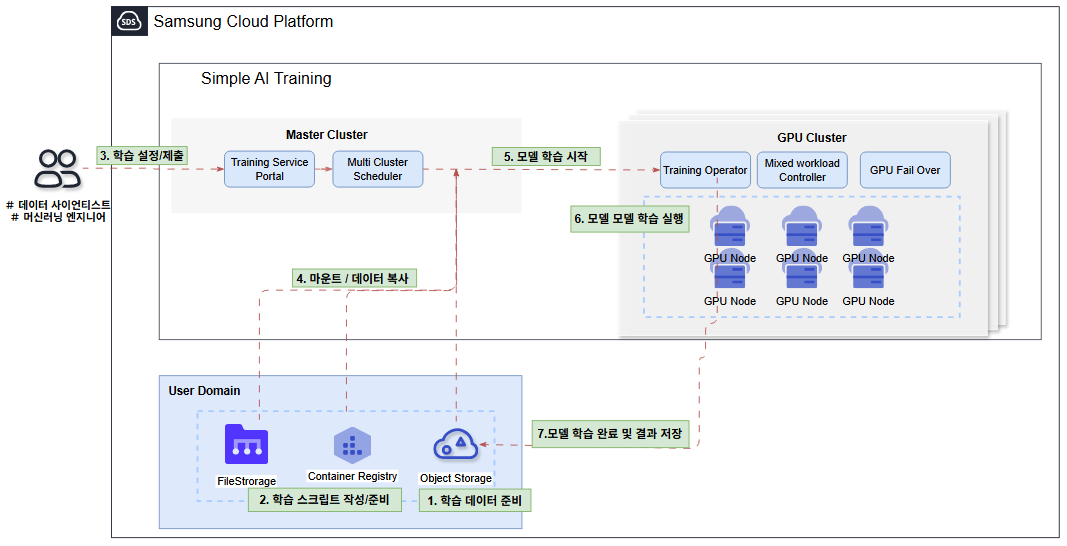
Diagram
Figure. Simple AI Training Diagram

Provided features

Simple AI Training provides the following features.

  • Serverless environment provision: Automate all processes from infrastructure setup, data loading, model training, to result storage, allowing you to focus solely on training.
  • Distributed Training and Warm Pool Support: Automatically distribute large models or massive datasets across multiple instances, and during continuous training jobs, instantly reuse instances to reduce infrastructure provisioning time.
  • Custom Container Support: You can import a user’s Docker container image for training (BYOC: Bring Your Own Container).
  • Model Training Availability: Supports GPU Failover and Checkpointing, enabling smooth model training.
    • GPU Failover: During training, if a GPU error occurs, the system automatically detects and recovers from the fault, preventing interruption caused by the error.
    • Curcurrent Checkpointing: By storing intermediate training results in Object Storage, training can be resumed from the checkpoint if a failure occurs.
  • Safe Data Access: Integrated with the cloud’s data storage (Object Storage), it can process data while maintaining security without worrying about external leaks.
  • Providing Various Pricing Plans: By offering various pricing plans, you can reduce costs and conduct efficient training.
Information
Custom Container feature is scheduled to be available in September 2026.

Provided server

Simple AI Training provides the g2 server type (H100) and the g3 server type (B300). For detailed specifications of the server type, refer to 서버 타입.

CategoryInstance type
g2at.g2v12h1, at.g2v24h2, at.g2v48h4, at.g2v96h8, at.g2.spot
g3at.g3v16b1, at.g3v16b2, at.g3v16b4, at.g3v16b8, at.g3.spot
Table. Simple AI Training provided server

Provision status by region

The regions that provide the Simple AI Training service are as follows.

RegionProvision status
Korea West (kr-west1)Provide
Korea East (kr-east1)Not provided
South Korea South 1 (kr-south1)Not provided
South Korea South 2 (kr-south2)Not provided
South Korea South 3 (kr-south3)Not provided
Table. Simple AI Training regional availability status

Preceding Service

This is a list of services that must be pre‑configured before creating the service. For detailed information, refer to the guide provided for each service and prepare in advance.

Service CategoryserviceDetailed description
StorageFile StorageStorage that enables multiple client servers to share files over a network connection.
StorageObject StorageObject storage that simplifies data storage and retrieval
ContainerContainer RegistryA service that easily stores, manages, and shares container images.
Table. Simple AI Training pre-service

1 - Server type

Simple AI Training is categorized according to the provided GPU type, and the GPU used for Simple AI Training is determined by the server type selected when creating a Training Job. Select the server type according to the specifications of the task you want to run in Simple AI Training. The server types supported by Simple AI Training are as follows.

at.g3v16b1
Category
ExampleDetailed description
Service CategoryatRefers to the Simple AI Training service
Server generationg3Provided server categories and generations
  • English denotes server specifications
    • g: denotes GPU server specifications
  • Numbers denote generations
    • 3 denotes the 3rd generation
CPUv16vCore count
  • v16: Allocated vCore is a virtual core
GPUb1GPU type and quantity
  • In English, it denotes GPU type
    • b: GPU type
  • Numbers denote GPU quantity
    • 8: GPU quantity
Table. Simple AI Training server type format

g2 server type

The g2 server type is a GPU Bare Metal Server that uses NVIDIA H100 SXM GPUs, making it suitable for large-scale high-performance AI computation.

  • Provide 8 NVIDIA Hopper Architecture-based H100 GPUs
  • Provides 1,979 TFLOPS of FP8 Tensor Core performance per GPU and 989 TFLOPS of FP16 Tensor Core performance.
  • Supports up to 96 vCPUs and 2,048 GB of memory
  • Supports up to 1,600 Gb/s NVIDIA InfiniBand RDMA network.
  • Service network up to 100 Gbps
  • 900 GB/s GPU P2P communication via NVSwitch within the node
Instance classificationvCPUMemoryGPULocal Disk
at.g2v12h112234110 Gi
at.g2v24h224468220 Gi
at.g2v48h448936440 Gi
at.g2v96h8961,872880 Gi
at.g2.spot12234110 Gi
Table. Multi-node GPU Cluster > H100 server type

g3 server type

The g3 server type is a GPU Bare Metal Server that uses the NVIDIA B300 SXM GPU, making it suitable not only for large-scale high-performance AI computation but also for LLM inference and AI deployment for generative AI.

  • Provides 8 NVIDIA Blackwell Ultra Architecture-based B300 GPUs
  • Provides 13.5 PFLOPS FP4 Tensor Core and 4.5 PFLOPS FP8 Tensor Core performance per GPU.
  • Supports up to 128 vCPUs and 4,096 GB of memory
  • Supports up to 6,400 Gb/s NVIDIA InfiniBand RDMA network.
  • Service network up to 100 Gbps
  • 1.8 TB/s GPU P2P communication via NVSwitch within a node
Instance classificationvCPUMemoryGPULocal Disk
at.g3v16b116480110 Gi
at.g3v32b232960220 Gi
at.g3v64b4641,920440 Gi
at.g3v128b81283,840880 Gi
at.g3.spot16480110 Gi
Table. Multi-node GPU Cluster > B300 server type

2 - ServiceWatch metric

Simple AI Training sends metrics to ServiceWatch. The metrics provided by default monitoring are data collected at 5‑minute intervals.

Reference
To view metrics in ServiceWatch, see the ServiceWatch guide.

Basic Metrics

The following are the basic metrics for the Simple AI Training namespace. The indicators whose names are displayed in bold below are the key indicators selected from the basic indicators provided by Simple AI Training. The main metrics are used to build service dashboards that are automatically created for each service in ServiceWatch. Each metric guides users via the user guide on which statistical value is meaningful when querying the metric, and among the meaningful statistics, the values displayed in bold are the primary statistics.

In the service dashboard or monitoring tab, you can view key metrics through primary statistical values. Or you can also view the key metrics on the monitoring tab of the Simple AI Training detail page. In ServiceWatch’s metrics menu, you can also view utilization by GPU device.

Performance Item (Metric Name)Detailed descriptionunitmeaningful statistics
CPU UsageAverage number of CPU cores used by the Training Job Pod in the last 5 minutesCores
  • Total
  • Average
  • Maximum
  • Minimum
GPU UtilizationGPU utilization in the Training JobPercent
  • Average
  • Maximum
  • Minimum
Memory UsageMemory currently used in the Training Job PodBytes
  • Total
  • Average
  • Maximum
  • Minimum
Table. Simple AI Training basic metrics