RAG
Building a Personalized RAG Based on SCP Service Information
Build a lightweight RAG (Retrieval-Augmented Generation) application that uses Simple AI Inference and OpenSearch running in a VM to search SCP service information and generate recommended answers based on virtual user profiles. It uses only a Python application, JSONL service documentation, and JSON user profiles, without a separate database or web UI.
Architecture
The following flow retrieves SCP service information and generates a response.

index_products.py generates vectors for service documents and indexes them in OpenSearch, while ask.py generates question vectors, performs KNN search, selects personalized documents, and calls the Chat Completions API.
From the OpenSearch KNN search results, prioritize the preferred categories from the user profile for up to 8 candidate documents, and use up to 3 documents in the response. User profiles are virtual data that only have preferred categories and usage purposes.
Prerequisites
Prepare the following environment.
- Python 3.10 or later and pip
- OpenSearch running in a VM (e.g.,
http://localhost:9200) - Private Endpoints and API Keys for Simple AI Inference
When using a private endpoint, add the VM resource to the allowed access targets when creating a Simple AI Inference. We recommend deploying the VM and Simple AI Inference in the same region. For details, refer to Create a Simple AI Inference and Manage API Keys.
Preparing the Project File
Create the file with the following structure. Each of the following code blocks is a complete file.
rag-product-demo/
├── data/
│   ├── products.jsonl
│   └── personas.json
├── index_products.py
└── ask.py
mkdir -p rag-product-demo/data
cd rag-product-demo
mkdir -p rag-product-demo/data
cd rag-product-demoPackage Installation
Install the required Python packages.
pip install requests opensearch-pypip install requests opensearch-pySCP service information and user profile
data/products.jsonl stores the SCP service documents to search, and data/personas.json stores the personalization conditions. The example uses a small dataset, but you can add services with the same structure.
Service Name: Virtual Server Auto-Scaling
Purpose: Automatically adjusts the number of web application servers in response to traffic fluctuations
Features: Scales Virtual Servers up or down based on policies or schedules, and can be integrated with Load Balancers.
{"id":"object-storage","name":"Object Storage","category":"Storage","source":"SCP Service Catalog / Object Storage","text":"Service Name: Object Storage\nPurpose: Store unstructured data such as images, documents, and logs\nFeatures: Store large volumes of data and leverage S3 API compatibility and access control features."}
Service Name: Load Balancer
Purpose: Distributes requests across multiple application servers
Features: Automatically distributes traffic to available servers during traffic spikes or server failures.
Service Name: Search Engine
Purpose: Configure search and analytics clusters based on OpenSearch or Elasticsearch
Features: Automates cluster creation and configuration in the Console and supports OpenSearch Dashboards.
Service Name: Simple AI Inference
Purpose: AI applications that use LLM models in API form
Features: Uses an OpenAI-compatible API and allows you to select a Public or Private Endpoint.
Service Name: Log Transmission
Purpose: Collects event logs from security devices and transmits them to the required areas
Features: Collects, stores, and transmits logs from firewalls, IPS, DDoS Protection, and other systems in real time.
{"id":"backup","name":"Backup","category":"Backup","source":"SCP Service Catalog / Backup","text":"Service Name: Backup\nPurpose: Back up data and restore it when needed\nFeatures: You can configure backup policies that include backup targets, frequency, and retention periods."}
Service Name: Archive Storage
Purpose: Store logs and documents that require long-term retention
Features: Archive Object Storage data and cost-effectively store data that is not frequently accessed.
Service Name: Virtual Server Auto-Scaling
Purpose: Automatically adjusts the number of web application servers in response to traffic fluctuations
Features: Scales Virtual Servers up or down based on policies or schedules, and can be integrated with Load Balancers.
{"id":"object-storage","name":"Object Storage","category":"Storage","source":"SCP Service Catalog / Object Storage","text":"Service Name: Object Storage\nPurpose: Store unstructured data such as images, documents, and logs\nFeatures: Store large volumes of data and leverage S3 API compatibility and access control features."}
Service Name: Load Balancer
Purpose: Distributes requests across multiple application servers
Features: Automatically distributes traffic to available servers during traffic spikes or server failures.
Service Name: Search Engine
Purpose: Configure search and analytics clusters based on OpenSearch or Elasticsearch
Features: Automates cluster creation and configuration in the Console and supports OpenSearch Dashboards.
Service Name: Simple AI Inference
Purpose: AI applications that use LLM models in API form
Features: Uses an OpenAI-compatible API and allows you to select a Public or Private Endpoint.
Service Name: Log Transmission
Purpose: Collects event logs from security devices and transmits them to the required areas
Features: Collects, stores, and transmits logs from firewalls, IPS, DDoS Protection, and other systems in real time.
{"id":"backup","name":"Backup","category":"Backup","source":"SCP Service Catalog / Backup","text":"Service Name: Backup\nPurpose: Back up data and restore it when needed\nFeatures: You can configure backup policies that include backup targets, frequency, and retention periods."}
Service Name: Archive Storage
Purpose: Store logs and documents that require long-term retention
Features: Archive Object Storage data and cost-effectively store data that is not frequently accessed.{
"startup-commerce": {
"name": "Initial Online Shopping Mall",
"description": "Operates an online shopping mall with significant traffic fluctuations, prioritizing scalability and cost efficiency."
"categories": ["Compute", "Storage", "Network"]
},
"secure-enterprise": {
"name": "Security-First Enterprise",
"Minimize external exposure and prioritize internal document search and security monitoring."
"categories": ["AI/ML", "Search", "Security", "Network"]
},
"
"name": "Long-term Data Retention Organization",
"Preserve logs and documentation for long-term retention, prioritizing recoverability."
"categories": ["Storage", "Backup"]
}
}{
"startup-commerce": {
"name": "Initial Online Shopping Mall",
"description": "Operates an online shopping mall with significant traffic fluctuations, prioritizing scalability and cost efficiency."
"categories": ["Compute", "Storage", "Network"]
},
"secure-enterprise": {
"name": "Security-First Enterprise",
"Minimize external exposure and prioritize internal document search and security monitoring."
"categories": ["AI/ML", "Search", "Security", "Network"]
},
"
"name": "Long-term Data Retention Organization",
"Preserve logs and documentation for long-term retention, prioritizing recoverability."
"categories": ["Storage", "Backup"]
}
}Indexing SCP service information
The following code vectorizes each SCP service document using the Embedding API and loads them into OpenSearch.
import json
import os
from pathlib import Path

import requests
from opensearchpy import OpenSearch

INDEX_NAME = "product-rag-demo"
DATA_FILE = Path("data/products.jsonl")


def required(name):
    value = os.getenv(name)
    if not value:
        raise SystemExit(f"Set the {name} environment variable.")
    return value


SAI_ENDPOINT = required("SAI_ENDPOINT").rstrip("/")
SAI_API_KEY = required("SAI_API_KEY")
EMBEDDING_MODEL = required("SAI_EMBEDDING_MODEL")


def sai_headers():
    return {
        "Authorization": f"bearer {SAI_API_KEY}",
        "Content-Type": "application/json",
    }


def create_embedding(text):
    response = requests.post(
        f"{SAI_ENDPOINT}/v1/embeddings",
        headers=sai_headers(),
        json={
            "model": EMBEDDING_MODEL,
            "input": text,
            "encoding_format": "float",
        },
        timeout=60,
    )
    response.raise_for_status()
    return response.json()["data"][0]["embedding"]


def get_opensearch_client():
    return OpenSearch(
        hosts=[{
            "host": os.getenv("OPENSEARCH_HOST", "localhost"),
            "port": int(os.getenv("OPENSEARCH_PORT", "9200")),
        }],
        use_ssl=False,
        verify_certs=False,
    )


def load_products():
    with DATA_FILE.open(encoding="utf-8") as file:
        return [json.loads(line) for line in file if line.strip()]


def create_index(client, dimension):
    if client.indices.exists(index=INDEX_NAME):
        client.indices.delete(index=INDEX_NAME)

    client.indices.create(
        index=INDEX_NAME,
        body={
            "settings": {"index": {"knn": True}},
            "mappings": {
                "properties": {
                    "id": {"type": "keyword"},
                    "name": {"type": "text"},
                    "category": {"type": "keyword"},
                    "source": {"type": "keyword"},
                    "text": {"type": "text"},
                    "embedding": {
                        "type": "knn_vector",
                        "dimension": dimension,
                    },
                }
            },
        },
    )


def main():
    products = load_products()
    if not products:
        raise SystemExit("No service information available.")

    first_embedding = create_embedding(products[0]["text"])
    client = get_opensearch_client()
    create_index(client, len(first_embedding))

    for position, product in enumerate(products):
        embedding = first_embedding if position == 0 else create_embedding(product["text"])
        document = {**product, "embedding": embedding}
        client.index(index=INDEX_NAME, id=product["id"], body=document)
        print(f"Indexing complete: {product['name']}")

    client.indices.refresh(index=INDEX_NAME)
    print(f"Indexed a total of {len(products)} services.")


if __name__ == "__main__":
    main()
import json
import os
from pathlib import Path
import requests
from opensearchpy import OpenSearch
INDEX_NAME = "product-rag-demo"
DATA_FILE = Path("data/products.jsonl")
def required(name):
value = os.getenv(name)
if not value:
raise SystemExit(f"Set the {name} environment variable.")
return value
SAI_ENDPOINT = required("SAI_ENDPOINT").rstrip("/")
SAI_API_KEY = required("SAI_API_KEY")
EMBEDDING_MODEL = required("SAI_EMBEDDING_MODEL")
def sai_headers():
return {
"Authorization": f"bearer {SAI_API_KEY}",
"Content-Type": "application/json",
}
def create_embedding(text):
response = requests.post(
f"{SAI_ENDPOINT}/v1/embeddings",
headers=sai_headers(),
json={
"model": EMBEDDING_MODEL,
"input": text,
"encoding_format": "float",
},
timeout=60,
)
response.raise_for_status()
return response.json()["data"][0]["embedding"]
def get_opensearch_client():
return OpenSearch(
hosts=[{
"host": os.getenv("OPENSEARCH_HOST", "localhost"),
"port": int(os.getenv("OPENSEARCH_PORT", "9200")),
}],
use_ssl=False,
verify_certs=False,
)
def load_products():
with DATA_FILE.open(encoding="utf-8") as file:
return [json.loads(line) for line in file if line.strip()]
def create_index(client, dimension):
if client.indices.exists(index=INDEX_NAME):
client.indices.delete(index=INDEX_NAME)
client.indices.create(
index=INDEX_NAME,
body={
"settings": {"index": {"knn": True}},
"mappings": {
"properties": {
"id": {"type": "keyword"},
"name": {"type": "text"},
"category": {"type": "keyword"},
"source": {"type": "keyword"},
"text": {"type": "text"},
"embedding": {
"type": "knn_vector",
"dimension": dimension,
},
}
},
},
)
def main():
products = load_products()
if not products:
raise SystemExit("No service information available.")
first_embedding = create_embedding(products[0]["text"])
client = get_opensearch_client()
create_index(client, len(first_embedding))
for position, product in enumerate(products):
embedding = first_embedding if position == 0 else create_embedding(product["text"])
document = {**product, "embedding": embedding}
client.index(index=INDEX_NAME, id=product["id"], body=document)
print(f"Indexing complete: {product['name']}")
client.indices.refresh(index=INDEX_NAME)
print(f"Indexed a total of {len(products)} services.")
if __name__ == "__main__":
main()Querying Personalized Service Information
The following code vectorizes the user’s query and finds similar service documents in OpenSearch. Pass the documents, prioritized by the user profile’s preferred categories, along with the user’s context to the Chat Completions API to generate the final response.
import argparse
import json
import os
from pathlib import Path

import requests
from opensearchpy import OpenSearch

INDEX_NAME = "product-rag-demo"
PERSONAS_FILE = Path("data/personas.json")
CANDIDATE_COUNT = 8
ANSWER_DOCUMENT_COUNT = 3


def required(name):
    value = os.getenv(name)
    if not value:
        raise SystemExit(f"Set the {name} environment variable.")
    return value


SAI_ENDPOINT = required("SAI_ENDPOINT").rstrip("/")
SAI_API_KEY = required("SAI_API_KEY")
EMBEDDING_MODEL = required("SAI_EMBEDDING_MODEL")
CHAT_MODEL = required("SAI_CHAT_MODEL")


def sai_headers():
    return {
        "Authorization": f"bearer {SAI_API_KEY}",
        "Content-Type": "application/json",
    }


def create_embedding(text):
    response = requests.post(
        f"{SAI_ENDPOINT}/v1/embeddings",
        headers=sai_headers(),
        json={"model": EMBEDDING_MODEL, "input": text, "encoding_format": "float"},
        timeout=60,
    )
    response.raise_for_status()
    return response.json()["data"][0]["embedding"]


def get_opensearch_client():
    return OpenSearch(
        hosts=[{
            "host": os.getenv("OPENSEARCH_HOST", "localhost"),
            "port": int(os.getenv("OPENSEARCH_PORT", "9200")),
        }],
        use_ssl=False,
        verify_certs=False,
    )


def search_candidates(client, question_vector):
    response = client.search(
        index=INDEX_NAME,
        body={
            "size": CANDIDATE_COUNT,
            "query": {
                "knn": {
                    "embedding": {
                        "vector": question_vector,
                        "k": CANDIDATE_COUNT,
                    }
                }
            },
        },
    )
    return [hit["_source"] for hit in response["hits"]["hits"]]


def select_personalized_documents(candidates, persona):
    preferred_categories = set(persona["categories"])
    preferred = [
        document for document in candidates
        if document["category"] in preferred_categories
    ]
    remaining = [document for document in candidates if document not in preferred]
    return (preferred + remaining)[:ANSWER_DOCUMENT_COUNT]


def create_answer(persona, question, documents):
    context = "\n\n".join(
        f"[Document {number}] {document['name']}\n{document['text']}\nSource: {document['source']}"
        for number, document in enumerate(documents, start=1)
    )
    prompt = f"""User situation: {persona['description']}
Preferred service categories: {', '.join(persona['categories'])}

Retrieved SCP service information:
{context}

Question: {question}

Answer in Korean using only the information in the document above. Recommend services tailored to the user's situation, and display the [document number] after the recommendation reason. Do not estimate prices, contract terms, or features that are not in the documentation.

    payload = {
        "model": CHAT_MODEL,
        "messages": [
            {"role": "system", "content": "You are an AI assistant that helps with SCP service information inquiries."},
            {"role": "user", "content": prompt},
        ],
        "temperature": 0.2,
    }
    response = requests.post(
        f"{SAI_ENDPOINT}/v1/chat/completions",
        headers=sai_headers(),
        json=payload,
        timeout=60,
    )
    response.raise_for_status()

    content = response.json()["choices"][0]["message"]["content"]
    if not content:
        raise RuntimeError("Failed to generate a response.         Check the model settings.")
    return content


def main():
    personas = json.loads(PERSONAS_FILE.read_text(encoding="utf-8"))
    parser = argparse.ArgumentParser()
    parser.add_argument("--persona", required=True, choices=sorted(personas))
    parser.add_argument("--question", required=True)
    args = parser.parse_args()

    persona = personas[args.persona]
    client = get_opensearch_client()
    candidates = search_candidates(client, create_embedding(args.question))
    documents = select_personalized_documents(candidates, persona)
    answer = create_answer(persona, args.question, documents)

    print(f"\n[User Profile] {persona['name']}")
    print("[Search Document]")
    for number, document in enumerate(documents, start=1):
        print(f"{number}.         {document['name']} ({document['source']})")
    print(f"\n[Answer]\n{answer}")


if __name__ == "__main__":
    main()
import argparse
import json
import os
from pathlib import Path
import requests
from opensearchpy import OpenSearch
INDEX_NAME = "product-rag-demo"
PERSONAS_FILE = Path("data/personas.json")
CANDIDATE_COUNT = 8
ANSWER_DOCUMENT_COUNT = 3
def required(name):
value = os.getenv(name)
if not value:
raise SystemExit(f"Set the {name} environment variable.")
return value
SAI_ENDPOINT = required("SAI_ENDPOINT").rstrip("/")
SAI_API_KEY = required("SAI_API_KEY")
EMBEDDING_MODEL = required("SAI_EMBEDDING_MODEL")
CHAT_MODEL = required("SAI_CHAT_MODEL")
def sai_headers():
return {
"Authorization": f"bearer {SAI_API_KEY}",
"Content-Type": "application/json",
}
def create_embedding(text):
response = requests.post(
f"{SAI_ENDPOINT}/v1/embeddings",
headers=sai_headers(),
json={"model": EMBEDDING_MODEL, "input": text, "encoding_format": "float"},
timeout=60,
)
response.raise_for_status()
return response.json()["data"][0]["embedding"]
def get_opensearch_client():
return OpenSearch(
hosts=[{
"host": os.getenv("OPENSEARCH_HOST", "localhost"),
"port": int(os.getenv("OPENSEARCH_PORT", "9200")),
}],
use_ssl=False,
verify_certs=False,
)
def search_candidates(client, question_vector):
response = client.search(
index=INDEX_NAME,
body={
"size": CANDIDATE_COUNT,
"query": {
"knn": {
"embedding": {
"vector": question_vector,
"k": CANDIDATE_COUNT,
}
}
},
},
)
return [hit["_source"] for hit in response["hits"]["hits"]]
def select_personalized_documents(candidates, persona):
preferred_categories = set(persona["categories"])
preferred = [
document for document in candidates
if document["category"] in preferred_categories
]
remaining = [document for document in candidates if document not in preferred]
return (preferred + remaining)[:ANSWER_DOCUMENT_COUNT]
def create_answer(persona, question, documents):
context = "\n\n".join(
f"[Document {number}] {document['name']}\n{document['text']}\nSource: {document['source']}"
for number, document in enumerate(documents, start=1)
)
prompt = f"""User situation: {persona['description']}
Preferred service categories: {', '.join(persona['categories'])}
Retrieved SCP service information:
{context}
Question: {question}
Answer in Korean using only the information in the document above. Recommend services tailored to the user's situation, and display the [document number] after the recommendation reason. Do not estimate prices, contract terms, or features that are not in the documentation.
payload = {
"model": CHAT_MODEL,
"messages": [
{"role": "system", "content": "You are an AI assistant that helps with SCP service information inquiries."},
{"role": "user", "content": prompt},
],
"temperature": 0.2,
}
response = requests.post(
f"{SAI_ENDPOINT}/v1/chat/completions",
headers=sai_headers(),
json=payload,
timeout=60,
)
response.raise_for_status()
content = response.json()["choices"][0]["message"]["content"]
if not content:
raise RuntimeError("Failed to generate a response. Check the model settings.")
return content
def main():
personas = json.loads(PERSONAS_FILE.read_text(encoding="utf-8"))
parser = argparse.ArgumentParser()
parser.add_argument("--persona", required=True, choices=sorted(personas))
parser.add_argument("--question", required=True)
args = parser.parse_args()
persona = personas[args.persona]
client = get_opensearch_client()
candidates = search_candidates(client, create_embedding(args.question))
documents = select_personalized_documents(candidates, persona)
answer = create_answer(persona, args.question, documents)
print(f"\n[User Profile] {persona['name']}")
print("[Search Document]")
for number, document in enumerate(documents, start=1):
print(f"{number}. {document['name']} ({document['source']})")
print(f"\n[Answer]\n{answer}")
if __name__ == "__main__":
main()Run
Set the Simple AI Inference endpoint, API key, and model ID to use as environment variables.
For the SAI_ENDPOINT, SAI_EMBEDDING_MODEL, and SAI_CHAT_MODEL values used in the code, refer to Serverless Inference detailed information and Model detailed information.
- Embedding API:
{Simple AI Inference private endpoint}/v1/embeddings - Chat Completions API:
{Simple AI Inference private endpoint}/v1/chat/completions SAI_EMBEDDING_MODEL:{Embedding model ID confirmed in the console}SAI_CHAT_MODEL:{Chat model ID confirmed in the console}
export SAI_ENDPOINT="{Simple AI Inference private endpoint}"
export SAI_API_KEY="sai-..."
export SAI_EMBEDDING_MODEL="{Embedding model ID confirmed in the console}"
export SAI_CHAT_MODEL="{Chat model ID confirmed in the console}"

# Configure this only if the VM's OpenSearch is not running on localhost:9200.
export OPENSEARCH_HOST="localhost"
export OPENSEARCH_PORT="9200"
export SAI_ENDPOINT="{Simple AI Inference private endpoint}"
export SAI_API_KEY="sai-..."
export SAI_EMBEDDING_MODEL="{Embedding model ID confirmed in the console}"
export SAI_CHAT_MODEL="{Chat model ID confirmed in the console}"
# Configure this only if the VM's OpenSearch is not running on localhost:9200.
export OPENSEARCH_HOST="localhost"
export OPENSEARCH_PORT="9200"Run index_products.py to vectorize the SCP service documentation and store it in OpenSearch. If the product-rag-demo index already exists, delete the existing index and then create it again.
python index_products.pypython index_products.pyAfter vector document storage is complete, the processing results by service and the total number of items are output as follows.
Indexing complete: Virtual Server Auto-Scaling
Indexing complete: Object Storage
Indexing complete: Load Balancer
Indexing complete: Search Engine
Indexing complete: Simple AI Inference
Indexing complete: Log Transmission
Indexing complete: Backup
Indexing complete: Archive Storage
Indexed a total of 8 services.
Indexing complete: Virtual Server Auto-Scaling
Indexing complete: Object Storage
Indexing complete: Load Balancer
Indexing complete: Search Engine
Indexing complete: Simple AI Inference
Indexing complete: Log Transmission
Indexing complete: Backup
Indexing complete: Archive Storage
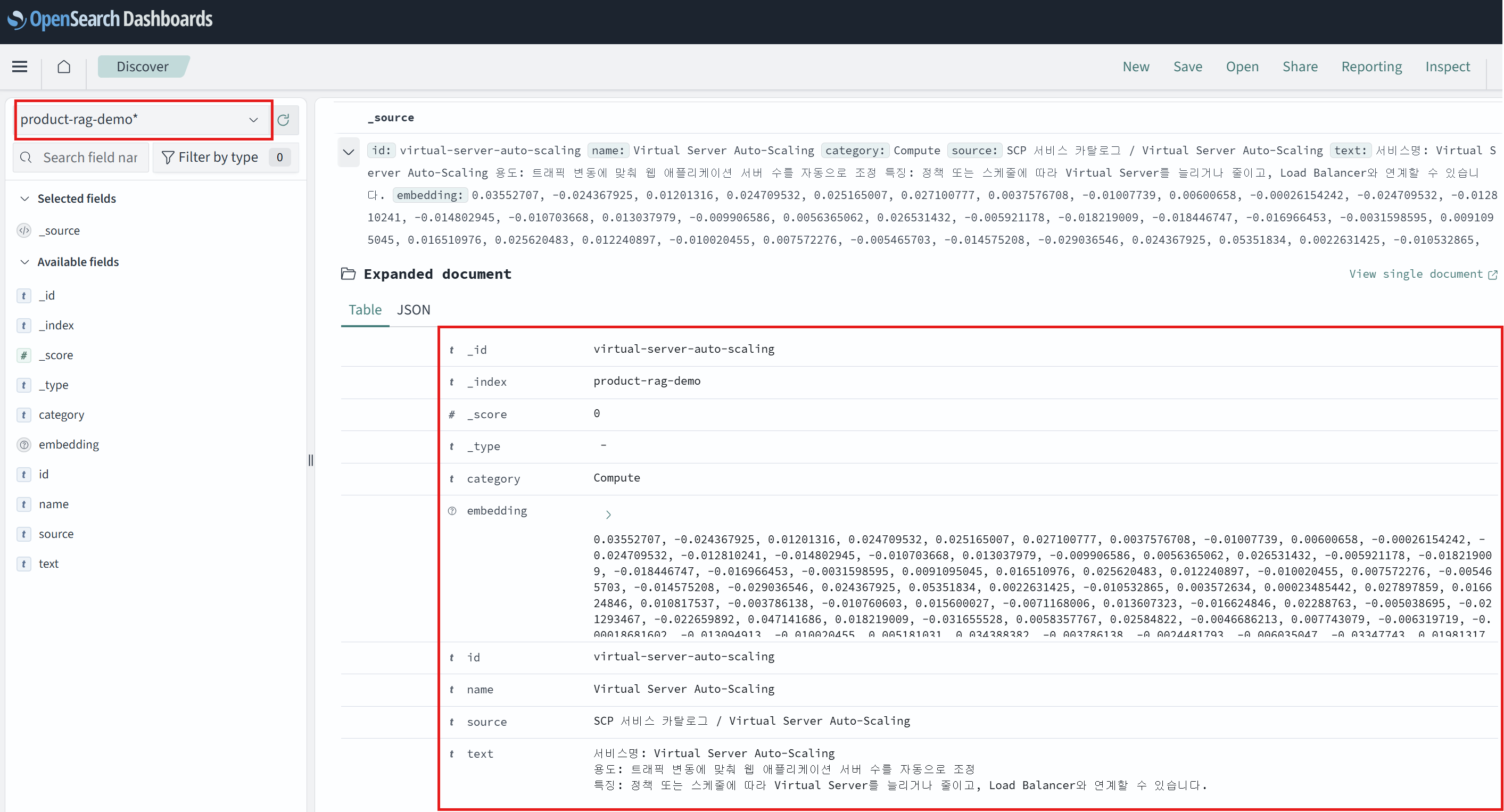
Indexed a total of 8 services.If you have access to OpenSearch Dashboards, you can select product-rag-demo* in Discover to view the service information and embedding vectors stored in the index.
Try running the question for each user profile.
python ask.py \
  --persona startup-commerce \
  --question "Please recommend a service suitable for an online shopping mall with high traffic fluctuations."

python ask.py \
  --persona secure-enterprise \
  --question "What service is suitable for configuring internal document search while minimizing external exposure?"
python ask.py \
--persona startup-commerce \
--question "Please recommend a service suitable for an online shopping mall with high traffic fluctuations."
python ask.py \
--persona secure-enterprise \
--question "What service is suitable for configuring internal document search while minimizing external exposure?"Example Output
The following is an example of running the above command once. The phrasing of the generated response may vary depending on the selected model.
[User Profile] Initial Online Shopping Mall
[Search Document]
1. Virtual Server Auto-Scaling (SCP Service Catalog / Virtual Server Auto-Scaling)
2. Load Balancer (SCP Service Catalog / Load Balancer)
3. Archive Storage (SCP Service Catalog / Archive Storage)

[Answer]
The following services are suitable for operating and scaling an online shopping mall with significant traffic fluctuations, prioritizing cost efficiency:

- **Virtual Server Auto-Scaling**: You can scale the number of servers up or down based on policies or schedules to handle traffic fluctuations. - [Document 1]
- **Load Balancer**: You can handle traffic spikes and distribute requests across multiple application servers to improve service availability. - [Document 2]
- **Archive Storage**: Ideal for cost-efficiency-first scenarios, as it provides cost-effective storage for logs and documents that are not frequently accessed. - [Document 3]
[User Profile] Initial Online Shopping Mall
[Search Document]
1. Virtual Server Auto-Scaling (SCP Service Catalog / Virtual Server Auto-Scaling)
2. Load Balancer (SCP Service Catalog / Load Balancer)
3. Archive Storage (SCP Service Catalog / Archive Storage)
[Answer]
The following services are suitable for operating and scaling an online shopping mall with significant traffic fluctuations, prioritizing cost efficiency:
- **Virtual Server Auto-Scaling**: You can scale the number of servers up or down based on policies or schedules to handle traffic fluctuations. - [Document 1]
- **Load Balancer**: You can handle traffic spikes and distribute requests across multiple application servers to improve service availability. - [Document 2]
- **Archive Storage**: Ideal for cost-efficiency-first scenarios, as it provides cost-effective storage for logs and documents that are not frequently accessed. - [Document 3][User Profile] Security-Focused Enterprise
[Search Document]
1. Search Engine (SCP Service Catalog / Search Engine)
2. Simple AI Inference (SCP Service Catalog / Simple AI Inference)
3. Log Transmission (SCP Service Catalog / Log Transmission)
[Answer]
To configure internal document search while minimizing external exposure, we recommend **Simple AI Inference** as the first choice. You can call the model API by selecting a Private Endpoint. [Document 2]
You can configure a **Search Engine** as the document search repository. You can configure an OpenSearch-based cluster to use as a search and analytics environment. [Document 1]
To collect security device event logs and transmit them to the required destinations, you can additionally use **Log Transmission**. [Document 3][User Profile] Security-Focused Enterprise
[Search Document]
1. Search Engine (SCP Service Catalog / Search Engine)
2. Simple AI Inference (SCP Service Catalog / Simple AI Inference)
3. Log Transmission (SCP Service Catalog / Log Transmission)
[Answer]
To configure internal document search while minimizing external exposure, we recommend **Simple AI Inference** as the first choice. You can call the model API by selecting a Private Endpoint. [Document 2]
You can configure a **Search Engine** as the document search repository. You can configure an OpenSearch-based cluster to use as a search and analytics environment. [Document 1]
To collect security device event logs and transmit them to the required destinations, you can additionally use **Log Transmission**. [Document 3]Personalization prioritizes preferred categories. The retrieved documents and answers may vary based on vector similarity to the query. If there are insufficient preferred category candidates, services from other categories may also be included.
Scaling to Production
When scaling to a production environment, consider the following.
- If you have documents that require permissions, apply the permission filter at the OpenSearch search stage, not after receiving the search results.
- For frequently changing information such as pricing, inventory, and contract availability, query a separate API or business system instead of RAG documents.
- As the number of service documents and search candidates grows, add the Rerank API to rerank the top documents.
For the request formats of the Embedding API and the Chat Completions API, refer to Embedding API and Chat Completions API, respectively.