This is the multi-page printable view of this section. Click here to print.
Simple AI Inference
- 1: Overview
- 1.1: ServiceWatch metric
- 2: How-to Guides
- 3: References
- 3.1: API Reference
- 4: Data Privacy
- 5: Release Note
1 - Overview
Service Overview
Simple AI Inference is a serverless service that provides various global foundation models as APIs, offering public or private environments so that LLMs can be used on internal Samsung Cloud Platform resources or externally. By using Simple AI Inference, you can use multiple LLM models through the same API and improve productivity in AI application service development. It also supports compatibility with OpenAI and the LangChain SDK, enabling easy integration with existing development environments and frameworks.
Features
- Convenient LLM Model Usage: As a fully managed serverless service, you can use multiple LLM models through the same API.
- Efficient Cost Management: Costs are charged based on the actual usage of input (Input) and output (Output) tokens.
- Stable Service Provision: We provide stable services through traffic control (TPM/RTM).
- Enterprise security provided: Data is securely protected in a rigorous security environment and is not used for external model training.
Service architecture diagram
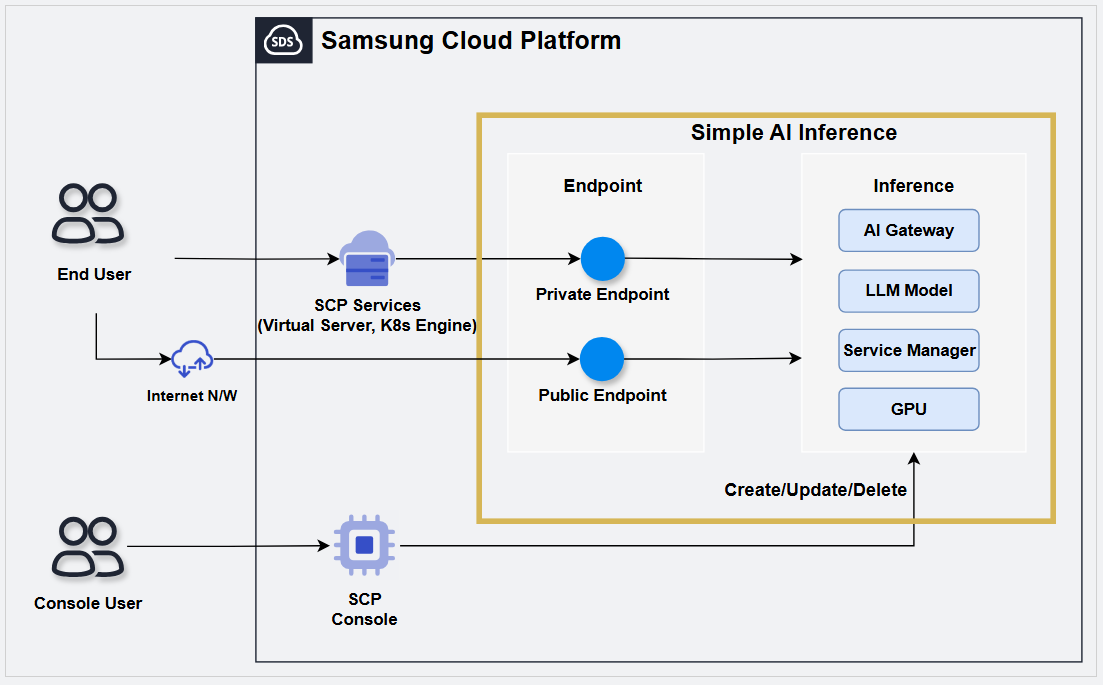
Provided Features
Simple AI Inference provides the following features.
Check convenient LLM model
- You can easily view the features and primary use cases of LLM models provided through the LLM model catalog.
- You can view and test the provided LLM model directly on the console screen using PlayGround.ReferencePlayGround is scheduled to be offered after September 2026.
Shared Use of LLM Model Account: If you request a model to use in Simple AI Inference, all users within the same Account can use it.
Serverless Service Provision : Users can request the desired model via an API and use it immediately without managing resources, and they pay only for what they use.
Public/Private endpoint provision: Depending on the user’s inference usage pattern, you can choose to use either a Public or Private endpoint.
Stable Service Provision: We provide a stable service environment through traffic control (TPM/RPM).
Provided model
The LLM models provided by Simple AI Inference are as follows.
| Model name | Application | Input type | TPM | RPM | Context Size | Image input limit count |
|---|---|---|---|---|---|---|
| Qwen3.6-27B | Text, Agent | Text, Image | 1,000,000 | 100 | 262,144 | 8 |
| gemma-4-31B-it | Text, Agent | Text, Image | 1,000,000 | 100 | 262,144 | 8 |
| gpt-oss-120b | Text | Text | 1,000,000 | 100 | 131,072 | - |
| Llama-Guard-4-12B | Security | Text, Image | 1,000,000 | 250 | 307,200 | 8 |
| Qwen3-VL-Embedding-8B | embedding | Text, Image | 1,000,000 | 250 | 262,144 | 8 |
| Qwen3-VL-Reranker-8B | reranker | Text, Image | 1,000,000 | 250 | 262,144 | 8 |
Provision status by region
The regions that provide Simple AI Inference service are as follows.
| Region | Provision status |
|---|---|
| Korea West (kr-west1) | Provide |
| Korea East (kr-east1) | Not provided |
| South Korea 1 (kr-south1) | Not provided |
| South Korea South 2 (kr-south2) | Not provided |
| South Korea South 3 (kr-south3) | Not provided |
Preceding Service
There are no services that need to be pre-configured before creating this service.
1.1 - ServiceWatch metric
Simple AI Inference sends metrics to ServiceWatch. The metrics provided by default monitoring are data collected at 5‑minute intervals.
Basic Metrics
The following are the basic metrics for the Simple AI Inference namespace. The indicators whose names are displayed in bold below are the key indicators selected among the default indicators provided by Simple AI Inference. The key metrics are used to build service dashboards that are automatically created for each service in ServiceWatch. Each metric provides guidance in the user guide on which statistical values are meaningful when querying that metric, and among the meaningful statistics, the values shown in bold are the primary statistics.
In the service dashboard or monitoring tab, you can view key metrics through primary statistical values. Or you can also view the key metrics on the monitoring tab of the Simple AI Inference detail page. You can also view the usage rate per GPU device in the ServiceWatch metrics menu.
| Performance item (metric name) | Detailed description | unit | meaningful statistics |
|---|---|---|---|
| Model Total Tokens | Model token usage (total) | Count |
|
| Model Request Server Error | Number of model request failures (server error) | Count |
|
| Model Input Tokens | Model token usage (input) | Count |
|
| Model Request Throttled | Model request limit count (request quota exceeded) | Count |
|
| Model Request Client Error | Model request failure count (client error) | Count |
|
| Model Output Tokens | Model token usage (output) | Count |
|
| Model Cached Tokens | Model token usage (cache) | Count |
|
| Model Request Prompt Rejected | Number of model request rejections (prompt review) | Count |
|
| Model Request Success | Number of successful model requests | Count |
|
2 - How-to Guides
Create Simple AI Inference
To use Simple AI Inference, you must first create an Inference. To create an inference, follow these steps.
Click the All Services > AI-ML > Simple AI Inference menu. 1. Go to the Service Home page of Simple AI Inference.
Service Home on the page, click the Create Simple AI Inference button. 2. Navigate to the Create Serverless Inference page.
Serverless Inference creation page, enter the information required to create the service and select detailed options.
- In the Service Information Input area, select the options required to create the service.
Category RequiredDetailed description Inference service name Required Enter Serverless Inference service name - Enter using lowercase English letters and numbers, 3 ~ 25 characters
Endpoint Required Select external access for Simple AI Inference - Private: Use only private endpoint access control
- Private&Public: Use both private and public endpoint access control
Private endpoint access control Selection Add resources within Samsung Cloud Platform and allow access only to those resources - Private Access Allowed Resource: Select the resource to grant access to
- Click the Add button to select the resource to grant access to
- Select the resource to delete from the resource list, then click the Delete button to remove it
- If no resources are added, access is granted to all resources on subnets within the same region
- Can be modified after applying for a Serverless endpoint
Public endpoint access control Selection Set whether to use public endpoint access control - Enabled if set, you can add IPs or resources that are allowed access
- Public Access Allowed IP: After entering the IP range to allow access in CIDR format or as an IP address, you can add it by clicking the Add button
- Up to 100 entries can be added
- If not used, access is allowed for all IPs
- Can be modified after applying for a Serverless endpoint
Table. Serverless Inference Service Information Input ItemsCautionIf you do not use public endpoint access control or set it to the entire IP range (Any, 0.0.0.0/0), the registry can be exposed to security attacks such as external scanning and hacking. - In the Additional Information Input area, enter or select the required information.
Category Required statusDetailed description tag Selection Add Tag - Up to 50 per resource can be added
- After clicking the Add Tag button, enter or select Key, Value values
Table. Serverless Inference additional information input fields
- In the Service Information Input area, select the options required to create the service.
Summary Verify the detailed information and estimated charges generated in the panel, then click the Create button.
When the popup notifying creation opens, click the Confirm button. 5. The creation request has been completed.
- When creation is complete, check the created items on the Serverless Inference List page.
Check usage by LLM model
On the Service Home page of Simple AI Inference, you can view the list of LLMs and token usage per model.
- All Services > AI-ML > Simple AI Inference Click the menu. 1. Go to the Service Home page of Simple AI Inference.
- Check the per-model usage of LLMs in the LLM Model Usage list on the dashboard of Service Home.
Category Detailed description Model name LLM name - clicking the name moves to the Report tab on the model’s detail page
Model type LLM type - information for each model, see Provided model
Token usage (1 Week) Token usage for the past week as of today Table. Simple AI Inference LLM model usage items
View Serverless Inference details
Follow these steps to view detailed information about Serverless Inference.
All Services > AI-ML > Simple AI Inference Click the menu. 1. Go to the Service Home page of Simple AI Inference.
On the Service Home page, click the Serverless Inference menu. 2. Serverless Inference List Go to the page.
Item Explanation Create Service Serverless Inference can be created - When the button is clicked, navigate to the Serverless Inference creation page
- For creation method, see Create Simple AI Inference
Inference service name Serverless Inference name Model ID Model ID value - When the Model ID is clicked, navigate to the detailed page of that model
- For detailed information about the model, see View model detailed information
Model name Model Name - When clicking the Model ID, navigate to the model’s detail page
- For detailed information about the model, see View model detailed information
Planned model termination date Model’s scheduled end-of-service date Latency Average response time Throughput The average number of tokens the model generates per second Uptime System uptime ratio that allows the system to operate normally without service interruption and handle user requests - Green: 95% or higher
- Yellow: 80% or higher ~ less than 95%
- Red: less than 80%
Service cancellation Serverless Inference can be terminated - When the button is clicked, navigate to the Serverless Inference termination page
- For termination instructions, see Terminate Inference
Table. Serverless Inference list informationReferenceClicking Model ID or Model name takes you to the Model Catalog’s model detail page, where you can view the model’s detailed information.Serverless Inference List page, click the Inference service name to view detailed information. 3. Serverless Inference Details Go to the page.
- Serverless Inference Detailed page consists of Details, Report, Tags, Job History tabs.
Detailed Information
Serverless Inference List page lets you view detailed information of the selected resource and modify the information if necessary.
| Category | Detailed description |
|---|---|
| service | Service Name |
| Resource Type | Resource Type |
| SRN | Unique resource ID in Samsung Cloud Platform |
| Resource name | Resource Name |
| Resource ID | Unique resource ID in the service |
| Constructor | User who created the service |
| Creation Date/Time | Service creation date and time |
| Modifier | User who edited the service information |
| Modification date and time | Date and time the service information was modified |
| Endpoint | External access methods for Simple AI Inference
|
| Private endpoint | Private endpoint value
|
| Public endpoint | Public endpoint value
|
| Private endpoint access control | Information about resources with private access allowed
|
| Public endpoint access control | Publicly accessible IP and resource information
|
Report
On the Serverless Inference List page, you can view the daily LLM call count and token usage for the selected resource.
| Category | Detailed description |
|---|---|
| Search filter | Select items to view in the report
|
| Number of calls | Display the number of calls as a graph for the selected period |
| Total call count | Provide the number of calls per model during the query period. |
| Token usage | Display Input and Output token usage as a graph over the selected period |
| Total token count | Display the total token usage during the query period, separated into Input and Output. |
| Average number of tokens per request | Display the average number of tokens used for LLM calls during the query period, separated into Input and Output. |
Tag
On the Serverless Inference List page, you can view the tag information of the selected resource, and you can add, modify, or delete it.
| Category | Detailed description |
|---|---|
| Tag List | Tag list
|
Job History
You can view the operation history of the selected resource on the Serverless Inference List page.
| Category | Detailed description |
|---|---|
| Task History List | Resource change history
|
View model detailed information
You can view the models provided by Simple AI Inference and their detailed information. To view the model details, follow these steps.
- All Services > AI-ML > Simple AI Inference Click the menu. 1. Go to the Service Home page of Simple AI Inference.
- On the Service Home page, click the Model Catalog menu. 2. Navigate to the Model Catalog page.
- On the Model Catalog page, click the model whose detailed information you want to view. 3. Model Catalog Navigate to the detailed page.
Item Explanation License Click the button to view the model’s license information. Overview Basic description of the model Sales criteria Model developer Category Scope of model usage latest version Provided version Release date Model release year and date Model ID Model ID information Maximum token Maximum token size Output modelities Model output method Input modelities Model input method language Model language types Deployment type Model deployment method Token Limits Token limit value Reqeust Limits request limit Table. Simple AI Inference Provided Model Details
Managing API Keys
You must create and register an API key to use Simple AI Inference in Severless Inference.
Create API Key
To generate an API key, follow these steps.
Click the All Services > AI-ML > Simple AI Inference menu. 1. Go to the Service Home page of Simple AI Inference.
On the Service Home page, click the API Key menu. 2. Navigate to the API key page.
On the API key page, click the Create key button. 3. Create API Key Go to the detail page.
On the API Key Creation page, after entering the information required to generate an API key, click the Create button.
Category Required statusDetailed description Inference type Required Select inference type Expiration period Required Enter the expiration period of the API key - permanent checking the item allows use without any time restriction
Usage Selection Enter the purpose of using the API key within 128 characters Table. Serverless Inference Service Information Input ItemsCautionIf you do not use public endpoint access control or set it to the entire IP range (Any, 0.0.0.0/0), the registry can be exposed to security attacks such as external scanning and hacking.When the popup informing you to create an API key opens, click the Confirm button.
- When an API key is created, it is downloaded once at the time of creation.
Check API Key
To check the API key, follow these steps.
- All Services > AI-ML > Simple AI Inference Click the menu. 1. Go to the Service Home page of Simple AI Inference.
- On the Service Home page, click the API Key menu. 2. Go to the API key page.
Item Explanation Authentication key Authentication key information Inference type Inference type with a registered authentication key Creation timestamp Authentication key generation time Expiration date and time Authentication key expiration time Delete Delete the selected authentication key - It becomes active when you select the authentication key to delete from the key list
More Change the usage status of the selected authentication key - Disable When selected, the authentication key is not deleted, only its functionality is blocked
Key generation Create API key - When the button is clicked, go to the Create API Key page
- Refer to Create API Key for how to create an API key
Table. Simple AI Inference provided model detailed information
Terminate Inference
Terminate Serverless Inference
To cancel Serverless Inference, follow the steps below.
- Click the All Services > AI-ML > Simple AI Inference menu. 1. Go to the Service Home page of Simple AI Inference.
- On the Service Home page, click the Serverless Inference menu. 2. Serverless Inference List Go to the page.
- On the Serverless Inference List page, click the Cancel Service button of the Serverless Inference you want to delete.
- When the pop-up notifying service termination opens, enter the service name and click the Confirm button.
3 - References
References
You can view the API Reference supported by Simple AI Inference.
| Category | Explanation |
|---|---|
| API Reference | List of APIs supported by Simple AI Inference
|
3.1 - API Reference
API Reference Overview
The API Reference supported by Simple AI Inference is as follows.
| API name | API | Detailed description |
|---|---|---|
| Chat Completions API | POST /v1/chat/completions | It is compatible with OpenAI’s Completions API and can be used with the OpenAI Python client. |
| Completions API | POST /v1/completions | It is compatible with OpenAI’s Completions API and can be used with the OpenAI Python client. |
| Embedding API | POST /v1/embeddings | You can convert text into high-dimensional vectors (embeddings) and use them for various natural language processing (NLP) tasks such as similarity calculation between texts, clustering, and search. |
| Rerank API | POST /v2/rerank | Predict the relevance between a single query and each item in a document list by applying an embedding model or a cross‑encoder model. |
| Responses API | POST /v1/responses | Compatible with OpenAI’s Responses API, it can generate text or JSON output from text, image, or file inputs, and supports function calls and built-in tools. |
| Tokenize API | POST /tokenize | Converts text to token IDs. Supports Completion mode and Chat mode. |
| Models API | GET /v1/models | Returns a list of deployed models. Compatible with OpenAI’s Models API. |
Chat Completions API
POST /v1/chat/completions
Overview
The Chat Completions API is compatible with OpenAI’s Completions API and can be used with the OpenAI Python client.
Request
Context
| Key | Type | Description | Example |
|---|---|---|---|
| Base URL | string | Simple AI Inference URL for API requests | Simple AI Inference endpoint |
| Request Method | string | HTTP methods used in API requests | POST |
| Headers | object | Header information required for the request | { “Content-Type”: “application/json”, “Authorization”: “bearer sai-xxxxxxx…” } |
| Body Parameters | object | Parameters included in the request body | {“model”: “google/gemma-4-31B-it”, “messages”: [{“role”: “user”, “content”: “hello”}], “stream”: true } |
Path Parameters
| Name | type | Required | Description | Default value | Boundary value | Example |
|---|---|---|---|---|---|---|
| None |
Query Parameters
| Name | type | Required | Description | Default value | Boundary value | Example |
|---|---|---|---|---|---|---|
| None |
Body Parameters
| Name | Name Sub | type | Required | Description | Default value | Boundary value | Example |
|---|---|---|---|---|---|---|---|
| model | - | string | ✅ | Specify the model to use for generating responses | “google/gemma-4-31B-it” | ||
| messages | role | string | ✅ | Message list containing conversation history | [ { “role” : “user” , “content” : “message” }] | ||
| frequency_penalty | - | number | ❌ | Adjust the penalty for repeated tokens | 0 | -2.0 ~ 2.0 | 0.5 |
| logit_bias | - | object | ❌ | Adjust the probability of a specific token (example: { “100”: 2.0 }) | null | Key: Token ID, Value: -100 ~ 100 | { “100”: 2.0 } |
| logprobs | - | boolean | ❌ | Returns token probabilities for the top logprobs count | false | true, false | true |
| max_completion_tokens | - | integer | ❌ | Limit the maximum number of generated tokens | None | 0 ~ model maximum value | 100 |
| max_tokens (Deprecated) | - | integer | ❌ | Limit the maximum number of generated tokens | None | 0 ~ model maximum value | 100 |
| n | - | integer | ❌ | Specify the number of responses to generate | 1 | 3 | |
| presence_penalty | - | number | ❌ | Adjust the penalty for tokens in the existing text. | 0 | -2.0 ~ 2.0 | 1.0 |
| seed | - | integer | ❌ | Specify the seed value for controlling randomness | None | ||
| stop | - | string / array / null | ❌ | Stop generation when a specific string appears. | null | "\n" | |
| stream | - | boolean | ❌ | Whether to return results in streaming mode | false | true/false | true |
| stream_options | include_usage, continuous_usage_stats | object | ❌ | Control streaming options (e.g., whether to include usage statistics) | null | { “include_usage”: true } | |
| temperature | - | number | ❌ | Adjust the creativity of the generated output (higher values are more random) | 1 | 0.0 ~ 1.0 | 0.7 |
| tool_choice | - | string | ❌ | Adjust which Tool is invoked by the model
|
| ||
| tools | - | array | ❌ | list of Tools that the model can invoke
| None | ||
| top_logprobs | - | integer | ❌ | Specify the number of tokens with the highest probability for an integer between 0 and 20
| None | 0 ~ 20 | 3 |
| top_p | - | number | ❌ | Limit token sampling probability (higher values consider more tokens) | 1 | 0.0 ~ 1.0 | 0.9 |
| prompt_safety_model | - | string | ❌ | Specify a guard model for prompt inspection. When set, the guard model checks the prompt first, returning the guard result if it is deemed unsafe, and processing the request with the model specified in the model parameter if it is safe. | “meta-llama/Llama-Guard-4-12B” | ||
| chat_template_kwargs | - | object | ❌ | Additional keyword arguments to pass to the template renderer. Used for per-model reasoning configuration (see Reasoning configuration for details) | null | { “enable_thinking”: true } |
Example
curl -X 'POST' \
   {Simple AI Inference endpoint}/v1/chat/completions \
  -H 'Authorization: bearer sai-xxxxxxx...' \
  -H 'Content-Type: application/json' \
  -d '{
    "model": "google/gemma-4-31B-it",
      "messages": [
      {
        "role": "assistant",
        "content": "You are a helpful assistant."
      },
      {
        "role": "user",
        "content": "What is the capital of South Korea?"
      }
    ]
}'
curl -X 'POST' \
{Simple AI Inference endpoint}/v1/chat/completions \
-H 'Authorization: bearer sai-xxxxxxx...' \
-H 'Content-Type: application/json' \
-d '{
"model": "google/gemma-4-31B-it",
"messages": [
{
"role": "assistant",
"content": "You are a helpful assistant."
},
{
"role": "user",
"content": "What is the capital of South Korea?"
}
]
}'Response
200 OK
| Name | Type | Description |
|---|---|---|
| id | string | Unique identifier of the response |
| object | string | Response object’s type (example: “chat.completion”) |
| created | integer | Creation time (Unix timestamp, in seconds) |
| model | string | Name of the model used |
| choices | array | List of generated response options |
| choices[].index | integer | The index of the corresponding choice |
| choices[].message | object | Generated message object |
| choices[].message.role | string | The role of the message author (e.g., “assistant”) |
| choices[].message.content | string | The actual content of the generated message |
| choices[].message.reasoning | string | The actual content of the generated inference message |
| choices[].message.tool_calls | array (optional) | Tool invocation information (may be included depending on model/settings) |
| choices[].finish_reason | string or null | Reason why the response was terminated (e.g., “stop”, “length”, etc) |
| choices[].stop_reason | object or null | Additional stop reason details |
| choices[].logprobs | object or null | Log probability information per token (included depending on settings) |
| usage | object | Token Usage Statistics |
| usage.prompt_tokens | integer | Number of tokens used in the input prompt |
| usage.completion_tokens | integer | Number of tokens used in the generated response |
| usage.total_tokens | integer | Total token count (input + output) |
Error Code
| HTTP status code | ErrorCode description |
|---|---|
| 400 | Bad Request |
| 422 | When a request is denied due to policies such as Prompt Guard |
| 500 | Internal Server Error |
Example
{
  "id": "chatcmpl-xxxxxxxx-xxxx-xxxx-xxxx-xxxxxxxxxxxx",
  "object": "chat.completion",
  "created": 1749702816,
  "model": "google/gemma-4-31B-it",
  "choices": [
    {
      "index": 0,
      "message": {
        "role": "assistant",
        "reasoning": null,
        "content": "The capital of South Korea is Seoul.",
        "tool_calls": []
      },
      "logprobs": null,
      "finish_reason": "stop",
      "stop_reason": null
    }
  ],
  "usage": {
    "prompt_tokens": 54,
    "total_tokens": 62,
    "completion_tokens": 8,
    "prompt_tokens_details": null
  },
  "prompt_logprobs": null
}
{
"id": "chatcmpl-xxxxxxxx-xxxx-xxxx-xxxx-xxxxxxxxxxxx",
"object": "chat.completion",
"created": 1749702816,
"model": "google/gemma-4-31B-it",
"choices": [
{
"index": 0,
"message": {
"role": "assistant",
"reasoning": null,
"content": "The capital of South Korea is Seoul.",
"tool_calls": []
},
"logprobs": null,
"finish_reason": "stop",
"stop_reason": null
}
],
"usage": {
"prompt_tokens": 54,
"total_tokens": 62,
"completion_tokens": 8,
"prompt_tokens_details": null
},
"prompt_logprobs": null
}Prompt Guard response
If the prompt_safety_model parameter is set, the guard model checks the prompt first.
- safe:
modelThe request is processed unchanged using the model specified in the parameter. - unsafe: Returns a guard result in the following form and the request is terminated.
{
  "guard_result": "unsafe",
  "categories": ["S1", "S2"],
  "categories_description": ["Violent Crimes", "Non-Violent Crimes"],
  "messages": [
    "Cannot fulfill the request due to violent content.",
    "Cannot respond as it may promote illegal activities."
  ]
}
{
"guard_result": "unsafe",
"categories": ["S1", "S2"],
"categories_description": ["Violent Crimes", "Non-Violent Crimes"],
"messages": [
"Cannot fulfill the request due to violent content.",
"Cannot respond as it may promote illegal activities."
]
}Reasoning configuration
Through the chat_template_kwargs parameter, you can control the reasoning (inference mode) configuration for each model. The default behavior and supported options vary by model.
| model | basic reasoning | Configure chat_template_kwargs | Explanation |
|---|---|---|---|
| zai-org/GLM-5.2 | On (Think Max) |
| Adjust inference depth with reasoning_effort, disable with enable_thinking=false |
| Qwen/Qwen3.6-27B | On |
| Reasoning is enabled by default and can be disabled when needed. |
| google/gemma-4-31B-it | Off |
| By default, reasoning is disabled, but it can be enabled when needed. |
| openai/gpt-oss-120b | medium |
| Adjust inference depth with reasoning_effort (default: medium) |
curl -X 'POST' \
{Simple AI Inference endpoint}/v1/chat/completions \
-H 'Authorization: bearer sai-xxxxxxx...' \
-H 'Content-Type: application/json' \
-d '{
"model": "zai-org/GLM-5.2",
"messages": [
{
"role": "user",
"content": "Please solve a complex math problem."
}
],
"chat_template_kwargs": {
"reasoning_effort": "high"
}
}'curl -X 'POST' \
{Simple AI Inference endpoint}/v1/chat/completions \
-H 'Authorization: bearer sai-xxxxxxx...' \
-H 'Content-Type: application/json' \
-d '{
"model": "zai-org/GLM-5.2",
"messages": [
{
"role": "user",
"content": "Please solve a complex math problem."
}
],
"chat_template_kwargs": {
"reasoning_effort": "high"
}
}'Reference
Completions API
POST /v1/completions
Overview
The Completions API is compatible with OpenAI’s Completions API and can be used with the OpenAI Python client.
Request
Context
| Key | Type | Description | Example |
|---|---|---|---|
| Base URL | string | Simple AI Inference URL for API requests | Simple AI Inference endpoint |
| Request Method | string | HTTP methods used in API requests | POST |
| Headers | object | Header information required for the request | { “Content-Type”: “application/json”, “Authorization”: “bearer sai-xxxxxxx…” } |
| Body Parameters | object | Parameters included in the request body | {“model”: “google/gemma-4-31B-it”, “prompt” : “hello”, “stream”: true } |
Path Parameters
| Name | type | Required | Description | Default value | Boundary value | Example |
|---|---|---|---|---|---|---|
| None |
Query Parameters
| Name | type | Required | Description | Default value | Boundary value | Example |
|---|---|---|---|---|---|---|
| None |
Body Parameters
| Name | Name Sub | type | Required | Description | Default value | Boundary value | Example |
|---|---|---|---|---|---|---|---|
| model | - | string | ✅ | Specify the model to use for generating responses | “google/gemma-4-31B-it” | ||
| prompt | - | array | ✅ | User input text | "" | ||
| echo | - | boolean | ❌ | Whether to include the input text in the output | false | true/false | true |
| frequency_penalty | - | number | ❌ | Adjust the penalty for repeated tokens | 0 | -2.0 ~ 2.0 | 0.5 |
| logit_bias | - | object | ❌ | Adjust the probability of a specific token (example: { “100”: 2.0 }) | null | Key: Token ID, Value: -100~100 | { “100”: 2.0 } |
| logprobs | - | integer | ❌ | Returns token probabilities for the top logprobs count | null | 1 ~ 5 | 5 |
| max_completion_tokens | - | integer | ❌ | Limit the maximum number of generated tokens | None | 0~model maximum value | 100 |
| max_tokens (Deprecated) | - | integer | ❌ | Limit the maximum number of generated tokens | None | 0~model maximum value | 100 |
| n | - | integer | ❌ | Specify the number of responses to generate | 1 | 3 | |
| presence_penalty | - | number | ❌ | Adjust the penalty for tokens in the existing text. | 0 | -2.0 ~ 2.0 | 1.0 |
| seed | - | integer | ❌ | Specify the seed value for controlling randomness | None | ||
| stop | - | string / array / null | ❌ | Stop generation when a specific string appears. | null | "\n" | |
| stream | - | boolean | ❌ | Whether to return results in streaming mode | false | true/false | true |
| stream_options | include_usage, continuous_usage_stats | object | ❌ | Control streaming options (e.g., whether to include usage statistics) | null | { “include_usage”: true } | |
| temperature | - | number | ❌ | Adjust the creativity of the generated output (higher values are more random) | 1 | 0.0 ~ 1.0 | 0.7 |
| top_p | - | number | ❌ | Limit the sampling probability of tokens (higher values consider more tokens) | 1 | 0.0 ~ 1.0 | 0.9 |
Example
curl -X 'POST' \
{Simple AI Inference endpoint}/v1/completions \
-H 'Authorization: bearer sai-xxxxxxx...' \
-H 'Content-Type: application/json' \
-d '{
"model": "google/gemma-4-31B-it",
"prompt": "What is the capital of South Korea?",
"temperature": 0.7
}'curl -X 'POST' \
{Simple AI Inference endpoint}/v1/completions \
-H 'Authorization: bearer sai-xxxxxxx...' \
-H 'Content-Type: application/json' \
-d '{
"model": "google/gemma-4-31B-it",
"prompt": "What is the capital of South Korea?",
"temperature": 0.7
}'Response
200 OK
| Name | Type | Description |
|---|---|---|
| id | string | Unique identifier of the response |
| object | string | Response object’s type (example: “text_completion”) |
| created | integer | Creation time (Unix timestamp, in seconds) |
| model | string | Name of the model used |
| choices | array | List of generated response options |
| choices[].index | number | The index of the corresponding choice |
| choices[].text | string | Generated text object |
| choices[].logprobs | object | Log probability information per token (included depending on settings) |
| choices[].finish_reason | string or null | Reason why the response was terminated (e.g., “stop”, “length”, etc) |
| choices[].stop_reason | object or null | Additional stop reason details |
| choices[].prompt_logprobs | object or null | Log probability per input prompt token (nullable) |
| usage | object | Token Usage Statistics |
| usage.prompt_tokens | number | Number of tokens used in the input prompt |
| usage.total_tokens | number | Total token count (input + output) |
| usage.completion_tokens | number | Number of tokens used in the generated response |
| usage.prompt_tokens_details | object | Prompt token usage details |
Error Code
| HTTP status code | ErrorCode description |
|---|---|
| 400 | Bad Request |
| 422 | When a request is denied due to policies such as Prompt Guard |
| 500 | Internal Server Error |
Example
{
"id": "cmpl-xxxxxxxx-xxxx-xxxx-xxxx-xxxxxxxxxxxx",
"object": "text_completion",
"created": 1749702612,
"model": "google/gemma-4-31B-it",
"choices": [
{
"index": 0,
"text": " \nOur capital city is Seoul. \n\nA. 1\nB. ",
"logprobs": null,
"finish_reason": "length",
"stop_reason": null,
"prompt_logprobs": null
}
],
"usage": {
"prompt_tokens": 9,
"total_tokens": 25,
"completion_tokens": 16,
"prompt_tokens_details": null
}
}{
"id": "cmpl-xxxxxxxx-xxxx-xxxx-xxxx-xxxxxxxxxxxx",
"object": "text_completion",
"created": 1749702612,
"model": "google/gemma-4-31B-it",
"choices": [
{
"index": 0,
"text": " \nOur capital city is Seoul. \n\nA. 1\nB. ",
"logprobs": null,
"finish_reason": "length",
"stop_reason": null,
"prompt_logprobs": null
}
],
"usage": {
"prompt_tokens": 9,
"total_tokens": 25,
"completion_tokens": 16,
"prompt_tokens_details": null
}
}Reference
Embedding API
POST /v1/embeddings
Overview
The Embedding API converts given text into high-dimensional vectors (embeddings), enabling support for various natural language processing (NLP) tasks such as similarity calculation between texts, clustering, and search.
Request
Context
| Key | Type | Description | Example |
|---|---|---|---|
| Base URL | string | Simple AI Inference URL for API requests | Simple AI Inference endpoint |
| Request Method | string | HTTP methods used in API requests | POST |
| Headers | object | Header information required for the request | { “Content-Type”: “application/json”, “Authorization”: “bearer sai-xxxxxxx…” } |
| Body Parameters | object | Parameters included in the request body | { “model”: “Qwen/Qwen3-VL-Embedding-8B”, “input”: “What is the capital of France?”} |
Path Parameters
| Name | type | Required | Description | Default value | Boundary value | Example |
|---|---|---|---|---|---|---|
| None |
Query Parameters
| Name | type | Required | Description | Default value | Boundary value | Example |
|---|---|---|---|---|---|---|
| None |
Body Parameters
| Name | Name Sub | type | Required | Description | Default value | Boundary value | Example |
|---|---|---|---|---|---|---|---|
| model | - | string | ✅ | Specify the model to use for generating responses | “Qwen/Qwen3-VL-Embedding-8B” | ||
| input | - | array | ✅ | User’s search query or question | “What is the capital of France?" | ||
| encoding_format | - | string | ❌ | Specify the format for returning the embedding | float | “float”, “base64” | [0.01319122314453125,0.057220458984375, … (omitted) |
| truncate_prompt_tokens | - | integer | ❌ | Limit the number of input tokens | > 0 | 100 |
Example
curl -X 'POST' \
{Simple AI Inference endpoint}/v1/embeddings \
-H 'Authorization: bearer sai-xxxxxxx...' \
-H 'Content-Type: application/json' \
-d '{
"model": "Qwen/Qwen3-VL-Embedding-8B",
"input": "What is the capital of France?",
"encoding_format": "float"
}'curl -X 'POST' \
{Simple AI Inference endpoint}/v1/embeddings \
-H 'Authorization: bearer sai-xxxxxxx...' \
-H 'Content-Type: application/json' \
-d '{
"model": "Qwen/Qwen3-VL-Embedding-8B",
"input": "What is the capital of France?",
"encoding_format": "float"
}'Response
200 OK
| Name | Type | Description |
|---|---|---|
| id | string | Unique identifier of the response |
| object | string | Response object’s type (example: “list”) |
| created | number | Creation time (Unix timestamp, in seconds) |
| model | string | Name of the model used |
| data | array | Array of objects containing embedding results |
| data.index | number | Order index of the input text (example: indicates the order when there are multiple input texts) |
| data.object | string | Data item type |
| data.embedding | array | Embedding vector values of the input text (composed of a float array according to the model’s embedding dimensions) |
| usage | object | Token Usage Statistics |
| usage.prompt_tokens | number | Number of tokens used in the input prompt |
| usage.total_tokens | number | Total token count (input + output) |
| usage.completion_tokens | number | Number of tokens used in the generated response |
| usage.prompt_tokens_details | object | Prompt token details |
Error Code
| HTTP status code | ErrorCode description |
|---|---|
| 400 | Bad Request |
| 422 | When the request is denied due to policies such as Prompt Guard |
| 500 | Internal Server Error |
Example
{
"id":"embd-xxxxxxxx-xxxx-xxxx-xxxx-xxxxxxxxxxxx",
"object":"list",
"created":1749035024,
"model":"Qwen/Qwen3-VL-Embedding-8B",
"data":[
{
"index":0,
"object":"embedding",
"embedding":
[0.01319122314453125,0.057220458984375,-0.028533935546875,-0.0008697509765625,-0.01422119140625,0.033416748046875,-0.0062408447265625,-0.04364013671875,-0.004497528076171875,0.0008072853088378906,-0.0193328857421875,0.041168212890625,-0.019317626953125,-0.0188751220703125,-0.047088623046875,
-0 ....(omitted)
-0.05706787109375,-0.0147705078125]
}
],
"usage":
{
"prompt_tokens":9,
"total_tokens":9,
"completion_tokens":0,
"prompt_tokens_details":null
}
}{
"id":"embd-xxxxxxxx-xxxx-xxxx-xxxx-xxxxxxxxxxxx",
"object":"list",
"created":1749035024,
"model":"Qwen/Qwen3-VL-Embedding-8B",
"data":[
{
"index":0,
"object":"embedding",
"embedding":
[0.01319122314453125,0.057220458984375,-0.028533935546875,-0.0008697509765625,-0.01422119140625,0.033416748046875,-0.0062408447265625,-0.04364013671875,-0.004497528076171875,0.0008072853088378906,-0.0193328857421875,0.041168212890625,-0.019317626953125,-0.0188751220703125,-0.047088623046875,
-0 ....(omitted)
-0.05706787109375,-0.0147705078125]
}
],
"usage":
{
"prompt_tokens":9,
"total_tokens":9,
"completion_tokens":0,
"prompt_tokens_details":null
}
}Reference
Rerank API
POST /v2/rerank
Overview
The Rerank API applies an embedding model or a cross‑encoder model to calculate similarity scores between a single query and each document in a list, and reorders the document ranking based on these scores. Generally, the score of a sentence pair represents the similarity between the two sentences on a scale from 0 to 1.
- Embedding-based model: After converting the query and documents each into vectors, we measure the similarity between vectors (e.g., cosine similarity) and calculate a score.
- Reranker(Cross-Encoder) based model: The query and document are input as a pair to the model for evaluation.
Request
Context
| Key | Type | Description | Example |
|---|---|---|---|
| Base URL | string | Simple AI Inference URL for API requests | Simple AI Inference endpoint |
| Request Method | string | HTTP methods used in API requests | POST |
| Headers | object | Header information required for the request | { “Content-Type”: “application/json”, “Authorization”: “bearer sai-xxxxxxx…” } |
| Body Parameters | object | Parameters included in the request body | { “model”: “Qwen/Qwen3-VL-Reranker-8B”, “query”: …, “documents”: […] } |
Path Parameters
| Name | type | Required | Description | Default value | Boundary value | Example |
|---|---|---|---|---|---|---|
| None |
Query Parameters
| Name | type | Required | Description | Default value | Boundary value | Example |
|---|---|---|---|---|---|---|
| None |
Body Parameters
| Name | Name Sub | type | Required | Description | Default value | Boundary value | Example |
|---|---|---|---|---|---|---|---|
| model | - | string | ✅ | Specify the model to use for generating responses | “Qwen/Qwen3-VL-Reranker-8B” | ||
| query | - | string | ✅ | User’s search query or question | “What is the capital of France?" | ||
| documents | - | array | ✅ | List of documents to be reordered | Maximum model input length limit | [“The capital of France is Paris.”] | |
| top_n | - | integer | ❌ | Specify the number of top documents to return (0 returns all) | 0 | > 0 | 5 |
| truncate_prompt_tokens | - | integer | ❌ | Limit the number of input tokens | > 0 | 100 |
Example
curl -X 'POST' \
{Simple AI Inference endpoint}/v2/rerank \
-H 'Authorization: bearer sai-xxxxxxx...' \
-H 'Content-Type: application/json' \
-d '{
"model": "Qwen/Qwen3-VL-Reranker-8B",
"query": "What is the capital of France?",
"documents": [
"The capital of France is Paris.",
"France capital city is known for the Eiffel Tower.",
"Paris is located in the north-central part of France."
],
"top_n": 2,
"truncate_prompt_tokens": 512
}'curl -X 'POST' \
{Simple AI Inference endpoint}/v2/rerank \
-H 'Authorization: bearer sai-xxxxxxx...' \
-H 'Content-Type: application/json' \
-d '{
"model": "Qwen/Qwen3-VL-Reranker-8B",
"query": "What is the capital of France?",
"documents": [
"The capital of France is Paris.",
"France capital city is known for the Eiffel Tower.",
"Paris is located in the north-central part of France."
],
"top_n": 2,
"truncate_prompt_tokens": 512
}'Response
200 OK
| Name | Type | Description |
|---|---|---|
| id | string | Unique identifier of the API response (UUID format) |
| model | string | Name of the model that generated the result |
| usage | object | Object containing resource information used in the request |
| usage.prompt_tokens | integer | Number of tokens used in the input prompt |
| usage.total_tokens | integer | Total number of tokens used for request processing |
| results | array | An array containing the results of documents related to the query. |
| results[].index | integer | Index number in the result array |
| results[].document | object | An object containing the contents of the retrieved document |
| results[].document.text | string | The actual text content of the retrieved document |
| results[].document.multi_modal | object or null | Multimodal document information |
| results[].relevance_score | float | Score indicating the relevance between the query and the document (0 ~ 1) |
Error Code
| HTTP status code | ErrorCode description |
|---|---|
| 400 | Bad Request |
| 422 | When the request is denied due to policies such as Prompt Guard |
| 500 | Internal Server Error |
Example
{
"id": "score-xxxxxxxx-xxxx-xxxx-xxxx-xxxxxxxxxxxx",
"model": "Qwen/Qwen3-VL-Reranker-8B",
"usage": {
"prompt_tokens": 54,
"total_tokens": 54
},
"results": [
{
"index": 0,
"document": {
"text": "The capital of France is Paris.",
"multi_modal": null
},
"relevance_score": 0.9237253665924072
},
{
"index": 2,
"document": {
"text": "Paris is located in the north-central part of France.",
"multi_modal": null
},
"relevance_score": 0.9181006550788879
}
]
}{
"id": "score-xxxxxxxx-xxxx-xxxx-xxxx-xxxxxxxxxxxx",
"model": "Qwen/Qwen3-VL-Reranker-8B",
"usage": {
"prompt_tokens": 54,
"total_tokens": 54
},
"results": [
{
"index": 0,
"document": {
"text": "The capital of France is Paris.",
"multi_modal": null
},
"relevance_score": 0.9237253665924072
},
{
"index": 2,
"document": {
"text": "Paris is located in the north-central part of France.",
"multi_modal": null
},
"relevance_score": 0.9181006550788879
}
]
}Reference
Responses API
POST /v1/responses
Overview
The Responses API is compatible with OpenAI’s Responses API and can be used in the OpenAI Python client. It can generate text or JSON output from text, image, or file inputs, and supports function calls and built-in tools (web search, file search, etc.).
Request
Context
| Key | Type | Description | Example |
|---|---|---|---|
| Base URL | string | Simple AI Inference URL for API requests | Simple AI Inference endpoint |
| Request Method | string | HTTP methods used in API requests | POST |
| Headers | object | Header information required for the request | { “Content-Type”: “application/json”, “Authorization”: “bearer sai-xxxxxxx…” } |
| Body Parameters | object | Parameters included in the request body | {“model”: “openai/gpt-oss-120b”, “input”: “What is the capital of South Korea?” } |
Path Parameters
| Name | type | Required | Description | Default value | Boundary value | Example |
|---|---|---|---|---|---|---|
| None |
Query Parameters
| Name | type | Required | Description | Default value | Boundary value | Example |
|---|---|---|---|---|---|---|
| None |
Body Parameters
| Name | Name Sub | type | Required | Description | Default value | Boundary value | Example |
|---|---|---|---|---|---|---|---|
| model | - | string | ✅ | Model ID to use for response generation | “openai/gpt-oss-120b” | ||
| input | - | string / array | ✅ | Text/image/file input for the model. String or InputItem array | “Tell me a story” or [{ “role” : “user”, “content” : “message” }] | ||
| instructions | - | string | ❌ | System (developer) message inserted into the model context | null | “You are a helpful assistant." | |
| temperature | - | number | ❌ | Sampling temperature. The higher, the more random; the lower, the more deterministic. | 1 | 0 ~ 2 | 0.7 |
| top_p | - | number | ❌ | Limit the nucleus sampling probability. Changing it together with temperature is not recommended. | 1 | 0 ~ 1 | 0.9 |
| top_logprobs | - | integer | ❌ | Maximum log-probability token count to return at each token position | null | 0 ~ 20 | 3 |
| stream | - | boolean | ❌ | Whether to return results in streaming mode | false | true/false | true |
| stream_options | include_usage | object | ❌ | Control streaming options (e.g., whether to include usage statistics) | null | { “include_usage”: true } | |
| tools | - | array | ❌ | List of tools the model can invoke (built-in tools + function)
| [] | ||
| tool_choice | - | string / object | ❌ | How the model selects tools
|
| ||
| prompt_safety_model | - | string | ❌ | Specify a guard model for prompt inspection. When set, the prompt is first checked by the guard model, and if judged unsafe, the guard result is returned; if safe, the request is processed with the model specified in the model parameter. | “meta-llama/Llama-Guard-4-12B” | ||
| chat_template_kwargs | - | object | ❌ | Additional keyword arguments to pass to the template renderer. Used for per-model reasoning configuration (gpt-oss-120b uses the reasoning parameter, see Reasoning configuration for details). | null | { “enable_thinking”: true } | |
| reasoning | - | object | ❌ | gpt-oss-120b model’s reasoning configuration. Specify inference depth with the effort field (low/medium/high, default medium) | null | { “effort”: “high” } |
Example
curl -X 'POST' \
{Simple AI Inference endpoint}/v1/responses \
-H 'Authorization: bearer sai-xxxxxxx...' \
-H 'Content-Type: application/json' \
-d '{
"model": "openai/gpt-oss-120b",
"input": "What is the capital of South Korea?"
}'curl -X 'POST' \
{Simple AI Inference endpoint}/v1/responses \
-H 'Authorization: bearer sai-xxxxxxx...' \
-H 'Content-Type: application/json' \
-d '{
"model": "openai/gpt-oss-120b",
"input": "What is the capital of South Korea?"
}'Response
200 OK
| Name | Type | Description |
|---|---|---|
| id | string | Unique identifier of the response |
| object | string | Response object type (always “response”) |
| created_at | integer | Creation time (Unix timestamp, in seconds) |
| completed_at | integer or null | Completion time (exists only when in completed state) |
| status | string | Response status (completed/failed/in_progress/cancelled/queued/incomplete) |
| model | string | Used model name |
| output | array | Array of output items generated by the model |
| output[].type | string | Output item type (example: “message”) |
| output[].id | string | Output Item ID |
| output[].status | string | Item status (example: “completed”) |
| output[].role | string | Message author role (example: “assistant”) |
| output[].content | array | Content array |
| output[].content[].type | string | Content type (example: “output_text”) |
| output[].content[].text | string | Generated text |
| output[].content[].annotations | array | annotation array |
| error | object or null | Error information |
| incomplete_details | object or null | Reason for incompletion (reason: max_output_tokens / content_filter) |
| instructions | string or null | System/Developer Message |
| max_output_tokens | integer or null | Maximum output token count |
| parallel_tool_calls | boolean | Whether to allow parallel tool invocation |
| previous_response_id | string or null | Previous response ID |
| reasoning | object or null | reasoning composition (effort, summary) |
| store | boolean | Whether to save the response |
| temperature | number | Sampling temperature |
| text | object | Text response configuration (format, etc) |
| tool_choice | string / object | Tool selection method |
| tools | array | Tool List |
| top_p | number | Top P value |
| truncation | string | Cutting strategy |
| usage | object | Token Usage Statistics |
| usage.input_tokens | integer | Number of input tokens |
| usage.input_tokens_details.cached_tokens | integer | Number of cached tokens |
| usage.output_tokens | integer | Number of output tokens |
| usage.output_tokens_details.reasoning_tokens | integer | reasoning token count |
| usage.total_tokens | integer | Total token count |
| metadata | object | metadata |
Error Code
| HTTP status code | ErrorCode description |
|---|---|
| 400 | Bad Request |
| 422 | When the request is denied due to policies such as Prompt Guard |
| 500 | Internal Server Error |
Example
{
"id": "resp_xxxxxxxxxxxxxxxxxxxxxxxxxxxxxxxxxxxxxxxxxxxxxxxx",
"object": "response",
"created_at": 1741476542,
"status": "completed",
"completed_at": 1741476543,
"error": null,
"incomplete_details": null,
"instructions": null,
"max_output_tokens": null,
"model": "openai/gpt-oss-120b",
"output": [
{
"type": "message",
"id": "msg_xxxxxxxxxxxxxxxxxxxxxxxxxxxxxxxxxxxxxxxxxxxxxxxx",
"status": "completed",
"role": "assistant",
"content": [
{
"type": "output_text",
"text": "The capital of South Korea is Seoul.",
"annotations": []
}
]
}
],
"parallel_tool_calls": true,
"previous_response_id": null,
"reasoning": {
"effort": null,
"summary": null
},
"store": true,
"temperature": 1.0,
"text": {
"format": {
"type": "text"
}
},
"tool_choice": "auto",
"tools": [],
"top_p": 1.0,
"truncation": "disabled",
"usage": {
"input_tokens": 54,
"input_tokens_details": {
"cached_tokens": 0
},
"output_tokens": 8,
"output_tokens_details": {
"reasoning_tokens": 0
},
"total_tokens": 62
},
"metadata": {}
}{
"id": "resp_xxxxxxxxxxxxxxxxxxxxxxxxxxxxxxxxxxxxxxxxxxxxxxxx",
"object": "response",
"created_at": 1741476542,
"status": "completed",
"completed_at": 1741476543,
"error": null,
"incomplete_details": null,
"instructions": null,
"max_output_tokens": null,
"model": "openai/gpt-oss-120b",
"output": [
{
"type": "message",
"id": "msg_xxxxxxxxxxxxxxxxxxxxxxxxxxxxxxxxxxxxxxxxxxxxxxxx",
"status": "completed",
"role": "assistant",
"content": [
{
"type": "output_text",
"text": "The capital of South Korea is Seoul.",
"annotations": []
}
]
}
],
"parallel_tool_calls": true,
"previous_response_id": null,
"reasoning": {
"effort": null,
"summary": null
},
"store": true,
"temperature": 1.0,
"text": {
"format": {
"type": "text"
}
},
"tool_choice": "auto",
"tools": [],
"top_p": 1.0,
"truncation": "disabled",
"usage": {
"input_tokens": 54,
"input_tokens_details": {
"cached_tokens": 0
},
"output_tokens": 8,
"output_tokens_details": {
"reasoning_tokens": 0
},
"total_tokens": 62
},
"metadata": {}
}Prompt Guard response
If the prompt_safety_model parameter is set, the guard model checks the prompt first.
- safe:
modelThe request is processed unchanged with the model specified in themodelparameter. - unsafe: Returns a guard result in the following form and the request is terminated.
{
  "guard_result": "unsafe",
  "categories": ["S1", "S2"],
  "categories_description": ["Violent Crimes", "Non-Violent Crimes"],
  "messages": [
    "Cannot fulfill the request due to violent content.",
    "Cannot respond as it may promote illegal activities."
  ]
}{
"guard_result": "unsafe",
"categories": ["S1", "S2"],
"categories_description": ["Violent Crimes", "Non-Violent Crimes"],
"messages": [
"Cannot fulfill the request due to violent content.",
"Cannot respond as it may promote illegal activities."
]
}Reasoning configuration
You can control the model-specific reasoning (inference mode) configuration via the chat_template_kwargs or reasoning parameters.
- gpt-oss-120b:
reasoningparameter’seffortfield specifies the inference depth. * (low/medium/high, default medium) - Other models:
chat_template_kwargsparameter is used, and please refer to Chat Completions API - Reasoning configuration for configuration.
| model | Parameter | basic reasoning | Configuration method |
|---|---|---|---|
| openai/gpt-oss-120b | reasoning | medium | { “effort”: “low” } / { “effort”: “medium” } (default) / { “effort”: “high” } |
| Other models | chat_template_kwargs | Varies by model | Chat Completions API - Reasoning Configuration see |
curl -X 'POST' \
   {Simple AI Inference endpoint}/v1/responses \
  -H 'Authorization: bearer sai-xxxxxxx...' \
  -H 'Content-Type: application/json' \
  -d '{
    "model": "openai/gpt-oss-120b",
    "input": "Please solve a complex math problem.",
    "reasoning": {
      "effort": "high"
    }
  }'
curl -X 'POST' \
{Simple AI Inference endpoint}/v1/responses \
-H 'Authorization: bearer sai-xxxxxxx...' \
-H 'Content-Type: application/json' \
-d '{
"model": "openai/gpt-oss-120b",
"input": "Please solve a complex math problem.",
"reasoning": {
"effort": "high"
}
}'Reference
Tokenize API
POST /tokenize
Overview
The Tokenize API converts text to token IDs. Supports two request types: Completion (prompt-based) and Chat (messages-based). Compatible with vLLM’s Tokenize API.
Request
Context
| Key | Type | Description | Example |
|---|---|---|---|
| Base URL | string | Simple AI Inference URL for API requests | Simple AI Inference endpoint |
| Request Method | string | HTTP methods used in API requests | POST |
| Headers | object | Header information required for the request | { “Content-Type”: “application/json”, “Authorization”: “bearer sai-xxxxxxx…” } |
| Body Parameters | object | Parameters included in the request body | { “model”: “openai/gpt-oss-120b”, “prompt”: “Hello, world!” } |
Path Parameters
| Name | type | Required | Description | Default value | Boundary value | Example |
|---|---|---|---|---|---|---|
| None |
Query Parameters
| Name | type | Required | Description | Default value | Boundary value | Example |
|---|---|---|---|---|---|---|
| None |
Body Parameters - Common
| Name | Name Sub | type | Required | Description | Default value | Boundary value | Example |
|---|---|---|---|---|---|---|---|
| model | - | string | ✅ | Specify the model to use for tokenization | “openai/gpt-oss-120b” |
Body Parameters - Completion method (prompt-based)
| Name | Name Sub | type | Required | Description | Default value | Boundary value | Example |
|---|---|---|---|---|---|---|---|
| prompt | - | string | ✅ | Text to be tokenized | “Hello, world!" | ||
| add_special_tokens | - | boolean | ❌ | If true, add special tokens (e.g., BOS) to the prompt. | true | true / false | true |
| return_token_strs | - | boolean | ❌ | If true, also return the token string corresponding to the token ID. | false | true / false | true |
Body Parameters - Chat method (based on messages)
| Name | Name Sub | type | Required | Description | Default value | Boundary value | Example |
|---|---|---|---|---|---|---|---|
| messages | role | string | ✅ | Message list containing conversation history | [{ “role”: “user”, “content”: “hi” }] | ||
| add_generation_prompt | - | boolean | ❌ | If true, add a generation prompt to the chat template. Cannot set to true simultaneously with continue_final_message. | true | true / false | true |
| continue_final_message | - | boolean | ❌ | If true, the last message is formatted in an open form without EOS. Instead of the model starting a new message, it continues that message. Cannot be set to true together with add_generation_prompt. | false | true / false | false |
| add_special_tokens | - | boolean | ❌ | If true, insert additional special tokens such as BOS in addition to the special tokens added by the chat template. Most models handle special tokens with the chat template, so the default false is recommended. | false | true / false | false |
| return_token_strs | - | boolean | ❌ | If true, also return the token string corresponding to the token ID. | false | true / false | true |
| chat_template | - | string | ❌ | Jinja template to use for conversion. Provide it if not defined in the tokenizer. | null | ||
| chat_template_kwargs | - | object | ❌ | Additional keyword arguments to pass to the template renderer | null | { “add_generation_prompt”: true } | |
| tools | - | array | ❌ | List of tools the model can invoke | null |
Example
curl -X 'POST' \
  {Simple AI Inference endpoint}/tokenize \
  -H 'Authorization: bearer sai-xxxxxxx...' \
  -H 'Content-Type: application/json' \
  -d '{
    "model": "openai/gpt-oss-120b",
    "prompt": "Hello, world!"
  }'
curl -X 'POST' \
{Simple AI Inference endpoint}/tokenize \
-H 'Authorization: bearer sai-xxxxxxx...' \
-H 'Content-Type: application/json' \
-d '{
"model": "openai/gpt-oss-120b",
"prompt": "Hello, world!"
}'curl -X 'POST' \
{Simple AI Inference endpoint}/tokenize \
-H 'Authorization: bearer sai-xxxxxxx...' \
-H 'Content-Type: application/json' \
-d '{
"model": "openai/gpt-oss-120b",
"messages": [
{
"role": "user",
"content": "hi"
}
]
}'curl -X 'POST' \
{Simple AI Inference endpoint}/tokenize \
-H 'Authorization: bearer sai-xxxxxxx...' \
-H 'Content-Type: application/json' \
-d '{
"model": "openai/gpt-oss-120b",
"messages": [
{
"role": "user",
"content": "hi"
}
]
}'Response
200 OK
| Name | Type | Description |
|---|---|---|
| count | integer | Number of tokenized tokens |
| max_model_len | integer | Maximum token length supported by the model |
| tokens | array | List of tokenized token IDs |
| token_strs | array | List of token strings corresponding to token IDs (returned only when return_token_strs is true) |
Error Code
| HTTP status code | ErrorCode description |
|---|---|
| 400 | Bad Request (model field missing, request body missing, etc) |
| 404 | Model Not Found (unsupported model) |
| 500 | Internal Server Error |
Example
{
  "max_model_len": 1024,
  "count": 6,
  "tokens": [638357778, 638357778, 399020470, 1618501362, 2382766391, 2765235376],
  "token_strs": null
}
{
"max_model_len": 1024,
"count": 6,
"tokens": [638357778, 638357778, 399020470, 1618501362, 2382766391, 2765235376],
"token_strs": null
}{
"max_model_len": 1024,
"count": 6,
"tokens": [638357778, 638357778, 399020470, 1618501362, 2382766391, 2765235376],
"token_strs": ["<|im_start|>", "user", "<|im_sep|>", "hi", "<|im_end|>", ""]
}{
"max_model_len": 1024,
"count": 6,
"tokens": [638357778, 638357778, 399020470, 1618501362, 2382766391, 2765235376],
"token_strs": ["<|im_start|>", "user", "<|im_sep|>", "hi", "<|im_end|>", ""]
}Reference
Models API
GET /v1/models
Overview
The Models API returns a list of Simple AI Inference models. Compatible with OpenAI’s Models API.
Request
Context
| Key | Type | Description | Example |
|---|---|---|---|
| Base URL | string | Simple AI Inference URL for API requests | Simple AI Inference endpoint |
| Request Method | string | HTTP methods used in API requests | GET |
| Headers | object | Header information required for the request | { “Authorization”: “bearer sai-xxxxxxx…” } |
| Body Parameters | - | - | Since it is a GET request, there is no body. |
Path Parameters
| Name | type | Required | Description | Default value | Boundary value | Example |
|---|---|---|---|---|---|---|
| None |
Query Parameters
| Name | type | Required | Description | Default value | Boundary value | Example |
|---|---|---|---|---|---|---|
| None |
Body Parameters
Since it is a GET request, there is no body.
Example
curl -X 'GET' \
  {Simple AI Inference endpoint}/v1/models \
  -H 'Authorization: bearer sai-xxxxxxx...'
curl -X 'GET' \
{Simple AI Inference endpoint}/v1/models \
-H 'Authorization: bearer sai-xxxxxxx...'Response
200 OK
| Name | Type | Description |
|---|---|---|
| object | string | Response object’s type (“list”) |
| data | array | Model object list |
| data[].id | string | Model identifier |
| data[].object | string | Object type (“model”) |
| data[].created | integer | Model creation time (Unix timestamp, in seconds) |
| data[].owned_by | string | Model owner |
Error Code
| HTTP status code | ErrorCode description |
|---|---|
| 401 | Unauthorized (apikey missing or invalid) |
| 500 | Internal Server Error |
Example
{
  "data": [
    {
      "id": "openai/gpt-oss-120b",
      "created": 1780979126,
      "object": "model",
      "owned_by": "SCP Simple AI Inference"
    },
    {
      "id": "Qwen/Qwen3-VL-Embedding-8B",
      "created": 1781512915,
      "object": "model",
      "owned_by": "SCP Simple AI Inference"
    },
    {
      "id": "Qwen/Qwen3-VL-Reranker-8B",
      "created": 1781512915,
      "object": "model",
      "owned_by": "SCP Simple AI Inference"
    }
  ],
  "object": "list"
}
{
"data": [
{
"id": "openai/gpt-oss-120b",
"created": 1780979126,
"object": "model",
"owned_by": "SCP Simple AI Inference"
},
{
"id": "Qwen/Qwen3-VL-Embedding-8B",
"created": 1781512915,
"object": "model",
"owned_by": "SCP Simple AI Inference"
},
{
"id": "Qwen/Qwen3-VL-Reranker-8B",
"created": 1781512915,
"object": "model",
"owned_by": "SCP Simple AI Inference"
}
],
"object": "list"
}Reference
4 - Data Privacy
Data Personal Information Protection and Security
Simple AI Inference operates its service with the principle that the confidentiality and security of customer data are paramount. Inference requests and response data transmitted through the service are processed only within the scope necessary to provide AI inference functionality and operate the service. This data will not be used for purposes other than providing the service.
Simple AI Inference adheres to the following principles.
- Customer request and response data are used solely for processing purposes related to service provision.
- We do not provide or share customers’ request and response content with third parties without the customer’s consent.
- Customer request and response data are not used as training data for AI model training or performance improvement.
5 - Release Note
Simple AI Inference
- Simple AI Inference service has been officially launched.
- You can use various open-source LLM models serverlessly via an API.
- After creating Virtual Server, GPU Server, and Kubernetes Engine resources on Samsung Cloud Platform, you can use LLM on those resources.