RAG
Goal
We vectorize GIT logs, PR descriptions, review comments, and similar data using the AI model provided by AIOS, and based on this, we implement a RAG-based PR review assistant chatbot.
RAG (Retrieval-Augmented Generation) is a natural language processing technique in which a large language model (LLM) first retrieves relevant information from an external, trustworthy knowledge base or database before generating a response, and then generates an answer based on the retrieved information. Traditional LLMs rely solely on their training data, which limits their ability to reflect up-to-date information or domain-specific knowledge. RAG addresses this limitation by first locating relevant documents or data—such as through vector search—and then using that information to produce more accurate and contextually appropriate answers to user queries.
environment
To run this tutorial, the following environment must be prepared.
System Environment
- Python 3.10 +
- pip
Required packages for installation
pip install streamlit
pip install opensearch-py
pip install streamlit
pip install opensearch-pyPrerequisites
- user knowledge base or database
- In this tutorial, we set up OpenSearch inside the VM and used it as a vector database.
- You can use the user’s existing repository, or utilize SCP’s Search Engine product.
System Architecture
It shows the entire workflow of collecting GitHub PR data, building a RAG-based QA system, and using the AIOS model to perform embedding and response generation.
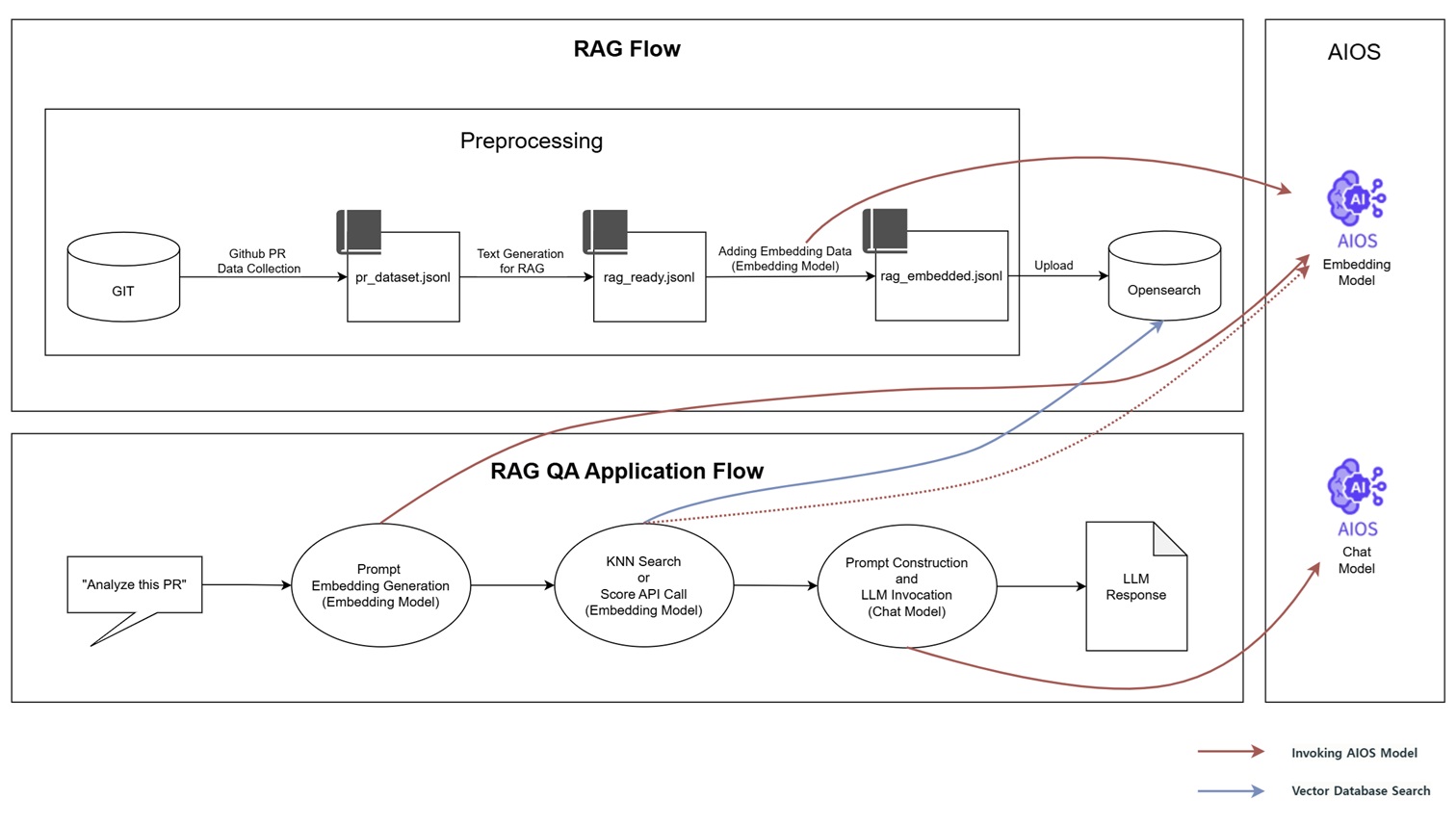
RAG Flow
- Collect PR data from a Git repository and generate pr_dataset.jsonl
- Text cleaning for RAG input → rag_ready.jsonl
- Generate vectors using the AIOS Embedding model and save them to the rag_embedded.jsonl file
- Upload the vector file to OpenSearch and configure it as a searchable format
RAG QA Application Flow
- Embedding the user’s query (e.g., “Analyze this PR.”) into a search query.
- Extract related documents via KNN search or AIOS Embedding model (score API) calls in OpenSearch.
- Compose a prompt based on the extracted document and send it to the AIOS Chat model.
- Generate a response and output the final result
Implementation
- In this tutorial, we used the Kubeflow project’s GitHub.
- The vector database data is configured as a one-time setup, and you can customize it for real-time integration and other uses in actual services.
Project Structure
rag-tutorial
├── app.py                                  # streamlit 메인 웹 앱 파일
├── generate_pr_dateset_from_branch.py      # 1. Github PR 데이터 수집
├── generate_rag_data_from_pr_dataset.py    # 2. RAG 입력용 텍스트 구성 (RAG 입력에 적합하도록 요약하여 텍스트 정제)
├── embed_prs.py                            # 3. RAG 입력용 텍스트 구성 (AIOS Embedding 모델을 통해 벡터 생성)
└── upload_rag_documnets.py                 # 4. OpenSearch에 업로드
Github PR Data Collection
Collect PR data from a Git repository and generate pr_dataset.jsonl.
- The code below is executed within the git directory.
- If there is no additional PR merge record, or if the PR merge is performed via rebase or squash-merge so that a regular merge commit is not created, data collection will not occur.
- When collecting data, each commit’s diff entry was limited to a maximum of 3000 characters. When building the actual system, additional chunking may be required depending on the length or structure of the content to enable efficient search and response generation.
$ git branch
* (HEAD detached at v1.9.1)
  master

$ python3 generate_pr_dateset_from_branch.py
🔍 Searching for merged PRs...
✅ Generated pr_dataset.jsonl with 43 merged PRs.

$ head -n 1 pr_dataset.jsonl | jq
{
  "merge_sha": "167e162ef7dffc033ddc82e55b0a108db27fc340"
  "author": "Ricardo Martinelli de Oliveira"
  "date": "Tue Mar 5 11:46:36 2024 -0300"
  "title": "Merge pull request #7461 from rimolive/kf-1.9"
  "pr_id": null,
  "commits": [
    {
      "sha": "68e4d10bbf976bb89810b4e16e8b765a2a0e68b7"
      "author": "Ricardo Martinelli de Oliveira"
      "message": "Update ROADMAP.md"
      "date": "Mon Feb 19 18:51:40 2024 -0300"
      "files": [
        ROADMAP.md
      ],
      "diff": "commit 68e4d10bbf976bb89810b4e16e8b765a2a0e68b7\nAuthor: Ricardo Martinelli de Oliveira <rmartine@redhat.com>\nDate:   Mon Feb 19 18:51:40 2024 -0300\n\n    Update ROADMAP.md\n    \n    Co-authored-by: Tommy Li <Tommy.chaoping.li@ibm.com>\n\ndiff --git a/ROADMAP.md b/ROADMAP.md\nindex 35021954..cfd39558 100644\n--- a/ROADMAP.md\n+++ b/ROADMAP.md\n@@ -8,7 +8,7 @@ The Kubeflow Community plans to deliver its v1.9 release in Jul 2024 per this [t\n * CNCF Transition\n * LLM APIs\n * New component: Model Registry\n-* Kubeflow Pipelines and kfp-tekton merged in a single GitHub repository\n+* Kubeflow Pipelines and kfp-tekton V2 merged in a single GitHub repository\n \n ### Detailed features, bug fixes and enhancements are identified in the Working Group Roadmaps and Tracking Issues:\n * [Training Operators](https://github.com/kubeflow/training-operator/issues/1994)"
    },
    {
      "sha": "5c3404782fa2700f8547b37132ff7ab2d1ed99fe"
      "author": "Ricardo M. Oliveira"
      "message": "Add Kubeflow 1.9 release roadmap"
      "date": "Mon Feb 5 14:43:45 2024 -0300"
      "files": [
        ROADMAP.md
      ],
      "diff": "commit 5c3404782fa2700f8547b37132ff7ab2d1ed99fe\nAuthor: Ricardo M. Oliveira <rmartine@redhat.com>\nDate:   Mon Feb 5 14:43:45 2024 -0300\n\n    Add Kubeflow 1.9 release roadmap\n    \n    Signed-off-by: Ricardo M. Oliveira <rmartine@redhat.com>\n\ndiff --git a/ROADMAP.md b/ROADMAP.md\nindex de3c8951..35021954 100644\n--- a/ROADMAP.md\n+++ b/ROADMAP.md\n@@ -1,6 +1,26 @@\n # Kubeflow Roadmap\n \n-## Kubeflow 1.8 Release, Planned for release: Oct 2023\n+## Kubeflow 1.9 Release, Planned for release: Jul 2024\n+The Kubeflow Community plans to deliver its v1.9 release in Jul 2024 per this [timeline](https://github.com/kubeflow/community/blob/master/releases/release-1.9/README.md#timeline). The high level deliverables are tracked in the [v1.9 Release](https://github.com/orgs/kubeflow/projects/61) Github project board. The v1.9 release process will be managed by the v1.9 [release team](https://github.com/kubeflow/community/blob/master/releases/release-1.9/release-team.md) using the best practices in the [Release Handbook](https://github.com/kubeflow/community/blob/master/releases/handbook.md).\n+\n+### Themes\n+* Kubernetes 1.29 support\n+* CNCF Transition\n+* LLM APIs\n+* New component: Model Registry\n+* Kubeflow Pipelines and kfp-tekton merged in a single GitHub repository\n+\n+### Detailed features, bug fixes and enhancements are identified in the Working Group Roadmaps and Tracking Issues:\n+* [Training Operators](https://github.com/kubeflow/training-operator/issues/1994)\n+* [KServe](https://github.com/orgs/kserve/projects/12)\n+* [Katib](https://github.com/kubeflow/katib/issues/2255)\n+* [Kubeflow Pipelines](https://github.com/kubeflow/pipelines/issues/10402)\n+* [Notebooks](https://github.com/kubeflow/kubeflow/issues/7459)\n+* [Manifests](https://github.com/kubeflow/manifests/issues/2592)\n+* [Security](https://github.com/kubeflow/manifests/issues/2598)\n+* [Model Registry](https://github.com/kubeflow/model-registry/issues/3)\n+\n+## Kubeflow 1.8 Release, Delivered: Nov 2023\n The Kubeflow Community plans to deliver its v1.8 release in Oct 2023 per this [timeline](https://github.com/kubeflow/community/tree/master/releases/release-1.8#timeline). The high level deliverables are tracked in the [v1.8 Release](https://github.com/orgs/kubeflow/projects/58/) Github project board. The v1.8 release process will be managed by the v1.8 [release team](https://github.com/kubeflow/community/blob/a956b3f6f15c49f928e37eaafec40d7f73ee1d5b/releases/release-team.md) using the best practices in the [Release Handbook](https://github.com/kubeflow/community/blob/master/releases/handbook.md).\n \n ### Themes"
    }
  ]
}
generate_pr_dateset_from_branch.py
import subprocess
import json

def run(cmd):
    return subprocess.check_output(cmd, shell=True, text=True).strip()

def extract_pr_commits(merge_sha):
    try:
        parent1 = run(f"git rev-parse {merge_sha}^1")
        parent2 = run(f"git rev-parse {merge_sha}^2")
    except subprocess.CalledProcessError:
        return []

    try:
        lines = run(f"git log {parent1}..{parent2} --pretty=format:'%H|%an|%s|%ad'").splitlines()
    except subprocess.CalledProcessError:
        return []

    commits = []
    for line in lines:
        try:
            sha, author, msg, date = line.split("|", 3)
            files = run(f"git show --pretty=format:'' --name-only {sha}").splitlines()
            diff = run(f"git show {sha}")
            commits.append({
                "sha": sha,
                "author": author,
                "message": msg,
                "date": date,
                "files": files,
                "diff": diff[:3000]  # diff가 너무 길면 자름
            })
        except:
            continue
    return commits

def extract_pr_id(title):
    if "# " in title:
        try:
            return title.split("#")[1].split()[0]
        except:
            return None
    return None

output = []

print("🔍 Searching for merged PRs...")
log_lines = run("git log --merges --pretty=format:'%H|%an|%ad|%s'").splitlines()

for line in log_lines:
    try:
        merge_sha, author, date, title = line.split("|", 3)
    except ValueError:
        continue

    commits = extract_pr_commits(merge_sha)
    if not commits:
        continue

    pr_doc = {
        "merge_sha": merge_sha,
        "author": author,
        "date": date,
        "title": title,
        "pr_id": extract_pr_id(title),
        "commits": commits
    }

    output.append(pr_doc)

with open("pr_dataset.jsonl", "w") as f:
    for item in output:
        f.write(json.dumps(item, ensure_ascii=False) + "\n")

print(f"✅ Generated pr_dataset.jsonl with {len(output)} merged PRs.")
import subprocess
import json
def run(cmd):
return subprocess.check_output(cmd, shell=True, text=True).strip()
def extract_pr_commits(merge_sha):
try:
parent1 = run(f"git rev-parse {merge_sha}^1")
parent2 = run(f"git rev-parse {merge_sha}^2")
except subprocess.CalledProcessError:
return []
try:
lines = run(f"git log {parent1}..{parent2} --pretty=format:'%H|%an|%s|%ad'").splitlines()
except subprocess.CalledProcessError:
return []
commits = []
for line in lines:
try:
sha, author, msg, date = line.split("|", 3)
files = run(f"git show --pretty=format:'' --name-only {sha}").splitlines()
diff = run(f"git show {sha}")
commits.append({
"sha": sha,
"author": author,
"message": msg,
"date": date,
"files": files,
"diff": diff[:3000] # diff가 너무 길면 자름
})
except:
continue
return commits
def extract_pr_id(title):
if "# " in title:
try:
return title.split("#")[1].split()[0]
except:
return None
return None
output = []
print("🔍 Searching for merged PRs...")
log_lines = run("git log --merges --pretty=format:'%H|%an|%ad|%s'").splitlines()
for line in log_lines:
try:
merge_sha, author, date, title = line.split("|", 3)
except ValueError:
continue
commits = extract_pr_commits(merge_sha)
if not commits:
continue
pr_doc = {
"merge_sha": merge_sha,
"author": author,
"date": date,
"title": title,
"pr_id": extract_pr_id(title),
"commits": commits
}
output.append(pr_doc)
with open("pr_dataset.jsonl", "w") as f:
for item in output:
f.write(json.dumps(item, ensure_ascii=False) + "\n")
print(f"✅ Generated pr_dataset.jsonl with {len(output)} merged PRs.")RAG 입력용 텍스트 구성
RAG 입력에 적합하도록 요약하여 텍스트 정제후, AIOS Embedding 모델을 통해 벡터를 생성합니다.
$ python3 generate_rag_data_from_pr_dataset.py
✅ RAG용 텍스트 생성 완료 → rag_ready.jsonl
$ head -n 1 rag_ready.jsonl | jq
{
  "pr_id": null,
  "title": "Merge pull request #7461 from rimolive/kf-1.9",
  "text": "PR 제목: Merge pull request #7461 from rimolive/kf-1.9\n병합자: Ricardo Martinelli de Oliveira / 날짜: Tue Mar 5 11:46:36 2024 -0300\n커밋 요약:\n- Ricardo Martinelli de Oliveira (Mon Feb 19 18:51:40 2024 -0300): Update ROADMAP.md\n  변경 파일: ROADMAP.md\n  변경사항:\ncommit 68e4d10bbf976bb89810b4e16e8b765a2a0e68b7\nAuthor: Ricardo Martinelli de Oliveira <rmartine@redhat.com>\nDate:   Mon Feb 19 18:51:40 2024 -0300\n\n    Update ROADMAP.md\n    \n    Co-authored-by: Tommy Li <Tommy.chaoping.li@ibm.com>\n\ndiff --git a/ROADMAP.md b/ROADMAP.md\nindex 35021954..cfd39558 100644\n--- a/ROADMAP.md\n+++ b/ROADMAP.md\n@@ -8,7 +8,7 @@ The Kubeflow Community plans to deliver its v1.9 release in Jul 2024 per this [t\n * CNCF Transition\n * LLM APIs\n * New component: Model Registry\n-* Kubeflow Pipelines and kfp-tekton merged in a single GitHub repository\n+* Kubeflow Pipelines and kfp-tekton V2 merged in a single GitHub repository\n \n ### Detailed features, bug fixes and enhancements are identified in the Working Group Roadmaps and Tracking Issues:\n * [Training Operators](https://github.com/kubeflow/training-operator/issues/1994)\n- Ricardo M. Oliveira (Mon Feb 5 14:43:45 2024 -0300): Add Kubeflow 1.9 release roadmap\n  변경 파일: ROADMAP.md\n  변경사항:\ncommit 5c3404782fa2700f8547b37132ff7ab2d1ed99fe\nAuthor: Ricardo M. Oliveira <rmartine@redhat.com>\nDate:   Mon Feb 5 14:43:45 2024 -0300\n\n    Add Kubeflow 1.9 release roadmap\n    \n    Signed-off-by: Ricardo M. Oliveira <rmartine@redhat.com>\n\ndiff --git a/ROADMAP.md b/ROADMAP.md\nindex de3c8951..35021954 100644\n--- a/ROADMAP.md\n+++ b/ROADMAP.md\n@@ -1,6 +1,26 @@\n # Kubeflow Roadmap\n \n-## Kubeflow 1.8 Release, Planned for release: Oct 2023\n+## Kubeflow 1.9 Release, Planned for release: Jul 2024\n+The Kubeflow Community plans to deliver its v1.9 release in Jul 2024 per this [timeline](https://github.com/kubeflow/community/blob/master/releases/release-1.9/README.md#timeline). The high level deliverables are tracked in the [v1.9 Release](https://github.com/orgs/kubeflow/projects/61) Github project board. The v1.9 release process will be managed by the v1.9 [release team](https://github.com/kubeflow/community/blob/master/releases/release-1.9/release-team.md) using the best practices in the [Rele"
}

$ python3 embed_prs.py
✅ Line 1: embedded
✅ Line 2: embedded
✅ Line 3: embedded
✅ Line 4: embedded
✅ Line 5: embedded
✅ Line 6: embedded
✅ Line 7: embedded
✅ Line 8: embedded
✅ Line 9: embedded
✅ Line 10: embedded
... (중략) ...
generate_rag_data_from_pr_dataset.py
import json

def build_text(pr):
    lines = []
    lines.append(f"PR title: {pr['title']}")
    lines.append(f"Merger: {pr['author']} / Date: {pr['date']}")
    lines.append("Commit summary:")
    for c in pr["commits"]:
        lines.append(f"- {c['author']} ({c['date']}): {c['message']}")
        if c["files"]:
            lines.append(f"  Changed files: {', '.join(c['files'])}")
        lines.append("  Changes:")
        lines.append(c["diff"][:1000])  # truncate if too long
    return "\n".join(lines)

with open("pr_dataset.jsonl") as fin, open("rag_ready.jsonl", "w") as fout:
    for line in fin:
        pr = json.loads(line)
        text = build_text(pr)
        out = {
            "pr_id": pr.get("pr_id"),
            "title": pr.get("title"),
            "text": text
        }
        fout.write(json.dumps(out, ensure_ascii=False) + "\n")

print("✅ Text generation for RAG completed → rag_ready.jsonl")
import json
def build_text(pr):
lines = []
lines.append(f"PR title: {pr['title']}")
lines.append(f"Merger: {pr['author']} / Date: {pr['date']}")
lines.append("Commit summary:")
for c in pr["commits"]:
lines.append(f"- {c['author']} ({c['date']}): {c['message']}")
if c["files"]:
lines.append(f" Changed files: {', '.join(c['files'])}")
lines.append(" Changes:")
lines.append(c["diff"][:1000]) # truncate if too long
return "\n".join(lines)
with open("pr_dataset.jsonl") as fin, open("rag_ready.jsonl", "w") as fout:
for line in fin:
pr = json.loads(line)
text = build_text(pr)
out = {
"pr_id": pr.get("pr_id"),
"title": pr.get("title"),
"text": text
}
fout.write(json.dumps(out, ensure_ascii=False) + "\n")
print("✅ Text generation for RAG completed → rag_ready.jsonl")embed_prs.py
- In the code, the AIOS_LLM_Private_Endpoint for EMBEDDING_API_URL and the model’s MODEL_ID refer to the LLM Usage Guide. Please refer to it. You can input them as shown in the example below.
- EMBEDDING_API_URL = “{AIOS LLM private endpoint}/{API}”
- “model”: “{modelID}”
import json
import requests
import time

EMBEDDING_API_URL = "AIOS_LLM_Private_Endpoint"
HEADERS = {"Content-Type": "application/json"}

def get_embedding(text):
    payload = {
        "model": "MODEL_ID",
        "input": text,
        "stream": False
    }

    try:
        response = requests.post(EMBEDDING_API_URL, headers=HEADERS, json=payload)
        if response.status_code == 200:
            result = response.json()
            return result["data"][0]["embedding"]
        else:
            print(f"❌ Failed with status {response.status_code}: {response.text}")
            return None
    except Exception as e:
        print(f"⚠️ Error calling embedding API: {e}")
        return None

def main():
    with open("rag_ready.jsonl", "r", encoding="utf-8") as fin, \
         open("rag_embedded.jsonl", "w", encoding="utf-8") as fout:

        for i, line in enumerate(fin, start=1):
            try:
                item = json.loads(line)
                text = item.get("text", "").strip()
                if not text:
                    print(f"⚠️ Line {i}: empty text, skipping")
                    continue

                embedding = get_embedding(text)
                if embedding is None:
                    print(f"⚠️ Line {i}: embedding failed, skipping")
                    continue

                item["embedding"] = embedding
                fout.write(json.dumps(item, ensure_ascii=False) + "\n")
                print(f"✅ Line {i}: embedded")

                time.sleep(0.2)  # optional: rate limiting
            except Exception as e:
                print(f"❌ Line {i}: error - {e}")
                continue

if __name__ == "__main__":
    main()
import json
import requests
import time
EMBEDDING_API_URL = "AIOS_LLM_Private_Endpoint"
HEADERS = {"Content-Type": "application/json"}
def get_embedding(text):
payload = {
"model": "MODEL_ID",
"input": text,
"stream": False
}
try:
response = requests.post(EMBEDDING_API_URL, headers=HEADERS, json=payload)
if response.status_code == 200:
result = response.json()
return result["data"][0]["embedding"]
else:
print(f"❌ Failed with status {response.status_code}: {response.text}")
return None
except Exception as e:
print(f"⚠️ Error calling embedding API: {e}")
return None
def main():
with open("rag_ready.jsonl", "r", encoding="utf-8") as fin, \
open("rag_embedded.jsonl", "w", encoding="utf-8") as fout:
for i, line in enumerate(fin, start=1):
try:
item = json.loads(line)
text = item.get("text", "").strip()
if not text:
print(f"⚠️ Line {i}: empty text, skipping")
continue
embedding = get_embedding(text)
if embedding is None:
print(f"⚠️ Line {i}: embedding failed, skipping")
continue
item["embedding"] = embedding
fout.write(json.dumps(item, ensure_ascii=False) + "\n")
print(f"✅ Line {i}: embedded")
time.sleep(0.2) # optional: rate limiting
except Exception as e:
print(f"❌ Line {i}: error - {e}")
continue
if __name__ == "__main__":
main()Upload to OpenSearch
Upload the vector file to OpenSearch and configure it as a searchable format.
- In this tutorial, we set up OpenSearch inside the VM and access it at http://localhost:9200. If you are using a custom vector database, please adjust the URL accordingly.
# Create an index named "kubeflow-pr-rag-index" in OpenSearch.
$ curl -X PUT "http://localhost:9200/kubeflow-pr-rag-index" \
  -H "Content-Type: application/json" \
  -d '{
    "settings": {
      "index": {
        "knn": true
      }
    },
    "mappings": {
      "properties": {
        "title": { "type": "text" },
        "text":  { "type": "text" },
        "embedding": {
          "type": "knn_vector"
          "dimension": 1024,
          "method": {
            "name": "hnsw"
            "space_type": "cosinesimil"
            "engine": "nmslib"
          }
        }
      }
    }
  }'
{"acknowledged":true,"shards_acknowledged":true,"index":"kubeflow-pr-rag-index"}

$ python3 upload_rag_documnets.py
✅ Uploaded document pr-1
✅ Uploaded document pr-2
✅ Uploaded document pr-3
✅ Uploaded document pr-4
✅ Uploaded document pr-5
✅ Uploaded document pr-6
✅ Uploaded document pr-7
✅ Uploaded document pr-8
✅ Uploaded document pr-9
✅ Uploaded document pr-10
... (omitted) ...
upload_rag_documnets.py
import json
from opensearchpy import OpenSearch

# OpenSearch 연결 설정
client = OpenSearch(
    hosts=[{"host": "localhost", "port": 9200}],
    use_ssl=False,
    verify_certs=False
)

index_name = "kubeflow-pr-rag-index"

with open("rag_embedded.jsonl", "r", encoding="utf-8") as f:
    for i, line in enumerate(f, 1):
        try:
            doc = json.loads(line)
            title = doc.get("title", "")
            text = doc.get("text", "")
            embedding = doc.get("embedding", [])

            if not embedding or len(embedding) != 1024:
                print(f"⚠️  Line {i}: Invalid embedding length, skipping.")
                continue

            body = {
                "title": title,
                "text": text,
                "embedding": embedding
            }

            doc_id = f"pr-{i}"
            client.index(index=index_name, id=doc_id, body=body)
            print(f"✅ Uploaded document {doc_id}")
        except Exception as e:
            print(f"❌ Line {i}: Failed to upload due to {e}")
import json
from opensearchpy import OpenSearch
# OpenSearch 연결 설정
client = OpenSearch(
hosts=[{"host": "localhost", "port": 9200}],
use_ssl=False,
verify_certs=False
)
index_name = "kubeflow-pr-rag-index"
with open("rag_embedded.jsonl", "r", encoding="utf-8") as f:
for i, line in enumerate(f, 1):
try:
doc = json.loads(line)
title = doc.get("title", "")
text = doc.get("text", "")
embedding = doc.get("embedding", [])
if not embedding or len(embedding) != 1024:
print(f"⚠️ Line {i}: Invalid embedding length, skipping.")
continue
body = {
"title": title,
"text": text,
"embedding": embedding
}
doc_id = f"pr-{i}"
client.index(index=index_name, id=doc_id, body=body)
print(f"✅ Uploaded document {doc_id}")
except Exception as e:
print(f"❌ Line {i}: Failed to upload due to {e}")OpenSearch Dashboards에서 확인
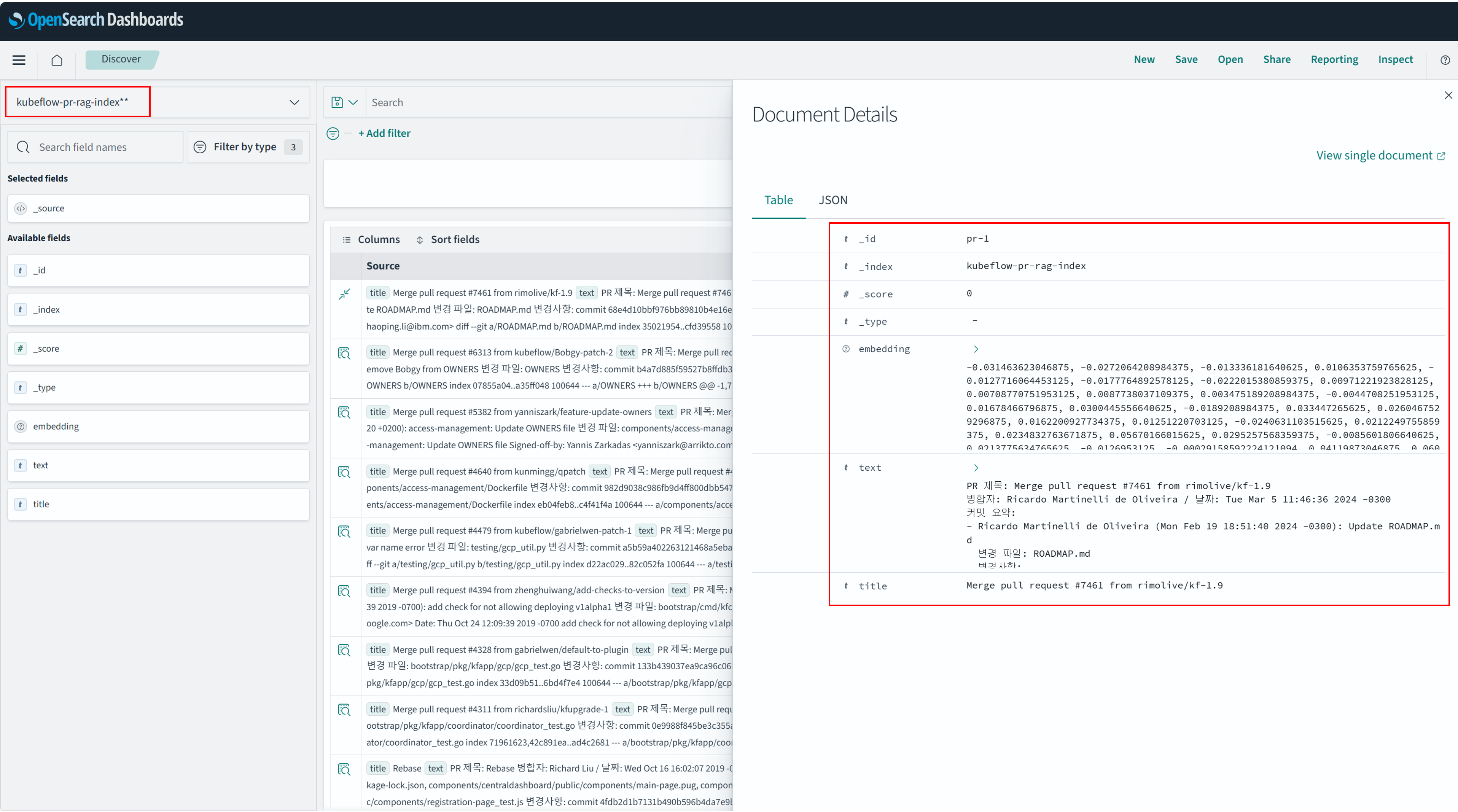
아래 그림과 같이 OpenSearch Dashboard에서 kubeflow-pr-rag-index 에 해당하는 데이터를 확인할 수 있습니다. 데이터는 title, text, embedding으로 구성되어 있습니다.
왼쪽 메뉴 → Dashboards Management → Index patterns → Create index pattern 클릭
RAG QA Application 구성
사용자의 질의를 임베딩하여 검색 질의로 변환한 뒤, RAG를 활용해 연관 문서를 추출하고, AIOS Chat 모델을 통해 최종 결과를 제공합니다.
- 이 코드에서는 유사도 검색 방식으로 OpenSearch의 KNN(K-Nearest Neightbors) 검색과 AIOS에서 제공하는 Embedding 모델의 Score API를 호출하여 입력 벡터와 가장 유사한 문서를 계산하는 방식을 지원합니다. 사용자는 두 방식 중 하나를 선택하여 사용할 수 있으며, 이 튜토리얼에서는 AIOS Score API 기반의 유사도 검색 방식을 사용합니다.
- OpenSearch의 KNN 호출 :
docs = search_similar_docs(query_vec, K) - AIOS Embedding 모델 호출 :
docs = search_similar_docs_with_score(question, K)
- OpenSearch의 KNN 호출 :
- 코드 내 EMBEDDING_API_URL, LLM_API_URL, SCORE_API_URL, MODEL_EMBEDDING, MODEL_CHAT은 LLM 이용 가이드를 참고하여 사용할 API와 Model로 입력해주세요. 아래의 예시처럼 입력할 수 있습니다.
- EMBEDDING_API_URL = “{AIOS LLM 프라이빗 엔드포인트}/{API}”
- MODEL_EMBEDDING = “{모델ID}”
app.py
import streamlit as st
import requests
from opensearchpy import OpenSearch

# 설정
def get_opensearch_client():
    return OpenSearch(
        hosts=[{"host": "localhost", "port": 9200}],
        use_ssl=False,
        verify_certs=False
    )

EMBEDDING_API_URL = "YOUR_EMBEDDING_API_URL"
LLM_API_URL = "YOUR_LLM_API_URL"
SCORE_API_URL = "YOUR_SCORE_API_URL"
MODEL_EMBEDDING = "YOUR_MODEL_EMBEDDING"
MODEL_CHAT = "YOUR_MODEL_CHAT"
INDEX_NAME = "kubeflow-pr-rag-index"
VECTOR_DIM = 1024
K = 3

# 임베딩 생성 함수
def embed_text(text):
    res = requests.post(
        EMBEDDING_API_URL,
        headers={"Content-Type": "application/json"},
        json={"model": MODEL_EMBEDDING, "input": text, "stream": False}
    )
    return res.json()["data"][0]["embedding"]

# 모든 문서 불러오기 (OpenSearch)
def fetch_all_docs():
    client = get_opensearch_client()
    res = client.search(
        index=INDEX_NAME,
        body={
            "size": 1000,  # 필요한 만큼 설정 (작을 경우 스크롤 API 활용 가능)
            "query": {"match_all": {}}
        }
    )
    return [doc["_source"] for doc in res["hits"]["hits"]]

# 두 문장 리스트를 받아 유사도 점수 계산
def score_text_pairs(text_1, text_2):
    payload = {
        "model": MODEL_EMBEDDING,
        "encoding_format": "float",
        "text_1": text_1,
        "text_2": text_2
    }
    headers = {
        "accept": "application/json",
        "Content-Type": "application/json"
    }

    response = requests.post(SCORE_API_URL, headers=headers, json=payload)
    response.raise_for_status()

    # 유사도 score만 추출
    scores = [item["score"] for item in response.json()["data"]]
    return scores

# 유사 문서 선택 (점수 기반 Top-K)
def search_similar_docs_with_score(query, k):
    all_docs = fetch_all_docs()
    doc_texts = [doc["text"] for doc in all_docs]
    queries = [query] * len(doc_texts)
    scores = score_text_pairs(queries, doc_texts)

    # 점수 높은 순으로 정렬
    scored_docs = sorted(zip(all_docs, scores), key=lambda x: x[1], reverse=True)
    top_docs = [doc for doc, score in scored_docs[:k]]
    return top_docs

# KNN 검색 함수
def search_similar_docs(query_vector, k):
    client = get_opensearch_client()
    res = client.search(
        index=INDEX_NAME,
        body={
            "size": k,
            "query": {
                "knn": {
                    "embedding": {
                        "vector": query_vector,
                        "k": k
                    }
                }
            }
        }
    )
    return [doc["_source"] for doc in res["hits"]["hits"]]

# 프롬프트 구성
def build_prompt(docs, question):
    context_blocks = []
    for i, doc in enumerate(docs):
        context_blocks.append(f"[문서 {i+1}]\n{doc['text']}")
    context = "\n\n".join(context_blocks)
    return f"""다음은 Kubeflow 프로젝트에서 유사한 PR 문서들입니다:

{context}

사용자 질문: {question}

위 내용을 참고하여 질문에 대해 자연어로 답변해 주세요. 가능한 문서 번호를 인용해서 설명해주세요."""

# LLM 호출 함수
def call_llm(prompt):
    res = requests.post(
        LLM_API_URL,
        headers={"Content-Type": "application/json"},
        json={
            "model": MODEL_CHAT,
            "messages": [{"role": "user", "content": prompt}],
            "stream": False
        }
    )
    return res.json()["choices"][0]["message"]["content"]

# Streamlit UI 시작
st.set_page_config(page_title="RAG QA", layout="wide")
st.title("📘 RAG-based PR Summary Chatbot")

question = st.text_input("Enter your question:", "Please summarize the PR the Add Kubeflow 1.9 release roadmap.")

if st.button("Searching and generating response"):
    with st.spinner("Generating embeddings..."):
        query_vec = embed_text(question)

    with st.spinner("Searching for similar documents in OpenSearch..."):
        #docs = search_similar_docs(query_vec, K)
        docs = search_similar_docs_with_score(question, K)

    with st.spinner("Constructing prompt and invoking LLM..."):
        prompt = build_prompt(docs, question)
        answer = call_llm(prompt)

    st.markdown("### 🤖 LLM response")
    st.write(answer)

    st.markdown("---")
    st.markdown("### 🔍 Highlighted PR document")
    for i, doc in enumerate(docs):
        with st.expander(f"문서 {i+1}: {doc['title']}"):
            # 간단한 질문 키워드 하이라이트
            highlighted = doc['text'].replace(question.split()[0], f"**{question.split()[0]}**")
            st.markdown(highlighted)
import streamlit as st
import requests
from opensearchpy import OpenSearch
# 설정
def get_opensearch_client():
return OpenSearch(
hosts=[{"host": "localhost", "port": 9200}],
use_ssl=False,
verify_certs=False
)
EMBEDDING_API_URL = "YOUR_EMBEDDING_API_URL"
LLM_API_URL = "YOUR_LLM_API_URL"
SCORE_API_URL = "YOUR_SCORE_API_URL"
MODEL_EMBEDDING = "YOUR_MODEL_EMBEDDING"
MODEL_CHAT = "YOUR_MODEL_CHAT"
INDEX_NAME = "kubeflow-pr-rag-index"
VECTOR_DIM = 1024
K = 3
# 임베딩 생성 함수
def embed_text(text):
res = requests.post(
EMBEDDING_API_URL,
headers={"Content-Type": "application/json"},
json={"model": MODEL_EMBEDDING, "input": text, "stream": False}
)
return res.json()["data"][0]["embedding"]
# 모든 문서 불러오기 (OpenSearch)
def fetch_all_docs():
client = get_opensearch_client()
res = client.search(
index=INDEX_NAME,
body={
"size": 1000, # 필요한 만큼 설정 (작을 경우 스크롤 API 활용 가능)
"query": {"match_all": {}}
}
)
return [doc["_source"] for doc in res["hits"]["hits"]]
# 두 문장 리스트를 받아 유사도 점수 계산
def score_text_pairs(text_1, text_2):
payload = {
"model": MODEL_EMBEDDING,
"encoding_format": "float",
"text_1": text_1,
"text_2": text_2
}
headers = {
"accept": "application/json",
"Content-Type": "application/json"
}
response = requests.post(SCORE_API_URL, headers=headers, json=payload)
response.raise_for_status()
# 유사도 score만 추출
scores = [item["score"] for item in response.json()["data"]]
return scores
# 유사 문서 선택 (점수 기반 Top-K)
def search_similar_docs_with_score(query, k):
all_docs = fetch_all_docs()
doc_texts = [doc["text"] for doc in all_docs]
queries = [query] * len(doc_texts)
scores = score_text_pairs(queries, doc_texts)
# 점수 높은 순으로 정렬
scored_docs = sorted(zip(all_docs, scores), key=lambda x: x[1], reverse=True)
top_docs = [doc for doc, score in scored_docs[:k]]
return top_docs
# KNN 검색 함수
def search_similar_docs(query_vector, k):
client = get_opensearch_client()
res = client.search(
index=INDEX_NAME,
body={
"size": k,
"query": {
"knn": {
"embedding": {
"vector": query_vector,
"k": k
}
}
}
}
)
return [doc["_source"] for doc in res["hits"]["hits"]]
# 프롬프트 구성
def build_prompt(docs, question):
context_blocks = []
for i, doc in enumerate(docs):
context_blocks.append(f"[문서 {i+1}]\n{doc['text']}")
context = "\n\n".join(context_blocks)
return f"""다음은 Kubeflow 프로젝트에서 유사한 PR 문서들입니다:
{context}
사용자 질문: {question}
위 내용을 참고하여 질문에 대해 자연어로 답변해 주세요. 가능한 문서 번호를 인용해서 설명해주세요."""
# LLM 호출 함수
def call_llm(prompt):
res = requests.post(
LLM_API_URL,
headers={"Content-Type": "application/json"},
json={
"model": MODEL_CHAT,
"messages": [{"role": "user", "content": prompt}],
"stream": False
}
)
return res.json()["choices"][0]["message"]["content"]
# Streamlit UI 시작
st.set_page_config(page_title="RAG QA", layout="wide")
st.title("📘 RAG-based PR Summary Chatbot")
question = st.text_input("Enter your question:", "Please summarize the PR the Add Kubeflow 1.9 release roadmap.")
if st.button("Searching and generating response"):
with st.spinner("Generating embeddings..."):
query_vec = embed_text(question)
with st.spinner("Searching for similar documents in OpenSearch..."):
#docs = search_similar_docs(query_vec, K)
docs = search_similar_docs_with_score(question, K)
with st.spinner("Constructing prompt and invoking LLM..."):
prompt = build_prompt(docs, question)
answer = call_llm(prompt)
st.markdown("### 🤖 LLM response")
st.write(answer)
st.markdown("---")
st.markdown("### 🔍 Highlighted PR document")
for i, doc in enumerate(docs):
with st.expander(f"문서 {i+1}: {doc['title']}"):
# 간단한 질문 키워드 하이라이트
highlighted = doc['text'].replace(question.split()[0], f"**{question.split()[0]}**")
st.markdown(highlighted)RAG QA Chatbot UI 사용 방법
호출 코드 실행
- VM에서 Streamlit 실행Color mode
streamlit run app.py --server.port 8501 --server.address 0.0.0.0streamlit run app.py --server.port 8501 --server.address 0.0.0.0Code block. Run Streamlit
You can now view your Streamlit app in your browser.

URL: http://0.0.0.0:8501
브라우저에서 http://{your_server_ip}:8501 또는 서버 SSH 터널링 설정 후 http://0.0.0.0:8501 로 접속합니다. SSH 터널링은 아래를 참고하세요.
2. 로컬PC에서 터널링으로 VM접속 (http://0.0.0.0:8501 로 접속하는 경우)
ssh -i {your_pemkey.pem} -L 8501:localhost:8501 ubuntu@{your_server_ip}ssh -i {your_pemkey.pem} -L 8501:localhost:8501 ubuntu@{your_server_ip}사용 예시
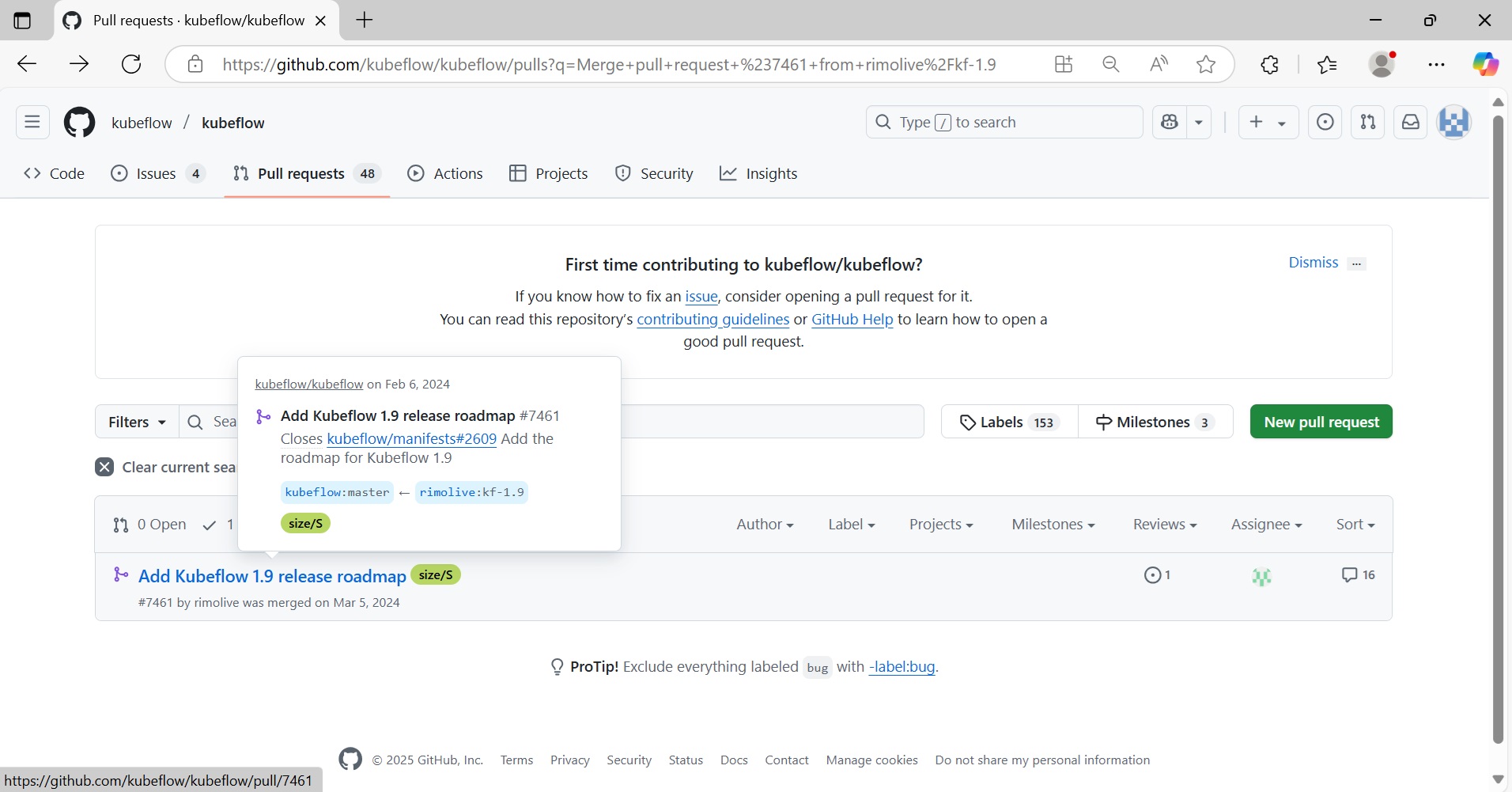
Kubeflow 프로젝트 Git에서 Add Kubeflow 1.9 release roadmap PR 에 대한 요약을 질문합니다.
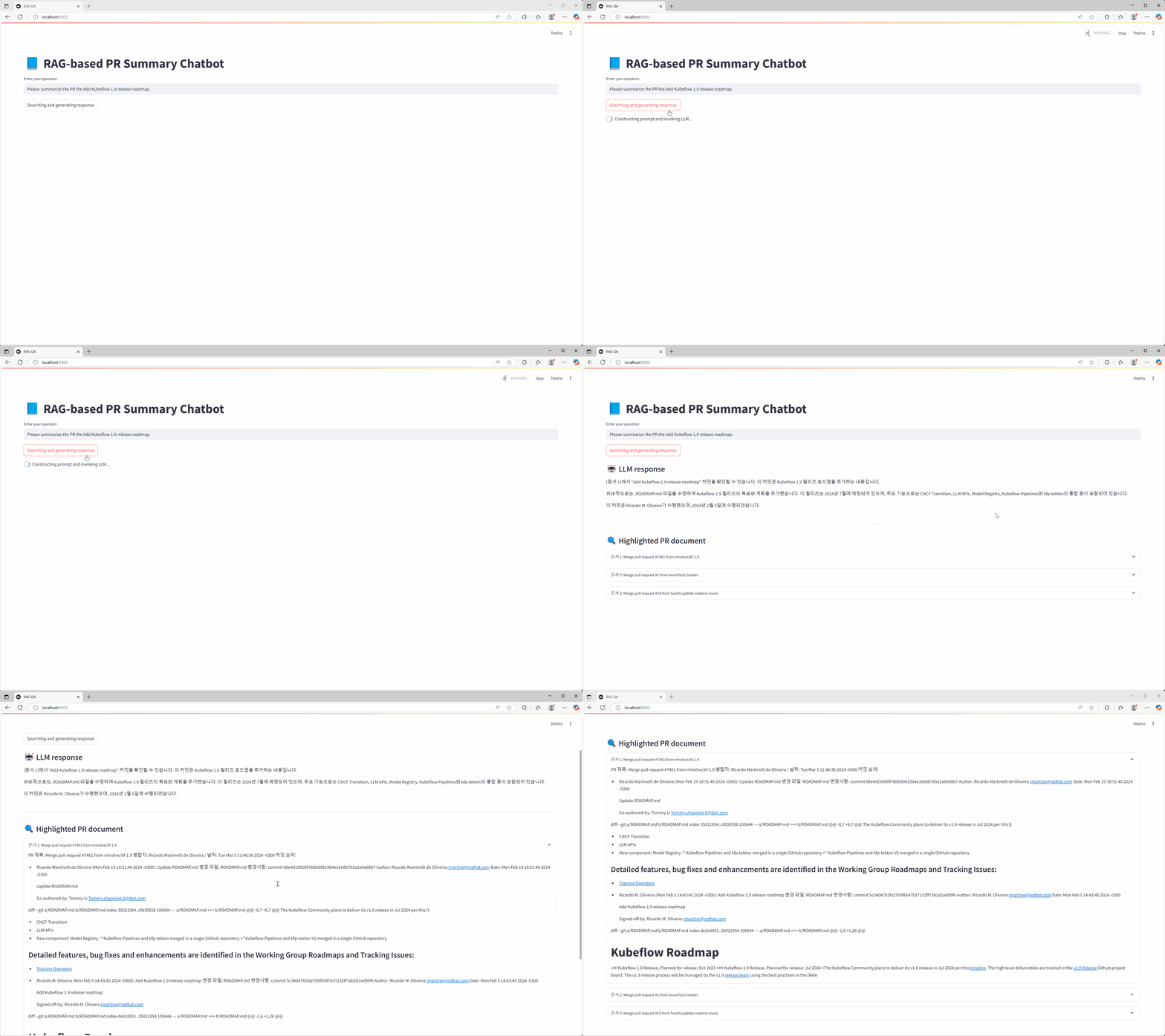
Kubeflow 프로젝트의 해당 PR에 대한 정보입니다.
마무리
이번 튜토리얼에서는 AIOS에서 제공하는 AI 모델을 활용하여 GIT PR 관련 데이터를 벡터화하고, OpenSearch 기반의 벡터 검색 및 LLM 응답을 조합하여 PR 리뷰 보조 챗봇을 구현해 보았습니다.이를 통해 과거 PR 히스토리에 기반한 질의응답이 가능해져, 개발자의 코드 리뷰 효율성과 품질을 향상시킬 수 있습니다. 본 시스템은 다음과 같은 방식으로 사용자 환경에 맞게 확장 및 커스터마이징할 수 있습니다.
- 벡터 데이터베이스 교체 : OpenSearch 외에 SCP Search Engine 상품 활용, 사용자 벡터 데이터베이스를 연동할 수 있습니다.
- 실시간 데이터 수집 연동 : Github Webhook 또는 Gitlab API 연동을 통해 실시간 PR 생성/업데이트 정보를 수집하고 자동 인덱싱 가능합니다.
- 대화형 UI 고도화: Streamlit 외에도 Slack Bot, 사내 메신저 등 다양한 인터페이스로 확장 가능합니다.
이번 튜토리얼을 기반으로 실제 서비스 목적에 따라 적합한 AIOS 기반 협업 도우미를 직접 구축해 보시길 바랍니다.