Chat Playground
Goal
This tutorial introduces how to create and use a web-based Playground that allows you to easily test the APIs of various AI models provided by AIOS using Streamlit in the SCP for Enterprise environment.
environment
To run this tutorial, the following environment must be prepared.
System Environment
- Python 3.10 +
- pip
Installation required packages
pip install streamlitpip install streamlitPython-based open-source web application framework that is highly suitable for visually presenting and sharing data science, machine learning, and data analysis results. Even without extensive web development knowledge, you can quickly create a web interface by writing just a few lines of code.
Implementation
Pre-check
Check that the model call via curl works correctly in the environment where the application runs. For this, refer to the AIOS_LLM_Private_Endpoint in the LLM Usage Guide.
- Example: {AIOS LLM private endpoint}/{API}
curl -H "Content-Type: application/json" \
-d '{"model": "meta-llama/Llama-3.3-70B-Instruct"
, "prompt" : "Hello, I am jihye, who are you"
, "temperature": 0
, "max_tokens": 100
, "stream": false}' -L AIOS_LLM_Private_Endpoint
curl -H "Content-Type: application/json" \
-d '{"model": "meta-llama/Llama-3.3-70B-Instruct"
, "prompt" : "Hello, I am jihye, who are you"
, "temperature": 0
, "max_tokens": 100
, "stream": false}' -L AIOS_LLM_Private_EndpointYou can see that the model’s answer is included in the text field of choices.
{"id":"cmpl-4ac698a99c014d758300a3ec5583d73b","object":"text_completion","created":1750140201,"model":"meta-llama/Llama-3.3-70B-Instruct","choices":[{"index":0,"text":"?\nI am a Korean student who is studying English.\nI am interested in learning about different cultures and making friends from around the world.\nI like to watch movies, listen to music, and read books in my free time.\nI am looking forward to chatting with you and learning more about your culture and way of life.\nNice to meet you, jihye! I'm happy to chat with you and learn more about Korean culture. What kind of movies, music, and books do you enjoy? Do","logprobs":null,"finish_reason":"length","stop_reason":null,"prompt_logprobs":null}],"usage":{"prompt_tokens":11,"total_tokens":111,"completion_tokens":100}}
Project Structure
chat-playground
├── app.py          # streamlit main web app file
├── endpoints.json  # AIOS model call type definitions
├── img
│   └── aios.png
└── models.json     # AIOS model list
Chat Playground code
- models.json, endpoints.json files must exist and be configured in the proper format. Please refer to the code below.
- In the code, modify BASE_URL to the AIOS LLM Private Endpoint address, referring to the LLM usage guide.
- This Playground is designed as a single-request, request-based structure, where the user provides input values, clicks a button to send one request, and then checks the result. This enables rapid testing and response verification without complex session management.
- The parameters Model, Type, Temperature, and Max Tokens configured in the sidebar are part of an interface built with st.sidebar, and you can freely extend or modify the functionality as needed.
- The image (file) uploaded with st.file_uploader() exists as a temporary BytesIO object in server memory and is not automatically saved to disk.
app.py
This is the main Streamlit web app file. Here, the BASE_URL AIOS_LLM_Private_Endpoint refers to the LLM usage guide.
import streamlit as st
import base64
import json
import requests
from urllib.parse import urljoin

BASE_URL = "AIOS_LLM_Private_Endpoint"

# ===== Settings =====
st.set_page_config(page_title="AIOS Chat Playground", layout="wide")
st.title("🤖 AIOS Chat Playground")

# ===== Common Functions =====
def load_models():
    with open("models.json", "r") as f:
        return json.load(f)

def load_endpoints():
    with open("endpoints.json", "r") as f:
        return json.load(f)

models = load_models()
endpoints_config = load_endpoints()

# ===== Sidebar Settings =====
st.sidebar.title('Hello!')
st.sidebar.image("img/aios.png")
st.sidebar.header("⚙️ Setting")
model = st.sidebar.selectbox("Model", models)
endpoint_labels = [ep["label"] for ep in endpoints_config]
endpoint_label = st.sidebar.selectbox("Type", endpoint_labels)
selected_endpoint = next(ep for ep in endpoints_config if ep["label"] == endpoint_label)

temperature = st.sidebar.slider("🔥 Temperature", 0.0, 1.0, 0.7)
max_tokens = st.sidebar.number_input("🧮 Max Tokens", min_value=1, max_value=5000, value=100)

base_url = BASE_URL
path = selected_endpoint["path"]
endpoint_type = selected_endpoint["type"]
api_style = selected_endpoint.get("style", "openai")  # openai or cohere

# ===== Input UI =====
prompt = ""
docs = []
image_base64 = None

if endpoint_type == "image":
    prompt = st.text_area("✍️ Enter your question:", "Explain this image.")
    uploaded_image = st.file_uploader("🖼️ Upload an image", type=["png", "jpg", "jpeg"])
    if uploaded_image:
        st.image(uploaded_image, caption="Uploaded image", use_container_width=300)
        image_bytes = uploaded_image.read()
        image_base64 = base64.b64encode(image_bytes).decode("utf-8")

elif endpoint_type == "rerank":
    prompt = st.text_area("✍️ Enter your query:", "What is the capital of France?")
    raw_docs = st.text_area("📄 Documents (one per line)", "The capital of France is Paris.\nFrance capital city is known for the Eiffel Tower.\nParis is located in the north-central part of France.")
    docs = raw_docs.strip().splitlines()

elif endpoint_type == "reasoning":
    prompt = st.text_area("✍️ Enter prompt:", "9.11 and 9.8, which is greater?")

elif endpoint_type == "embedding":
    prompt = st.text_area("✍️ Enter prompt:", "What is the capital of France?")

else:
    prompt = st.text_area("✍️ Enter prompt:", "Hello, who are you?")
    uploaded_image = st.file_uploader("🖼️ Upload an image (Optional)", type=["png", "jpg", "jpeg"])
    if uploaded_image:
        image_bytes = uploaded_image.read()
        image_base64 = base64.b64encode(image_bytes).decode("utf-8")

# ===== Call Button =====
if st.button("🚀 Invoke model"):
    headers = {
        "Content-Type": "application/json"
        "Authorization": "Bearer EMPTY_KEY"
    }

    try:
        if endpoint_type == "chat":
            url = urljoin(base_url, "v1/chat/completions")
            payload = {
                "model": model,
                "messages": [
                    {"role": "system", "content": "You are a helpful assistant."}
                    {"role": "user", "content": prompt}
                ],
                "temperature": temperature,
                "max_tokens": max_tokens
            }

        elif endpoint_type == "completion":
            url = urljoin(base_url, "v1/completions")
            payload = {
                "model": model,
                "prompt": prompt,
                "temperature": temperature,
                "max_tokens": max_tokens
            }

        elif endpoint_type == "embedding":
            url = urljoin(base_url, "v1/embeddings")
            payload = {
                "model": model,
                "input": prompt
            }

        elif endpoint_type == "reasoning":
            url = urljoin(BASE_URL, "v1/chat/completions")
            payload = {
                "model": model,
                "messages": [
                    {"role": "user", "content": prompt}
                ],
                "temperature": temperature,
                "max_tokens": max_tokens
            }

        elif endpoint_type == "image":
            url = urljoin(base_url, "v1/chat/completions")
            if not image_base64:
                st.warning("🖼️ Upload an image")
                st.stop()

            payload = {
                "model": model,
                "messages": [
                    {
                        "role": "user"
                        "content": [
                            {"type": "text", "text": prompt}
                            {"type": "image_url", "image_url": {"url": f"data:image/jpeg;base64,{image_base64}"}}
                        ]
                    }
                ]
            }

        elif endpoint_type == "rerank":
            url = urljoin(base_url, "v2/rerank")
            payload = {
                "model": model,
                "query": prompt,
                "documents": docs,
                "top_n": len(docs)
            }

        else:
            st.error("❌ Unknown endpoint type")
            st.stop()

        st.expander("📤 Request payload").code(json.dumps(payload, indent=2), language="json")
        response = requests.post(url, headers=headers, json=payload)
        response.raise_for_status()
        res = response.json()

        # ===== Response Parsing =====
        if endpoint_type == "chat" or endpoint_type == "image":
            output = res["choices"][0]["message"]["content"]

        elif endpoint_type == "completion":
            output = res["choices"][0]["text"]

        elif endpoint_type == "embedding":
            vec = res["data"][0]["embedding"]
            output = f"🔢 Vector dimensions: {len(vec)}"
            st.expander("📐 Vector preview").code(vec[:20])

        elif endpoint_type == "rerank":
            results = res["results"]
            output = "\n\n".join(
                [f"{i+1}. {r['document']['text']} (score: {r['relevance_score']:.3f})" for i, r in enumerate(results)]
            )

        elif endpoint_type == "reasoning":
            message = res.get("choices", [{}])[0].get("message", {})
            reasoning = message.get("reasoning_content", "❌ No reasoning_content")
            content = message.get("content", "❌ No content")
            output = f"""📘 <b>response:</b><br>{content}<br><br>🧠 <b>Reasoning:</b><br>{reasoning}"""

        st.success("✅ Model response:")
        st.markdown(f"<div style='padding:1rem;background:#f0f0f0;border-radius:8px'>{output}</div>", unsafe_allow_html=True)

        st.expander("📦 View full response").json(res)

    except requests.RequestException as e:
        st.error("❌ Request failed")
        st.code(str(e))
import streamlit as st
import base64
import json
import requests
from urllib.parse import urljoin
BASE_URL = "AIOS_LLM_Private_Endpoint"
# ===== Settings =====
st.set_page_config(page_title="AIOS Chat Playground", layout="wide")
st.title("🤖 AIOS Chat Playground")
# ===== Common Functions =====
def load_models():
with open("models.json", "r") as f:
return json.load(f)
def load_endpoints():
with open("endpoints.json", "r") as f:
return json.load(f)
models = load_models()
endpoints_config = load_endpoints()
# ===== Sidebar Settings =====
st.sidebar.title('Hello!')
st.sidebar.image("img/aios.png")
st.sidebar.header("⚙️ Setting")
model = st.sidebar.selectbox("Model", models)
endpoint_labels = [ep["label"] for ep in endpoints_config]
endpoint_label = st.sidebar.selectbox("Type", endpoint_labels)
selected_endpoint = next(ep for ep in endpoints_config if ep["label"] == endpoint_label)
temperature = st.sidebar.slider("🔥 Temperature", 0.0, 1.0, 0.7)
max_tokens = st.sidebar.number_input("🧮 Max Tokens", min_value=1, max_value=5000, value=100)
base_url = BASE_URL
path = selected_endpoint["path"]
endpoint_type = selected_endpoint["type"]
api_style = selected_endpoint.get("style", "openai") # openai or cohere
# ===== Input UI =====
prompt = ""
docs = []
image_base64 = None
if endpoint_type == "image":
prompt = st.text_area("✍️ Enter your question:", "Explain this image.")
uploaded_image = st.file_uploader("🖼️ Upload an image", type=["png", "jpg", "jpeg"])
if uploaded_image:
st.image(uploaded_image, caption="Uploaded image", use_container_width=300)
image_bytes = uploaded_image.read()
image_base64 = base64.b64encode(image_bytes).decode("utf-8")
elif endpoint_type == "rerank":
prompt = st.text_area("✍️ Enter your query:", "What is the capital of France?")
raw_docs = st.text_area("📄 Documents (one per line)", "The capital of France is Paris.\nFrance capital city is known for the Eiffel Tower.\nParis is located in the north-central part of France.")
docs = raw_docs.strip().splitlines()
elif endpoint_type == "reasoning":
prompt = st.text_area("✍️ Enter prompt:", "9.11 and 9.8, which is greater?")
elif endpoint_type == "embedding":
prompt = st.text_area("✍️ Enter prompt:", "What is the capital of France?")
else:
prompt = st.text_area("✍️ Enter prompt:", "Hello, who are you?")
uploaded_image = st.file_uploader("🖼️ Upload an image (Optional)", type=["png", "jpg", "jpeg"])
if uploaded_image:
image_bytes = uploaded_image.read()
image_base64 = base64.b64encode(image_bytes).decode("utf-8")
# ===== Call Button =====
if st.button("🚀 Invoke model"):
headers = {
"Content-Type": "application/json"
"Authorization": "Bearer EMPTY_KEY"
}
try:
if endpoint_type == "chat":
url = urljoin(base_url, "v1/chat/completions")
payload = {
"model": model,
"messages": [
{"role": "system", "content": "You are a helpful assistant."}
{"role": "user", "content": prompt}
],
"temperature": temperature,
"max_tokens": max_tokens
}
elif endpoint_type == "completion":
url = urljoin(base_url, "v1/completions")
payload = {
"model": model,
"prompt": prompt,
"temperature": temperature,
"max_tokens": max_tokens
}
elif endpoint_type == "embedding":
url = urljoin(base_url, "v1/embeddings")
payload = {
"model": model,
"input": prompt
}
elif endpoint_type == "reasoning":
url = urljoin(BASE_URL, "v1/chat/completions")
payload = {
"model": model,
"messages": [
{"role": "user", "content": prompt}
],
"temperature": temperature,
"max_tokens": max_tokens
}
elif endpoint_type == "image":
url = urljoin(base_url, "v1/chat/completions")
if not image_base64:
st.warning("🖼️ Upload an image")
st.stop()
payload = {
"model": model,
"messages": [
{
"role": "user"
"content": [
{"type": "text", "text": prompt}
{"type": "image_url", "image_url": {"url": f"data:image/jpeg;base64,{image_base64}"}}
]
}
]
}
elif endpoint_type == "rerank":
url = urljoin(base_url, "v2/rerank")
payload = {
"model": model,
"query": prompt,
"documents": docs,
"top_n": len(docs)
}
else:
st.error("❌ Unknown endpoint type")
st.stop()
st.expander("📤 Request payload").code(json.dumps(payload, indent=2), language="json")
response = requests.post(url, headers=headers, json=payload)
response.raise_for_status()
res = response.json()
# ===== Response Parsing =====
if endpoint_type == "chat" or endpoint_type == "image":
output = res["choices"][0]["message"]["content"]
elif endpoint_type == "completion":
output = res["choices"][0]["text"]
elif endpoint_type == "embedding":
vec = res["data"][0]["embedding"]
output = f"🔢 Vector dimensions: {len(vec)}"
st.expander("📐 Vector preview").code(vec[:20])
elif endpoint_type == "rerank":
results = res["results"]
output = "\n\n".join(
[f"{i+1}. {r['document']['text']} (score: {r['relevance_score']:.3f})" for i, r in enumerate(results)]
)
elif endpoint_type == "reasoning":
message = res.get("choices", [{}])[0].get("message", {})
reasoning = message.get("reasoning_content", "❌ No reasoning_content")
content = message.get("content", "❌ No content")
output = f"""📘 <b>response:</b><br>{content}<br><br>🧠 <b>Reasoning:</b><br>{reasoning}"""
st.success("✅ Model response:")
st.markdown(f"<div style='padding:1rem;background:#f0f0f0;border-radius:8px'>{output}</div>", unsafe_allow_html=True)
st.expander("📦 View full response").json(res)
except requests.RequestException as e:
st.error("❌ Request failed")
st.code(str(e))models.json
This is the list of AIOS models. Refer to the LLM Usage Guide to configure the model you will use.
[
  meta-llama/Llama-3.3-70B-Instruct
  "qwen/Qwen3-30B-A3B"
  "qwen/QwQ-32B"
  google/gemma-3-27b-it
  meta-llama/Llama-4-Scout
  "meta-llama/Llama-Guard-4-12B"
  "sds/bge-m3"
  "sds/bge-reranker-v2-m3"
]
[
meta-llama/Llama-3.3-70B-Instruct
"qwen/Qwen3-30B-A3B"
"qwen/QwQ-32B"
google/gemma-3-27b-it
meta-llama/Llama-4-Scout
"meta-llama/Llama-Guard-4-12B"
"sds/bge-m3"
"sds/bge-reranker-v2-m3"
]endpoints.json
The AIOS model’s call types are defined. Depending on the type, the input screen and results are displayed differently.
[
  {
    "label": "Chat Model"
    "path": "/v1/chat/completions"
    "type": "chat"

  },
  {
    "label": "Completion Model"
    "path": "/v1/completions"
    "type": "completion"

  },
  {
    "label": "Embedding Model"
    "path": "/v1/embeddings"
    "type": "embedding"

  },
  {
    "label": "Image Chat Model"
    "path": "/v1/chat/completions"
    "type": "image
  },
  {
    "label": "Rerank Model"
    "path": "/v2/rerank"
    "type": "rerank"
  },
  {
    "label": "Reasoning Model"
    "path": "/v1/chat/completions"
    "type": "reasoning"

  }
]
[
{
"label": "Chat Model"
"path": "/v1/chat/completions"
"type": "chat"
},
{
"label": "Completion Model"
"path": "/v1/completions"
"type": "completion"
},
{
"label": "Embedding Model"
"path": "/v1/embeddings"
"type": "embedding"
},
{
"label": "Image Chat Model"
"path": "/v1/chat/completions"
"type": "image
},
{
"label": "Rerank Model"
"path": "/v2/rerank"
"type": "rerank"
},
{
"label": "Reasoning Model"
"path": "/v1/chat/completions"
"type": "reasoning"
}
]How to use Playground
This document covers the two ways to run Playground.
Run on Virtual Server
1. Run Streamlit on Virtual Server
streamlit run app.py --server.port 8501 --server.address 0.0.0.0streamlit run app.py --server.port 8501 --server.address 0.0.0.0You can now view your Streamlit app in your browser.
URL: http://0.0.0.0:8501
In the browser, access http://{your_server_ip}:8501 or, after configuring server SSH tunneling, http://localhost:8501. Refer to the following for SSH tunneling.
2. Access Virtual Server via tunneling from local PC (when accessing via http://localhost:8501)
ssh -i {your_pemkey.pem} -L 8501:localhost:8501 ubuntu@{your_server_ip}ssh -i {your_pemkey.pem} -L 8501:localhost:8501 ubuntu@{your_server_ip}Run on SCP Kubernetes Engine
1. Deployment and Service startup
Execute the following YAML to start the Deployment and Service. A container image that packages the code and Python library files is provided to run the Chat Playground tutorial.
apiVersion: apps/v1
kind: Deployment
metadata:
name: streamlit-deployment
spec:
replicas: 1
selector:
matchLabels:
app: streamlit
template:
metadata:
labels:
app: streamlit
spec:
containers:
- name: streamlit-app
image: aios-zcavifox.scr.private.kr-west1.e.samsungsdscloud.com/tutorial/chat-playground:v1.0
ports:
- containerPort: 8501
---
apiVersion: v1
kind: Service
metadata:
name: streamlit-service
spec:
type: NodePort
selector:
app: streamlit
ports:
- protocol: TCP
port: 80
targetPort: 8501
nodePort: 30081apiVersion: apps/v1
kind: Deployment
metadata:
name: streamlit-deployment
spec:
replicas: 1
selector:
matchLabels:
app: streamlit
template:
metadata:
labels:
app: streamlit
spec:
containers:
- name: streamlit-app
image: aios-zcavifox.scr.private.kr-west1.e.samsungsdscloud.com/tutorial/chat-playground:v1.0
ports:
- containerPort: 8501
---
apiVersion: v1
kind: Service
metadata:
name: streamlit-service
spec:
type: NodePort
selector:
app: streamlit
ports:
- protocol: TCP
port: 80
targetPort: 8501
nodePort: 30081kubectl apply -f run.yamlkubectl apply -f run.yaml$ kubectl get pod
NAME READY STATUS RESTARTS AGE
streamlit-deployment-8bfcd5959-6xpx9 1/1 Running 0 17s
$ kubectl logs streamlit-deployment-8bfcd5959-6xpx9
Collecting usage statistics. To deactivate, set browser.gatherUsageStats to false.
You can now view your Streamlit app in your browser.

URL: http://0.0.0.0:8501
$ kubectl get svc
NAME TYPE CLUSTER-IP EXTERNAL-IP PORT(S) AGE
kubernetes ClusterIP 172.20.0.1 <none> 443/TCP 46h
streamlit-service NodePort 172.20.95.192 <none> 80:30081/TCP 130m
In the browser, access http://{worker_node_ip}:30081 or after configuring server SSH tunneling, access http://localhost:8501. See below for SSH tunneling.
2. Access the worker node via tunneling from the local PC (http://localhost:8501 when accessing)
ssh -i {your_pemkey.pem} -L 8501:{worker_node_ip}:30081 ubuntu@{worker_node_ip}ssh -i {your_pemkey.pem} -L 8501:{worker_node_ip}:30081 ubuntu@{worker_node_ip}3. Access the worker node via a relay server through tunneling from the local PC (http://localhost:8501 when accessing)
ssh -i {your_pemkey.pem} -L 8501:{worker_node_ip}:30081 ubuntu@{your_server_ip}ssh -i {your_pemkey.pem} -L 8501:{worker_node_ip}:30081 ubuntu@{your_server_ip}Usage
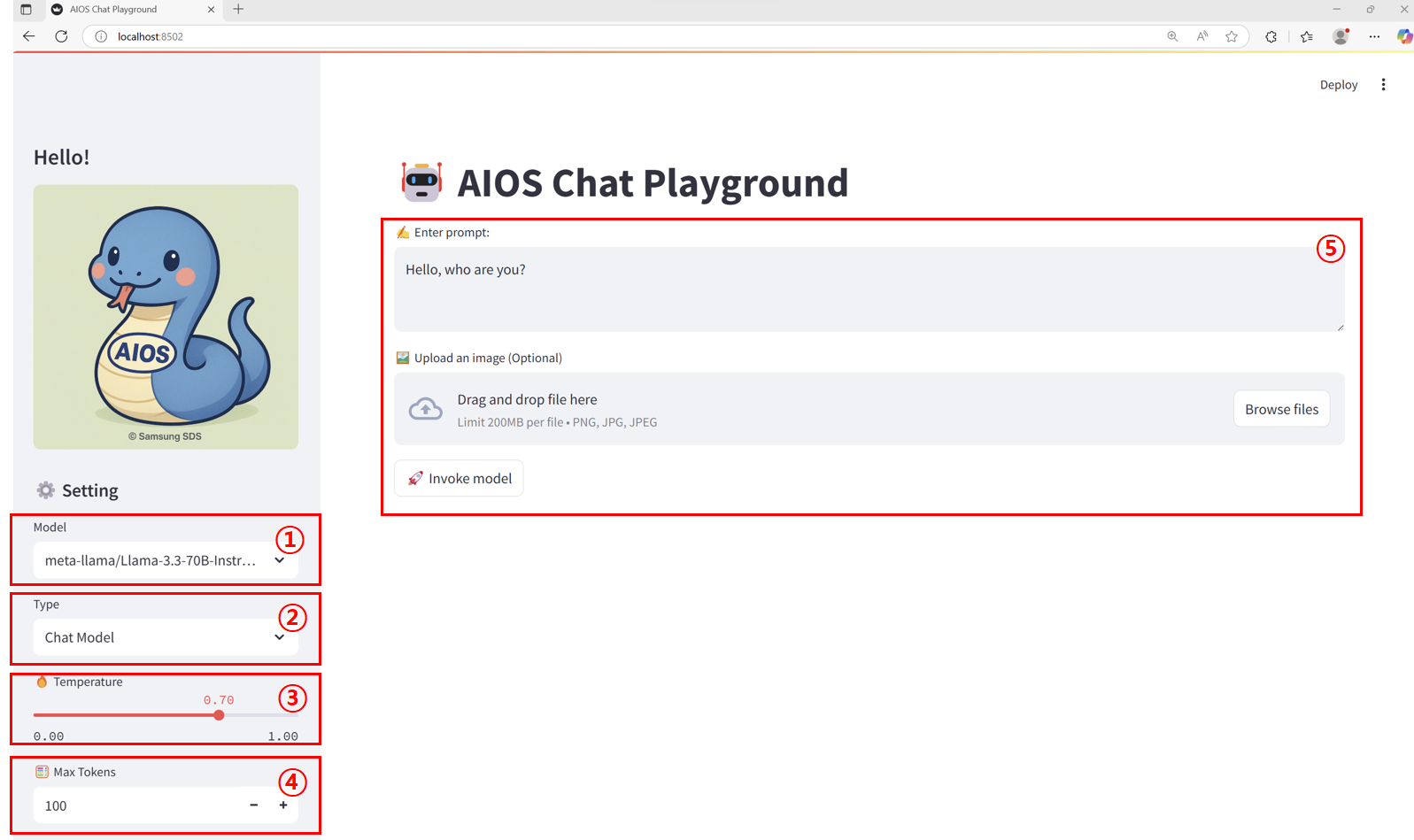
Main screen layout
| Item | description | |
|---|---|---|
| 1 | Model | The list of callable models configured in the models.json file. |
| 2 | Endpoint type | Select the appropriate model according to the call format defined in the endpoints.json file. |
| 3 | Temperature | This is a parameter that controls the degree of “randomness” or “creativity” in model output. In this tutorial, it is set in the range 0.00 ~ 1.00.
|
| 4 | Max Tokens | Set the maximum number of tokens that can be generated in the response text using the output length limit parameter. In this tutorial, it is set to a range of 1 ~ 5000. |
| 5 | input area | The way prompts, images, etc. are received varies by endpoint type.
|
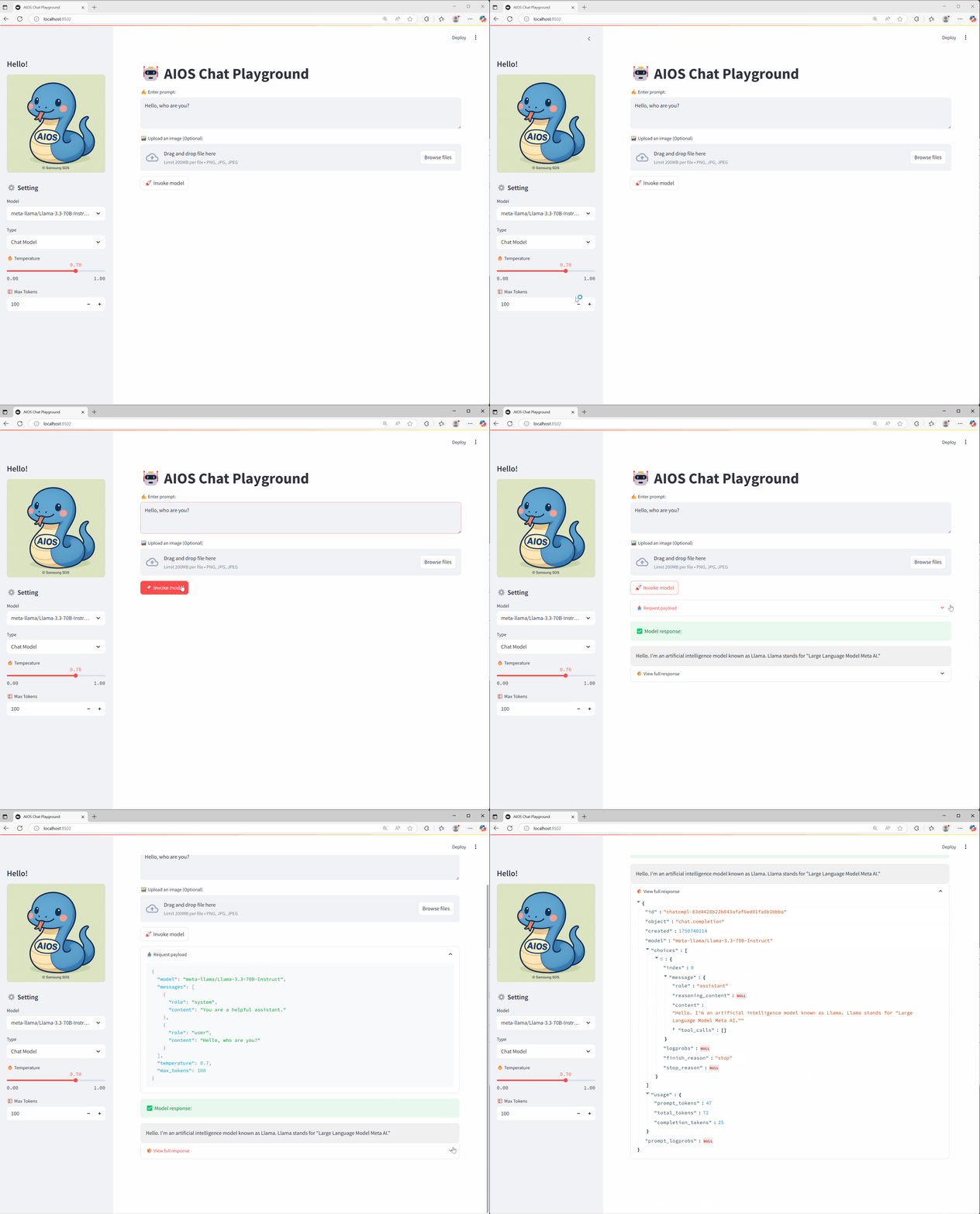
Calling a Chat model
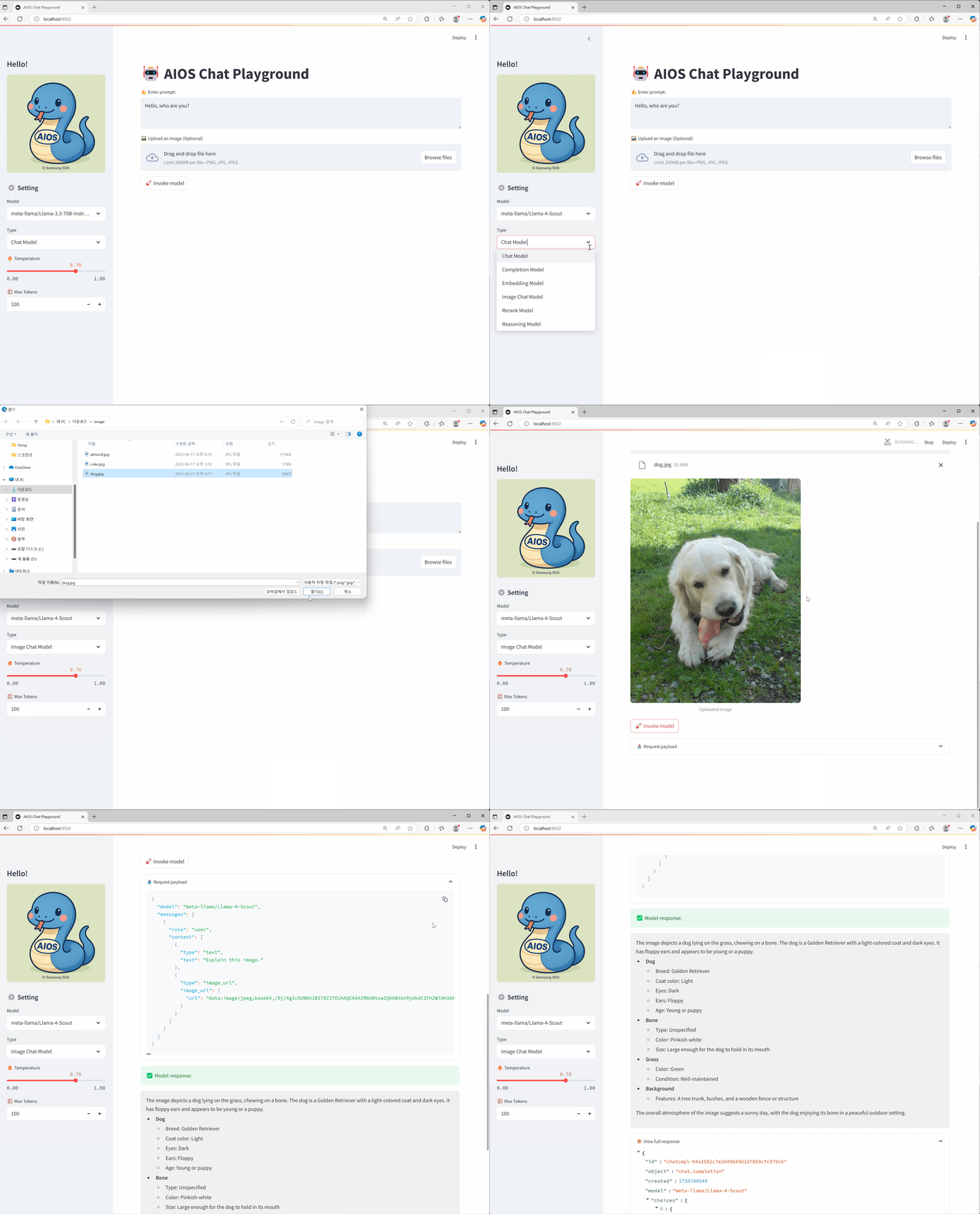
Calling an Image model
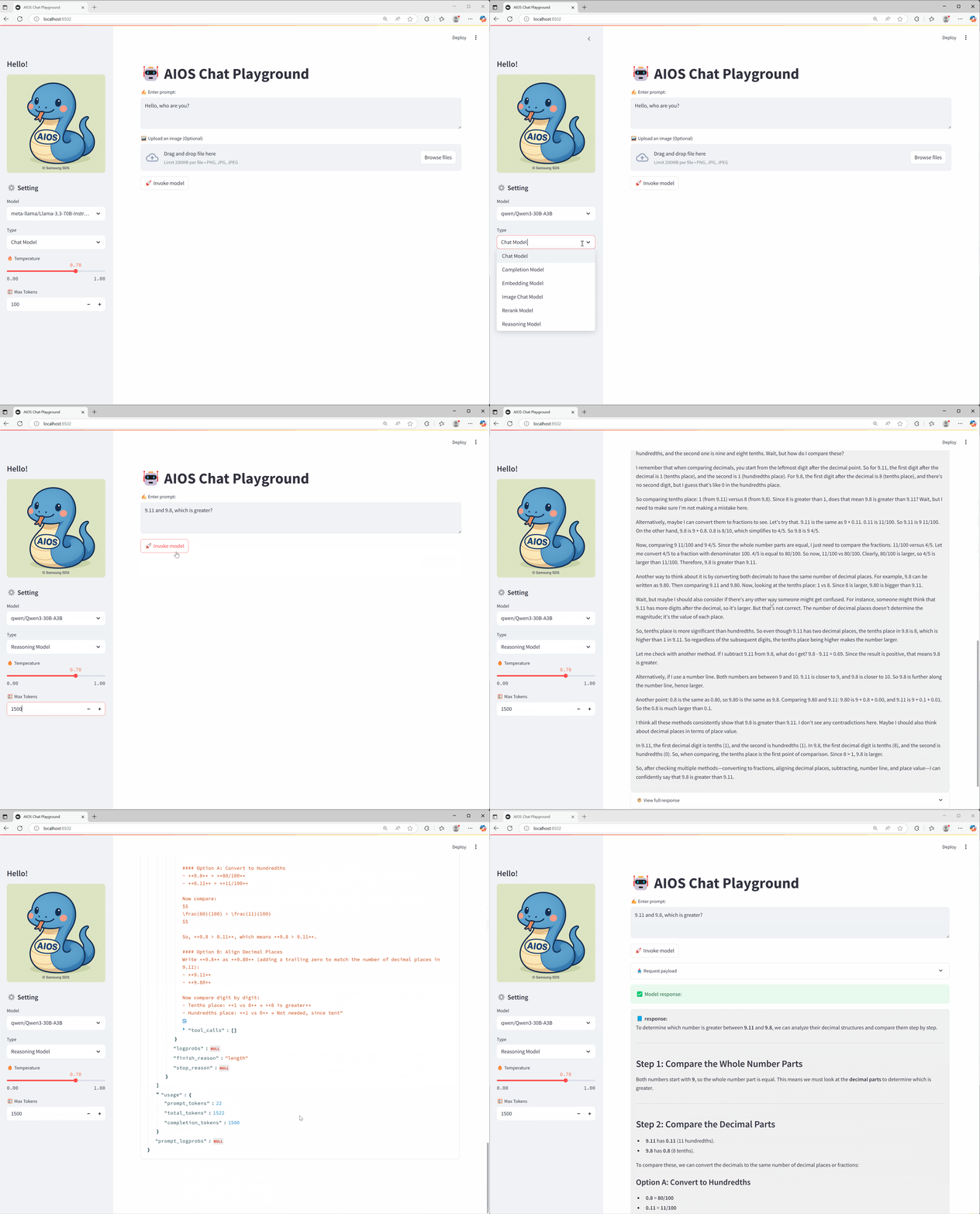
Calling a Reasoning model
Conclusion
We hope that through this tutorial you have learned how to build and use a Playground UI that lets you easily test the various AI model APIs provided by AIOS. Depending on your actual service needs, you can flexibly customize it to match the desired model and endpoint architecture.