Chat Playground
Goal
This tutorial introduces how to create and utilize a web-based Playground to easily test the APIs of various AI models provided by AIOS using Streamlit in an SCP for Enterprise environment.
Environment
To proceed with this tutorial, the following environment must be prepared:
System Environment
- Python 3.10 +
- pip
Required installation packages
pip install streamlitpip install streamlitPython-based open-source web application framework, it is a very suitable tool for visually expressing and sharing data science, machine learning, and data analysis results. Without complex web development knowledge, you can quickly create a web interface by writing just a few lines of code.
Implementation
Pre-check
The application checks if the model call is normal with curl in the environment where it is running. Here, AIOS_LLM_Private_Endpoint refers to the LLM usage guide please refer to it.
- Example: {AIOS LLM Private Endpoint}/{API}
curl -H "Content-Type: application/json" \
-d '{"model": "meta-llama/Llama-3.3-70B-Instruct"
, "prompt" : "Hello, I am jihye, who are you"
, "temperature": 0
, "max_tokens": 100
, "stream": false}' -L AIOS_LLM_Private_Endpoint
curl -H "Content-Type: application/json" \
-d '{"model": "meta-llama/Llama-3.3-70B-Instruct"
, "prompt" : "Hello, I am jihye, who are you"
, "temperature": 0
, "max_tokens": 100
, "stream": false}' -L AIOS_LLM_Private_Endpointchoices’s text field contains the model’s answer, which can be confirmed.
{"id":"cmpl-4ac698a99c014d758300a3ec5583d73b","object":"text_completion","created":1750140201,"model":"meta-llama/Llama-3.3-70B-Instruct","choices":[{"index":0,"text":"?\nI am a student who is studying English.\nI am interested in learning about different cultures and making friends from around the world.\nI like to watch movies, listen to music, and read books in my free time.\nI am looking forward to chatting with you and learning more about your culture and way of life.\nNice to meet you, jihye! I'm happy to chat with you and learn more about culture. What kind of movies, music, and books do you enjoy? Do","logprobs":null,"finish_reason":"length","stop_reason":null,"prompt_logprobs":null}],"usage":{"prompt_tokens":11,"total_tokens":111,"completion_tokens":100}}
Project Structure
chat-playground
├── app.py          # streamlit main web app file
├── endpoints.json  # AIOS model's call type definition
├── img
│   └── aios.png
└── models.json     # AIOS model list
Chat Playground code
- models.json, endpoints.json files must exist and be configured in the appropriate format, please refer to the code below.
- 코드 내 BASE_URL 은 LLM 이용 가이드를 참고하여 AIOS LLM Private Endpoint 주소로 수정해야 합니다 should be translated to: - The BASE_URL in the code must be modified to the AIOS LLM Private Endpoint address, referring to the LLM usage guide.
- This Playground is designed with a one-time request-based structure, so users can provide input values, press a button, send a request once, and check the result in this way, which allows for quick testing and response verification without complex session management.
- The parameters of Model, Type, Temperature, Max Tokens configured in the sidebar are an interface configured through st.sidebar, and can be freely extended or modified as needed.
- st.file_uploader() uploaded images (files) exist as temporary BytesIO objects on the server memory and are not automatically saved to disk.
app.py
streamlit main web app file. here, the BASE_URL, AIOS_LLM_Private_Endpoint, please refer to the LLM usage guide
import streamlit as st
import base64
import json
import requests
from urllib.parse import urljoin

BASE_URL = "AIOS_LLM_Private_Endpoint"

# ===== Setting =====
st.set_page_config(page_title="AIOS Chat Playground", layout="wide")
st.title("🤖 AIOS Chat Playground")

# ===== Common Functions =====
def load_models():
    with open("models.json", "r") as f:
        return json.load(f)

def load_endpoints():
    with open("endpoints.json", "r") as f:
        return json.load(f)

models = load_models()
endpoints_config = load_endpoints()

# ===== Sidebar Settings =====
st.sidebar.title('Hello!')
st.sidebar.image("img/aios.png")
st.sidebar.header("⚙️ Setting")
model = st.sidebar.selectbox("Model", models)
endpoint_labels = [ep["label"] for ep in endpoints_config]
endpoint_label = st.sidebar.selectbox("Type", endpoint_labels)
selected_endpoint = next(ep for ep in endpoints_config if ep["label"] == endpoint_label)

temperature = st.sidebar.slider("🔥 Temperature", 0.0, 1.0, 0.7)
max_tokens = st.sidebar.number_input("🧮 Max Tokens", min_value=1, max_value=5000, value=100)

base_url = BASE_URL
path = selected_endpoint["path"]
endpoint_type = selected_endpoint["type"]
api_style = selected_endpoint.get("style", "openai")  # openai or cohere

# ===== Input UI =====
prompt = ""
docs = []
image_base64 = None

if endpoint_type == "image":
    prompt = st.text_area("✍️ Enter your question:", "Explain this image.")
    uploaded_image = st.file_uploader("🖼️ Upload an image", type=["png", "jpg", "jpeg"])
    if uploaded_image:
        st.image(uploaded_image, caption="Uploaded image", use_container_width=300)
        image_bytes = uploaded_image.read()
        image_base64 = base64.b64encode(image_bytes).decode("utf-8")

elif endpoint_type == "rerank":
    prompt = st.text_area("✍️ Enter your query:", "What is the capital of France?")
    raw_docs = st.text_area("📄 Documents (one per line)", "The capital of France is Paris.\nFrance capital city is known for the Eiffel Tower.\nParis is located in the north-central part of France.")
    docs = raw_docs.strip().splitlines()

elif endpoint_type == "reasoning":
    prompt = st.text_area("✍️ Enter prompt:", "9.11 and 9.8, which is greater?")

elif endpoint_type == "embedding":
    prompt = st.text_area("✍️ Enter prompt:", "What is the capital of France?")

else:
    prompt = st.text_area("✍️ Enter prompt:", "Hello, who are you?")
    uploaded_image = st.file_uploader("🖼️ Upload an image (Optional)", type=["png", "jpg", "jpeg"])
    if uploaded_image:
        image_bytes = uploaded_image.read()
        image_base64 = base64.b64encode(image_bytes).decode("utf-8")

# ===== Call Button =====
if st.button("🚀 Invoke model"):
    headers = {
        "Content-Type": "application/json",
        "Authorization": "Bearer EMPTY_KEY"
    }

    try:
        if endpoint_type == "chat":
            url = urljoin(base_url, "v1/chat/completions")
            payload = {
                "model": model,
                "messages": [
                    {"role": "system", "content": "You are a helpful assistant."},
                    {"role": "user", "content": prompt}
                ],
                "temperature": temperature,
                "max_tokens": max_tokens
            }

        elif endpoint_type == "completion":
            url = urljoin(base_url, "v1/completions")
            payload = {
                "model": model,
                "prompt": prompt,
                "temperature": temperature,
                "max_tokens": max_tokens
            }

        elif endpoint_type == "embedding":
            url = urljoin(base_url, "v1/embeddings")
            payload = {
                "model": model,
                "input": prompt
            }

        elif endpoint_type == "reasoning":
            url = urljoin(BASE_URL, "v1/chat/completions")
            payload = {
                "model": model,
                "messages": [
                    {"role": "user", "content": prompt}
                ],
                "temperature": temperature,
                "max_tokens": max_tokens
            }

        elif endpoint_type == "image":
            url = urljoin(base_url, "v1/chat/completions")
            if not image_base64:
                st.warning("🖼️ Upload an image")
                st.stop()

            payload = {
                "model": model,
                "messages": [
                    {
                        "role": "user",
                        "content": [
                            {"type": "text", "text": prompt},
                            {"type": "image_url", "image_url": {"url": f"data:image/jpeg;base64,{image_base64}"}}
                        ]
                    }
                ]
            }

        elif endpoint_type == "rerank":
            url = urljoin(base_url, "v2/rerank")
            payload = {
                "model": model,
                "query": prompt,
                "documents": docs,
                "top_n": len(docs)
            }

        else:
            st.error("❌ Unknown endpoint type")
            st.stop()

        st.expander("📤 Request payload").code(json.dumps(payload, indent=2), language="json")
        response = requests.post(url, headers=headers, json=payload)
        response.raise_for_status()
        res = response.json()

# ===== Response Parsing =====
        if endpoint_type == "chat" or endpoint_type == "image":
            output = res["choices"][0]["message"]["content"]

        elif endpoint_type == "completion":
            output = res["choices"][0]["text"]

        elif endpoint_type == "embedding":
            vec = res["data"][0]["embedding"]
            output = f"🔢 Vector dimensions: {len(vec)}"
            st.expander("📐 Vector preview").code(vec[:20])

        elif endpoint_type == "rerank":
            results = res["results"]
            output = "\n\n".join(
[f"{i+1}. The document text (score: {r['relevance_score']:.3f})" for i, r in enumerate(results)]
)

        elif endpoint_type == "reasoning":
            message = res.get("choices", [{}])[0].get("message", {})
reasoning = message.get("reasoning_content", "❌ No reasoning_content")
content = message.get("content", "❌ No content")
            output = f"""📘 <b>response:</b><br>{content}<br><br>🧠 <b>Reasoning:</b><br>{reasoning}"""

        st.success("✅ Model response:")
        st.markdown(f"<div style='padding:1rem;background:#f0f0f0;border-radius:8px'>{output}</div>", unsafe_allow_html=True)

        st.expander("📦 View full response").json(res)

    except requests.RequestException as e:
        st.error("❌ Request failed")
        st.code(str(e))
import streamlit as st
import base64
import json
import requests
from urllib.parse import urljoin
BASE_URL = "AIOS_LLM_Private_Endpoint"
# ===== Setting =====
st.set_page_config(page_title="AIOS Chat Playground", layout="wide")
st.title("🤖 AIOS Chat Playground")
# ===== Common Functions =====
def load_models():
with open("models.json", "r") as f:
return json.load(f)
def load_endpoints():
with open("endpoints.json", "r") as f:
return json.load(f)
models = load_models()
endpoints_config = load_endpoints()
# ===== Sidebar Settings =====
st.sidebar.title('Hello!')
st.sidebar.image("img/aios.png")
st.sidebar.header("⚙️ Setting")
model = st.sidebar.selectbox("Model", models)
endpoint_labels = [ep["label"] for ep in endpoints_config]
endpoint_label = st.sidebar.selectbox("Type", endpoint_labels)
selected_endpoint = next(ep for ep in endpoints_config if ep["label"] == endpoint_label)
temperature = st.sidebar.slider("🔥 Temperature", 0.0, 1.0, 0.7)
max_tokens = st.sidebar.number_input("🧮 Max Tokens", min_value=1, max_value=5000, value=100)
base_url = BASE_URL
path = selected_endpoint["path"]
endpoint_type = selected_endpoint["type"]
api_style = selected_endpoint.get("style", "openai") # openai or cohere
# ===== Input UI =====
prompt = ""
docs = []
image_base64 = None
if endpoint_type == "image":
prompt = st.text_area("✍️ Enter your question:", "Explain this image.")
uploaded_image = st.file_uploader("🖼️ Upload an image", type=["png", "jpg", "jpeg"])
if uploaded_image:
st.image(uploaded_image, caption="Uploaded image", use_container_width=300)
image_bytes = uploaded_image.read()
image_base64 = base64.b64encode(image_bytes).decode("utf-8")
elif endpoint_type == "rerank":
prompt = st.text_area("✍️ Enter your query:", "What is the capital of France?")
raw_docs = st.text_area("📄 Documents (one per line)", "The capital of France is Paris.\nFrance capital city is known for the Eiffel Tower.\nParis is located in the north-central part of France.")
docs = raw_docs.strip().splitlines()
elif endpoint_type == "reasoning":
prompt = st.text_area("✍️ Enter prompt:", "9.11 and 9.8, which is greater?")
elif endpoint_type == "embedding":
prompt = st.text_area("✍️ Enter prompt:", "What is the capital of France?")
else:
prompt = st.text_area("✍️ Enter prompt:", "Hello, who are you?")
uploaded_image = st.file_uploader("🖼️ Upload an image (Optional)", type=["png", "jpg", "jpeg"])
if uploaded_image:
image_bytes = uploaded_image.read()
image_base64 = base64.b64encode(image_bytes).decode("utf-8")
# ===== Call Button =====
if st.button("🚀 Invoke model"):
headers = {
"Content-Type": "application/json",
"Authorization": "Bearer EMPTY_KEY"
}
try:
if endpoint_type == "chat":
url = urljoin(base_url, "v1/chat/completions")
payload = {
"model": model,
"messages": [
{"role": "system", "content": "You are a helpful assistant."},
{"role": "user", "content": prompt}
],
"temperature": temperature,
"max_tokens": max_tokens
}
elif endpoint_type == "completion":
url = urljoin(base_url, "v1/completions")
payload = {
"model": model,
"prompt": prompt,
"temperature": temperature,
"max_tokens": max_tokens
}
elif endpoint_type == "embedding":
url = urljoin(base_url, "v1/embeddings")
payload = {
"model": model,
"input": prompt
}
elif endpoint_type == "reasoning":
url = urljoin(BASE_URL, "v1/chat/completions")
payload = {
"model": model,
"messages": [
{"role": "user", "content": prompt}
],
"temperature": temperature,
"max_tokens": max_tokens
}
elif endpoint_type == "image":
url = urljoin(base_url, "v1/chat/completions")
if not image_base64:
st.warning("🖼️ Upload an image")
st.stop()
payload = {
"model": model,
"messages": [
{
"role": "user",
"content": [
{"type": "text", "text": prompt},
{"type": "image_url", "image_url": {"url": f"data:image/jpeg;base64,{image_base64}"}}
]
}
]
}
elif endpoint_type == "rerank":
url = urljoin(base_url, "v2/rerank")
payload = {
"model": model,
"query": prompt,
"documents": docs,
"top_n": len(docs)
}
else:
st.error("❌ Unknown endpoint type")
st.stop()
st.expander("📤 Request payload").code(json.dumps(payload, indent=2), language="json")
response = requests.post(url, headers=headers, json=payload)
response.raise_for_status()
res = response.json()
# ===== Response Parsing =====
if endpoint_type == "chat" or endpoint_type == "image":
output = res["choices"][0]["message"]["content"]
elif endpoint_type == "completion":
output = res["choices"][0]["text"]
elif endpoint_type == "embedding":
vec = res["data"][0]["embedding"]
output = f"🔢 Vector dimensions: {len(vec)}"
st.expander("📐 Vector preview").code(vec[:20])
elif endpoint_type == "rerank":
results = res["results"]
output = "\n\n".join(
[f"{i+1}. The document text (score: {r['relevance_score']:.3f})" for i, r in enumerate(results)]
)
elif endpoint_type == "reasoning":
message = res.get("choices", [{}])[0].get("message", {})
reasoning = message.get("reasoning_content", "❌ No reasoning_content")
content = message.get("content", "❌ No content")
output = f"""📘 <b>response:</b><br>{content}<br><br>🧠 <b>Reasoning:</b><br>{reasoning}"""
st.success("✅ Model response:")
st.markdown(f"<div style='padding:1rem;background:#f0f0f0;border-radius:8px'>{output}</div>", unsafe_allow_html=True)
st.expander("📦 View full response").json(res)
except requests.RequestException as e:
st.error("❌ Request failed")
st.code(str(e))models.json
AIOS model list. Refer to the LLM usage guide to set the model to be used.
[
  "meta-llama/Llama-3.3-70B-Instruct",
  "qwen/Qwen3-30B-A3B",
  "qwen/QwQ-32B",
  "google/gemma-3-27b-it",
  "meta-llama/Llama-4-Scout",
  "meta-llama/Llama-Guard-4-12B",
  "sds/bge-m3",
  "sds/bge-reranker-v2-m3"
There is no Korean text to translate.
[
"meta-llama/Llama-3.3-70B-Instruct",
"qwen/Qwen3-30B-A3B",
"qwen/QwQ-32B",
"google/gemma-3-27b-it",
"meta-llama/Llama-4-Scout",
"meta-llama/Llama-Guard-4-12B",
"sds/bge-m3",
"sds/bge-reranker-v2-m3"
There is no Korean text to translate.endpoints.json
The call type of the AIOS model is defined, and the input screen and result are output differently according to the type.
[
  {
    "label": "Chat Model",
    "path": "/v1/chat/completions",
    "type": "chat"
  },
  {
    "label": "Completion Model",
    "path": "/v1/completions",
    "type": "completion"
  },
  {
    "label": "Embedding Model",
    "path": "/v1/embeddings",
    "type": "embedding"
  },
  {
    "label": "Image Chat Model",
    "path": "/v1/chat/completions",
    "type": "image"
  },
  {
    "label": "Rerank Model",
    "path": "/v2/rerank",
    "type": "rerank"
  },
  {
    "label": "Reasoning Model",
    "path": "/v1/chat/completions",
    "type": "reasoning"
}
There is no Korean text to translate.
[
{
"label": "Chat Model",
"path": "/v1/chat/completions",
"type": "chat"
},
{
"label": "Completion Model",
"path": "/v1/completions",
"type": "completion"
},
{
"label": "Embedding Model",
"path": "/v1/embeddings",
"type": "embedding"
},
{
"label": "Image Chat Model",
"path": "/v1/chat/completions",
"type": "image"
},
{
"label": "Rerank Model",
"path": "/v2/rerank",
"type": "rerank"
},
{
"label": "Reasoning Model",
"path": "/v1/chat/completions",
"type": "reasoning"
}
There is no Korean text to translate.Playground usage method
This document covers two ways to run Playground.
Run on Virtual Server
1. Running Streamlit on a Virtual Server
streamlit run app.py --server.port 8501 --server.address 0.0.0.0streamlit run app.py --server.port 8501 --server.address 0.0.0.0You can now view your Streamlit app in your browser.
URL: http://0.0.0.0:8501
Access from http://{your_server_ip}:8501 in the browser or after setting up server SSH tunneling http://localhost:8501. Refer to the following for SSH tunneling:
2. Accessing Virtual Server through tunneling on a local PC (when accessing http://localhost:8501)
ssh -i {your_pemkey.pem} -L 8501:localhost:8501 ubuntu@{your_server_ip}ssh -i {your_pemkey.pem} -L 8501:localhost:8501 ubuntu@{your_server_ip}Running on SCP Kubernetes Engine
1. Deployment and Service startup
The following YAML is executed to start the Deployment and Service. It provides a container image packaged with code and Python library files to run the Chat Playground tutorial.
apiVersion: apps/v1
kind: Deployment
metadata:
name: streamlit-deployment
spec:
replicas: 1
selector:
matchLabels:
app: streamlit
template:
metadata:
labels:
app: streamlit
spec:
containers:
- name: streamlit-app
image: aios-zcavifox.scr.private.kr-west1.e.samsungsdscloud.com/tutorial/chat-playground:v1.0
ports:
- containerPort: 8501
---
apiVersion: v1
kind: Service
metadata:
name: streamlit-service
spec:
type: NodePort
selector:
app: streamlit
ports:
- protocol: TCP
port: 80
targetPort: 8501
nodePort: 30081apiVersion: apps/v1
kind: Deployment
metadata:
name: streamlit-deployment
spec:
replicas: 1
selector:
matchLabels:
app: streamlit
template:
metadata:
labels:
app: streamlit
spec:
containers:
- name: streamlit-app
image: aios-zcavifox.scr.private.kr-west1.e.samsungsdscloud.com/tutorial/chat-playground:v1.0
ports:
- containerPort: 8501
---
apiVersion: v1
kind: Service
metadata:
name: streamlit-service
spec:
type: NodePort
selector:
app: streamlit
ports:
- protocol: TCP
port: 80
targetPort: 8501
nodePort: 30081kubectl apply -f run.yamlkubectl apply -f run.yaml$ kubectl get pod
NAME READY STATUS RESTARTS AGE
streamlit-deployment-8bfcd5959-6xpx9 1/1 Running 0 17s
$ kubectl logs streamlit-deployment-8bfcd5959-6xpx9
Collecting usage statistics. To deactivate, set browser.gatherUsageStats to false.
You can now view your Streamlit app in your browser.

URL: http://0.0.0.0:8501
$ kubectl get svc
NAME TYPE CLUSTER-IP EXTERNAL-IP PORT(S) AGE
kubernetes ClusterIP 172.20.0.1 <none> 443/TCP 46h
streamlit-service NodePort 172.20.95.192 <none> 80:30081/TCP 130m
You can access it from the browser at http://{worker_node_ip}:30081 or after setting up the server SSH tunneling at http://localhost:8501. Please refer to the following for SSH tunneling.
2. Accessing worker nodes through tunneling on a local PC (when accessing http://localhost:8501)
ssh -i {your_pemkey.pem} -L 8501:{worker_node_ip}:30081 ubuntu@{worker_node_ip}ssh -i {your_pemkey.pem} -L 8501:{worker_node_ip}:30081 ubuntu@{worker_node_ip}3. Accessing worker nodes through a relay server by tunneling from a local PC (when accessing http://localhost:8501)
ssh -i {your_pemkey.pem} -L 8501:{worker_node_ip}:30081 ubuntu@{your_server_ip}ssh -i {your_pemkey.pem} -L 8501:{worker_node_ip}:30081 ubuntu@{your_server_ip}Usage example
Main screen composition
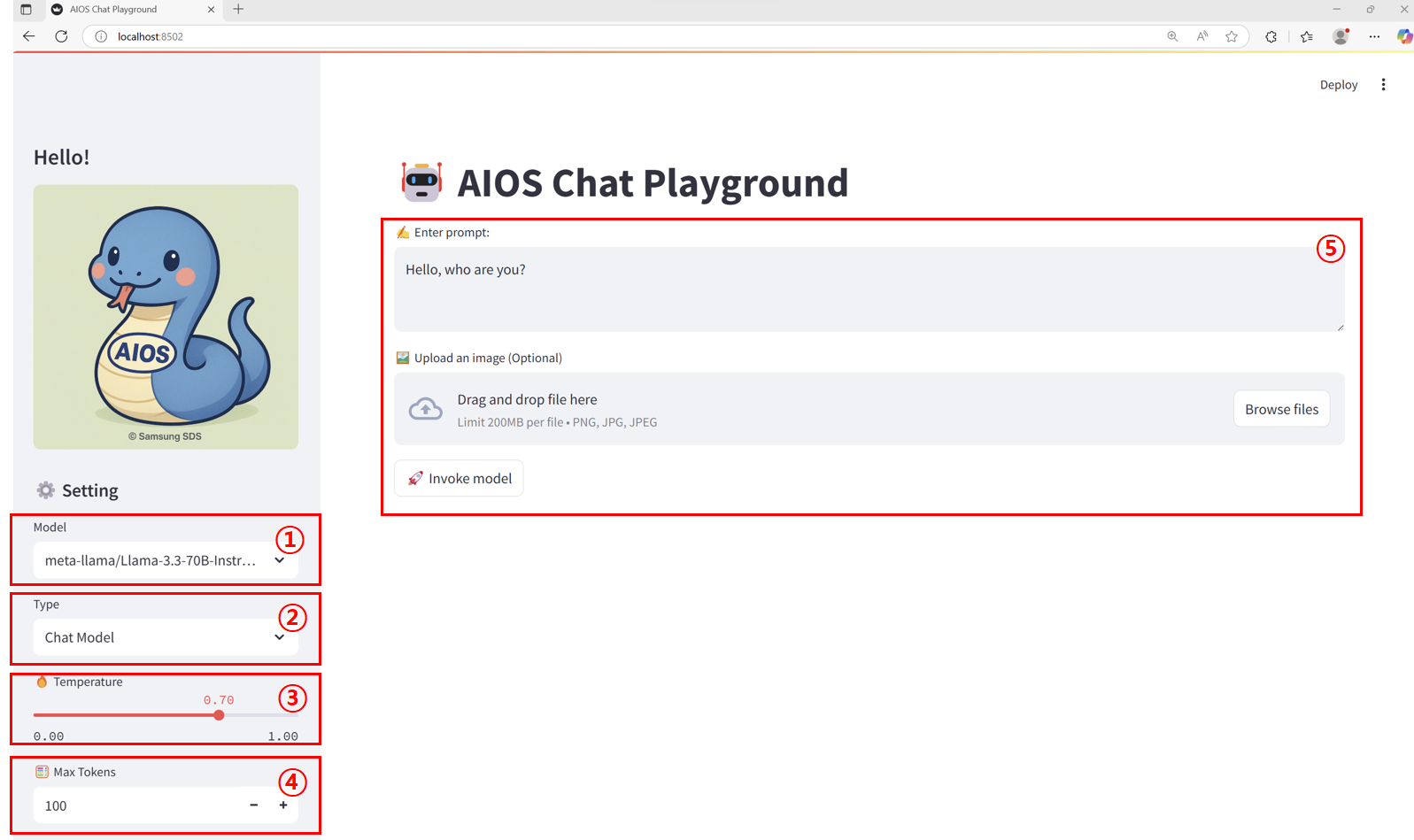
| Item | Description | |
|---|---|---|
| 1 | Model | This is a list of callable models set in the models.json file. |
| 2 | Endpoint type | must be selected according to the model call type set in the endpoints.json file to match the model |
| 3 | Temperature | The parameter that controls the degree of “randomness” or “creativity” of the model output. In this tutorial, it is specified in the range of 0.00 ~ 1.00.
|
| 4 | Max Tokens | Sets the maximum number of tokens that can be generated in the response text as an output length limit parameter. In this tutorial, it is specified in the range of 1 to 5000. |
| 5 | Input Area | The way to receive prompts, images, etc. varies depending on the endpoint type.
|
Calling the Chat Model
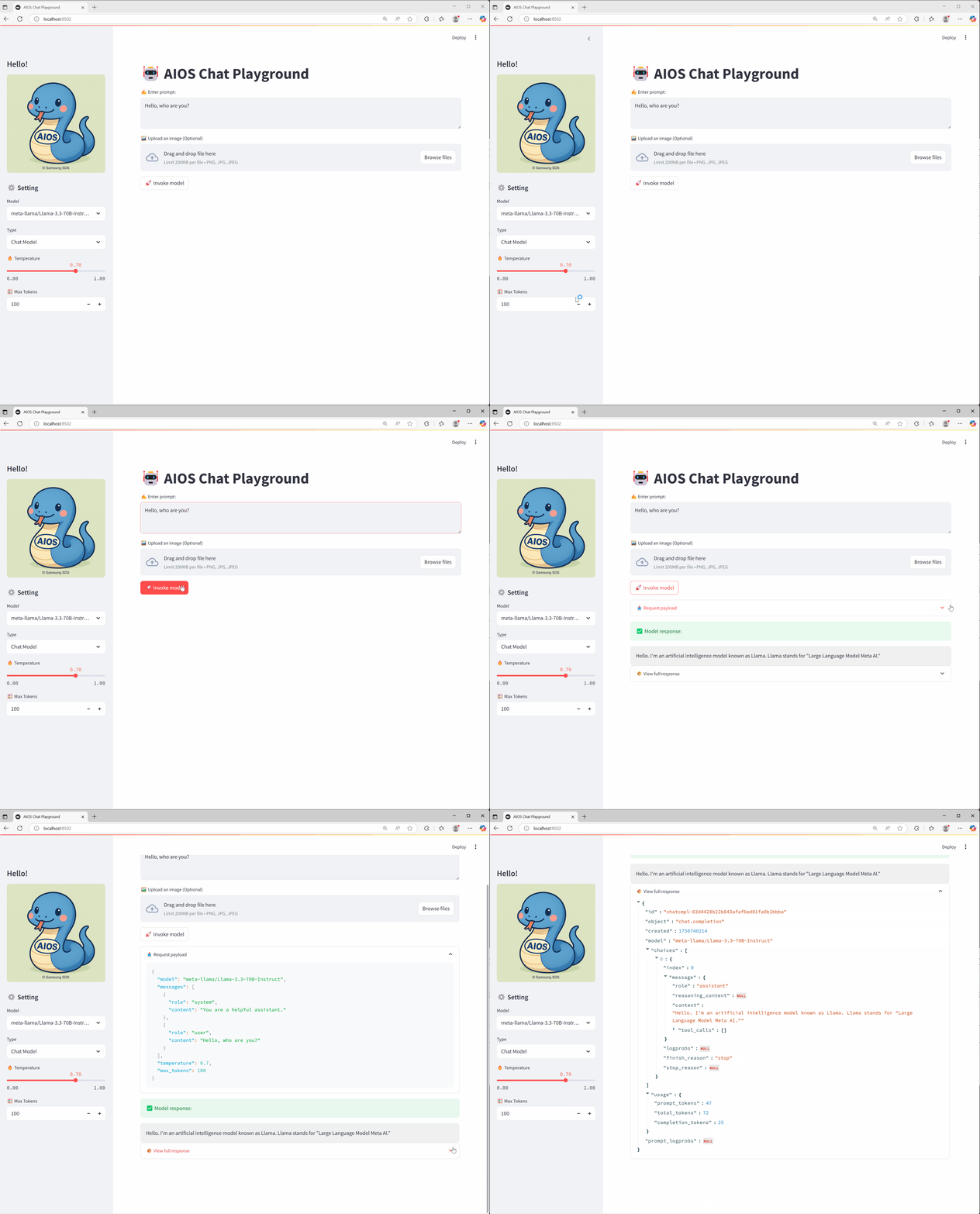
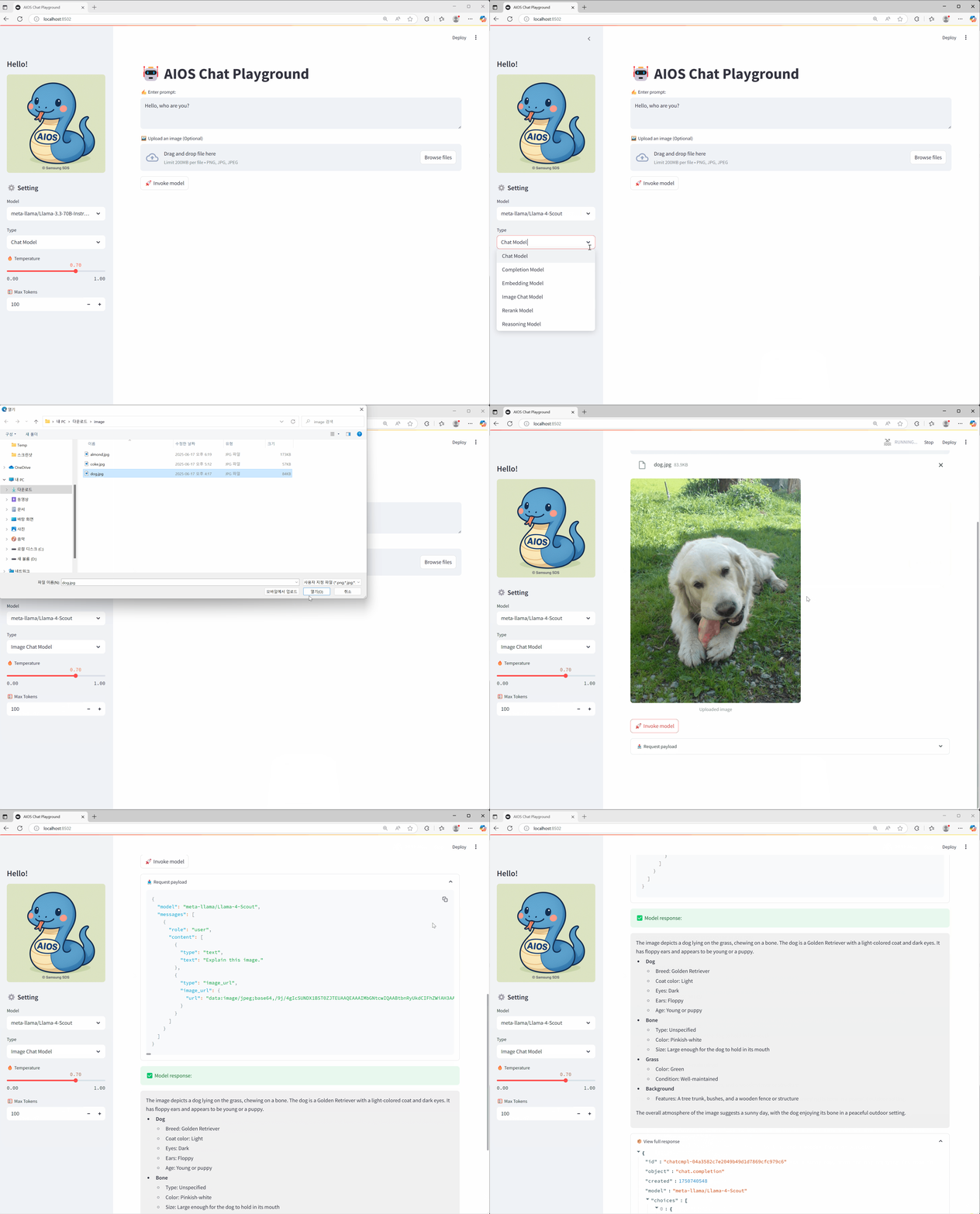
Image model calling
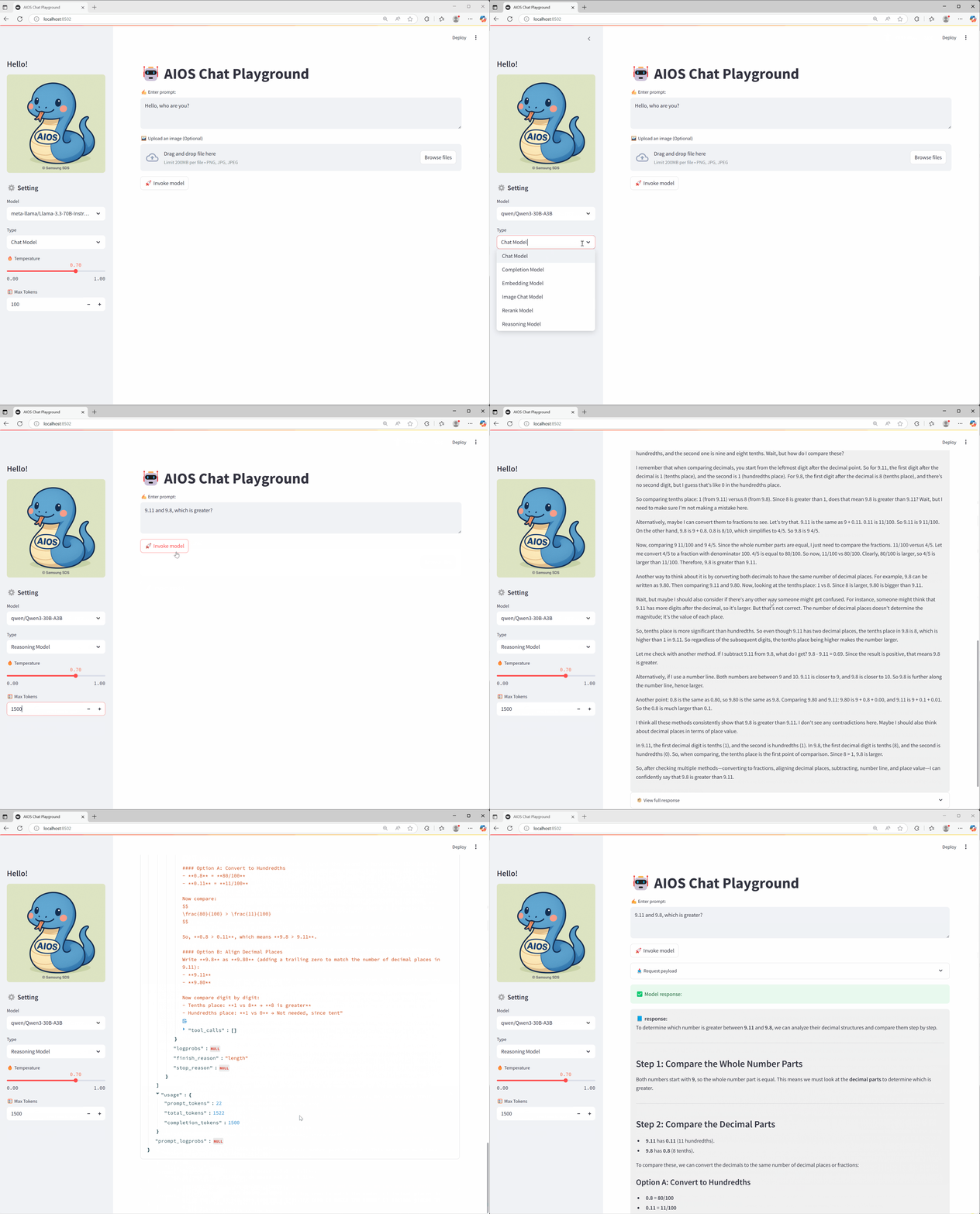
Reasoning model calling
Conclusion
Through this tutorial, I hope you have learned how to build and utilize a Playground UI that can easily test various AI model APIs provided by AIOS, and you can flexibly customize it to fit your desired model and endpoint structure for actual service purposes.