Autogen
Goal
Create an Autogen AI Agent application using the AI model provided by AIOS.
Autogen is an open-source framework that enables easy building and management of LLM-based multi-agent collaboration and event-driven automation workflows.
environment
To complete this tutorial, the following environment must be prepared.
System Environment
- Python 3.10 +
- pip
Packages required for installation
pip install autogen-agentchat==0.6.1 autogen-ext[openai,mcp]==0.6.1 mcp-server-time==0.6.2pip install autogen-agentchat==0.6.1 autogen-ext[openai,mcp]==0.6.1 mcp-server-time==0.6.2System Architecture
Displays the complete flow of the multi‑AI agent architecture and the agent architecture that leverages MCP.
Travel Planning Agent Flow
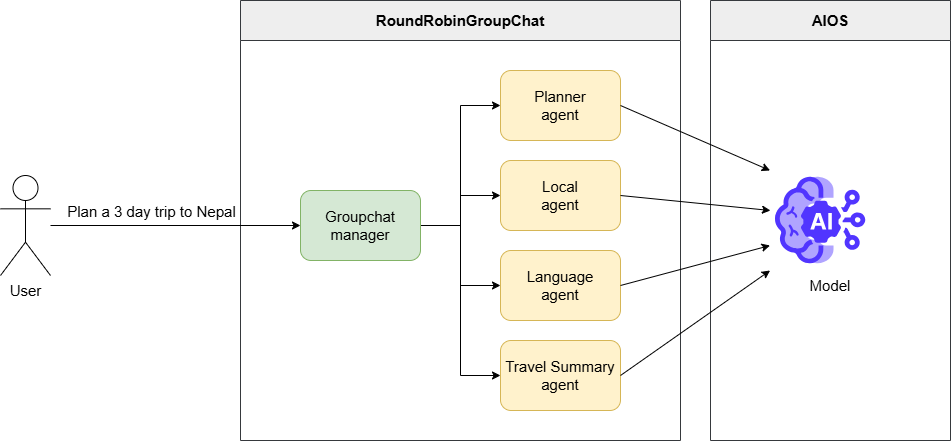
- The user requests a 3‑day Nepal travel itinerary.
- Groupchat manager adjusts the execution order of registered agents (travel planning, local information, travel conversation, comprehensive summary).
- Each agent collaborates to carry out the assigned tasks according to its role.
- When the final travel plan deliverable is generated, it is delivered to the user
MCP Flow
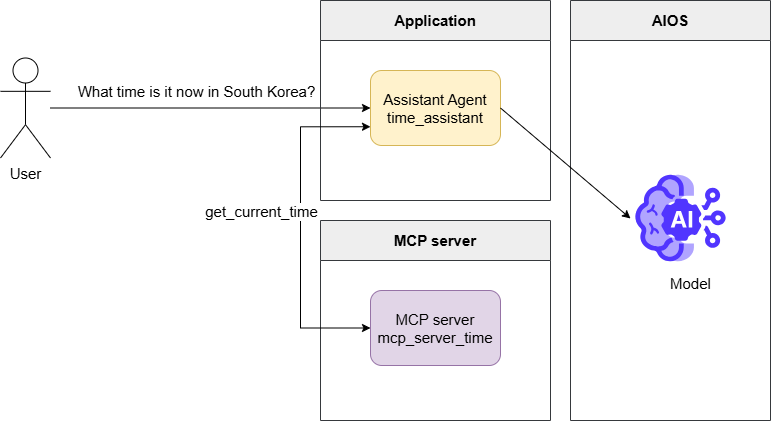
MCP
MCP (Model Context Protocol) is an open standard protocol that coordinates interactions between the model and external data or tools.
The MCP server implements this functionality, mediating and executing function calls by leveraging tool metadata.
- The user queries the current time in Korea.
- mcp_server_time model request including metadata for a tool that can retrieve the current time through the server.
- Generate a tool calls message that calls the
get_current_timefunction - If you execute the
get_current_timefunction via the MCP server and pass the result to a model request, it generates the final response and delivers it to the user.
Implementation
Travel Planning Agent
- For the AIOS_BASE_URL AIOS_LLM_Private_Endpoint and the MODEL’s MODEL_ID in the code, please refer to the LLM Usage Guide.
autogen_travel_planning.py
from urllib.parse import urljoin

from autogen_agentchat.agents import AssistantAgent
from autogen_agentchat.conditions import TextMentionTermination
from autogen_agentchat.teams import RoundRobinGroupChat
from autogen_agentchat.ui import Console
from autogen_ext.models.openai import OpenAIChatCompletionClient
from autogen_core.models import ModelFamily


# Set the API URL and model name for accessing the model.
AIOS_BASE_URL = "AIOS_LLM_Private_Endpoint"
MODEL = "MODEL_ID"

# Create a model client using OpenAIChatCompletionClient.
model_client = OpenAIChatCompletionClient(
    model=MODEL,
    base_url=urljoin(AIOS_BASE_URL, "v1"),
    api_key="EMPTY_KEY",
    model_info={
        # Set to True when images are supported.
        "vision": False
        # Set to True when function calls are supported.
        "function_calling": True,
        # Set to True when JSON output is supported.
        "json_output": True,
        # If the model you want to use is not provided by ModelFamily, use UNKNOWN.
        # "family": ModelFamily.UNKNOWN,
        "family": ModelFamily.LLAMA_3_3_70B,
        # Set to True when structured output is supported.
        "structured_output": True,
    },
)

# Create multiple agents.
# Each agent performs roles such as travel planning, recommending local activities, providing language tips, and summarizing travel itineraries.
planner_agent = AssistantAgent(
    planner_agent
    model_client=model_client,
    description="A helpful assistant that can plan trips."
    system_message=("You are a helpful assistant that can suggest a travel plan "
                    "for a user based on their request."
)

local_agent = AssistantAgent(
    "local_agent"
    model_client=model_client,
    description="A local assistant that can suggest local activities or places to visit."
    system_message=("You are a helpful assistant that can suggest authentic and ")
                    interesting local activities or places to visit for a user
                    "and can utilize any context information provided."
)

language_agent = AssistantAgent(
    language_agent
    model_client=model_client,
    description="A helpful assistant that can provide language tips for a given destination."
    system_message=("You are a helpful assistant that can review travel plans, ")
                    providing feedback on important/critical tips about how best to address
                    language or communication challenges for the given destination.
                    If the plan already includes language tips,
                    you can mention that the plan is satisfactory, with rationale.
)

travel_summary_agent = AssistantAgent(
    travel_summary_agent
    model_client=model_client,
    description="A helpful assistant that can summarize the travel plan."
    system_message=("You are a helpful assistant that can take in all of the suggestions "
                    and advice from the other agents and provide a detailed final travel plan.
                    You must ensure that the final plan is integrated and complete.
                    "YOUR FINAL RESPONSE MUST BE THE COMPLETE PLAN. "
                    "When the plan is complete and all perspectives are integrated, "
                    "you can respond with TERMINATE."
)

# Group the agents into a group and create a RoundRobinGroupChat.
# RoundRobinGroupChat adjusts agents to perform tasks in the order they were registered, rotating through them.
# This group enables agents to interact and create travel plans.
# The termination condition uses TextMentionTermination to end the group chat when the text "TERMINATE" is mentioned.
termination = TextMentionTermination("TERMINATE")
group_chat = RoundRobinGroupChat(
    [planner_agent, local_agent, language_agent, travel_summary_agent],
    termination_condition=termination,
)

async def main():
    In the main function, it runs group chat and creates a travel plan.
    # Start a group chat to plan the trip.
    # The user requests the task "Plan a 3 day trip to Nepal."
    # Print the results using the console.
    await Console(group_chat.run_stream(task="Plan a 3 day trip to Nepal."))
    await model_client.close()


if __name__ == "__main__":
    import asyncio

    asyncio.run(main())
from urllib.parse import urljoin
from autogen_agentchat.agents import AssistantAgent
from autogen_agentchat.conditions import TextMentionTermination
from autogen_agentchat.teams import RoundRobinGroupChat
from autogen_agentchat.ui import Console
from autogen_ext.models.openai import OpenAIChatCompletionClient
from autogen_core.models import ModelFamily
# Set the API URL and model name for accessing the model.
AIOS_BASE_URL = "AIOS_LLM_Private_Endpoint"
MODEL = "MODEL_ID"
# Create a model client using OpenAIChatCompletionClient.
model_client = OpenAIChatCompletionClient(
model=MODEL,
base_url=urljoin(AIOS_BASE_URL, "v1"),
api_key="EMPTY_KEY",
model_info={
# Set to True when images are supported.
"vision": False
# Set to True when function calls are supported.
"function_calling": True,
# Set to True when JSON output is supported.
"json_output": True,
# If the model you want to use is not provided by ModelFamily, use UNKNOWN.
# "family": ModelFamily.UNKNOWN,
"family": ModelFamily.LLAMA_3_3_70B,
# Set to True when structured output is supported.
"structured_output": True,
},
)
# Create multiple agents.
# Each agent performs roles such as travel planning, recommending local activities, providing language tips, and summarizing travel itineraries.
planner_agent = AssistantAgent(
planner_agent
model_client=model_client,
description="A helpful assistant that can plan trips."
system_message=("You are a helpful assistant that can suggest a travel plan "
"for a user based on their request."
)
local_agent = AssistantAgent(
"local_agent"
model_client=model_client,
description="A local assistant that can suggest local activities or places to visit."
system_message=("You are a helpful assistant that can suggest authentic and ")
interesting local activities or places to visit for a user
"and can utilize any context information provided."
)
language_agent = AssistantAgent(
language_agent
model_client=model_client,
description="A helpful assistant that can provide language tips for a given destination."
system_message=("You are a helpful assistant that can review travel plans, ")
providing feedback on important/critical tips about how best to address
language or communication challenges for the given destination.
If the plan already includes language tips,
you can mention that the plan is satisfactory, with rationale.
)
travel_summary_agent = AssistantAgent(
travel_summary_agent
model_client=model_client,
description="A helpful assistant that can summarize the travel plan."
system_message=("You are a helpful assistant that can take in all of the suggestions "
and advice from the other agents and provide a detailed final travel plan.
You must ensure that the final plan is integrated and complete.
"YOUR FINAL RESPONSE MUST BE THE COMPLETE PLAN. "
"When the plan is complete and all perspectives are integrated, "
"you can respond with TERMINATE."
)
# Group the agents into a group and create a RoundRobinGroupChat.
# RoundRobinGroupChat adjusts agents to perform tasks in the order they were registered, rotating through them.
# This group enables agents to interact and create travel plans.
# The termination condition uses TextMentionTermination to end the group chat when the text "TERMINATE" is mentioned.
termination = TextMentionTermination("TERMINATE")
group_chat = RoundRobinGroupChat(
[planner_agent, local_agent, language_agent, travel_summary_agent],
termination_condition=termination,
)
async def main():
In the main function, it runs group chat and creates a travel plan.
# Start a group chat to plan the trip.
# The user requests the task "Plan a 3 day trip to Nepal."
# Print the results using the console.
await Console(group_chat.run_stream(task="Plan a 3 day trip to Nepal."))
await model_client.close()
if __name__ == "__main__":
import asyncio
asyncio.run(main())When you run the file using python, you can see multiple agents working together, each performing its role for a single task.
python autogen_travel_planning.pypython autogen_travel_planning.pyExecution result
---------- TextMessage (user) ----------
Plan a 3 day trip to Nepal.
---------- TextMessage (planner_agent) ----------
Nepal! A country with a rich cultural heritage, breathtaking natural beauty, and warm hospitality. Here's a suggested 3-day itinerary for your trip to Nepal:

**Day 1: Arrival in Kathmandu and Exploration of the City**

* Arrive at Tribhuvan International Airport in Kathmandu, the capital city of Nepal.
* Check-in to your hotel and freshen up.
* Visit the famous **Boudhanath Stupa**, one of the largest Buddhist stupas in the world.
* Explore the **Thamel** area, a popular tourist hub known for its narrow streets, shops, and restaurants.
* In the evening, enjoy a traditional Nepali dinner and watch a cultural performance at a local restaurant.

**Day 2: Kathmandu Valley Tour**

* Start the day with a visit to the **Pashupatinath Temple**, a sacred Hindu temple dedicated to Lord Shiva.
* Next, head to the **Kathmandu Durbar Square**, a UNESCO World Heritage Site and the former royal palace of the Malla kings.
* Visit the **Swayambhunath Stupa**, also known as the Monkey Temple, which offers stunning views of the city.
* In the afternoon, take a short drive to the **Patan City**, known for its rich cultural heritage and traditional crafts.
* Explore the **Patan Durbar Square** and visit the **Krishna Temple**, a beautiful example of Nepali architecture.

**Day 3: Bhaktapur and Nagarkot**

* Drive to **Bhaktapur**, a medieval town and a UNESCO World Heritage Site (approximately 1 hour).
* Explore the **Bhaktapur Durbar Square**, which features stunning architecture, temples, and palaces.
* Visit the **Pottery Square**, where you can see traditional pottery-making techniques.
* In the afternoon, drive to **Nagarkot**, a scenic hill station with breathtaking views of the Himalayas (approximately 1.5 hours).
* Watch the sunset over the Himalayas and enjoy the peaceful atmosphere.

**Additional Tips:**

* Make sure to try some local Nepali cuisine, such as momos, dal bhat, and gorkhali lamb.
* Bargain while shopping in the markets, as it's a common practice in Nepal.
* Respect local customs and traditions, especially when visiting temples and cultural sites.
* Stay hydrated and bring sunscreen, as the sun can be strong in Nepal.

**Accommodation:**

Kathmandu has a wide range of accommodation options, from budget-friendly guesthouses to luxury hotels. Some popular areas to stay include Thamel, Lazimpat, and Boudha.

**Transportation:**

You can hire a taxi or a private vehicle for the day to travel between destinations. Alternatively, you can use public transportation, such as buses or microbuses, which are affordable and convenient.

**Budget:**

The budget for a 3-day trip to Nepal can vary depending on your accommodation choices, transportation, and activities. However, here's a rough estimate:

* Accommodation: $20-50 per night
* Transportation: $10-20 per day
* Food: $10-20 per meal
* Activities: $10-20 per person

Total estimated budget for 3 days: $200-500 per person

I hope this helps, and you have a wonderful trip to Nepal!
---------- TextMessage (local_agent) ----------
Your 3-day itinerary for Nepal is well-planned and covers many of the country's cultural and natural highlights. Here are a few additional suggestions and tips to enhance your trip:

**Day 1:**

* After visiting the Boudhanath Stupa, consider exploring the surrounding streets, which are filled with Tibetan shops, restaurants, and monasteries.
* In the Thamel area, be sure to try some of the local street food, such as momos or sel roti.
* For dinner, consider trying a traditional Nepali restaurant, such as the Kathmandu Guest House or the Northfield Cafe.

**Day 2:**

* At the Pashupatinath Temple, be respectful of the Hindu rituals and customs. You can also take a stroll along the Bagmati River, which runs through the temple complex.
* At the Kathmandu Durbar Square, consider hiring a guide to provide more insight into the history and significance of the temples and palaces.
* In the afternoon, visit the Patan Museum, which showcases the art and culture of the Kathmandu Valley.

**Day 3:**

* In Bhaktapur, be sure to try some of the local pottery and handicrafts. You can also visit the Bhaktapur National Art Gallery, which features traditional Nepali art.
* At Nagarkot, consider taking a short hike to the nearby villages, which offer stunning views of the Himalayas.
* For sunset, find a spot with a clear view of the mountains, and enjoy the peaceful atmosphere.

**Additional Tips:**

* Nepal is a relatively conservative country, so dress modestly and respect local customs.
* Try to learn some basic Nepali phrases, such as "namaste" (hello) and "dhanyabaad" (thank you).
* Be prepared for crowds and chaos in the cities, especially in Thamel and Kathmandu Durbar Square.
* Consider purchasing a local SIM card or portable Wi-Fi hotspot to stay connected during your trip.

**Accommodation:**

* Consider staying in a hotel or guesthouse that is centrally located and has good reviews.
* Look for accommodations that offer amenities such as free Wi-Fi, hot water, and a restaurant or cafe.

**Transportation:**

* Consider hiring a private vehicle or taxi for the day, as this will give you more flexibility and convenience.
* Be sure to negotiate the price and agree on the itinerary before setting off.

**Budget:**

* Be prepared for variable prices and exchange rates, and have some local currency (Nepali rupees) on hand.
* Consider budgeting extra for unexpected expenses, such as transportation or food.

Overall, your itinerary provides a good balance of culture, history, and natural beauty, and with these additional tips and suggestions, you'll be well-prepared for an unforgettable trip to Nepal!
---------- TextMessage (language_agent) ----------
Your 3-day itinerary for Nepal is well-planned and covers many of the country's cultural and natural highlights. The additional suggestions and tips you provided are excellent and will help enhance the trip experience.

One aspect that is well-covered in your plan is the cultural and historical significance of the destinations. You have included a mix of temples, stupas, and cultural sites, which will give visitors a good understanding of Nepal's rich heritage.

Regarding language and communication challenges, your tip to "try to learn some basic Nepali phrases, such as 'namaste' (hello) and 'dhanyabaad' (thank you)" is excellent. This will help visitors show respect for the local culture and people, and can also facilitate interactions with locals.

Additionally, your suggestion to "consider purchasing a local SIM card or portable Wi-Fi hotspot to stay connected during your trip" is practical and will help visitors stay in touch with family and friends back home, as well as navigate the local area.

Your plan is satisfactory, and with the additional tips and suggestions, visitors will be well-prepared for an unforgettable trip to Nepal. The itinerary provides a good balance of culture, history, and natural beauty, and the tips on language, communication, and logistics will help ensure a smooth and enjoyable journey.

Overall, your plan is well-thought-out, and the additional suggestions and tips will help visitors make the most of their trip to Nepal. Well done!

However, one minor suggestion I might make is to consider including a few phrases in the local language for emergency situations, such as "where is the hospital?" or "how do I get to the airport?" This can help visitors in case of an unexpected situation, and can also give them more confidence when navigating unfamiliar areas.

But overall, your plan is excellent, and with these minor suggestions, it can be even more comprehensive and helpful for visitors to Nepal.
---------- TextMessage (travel_summary_agent) ----------
TERMINATE

Here is the complete and integrated 3-day travel plan to Nepal:

**Day 1: Arrival in Kathmandu and Exploration of the City**

* Arrive at Tribhuvan International Airport in Kathmandu, the capital city of Nepal.
* Check-in to your hotel and freshen up.
* Visit the famous **Boudhanath Stupa**, one of the largest Buddhist stupas in the world.
* Explore the surrounding streets, which are filled with Tibetan shops, restaurants, and monasteries.
* Explore the **Thamel** area, a popular tourist hub known for its narrow streets, shops, and restaurants. Be sure to try some of the local street food, such as momos or sel roti.
* In the evening, enjoy a traditional Nepali dinner and watch a cultural performance at a local restaurant, such as the Kathmandu Guest House or the Northfield Cafe.

**Day 2: Kathmandu Valley Tour**

* Start the day with a visit to the **Pashupatinath Temple**, a sacred Hindu temple dedicated to Lord Shiva. Be respectful of the Hindu rituals and customs, and take a stroll along the Bagmati River, which runs through the temple complex.
* Next, head to the **Kathmandu Durbar Square**, a UNESCO World Heritage Site and the former royal palace of the Malla kings. Consider hiring a guide to provide more insight into the history and significance of the temples and palaces.
* Visit the **Swayambhunath Stupa**, also known as the Monkey Temple, which offers stunning views of the city.
* In the afternoon, visit the **Patan City**, known for its rich cultural heritage and traditional crafts. Explore the **Patan Durbar Square** and visit the **Krishna Temple**, a beautiful example of Nepali architecture. Also, visit the Patan Museum, which showcases the art and culture of the Kathmandu Valley.

**Day 3: Bhaktapur and Nagarkot**

* Drive to **Bhaktapur**, a medieval town and a UNESCO World Heritage Site (approximately 1 hour). Explore the **Bhaktapur Durbar Square**, which features stunning architecture, temples, and palaces. Be sure to try some of the local pottery and handicrafts, and visit the Bhaktapur National Art Gallery, which features traditional Nepali art.
* In the afternoon, drive to **Nagarkot**, a scenic hill station with breathtaking views of the Himalayas (approximately 1.5 hours). Consider taking a short hike to the nearby villages, which offer stunning views of the Himalayas. Find a spot with a clear view of the mountains, and enjoy the peaceful atmosphere during sunset.

**Additional Tips:**

* Make sure to try some local Nepali cuisine, such as momos, dal bhat, and gorkhali lamb.
* Bargain while shopping in the markets, as it's a common practice in Nepal.
* Respect local customs and traditions, especially when visiting temples and cultural sites.
* Stay hydrated and bring sunscreen, as the sun can be strong in Nepal.
* Dress modestly and respect local customs, as Nepal is a relatively conservative country.
* Try to learn some basic Nepali phrases, such as "namaste" (hello), "dhanyabaad" (thank you), "where is the hospital?" and "how do I get to the airport?".
* Consider purchasing a local SIM card or portable Wi-Fi hotspot to stay connected during your trip.
* Be prepared for crowds and chaos in the cities, especially in Thamel and Kathmandu Durbar Square.

**Accommodation:**

* Consider staying in a hotel or guesthouse that is centrally located and has good reviews.
* Look for accommodations that offer amenities such as free Wi-Fi, hot water, and a restaurant or cafe.

**Transportation:**

* Consider hiring a private vehicle or taxi for the day, as this will give you more flexibility and convenience.
* Be sure to negotiate the price and agree on the itinerary before setting off.

**Budget:**

* The budget for a 3-day trip to Nepal can vary depending on your accommodation choices, transportation, and activities. However, here's a rough estimate:
        + Accommodation: $20-50 per night
        + Transportation: $10-20 per day
        + Food: $10-20 per meal
        + Activities: $10-20 per person
* Total estimated budget for 3 days: $200-500 per person
* Be prepared for variable prices and exchange rates, and have some local currency (Nepali rupees) on hand.
* Consider budgeting extra for unexpected expenses, such as transportation or food.
Summary of conversation content by agent
| agent | Conversation summary |
|---|---|
| planner_agent | We propose a 3‑day itinerary for Nepal. Additional tips: Respect local customs, try local food, choose transportation options, etc. |
| local_agent | Based on the planner_agent’s 3‑day itinerary, we provide additional suggestions and tips. Additional tips: Respect local customs, learn basic Nepali, use local facilities, etc. |
| language_agent | Evaluate the travel itinerary and provide additional suggestions. Basic Nepali learning, using local facilities, language preparation for emergencies, etc. |
| travel_summary_agent | Summarize the overall 3‑day itinerary. Additional tips: Respect local customs, try local food, choose transportation options, etc. |
MCP Utilization Agent
- For the AIOS_LLM_Private_Endpoint used as AIOS_BASE_URL in the code and the MODEL_ID of the MODEL, please refer to the LLM Usage Guide.
autogen_mcp.py
from urllib.parse import urljoin

from autogen_core.models import ModelFamily
from autogen_ext.models.openai import OpenAIChatCompletionClient
from autogen_ext.tools.mcp import McpWorkbench, StdioServerParams
from autogen_agentchat.agents import AssistantAgent
from autogen_agentchat.ui import Console

# Set the API URL and model name for accessing the model.
AIOS_BASE_URL = "AIOS_LLM_Private_Endpoint"
MODEL = "MODEL_ID"

# Create a model client using OpenAIChatCompletionClient.
model_client = OpenAIChatCompletionClient(
    model=MODEL,
    base_url=urljoin(AIOS_BASE_URL, "v1"),
    api_key="EMPTY_KEY",
    model_info={
        # Set to True when images are supported.
        "vision": False
        # Set to True when function calls are supported.
        "function_calling": True,
        # Set to True when JSON output is supported.
        "json_output": True,
        # If the model you want to use is not provided by ModelFamily, use UNKNOWN.
        # "family": ModelFamily.UNKNOWN,
        "family": ModelFamily.LLAMA_3_3_70B,
        # Set to True when structured output is supported.
        "structured_output": True,
    }
)

# Configure the MCP server parameters.
# mcp_server_time is an MCP server implemented in python,
# It includes the get_current_time function that provides the current time and the convert_time function that converts time zones.
# This parameter sets the MCP server to the local timezone so that the time can be checked.
# For example, setting it to "Asia/Seoul" allows you to view the time according to the Korean time zone.
mcp_server_params = StdioServerParams(
    command="python","
    args=["-m", "mcp_server_time", "--local-timezone", "Asia/Seoul"],
)

async def main():
    In the main function, it runs an agent that checks the time using the MCP workbench.
    # Create and run an agent that checks the time using the MCP Workbench.
    # The agent performs the task "What time is it now in South Korea?".
    # Print the results using the console.
    # While the MCP Workbench is running, the agent checks the time
    # Outputs the result in a streaming fashion.
    # When the MCP Workbench is closed, the agent also shuts down.
    async with McpWorkbench(mcp_server_params) as workbench
        time_agent = AssistantAgent(
            "time_assistant"
            model_client=model_client,
            workbench=workbench,
            reflect_on_tool_use=True,
        )
        await Console(time_agent.run_stream(task="What time is it now in South Korea?"))
    await model_client.close()

if __name__ == "__main__":
    import asyncio
    asyncio.run(main())
from urllib.parse import urljoin
from autogen_core.models import ModelFamily
from autogen_ext.models.openai import OpenAIChatCompletionClient
from autogen_ext.tools.mcp import McpWorkbench, StdioServerParams
from autogen_agentchat.agents import AssistantAgent
from autogen_agentchat.ui import Console
# Set the API URL and model name for accessing the model.
AIOS_BASE_URL = "AIOS_LLM_Private_Endpoint"
MODEL = "MODEL_ID"
# Create a model client using OpenAIChatCompletionClient.
model_client = OpenAIChatCompletionClient(
model=MODEL,
base_url=urljoin(AIOS_BASE_URL, "v1"),
api_key="EMPTY_KEY",
model_info={
# Set to True when images are supported.
"vision": False
# Set to True when function calls are supported.
"function_calling": True,
# Set to True when JSON output is supported.
"json_output": True,
# If the model you want to use is not provided by ModelFamily, use UNKNOWN.
# "family": ModelFamily.UNKNOWN,
"family": ModelFamily.LLAMA_3_3_70B,
# Set to True when structured output is supported.
"structured_output": True,
}
)
# Configure the MCP server parameters.
# mcp_server_time is an MCP server implemented in python,
# It includes the get_current_time function that provides the current time and the convert_time function that converts time zones.
# This parameter sets the MCP server to the local timezone so that the time can be checked.
# For example, setting it to "Asia/Seoul" allows you to view the time according to the Korean time zone.
mcp_server_params = StdioServerParams(
command="python","
args=["-m", "mcp_server_time", "--local-timezone", "Asia/Seoul"],
)
async def main():
In the main function, it runs an agent that checks the time using the MCP workbench.
# Create and run an agent that checks the time using the MCP Workbench.
# The agent performs the task "What time is it now in South Korea?".
# Print the results using the console.
# While the MCP Workbench is running, the agent checks the time
# Outputs the result in a streaming fashion.
# When the MCP Workbench is closed, the agent also shuts down.
async with McpWorkbench(mcp_server_params) as workbench
time_agent = AssistantAgent(
"time_assistant"
model_client=model_client,
workbench=workbench,
reflect_on_tool_use=True,
)
await Console(time_agent.run_stream(task="What time is it now in South Korea?"))
await model_client.close()
if __name__ == "__main__":
import asyncio
asyncio.run(main())When you run the file using python, it retrieves the tool’s metadata from the MCP server, calls the model, and when the model generates a tool calls message,
You can see that the get_current_time function is executed to retrieve the current time.
python autogen_mcp.pypython autogen_mcp.pyExecution result
# TextMessage (user): 사용자가 준 입력 메시지
---------- TextMessage (user) ----------
What time is it now in South Korea?
# MCP 서버에서 사용할 수 있는 도구들의 메타데이터 조회
INFO:mcp.server.lowlevel.server:Processing request of type ListToolsRequest
...생략...
INFO:autogen_core.events:{
  # MCP 서버에서 사용 가능한 도구들의 메타데이터
  "tools": [
    {
      "type": "function",
      "function": {
        "name": "get_current_time",
        "description": "Get current time in a specific timezones",
        "parameters": {
          "type": "object",
          "properties": {
            "timezone": {
              "type": "string",
              "description": "IANA timezone name (e.g., 'America/New_York', 'Europe/London'). Use 'Asia/Seoul' as local timezone if no timezone provided by the user."
            }
          },
          "required": [
            "timezone"
          ],
          "additionalProperties": false
        },
        "strict": false
      }
    },
    {
      "type": "function",
      "function": {
        "name": "convert_time",
        "description": "Convert time between timezones",
        "parameters": {
          "type": "object",
          "properties": {
            "source_timezone": {
              "type": "string",
              "description": "Source IANA timezone name (e.g., 'America/New_York', 'Europe/London'). Use 'Asia/Seoul' as local timezone if no source timezone provided by the user."
            },
            "time": {
              "type": "string",
              "description": "Time to convert in 24-hour format (HH:MM)"
            },
            "target_timezone": {
              "type": "string",
              "description": "Target IANA timezone name (e.g., 'Asia/Tokyo', 'America/San_Francisco'). Use 'Asia/Seoul' as local timezone if no target timezone provided by the user."
            }
          },
          "required": [
            "source_timezone",
            "time",
            "target_timezone"
          ],
          "additionalProperties": false
        },
        "strict": false
      }
    }
  ],
  "type": "LLMCall",
  # 입력 메시지
  "messages": [
    {
      "content": "You are a helpful AI assistant. Solve tasks using your tools. Reply with TERMINATE when the task has been completed.",
      "role": "system"
    },
    {
      "role": "user",
      "name": "user",
      "content": "What time is it now in South Korea?"
    }
  ],
  # 모델 응답
  "response": {
    "id": "chatcmpl-xxxxxxxxxxxxxxxxxxxxxxxxxxxxxxxx",
    "choices": [
      {
        "finish_reason": "tool_calls",
        "index": 0,
        "logprobs": null,
        "message": {
          "content": null,
          "refusal": null,
          "role": "assistant",
          "annotations": null,
          "audio": null,
          "function_call": null,
          "tool_calls": [
            {
              "id": "chatcmpl-tool-xxxxxxxxxxxxxxxxxxxxxxxxxxxxxxxx",
              "function": {
                "arguments": "{\"timezone\": \"Asia/Seoul\"}",
                "name": "get_current_time"
              },
              "type": "function"
            }
          ],
          "reasoning_content": null
        },
        "stop_reason": 128008
      }
    ],
    "created": 1751278737,
    "model": "MODEL_ID",
    "object": "chat.completion",
    "service_tier": null,
    "system_fingerprint": null,
    "usage": {
      "completion_tokens": 21,
      "prompt_tokens": 508,
      "total_tokens": 529,
      "completion_tokens_details": null,
      "prompt_tokens_details": null
    },
    "prompt_logprobs": null
  },
  "prompt_tokens": 508,
  "completion_tokens": 21,
  "agent_id": null
}
# ToolCallRequestEvent: 모델로부터 tool call 메시지를 받음
---------- ToolCallRequestEvent (time_assistant) ----------
[FunctionCall(id='chatcmpl-tool-xxxxxxxxxxxxxxxxxxxxxxxxxxxxxxxx', arguments='{"timezone": "Asia/Seoul"}', name='get_current_time')]
INFO:mcp.server.lowlevel.server:Processing request of type ListToolsRequest
# MCP 서버를 통해 tool call 메시지의 함수 실행
INFO:mcp.server.lowlevel.server:Processing request of type CallToolRequest
# ToolCallExecutionEvent: 함수의 실행 결과를 모델에게 전달
---------- ToolCallExecutionEvent (time_assistant) ----------
[FunctionExecutionResult(content='{\n  "timezone": "Asia/Seoul",\n  "datetime": "2025-06-30T19:18:58+09:00",\n  "is_dst": false\n}', name='get_current_time', call_id='chatcmpl-tool-xxxxxxxxxxxxxxxxxxxxxxxxxxxxxxxx', is_error=False)]
...생략...
# TextMessage (time_assistant): 모델이 생성한 최종 답변
---------- TextMessage (time_assistant) ----------
The current time in South Korea is 19:18:58 KST.
TERMINATE
MCP Server Time Query System Log Analysis Results
Log analysis results that show the execution process of the time query system through the MCP (Model Control Protocol) server.
Request Information
| Item | content |
|---|---|
| User request | What time is it now in South Korea? |
| Request time | 2025-06-30 19:18:58 KST |
| Processing method | Invoke MCP server tool |
Available Tools
| Tool name | Explanation | Parameter | default |
|---|---|---|---|
get_current_time | Retrieve the current time of a specific time zone | timezone (IANA time zone name) | Asia/Seoul |
convert_time | Time conversion between time zones | source_timezone, time, target_timezone | Asia/Seoul |
Processing Steps
| Step | action | Detailed description |
|---|---|---|
| 1 | Tool Metadata Lookup | Check the list of tools available on the MCP server |
| 2 | AI model response | Call the get_current_time function with the Asia/Seoul timezone |
| 3 | Function execution | MCP server runs the time query tool |
| 4 | Return result | Provide time information in a structured JSON format |
| 5 | Final answer | Present time to the user in a readable format |
Function Call Details
| Item | value |
|---|---|
| function name | get_current_time |
| parameter | {"timezone": "Asia/Seoul"} |
| Call ID | chatcmpl-tool-xxxxxxxxxxxxxxxxxxxxxxxxxxxxxxxx |
| type | function |
Execution Result
| field | value | description |
|---|---|---|
timezone | Asia/Seoul | time zone |
datetime | 2025-06-30T19:18:58+09:00 | ISO 8601 formatted time |
is_dst | false | Whether daylight saving time is applied |
Final response
| Item | content |
|---|---|
| Response message | The current time in South Korea is 19:18:58 KST. |
| Mark as complete | TERMINATE |
| Response time | 19:18:58 KST |
Usage Metrics Table
| Indicator | value |
|---|---|
| prompt token | 508 |
| completion token | 21 |
| Total token usage | 529 |
| Processing time | Immediately (real-time) |
Key Features
| feature | description |
|---|---|
| Utilizing the MCP protocol | Seamless integration with external tools |
| Korean time zone default setting | Use Asia/Seoul as the default |
| Structured response | Return clear data in JSON format |
| Auto-complete indicator | Notification of task completion using TERMINATE |
| Providing real-time information | Retrieve the exact current time |
Technical Significance
This is an example of a modern architecture where an AI assistant integrates with external systems to provide real-time information. Through MCP, the AI model can access various external tools and services, enabling more practical and dynamic responses.
Conclusion
In this tutorial, we implemented an application that creates travel itineraries using multiple agents by leveraging the AI model provided by AIOS and autogen, and an agent application that can use external tools by utilizing the MCP server. Through this, we learned that multiple agents with different perspectives can solve problems from various angles and utilize external tools. This system can be expanded and customized to fit user environments in the following ways.
- Agent flow control: Various techniques can be used when selecting the agent to perform a task. For reliable results, you can fix the order of agents and implement it that way, or you can let the AI model choose the agents for flexible handling. Additionally, you can use event-driven methods to implement parallel processing by multiple agents handling the work.
- Introduction of various MCP servers: In addition to mcp_server_time, various MCP servers have already been implemented. By leveraging these, the AI model can flexibly utilize diverse external tools to create useful applications.
Based on this tutorial, we encourage you to build a suitable AIOS-based collaboration assistant tailored to your actual service needs.
reference link
https://microsoft.github.io/autogen
https://modelcontextprotocol.io/
https://github.com/modelcontextprotocol/servers