Request Examples
Supported SDKs per API
The AIOS model is compatible with the APIs of OpenAI and Cohere, so it is also compatible with the SDKs of OpenAI and Cohere. The list of OpenAI and Cohere compatible APIs supported by the Samsung Cloud Platform AIOS service is as follows.
| API name | API | Detailed description | Supported SDK |
|---|---|---|---|
| Text Completion API | Generates a natural sentence that continues from the given input string. |
| |
| Chat Completion API | Generate a response that follows the conversation. |
| |
| Embeddings API | You can convert text into high-dimensional vectors (embeddings) to calculate similarity between texts, perform clustering, search, and various other natural language processing (NLP) tasks. |
| |
| Rerank API | Predict the relevance between a single query and each item in a document list by applying an embedding model or a cross-encoder model. |
|
- Request Examples The guide explains based on a Virtual Server environment configured with Python/NodeJS/Go runtime environments.
- The number of tokens and message content may differ from the example during actual execution.
Package Installation
You can install an SDK package that supports API requests for the AIOS model, depending on the runtime environment you are using.
pip install requests openai cohere
  langchain langchain-openai langchain-cohere langchain-together
pip install requests openai cohere
langchain langchain-openai langchain-cohere langchain-togethernpm install openai cohere-ai langchain
@langchain/core @langchain/openai @langchain/coherenpm install openai cohere-ai langchain
@langchain/core @langchain/openai @langchain/coherego get github.com/openai/openai-go
github.com/cohere-ai/cohere-go/v2go get github.com/openai/openai-go
github.com/cohere-ai/cohere-go/v2Text Completion API
The text completion API generates natural sentences that directly follow the given input string.
non-stream request
Request
import json
import requests
from urllib.parse import urljoin

aios_base_url = "<<aios endpoint-url>>" # Enter the aios endpoint URL for calling the AIOS model.
model = "<<model>>"                     # Enter the model ID for calling the AIOS model.

# Construct the request data.
# This includes the model ID to use and the prompt (prompt).
data = {
  "model": model,
  "prompt": "Hi"
}

# Send a POST request to the v1/completions endpoint of the AIOS API.
# Combine the base URL and endpoint path using the urljoin function.
response = requests.post(urljoin(aios_base_url, "v1/completions"), json=data)

# Parse the response body as JSON.
body = json.loads(response.text)

# The choices[0].text in the response body is the response text generated by the AI model.
print(body["choices"][0]["text"])
import json
import requests
from urllib.parse import urljoin
aios_base_url = "<<aios endpoint-url>>" # Enter the aios endpoint URL for calling the AIOS model.
model = "<<model>>" # Enter the model ID for calling the AIOS model.
# Construct the request data.
# This includes the model ID to use and the prompt (prompt).
data = {
"model": model,
"prompt": "Hi"
}
# Send a POST request to the v1/completions endpoint of the AIOS API.
# Combine the base URL and endpoint path using the urljoin function.
response = requests.post(urljoin(aios_base_url, "v1/completions"), json=data)
# Parse the response body as JSON.
body = json.loads(response.text)
# The choices[0].text in the response body is the response text generated by the AI model.
print(body["choices"][0]["text"])from openai import OpenAI
from urllib.parse import urljoin
aios_base_url = "<<aios endpoint-url>>" # Enter the aios endpoint URL for calling the AIOS model.
model = "<<model>>" # Enter the model ID for calling the AIOS model.
# Create an OpenAI client.
# base_url refers to the v1 endpoint of the AIOS API,
# api_key is the key required by AIOS, and it is typically set to "EMPTY_KEY".
client = OpenAI(base_url=urljoin(aios_base_url, "v1"), api_key="EMPTY_KEY")
# Generate completions using the AIOS model.
# The model parameter specifies the model ID to use,
# The prompt parameter is the input text provided to the AI.
response = client.completions.create(
model=model,
prompt="Hi"
)
# response.choices[0].text is the response text generated by the AI model.
print(response.choices[0].text)from openai import OpenAI
from urllib.parse import urljoin
aios_base_url = "<<aios endpoint-url>>" # Enter the aios endpoint URL for calling the AIOS model.
model = "<<model>>" # Enter the model ID for calling the AIOS model.
# Create an OpenAI client.
# base_url refers to the v1 endpoint of the AIOS API,
# api_key is the key required by AIOS, and it is typically set to "EMPTY_KEY".
client = OpenAI(base_url=urljoin(aios_base_url, "v1"), api_key="EMPTY_KEY")
# Generate completions using the AIOS model.
# The model parameter specifies the model ID to use,
# The prompt parameter is the input text provided to the AI.
response = client.completions.create(
model=model,
prompt="Hi"
)
# response.choices[0].text is the response text generated by the AI model.
print(response.choices[0].text)from langchain_openai import OpenAI
from urllib.parse import urljoin
aios_base_url = "<<aios endpoint-url>>" # Enter the aios endpoint URL for calling the AIOS model.
model = "<<model>>" # Enter the model ID for calling the AIOS model.
# Create an LLM (large language model) instance using LangChain's OpenAI class.
# base_url refers to the v1 endpoint of the AIOS API,
# api_key is the key required by AIOS, and it is typically set to "EMPTY_KEY".
# The model parameter specifies the model ID to use.
llm = OpenAI(
base_url=urljoin(aios_base_url, "v1"),
api_key="EMPTY_KEY",
model=model
)
# Pass the prompt "Hi" to the LLM and receive a response.
# The invoke method returns the model's output.
print(llm.invoke("Hi"))from langchain_openai import OpenAI
from urllib.parse import urljoin
aios_base_url = "<<aios endpoint-url>>" # Enter the aios endpoint URL for calling the AIOS model.
model = "<<model>>" # Enter the model ID for calling the AIOS model.
# Create an LLM (large language model) instance using LangChain's OpenAI class.
# base_url refers to the v1 endpoint of the AIOS API,
# api_key is the key required by AIOS, and it is typically set to "EMPTY_KEY".
# The model parameter specifies the model ID to use.
llm = OpenAI(
base_url=urljoin(aios_base_url, "v1"),
api_key="EMPTY_KEY",
model=model
)
# Pass the prompt "Hi" to the LLM and receive a response.
# The invoke method returns the model's output.
print(llm.invoke("Hi"))const aios_base_url = "<<aios endpoint-url>>" // Enter the aios endpoint URL for calling the AIOS model.
const model = "<<model>>" // Enter the model ID for invoking the AIOS model.
// Construct the request data.
// This includes the model ID to be used and the prompt (prompt).
const data = {
model: model,
prompt: "Hi"
};
// Generate the URL for the AIOS API v1/completions endpoint.
let url = new URL("/v1/completions", aios_base_url);
// Send a POST request to the AIOS API.
const response = await fetch(url, {
method: "POST",
headers: {
"Content-Type": "application/json"
},
body: JSON.stringify(data),
});
// Parse the response body as JSON.
const body = await response.json();
// The choices[0].text in the response body is the response text generated by the AI model.
console.log(body.choices[0].text);const aios_base_url = "<<aios endpoint-url>>" // Enter the aios endpoint URL for calling the AIOS model.
const model = "<<model>>" // Enter the model ID for invoking the AIOS model.
// Construct the request data.
// This includes the model ID to be used and the prompt (prompt).
const data = {
model: model,
prompt: "Hi"
};
// Generate the URL for the AIOS API v1/completions endpoint.
let url = new URL("/v1/completions", aios_base_url);
// Send a POST request to the AIOS API.
const response = await fetch(url, {
method: "POST",
headers: {
"Content-Type": "application/json"
},
body: JSON.stringify(data),
});
// Parse the response body as JSON.
const body = await response.json();
// The choices[0].text in the response body is the response text generated by the AI model.
console.log(body.choices[0].text);import OpenAI from "openai";
const aios_base_url = "<<aios endpoint-url>>" // Enter the aios endpoint URL for calling the AIOS model.
const model = "<<model>>" // Enter the model ID to invoke the AIOS model.
// Create an OpenAI client.
// apiKey is the key required by AIOS, typically set to "EMPTY_KEY".
// baseURL points to the v1 endpoint of the AIOS API.
const client = new OpenAI({
apiKey: "EMPTY_KEY",
baseURL: new URL("v1", aios_base_url).href,
});
// Generate a completion using the AIOS model.
// model parameter specifies the model ID to use,
// prompt parameter is the input text provided to the AI.
const completions = await client.completions.create({
model: model,
prompt: "Hi"
});
// The choices[0].text in the response body is the response text generated by the AI model.
console.log(completions.choices[0].text);import OpenAI from "openai";
const aios_base_url = "<<aios endpoint-url>>" // Enter the aios endpoint URL for calling the AIOS model.
const model = "<<model>>" // Enter the model ID to invoke the AIOS model.
// Create an OpenAI client.
// apiKey is the key required by AIOS, typically set to "EMPTY_KEY".
// baseURL points to the v1 endpoint of the AIOS API.
const client = new OpenAI({
apiKey: "EMPTY_KEY",
baseURL: new URL("v1", aios_base_url).href,
});
// Generate a completion using the AIOS model.
// model parameter specifies the model ID to use,
// prompt parameter is the input text provided to the AI.
const completions = await client.completions.create({
model: model,
prompt: "Hi"
});
// The choices[0].text in the response body is the response text generated by the AI model.
console.log(completions.choices[0].text);import { OpenAI } from "@langchain/openai";
const aios_base_url = "<<aios endpoint-url>>" // Enter the aios endpoint URL for calling the AIOS model.
const model = "<<model>>" // Enter the model ID to call the AIOS model.
// Create an LLM (large language model) instance using LangChain's OpenAI class.
// model parameter specifies the model ID to use.
// apiKey is the key required by AIOS, and is typically set to "EMPTY_KEY".
// configuration.baseURL points to the v1 endpoint of the AIOS API.
const llm = new OpenAI({
model: model,
apiKey: "EMPTY_KEY",
configuration: {
baseURL: new URL("v1", aios_base_url).href,
},
});
// Send the prompt "Hi" to the LLM and receive a response.
// invoke method returns the model's output.
const completion = await llm.invoke("Hi");
// Print the generated response.
// This text is a response generated by an AI model.
console.log(completion);import { OpenAI } from "@langchain/openai";
const aios_base_url = "<<aios endpoint-url>>" // Enter the aios endpoint URL for calling the AIOS model.
const model = "<<model>>" // Enter the model ID to call the AIOS model.
// Create an LLM (large language model) instance using LangChain's OpenAI class.
// model parameter specifies the model ID to use.
// apiKey is the key required by AIOS, and is typically set to "EMPTY_KEY".
// configuration.baseURL points to the v1 endpoint of the AIOS API.
const llm = new OpenAI({
model: model,
apiKey: "EMPTY_KEY",
configuration: {
baseURL: new URL("v1", aios_base_url).href,
},
});
// Send the prompt "Hi" to the LLM and receive a response.
// invoke method returns the model's output.
const completion = await llm.invoke("Hi");
// Print the generated response.
// This text is a response generated by an AI model.
console.log(completion);package main
import (
bytes
"encoding/json"
"fmt"
io
"net/http"
)
const (
aiosBaseUrl = "<<aios endpoint-url>>" // Enter the aios endpoint URL for calling the AIOS model.
model = "<<model>>" // Enter the model ID for calling the AIOS model.
)
// Define the data structure to be used for POST requests.
// Model: model ID to use
// Prompt: Input text to provide to the AI
// Stream: streaming response flag (optional)
type PostData struct {
Model string `json:"model"`
Prompt string `json:"prompt"`
Stream bool `json:"stream,omitempty"`
}
func main() {
// Generate request data.
data := PostData{
Model: model,
Prompt: "Hi",
}
// Marshal the data into JSON format.
jsonData, err := json.Marshal(data)
if err != nil {
panic(err)
}
// Send a POST request to the AIOS API's v1/completions endpoint.
response, err := http.Post(aiosBaseUrl + "/v1/completions", "application/json", bytes.NewBuffer(jsonData))
if err != nil {
panic(err)
}
defer response.Body.Close()
// Read the entire response body.
body, err := io.ReadAll(response.Body)
if err != nil {
panic(err)
}
var v map[string]interface{}
json.Unmarshal(body, &v)
// Extract the choices array from the response.
choices := v["choices"].([]interface{})
// Extract the text of the first data.
choice := choices[0].(map[string]interface{})
text := choice["text"]
// Print the response text generated by the AI model.
fmt.Println(text)
}package main
import (
bytes
"encoding/json"
"fmt"
io
"net/http"
)
const (
aiosBaseUrl = "<<aios endpoint-url>>" // Enter the aios endpoint URL for calling the AIOS model.
model = "<<model>>" // Enter the model ID for calling the AIOS model.
)
// Define the data structure to be used for POST requests.
// Model: model ID to use
// Prompt: Input text to provide to the AI
// Stream: streaming response flag (optional)
type PostData struct {
Model string `json:"model"`
Prompt string `json:"prompt"`
Stream bool `json:"stream,omitempty"`
}
func main() {
// Generate request data.
data := PostData{
Model: model,
Prompt: "Hi",
}
// Marshal the data into JSON format.
jsonData, err := json.Marshal(data)
if err != nil {
panic(err)
}
// Send a POST request to the AIOS API's v1/completions endpoint.
response, err := http.Post(aiosBaseUrl + "/v1/completions", "application/json", bytes.NewBuffer(jsonData))
if err != nil {
panic(err)
}
defer response.Body.Close()
// Read the entire response body.
body, err := io.ReadAll(response.Body)
if err != nil {
panic(err)
}
var v map[string]interface{}
json.Unmarshal(body, &v)
// Extract the choices array from the response.
choices := v["choices"].([]interface{})
// Extract the text of the first data.
choice := choices[0].(map[string]interface{})
text := choice["text"]
// Print the response text generated by the AI model.
fmt.Println(text)
}package main
import (
context
fmt
"github.com/openai/openai-go"
github.com/openai/openai-go/option
github.com/openai/openai-go/packages/param
)
const (
aiosBaseUrl = "<<aios endpoint-url>>" // Enter the aios endpoint URL for invoking the AIOS model.
model = "<<model>>" // Enter the model ID for invoking the AIOS model.
)
func main() {
// Create an OpenAI client.
// Set the v1 endpoint of the AIOS API using option.WithBaseURL.
client := openai.NewClient(
option.WithBaseURL(aiosBaseUrl+"/v1"),
)
// Generate completion using the AIOS model.
// Set the model and prompt using openai.CompletionNewParams.
completion, err := client.Completions.New(context.TODO(), openai.CompletionNewParams{
Model: openai.CompletionNewParamsModel(model),
Prompt: openai.CompletionNewParamsPromptUnion{OfString: param.Opt[string]{Value: "Hi"}},
})
if err != nil {
panic(err)
}
// The choices[0].text in the response body is the response text generated by the AI model.
fmt.Println(completion.Choices[0].Text)
}package main
import (
context
fmt
"github.com/openai/openai-go"
github.com/openai/openai-go/option
github.com/openai/openai-go/packages/param
)
const (
aiosBaseUrl = "<<aios endpoint-url>>" // Enter the aios endpoint URL for invoking the AIOS model.
model = "<<model>>" // Enter the model ID for invoking the AIOS model.
)
func main() {
// Create an OpenAI client.
// Set the v1 endpoint of the AIOS API using option.WithBaseURL.
client := openai.NewClient(
option.WithBaseURL(aiosBaseUrl+"/v1"),
)
// Generate completion using the AIOS model.
// Set the model and prompt using openai.CompletionNewParams.
completion, err := client.Completions.New(context.TODO(), openai.CompletionNewParams{
Model: openai.CompletionNewParamsModel(model),
Prompt: openai.CompletionNewParamsPromptUnion{OfString: param.Opt[string]{Value: "Hi"}},
})
if err != nil {
panic(err)
}
// The choices[0].text in the response body is the response text generated by the AI model.
fmt.Println(completion.Choices[0].Text)
}Response
You can see that the model’s answer is included in the text field of choices.
future president of the United States, I hope you’re doing well. As a
stream request
By using the stream feature, you can receive answers token by token as the model generates tokens, without waiting for the model to complete the entire response.
Request
Enter True for the stream parameter.
import json
import requests
from urllib.parse import urljoin

aios_base_url = "<<aios endpoint-url>>" # Enter the aios endpoint URL for calling the AIOS model.
model = "<<model>>"                     # Enter the model ID for calling the AIOS model.

# Construct the request data.
# It includes the model ID to use, the prompt (prompt), and whether streaming (stream) is enabled.
data = {
  "model": model,
  "prompt": "Hi"
  "stream": True
}

# Send a POST request to the AIOS API's v1/completions endpoint.
# Set stream=True to receive real-time streaming responses.
response = requests.post(urljoin(aios_base_url, "v1/completions"), json=data, stream=True)

# You can receive it as a response each time the model generates a token.
# Since the response is split into separate lines, process it with iter_lines().
for line in response.iter_lines():
  if line:
    try:
	  # Remove the 'data: ' prefix and parse the JSON data.
      body = json.loads(line[len("data: "):])
	  # The choices[0].text in the response body is the response text generated by the AI model.
      print(body["choices"][0]["text"])
    except:
      pass
import json
import requests
from urllib.parse import urljoin
aios_base_url = "<<aios endpoint-url>>" # Enter the aios endpoint URL for calling the AIOS model.
model = "<<model>>" # Enter the model ID for calling the AIOS model.
# Construct the request data.
# It includes the model ID to use, the prompt (prompt), and whether streaming (stream) is enabled.
data = {
"model": model,
"prompt": "Hi"
"stream": True
}
# Send a POST request to the AIOS API's v1/completions endpoint.
# Set stream=True to receive real-time streaming responses.
response = requests.post(urljoin(aios_base_url, "v1/completions"), json=data, stream=True)
# You can receive it as a response each time the model generates a token.
# Since the response is split into separate lines, process it with iter_lines().
for line in response.iter_lines():
if line:
try:
# Remove the 'data: ' prefix and parse the JSON data.
body = json.loads(line[len("data: "):])
# The choices[0].text in the response body is the response text generated by the AI model.
print(body["choices"][0]["text"])
except:
passfrom openai import OpenAI
from urllib.parse import urljoin
aios_base_url = "<<aios endpoint-url>>" # Enter the aios endpoint URL for calling the AIOS model.
model = "<<model>>" # Enter the model ID for calling the AIOS model.
# Create an OpenAI client.
# base_url refers to the v1 endpoint of the AIOS API,
# api_key is the key required by AIOS, and it is typically set to "EMPTY_KEY".
client = OpenAI(base_url=urljoin(aios_base_url, "v1"), api_key="EMPTY_KEY")
# Generate completions using the AIOS model.
# The model parameter specifies the model ID to use,
# The prompt parameter is the input text provided to the AI.
# Set stream=True to receive real-time streaming responses.
response = client.completions.create(
model=model,
prompt="Hi"
stream=True
)
# You can receive it as a response each time the model generates a token.
# Since the response is sent as a stream, it can be processed iteratively.
for chunk in response:
# In each chunk, choices[0].text is the response text generated by the AI model.
print(chunk.choices[0].text)from openai import OpenAI
from urllib.parse import urljoin
aios_base_url = "<<aios endpoint-url>>" # Enter the aios endpoint URL for calling the AIOS model.
model = "<<model>>" # Enter the model ID for calling the AIOS model.
# Create an OpenAI client.
# base_url refers to the v1 endpoint of the AIOS API,
# api_key is the key required by AIOS, and it is typically set to "EMPTY_KEY".
client = OpenAI(base_url=urljoin(aios_base_url, "v1"), api_key="EMPTY_KEY")
# Generate completions using the AIOS model.
# The model parameter specifies the model ID to use,
# The prompt parameter is the input text provided to the AI.
# Set stream=True to receive real-time streaming responses.
response = client.completions.create(
model=model,
prompt="Hi"
stream=True
)
# You can receive it as a response each time the model generates a token.
# Since the response is sent as a stream, it can be processed iteratively.
for chunk in response:
# In each chunk, choices[0].text is the response text generated by the AI model.
print(chunk.choices[0].text)from langchain_openai import OpenAI
from urllib.parse import urljoin
aios_base_url = "<<aios endpoint-url>>" # Enter the aios endpoint URL for calling the AIOS model.
model = "<<model>>" # Enter the model ID for calling the AIOS model.
# Create an LLM (large language model) instance using LangChain's OpenAI class.
# base_url refers to the v1 endpoint of the AIOS API,
# api_key is the key required by AIOS, and it is typically set to "EMPTY_KEY".
# The model parameter specifies the model ID to use.
llm = OpenAI(
base_url=urljoin(aios_base_url, "v1"),
api_key="EMPTY_KEY",
model=model
)
# Send the prompt "Hi" to the LLM and receive a streaming response.
# The stream method returns a stream that generates tokens in real time.
response = llm.stream("Hi")
# You can receive it as a response each time the model generates a token.
# Since the response is transmitted as a stream, it can be processed iteratively.
for chunk in response:
# Print each chunk.
# This chunk is a response token generated by the AI model.
print(chunk)from langchain_openai import OpenAI
from urllib.parse import urljoin
aios_base_url = "<<aios endpoint-url>>" # Enter the aios endpoint URL for calling the AIOS model.
model = "<<model>>" # Enter the model ID for calling the AIOS model.
# Create an LLM (large language model) instance using LangChain's OpenAI class.
# base_url refers to the v1 endpoint of the AIOS API,
# api_key is the key required by AIOS, and it is typically set to "EMPTY_KEY".
# The model parameter specifies the model ID to use.
llm = OpenAI(
base_url=urljoin(aios_base_url, "v1"),
api_key="EMPTY_KEY",
model=model
)
# Send the prompt "Hi" to the LLM and receive a streaming response.
# The stream method returns a stream that generates tokens in real time.
response = llm.stream("Hi")
# You can receive it as a response each time the model generates a token.
# Since the response is transmitted as a stream, it can be processed iteratively.
for chunk in response:
# Print each chunk.
# This chunk is a response token generated by the AI model.
print(chunk)const aios_base_url = "<<aios endpoint-url>>" // Enter the aios endpoint URL for calling the AIOS model.
const model = "<<model>>" // Enter the model ID to invoke the AIOS model.
// Construct the request data.
// This contains the model ID to use, the prompt (prompt), and the streaming option (stream).
const data = {
model: model,
prompt: "Hi"
stream: true,
};
// Generate the v1/completions endpoint URL of the AIOS API.
let url = new URL("/v1/completions", aios_base_url);
// Send a POST request to the AIOS API.
// Set stream: true to receive real-time streaming responses.
const response = await fetch(url, {
method: "POST",
headers: {
"Content-Type": "application/json"
},
body: JSON.stringify(data),
});
// You can receive it as a response each time the model generates a token.
// Convert the response body to a text decoder stream and read it.
const reader = response.body.pipeThrough(new TextDecoderStream()).getReader();
let buf = "";
while (true) {
const { value, done } = await reader.read();
if (done) break;
// Add the received data to the buffer.
buf += value;
let sep;
// Find newline characters (\n\n) in the buffer and split the data.
while ((sep = buf.indexOf("\n\n")) >= 0) {
const data = buf.slice(0, sep);
buf = buf.slice(sep + 2);
// Process each line.
for (const rawLine of data.split("\n")) {
const line = rawLine.trim();
if (!line.startsWith("data: ")) continue;
// "data: " Remove the prefix and extract the JSON data.
const payload = line.slice("data: ".length).trim();
if (payload === "[DONE]") break;
// Parse JSON data.
const json = JSON.parse(payload);
// choices[0].text is the response text generated by the AI model.
console.log(json.choices[0].text);
}
}
}const aios_base_url = "<<aios endpoint-url>>" // Enter the aios endpoint URL for calling the AIOS model.
const model = "<<model>>" // Enter the model ID to invoke the AIOS model.
// Construct the request data.
// This contains the model ID to use, the prompt (prompt), and the streaming option (stream).
const data = {
model: model,
prompt: "Hi"
stream: true,
};
// Generate the v1/completions endpoint URL of the AIOS API.
let url = new URL("/v1/completions", aios_base_url);
// Send a POST request to the AIOS API.
// Set stream: true to receive real-time streaming responses.
const response = await fetch(url, {
method: "POST",
headers: {
"Content-Type": "application/json"
},
body: JSON.stringify(data),
});
// You can receive it as a response each time the model generates a token.
// Convert the response body to a text decoder stream and read it.
const reader = response.body.pipeThrough(new TextDecoderStream()).getReader();
let buf = "";
while (true) {
const { value, done } = await reader.read();
if (done) break;
// Add the received data to the buffer.
buf += value;
let sep;
// Find newline characters (\n\n) in the buffer and split the data.
while ((sep = buf.indexOf("\n\n")) >= 0) {
const data = buf.slice(0, sep);
buf = buf.slice(sep + 2);
// Process each line.
for (const rawLine of data.split("\n")) {
const line = rawLine.trim();
if (!line.startsWith("data: ")) continue;
// "data: " Remove the prefix and extract the JSON data.
const payload = line.slice("data: ".length).trim();
if (payload === "[DONE]") break;
// Parse JSON data.
const json = JSON.parse(payload);
// choices[0].text is the response text generated by the AI model.
console.log(json.choices[0].text);
}
}
}import OpenAI from "openai";
const aios_base_url = "<<aios endpoint-url>>" // Enter the aios endpoint URL for calling the AIOS model.
const model = "<<model>>" // Enter the model ID to call the AIOS model.
// Create an OpenAI client.
// apiKey is the key required by AIOS, and is typically set to "EMPTY_KEY".
// baseURL points to the v1 endpoint of the AIOS API.
const client = new OpenAI({
apiKey: "EMPTY_KEY","
baseURL: new URL("v1", aios_base_url).href,
});
// Generate completion using the AIOS model.
// model parameter specifies the model ID to use,
// prompt parameter is the input text provided to the AI.
// Set stream: true to receive real-time streaming responses.
const completions = await client.completions.create({
model: model,
prompt: "Hi"
stream: true,
});
// You can receive it as a response each time the model generates a token.
// Process stream events sequentially using a for await...of loop.
for await (const event of completions) {
// The choices[0].text of each event is the response text generated by the AI model.
console.log(event.choices[0].text);
}import OpenAI from "openai";
const aios_base_url = "<<aios endpoint-url>>" // Enter the aios endpoint URL for calling the AIOS model.
const model = "<<model>>" // Enter the model ID to call the AIOS model.
// Create an OpenAI client.
// apiKey is the key required by AIOS, and is typically set to "EMPTY_KEY".
// baseURL points to the v1 endpoint of the AIOS API.
const client = new OpenAI({
apiKey: "EMPTY_KEY","
baseURL: new URL("v1", aios_base_url).href,
});
// Generate completion using the AIOS model.
// model parameter specifies the model ID to use,
// prompt parameter is the input text provided to the AI.
// Set stream: true to receive real-time streaming responses.
const completions = await client.completions.create({
model: model,
prompt: "Hi"
stream: true,
});
// You can receive it as a response each time the model generates a token.
// Process stream events sequentially using a for await...of loop.
for await (const event of completions) {
// The choices[0].text of each event is the response text generated by the AI model.
console.log(event.choices[0].text);
}import { OpenAI } from "@langchain/openai";
const aios_base_url = "<<aios endpoint-url>>" // Enter the aios endpoint URL for calling the AIOS model.
const model = "<<model>>" // Enter the model ID to invoke the AIOS model.
// Create an LLM (large language model) instance using LangChain's OpenAI class.
// model parameter specifies the model ID to use.
// apiKey is the key required by AIOS, and is typically set to "EMPTY_KEY".
// configuration.baseURL points to the v1 endpoint of the AIOS API.
const llm = new OpenAI({
model: model,
apiKey: "EMPTY_KEY","
configuration: {
baseURL: new URL("v1", aios_base_url).href,
},
});
// Send the prompt "Hi" to the LLM and receive a streaming response.
// stream method returns a stream that generates tokens in real time.
const completion = await llm.stream("Hi");
// You can receive it as a response each time the model generates a token.
// for await...of loop processes stream chunks sequentially.
for await (const chunk of completion) {
// Print each chunk.
// This chunk is a response token generated by the AI model.
console.log(chunk);
}import { OpenAI } from "@langchain/openai";
const aios_base_url = "<<aios endpoint-url>>" // Enter the aios endpoint URL for calling the AIOS model.
const model = "<<model>>" // Enter the model ID to invoke the AIOS model.
// Create an LLM (large language model) instance using LangChain's OpenAI class.
// model parameter specifies the model ID to use.
// apiKey is the key required by AIOS, and is typically set to "EMPTY_KEY".
// configuration.baseURL points to the v1 endpoint of the AIOS API.
const llm = new OpenAI({
model: model,
apiKey: "EMPTY_KEY","
configuration: {
baseURL: new URL("v1", aios_base_url).href,
},
});
// Send the prompt "Hi" to the LLM and receive a streaming response.
// stream method returns a stream that generates tokens in real time.
const completion = await llm.stream("Hi");
// You can receive it as a response each time the model generates a token.
// for await...of loop processes stream chunks sequentially.
for await (const chunk of completion) {
// Print each chunk.
// This chunk is a response token generated by the AI model.
console.log(chunk);
}package main
import (
bufio
bytes
"encoding/json"
fmt
net/http
)
const (
aiosBaseUrl = "<<aios endpoint-url>>" // Enter the aios endpoint URL for calling the AIOS model.
model = "<<model>>" // Enter the model ID for invoking the AIOS model.
)
// Define the data structure to be used for POST requests.
// Model: model ID to use
// Prompt: input text to provide to the AI
// Stream: streaming response (optional)
type PostData struct {
Model string `json:"model"`
Prompt string `json:"prompt"`
Stream bool `json:"stream,omitempty"`
}
func main() {
// Generate request data.
// Set Stream: true to receive real-time streaming responses.
data := PostData{
Model: model,
Prompt: "Hi",
Stream: true,
}
// Marshal the data into JSON format.
jsonData, err := json.Marshal(data)
if err != nil {
panic(err)
}
// Send a POST request to the AIOS API's v1/completions endpoint.
response, err := http.Post(aiosBaseUrl+"/v1/completions", "application/json", bytes.NewBuffer(jsonData))
if err != nil {
panic(err)
}
defer response.Body.Close()
// You can receive it as a response each time the model generates a token.
// Scan the HTTP response body and process it line by line.
var v map[string]interface{}
scanner := bufio.NewScanner(response.Body)
for scanner.Scan() {
line := bytes.TrimSpace(scanner.Bytes())
// Skip if the line does not start with "data: "
if !bytes.HasPrefix(line, []byte("data: ")) {
continue
}
// Remove the "data: " prefix.
payload := bytes.TrimPrefix(line, []byte("data: "))
// If the payload is "[DONE]", terminate the streaming.
if bytes.Equal(payload, []byte("[DONE]")) {
break
}
// Parse JSON data.
json.Unmarshal(payload, &v)
// Extract the choices array from the response.
choices := v["choices"].([]interface{})
// Extract the first data.
choice := choices[0].(map[string]interface{})
// Extract response tokens generated by the AI model.
text := choice["text"]
fmt.Println(text)
}
}package main
import (
bufio
bytes
"encoding/json"
fmt
net/http
)
const (
aiosBaseUrl = "<<aios endpoint-url>>" // Enter the aios endpoint URL for calling the AIOS model.
model = "<<model>>" // Enter the model ID for invoking the AIOS model.
)
// Define the data structure to be used for POST requests.
// Model: model ID to use
// Prompt: input text to provide to the AI
// Stream: streaming response (optional)
type PostData struct {
Model string `json:"model"`
Prompt string `json:"prompt"`
Stream bool `json:"stream,omitempty"`
}
func main() {
// Generate request data.
// Set Stream: true to receive real-time streaming responses.
data := PostData{
Model: model,
Prompt: "Hi",
Stream: true,
}
// Marshal the data into JSON format.
jsonData, err := json.Marshal(data)
if err != nil {
panic(err)
}
// Send a POST request to the AIOS API's v1/completions endpoint.
response, err := http.Post(aiosBaseUrl+"/v1/completions", "application/json", bytes.NewBuffer(jsonData))
if err != nil {
panic(err)
}
defer response.Body.Close()
// You can receive it as a response each time the model generates a token.
// Scan the HTTP response body and process it line by line.
var v map[string]interface{}
scanner := bufio.NewScanner(response.Body)
for scanner.Scan() {
line := bytes.TrimSpace(scanner.Bytes())
// Skip if the line does not start with "data: "
if !bytes.HasPrefix(line, []byte("data: ")) {
continue
}
// Remove the "data: " prefix.
payload := bytes.TrimPrefix(line, []byte("data: "))
// If the payload is "[DONE]", terminate the streaming.
if bytes.Equal(payload, []byte("[DONE]")) {
break
}
// Parse JSON data.
json.Unmarshal(payload, &v)
// Extract the choices array from the response.
choices := v["choices"].([]interface{})
// Extract the first data.
choice := choices[0].(map[string]interface{})
// Extract response tokens generated by the AI model.
text := choice["text"]
fmt.Println(text)
}
}package main
import (
context
fmt
"github.com/openai/openai-go"
github.com/openai/openai-go/option
github.com/openai/openai-go/packages/param
)
const (
aiosBaseUrl = "<<aios endpoint-url>>" // Enter the aios endpoint URL for calling the AIOS model.
model = "<<model>>" // Enter the model ID for invoking the AIOS model.
)
func main() {
// Create an OpenAI client.
// Set the v1 endpoint of the AIOS API using option.WithBaseURL.
client := openai.NewClient(
option.WithBaseURL(aiosBaseUrl + "/v1"),
)
// Generate streaming completion using the AIOS model.
// Set the model and prompt using openai.CompletionNewParams.
completion := client.Completions.NewStreaming(context.TODO(), openai.CompletionNewParams{
Model: openai.CompletionNewParamsModel(model),
Prompt: openai.CompletionNewParamsPromptUnion{OfString: param.Opt[string]{Value: "Hi"}},
})
// You can receive it as a response each time the model generates a token.
// Next() method returns true when there is a next chunk.
for completion.Next() {
// Get the choices slice of the current chunk.
chunk := completion.Current().Choices
// choices[0].text is the response text generated by the AI model.
fmt.Println(chunk[0].Text)
}
}package main
import (
context
fmt
"github.com/openai/openai-go"
github.com/openai/openai-go/option
github.com/openai/openai-go/packages/param
)
const (
aiosBaseUrl = "<<aios endpoint-url>>" // Enter the aios endpoint URL for calling the AIOS model.
model = "<<model>>" // Enter the model ID for invoking the AIOS model.
)
func main() {
// Create an OpenAI client.
// Set the v1 endpoint of the AIOS API using option.WithBaseURL.
client := openai.NewClient(
option.WithBaseURL(aiosBaseUrl + "/v1"),
)
// Generate streaming completion using the AIOS model.
// Set the model and prompt using openai.CompletionNewParams.
completion := client.Completions.NewStreaming(context.TODO(), openai.CompletionNewParams{
Model: openai.CompletionNewParamsModel(model),
Prompt: openai.CompletionNewParamsPromptUnion{OfString: param.Opt[string]{Value: "Hi"}},
})
// You can receive it as a response each time the model generates a token.
// Next() method returns true when there is a next chunk.
for completion.Next() {
// Get the choices slice of the current chunk.
chunk := completion.Current().Choices
// choices[0].text is the response text generated by the AI model.
fmt.Println(chunk[0].Text)
}
}Response
A response is generated for each token, and each token can be seen in the text field of choices.
 I
'm
 looking
 for
 a
 way
 to
 check
 if
 a
 specific
 process
 is
 running
 on
Chat Completion API
The chat completion API takes a sequential list of messages (context) as input and responds by having the model generate an appropriate message for the next turn.
non-stream request
Request
If it consists only of text messages, you can call it as follows.
import json
import requests
from urllib.parse import urljoin

aios_base_url = "<<aios endpoint-url>>" # Enter the aios endpoint URL for calling the AIOS model.
model = "<<model>>"                     # Enter the model ID for calling the AIOS model.

# Construct the request data.
# This includes the model ID to use and the list of messages (messages).
# The message list includes system messages and user messages.
data = {
  "model": model,
  "messages": [
    {"role": "system", "content": "You are a helpful assistant."},
    Hi
  ]
}

# Send a POST request to the AIOS API's v1/chat/completions endpoint.
response = requests.post(urljoin(aios_base_url, "v1/chat/completions"), json=data)

# Parse the response body as JSON.
body = json.loads(response.text)
# choices[0].message is a response generated by the AI model.
print(body["choices"][0]["message"])
import json
import requests
from urllib.parse import urljoin
aios_base_url = "<<aios endpoint-url>>" # Enter the aios endpoint URL for calling the AIOS model.
model = "<<model>>" # Enter the model ID for calling the AIOS model.
# Construct the request data.
# This includes the model ID to use and the list of messages (messages).
# The message list includes system messages and user messages.
data = {
"model": model,
"messages": [
{"role": "system", "content": "You are a helpful assistant."},
Hi
]
}
# Send a POST request to the AIOS API's v1/chat/completions endpoint.
response = requests.post(urljoin(aios_base_url, "v1/chat/completions"), json=data)
# Parse the response body as JSON.
body = json.loads(response.text)
# choices[0].message is a response generated by the AI model.
print(body["choices"][0]["message"])from openai import OpenAI
from urllib.parse import urljoin
aios_base_url = "<<aios endpoint-url>>" # Enter the aios endpoint URL for calling the AIOS model.
model = "<<model>>" # Enter the model ID for calling the AIOS model.
# Create an OpenAI client.
# base_url refers to the v1 endpoint of the AIOS API,
# api_key is the key required by AIOS, and it is typically set to "EMPTY_KEY".
client = OpenAI(base_url=urljoin(aios_base_url, "v1"), api_key="EMPTY_KEY")
# Generate chat completions using the AIOS model.
# The model parameter specifies the model ID to use.
# The messages parameter is a list of messages that includes system messages and user messages.
response = client.chat.completions.create(
model=model,
messages=[
{"role": "system", "content": "You are a helpful assistant."},
Hi
]
)
# Print choices[0].message from the generated response.
print(response.choices[0].message.model_dump())from openai import OpenAI
from urllib.parse import urljoin
aios_base_url = "<<aios endpoint-url>>" # Enter the aios endpoint URL for calling the AIOS model.
model = "<<model>>" # Enter the model ID for calling the AIOS model.
# Create an OpenAI client.
# base_url refers to the v1 endpoint of the AIOS API,
# api_key is the key required by AIOS, and it is typically set to "EMPTY_KEY".
client = OpenAI(base_url=urljoin(aios_base_url, "v1"), api_key="EMPTY_KEY")
# Generate chat completions using the AIOS model.
# The model parameter specifies the model ID to use.
# The messages parameter is a list of messages that includes system messages and user messages.
response = client.chat.completions.create(
model=model,
messages=[
{"role": "system", "content": "You are a helpful assistant."},
Hi
]
)
# Print choices[0].message from the generated response.
print(response.choices[0].message.model_dump())from langchain_openai import ChatOpenAI
from urllib.parse import urljoin
aios_base_url = "<<aios endpoint-url>>" # Enter the aios endpoint URL for calling the AIOS model.
model = "<<model>>" # Enter the model ID for calling the AIOS model.
# Create a chat LLM (large language model) instance using LangChain's ChatOpenAI class.
# base_url refers to the v1 endpoint of the AIOS API,
# api_key is the key required by AIOS, and it is typically set to "EMPTY_KEY".
# The model parameter specifies the model ID to use.
chat_llm = ChatOpenAI(
base_url=urljoin(aios_base_url, "v1"),
api_key="EMPTY_KEY",
model=model
)
# Construct the chat message list.
# Includes system messages and user messages.
messages = [
("system", "You are a helpful assistant.")
("human", "Hi"),
]
# Pass a list of messages to the chat LLM and receive a response.
# The invoke method returns the model's output.
chat_completion = chat_llm.invoke(messages)
# Print the generated response.
print(chat_completion.model_dump())from langchain_openai import ChatOpenAI
from urllib.parse import urljoin
aios_base_url = "<<aios endpoint-url>>" # Enter the aios endpoint URL for calling the AIOS model.
model = "<<model>>" # Enter the model ID for calling the AIOS model.
# Create a chat LLM (large language model) instance using LangChain's ChatOpenAI class.
# base_url refers to the v1 endpoint of the AIOS API,
# api_key is the key required by AIOS, and it is typically set to "EMPTY_KEY".
# The model parameter specifies the model ID to use.
chat_llm = ChatOpenAI(
base_url=urljoin(aios_base_url, "v1"),
api_key="EMPTY_KEY",
model=model
)
# Construct the chat message list.
# Includes system messages and user messages.
messages = [
("system", "You are a helpful assistant.")
("human", "Hi"),
]
# Pass a list of messages to the chat LLM and receive a response.
# The invoke method returns the model's output.
chat_completion = chat_llm.invoke(messages)
# Print the generated response.
print(chat_completion.model_dump())const aios_base_url = "<<aios endpoint-url>>"; // Enter the aios endpoint URL for calling the AIOS model.
const model = "<<model>>"; // Enter the model ID to call the AIOS model.
// Construct the request data.
// This includes the model ID to be used and the list of messages (messages).
// The message list includes system messages and user messages.
const data = {
model: model,
messages: [
{ role: "system", content: "You are a helpful assistant." }
{ role: "user", content: "Hi" }
],
};
// Generate the URL for the AIOS API v1/chat/completions endpoint.
let url = new URL("/v1/chat/completions", aios_base_url);
// Send a POST request to the AIOS API.
const response = await fetch(url, {
method: "POST",
headers: {
"Content-Type": "application/json"
},
body: JSON.stringify(data),
});
// Parse the response body as JSON.
const body = await response.json();
// Print choices[0].message from the generated response.
console.log(body.choices[0].message);const aios_base_url = "<<aios endpoint-url>>"; // Enter the aios endpoint URL for calling the AIOS model.
const model = "<<model>>"; // Enter the model ID to call the AIOS model.
// Construct the request data.
// This includes the model ID to be used and the list of messages (messages).
// The message list includes system messages and user messages.
const data = {
model: model,
messages: [
{ role: "system", content: "You are a helpful assistant." }
{ role: "user", content: "Hi" }
],
};
// Generate the URL for the AIOS API v1/chat/completions endpoint.
let url = new URL("/v1/chat/completions", aios_base_url);
// Send a POST request to the AIOS API.
const response = await fetch(url, {
method: "POST",
headers: {
"Content-Type": "application/json"
},
body: JSON.stringify(data),
});
// Parse the response body as JSON.
const body = await response.json();
// Print choices[0].message from the generated response.
console.log(body.choices[0].message);import OpenAI from "openai";
const aios_base_url = "<<aios endpoint-url>>"; // Enter the aios endpoint URL for calling the AIOS model.
const model = "<<model>>"; // Enter the model ID for invoking the AIOS model.
// Create an OpenAI client.
// apiKey is the key required by AIOS, and is typically set to "EMPTY_KEY".
// baseURL points to the v1 endpoint of the AIOS API.
const client = new OpenAI({
apiKey: "EMPTY_KEY","
baseURL: new URL("v1", aios_base_url).href,
});
// Generate chat completion using the AIOS model.
// model parameter specifies the model ID to use.
// messages parameter is a list of messages that includes system messages and user messages.
const response = await client.chat.completions.create({
model: model,
messages: [
{ role: "system", content: "You are a helpful assistant." },
{ role: "user", content: "Hi" }
],
});
// Print choices[0].message from the generated response.
console.log(response.choices[0].message);import OpenAI from "openai";
const aios_base_url = "<<aios endpoint-url>>"; // Enter the aios endpoint URL for calling the AIOS model.
const model = "<<model>>"; // Enter the model ID for invoking the AIOS model.
// Create an OpenAI client.
// apiKey is the key required by AIOS, and is typically set to "EMPTY_KEY".
// baseURL points to the v1 endpoint of the AIOS API.
const client = new OpenAI({
apiKey: "EMPTY_KEY","
baseURL: new URL("v1", aios_base_url).href,
});
// Generate chat completion using the AIOS model.
// model parameter specifies the model ID to use.
// messages parameter is a list of messages that includes system messages and user messages.
const response = await client.chat.completions.create({
model: model,
messages: [
{ role: "system", content: "You are a helpful assistant." },
{ role: "user", content: "Hi" }
],
});
// Print choices[0].message from the generated response.
console.log(response.choices[0].message);import { HumanMessage, SystemMessage } from "@langchain/core/messages";
import { ChatOpenAI } from "@langchain/openai";
const aios_base_url = "<<aios endpoint-url>>"; // Enter the aios endpoint URL for calling the AIOS model.
const model = "<<model>>"; // Enter the model ID to call the AIOS model.
// Create a chat LLM (large language model) instance using LangChain's ChatOpenAI class.
// model parameter specifies the model ID to use.
// apiKey is the key required by AIOS, typically set to "EMPTY_KEY".
// configuration.baseURL points to the v1 endpoint of the AIOS API.
const llm = new ChatOpenAI({
model: model,
apiKey: "EMPTY_KEY","
configuration: {
baseURL: new URL("v1", aios_base_url).href,
},
});
// Constructs the chat message list.
// Include system messages and user messages using SystemMessage and HumanMessage objects.
const messages = [
new SystemMessage("You are a helpful assistant.")
new HumanMessage("Hi"),
];
// Pass a list of messages to the chat LLM to receive a response.
// invoke method returns the model's output.
const response = await llm.invoke(messages);
// Print the generated response's content (content).
// This content is a response text generated by an AI model.
console.log(response.content);import { HumanMessage, SystemMessage } from "@langchain/core/messages";
import { ChatOpenAI } from "@langchain/openai";
const aios_base_url = "<<aios endpoint-url>>"; // Enter the aios endpoint URL for calling the AIOS model.
const model = "<<model>>"; // Enter the model ID to call the AIOS model.
// Create a chat LLM (large language model) instance using LangChain's ChatOpenAI class.
// model parameter specifies the model ID to use.
// apiKey is the key required by AIOS, typically set to "EMPTY_KEY".
// configuration.baseURL points to the v1 endpoint of the AIOS API.
const llm = new ChatOpenAI({
model: model,
apiKey: "EMPTY_KEY","
configuration: {
baseURL: new URL("v1", aios_base_url).href,
},
});
// Constructs the chat message list.
// Include system messages and user messages using SystemMessage and HumanMessage objects.
const messages = [
new SystemMessage("You are a helpful assistant.")
new HumanMessage("Hi"),
];
// Pass a list of messages to the chat LLM to receive a response.
// invoke method returns the model's output.
const response = await llm.invoke(messages);
// Print the generated response's content (content).
// This content is a response text generated by an AI model.
console.log(response.content);package main
import (
bytes
"encoding/json"
fmt
io
"net/http"
)
const (
aiosBaseUrl = "<<aios endpoint-url>>" // Enter the aios endpoint URL for calling the AIOS model.
model = "<<model>>" // Enter the model ID for invoking the AIOS model.
)
// Define the message structure.
// Role: message role (e.g., system, user)
// Content: message content
type Message struct {
Role string `json:"role"`
Content string `json:"content"`
}
// Define the data structure used for POST requests.
// Model: model ID to use
// Messages: Message list
// Stream: streaming response (optional)
type PostData struct {
Model string `json:"model"`
Messages []Message `json:"messages"`
Stream bool `json:"stream,omitempty"`
}
func main() {
// Generate request data.
// The message list includes system messages and user messages.
data := PostData{
Model: model,
Messages: []Message{
{
Role: "system",
You are a helpful assistant.
},
{
Role: "user",
Content: "Hi"
},
},
}
// Marshal the data into JSON format.
jsonData, err := json.Marshal(data)
if err != nil {
panic(err)
}
// Send a POST request to the AIOS API's v1/chat/completions endpoint.
response, err := http.Post(aiosBaseUrl+"/v1/chat/completions", "application/json", bytes.NewBuffer(jsonData))
if err != nil {
panic(err)
}
defer response.Body.Close()
// Read the entire response body.
body, err := io.ReadAll(response.Body)
if err != nil {
panic(err)
}
// Unmarshal the response body into a map.
var v map[string]interface{}
json.Unmarshal(body, &v)
// Extract the choices array from the response.
choices := v["choices"].([]interface{})
// Extract the first data.
choice := choices[0].(map[string]interface{})
// Formats and outputs the response message generated by the AI model in JSON format.
message, err := json.MarshalIndent(choice["message"], "", " ")
if err != nil {
panic(err)
}
fmt.Println(string(message))
}package main
import (
bytes
"encoding/json"
fmt
io
"net/http"
)
const (
aiosBaseUrl = "<<aios endpoint-url>>" // Enter the aios endpoint URL for calling the AIOS model.
model = "<<model>>" // Enter the model ID for invoking the AIOS model.
)
// Define the message structure.
// Role: message role (e.g., system, user)
// Content: message content
type Message struct {
Role string `json:"role"`
Content string `json:"content"`
}
// Define the data structure used for POST requests.
// Model: model ID to use
// Messages: Message list
// Stream: streaming response (optional)
type PostData struct {
Model string `json:"model"`
Messages []Message `json:"messages"`
Stream bool `json:"stream,omitempty"`
}
func main() {
// Generate request data.
// The message list includes system messages and user messages.
data := PostData{
Model: model,
Messages: []Message{
{
Role: "system",
You are a helpful assistant.
},
{
Role: "user",
Content: "Hi"
},
},
}
// Marshal the data into JSON format.
jsonData, err := json.Marshal(data)
if err != nil {
panic(err)
}
// Send a POST request to the AIOS API's v1/chat/completions endpoint.
response, err := http.Post(aiosBaseUrl+"/v1/chat/completions", "application/json", bytes.NewBuffer(jsonData))
if err != nil {
panic(err)
}
defer response.Body.Close()
// Read the entire response body.
body, err := io.ReadAll(response.Body)
if err != nil {
panic(err)
}
// Unmarshal the response body into a map.
var v map[string]interface{}
json.Unmarshal(body, &v)
// Extract the choices array from the response.
choices := v["choices"].([]interface{})
// Extract the first data.
choice := choices[0].(map[string]interface{})
// Formats and outputs the response message generated by the AI model in JSON format.
message, err := json.MarshalIndent(choice["message"], "", " ")
if err != nil {
panic(err)
}
fmt.Println(string(message))
}package main
import (
context
fmt
"github.com/openai/openai-go"
github.com/openai/openai-go/option
)
const (
aiosBaseUrl = "<<aios endpoint-url>>" // Enter the aios endpoint URL for calling the AIOS model.
model = "<<model>>" // Enter the model ID for invoking the AIOS model.
)
func main() {
// Create an OpenAI client.
// Set the v1 endpoint of the AIOS API using option.WithBaseURL.
client := openai.NewClient(
option.WithBaseURL(aiosBaseUrl + "/v1"),
)
// Generate chat completion using the AIOS model.
// Set the model and message list using openai.ChatCompletionNewParams.
// The message list includes system messages and user messages.
response, err := client.Chat.Completions.New(context.TODO(), openai.ChatCompletionNewParams{
Model: model,
Messages: []openai.ChatCompletionMessageParamUnion{
openai.SystemMessage("You are a helpful assistant.")
openai.UserMessage("Hi"),
},
})
if err != nil {
panic(err)
}
// Format and output the response message generated by the AI model in JSON format.
fmt.Println(response.Choices[0].Message.RawJSON())
}package main
import (
context
fmt
"github.com/openai/openai-go"
github.com/openai/openai-go/option
)
const (
aiosBaseUrl = "<<aios endpoint-url>>" // Enter the aios endpoint URL for calling the AIOS model.
model = "<<model>>" // Enter the model ID for invoking the AIOS model.
)
func main() {
// Create an OpenAI client.
// Set the v1 endpoint of the AIOS API using option.WithBaseURL.
client := openai.NewClient(
option.WithBaseURL(aiosBaseUrl + "/v1"),
)
// Generate chat completion using the AIOS model.
// Set the model and message list using openai.ChatCompletionNewParams.
// The message list includes system messages and user messages.
response, err := client.Chat.Completions.New(context.TODO(), openai.ChatCompletionNewParams{
Model: model,
Messages: []openai.ChatCompletionMessageParamUnion{
openai.SystemMessage("You are a helpful assistant.")
openai.UserMessage("Hi"),
},
})
if err != nil {
panic(err)
}
// Format and output the response message generated by the AI model in JSON format.
fmt.Println(response.Choices[0].Message.RawJSON())
}Response
You can check the model’s response content in the message of choices.
{
  'annotations': None,
  'audio': None,
  'content': 'Hello! How can I help you today?',
  'function_call': None,
  'reasoning_content': 'The user says "Hi". We respond politely.',
  'refusal': None,
  'role': 'assistant',
  'tool_calls': []
}
stream request
By using stream, you can avoid waiting for the model to generate the entire response before receiving a single reply; instead, you can receive and process a response for each token the model generates.
Request
Enter the stream parameter value as True.
import json
import requests
from urllib.parse import urljoin

aios_base_url = "<<aios endpoint-url>>" # Enter the aios endpoint URL for calling the AIOS model.
model = "<<model>>"                     # Enter the model ID for calling the AIOS model.

# Construct the request data.
# This includes the model ID to use, the list of messages (messages), and the streaming flag (stream).
# The message list includes system messages and user messages.
data = {
  "model": model,
  "messages": [
    {"role": "system", "content": "You are a helpful assistant."},
    Hi
  ],
  "stream": True
}

# Send a POST request to the AIOS API's v1/chat/completions endpoint.
# Set stream=True to receive real-time streaming responses.
response = requests.post(urljoin(aios_base_url, "v1/chat/completions"), json=data, stream=True)

# You can receive it as a response each time the model generates a token.
# Since the response is sent split into separate lines, process it with iter_lines().
for line in response.iter_lines():
  if line:
    try:
	  # Remove the 'data: ' prefix and parse the JSON data.
      body = json.loads(line[len("data: "):])
	  # Print the delta (choices[0].delta).
      # Delta is a response token generated by the AI model.
      print(body["choices"][0]["delta"])
    except:
      pass
import json
import requests
from urllib.parse import urljoin
aios_base_url = "<<aios endpoint-url>>" # Enter the aios endpoint URL for calling the AIOS model.
model = "<<model>>" # Enter the model ID for calling the AIOS model.
# Construct the request data.
# This includes the model ID to use, the list of messages (messages), and the streaming flag (stream).
# The message list includes system messages and user messages.
data = {
"model": model,
"messages": [
{"role": "system", "content": "You are a helpful assistant."},
Hi
],
"stream": True
}
# Send a POST request to the AIOS API's v1/chat/completions endpoint.
# Set stream=True to receive real-time streaming responses.
response = requests.post(urljoin(aios_base_url, "v1/chat/completions"), json=data, stream=True)
# You can receive it as a response each time the model generates a token.
# Since the response is sent split into separate lines, process it with iter_lines().
for line in response.iter_lines():
if line:
try:
# Remove the 'data: ' prefix and parse the JSON data.
body = json.loads(line[len("data: "):])
# Print the delta (choices[0].delta).
# Delta is a response token generated by the AI model.
print(body["choices"][0]["delta"])
except:
passfrom openai import OpenAI
from urllib.parse import urljoin
aios_base_url = "<<aios endpoint-url>>" # Enter the aios endpoint URL for calling the AIOS model.
model = "<<model>>" # Enter the model ID for calling the AIOS model.
# Create an OpenAI client.
# base_url refers to the v1 endpoint of the AIOS API,
# api_key is the key required by AIOS, and it is typically set to "EMPTY_KEY".
client = OpenAI(base_url=urljoin(aios_base_url, "v1"), api_key="EMPTY_KEY")
# Generate chat completions using the AIOS model.
# The model parameter specifies the model ID to use.
# The messages parameter is a list of messages that includes system messages and user messages.
# Set stream=True to receive real-time streaming responses.
response = client.chat.completions.create(
model=model,
messages=[
{"role": "system", "content": "You are a helpful assistant."},
Hi
],
stream=True
)
# You can receive it as a response each time the model generates a token.
# Since the response is transmitted as a stream, it can be processed iteratively.
for chunk in response:
# Print the delta (choices[0].delta).
# Delta is a response token generated by the AI model.
print(chunk.choices[0].delta.model_dump())from openai import OpenAI
from urllib.parse import urljoin
aios_base_url = "<<aios endpoint-url>>" # Enter the aios endpoint URL for calling the AIOS model.
model = "<<model>>" # Enter the model ID for calling the AIOS model.
# Create an OpenAI client.
# base_url refers to the v1 endpoint of the AIOS API,
# api_key is the key required by AIOS, and it is typically set to "EMPTY_KEY".
client = OpenAI(base_url=urljoin(aios_base_url, "v1"), api_key="EMPTY_KEY")
# Generate chat completions using the AIOS model.
# The model parameter specifies the model ID to use.
# The messages parameter is a list of messages that includes system messages and user messages.
# Set stream=True to receive real-time streaming responses.
response = client.chat.completions.create(
model=model,
messages=[
{"role": "system", "content": "You are a helpful assistant."},
Hi
],
stream=True
)
# You can receive it as a response each time the model generates a token.
# Since the response is transmitted as a stream, it can be processed iteratively.
for chunk in response:
# Print the delta (choices[0].delta).
# Delta is a response token generated by the AI model.
print(chunk.choices[0].delta.model_dump())from langchain_openai import ChatOpenAI
from urllib.parse import urljoin
aios_base_url = "<<aios endpoint-url>>" # Enter the aios endpoint URL for calling the AIOS model.
model = "<<model>>" # Enter the model ID for calling the AIOS model.
# Create a chat LLM (large language model) instance using LangChain's ChatOpenAI class.
# base_url refers to the v1 endpoint of the AIOS API,
# api_key is the key required by AIOS, and it is typically set to "EMPTY_KEY".
# The model parameter specifies the model ID to use.
llm = ChatOpenAI(
base_url=urljoin(aios_base_url, "v1"),
api_key="EMPTY_KEY",
model=model
)
# Construct the chat message list.
# Includes system messages and user messages.
messages = [
("system", "You are a helpful assistant.")
("human", "Hi"),
]
# You can receive it as a response each time the model generates a token.
# The llm.stream method returns a stream that generates tokens in real time.
for chunk in llm.stream(messages):
# Print each chunk.
# This chunk is a response token generated by the AI model.
print(chunk)from langchain_openai import ChatOpenAI
from urllib.parse import urljoin
aios_base_url = "<<aios endpoint-url>>" # Enter the aios endpoint URL for calling the AIOS model.
model = "<<model>>" # Enter the model ID for calling the AIOS model.
# Create a chat LLM (large language model) instance using LangChain's ChatOpenAI class.
# base_url refers to the v1 endpoint of the AIOS API,
# api_key is the key required by AIOS, and it is typically set to "EMPTY_KEY".
# The model parameter specifies the model ID to use.
llm = ChatOpenAI(
base_url=urljoin(aios_base_url, "v1"),
api_key="EMPTY_KEY",
model=model
)
# Construct the chat message list.
# Includes system messages and user messages.
messages = [
("system", "You are a helpful assistant.")
("human", "Hi"),
]
# You can receive it as a response each time the model generates a token.
# The llm.stream method returns a stream that generates tokens in real time.
for chunk in llm.stream(messages):
# Print each chunk.
# This chunk is a response token generated by the AI model.
print(chunk)const aios_base_url = "<<aios endpoint-url>>"; // Enter the aios endpoint URL for calling the AIOS model.
const model = "<<model>>"; // Enter the model ID for invoking the AIOS model.
// Construct the request data.
// This includes the model ID to use, the list of messages (messages), and whether streaming is enabled (stream).
// The message list includes system messages and user messages.
const data = {
model: model,
messages: [
{ role: "system", content: "You are a helpful assistant." }
{ role: "user", content: "Hi" }
],
stream: true,
};
// Generate the URL for the AIOS API v1/chat/completions endpoint.
let url = new URL("/v1/chat/completions", aios_base_url);
// Send a POST request to the AIOS API.
const response = await fetch(url, {
method: "POST",
headers: {
"Content-Type": "application/json"
},
body: JSON.stringify(data),
});
// You can receive it as a response each time the model generates a token.
// Convert the response body to a text decoder stream and read it.
const reader = response.body.pipeThrough(new TextDecoderStream()).getReader();
let buf = "";
while (true) {
const { value, done } = await reader.read();
if (done) break;
// Add the received data to the buffer.
buf += value;
let sep;
// Find newline characters (\n\n) in the buffer and split the data.
while ((sep = buf.indexOf("\n\n")) >= 0) {
const data = buf.slice(0, sep);
buf = buf.slice(sep + 2);
// Process each line.
for (const rawLine of data.split("\n")) {
const line = rawLine.trim();
if (!line.startsWith("data: ")) continue;
// Remove the "data: " prefix and extract the JSON data.
const payload = line.slice("data: ".length).trim();
if (payload === "[DONE]") break;
// Parse JSON data.
const json = JSON.parse(payload);
// Print delta (choices[0].delta).
// Delta is a response token generated by the AI model.
console.log(json.choices[0].delta);
}
}
}const aios_base_url = "<<aios endpoint-url>>"; // Enter the aios endpoint URL for calling the AIOS model.
const model = "<<model>>"; // Enter the model ID for invoking the AIOS model.
// Construct the request data.
// This includes the model ID to use, the list of messages (messages), and whether streaming is enabled (stream).
// The message list includes system messages and user messages.
const data = {
model: model,
messages: [
{ role: "system", content: "You are a helpful assistant." }
{ role: "user", content: "Hi" }
],
stream: true,
};
// Generate the URL for the AIOS API v1/chat/completions endpoint.
let url = new URL("/v1/chat/completions", aios_base_url);
// Send a POST request to the AIOS API.
const response = await fetch(url, {
method: "POST",
headers: {
"Content-Type": "application/json"
},
body: JSON.stringify(data),
});
// You can receive it as a response each time the model generates a token.
// Convert the response body to a text decoder stream and read it.
const reader = response.body.pipeThrough(new TextDecoderStream()).getReader();
let buf = "";
while (true) {
const { value, done } = await reader.read();
if (done) break;
// Add the received data to the buffer.
buf += value;
let sep;
// Find newline characters (\n\n) in the buffer and split the data.
while ((sep = buf.indexOf("\n\n")) >= 0) {
const data = buf.slice(0, sep);
buf = buf.slice(sep + 2);
// Process each line.
for (const rawLine of data.split("\n")) {
const line = rawLine.trim();
if (!line.startsWith("data: ")) continue;
// Remove the "data: " prefix and extract the JSON data.
const payload = line.slice("data: ".length).trim();
if (payload === "[DONE]") break;
// Parse JSON data.
const json = JSON.parse(payload);
// Print delta (choices[0].delta).
// Delta is a response token generated by the AI model.
console.log(json.choices[0].delta);
}
}
}import OpenAI from "openai";
const aios_base_url = "<<aios endpoint-url>>"; // Enter the aios endpoint URL for calling the AIOS model.
const model = "<<model>>"; // Enter the model ID for invoking the AIOS model.
// Create an OpenAI client.
// apiKey is the key required by AIOS, and is typically set to "EMPTY_KEY".
// baseURL points to the v1 endpoint of the AIOS API.
const client = new OpenAI({
apiKey: "EMPTY_KEY","
baseURL: new URL("v1", aios_base_url).href,
});
// Generate chat completion using the AIOS model.
// model parameter specifies the model ID to use.
// messages parameter is a list of messages that includes system messages and user messages.
// Set stream: true to receive real-time streaming responses.
const response = await client.chat.completions.create({
model: model,
messages: [
{ role: "system", content: "You are a helpful assistant." }
{ role: "user", content: "Hi" }
],
stream: true,
});
// You can receive it as a response each time the model generates a token.
// Process stream events sequentially using a for await...of loop.
for await (const event of response) {
// Print delta (choices[0].delta).
// Delta is a response token generated by the AI model.
console.log(event.choices[0].delta);
}import OpenAI from "openai";
const aios_base_url = "<<aios endpoint-url>>"; // Enter the aios endpoint URL for calling the AIOS model.
const model = "<<model>>"; // Enter the model ID for invoking the AIOS model.
// Create an OpenAI client.
// apiKey is the key required by AIOS, and is typically set to "EMPTY_KEY".
// baseURL points to the v1 endpoint of the AIOS API.
const client = new OpenAI({
apiKey: "EMPTY_KEY","
baseURL: new URL("v1", aios_base_url).href,
});
// Generate chat completion using the AIOS model.
// model parameter specifies the model ID to use.
// messages parameter is a list of messages that includes system messages and user messages.
// Set stream: true to receive real-time streaming responses.
const response = await client.chat.completions.create({
model: model,
messages: [
{ role: "system", content: "You are a helpful assistant." }
{ role: "user", content: "Hi" }
],
stream: true,
});
// You can receive it as a response each time the model generates a token.
// Process stream events sequentially using a for await...of loop.
for await (const event of response) {
// Print delta (choices[0].delta).
// Delta is a response token generated by the AI model.
console.log(event.choices[0].delta);
}import { ChatOpenAI } from "@langchain/openai";
const aios_base_url = "<<aios endpoint-url>>"; // Enter the aios endpoint URL for calling the AIOS model.
const model = "<<model>>"; // Enter the model ID for invoking the AIOS model.
// Create a chat LLM (large language model) instance using LangChain's ChatOpenAI class.
// model parameter specifies the model ID to use.
// apiKey is the key required by AIOS, and is typically set to "EMPTY_KEY".
// configuration.baseURL points to the v1 endpoint of the AIOS API.
const llm = new ChatOpenAI({
model: model,
apiKey: "EMPTY_KEY","
configuration: {
baseURL: new URL("v1", aios_base_url).href,
},
});
// Constructs the chat message list.
// Includes system messages and user messages.
const messages = [
{ role: "system", content: "You are a helpful assistant." }
{ role: "user", content: "Hi" }
];
// You can receive it as a response each time the model generates a token.
// llm.stream method returns a stream that generates tokens in real time.
const completion = await llm.stream(messages);
for await (const chunk of completion) {
// Print each chunk's content (content).
// This content is a response token generated by the AI model.
console.log(chunk.content);
}import { ChatOpenAI } from "@langchain/openai";
const aios_base_url = "<<aios endpoint-url>>"; // Enter the aios endpoint URL for calling the AIOS model.
const model = "<<model>>"; // Enter the model ID for invoking the AIOS model.
// Create a chat LLM (large language model) instance using LangChain's ChatOpenAI class.
// model parameter specifies the model ID to use.
// apiKey is the key required by AIOS, and is typically set to "EMPTY_KEY".
// configuration.baseURL points to the v1 endpoint of the AIOS API.
const llm = new ChatOpenAI({
model: model,
apiKey: "EMPTY_KEY","
configuration: {
baseURL: new URL("v1", aios_base_url).href,
},
});
// Constructs the chat message list.
// Includes system messages and user messages.
const messages = [
{ role: "system", content: "You are a helpful assistant." }
{ role: "user", content: "Hi" }
];
// You can receive it as a response each time the model generates a token.
// llm.stream method returns a stream that generates tokens in real time.
const completion = await llm.stream(messages);
for await (const chunk of completion) {
// Print each chunk's content (content).
// This content is a response token generated by the AI model.
console.log(chunk.content);
}package main
import (
bufio
bytes
"encoding/json"
fmt
"net/http"
)
const (
aiosBaseUrl = "<<aios endpoint-url>>" // Enter the aios endpoint URL for calling the AIOS model.
model = "<<model>>" // Enter the model ID for invoking the AIOS model.
)
// Define the message structure.
// Role: message role (e.g., system, user)
// Content: message content
type Message struct {
Role string `json:"role"`
Content string `json:"content"`
}
// Define the data structure used for POST requests.
// Model: model ID to use
// Messages: Message list
// Stream: streaming response (optional)
type PostData struct {
Model string `json:"model"`
Messages []Message `json:"messages"`
Stream bool `json:"stream,omitempty"`
}
func main() {
// Generate request data.
// The message list includes system messages and user messages.
// Set Stream: true to receive real-time streaming responses.
data := PostData{
Model: model,
Messages: []Message{
{
Role: "system",
You are a helpful assistant.
},
{
Role: "user",
Content: "Hi"
},
},
Stream: true,
}
// Marshal the data into JSON format.
jsonData, err := json.Marshal(data)
if err != nil {
panic(err)
}
// Send a POST request to the AIOS API's v1/chat/completions endpoint.
response, err := http.Post(aiosBaseUrl+"/v1/chat/completions", "application/json", bytes.NewBuffer(jsonData))
if err != nil {
panic(err)
}
defer response.Body.Close()
// You can receive it as a response each time the model generates a token.
// Scan the HTTP response body and process it line by line.
var v map[string]interface{}
scanner := bufio.NewScanner(response.Body)
for scanner.Scan() {
line := bytes.TrimSpace(scanner.Bytes())
// Skip if the line does not start with "data: ".
if !bytes.HasPrefix(line, []byte("data: ")) {
continue
}
// "data: " removes the prefix.
payload := bytes.TrimPrefix(line, []byte("data: "))
// If the payload is "[DONE]", terminate the streaming.
if bytes.Equal(payload, []byte("[DONE]")) {
break
}
// Parse JSON data.
json.Unmarshal(payload, &v)
// Extract the choices array from the response.
choices := v["choices"].([]interface{})
// Extract the first data.
choice := choices[0].(map[string]interface{})
// Serialize delta to JSON format and output it.
message, err := json.Marshal(choice["delta"])
if err != nil {
panic(err)
}
fmt.Println(string(message))
}
}package main
import (
bufio
bytes
"encoding/json"
fmt
"net/http"
)
const (
aiosBaseUrl = "<<aios endpoint-url>>" // Enter the aios endpoint URL for calling the AIOS model.
model = "<<model>>" // Enter the model ID for invoking the AIOS model.
)
// Define the message structure.
// Role: message role (e.g., system, user)
// Content: message content
type Message struct {
Role string `json:"role"`
Content string `json:"content"`
}
// Define the data structure used for POST requests.
// Model: model ID to use
// Messages: Message list
// Stream: streaming response (optional)
type PostData struct {
Model string `json:"model"`
Messages []Message `json:"messages"`
Stream bool `json:"stream,omitempty"`
}
func main() {
// Generate request data.
// The message list includes system messages and user messages.
// Set Stream: true to receive real-time streaming responses.
data := PostData{
Model: model,
Messages: []Message{
{
Role: "system",
You are a helpful assistant.
},
{
Role: "user",
Content: "Hi"
},
},
Stream: true,
}
// Marshal the data into JSON format.
jsonData, err := json.Marshal(data)
if err != nil {
panic(err)
}
// Send a POST request to the AIOS API's v1/chat/completions endpoint.
response, err := http.Post(aiosBaseUrl+"/v1/chat/completions", "application/json", bytes.NewBuffer(jsonData))
if err != nil {
panic(err)
}
defer response.Body.Close()
// You can receive it as a response each time the model generates a token.
// Scan the HTTP response body and process it line by line.
var v map[string]interface{}
scanner := bufio.NewScanner(response.Body)
for scanner.Scan() {
line := bytes.TrimSpace(scanner.Bytes())
// Skip if the line does not start with "data: ".
if !bytes.HasPrefix(line, []byte("data: ")) {
continue
}
// "data: " removes the prefix.
payload := bytes.TrimPrefix(line, []byte("data: "))
// If the payload is "[DONE]", terminate the streaming.
if bytes.Equal(payload, []byte("[DONE]")) {
break
}
// Parse JSON data.
json.Unmarshal(payload, &v)
// Extract the choices array from the response.
choices := v["choices"].([]interface{})
// Extract the first data.
choice := choices[0].(map[string]interface{})
// Serialize delta to JSON format and output it.
message, err := json.Marshal(choice["delta"])
if err != nil {
panic(err)
}
fmt.Println(string(message))
}
}package main
import (
context
fmt
"github.com/openai/openai-go"
github.com/openai/openai-go/option
)
const (
aiosBaseUrl = "<<aios endpoint-url>>" // Enter the aios endpoint URL for calling the AIOS model.
model = "<<model>>" // Enter the model ID for invoking the AIOS model.
)
func main() {
// Create an OpenAI client.
// Set the v1 endpoint of the AIOS API using option.WithBaseURL.
client := openai.NewClient(
option.WithBaseURL(aiosBaseUrl + "/v1"),
)
// Generate streaming chat completion using the AIOS model.
// Set the model and message list using openai.ChatCompletionNewParams.
// The message list includes system messages and user messages.
response := client.Chat.Completions.NewStreaming(context.TODO(), openai.ChatCompletionNewParams{
Model: model,
Messages: []openai.ChatCompletionMessageParamUnion{
openai.SystemMessage("You are a helpful assistant.")
openai.UserMessage("Hi"),
},
})
// You can receive it as a response each time the model generates a token.
// Next() method returns true when there is a next chunk.
for response.Next() {
// Print the delta of the current chunk (choices[0].delta).
// Delta is a response token generated by the AI model.
chunk := response.Current().Choices[0].Delta
fmt.Println(chunk.RawJSON())
}
}package main
import (
context
fmt
"github.com/openai/openai-go"
github.com/openai/openai-go/option
)
const (
aiosBaseUrl = "<<aios endpoint-url>>" // Enter the aios endpoint URL for calling the AIOS model.
model = "<<model>>" // Enter the model ID for invoking the AIOS model.
)
func main() {
// Create an OpenAI client.
// Set the v1 endpoint of the AIOS API using option.WithBaseURL.
client := openai.NewClient(
option.WithBaseURL(aiosBaseUrl + "/v1"),
)
// Generate streaming chat completion using the AIOS model.
// Set the model and message list using openai.ChatCompletionNewParams.
// The message list includes system messages and user messages.
response := client.Chat.Completions.NewStreaming(context.TODO(), openai.ChatCompletionNewParams{
Model: model,
Messages: []openai.ChatCompletionMessageParamUnion{
openai.SystemMessage("You are a helpful assistant.")
openai.UserMessage("Hi"),
},
})
// You can receive it as a response each time the model generates a token.
// Next() method returns true when there is a next chunk.
for response.Next() {
// Print the delta of the current chunk (choices[0].delta).
// Delta is a response token generated by the AI model.
chunk := response.Current().Choices[0].Delta
fmt.Println(chunk.RawJSON())
}
}Response
A response is generated for each token, and each token can be found in the delta field of choices.
{'role': 'assistant', 'content': ''}
{'reasoning_content': ''}
{'reasoning_content': 'The'}
{'reasoning_content': ' user'}
{'reasoning_content': ' says'}
{'reasoning_content': ' "'}
{'reasoning_content': 'Hi'}
{'reasoning_content': '".'}
{'reasoning_content': ' We'}
{'reasoning_content': ' respond'}
{'reasoning_content': ' with'}
{'reasoning_content': ' a'}
{'reasoning_content': ' greeting'}
{'reasoning_content': '.'}
{'content': ''}
{'content': 'Hello'}
{'content': '!'}
{'content': ' How'}
{'content': ' can'}
{'content': ' I'}
{'content': ' assist'}
{'content': ' you'}
{'content': ' today'}
{'content': '?'}
{}
tool calling
The Tool Calling feature allows the model to invoke external functions to perform specific tasks.
The model analyzes the user’s request, selects the required tool, and generates the arguments to invoke that tool as a response.
If you use the tool call message generated by the model to execute the actual tool, then compose the result as a tool message and request the model again,
Generate a natural answer for the user based on the tool’s execution results.
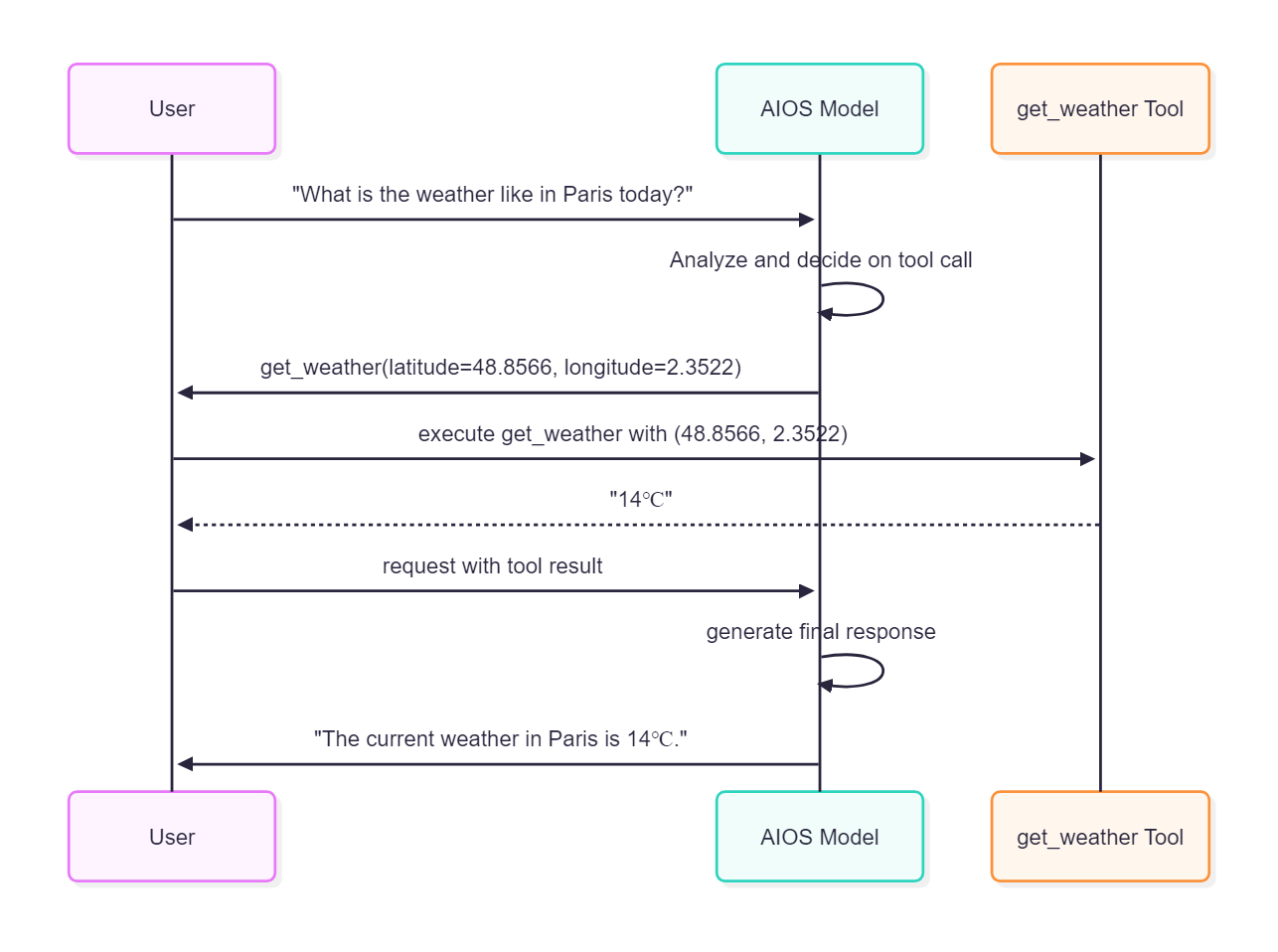
- The openai/gpt-oss-120b model’s tool calling feature does not work.
Request
import json
import requests
from urllib.parse import urljoin

aios_base_url = "<<aios endpoint-url>>" # Enter the aios endpoint URL for calling the AIOS model.
model = "<<model>>"                     # Enter the model ID for invoking the AIOS model.

# Define a function that retrieves weather information.
# This function returns the current temperature in Celsius for the given coordinates.
tools = [{
    "type": "function"
    "function": {
        "name": "get_weather"
        "description": "Get current temperature for provided coordinates in celsius."
        "parameters": {
            "type": "object"
            "properties": {
                "latitude": {"type": "number"}
                "longitude": {"type": "number"}
            },
            "required": ["latitude", "longitude"],
            "additionalProperties": False
        },
        "strict": True
    }
}]"

# Define a user message.
# The user is asking about today's weather in Paris.
messages = [{"role": "user", "content": "What is the weather like in Paris today?"}]

# Construct the request data.
# This includes the model ID to use, the list of messages (messages), and the list of tools (tools).
data = {
  "model": model,
  "messages": messages,
  "tools": tools
}

# Send a POST request to the AIOS API's v1/chat/completions endpoint.
# This request instructs the model to process the user's question and determine the necessary tool calls.
response = requests.post(urljoin(aios_base_url, "v1/chat/completions"), json=data)

# Parse the response body as JSON.
body = json.loads(response.text)
# Outputs tool call information in the response generated by the AI model.
# This information indicates which tool the model should invoke.
print(body["choices"][0]["message"]["tool_calls"])

# The weather function implementation always returns 14 degrees.
def get_weather(latitude, longitude):
  return "14℃"

# Extract the tool call information from the first response.
# This retrieves the tool call information requested by the model.
tool_call = body["choices"][0]["message"]["tool_calls"][0]

# Parses the arguments of a tool call in JSON string format into a dict format.
args = json.loads(tool_call["function"]["arguments"])

# Call the actual function to obtain the result. (e.g., "14℃")
# In this step, the actual weather information retrieval logic is executed.
result = get_weather(args["latitude"], args["longitude"]) # "14℃"

# If you add the function's return value as a **tool** message to the conversation context and call the model again
# The model generates an appropriate response using the function’s return value.
# Add the model's tool call message to messages to maintain the conversation context.
messages.append(body["choices"][0]["message"])

# Add the result of the actual function call to messages.
# This allows the model to generate the final answer based on the tool call results.
messages.append({
  "role": "tool"
  "tool_call_id": tool_call["id"],
  "content": str(result)
})

# Construct the second request data.
# This includes the model ID to use and the updated list of messages (messages).
data = {
  "model": model,
  "messages": messages,
}

# Send a POST request to the AIOS API's v1/chat/completions endpoint.
# This request generates the final answer based on the tool call results.
response_2 = requests.post(urljoin(aios_base_url, "v1/chat/completions"), json=data)

# Parse the response body as JSON.
body = json.loads(response_2.text)
# Print the AI-generated message in the second response.
# This is the final answer to the user's question.
print(body["choices"][0]["message"])
import json
import requests
from urllib.parse import urljoin
aios_base_url = "<<aios endpoint-url>>" # Enter the aios endpoint URL for calling the AIOS model.
model = "<<model>>" # Enter the model ID for invoking the AIOS model.
# Define a function that retrieves weather information.
# This function returns the current temperature in Celsius for the given coordinates.
tools = [{
"type": "function"
"function": {
"name": "get_weather"
"description": "Get current temperature for provided coordinates in celsius."
"parameters": {
"type": "object"
"properties": {
"latitude": {"type": "number"}
"longitude": {"type": "number"}
},
"required": ["latitude", "longitude"],
"additionalProperties": False
},
"strict": True
}
}]"
# Define a user message.
# The user is asking about today's weather in Paris.
messages = [{"role": "user", "content": "What is the weather like in Paris today?"}]
# Construct the request data.
# This includes the model ID to use, the list of messages (messages), and the list of tools (tools).
data = {
"model": model,
"messages": messages,
"tools": tools
}
# Send a POST request to the AIOS API's v1/chat/completions endpoint.
# This request instructs the model to process the user's question and determine the necessary tool calls.
response = requests.post(urljoin(aios_base_url, "v1/chat/completions"), json=data)
# Parse the response body as JSON.
body = json.loads(response.text)
# Outputs tool call information in the response generated by the AI model.
# This information indicates which tool the model should invoke.
print(body["choices"][0]["message"]["tool_calls"])
# The weather function implementation always returns 14 degrees.
def get_weather(latitude, longitude):
return "14℃"
# Extract the tool call information from the first response.
# This retrieves the tool call information requested by the model.
tool_call = body["choices"][0]["message"]["tool_calls"][0]
# Parses the arguments of a tool call in JSON string format into a dict format.
args = json.loads(tool_call["function"]["arguments"])
# Call the actual function to obtain the result. (e.g., "14℃")
# In this step, the actual weather information retrieval logic is executed.
result = get_weather(args["latitude"], args["longitude"]) # "14℃"
# If you add the function's return value as a **tool** message to the conversation context and call the model again
# The model generates an appropriate response using the function’s return value.
# Add the model's tool call message to messages to maintain the conversation context.
messages.append(body["choices"][0]["message"])
# Add the result of the actual function call to messages.
# This allows the model to generate the final answer based on the tool call results.
messages.append({
"role": "tool"
"tool_call_id": tool_call["id"],
"content": str(result)
})
# Construct the second request data.
# This includes the model ID to use and the updated list of messages (messages).
data = {
"model": model,
"messages": messages,
}
# Send a POST request to the AIOS API's v1/chat/completions endpoint.
# This request generates the final answer based on the tool call results.
response_2 = requests.post(urljoin(aios_base_url, "v1/chat/completions"), json=data)
# Parse the response body as JSON.
body = json.loads(response_2.text)
# Print the AI-generated message in the second response.
# This is the final answer to the user's question.
print(body["choices"][0]["message"])import json
from openai import OpenAI
from urllib.parse import urljoin
aios_base_url = "<<aios endpoint-url>>" # Enter the aios endpoint URL for calling the AIOS model.
model = "<<model>>" # Enter the model ID for calling the AIOS model.
# Create an OpenAI client.
# base_url refers to the v1 endpoint of the AIOS API,
# api_key is the key required by AIOS, and it is typically set to "EMPTY_KEY".
client = OpenAI(base_url=urljoin(aios_base_url, "v1"), api_key="EMPTY_KEY")
# Define a function that retrieves weather information.
# This function returns the current temperature in Celsius for the given coordinates.
tools = [{
"type": "function"
"function": {
"name": "get_weather"
"description": "Get current temperature for provided coordinates in celsius."
"parameters": {
"type": "object",
"properties": {
"latitude": {"type": "number"},
"longitude": {"type": "number"}
},
"required": ["latitude", "longitude"],
"additionalProperties": False
},
"strict": True
}
}]"
# Define the user message.
# The user is asking about today's weather in Paris.
messages = [{"role": "user", "content": "What is the weather like in Paris today?"}]
# Generate chat completions using the AIOS model.
# The model parameter specifies the model ID to use.
# The messages parameter is a list of messages that includes user messages.
# The tools parameter provides the model with metadata about the tools it can use.
response = client.chat.completions.create(
model=model,
messages=messages,
tools=tools # Provides the model with metadata about the tools that can be used.
)
# Outputs tool call information from the AI model's generated response.
# This information indicates which tool the model should invoke.
print(response.choices[0].message.tool_calls[0].model_dump())
# The weather function implementation always returns 14 degrees.
def get_weather(latitude, longitude):
return "14℃"
# Extract tool call information from the first response.
# This retrieves the tool call information requested by the model.
tool_call = response.choices[0].message.tool_calls[0]
# Parse the arguments of the tool call as JSON.
args = json.loads(tool_call.function.arguments)
# Call the actual function to obtain the result. (e.g., "14℃")
# In this step, the actual weather information retrieval logic is executed.
result = get_weather(args["latitude"], args["longitude"]) # "14℃"
# If you add the function's return value as a **tool** message to the conversation context and call the model again
# The model generates an appropriate answer using the function's return value.
# Add the model's tool call message to messages to maintain the conversation context.
messages.append(response.choices[0].message)
# Add the result of the actual function call to messages.
# This allows the model to generate the final answer based on the tool call results.
messages.append({
"role": "tool"
"tool_call_id": tool_call.id,
"content": str(result)
})
# Create the second chat completion.
# This includes the model ID to use and the updated list of messages (messages).
# This request generates the final answer based on the tool call results.
response_2 = client.chat.completions.create(
model=model,
messages=messages,
)
# Print the AI-generated message in the second response.
# This is the final answer to the user's question.
print(response_2.choices[0].message.model_dump())import json
from openai import OpenAI
from urllib.parse import urljoin
aios_base_url = "<<aios endpoint-url>>" # Enter the aios endpoint URL for calling the AIOS model.
model = "<<model>>" # Enter the model ID for calling the AIOS model.
# Create an OpenAI client.
# base_url refers to the v1 endpoint of the AIOS API,
# api_key is the key required by AIOS, and it is typically set to "EMPTY_KEY".
client = OpenAI(base_url=urljoin(aios_base_url, "v1"), api_key="EMPTY_KEY")
# Define a function that retrieves weather information.
# This function returns the current temperature in Celsius for the given coordinates.
tools = [{
"type": "function"
"function": {
"name": "get_weather"
"description": "Get current temperature for provided coordinates in celsius."
"parameters": {
"type": "object",
"properties": {
"latitude": {"type": "number"},
"longitude": {"type": "number"}
},
"required": ["latitude", "longitude"],
"additionalProperties": False
},
"strict": True
}
}]"
# Define the user message.
# The user is asking about today's weather in Paris.
messages = [{"role": "user", "content": "What is the weather like in Paris today?"}]
# Generate chat completions using the AIOS model.
# The model parameter specifies the model ID to use.
# The messages parameter is a list of messages that includes user messages.
# The tools parameter provides the model with metadata about the tools it can use.
response = client.chat.completions.create(
model=model,
messages=messages,
tools=tools # Provides the model with metadata about the tools that can be used.
)
# Outputs tool call information from the AI model's generated response.
# This information indicates which tool the model should invoke.
print(response.choices[0].message.tool_calls[0].model_dump())
# The weather function implementation always returns 14 degrees.
def get_weather(latitude, longitude):
return "14℃"
# Extract tool call information from the first response.
# This retrieves the tool call information requested by the model.
tool_call = response.choices[0].message.tool_calls[0]
# Parse the arguments of the tool call as JSON.
args = json.loads(tool_call.function.arguments)
# Call the actual function to obtain the result. (e.g., "14℃")
# In this step, the actual weather information retrieval logic is executed.
result = get_weather(args["latitude"], args["longitude"]) # "14℃"
# If you add the function's return value as a **tool** message to the conversation context and call the model again
# The model generates an appropriate answer using the function's return value.
# Add the model's tool call message to messages to maintain the conversation context.
messages.append(response.choices[0].message)
# Add the result of the actual function call to messages.
# This allows the model to generate the final answer based on the tool call results.
messages.append({
"role": "tool"
"tool_call_id": tool_call.id,
"content": str(result)
})
# Create the second chat completion.
# This includes the model ID to use and the updated list of messages (messages).
# This request generates the final answer based on the tool call results.
response_2 = client.chat.completions.create(
model=model,
messages=messages,
)
# Print the AI-generated message in the second response.
# This is the final answer to the user's question.
print(response_2.choices[0].message.model_dump())from langchain_openai import ChatOpenAI
from langchain_core.tools import tool
from urllib.parse import urljoin
aios_base_url = "<<aios endpoint-url>>" # Enter the aios endpoint URL for calling the AIOS model.
model = "<<model>>" # Enter the model ID for calling the AIOS model.
# Define a utility function that retrieves weather information.
# This function returns the current temperature in Celsius for the given coordinates.
@tool
def get_weather(latitude: float, longitude: float) -> str:
Get current temperature for provided coordinates in celsius.
return "14℃"
# Create a chat LLM (large language model) instance using LangChain's ChatOpenAI class.
# base_url refers to the v1 endpoint of the AIOS API,
# api_key is the key required by AIOS, and it is typically set to "EMPTY_KEY".
# The model parameter specifies the model ID to use.
chat_llm = ChatOpenAI(
base_url=urljoin(aios_base_url, "v1"),
api_key="EMPTY_KEY",
model=model
)
# Bind tools to the model.
# The get_weather function returns the current temperature in Celsius for the given coordinates.
llm_with_tools = chat_llm.bind_tools([get_weather])
# Construct a list of chat messages.
# The user is asking about today's weather in Paris.
messages = [("human", "What is the weather like in Paris today?")]
# Pass a list of messages to the chat LLM and receive a response.
# The invoke method returns the model's output.
# In this step, the model analyzes the user's question and determines the necessary tool calls.
response = llm_with_tools.invoke(messages)
# Outputs tool call information from the AI model's generated response.
# This information indicates which tool the model should invoke.
print(response.tool_calls)
# Add the model's tool call message to messages to maintain the conversation context.
# This enables the model to remember and link previous conversation content.
messages.append(response)
# Call the actual tool function to obtain the result.
# In this step, the get_weather function is executed and returns the weather information.
tool_call = response.tool_calls[0]
tool_message = get_weather.invoke(tool_call)
# Add the tool call result to messages.
# This allows the model to generate the final answer based on the tool call results.
messages.append(tool_message)
# Execute the second request to obtain the final answer.
# Now the model generates an appropriate response to the user based on the tool call results.
response2 = chat_llm.invoke(messages)
# Print the final AI model response.
# This is the final answer to the user's question.
print(response2.model_dump())from langchain_openai import ChatOpenAI
from langchain_core.tools import tool
from urllib.parse import urljoin
aios_base_url = "<<aios endpoint-url>>" # Enter the aios endpoint URL for calling the AIOS model.
model = "<<model>>" # Enter the model ID for calling the AIOS model.
# Define a utility function that retrieves weather information.
# This function returns the current temperature in Celsius for the given coordinates.
@tool
def get_weather(latitude: float, longitude: float) -> str:
Get current temperature for provided coordinates in celsius.
return "14℃"
# Create a chat LLM (large language model) instance using LangChain's ChatOpenAI class.
# base_url refers to the v1 endpoint of the AIOS API,
# api_key is the key required by AIOS, and it is typically set to "EMPTY_KEY".
# The model parameter specifies the model ID to use.
chat_llm = ChatOpenAI(
base_url=urljoin(aios_base_url, "v1"),
api_key="EMPTY_KEY",
model=model
)
# Bind tools to the model.
# The get_weather function returns the current temperature in Celsius for the given coordinates.
llm_with_tools = chat_llm.bind_tools([get_weather])
# Construct a list of chat messages.
# The user is asking about today's weather in Paris.
messages = [("human", "What is the weather like in Paris today?")]
# Pass a list of messages to the chat LLM and receive a response.
# The invoke method returns the model's output.
# In this step, the model analyzes the user's question and determines the necessary tool calls.
response = llm_with_tools.invoke(messages)
# Outputs tool call information from the AI model's generated response.
# This information indicates which tool the model should invoke.
print(response.tool_calls)
# Add the model's tool call message to messages to maintain the conversation context.
# This enables the model to remember and link previous conversation content.
messages.append(response)
# Call the actual tool function to obtain the result.
# In this step, the get_weather function is executed and returns the weather information.
tool_call = response.tool_calls[0]
tool_message = get_weather.invoke(tool_call)
# Add the tool call result to messages.
# This allows the model to generate the final answer based on the tool call results.
messages.append(tool_message)
# Execute the second request to obtain the final answer.
# Now the model generates an appropriate response to the user based on the tool call results.
response2 = chat_llm.invoke(messages)
# Print the final AI model response.
# This is the final answer to the user's question.
print(response2.model_dump())const aios_base_url = "<<aios endpoint-url>>"; // Enter the aios endpoint URL for calling the AIOS model.
const model = "<<model>>"; // Enter the model ID to call the AIOS model.
// Define a function that retrieves weather information.
// This function returns the current temperature in Celsius for the given coordinates.
const tools = [
{
type: "function",
function: {
name: "get_weather","
description:
Get current temperature for provided coordinates in celsius.
parameters: {
type: "object",
properties: {
latitude: { type: "number" },
longitude: { type: "number" },
},
required: ["latitude", "longitude"],
additionalProperties: false,
},
strict: true,
},
},
];
// Define user messages.
// The user is asking about today's weather in Paris.
const messages = [
{ role: "user", content: "What is the weather like in Paris today?" },
];
// Construct the request data.
// This includes the model ID to use, the list of messages (messages), and the list of tools (tools).
let data = {
model: model,
messages: messages,
tools: tools,
};
// Generate the URL for the AIOS API v1/chat/completions endpoint.
let url = new URL("/v1/chat/completions", aios_base_url);
// Send a POST request to the AIOS API.
// This request instructs the model to process the user's question and determine the necessary tool calls.
const response = await fetch(url, {
method: "POST",
headers: {
"Content-Type": "application/json"
},
body: JSON.stringify(data),
});
// Parse the response body as JSON.
let body = await response.json();
// Print tool call information from the response generated by the AI model.
// This information indicates which tool the model should invoke.
console.log(JSON.stringify(body.choices[0].message.tool_calls));
// Weather function implementation, always responds with 14 degrees.
function getWeather(latitude, longitude) {
return "14℃";
}
// Extract tool call information from the first response.
// This retrieves the tool call information requested by the model.
const toolCall = body.choices[0].message.tool_calls[0];
// Parse the arguments of the tool call as JSON.
// This extracts the parameters needed for tool invocation.
const args = JSON.parse(toolCall.function.arguments);
// Call the actual function to obtain the result. (e.g., "14℃")
// In this step, the actual weather information retrieval logic is executed.
const result = getWeather(args.latitude, args.longitude);
// When you add the function's return value as a **tool** message to the conversation context and call the model again
// Use the function call's return value to generate an appropriate answer from the model.
// Add the model's tool call message to messages to maintain conversation context.
messages.push(body.choices[0].message);
// Add the result of calling the actual function to messages.
// This allows the model to generate the final answer based on tool call results.
messages.push({
role: "tool",
tool_call_id: toolCall.id,
content: String(result),
});
// Construct the second request data.
// This includes the model ID to use and the updated list of messages (messages).
// This request generates the final answer based on the tool call result.
data = {
model: model,
messages: messages,
};
// Send a POST request to the AIOS API again.
// This request generates the final answer based on the tool call result.
const response2 = await fetch(url, {
method: "POST",
headers: {
"Content-Type": "application/json"
},
body: JSON.stringify(data),
});
body = await response2.json();
// Print the message generated by the AI in the second response.
// This is the final answer to the user's question.
console.log(JSON.stringify(body.choices[0].message));const aios_base_url = "<<aios endpoint-url>>"; // Enter the aios endpoint URL for calling the AIOS model.
const model = "<<model>>"; // Enter the model ID to call the AIOS model.
// Define a function that retrieves weather information.
// This function returns the current temperature in Celsius for the given coordinates.
const tools = [
{
type: "function",
function: {
name: "get_weather","
description:
Get current temperature for provided coordinates in celsius.
parameters: {
type: "object",
properties: {
latitude: { type: "number" },
longitude: { type: "number" },
},
required: ["latitude", "longitude"],
additionalProperties: false,
},
strict: true,
},
},
];
// Define user messages.
// The user is asking about today's weather in Paris.
const messages = [
{ role: "user", content: "What is the weather like in Paris today?" },
];
// Construct the request data.
// This includes the model ID to use, the list of messages (messages), and the list of tools (tools).
let data = {
model: model,
messages: messages,
tools: tools,
};
// Generate the URL for the AIOS API v1/chat/completions endpoint.
let url = new URL("/v1/chat/completions", aios_base_url);
// Send a POST request to the AIOS API.
// This request instructs the model to process the user's question and determine the necessary tool calls.
const response = await fetch(url, {
method: "POST",
headers: {
"Content-Type": "application/json"
},
body: JSON.stringify(data),
});
// Parse the response body as JSON.
let body = await response.json();
// Print tool call information from the response generated by the AI model.
// This information indicates which tool the model should invoke.
console.log(JSON.stringify(body.choices[0].message.tool_calls));
// Weather function implementation, always responds with 14 degrees.
function getWeather(latitude, longitude) {
return "14℃";
}
// Extract tool call information from the first response.
// This retrieves the tool call information requested by the model.
const toolCall = body.choices[0].message.tool_calls[0];
// Parse the arguments of the tool call as JSON.
// This extracts the parameters needed for tool invocation.
const args = JSON.parse(toolCall.function.arguments);
// Call the actual function to obtain the result. (e.g., "14℃")
// In this step, the actual weather information retrieval logic is executed.
const result = getWeather(args.latitude, args.longitude);
// When you add the function's return value as a **tool** message to the conversation context and call the model again
// Use the function call's return value to generate an appropriate answer from the model.
// Add the model's tool call message to messages to maintain conversation context.
messages.push(body.choices[0].message);
// Add the result of calling the actual function to messages.
// This allows the model to generate the final answer based on tool call results.
messages.push({
role: "tool",
tool_call_id: toolCall.id,
content: String(result),
});
// Construct the second request data.
// This includes the model ID to use and the updated list of messages (messages).
// This request generates the final answer based on the tool call result.
data = {
model: model,
messages: messages,
};
// Send a POST request to the AIOS API again.
// This request generates the final answer based on the tool call result.
const response2 = await fetch(url, {
method: "POST",
headers: {
"Content-Type": "application/json"
},
body: JSON.stringify(data),
});
body = await response2.json();
// Print the message generated by the AI in the second response.
// This is the final answer to the user's question.
console.log(JSON.stringify(body.choices[0].message));import OpenAI from "openai";
const aios_base_url = "<<aios endpoint-url>>"; // Enter the aios endpoint URL for calling the AIOS model.
const model = "<<model>>"; // Enter the model ID to call the AIOS model.
// Define a function that retrieves weather information.
// This function returns the current temperature in Celsius for the given coordinates.
const tools = [
{
type: "function",
function: {
name: "get_weather","
description:
Get current temperature for provided coordinates in celsius.
parameters: {
type: "object",
properties: {
latitude: { type: "number" },
longitude: { type: "number" },
},
required: ["latitude", "longitude"],
additionalProperties: false,
},
strict: true,
},
},
];
// Define user messages.
// The user is asking about today's weather in Paris.
const messages = [
{ role: "user", content: "What is the weather like in Paris today?" },
];
// Create an OpenAI client.
// apiKey is the key required by AIOS, and is typically set to "EMPTY_KEY".
// baseURL points to the v1 endpoint of the AIOS API.
const client = new OpenAI({
apiKey: "EMPTY_KEY","
baseURL: new URL("v1", aios_base_url).href,
});
// Generate chat completion using the AIOS model.
// model parameter specifies the model ID to use.
// messages parameter is a list of messages that includes user messages.
// tools parameter provides the model with metadata of tools that can be used.
const response = await client.chat.completions.create({
model: model,
messages: messages,
tools: tools,
});
// Print tool call information from the response generated by the AI model.
// This information indicates which tool the model should invoke.
console.log(JSON.stringify(response.choices[0].message.tool_calls));
// Weather function implementation, always responds with 14 degrees.
function getWeather(latitude, longitude) {
return "14℃";
}
// Extract tool call information from the first response.
// This retrieves the tool call information requested by the model.
const toolCall = response.choices[0].message.tool_calls[0];
// Parse the tool call arguments as JSON.
// This extracts the parameters needed for tool invocation.
const args = JSON.parse(toolCall.function.arguments);
// Call the actual function to obtain the result. (e.g., "14℃")
// In this step, the actual weather information retrieval logic is executed.
const result = getWeather(args.latitude, args.longitude);
// If you add the function's return value as a **tool** message to the conversation context and call the model again
// Use the function call's return value to generate an appropriate answer from the model.
// Add the model's tool call message to messages to maintain conversation context.
messages.push(response.choices[0].message);
// Add the result of calling the actual function to messages.
// This allows the model to generate the final answer based on tool call results.
messages.push({
role: "tool",
tool_call_id: toolCall.id,
content: String(result),
});
// Create the second chat completion.
// This includes the model ID to use and the updated list of messages (messages).
// This request generates the final answer based on the tool call result.
const response2 = await client.chat.completions.create({
model: model,
messages: messages,
});
// Print the message generated by the AI in the second response.
// This is the final answer to the user's question.
console.log(JSON.stringify(response2.choices[0].message));import OpenAI from "openai";
const aios_base_url = "<<aios endpoint-url>>"; // Enter the aios endpoint URL for calling the AIOS model.
const model = "<<model>>"; // Enter the model ID to call the AIOS model.
// Define a function that retrieves weather information.
// This function returns the current temperature in Celsius for the given coordinates.
const tools = [
{
type: "function",
function: {
name: "get_weather","
description:
Get current temperature for provided coordinates in celsius.
parameters: {
type: "object",
properties: {
latitude: { type: "number" },
longitude: { type: "number" },
},
required: ["latitude", "longitude"],
additionalProperties: false,
},
strict: true,
},
},
];
// Define user messages.
// The user is asking about today's weather in Paris.
const messages = [
{ role: "user", content: "What is the weather like in Paris today?" },
];
// Create an OpenAI client.
// apiKey is the key required by AIOS, and is typically set to "EMPTY_KEY".
// baseURL points to the v1 endpoint of the AIOS API.
const client = new OpenAI({
apiKey: "EMPTY_KEY","
baseURL: new URL("v1", aios_base_url).href,
});
// Generate chat completion using the AIOS model.
// model parameter specifies the model ID to use.
// messages parameter is a list of messages that includes user messages.
// tools parameter provides the model with metadata of tools that can be used.
const response = await client.chat.completions.create({
model: model,
messages: messages,
tools: tools,
});
// Print tool call information from the response generated by the AI model.
// This information indicates which tool the model should invoke.
console.log(JSON.stringify(response.choices[0].message.tool_calls));
// Weather function implementation, always responds with 14 degrees.
function getWeather(latitude, longitude) {
return "14℃";
}
// Extract tool call information from the first response.
// This retrieves the tool call information requested by the model.
const toolCall = response.choices[0].message.tool_calls[0];
// Parse the tool call arguments as JSON.
// This extracts the parameters needed for tool invocation.
const args = JSON.parse(toolCall.function.arguments);
// Call the actual function to obtain the result. (e.g., "14℃")
// In this step, the actual weather information retrieval logic is executed.
const result = getWeather(args.latitude, args.longitude);
// If you add the function's return value as a **tool** message to the conversation context and call the model again
// Use the function call's return value to generate an appropriate answer from the model.
// Add the model's tool call message to messages to maintain conversation context.
messages.push(response.choices[0].message);
// Add the result of calling the actual function to messages.
// This allows the model to generate the final answer based on tool call results.
messages.push({
role: "tool",
tool_call_id: toolCall.id,
content: String(result),
});
// Create the second chat completion.
// This includes the model ID to use and the updated list of messages (messages).
// This request generates the final answer based on the tool call result.
const response2 = await client.chat.completions.create({
model: model,
messages: messages,
});
// Print the message generated by the AI in the second response.
// This is the final answer to the user's question.
console.log(JSON.stringify(response2.choices[0].message));import { HumanMessage } from "@langchain/core/messages";
import { tool } from "@langchain/core/tools";
import { ChatOpenAI } from "@langchain/openai";
import { z } from "zod";
const aios_base_url = "<<aios endpoint-url>>"; // Enter the aios endpoint URL for calling the AIOS model.
const model = "<<model>>"; // Enter the model ID for invoking the AIOS model.
// Define a utility function that retrieves weather information.
// This function returns the current temperature in Celsius for the given coordinates.
const getWeather = tool(
function (latitude, longitude) {
/**
* Get current temperature for provided coordinates in celsius.
*/
return "14℃";
},
{
name: "get_weather","
description: "Get current temperature for provided coordinates in celsius."
schema: z.object({
latitude: z.number(),
longitude: z.number(),
}),
}
);
// Create a chat LLM (large language model) instance using LangChain's ChatOpenAI class.
// base_url points to the v1 endpoint of the AIOS API,
// api_key is the key required by AIOS, and is typically set to "EMPTY_KEY".
// model parameter specifies the model ID to use.
const llm = new ChatOpenAI({
model: model,
apiKey: "EMPTY_KEY","
configuration: {
baseURL: new URL("v1", aios_base_url).href,
},
});
// Bind tools to the model.
// getWeather function returns the current temperature in Celsius for the provided coordinates.
const llmWithTools = llm.bindTools([getWeather]);
// Constructs the chat message list.
// The user is asking about today's weather in Paris.
const messages = [new HumanMessage("What is the weather like in Paris today?")];
// Pass a list of messages to the chat LLM to receive a response.
// invoke method returns the model's output.
// This request instructs the model to process the user's question and determine the necessary tool calls.
const response = await llmWithTools.invoke(messages);
// Print tool call information from the response generated by the AI model.
// This information indicates which tool the model should invoke.
console.log(response.tool_calls);
// Add the model's tool call message to messages to maintain conversation context.
// This enables the model to remember and link previous conversation content.
messages.push(response);
// Call the actual tool function to obtain the result.
// In this step, the getWeather function is executed and returns weather information.
const toolCall = response.tool_calls[0];
const toolMessage = await getWeather.invoke(toolCall);
// Add the tool call result to messages.
// This allows the model to generate the final answer based on tool call results.
messages.push(toolMessage);
// Perform the second request to obtain the final answer.
// Now the model generates an appropriate response to the user based on the tool call results.
const response2 = await llm.invoke(messages);
// Print the final AI model response.
console.log(response2.content);import { HumanMessage } from "@langchain/core/messages";
import { tool } from "@langchain/core/tools";
import { ChatOpenAI } from "@langchain/openai";
import { z } from "zod";
const aios_base_url = "<<aios endpoint-url>>"; // Enter the aios endpoint URL for calling the AIOS model.
const model = "<<model>>"; // Enter the model ID for invoking the AIOS model.
// Define a utility function that retrieves weather information.
// This function returns the current temperature in Celsius for the given coordinates.
const getWeather = tool(
function (latitude, longitude) {
/**
* Get current temperature for provided coordinates in celsius.
*/
return "14℃";
},
{
name: "get_weather","
description: "Get current temperature for provided coordinates in celsius."
schema: z.object({
latitude: z.number(),
longitude: z.number(),
}),
}
);
// Create a chat LLM (large language model) instance using LangChain's ChatOpenAI class.
// base_url points to the v1 endpoint of the AIOS API,
// api_key is the key required by AIOS, and is typically set to "EMPTY_KEY".
// model parameter specifies the model ID to use.
const llm = new ChatOpenAI({
model: model,
apiKey: "EMPTY_KEY","
configuration: {
baseURL: new URL("v1", aios_base_url).href,
},
});
// Bind tools to the model.
// getWeather function returns the current temperature in Celsius for the provided coordinates.
const llmWithTools = llm.bindTools([getWeather]);
// Constructs the chat message list.
// The user is asking about today's weather in Paris.
const messages = [new HumanMessage("What is the weather like in Paris today?")];
// Pass a list of messages to the chat LLM to receive a response.
// invoke method returns the model's output.
// This request instructs the model to process the user's question and determine the necessary tool calls.
const response = await llmWithTools.invoke(messages);
// Print tool call information from the response generated by the AI model.
// This information indicates which tool the model should invoke.
console.log(response.tool_calls);
// Add the model's tool call message to messages to maintain conversation context.
// This enables the model to remember and link previous conversation content.
messages.push(response);
// Call the actual tool function to obtain the result.
// In this step, the getWeather function is executed and returns weather information.
const toolCall = response.tool_calls[0];
const toolMessage = await getWeather.invoke(toolCall);
// Add the tool call result to messages.
// This allows the model to generate the final answer based on tool call results.
messages.push(toolMessage);
// Perform the second request to obtain the final answer.
// Now the model generates an appropriate response to the user based on the tool call results.
const response2 = await llm.invoke(messages);
// Print the final AI model response.
console.log(response2.content);package main
import (
bytes
"encoding/json"
fmt
io
"net/http"
)
const (
aiosBaseUrl = "<<aios endpoint-url>>" // Enter the aios endpoint URL for calling the AIOS model.
model = "<<model>>" // Enter the model ID for invoking the AIOS model.
)
// Define the message struct.
// Role: message role (user, assistant, tool etc.)
// Content: message content
// ToolCalls: tool call information
// ToolCallId: tool call identifier
type Message struct {
Role string `json:"role"`
Content string `json:"content,omitempty"`
ToolCalls []map[string]any `json:"tool_calls,omitempty"`
ToolCallId string `json:"tool_call_id,omitempty"`
}
// Define the POST request data structure.
// Model: model ID to use
// Messages: Message list
// Tools: List of available tools
// Stream: streaming status
type PostData struct {
Model string `json:"model"`
Messages []Message `json:"messages"`
Tools []map[string]any `json:"tools,omitempty"`
Stream bool `json:"stream,omitempty"`
}
// Define a function that retrieves weather information.
// This function always returns 14 degrees (sample implementation).
func getWeather(latitude float32, longitude float32) string {
_ = fmt.Sprintf("latitude: %f, longitude: %f", latitude, longitude)
return "14℃"
}
func main() {
// Define user messages.
// The user is asking about today's weather in Paris.
messages := []Message{
{
Role: "user",
Content: "What is the weather like in Paris today?"
},
}
// Function that retrieves weather information
// This tool returns the current temperature in Celsius for the given coordinates.
tools := []map[string]any{
{
"type": "function"
"function": map[string]any{
"name": "get_weather"
"description": "Get current temperature for provided coordinates in celsius."
"parameters": map[string]any{
"type": "object",
"properties": map[string]any{
"latitude": map[string]string{"type": "number"},
"longitude": map[string]string{"type": "number"},
},
"required": []string{"latitude", "longitude"},
"additionalProperties": false,
},
"strict": true,
},
},
}
// Construct the request data.
// This includes the model ID to use, the list of messages (messages), and the list of tools (tools).
data := PostData{
Model: model,
Messages: messages,
Tools: tools,
}
// Serialize request data to JSON format.
jsonData, err := json.Marshal(data)
if err != nil {
panic(err)
}
// Send a POST request to the AIOS API's v1/chat/completions endpoint.
// This request instructs the model to process the user's question and determine the necessary tool calls.
response, err := http.Post(aiosBaseUrl+"/v1/chat/completions", "application/json", bytes.NewBuffer(jsonData))
if err != nil {
panic(err)
}
defer response.Body.Close()
// Read the response body.
body, err := io.ReadAll(response.Body)
if err != nil {
panic(err)
}
// Parse the response body as a map.
var v map[string]interface{}
json.Unmarshal(body, &v)
// Extract message information from the first response.
choices := v["choices"].([]interface{})
choice := choices[0].(map[string]interface{})
message, err := json.MarshalIndent(choice["message"], "", " ")
if err != nil {
panic(err)
}
messageData := choice["message"].(map[string]interface{})
toolCalls := messageData["tool_calls"].([]interface{})
// Print tool call information from the response generated by the AI model.
// This information indicates which tool the model should invoke.
toolCallJson, err := json.MarshalIndent(toolCalls, "", " ")
if err != nil {
panic(err)
}
fmt.Println(string(toolCallJson))
// Extract tool call information from the first response.
// This retrieves the tool call information requested by the model.
toolCall := toolCalls[0].(map[string]interface{})
function := toolCall["function"].(map[string]interface{})
// Parse the arguments of a tool call in JSON string format into a map.
// This extracts the parameters needed for tool invocation.
var args map[string]float32
err = json.Unmarshal([]byte(function["arguments"].(string)), &args)
if err != nil {
panic(err)
}
// Call the actual function to obtain the result. (e.g., "14℃")
// In this step, the actual weather information retrieval logic is executed.
result := getWeather(args["latitude"], args["longitude"])
// Convert tool call result to a message.
var toolMessage Message
err = json.Unmarshal(message, &toolMessage)
if err != nil {
panic(err)
}
// Add the model's tool call message to messages to maintain conversation context.
messages = append(messages, toolMessage)
// Add the result of calling the actual function to messages.
// This allows the model to generate the final answer based on tool call results.
messages = append(messages, Message{
Role: "tool","
ToolCallId: toolCall["id"].(string),
Content: string(result),
})
// Construct the second request data.
// This includes the model ID to use and the updated list of messages (messages).
// This request generates the final answer based on the tool call result.
data = PostData{
Model: model,
Messages: messages,
}
jsonData, err = json.Marshal(data)
if err != nil {
panic(err)
}
// Send a POST request to the AIOS API again.
// This request generates the final answer based on the tool call result.
response2, err := http.Post(aiosBaseUrl+"/v1/chat/completions", "application/json", bytes.NewBuffer(jsonData))
if err != nil {
panic(err)
}
defer response2.Body.Close()
// Read the second response body.
body, err = io.ReadAll(response2.Body)
if err != nil {
panic(err)
}
// Parse the second response as JSON.
json.Unmarshal(body, &v)
// Print the message generated by the AI in the second response.
// This is the final answer to the user's question.
choices = v["choices"].([]interface{})
choice = choices[0].(map[string]interface{})
message, err = json.MarshalIndent(choice["message"], "", " ")
if err != nil {
panic(err)
}
fmt.Println(string(message))
}package main
import (
bytes
"encoding/json"
fmt
io
"net/http"
)
const (
aiosBaseUrl = "<<aios endpoint-url>>" // Enter the aios endpoint URL for calling the AIOS model.
model = "<<model>>" // Enter the model ID for invoking the AIOS model.
)
// Define the message struct.
// Role: message role (user, assistant, tool etc.)
// Content: message content
// ToolCalls: tool call information
// ToolCallId: tool call identifier
type Message struct {
Role string `json:"role"`
Content string `json:"content,omitempty"`
ToolCalls []map[string]any `json:"tool_calls,omitempty"`
ToolCallId string `json:"tool_call_id,omitempty"`
}
// Define the POST request data structure.
// Model: model ID to use
// Messages: Message list
// Tools: List of available tools
// Stream: streaming status
type PostData struct {
Model string `json:"model"`
Messages []Message `json:"messages"`
Tools []map[string]any `json:"tools,omitempty"`
Stream bool `json:"stream,omitempty"`
}
// Define a function that retrieves weather information.
// This function always returns 14 degrees (sample implementation).
func getWeather(latitude float32, longitude float32) string {
_ = fmt.Sprintf("latitude: %f, longitude: %f", latitude, longitude)
return "14℃"
}
func main() {
// Define user messages.
// The user is asking about today's weather in Paris.
messages := []Message{
{
Role: "user",
Content: "What is the weather like in Paris today?"
},
}
// Function that retrieves weather information
// This tool returns the current temperature in Celsius for the given coordinates.
tools := []map[string]any{
{
"type": "function"
"function": map[string]any{
"name": "get_weather"
"description": "Get current temperature for provided coordinates in celsius."
"parameters": map[string]any{
"type": "object",
"properties": map[string]any{
"latitude": map[string]string{"type": "number"},
"longitude": map[string]string{"type": "number"},
},
"required": []string{"latitude", "longitude"},
"additionalProperties": false,
},
"strict": true,
},
},
}
// Construct the request data.
// This includes the model ID to use, the list of messages (messages), and the list of tools (tools).
data := PostData{
Model: model,
Messages: messages,
Tools: tools,
}
// Serialize request data to JSON format.
jsonData, err := json.Marshal(data)
if err != nil {
panic(err)
}
// Send a POST request to the AIOS API's v1/chat/completions endpoint.
// This request instructs the model to process the user's question and determine the necessary tool calls.
response, err := http.Post(aiosBaseUrl+"/v1/chat/completions", "application/json", bytes.NewBuffer(jsonData))
if err != nil {
panic(err)
}
defer response.Body.Close()
// Read the response body.
body, err := io.ReadAll(response.Body)
if err != nil {
panic(err)
}
// Parse the response body as a map.
var v map[string]interface{}
json.Unmarshal(body, &v)
// Extract message information from the first response.
choices := v["choices"].([]interface{})
choice := choices[0].(map[string]interface{})
message, err := json.MarshalIndent(choice["message"], "", " ")
if err != nil {
panic(err)
}
messageData := choice["message"].(map[string]interface{})
toolCalls := messageData["tool_calls"].([]interface{})
// Print tool call information from the response generated by the AI model.
// This information indicates which tool the model should invoke.
toolCallJson, err := json.MarshalIndent(toolCalls, "", " ")
if err != nil {
panic(err)
}
fmt.Println(string(toolCallJson))
// Extract tool call information from the first response.
// This retrieves the tool call information requested by the model.
toolCall := toolCalls[0].(map[string]interface{})
function := toolCall["function"].(map[string]interface{})
// Parse the arguments of a tool call in JSON string format into a map.
// This extracts the parameters needed for tool invocation.
var args map[string]float32
err = json.Unmarshal([]byte(function["arguments"].(string)), &args)
if err != nil {
panic(err)
}
// Call the actual function to obtain the result. (e.g., "14℃")
// In this step, the actual weather information retrieval logic is executed.
result := getWeather(args["latitude"], args["longitude"])
// Convert tool call result to a message.
var toolMessage Message
err = json.Unmarshal(message, &toolMessage)
if err != nil {
panic(err)
}
// Add the model's tool call message to messages to maintain conversation context.
messages = append(messages, toolMessage)
// Add the result of calling the actual function to messages.
// This allows the model to generate the final answer based on tool call results.
messages = append(messages, Message{
Role: "tool","
ToolCallId: toolCall["id"].(string),
Content: string(result),
})
// Construct the second request data.
// This includes the model ID to use and the updated list of messages (messages).
// This request generates the final answer based on the tool call result.
data = PostData{
Model: model,
Messages: messages,
}
jsonData, err = json.Marshal(data)
if err != nil {
panic(err)
}
// Send a POST request to the AIOS API again.
// This request generates the final answer based on the tool call result.
response2, err := http.Post(aiosBaseUrl+"/v1/chat/completions", "application/json", bytes.NewBuffer(jsonData))
if err != nil {
panic(err)
}
defer response2.Body.Close()
// Read the second response body.
body, err = io.ReadAll(response2.Body)
if err != nil {
panic(err)
}
// Parse the second response as JSON.
json.Unmarshal(body, &v)
// Print the message generated by the AI in the second response.
// This is the final answer to the user's question.
choices = v["choices"].([]interface{})
choice = choices[0].(map[string]interface{})
message, err = json.MarshalIndent(choice["message"], "", " ")
if err != nil {
panic(err)
}
fmt.Println(string(message))
}package main
import (
context
"encoding/json"
fmt
"github.com/openai/openai-go"
github.com/openai/openai-go/option
)
const (
aiosBaseUrl = "<<aios endpoint-url>>" // Enter the aios endpoint URL for calling the AIOS model.
model = "<<model>>" // Enter the model ID for invoking the AIOS model.
)
// Define a function that retrieves weather information.
// This function always returns 14 degrees (sample implementation).
func getWeather(latitude float32, longitude float32) string {
_ = fmt.Sprintf("latitude: %f, longitude: %f", latitude, longitude)
return "14℃"
}
func main() {
// Create an OpenAI client.
// base_url points to the v1 endpoint of the AIOS API.
client := openai.NewClient(
option.WithBaseURL(aiosBaseUrl + "/v1"),
)
// Define user messages.
// The user is asking about today's weather in Paris.
messages := []openai.ChatCompletionMessageParamUnion{
openai.UserMessage("What is the weather like in Paris today?")
}
// Generate chat completion using the AIOS model.
// model parameter specifies the model ID to use.
// messages parameter is a list of messages that includes user messages.
// tools parameter provides the model with metadata of tools that can be used.
response, err := client.Chat.Completions.New(context.TODO(), openai.ChatCompletionNewParams{
Model: model,
Messages: messages,
Tools: []openai.ChatCompletionToolParam{
{
Function: openai.FunctionDefinitionParam{
Name: "get_weather"
Description: openai.String("Get current temperature for provided coordinates in celsius.")
Parameters: openai.FunctionParameters{
"type": "object",
"properties": map[string]interface{}{
"latitude": map[string]string{
"type": "number"
},
"longitude": map[string]string{
"type": "number"
},
},
"required": []string{"latitude", "longitude"},
"additionalProperties": false,
},
Strict: openai.Bool(true),
},
},
},
})
if err != nil {
panic(err)
}
// Print the response generated by the AI model.
// This response includes tool call information.
fmt.Println([]string{response.Choices[0].Message.ToolCalls[0].RawJSON()})
// Extract tool call information from the first response.
// This retrieves the tool call information requested by the model.
var v map[string]float32
toolCall := response.Choices[0].Message.ToolCalls[0]
args := toolCall.Function.Arguments
// Parse the arguments of a tool call in JSON string format into a map.
// This extracts the parameters needed for tool invocation.
err = json.Unmarshal([]byte(args), &v)
if err != nil {
panic(err)
}
// Call the actual function to obtain the result. (e.g., "14℃")
// In this step, the actual weather information retrieval logic is executed.
result := getWeather(v["latitude"], v["longitude"])
// When you add the function's return value as a **tool** message to the conversation context and call the model again
// Use the result of the function call to generate an appropriate response from the model.
// Add the model's tool call message to messages to maintain conversation context.
messages = append(messages, response.Choices[0].Message.ToParam())
// Add the result of calling the actual function to messages.
// This allows the model to generate a final answer based on tool call results.
messages = append(messages, openai.ToolMessage(string(result), toolCall.ID))
// Create the second chat completion.
// This includes the model ID to use and the updated list of messages (messages).
// This request generates the final answer based on the tool call results.
response2, err := client.Chat.Completions.New(context.TODO(), openai.ChatCompletionNewParams{
Model: model,
Messages: messages,
})
if err != nil {
panic(err)
}
// Print the message generated by the AI in the second response.
// This is the final answer to the user's question.
fmt.Println(response2.Choices[0].Message.RawJSON())
}package main
import (
context
"encoding/json"
fmt
"github.com/openai/openai-go"
github.com/openai/openai-go/option
)
const (
aiosBaseUrl = "<<aios endpoint-url>>" // Enter the aios endpoint URL for calling the AIOS model.
model = "<<model>>" // Enter the model ID for invoking the AIOS model.
)
// Define a function that retrieves weather information.
// This function always returns 14 degrees (sample implementation).
func getWeather(latitude float32, longitude float32) string {
_ = fmt.Sprintf("latitude: %f, longitude: %f", latitude, longitude)
return "14℃"
}
func main() {
// Create an OpenAI client.
// base_url points to the v1 endpoint of the AIOS API.
client := openai.NewClient(
option.WithBaseURL(aiosBaseUrl + "/v1"),
)
// Define user messages.
// The user is asking about today's weather in Paris.
messages := []openai.ChatCompletionMessageParamUnion{
openai.UserMessage("What is the weather like in Paris today?")
}
// Generate chat completion using the AIOS model.
// model parameter specifies the model ID to use.
// messages parameter is a list of messages that includes user messages.
// tools parameter provides the model with metadata of tools that can be used.
response, err := client.Chat.Completions.New(context.TODO(), openai.ChatCompletionNewParams{
Model: model,
Messages: messages,
Tools: []openai.ChatCompletionToolParam{
{
Function: openai.FunctionDefinitionParam{
Name: "get_weather"
Description: openai.String("Get current temperature for provided coordinates in celsius.")
Parameters: openai.FunctionParameters{
"type": "object",
"properties": map[string]interface{}{
"latitude": map[string]string{
"type": "number"
},
"longitude": map[string]string{
"type": "number"
},
},
"required": []string{"latitude", "longitude"},
"additionalProperties": false,
},
Strict: openai.Bool(true),
},
},
},
})
if err != nil {
panic(err)
}
// Print the response generated by the AI model.
// This response includes tool call information.
fmt.Println([]string{response.Choices[0].Message.ToolCalls[0].RawJSON()})
// Extract tool call information from the first response.
// This retrieves the tool call information requested by the model.
var v map[string]float32
toolCall := response.Choices[0].Message.ToolCalls[0]
args := toolCall.Function.Arguments
// Parse the arguments of a tool call in JSON string format into a map.
// This extracts the parameters needed for tool invocation.
err = json.Unmarshal([]byte(args), &v)
if err != nil {
panic(err)
}
// Call the actual function to obtain the result. (e.g., "14℃")
// In this step, the actual weather information retrieval logic is executed.
result := getWeather(v["latitude"], v["longitude"])
// When you add the function's return value as a **tool** message to the conversation context and call the model again
// Use the result of the function call to generate an appropriate response from the model.
// Add the model's tool call message to messages to maintain conversation context.
messages = append(messages, response.Choices[0].Message.ToParam())
// Add the result of calling the actual function to messages.
// This allows the model to generate a final answer based on tool call results.
messages = append(messages, openai.ToolMessage(string(result), toolCall.ID))
// Create the second chat completion.
// This includes the model ID to use and the updated list of messages (messages).
// This request generates the final answer based on the tool call results.
response2, err := client.Chat.Completions.New(context.TODO(), openai.ChatCompletionNewParams{
Model: model,
Messages: messages,
})
if err != nil {
panic(err)
}
// Print the message generated by the AI in the second response.
// This is the final answer to the user's question.
fmt.Println(response2.Choices[0].Message.RawJSON())
}Response
In the first response’s choices message.tool_calls, you can see how to execute the tool that the model deems suitable for use.
In the function of tool_calls, you can see that the get_weather function is used and verify which arguments are passed to it.
[
  {
    'id': 'chatcmpl-tool-xxxxxxxxxxxxxxxxxxxxxxxxxxxxxxxx',
    'type': 'function',
    'function': {
      'name': 'get_weather',
      'arguments': '{"latitude": 48.8566, "longitude": 2.3522}'
	}
  }
]
The second request included three messages.
- The first user message
- Tool calling message generated by the first model
- tool message containing the result of running the get_weather tool
In the second response, the model generates the final answer using all the content of the above messages.
{
  'content': 'The current weather in Paris is 14℃.',
  'refusal': None,
  'role': 'assistant',
  'annotations': None,
  'audio': None,
  'function_call': None,
  'tool_calls': [],
  'reasoning_content': 'We have user asking weather in Paris today. We called '
                      'get_weather function with coordinates and got "14℃" as '
                      'comment. We need to respond. Should incorporate info '
                      'and maybe note we are using approximate. Provide '
                      'answer.',
}
reasoning
Request
For models that support reasoning, you can check the reasoning value as follows.
import json
import requests
from urllib.parse import urljoin

aios_base_url = "<<aios endpoint-url>>" # Enter the aios endpoint URL for calling the AIOS model.
model = "<<model>>"                     # Enter the model ID for calling the AIOS model.

# Construct the request data.
# In this example, the user is prompted to compare which of two numbers is larger.
# "Think step by step" is a prompt that encourages the model to think through logical steps.
data = {
  "model": model,
  "messages": [
    {"role": "user", "content": "Think step by step. 9.11 and 9.8, which is greater?"}
  ]
}

# Send a POST request to the AIOS API's v1/chat/completions endpoint.
# This request instructs the model to handle the user's question.
response = requests.post(urljoin(aios_base_url, "v1/chat/completions"), json=data)
body = json.loads(response.text)
# Outputs the response generated by the AI model.
print(body["choices"][0]["message"])
import json
import requests
from urllib.parse import urljoin
aios_base_url = "<<aios endpoint-url>>" # Enter the aios endpoint URL for calling the AIOS model.
model = "<<model>>" # Enter the model ID for calling the AIOS model.
# Construct the request data.
# In this example, the user is prompted to compare which of two numbers is larger.
# "Think step by step" is a prompt that encourages the model to think through logical steps.
data = {
"model": model,
"messages": [
{"role": "user", "content": "Think step by step. 9.11 and 9.8, which is greater?"}
]
}
# Send a POST request to the AIOS API's v1/chat/completions endpoint.
# This request instructs the model to handle the user's question.
response = requests.post(urljoin(aios_base_url, "v1/chat/completions"), json=data)
body = json.loads(response.text)
# Outputs the response generated by the AI model.
print(body["choices"][0]["message"])from openai import OpenAI
from urllib.parse import urljoin
aios_base_url = "<<aios endpoint-url>>" # Enter the aios endpoint URL for calling the AIOS model.
model = "<<model>>" # Enter the model ID for calling the AIOS model.
# Create an OpenAI client.
# base_url refers to the v1 endpoint of the AIOS API,
# api_key is the key required by AIOS, and it is typically set to "EMPTY_KEY".
client = OpenAI(base_url=urljoin(aios_base_url, "v1"), api_key="EMPTY_KEY")
# Generate chat completions using the AIOS model.
# The model parameter specifies the model ID to use.
# The messages parameter is a list of messages that includes user messages.
# "Think step by step" is a prompt that encourages the model to think through logical steps.
response = client.chat.completions.create(
model=model,
messages=[
{"role": "user", "content": "Think step by step. 9.11 and 9.8, which is greater?"}
],
)
# Outputs the response generated by the AI model.
print(response.choices[0].message.model_dump())from openai import OpenAI
from urllib.parse import urljoin
aios_base_url = "<<aios endpoint-url>>" # Enter the aios endpoint URL for calling the AIOS model.
model = "<<model>>" # Enter the model ID for calling the AIOS model.
# Create an OpenAI client.
# base_url refers to the v1 endpoint of the AIOS API,
# api_key is the key required by AIOS, and it is typically set to "EMPTY_KEY".
client = OpenAI(base_url=urljoin(aios_base_url, "v1"), api_key="EMPTY_KEY")
# Generate chat completions using the AIOS model.
# The model parameter specifies the model ID to use.
# The messages parameter is a list of messages that includes user messages.
# "Think step by step" is a prompt that encourages the model to think through logical steps.
response = client.chat.completions.create(
model=model,
messages=[
{"role": "user", "content": "Think step by step. 9.11 and 9.8, which is greater?"}
],
)
# Outputs the response generated by the AI model.
print(response.choices[0].message.model_dump())from langchain_openai import ChatOpenAI
from urllib.parse import urljoin
aios_base_url = "<<aios endpoint-url>>" # Enter the aios endpoint URL for calling the AIOS model.
model = "<<model>>" # Enter the model ID for calling the AIOS model.
# Create a chat LLM (large language model) instance using LangChain's ChatOpenAI class.
# base_url refers to the v1 endpoint of the AIOS API,
# api_key is the key required by AIOS, and it is typically set to "EMPTY_KEY".
# The model parameter specifies the model ID to use.
chat_llm = ChatOpenAI(
base_url=urljoin(aios_base_url, "v1"),
api_key="EMPTY_KEY",
model=model
)
# Construct the chat message list.
# The user is requesting to compare which of the two numbers is larger.
# "Think step by step" is a prompt that encourages the model to think through logical steps.
messages = [
("human", "Think step by step. 9.11 and 9.8, which is greater?")
]
# Pass a list of messages to the chat LLM and receive a response.
# The invoke method returns the model's output.
# This request instructs the model to handle the user's question.
chat_completion = chat_llm.invoke(messages)
# Outputs the response generated by the AI model.
print(chat_completion.model_dump())from langchain_openai import ChatOpenAI
from urllib.parse import urljoin
aios_base_url = "<<aios endpoint-url>>" # Enter the aios endpoint URL for calling the AIOS model.
model = "<<model>>" # Enter the model ID for calling the AIOS model.
# Create a chat LLM (large language model) instance using LangChain's ChatOpenAI class.
# base_url refers to the v1 endpoint of the AIOS API,
# api_key is the key required by AIOS, and it is typically set to "EMPTY_KEY".
# The model parameter specifies the model ID to use.
chat_llm = ChatOpenAI(
base_url=urljoin(aios_base_url, "v1"),
api_key="EMPTY_KEY",
model=model
)
# Construct the chat message list.
# The user is requesting to compare which of the two numbers is larger.
# "Think step by step" is a prompt that encourages the model to think through logical steps.
messages = [
("human", "Think step by step. 9.11 and 9.8, which is greater?")
]
# Pass a list of messages to the chat LLM and receive a response.
# The invoke method returns the model's output.
# This request instructs the model to handle the user's question.
chat_completion = chat_llm.invoke(messages)
# Outputs the response generated by the AI model.
print(chat_completion.model_dump())const aios_base_url = "<<aios endpoint-url>>"; // Enter the aios endpoint URL for invoking the AIOS model.
const model = "<<model>>"; // Enter the model ID to call the AIOS model.
// Construct the request data.
// In this example, the user is prompted to compare which of the two numbers is larger.
// "Think step by step" is an instruction that prompts the model to think through logical steps.
const data = {
model: model,
messages: [
{
role: "user",
Think step by step. 9.11 and 9.8, which is greater?
},
],
};
// Generate the URL for the AIOS API v1/chat/completions endpoint.
let url = new URL("/v1/chat/completions", aios_base_url);
// Send a POST request to the AIOS API.
// This request instructs the model to process the user's question.
const response = await fetch(url, {
method: "POST",
headers: {
"Content-Type": "application/json"
},
body: JSON.stringify(data),
});
const body = await response.json();
// Print the response generated by the AI model.
console.log(body.choices[0].message);const aios_base_url = "<<aios endpoint-url>>"; // Enter the aios endpoint URL for invoking the AIOS model.
const model = "<<model>>"; // Enter the model ID to call the AIOS model.
// Construct the request data.
// In this example, the user is prompted to compare which of the two numbers is larger.
// "Think step by step" is an instruction that prompts the model to think through logical steps.
const data = {
model: model,
messages: [
{
role: "user",
Think step by step. 9.11 and 9.8, which is greater?
},
],
};
// Generate the URL for the AIOS API v1/chat/completions endpoint.
let url = new URL("/v1/chat/completions", aios_base_url);
// Send a POST request to the AIOS API.
// This request instructs the model to process the user's question.
const response = await fetch(url, {
method: "POST",
headers: {
"Content-Type": "application/json"
},
body: JSON.stringify(data),
});
const body = await response.json();
// Print the response generated by the AI model.
console.log(body.choices[0].message);import OpenAI from "openai";
const aios_base_url = "<<aios endpoint-url>>"; // Enter the aios endpoint URL for calling the AIOS model.
const model = "<<model>>"; // Enter the model ID for invoking the AIOS model.
// Create an OpenAI client.
// apiKey is the key required by AIOS, and is typically set to "EMPTY_KEY".
// baseURL points to the v1 endpoint of the AIOS API.
const client = new OpenAI({
apiKey: "EMPTY_KEY","
baseURL: new URL("v1", aios_base_url).href,
});
// Generate chat completion using the AIOS model.
// model parameter specifies the model ID to use.
// messages parameter is a list of messages that includes user messages.
// "Think step by step" is a prompt that encourages the model to think through logical steps.
const response = await client.chat.completions.create({
model: model,
messages: [
{
role: "user",
content: "Think step by step. 9.11 and 9.8, which is greater?"
},
],
});
// Print the response generated by the AI model.
console.log(response.choices[0].message);import OpenAI from "openai";
const aios_base_url = "<<aios endpoint-url>>"; // Enter the aios endpoint URL for calling the AIOS model.
const model = "<<model>>"; // Enter the model ID for invoking the AIOS model.
// Create an OpenAI client.
// apiKey is the key required by AIOS, and is typically set to "EMPTY_KEY".
// baseURL points to the v1 endpoint of the AIOS API.
const client = new OpenAI({
apiKey: "EMPTY_KEY","
baseURL: new URL("v1", aios_base_url).href,
});
// Generate chat completion using the AIOS model.
// model parameter specifies the model ID to use.
// messages parameter is a list of messages that includes user messages.
// "Think step by step" is a prompt that encourages the model to think through logical steps.
const response = await client.chat.completions.create({
model: model,
messages: [
{
role: "user",
content: "Think step by step. 9.11 and 9.8, which is greater?"
},
],
});
// Print the response generated by the AI model.
console.log(response.choices[0].message);package main
import (
bytes
"encoding/json"
fmt
io
"net/http"
)
const (
aiosBaseUrl = "<<aios endpoint-url>>" // Enter the aios endpoint URL for calling the AIOS model.
model = "<<model>>" // Enter the model ID for invoking the AIOS model.
)
// Define the message struct.
// Role: message role (user, assistant etc)
// Content: message content
type Message struct {
Role string `json:"role"`
Content string `json:"content"`
}
// Define the POST request data structure.
// Model: model ID to use
// Messages: Message list
// Stream: streaming status
type PostData struct {
Model string `json:"model"`
Messages []Message `json:"messages"`
Stream bool `json:"stream,omitempty"`
}
func main() {
// Construct the request data.
// In this example, the user is prompted to compare which of the two numbers is larger.
// "Think step by step" is a prompt that encourages the model to think through logical steps.
data := PostData{
Model: model,
Messages: []Message{
{
Role: "user","
Think step by step. 9.11 and 9.8, which is greater?
},
},
}
// Serialize request data to JSON format.
jsonData, err := json.Marshal(data)
if err != nil {
panic(err)
}
// Send a POST request to the AIOS API's v1/chat/completions endpoint.
response, err := http.Post(aiosBaseUrl+"/v1/chat/completions", "application/json", bytes.NewBuffer(jsonData))
if err != nil {
panic(err)
}
defer response.Body.Close()
// Read the response body.
body, err := io.ReadAll(response.Body)
if err != nil {
panic(err)
}
// Parse the response body as JSON.
// This converts the model's response received from the server into structured data.
var v map[string]interface{}
json.Unmarshal(body, &v)
choices := v["choices"].([]interface{})
choice := choices[0].(map[string]interface{})
message, err := json.MarshalIndent(choice["message"], "", " ")
if err != nil {
panic(err)
}
// Print the response generated by the AI model.
fmt.Println(string(message))
}package main
import (
bytes
"encoding/json"
fmt
io
"net/http"
)
const (
aiosBaseUrl = "<<aios endpoint-url>>" // Enter the aios endpoint URL for calling the AIOS model.
model = "<<model>>" // Enter the model ID for invoking the AIOS model.
)
// Define the message struct.
// Role: message role (user, assistant etc)
// Content: message content
type Message struct {
Role string `json:"role"`
Content string `json:"content"`
}
// Define the POST request data structure.
// Model: model ID to use
// Messages: Message list
// Stream: streaming status
type PostData struct {
Model string `json:"model"`
Messages []Message `json:"messages"`
Stream bool `json:"stream,omitempty"`
}
func main() {
// Construct the request data.
// In this example, the user is prompted to compare which of the two numbers is larger.
// "Think step by step" is a prompt that encourages the model to think through logical steps.
data := PostData{
Model: model,
Messages: []Message{
{
Role: "user","
Think step by step. 9.11 and 9.8, which is greater?
},
},
}
// Serialize request data to JSON format.
jsonData, err := json.Marshal(data)
if err != nil {
panic(err)
}
// Send a POST request to the AIOS API's v1/chat/completions endpoint.
response, err := http.Post(aiosBaseUrl+"/v1/chat/completions", "application/json", bytes.NewBuffer(jsonData))
if err != nil {
panic(err)
}
defer response.Body.Close()
// Read the response body.
body, err := io.ReadAll(response.Body)
if err != nil {
panic(err)
}
// Parse the response body as JSON.
// This converts the model's response received from the server into structured data.
var v map[string]interface{}
json.Unmarshal(body, &v)
choices := v["choices"].([]interface{})
choice := choices[0].(map[string]interface{})
message, err := json.MarshalIndent(choice["message"], "", " ")
if err != nil {
panic(err)
}
// Print the response generated by the AI model.
fmt.Println(string(message))
}package main
import (
context
fmt
"github.com/openai/openai-go"
github.com/openai/openai-go/option
)
const (
aiosBaseUrl = "<<aios endpoint-url>>" // Enter the aios endpoint URL for calling the AIOS model.
model = "<<model>>" // Enter the model ID for invoking the AIOS model.
)
func main() {
// Create an OpenAI client.
// base_url points to the v1 endpoint of the AIOS API.
client := openai.NewClient(
option.WithBaseURL(aiosBaseUrl + "/v1"),
)
// Generate chat completion using the AIOS model.
// model parameter specifies the model ID to use.
// messages parameter is a list of messages that includes user messages.
// "Think step by step" is a prompt that encourages the model to think through logical steps.
response, err := client.Chat.Completions.New(context.TODO(), openai.ChatCompletionNewParams{
Model: model,
Messages: []openai.ChatCompletionMessageParamUnion{
openai.UserMessage("Think step by step. 9.11 and 9.8, which is greater?")
},
})
if err != nil {
panic(err)
}
// Print the response generated by the AI model.
fmt.Println(response.Choices[0].Message.RawJSON())
}package main
import (
context
fmt
"github.com/openai/openai-go"
github.com/openai/openai-go/option
)
const (
aiosBaseUrl = "<<aios endpoint-url>>" // Enter the aios endpoint URL for calling the AIOS model.
model = "<<model>>" // Enter the model ID for invoking the AIOS model.
)
func main() {
// Create an OpenAI client.
// base_url points to the v1 endpoint of the AIOS API.
client := openai.NewClient(
option.WithBaseURL(aiosBaseUrl + "/v1"),
)
// Generate chat completion using the AIOS model.
// model parameter specifies the model ID to use.
// messages parameter is a list of messages that includes user messages.
// "Think step by step" is a prompt that encourages the model to think through logical steps.
response, err := client.Chat.Completions.New(context.TODO(), openai.ChatCompletionNewParams{
Model: model,
Messages: []openai.ChatCompletionMessageParamUnion{
openai.UserMessage("Think step by step. 9.11 and 9.8, which is greater?")
},
})
if err != nil {
panic(err)
}
// Print the response generated by the AI model.
fmt.Println(response.Choices[0].Message.RawJSON())
}Response
If you check the message field of choices, you can also see reasoning_content in addition to content.
reasoning_content refers to the tokens generated during the reasoning stage before producing the final answer.
{
  'annotations': None,
  'audio': None,
  'content': 'Sure! Let’s compare the two numbers step by step.\n'
              '\n'
              '1. **Identify the numbers**  \n'
              '   - First number: **9.11**  \n'
              '   - Second number: **9.8**\n'
              '\n'
              '2. **Look at the whole-number part**  \n'
              '   Both numbers have the same whole‑number part, **9**. So the '
              'comparison will depend on the decimal part.\n'
              '\n'
              '3. **Compare the decimal parts**  \n'
              '   - Decimal part of 9.11 = **0.11**  \n'
              '   - Decimal part of 9.8  = **0.80** (since 9.8 = 9.80)\n'
              '\n'
              '4. **Determine which decimal part is larger**  \n'
              '   - 0.80 is greater than 0.11.\n'
              '\n'
              '5. **Conclude**  \n'
              '   Because the whole-number parts are equal and the decimal part '
              'of 9.8 is larger, **9.8 is greater than 9.11**.',
  'function_call': None,
  'reasoning_content': 'User asks: "Think step by step. 9.11 and 9.8, which is '
                        'greater?" We need to compare numbers 9.11 and 9.8. '
                        'Value: 9.11 < 9.8, so 9.8 is greater. Provide '
                        'step-by-step reasoning. No policy conflict.',
  'refusal': None,
  'role': 'assistant',
  'tool_calls': []
}
image to text
For models that support vision, you can input an image as follows.

Input images for vision-supported models have limits on size and quantity.
For details on image input limits, please refer to Provided Model.
Request
You can input an image in data URL format encoded in base64 with the MIME type.
import base64
import json
import requests
from urllib.parse import urljoin

aios_base_url = "<<aios endpoint-url>>" # Enter the aios endpoint URL for calling the AIOS model.
model = "<<model>>"                     # Enter the model ID for calling the AIOS model.

image_path = "image/path.jpg"

# Define a function that encodes an image to Base64.
# This converts the image into text format for transmission to the API.
def encode_image(image_path: str):
  with open(image_path, "rb") as image_file:
    return base64.b64encode(image_file.read()).decode("utf-8")

# Encode the image in Base64 format.
base64_image = encode_image(image_path)

# Construct the request data.
# In this example, the user is prompted to ask a question about the image.
# The image is transmitted as a Base64-encoded string.
data = {
  "model": model,
  "messages": [
    {
      "role": "user"
      "content": [
        {"type": "text", "text": "what's in this image?"}
        {
          "type": "image_url"
          "image_url": {
            "url": f"data:image/jpeg;base64,{base64_image}",
          },
        },
      ]
    },
  ]
}

# Send a POST request to the AIOS API's v1/chat/completions endpoint.
# This request asks the model to perform image analysis.
response = requests.post(urljoin(aios_base_url, "v1/chat/completions"), json=data)
body = json.loads(response.text)
# Outputs the response generated by the AI model.
# This response is the model's description of the image content.
print(body["choices"][0]["message"])
import base64
import json
import requests
from urllib.parse import urljoin
aios_base_url = "<<aios endpoint-url>>" # Enter the aios endpoint URL for calling the AIOS model.
model = "<<model>>" # Enter the model ID for calling the AIOS model.
image_path = "image/path.jpg"
# Define a function that encodes an image to Base64.
# This converts the image into text format for transmission to the API.
def encode_image(image_path: str):
with open(image_path, "rb") as image_file:
return base64.b64encode(image_file.read()).decode("utf-8")
# Encode the image in Base64 format.
base64_image = encode_image(image_path)
# Construct the request data.
# In this example, the user is prompted to ask a question about the image.
# The image is transmitted as a Base64-encoded string.
data = {
"model": model,
"messages": [
{
"role": "user"
"content": [
{"type": "text", "text": "what's in this image?"}
{
"type": "image_url"
"image_url": {
"url": f"data:image/jpeg;base64,{base64_image}",
},
},
]
},
]
}
# Send a POST request to the AIOS API's v1/chat/completions endpoint.
# This request asks the model to perform image analysis.
response = requests.post(urljoin(aios_base_url, "v1/chat/completions"), json=data)
body = json.loads(response.text)
# Outputs the response generated by the AI model.
# This response is the model's description of the image content.
print(body["choices"][0]["message"])import base64
from openai import OpenAI
from urllib.parse import urljoin
aios_base_url = "<<aios endpoint-url>>" # Enter the aios endpoint URL for calling the AIOS model.
model = "<<model>>" # Enter the model ID for calling the AIOS model.
# Create an OpenAI client.
# base_url refers to the v1 endpoint of the AIOS API,
# api_key is the key required by AIOS, and it is typically set to "EMPTY_KEY".
client = OpenAI(base_url=urljoin(aios_base_url, "v1"), api_key="EMPTY_KEY")
image_path = "image/path.jpg"
# Define a function that encodes an image to Base64.
# This converts the image into text format for transmission to the API.
def encode_image(image_path: str):
with open(image_path, "rb") as image_file:
return base64.b64encode(image_file.read()).decode("utf-8")
# Encode the image in Base64 format.
base64_image = encode_image(image_path)
# Generate chat completions using the AIOS model.
# The model parameter specifies the model ID to use.
# The messages parameter is a list of messages that includes user messages.
# In this example, the user is prompted to ask a question about the image.
# The image is transmitted as a Base64-encoded string.
response = client.chat.completions.create(
model=model,
messages=[
{
"role": "user"
"content": [
{"type": "text", "text": "what's in this image?"}
{
"type": "image_url"
"image_url": {
"url": f"data:image/jpeg;base64,{base64_image}",
},
},
]
},
],
)
# Outputs the response generated by the AI model.
# This response is the model's description of the image content.
print(response.choices[0].message.model_dump())import base64
from openai import OpenAI
from urllib.parse import urljoin
aios_base_url = "<<aios endpoint-url>>" # Enter the aios endpoint URL for calling the AIOS model.
model = "<<model>>" # Enter the model ID for calling the AIOS model.
# Create an OpenAI client.
# base_url refers to the v1 endpoint of the AIOS API,
# api_key is the key required by AIOS, and it is typically set to "EMPTY_KEY".
client = OpenAI(base_url=urljoin(aios_base_url, "v1"), api_key="EMPTY_KEY")
image_path = "image/path.jpg"
# Define a function that encodes an image to Base64.
# This converts the image into text format for transmission to the API.
def encode_image(image_path: str):
with open(image_path, "rb") as image_file:
return base64.b64encode(image_file.read()).decode("utf-8")
# Encode the image in Base64 format.
base64_image = encode_image(image_path)
# Generate chat completions using the AIOS model.
# The model parameter specifies the model ID to use.
# The messages parameter is a list of messages that includes user messages.
# In this example, the user is prompted to ask a question about the image.
# The image is transmitted as a Base64-encoded string.
response = client.chat.completions.create(
model=model,
messages=[
{
"role": "user"
"content": [
{"type": "text", "text": "what's in this image?"}
{
"type": "image_url"
"image_url": {
"url": f"data:image/jpeg;base64,{base64_image}",
},
},
]
},
],
)
# Outputs the response generated by the AI model.
# This response is the model's description of the image content.
print(response.choices[0].message.model_dump())import base64
from langchain_openai import ChatOpenAI
from urllib.parse import urljoin
aios_base_url = "<<aios endpoint-url>>" # Enter the aios endpoint URL for calling the AIOS model.
model = "<<model>>" # Enter the model ID for calling the AIOS model.
# Create a chat LLM (large language model) instance using LangChain's ChatOpenAI class.
# base_url refers to the v1 endpoint of the AIOS API,
# api_key is the key required by AIOS, and it is typically set to "EMPTY_KEY".
# The model parameter specifies the model ID to use.
chat_llm = ChatOpenAI(
base_url=urljoin(aios_base_url, "v1"),
api_key="EMPTY_KEY",
model=model
)
image_path = "image/path.jpg"
# Define a function that encodes an image to Base64.
# This converts the image into text format for transmission to the API.
def encode_image(image_path: str):
with open(image_path, "rb") as image_file:
return base64.b64encode(image_file.read()).decode("utf-8")
# Encode the image in Base64 format.
base64_image = encode_image(image_path)
# Construct the chat message list.
# In this example, the user is prompted to ask a question about the image.
# The image is transmitted as a Base64-encoded string.
messages = [
{
"role": "user"
"content": [
{"type": "text", "text": "what's in this image?"}
{
"type": "image_url"
"image_url": {
"url": f"data:image/jpeg;base64,{base64_image}",
},
},
]
},
]
# Pass a list of messages to the chat LLM and receive a response.
# The invoke method returns the model's output.
# This request asks the model to perform image analysis.
chat_completion = chat_llm.invoke(messages)
# Outputs the response generated by the AI model.
# This response is the model's description of the image content.
print(chat_completion.model_dump())import base64
from langchain_openai import ChatOpenAI
from urllib.parse import urljoin
aios_base_url = "<<aios endpoint-url>>" # Enter the aios endpoint URL for calling the AIOS model.
model = "<<model>>" # Enter the model ID for calling the AIOS model.
# Create a chat LLM (large language model) instance using LangChain's ChatOpenAI class.
# base_url refers to the v1 endpoint of the AIOS API,
# api_key is the key required by AIOS, and it is typically set to "EMPTY_KEY".
# The model parameter specifies the model ID to use.
chat_llm = ChatOpenAI(
base_url=urljoin(aios_base_url, "v1"),
api_key="EMPTY_KEY",
model=model
)
image_path = "image/path.jpg"
# Define a function that encodes an image to Base64.
# This converts the image into text format for transmission to the API.
def encode_image(image_path: str):
with open(image_path, "rb") as image_file:
return base64.b64encode(image_file.read()).decode("utf-8")
# Encode the image in Base64 format.
base64_image = encode_image(image_path)
# Construct the chat message list.
# In this example, the user is prompted to ask a question about the image.
# The image is transmitted as a Base64-encoded string.
messages = [
{
"role": "user"
"content": [
{"type": "text", "text": "what's in this image?"}
{
"type": "image_url"
"image_url": {
"url": f"data:image/jpeg;base64,{base64_image}",
},
},
]
},
]
# Pass a list of messages to the chat LLM and receive a response.
# The invoke method returns the model's output.
# This request asks the model to perform image analysis.
chat_completion = chat_llm.invoke(messages)
# Outputs the response generated by the AI model.
# This response is the model's description of the image content.
print(chat_completion.model_dump())import { readFile } from "fs/promises";
const aios_base_url = "<<aios endpoint-url>>"; // Enter the aios endpoint URL for calling the AIOS model.
const model = "<<model>>"; // Enter the model ID to call the AIOS model.
const imagePath = "image/path.jpg";
// Define a function that converts an image file to Base64.
// This converts the image to text format so it can be sent to the API.
async function imageFileToBase64(imagePath) {
// Read the file contents into a buffer
const fileBuffer = await readFile(imagePath);
// Convert the buffer to a Base64 string
return fileBuffer.toString("base64");
}
// Convert the image file to Base64 format.
const base64Image = await imageFileToBase64(imagePath);
// Construct the request data.
// In this example, the user is prompted to ask a question about the image.
// The image is transmitted as a Base64-encoded string.
const data = {
model: model,
messages: [
{
role: "user",
content: [
{ type: "text", text: "what's in this image?" },
{
type: "image_url",
image_url: {
url: `data:image/jpeg;base64,${base64Image}`,
},
},
],
},
],
};
// Generate the URL for the AIOS API v1/chat/completions endpoint.
let url = new URL("/v1/chat/completions", aios_base_url);
// Send a POST request to the AIOS API.
// This request asks the model to perform image analysis.
const response = await fetch(url, {
method: "POST",
headers: {
"Content-Type": "application/json"
},
body: JSON.stringify(data),
});
const body = await response.json();
// Print the response generated by the AI model.
// This response is the model's description of the image content.
console.log(body.choices[0].message);import { readFile } from "fs/promises";
const aios_base_url = "<<aios endpoint-url>>"; // Enter the aios endpoint URL for calling the AIOS model.
const model = "<<model>>"; // Enter the model ID to call the AIOS model.
const imagePath = "image/path.jpg";
// Define a function that converts an image file to Base64.
// This converts the image to text format so it can be sent to the API.
async function imageFileToBase64(imagePath) {
// Read the file contents into a buffer
const fileBuffer = await readFile(imagePath);
// Convert the buffer to a Base64 string
return fileBuffer.toString("base64");
}
// Convert the image file to Base64 format.
const base64Image = await imageFileToBase64(imagePath);
// Construct the request data.
// In this example, the user is prompted to ask a question about the image.
// The image is transmitted as a Base64-encoded string.
const data = {
model: model,
messages: [
{
role: "user",
content: [
{ type: "text", text: "what's in this image?" },
{
type: "image_url",
image_url: {
url: `data:image/jpeg;base64,${base64Image}`,
},
},
],
},
],
};
// Generate the URL for the AIOS API v1/chat/completions endpoint.
let url = new URL("/v1/chat/completions", aios_base_url);
// Send a POST request to the AIOS API.
// This request asks the model to perform image analysis.
const response = await fetch(url, {
method: "POST",
headers: {
"Content-Type": "application/json"
},
body: JSON.stringify(data),
});
const body = await response.json();
// Print the response generated by the AI model.
// This response is the model's description of the image content.
console.log(body.choices[0].message);import OpenAI from "openai";
import { readFile } from "fs/promises";
const aios_base_url = "<<aios endpoint-url>>"; // Enter the aios endpoint URL for calling the AIOS model.
const model = "<<model>>"; // Enter the model ID for invoking the AIOS model.
const imagePath = "image/path.jpg";
// Define a function that converts an image file to Base64.
// This converts the image to text format so it can be sent to the API.
async function imageFileToBase64(imagePath) {
// Read the file contents into a buffer
const fileBuffer = await readFile(imagePath);
// Convert the buffer to a Base64 string
return fileBuffer.toString("base64");
}
// Convert the image file to Base64 format.
const base64Image = await imageFileToBase64(imagePath);
// Create an OpenAI client.
// apiKey is the key required by AIOS, and is typically set to "EMPTY_KEY".
// baseURL points to the v1 endpoint of the AIOS API.
const client = new OpenAI({
apiKey: "EMPTY_KEY","
baseURL: new URL("v1", aios_base_url).href,
});
// Generate chat completion using the AIOS model.
// model parameter specifies the model ID to use.
// messages parameter is a list of messages that includes user messages.
// In this example, the user is prompted to ask a question about the image.
// The image is transmitted as a Base64-encoded string.
const response = await client.chat.completions.create({
model: model,
messages: [
{
role: "user",
content: [
{ type: "text", text: "what's in this image?" },
{
type: "image_url",
image_url: {
url: `data:image/jpeg;base64,${base64Image}`,
},
},
],
},
],
});
// Print the response generated by the AI model.
// This response is the model's description of the image content.
console.log(response.choices[0].message);import OpenAI from "openai";
import { readFile } from "fs/promises";
const aios_base_url = "<<aios endpoint-url>>"; // Enter the aios endpoint URL for calling the AIOS model.
const model = "<<model>>"; // Enter the model ID for invoking the AIOS model.
const imagePath = "image/path.jpg";
// Define a function that converts an image file to Base64.
// This converts the image to text format so it can be sent to the API.
async function imageFileToBase64(imagePath) {
// Read the file contents into a buffer
const fileBuffer = await readFile(imagePath);
// Convert the buffer to a Base64 string
return fileBuffer.toString("base64");
}
// Convert the image file to Base64 format.
const base64Image = await imageFileToBase64(imagePath);
// Create an OpenAI client.
// apiKey is the key required by AIOS, and is typically set to "EMPTY_KEY".
// baseURL points to the v1 endpoint of the AIOS API.
const client = new OpenAI({
apiKey: "EMPTY_KEY","
baseURL: new URL("v1", aios_base_url).href,
});
// Generate chat completion using the AIOS model.
// model parameter specifies the model ID to use.
// messages parameter is a list of messages that includes user messages.
// In this example, the user is prompted to ask a question about the image.
// The image is transmitted as a Base64-encoded string.
const response = await client.chat.completions.create({
model: model,
messages: [
{
role: "user",
content: [
{ type: "text", text: "what's in this image?" },
{
type: "image_url",
image_url: {
url: `data:image/jpeg;base64,${base64Image}`,
},
},
],
},
],
});
// Print the response generated by the AI model.
// This response is the model's description of the image content.
console.log(response.choices[0].message);import { HumanMessage } from "@langchain/core/messages";
import { ChatOpenAI } from "@langchain/openai";
import { readFile } from "fs/promises";
const aios_base_url = "<<aios endpoint-url>>"; // Enter the aios endpoint URL for calling the AIOS model.
const model = "<<model>>"; // Enter the model ID for invoking the AIOS model.
const imagePath = "image/path.jpg";
// Define a function that converts an image file to Base64.
// This converts the image to text format so it can be sent to the API.
async function imageFileToBase64(imagePath) {
// Read the file contents into a buffer
const fileBuffer = await readFile(imagePath);
// Convert the buffer to a Base64 string
return fileBuffer.toString("base64");
}
// Convert the image file to Base64 format.
const base64Image = await imageFileToBase64(imagePath);
// Create a chat LLM (large language model) instance using LangChain's ChatOpenAI class.
// base_url points to the v1 endpoint of the AIOS API,
// api_key is the key required by AIOS, and is typically set to "EMPTY_KEY".
// model parameter specifies the model ID to use.
const llm = new ChatOpenAI({
model: model,
apiKey: "EMPTY_KEY","
configuration: {
baseURL: new URL("v1", aios_base_url).href,
},
});
// Constructs the chat message list.
// In this example, the user is prompted to ask a question about the image.
// The image is transmitted as a Base64-encoded string.
const messages = [
new HumanMessage({
content: [
{ type: "text", text: "what's in this image?" },
{
type: "image_url",
image_url: {
url: `data:image/jpeg;base64,${base64Image}`,
},
},
],
}),
];
// Pass a list of messages to the chat LLM to receive a response.
// invoke method returns the model's output.
// This request asks the model to perform image analysis.
const response = await llm.invoke(messages);
// Print the response generated by the AI model.
// This response is the model's description of the image content.
console.log(response.content);import { HumanMessage } from "@langchain/core/messages";
import { ChatOpenAI } from "@langchain/openai";
import { readFile } from "fs/promises";
const aios_base_url = "<<aios endpoint-url>>"; // Enter the aios endpoint URL for calling the AIOS model.
const model = "<<model>>"; // Enter the model ID for invoking the AIOS model.
const imagePath = "image/path.jpg";
// Define a function that converts an image file to Base64.
// This converts the image to text format so it can be sent to the API.
async function imageFileToBase64(imagePath) {
// Read the file contents into a buffer
const fileBuffer = await readFile(imagePath);
// Convert the buffer to a Base64 string
return fileBuffer.toString("base64");
}
// Convert the image file to Base64 format.
const base64Image = await imageFileToBase64(imagePath);
// Create a chat LLM (large language model) instance using LangChain's ChatOpenAI class.
// base_url points to the v1 endpoint of the AIOS API,
// api_key is the key required by AIOS, and is typically set to "EMPTY_KEY".
// model parameter specifies the model ID to use.
const llm = new ChatOpenAI({
model: model,
apiKey: "EMPTY_KEY","
configuration: {
baseURL: new URL("v1", aios_base_url).href,
},
});
// Constructs the chat message list.
// In this example, the user is prompted to ask a question about the image.
// The image is transmitted as a Base64-encoded string.
const messages = [
new HumanMessage({
content: [
{ type: "text", text: "what's in this image?" },
{
type: "image_url",
image_url: {
url: `data:image/jpeg;base64,${base64Image}`,
},
},
],
}),
];
// Pass a list of messages to the chat LLM to receive a response.
// invoke method returns the model's output.
// This request asks the model to perform image analysis.
const response = await llm.invoke(messages);
// Print the response generated by the AI model.
// This response is the model's description of the image content.
console.log(response.content);package main
import (
bytes
"encoding/base64"
"encoding/json"
fmt
io
"net/http"
os
)
const (
aiosBaseUrl = "<<aios endpoint-url>>" // Enter the aios endpoint URL for calling the AIOS model.
model = "<<model>>" // Enter the model ID for invoking the AIOS model.
)
var imagePath = "image/path.jpg"
// Define the message struct.
// Role: message role (user, assistant etc)
// Content: Message content (including text and image URL)
type Message struct {
Role string `json:"role"`
Content []map[string]interface{} `json:"content"`
}
// Define the POST request data structure.
// Model: model ID to use
// Messages: Message list
// Stream: streaming status
type PostData struct {
Model string `json:"model"`
Messages []Message `json:"messages"`
Stream bool `json:"stream,omitempty"`
}
// Define a function that encodes an image file to Base64.
// This converts the image to text format so it can be sent to the API.
func imageFileToBase64(imagePath string) (string, error) {
data, err := os.ReadFile(imagePath)
if err != nil {
return "", err
}
return base64.StdEncoding.EncodeToString([]byte(data)), nil
}
func main() {
// Encode image file in Base64 format.
base64Image, err := imageFileToBase64(imagePath)
if err != nil {
panic(err)
}
// Construct the request data.
// In this example, the user is prompted to ask a question about the image.
// The image is transmitted as a Base64-encoded string.
data := PostData{
Model: model,
Messages: []Message{
{
Role: "user","
Content: []map[string]interface{}{}
{
"type": "text",
"text": "what's in this image?"
},
{
"type": "image_url"
"image_url": map[string]string{
"url": fmt.Sprintf("data:image/jpeg;base64,%s", base64Image),
},
},
},
},
},
}
// Serialize request data to JSON format.
jsonData, err := json.Marshal(data)
if err != nil {
panic(err)
}
// Send a POST request to the AIOS API's v1/chat/completions endpoint.
// This request asks the model to perform image analysis.
response, err := http.Post(aiosBaseUrl+"/v1/chat/completions", "application/json", bytes.NewBuffer(jsonData))
if err != nil {
panic(err)
}
defer response.Body.Close()
// Read the response body.
body, err := io.ReadAll(response.Body)
if err != nil {
panic(err)
}
// Parse the response body as JSON.
// This converts the model's response received from the server into structured data.
var v map[string]interface{}
json.Unmarshal(body, &v)
// Print the response generated by the AI model.
// This response is the model's description of the image content.
choices := v["choices"].([]interface{})
choice := choices[0].(map[string]interface{})
message, err := json.MarshalIndent(choice["message"], "", " ")
if err != nil {
panic(err)
}
fmt.Println(string(message))
}package main
import (
bytes
"encoding/base64"
"encoding/json"
fmt
io
"net/http"
os
)
const (
aiosBaseUrl = "<<aios endpoint-url>>" // Enter the aios endpoint URL for calling the AIOS model.
model = "<<model>>" // Enter the model ID for invoking the AIOS model.
)
var imagePath = "image/path.jpg"
// Define the message struct.
// Role: message role (user, assistant etc)
// Content: Message content (including text and image URL)
type Message struct {
Role string `json:"role"`
Content []map[string]interface{} `json:"content"`
}
// Define the POST request data structure.
// Model: model ID to use
// Messages: Message list
// Stream: streaming status
type PostData struct {
Model string `json:"model"`
Messages []Message `json:"messages"`
Stream bool `json:"stream,omitempty"`
}
// Define a function that encodes an image file to Base64.
// This converts the image to text format so it can be sent to the API.
func imageFileToBase64(imagePath string) (string, error) {
data, err := os.ReadFile(imagePath)
if err != nil {
return "", err
}
return base64.StdEncoding.EncodeToString([]byte(data)), nil
}
func main() {
// Encode image file in Base64 format.
base64Image, err := imageFileToBase64(imagePath)
if err != nil {
panic(err)
}
// Construct the request data.
// In this example, the user is prompted to ask a question about the image.
// The image is transmitted as a Base64-encoded string.
data := PostData{
Model: model,
Messages: []Message{
{
Role: "user","
Content: []map[string]interface{}{}
{
"type": "text",
"text": "what's in this image?"
},
{
"type": "image_url"
"image_url": map[string]string{
"url": fmt.Sprintf("data:image/jpeg;base64,%s", base64Image),
},
},
},
},
},
}
// Serialize request data to JSON format.
jsonData, err := json.Marshal(data)
if err != nil {
panic(err)
}
// Send a POST request to the AIOS API's v1/chat/completions endpoint.
// This request asks the model to perform image analysis.
response, err := http.Post(aiosBaseUrl+"/v1/chat/completions", "application/json", bytes.NewBuffer(jsonData))
if err != nil {
panic(err)
}
defer response.Body.Close()
// Read the response body.
body, err := io.ReadAll(response.Body)
if err != nil {
panic(err)
}
// Parse the response body as JSON.
// This converts the model's response received from the server into structured data.
var v map[string]interface{}
json.Unmarshal(body, &v)
// Print the response generated by the AI model.
// This response is the model's description of the image content.
choices := v["choices"].([]interface{})
choice := choices[0].(map[string]interface{})
message, err := json.MarshalIndent(choice["message"], "", " ")
if err != nil {
panic(err)
}
fmt.Println(string(message))
}package main
import (
context
"encoding/base64"
fmt
os
"github.com/openai/openai-go"
"github.com/openai/openai-go/option"
)
const (
aiosBaseUrl = "<<aios endpoint-url>>" // Enter the aios endpoint URL for calling the AIOS model.
model = "<<model>>" // Enter the model ID for invoking the AIOS model.
)
var imagePath = "image/path.jpg"
// Define a function that encodes an image file to Base64.
// This converts the image to text format so it can be sent to the API.
func imageFileToBase64(imagePath string) (string, error) {
data, err := os.ReadFile(imagePath)
if err != nil {
return "", err
}
return base64.StdEncoding.EncodeToString([]byte(data)), nil
}
func main() {
// Encode image file to Base64 format.
base64Image, err := imageFileToBase64(imagePath)
if err != nil {
panic(err)
}
// Create an OpenAI client.
// base_url points to the v1 endpoint of the AIOS API.
client := openai.NewClient(
option.WithBaseURL(aiosBaseUrl + "/v1"),
)
// Generate chat completion using the AIOS model.
// model parameter specifies the model ID to use.
// messages parameter is a list of messages that includes user messages.
// In this example, the user is prompted to ask a question about the image.
// The image is transmitted as a Base64-encoded string.
response, err := client.Chat.Completions.New(context.TODO(), openai.ChatCompletionNewParams{
Model: model,
Messages: []openai.ChatCompletionMessageParamUnion{
openai.UserMessage([]openai.ChatCompletionContentPartUnionParam{
{
OfText: &openai.ChatCompletionContentPartTextParam{
Text: "what's in this image?"
},
},
{
OfImageURL: &openai.ChatCompletionContentPartImageParam{
ImageURL: openai.ChatCompletionContentPartImageImageURLParam{
URL: fmt.Sprintf("data:image/jpeg;base64,%s", base64Image),
},
},
},
}),
},
})
if err != nil {
panic(err)
}
// Print the response generated by the AI model.
// This response is the model's description of the image content.
fmt.Println(response.Choices[0].Message.RawJSON())
}package main
import (
context
"encoding/base64"
fmt
os
"github.com/openai/openai-go"
"github.com/openai/openai-go/option"
)
const (
aiosBaseUrl = "<<aios endpoint-url>>" // Enter the aios endpoint URL for calling the AIOS model.
model = "<<model>>" // Enter the model ID for invoking the AIOS model.
)
var imagePath = "image/path.jpg"
// Define a function that encodes an image file to Base64.
// This converts the image to text format so it can be sent to the API.
func imageFileToBase64(imagePath string) (string, error) {
data, err := os.ReadFile(imagePath)
if err != nil {
return "", err
}
return base64.StdEncoding.EncodeToString([]byte(data)), nil
}
func main() {
// Encode image file to Base64 format.
base64Image, err := imageFileToBase64(imagePath)
if err != nil {
panic(err)
}
// Create an OpenAI client.
// base_url points to the v1 endpoint of the AIOS API.
client := openai.NewClient(
option.WithBaseURL(aiosBaseUrl + "/v1"),
)
// Generate chat completion using the AIOS model.
// model parameter specifies the model ID to use.
// messages parameter is a list of messages that includes user messages.
// In this example, the user is prompted to ask a question about the image.
// The image is transmitted as a Base64-encoded string.
response, err := client.Chat.Completions.New(context.TODO(), openai.ChatCompletionNewParams{
Model: model,
Messages: []openai.ChatCompletionMessageParamUnion{
openai.UserMessage([]openai.ChatCompletionContentPartUnionParam{
{
OfText: &openai.ChatCompletionContentPartTextParam{
Text: "what's in this image?"
},
},
{
OfImageURL: &openai.ChatCompletionContentPartImageParam{
ImageURL: openai.ChatCompletionContentPartImageImageURLParam{
URL: fmt.Sprintf("data:image/jpeg;base64,%s", base64Image),
},
},
},
}),
},
})
if err != nil {
panic(err)
}
// Print the response generated by the AI model.
// This response is the model's description of the image content.
fmt.Println(response.Choices[0].Message.RawJSON())
}Response
Generate text by analyzing the image as follows.
{
  'annotations': None,
  'audio': None,
  'content': "Here's what's in the image:\n"
              '\n'
              '*   **A Golden Retriever puppy:** The main focus is a cute, '
              'fluffy golden retriever puppy lying on a patch of grass.\n'
              '*   **A bone:** The puppy is chewing on a pink bone.\n'
              '*   **Green grass:** The puppy is lying on a vibrant green lawn.\n'
              '*   **Background:** There’s a bit of foliage and some elements of '
              'a garden or yard in the background, including a small shed and '
              'some plants.\n'
              '\n'
              'It’s a really heartwarming image!',
  'function_call': None,
  'reasoning_content': None,
  'refusal': None,
  'role': 'assistant',
  'tool_calls': []
}
Embeddings API
Embeddings convert input text into high-dimensional vectors of a fixed dimension.
You can use the generated vectors for various natural language processing tasks such as text similarity, clustering, and search.
Request
import json
import requests
from urllib.parse import urljoin

aios_base_url = "<<aios endpoint-url>>" # Enter the aios endpoint URL for calling the AIOS model.
model = "<<model>>"                     # Enter the model ID for calling the AIOS model.

# Prepare the data to be passed to the model.
data = {
  "model": model,
  "input": "What is the capital of France?"
}

# Send a POST request to AIOS's /v1/embeddings API endpoint.
response = requests.post(urljoin(aios_base_url, "v1/embeddings"), json=data)
body = json.loads(response.text)
# Outputs the embedding vectors generated in the response.
print(body["data"][0]["embedding"])
import json
import requests
from urllib.parse import urljoin
aios_base_url = "<<aios endpoint-url>>" # Enter the aios endpoint URL for calling the AIOS model.
model = "<<model>>" # Enter the model ID for calling the AIOS model.
# Prepare the data to be passed to the model.
data = {
"model": model,
"input": "What is the capital of France?"
}
# Send a POST request to AIOS's /v1/embeddings API endpoint.
response = requests.post(urljoin(aios_base_url, "v1/embeddings"), json=data)
body = json.loads(response.text)
# Outputs the embedding vectors generated in the response.
print(body["data"][0]["embedding"])from openai import OpenAI
from urllib.parse import urljoin
aios_base_url = "<<aios endpoint-url>>" # Enter the aios endpoint URL for calling the AIOS model.
model = "<<model>>" # Enter the model ID for calling the AIOS model.
# Create an OpenAI client.
# base_url specifies the API endpoint of AIOS,
# api_key is set to a dummy value ("EMPTY_KEY").
client = OpenAI(base_url=urljoin(aios_base_url, "v1"), api_key="EMPTY_KEY")
# To generate an embedding, call the embeddings.create method of the OpenAI client.
# Generates an embedding vector by providing the input text and model ID.
response = client.embeddings.create(
input="What is the capital of France?"
model=model
)
# Outputs the generated embedding vectors.
print(response.data[0].embedding)from openai import OpenAI
from urllib.parse import urljoin
aios_base_url = "<<aios endpoint-url>>" # Enter the aios endpoint URL for calling the AIOS model.
model = "<<model>>" # Enter the model ID for calling the AIOS model.
# Create an OpenAI client.
# base_url specifies the API endpoint of AIOS,
# api_key is set to a dummy value ("EMPTY_KEY").
client = OpenAI(base_url=urljoin(aios_base_url, "v1"), api_key="EMPTY_KEY")
# To generate an embedding, call the embeddings.create method of the OpenAI client.
# Generates an embedding vector by providing the input text and model ID.
response = client.embeddings.create(
input="What is the capital of France?"
model=model
)
# Outputs the generated embedding vectors.
print(response.data[0].embedding)from langchain_together import TogetherEmbeddings
from urllib.parse import urljoin
aios_base_url = "<<aios endpoint-url>>" # Enter the aios endpoint URL for calling the AIOS model.
model = "<<model>>" # Enter the model ID for invoking the AIOS model.
# Create an embedding instance using the TogetherEmbeddings class.
# base_url specifies the API endpoint of AIOS,
# api_key is set to a dummy value ("EMPTY_KEY").
# model specifies the embedding model to use.
embeddings = TogetherEmbeddings(
base_url=urljoin(aios_base_url, "v1"),
api_key="EMPTY_KEY",
model=model
)
# Generates an embedding vector for the input text.
# The embed_query method generates an embedding for a single sentence.
embedding = embeddings.embed_query("What is the capital of France?")
# Outputs the generated embedding vectors.
print(embedding)from langchain_together import TogetherEmbeddings
from urllib.parse import urljoin
aios_base_url = "<<aios endpoint-url>>" # Enter the aios endpoint URL for calling the AIOS model.
model = "<<model>>" # Enter the model ID for invoking the AIOS model.
# Create an embedding instance using the TogetherEmbeddings class.
# base_url specifies the API endpoint of AIOS,
# api_key is set to a dummy value ("EMPTY_KEY").
# model specifies the embedding model to use.
embeddings = TogetherEmbeddings(
base_url=urljoin(aios_base_url, "v1"),
api_key="EMPTY_KEY",
model=model
)
# Generates an embedding vector for the input text.
# The embed_query method generates an embedding for a single sentence.
embedding = embeddings.embed_query("What is the capital of France?")
# Outputs the generated embedding vectors.
print(embedding)const aios_base_url = "<<aios endpoint-url>>"; // Enter the aios endpoint URL for calling the AIOS model.
const model = "<<model>>"; // Enter the model ID to call the AIOS model.
// Construct the data to be passed to the model.
const data = {
model: model,
What is the capital of France?
};
// Generate the v1/embeddings endpoint URL of the AIOS API.
let url = new URL("/v1/embeddings", aios_base_url);
// Send a POST request to AIOS's embedding API endpoint.
const response = await fetch(url, {
method: "POST",
headers: {
"Content-Type": "application/json"
},
body: JSON.stringify(data),
});
const body = await response.json();
// Print the embedding vector generated in the response.
console.log(body.data[0].embedding);const aios_base_url = "<<aios endpoint-url>>"; // Enter the aios endpoint URL for calling the AIOS model.
const model = "<<model>>"; // Enter the model ID to call the AIOS model.
// Construct the data to be passed to the model.
const data = {
model: model,
What is the capital of France?
};
// Generate the v1/embeddings endpoint URL of the AIOS API.
let url = new URL("/v1/embeddings", aios_base_url);
// Send a POST request to AIOS's embedding API endpoint.
const response = await fetch(url, {
method: "POST",
headers: {
"Content-Type": "application/json"
},
body: JSON.stringify(data),
});
const body = await response.json();
// Print the embedding vector generated in the response.
console.log(body.data[0].embedding);import OpenAI from "openai";
const aios_base_url = "<<aios endpoint-url>>"; // Enter the aios endpoint URL for calling the AIOS model.
const model = "<<model>>"; // Enter the model ID for invoking the AIOS model.
// Create an OpenAI client.
// apiKey is set to a dummy value ("EMPTY_KEY"),
// baseURL specifies the API endpoint of AIOS.
const client = new OpenAI({
apiKey: "EMPTY_KEY","
baseURL: new URL("v1", aios_base_url).href,
});
// Call the OpenAI client’s embeddings.create method to generate an embedding.
// Generate embedding vectors by providing input text and model ID.
const response = await client.embeddings.create({
model: model,
input: "What is the capital of France?"
});
// Print the generated embedding vector.
console.log(response.data[0].embedding);import OpenAI from "openai";
const aios_base_url = "<<aios endpoint-url>>"; // Enter the aios endpoint URL for calling the AIOS model.
const model = "<<model>>"; // Enter the model ID for invoking the AIOS model.
// Create an OpenAI client.
// apiKey is set to a dummy value ("EMPTY_KEY"),
// baseURL specifies the API endpoint of AIOS.
const client = new OpenAI({
apiKey: "EMPTY_KEY","
baseURL: new URL("v1", aios_base_url).href,
});
// Call the OpenAI client’s embeddings.create method to generate an embedding.
// Generate embedding vectors by providing input text and model ID.
const response = await client.embeddings.create({
model: model,
input: "What is the capital of France?"
});
// Print the generated embedding vector.
console.log(response.data[0].embedding);import { OpenAIEmbeddings } from "@langchain/openai";
const aios_base_url = "<<aios endpoint-url>>"; // Enter the aios endpoint URL for calling the AIOS model.
const model = "<<model>>"; // Enter the model ID for invoking the AIOS model.
// Create an embedding instance using LangChain's OpenAIEmbeddings class.
// base_url points to the v1 endpoint of the AIOS API,
// api_key is the key required by AIOS, and is typically set to "EMPTY_KEY".
// model parameter specifies the model ID to use.
const embeddings = new OpenAIEmbeddings({
model: model,
apiKey: "EMPTY_KEY","
configuration: {
baseURL: new URL("v1", aios_base_url).href,
},
});
// Generate embedding vectors for the input text.
// embedQuery method generates an embedding for a single sentence.
const response = await embeddings.embedQuery("What is the capital of France?");
// Print the generated embedding vector.
console.log(response);import { OpenAIEmbeddings } from "@langchain/openai";
const aios_base_url = "<<aios endpoint-url>>"; // Enter the aios endpoint URL for calling the AIOS model.
const model = "<<model>>"; // Enter the model ID for invoking the AIOS model.
// Create an embedding instance using LangChain's OpenAIEmbeddings class.
// base_url points to the v1 endpoint of the AIOS API,
// api_key is the key required by AIOS, and is typically set to "EMPTY_KEY".
// model parameter specifies the model ID to use.
const embeddings = new OpenAIEmbeddings({
model: model,
apiKey: "EMPTY_KEY","
configuration: {
baseURL: new URL("v1", aios_base_url).href,
},
});
// Generate embedding vectors for the input text.
// embedQuery method generates an embedding for a single sentence.
const response = await embeddings.embedQuery("What is the capital of France?");
// Print the generated embedding vector.
console.log(response);package main
import (
bytes
"encoding/json"
fmt
io
"net/http"
)
const (
aiosBaseUrl = "<<aios endpoint-url>>" // Enter the aios endpoint URL for calling the AIOS model.
model = "<<model>>" // Enter the model ID for invoking the AIOS model.
)
// Define the data structure used for POST requests.
// Model: model ID to use
// Input: input text for generating embeddings
type PostData struct {
Model string `json:"model"`
Input string `json:"input"`
}
func main() {
// Generate request data.
data := PostData{
Model: model,
What is the capital of France?
}
// Marshal data to JSON format.
jsonData, err := json.Marshal(data)
if err != nil {
panic(err)
}
// Send a POST request to the AIOS API's v1/embeddings endpoint.
response, err := http.Post(aiosBaseUrl+"/v1/embeddings", "application/json", bytes.NewBuffer(jsonData))
if err != nil {
panic(err)
}
defer response.Body.Close()
// Read the entire response body.
body, err := io.ReadAll(response.Body)
if err != nil {
panic(err)
}
// Unmarshal the response body into a map.
var v map[string]interface{}
json.Unmarshal(body, &v)
responseData := v["data"].([]interface{})
firstData := responseData[0].(map[string]interface{})
// Format the embedding vector of the first data as JSON and output it.
embedding, err := json.MarshalIndent(firstData["embedding"], "", " ")
if err != nil {
panic(err)
}
fmt.Println(string(embedding))
}package main
import (
bytes
"encoding/json"
fmt
io
"net/http"
)
const (
aiosBaseUrl = "<<aios endpoint-url>>" // Enter the aios endpoint URL for calling the AIOS model.
model = "<<model>>" // Enter the model ID for invoking the AIOS model.
)
// Define the data structure used for POST requests.
// Model: model ID to use
// Input: input text for generating embeddings
type PostData struct {
Model string `json:"model"`
Input string `json:"input"`
}
func main() {
// Generate request data.
data := PostData{
Model: model,
What is the capital of France?
}
// Marshal data to JSON format.
jsonData, err := json.Marshal(data)
if err != nil {
panic(err)
}
// Send a POST request to the AIOS API's v1/embeddings endpoint.
response, err := http.Post(aiosBaseUrl+"/v1/embeddings", "application/json", bytes.NewBuffer(jsonData))
if err != nil {
panic(err)
}
defer response.Body.Close()
// Read the entire response body.
body, err := io.ReadAll(response.Body)
if err != nil {
panic(err)
}
// Unmarshal the response body into a map.
var v map[string]interface{}
json.Unmarshal(body, &v)
responseData := v["data"].([]interface{})
firstData := responseData[0].(map[string]interface{})
// Format the embedding vector of the first data as JSON and output it.
embedding, err := json.MarshalIndent(firstData["embedding"], "", " ")
if err != nil {
panic(err)
}
fmt.Println(string(embedding))
}package main
import (
context
fmt
"github.com/openai/openai-go"
github.com/openai/openai-go/option
)
const (
aiosBaseUrl = "<<aios endpoint-url>>" // Enter the aios endpoint URL for calling the AIOS model.
model = "<<model>>" // Enter the model ID for invoking the AIOS model.
)
func main() {
// Create an OpenAI client.
// Set the v1 endpoint of the AIOS API using option.WithBaseURL.
client := openai.NewClient(
option.WithBaseURL(aiosBaseUrl + "/v1"),
)
// Generate embeddings using the AIOS model.
// Set the model and input text using openai.EmbeddingNewParams.
// The input text is "What is the capital of France?"
completion, err := client.Embeddings.New(context.TODO(), openai.EmbeddingNewParams{
Model: model,
Input: openai.EmbeddingNewParamsInputUnion{
OfString: openai.String("What is the capital of France?"),
},
})
if err != nil {
panic(err)
}
// Print the generated embedding vector.
fmt.Println(completion.Data[0].Embedding)
}package main
import (
context
fmt
"github.com/openai/openai-go"
github.com/openai/openai-go/option
)
const (
aiosBaseUrl = "<<aios endpoint-url>>" // Enter the aios endpoint URL for calling the AIOS model.
model = "<<model>>" // Enter the model ID for invoking the AIOS model.
)
func main() {
// Create an OpenAI client.
// Set the v1 endpoint of the AIOS API using option.WithBaseURL.
client := openai.NewClient(
option.WithBaseURL(aiosBaseUrl + "/v1"),
)
// Generate embeddings using the AIOS model.
// Set the model and input text using openai.EmbeddingNewParams.
// The input text is "What is the capital of France?"
completion, err := client.Embeddings.New(context.TODO(), openai.EmbeddingNewParams{
Model: model,
Input: openai.EmbeddingNewParamsInputUnion{
OfString: openai.String("What is the capital of France?"),
},
})
if err != nil {
panic(err)
}
// Print the generated embedding vector.
fmt.Println(completion.Data[0].Embedding)
}Response
You receive the value converted into a vector form for the embedding of data as a response.
[
  0.01319122314453125,
  0.057220458984375,
  -0.028533935546875,
  -0.0008697509765625,
  -0.01422119140625,
  ...생략...
]
Rerank API
Rerank calculates the relevance to the query for the given documents and assigns a rank.
Adjusting relevant documents toward the front can help improve the performance of applications with an RAG (Retrieval-Augmented Generation) architecture.
Request
import json
import requests
from urllib.parse import urljoin

aios_base_url = "<<aios endpoint-url>>" # Enter the aios endpoint URL for calling the AIOS model.
model = "<<model>>"                     # Enter the model ID for calling the AIOS model.

# Construct the request data.
# This includes the model ID to use, the query (query), the list of documents (documents), and the top N results (top_n).
data = {
  "model": model,
  "query": "What is the capital of France?"
  "documents": [
    The capital of France is Paris.
    France capital city is known for the Eiffel Tower.
    Paris is located in the north-central part of France.
  ],
  "top_n": 3
}

# Send a POST request to the AIOS API's v2/rerank endpoint.
# Compare the query with the document list and reorder the documents by relevance.
response = requests.post(urljoin(aios_base_url, "v2/rerank"), json=data)
body = json.loads(response.text)
# Outputs the reordered result.
# This result is a list of documents sorted by relevance scores between the query and the documents.
print(body["results"])
import json
import requests
from urllib.parse import urljoin
aios_base_url = "<<aios endpoint-url>>" # Enter the aios endpoint URL for calling the AIOS model.
model = "<<model>>" # Enter the model ID for calling the AIOS model.
# Construct the request data.
# This includes the model ID to use, the query (query), the list of documents (documents), and the top N results (top_n).
data = {
"model": model,
"query": "What is the capital of France?"
"documents": [
The capital of France is Paris.
France capital city is known for the Eiffel Tower.
Paris is located in the north-central part of France.
],
"top_n": 3
}
# Send a POST request to the AIOS API's v2/rerank endpoint.
# Compare the query with the document list and reorder the documents by relevance.
response = requests.post(urljoin(aios_base_url, "v2/rerank"), json=data)
body = json.loads(response.text)
# Outputs the reordered result.
# This result is a list of documents sorted by relevance scores between the query and the documents.
print(body["results"])import cohere
from urllib.parse import urljoin
aios_base_url = "<<aios endpoint-url>>" # Enter the aios endpoint URL for calling the AIOS model.
model = "<<model>>" # Enter the model ID for invoking the AIOS model.
# Create a Cohere client.
# api_key is the key required by AIOS, and it is typically set to "EMPTY_KEY".
# base_url refers to the base path of the AIOS API.
client = cohere.ClientV2("EMPTY_KEY", base_url=aios_base_url)
# Define the document list.
# These documents are the ones to be searched.
docs = [
The capital of France is Paris.
France capital city is known for the Eiffel Tower.
Paris is located in the north-central part of France.
]
# Reorder the document using the AIOS model.
# The model parameter specifies the model ID to use.
# The query parameter is the query to search.
# The documents parameter is the list of documents to search.
# The top_n parameter returns the top N results.
response = client.rerank(
model=model,
query="What is the capital of France?"
documents=docs,
top_n=3,
)
# Outputs the reordered result.
# This result is a list of documents sorted by relevance scores between the query and the documents.
print([result.model_dump() for result in response.results])import cohere
from urllib.parse import urljoin
aios_base_url = "<<aios endpoint-url>>" # Enter the aios endpoint URL for calling the AIOS model.
model = "<<model>>" # Enter the model ID for invoking the AIOS model.
# Create a Cohere client.
# api_key is the key required by AIOS, and it is typically set to "EMPTY_KEY".
# base_url refers to the base path of the AIOS API.
client = cohere.ClientV2("EMPTY_KEY", base_url=aios_base_url)
# Define the document list.
# These documents are the ones to be searched.
docs = [
The capital of France is Paris.
France capital city is known for the Eiffel Tower.
Paris is located in the north-central part of France.
]
# Reorder the document using the AIOS model.
# The model parameter specifies the model ID to use.
# The query parameter is the query to search.
# The documents parameter is the list of documents to search.
# The top_n parameter returns the top N results.
response = client.rerank(
model=model,
query="What is the capital of France?"
documents=docs,
top_n=3,
)
# Outputs the reordered result.
# This result is a list of documents sorted by relevance scores between the query and the documents.
print([result.model_dump() for result in response.results])from langchain_cohere.rerank import CohereRerank
aios_base_url = "<<aios endpoint-url>>" # Enter the aios endpoint URL for calling the AIOS model.
model = "<<model>>" # Enter the model ID for calling the AIOS model.
# Create a reranker instance using the CohereRerank class.
# base_url refers to the base path of the AIOS API.
# cohere_api_key is the key required for API requests, and it is typically set to "EMPTY_KEY".
# The model parameter specifies the model ID to use.
rerank = CohereRerank(
base_url=aios_base_url,
cohere_api_key="EMPTY_KEY","
model=model
)
# Define the document list.
# These documents are to be rearranged.
docs = [
The capital of France is Paris.
France capital city is known for the Eiffel Tower.
Paris is located in the north-central part of France.
]
# Reorder the documents using a reranker.
# The documents parameter is the list of documents to be reordered.
# The query parameter is the query to search.
# The top_n parameter returns the top N results.
ranks = rerank.rerank(
documents=docs,
query="What is the capital of France?"
top_n=3
)
# Outputs the reordered result.
# This result is a list of documents sorted by relevance scores between the query and the documents.
print(ranks)from langchain_cohere.rerank import CohereRerank
aios_base_url = "<<aios endpoint-url>>" # Enter the aios endpoint URL for calling the AIOS model.
model = "<<model>>" # Enter the model ID for calling the AIOS model.
# Create a reranker instance using the CohereRerank class.
# base_url refers to the base path of the AIOS API.
# cohere_api_key is the key required for API requests, and it is typically set to "EMPTY_KEY".
# The model parameter specifies the model ID to use.
rerank = CohereRerank(
base_url=aios_base_url,
cohere_api_key="EMPTY_KEY","
model=model
)
# Define the document list.
# These documents are to be rearranged.
docs = [
The capital of France is Paris.
France capital city is known for the Eiffel Tower.
Paris is located in the north-central part of France.
]
# Reorder the documents using a reranker.
# The documents parameter is the list of documents to be reordered.
# The query parameter is the query to search.
# The top_n parameter returns the top N results.
ranks = rerank.rerank(
documents=docs,
query="What is the capital of France?"
top_n=3
)
# Outputs the reordered result.
# This result is a list of documents sorted by relevance scores between the query and the documents.
print(ranks)const aios_base_url = "<<aios endpoint-url>>"; // Enter the aios endpoint URL for calling the AIOS model.
const model = "<<model>>"; // Enter the model ID to call the AIOS model.
// Construct the request data.
// Includes the model ID to use, the query (query), the document list (documents), and the top N results (top_n).
const data = {
model: model,
query: "What is the capital of France?"
documents: [
The capital of France is Paris.
France capital city is known for the Eiffel Tower.
Paris is located in the north-central part of France.
],
top_n: 3,
};
// Generate the v2/rerank endpoint URL of the AIOS API.
let url = new URL("/v2/rerank", aios_base_url);
// Send a POST request to the AIOS API.
// This endpoint compares the query with the list of documents and reorders the documents by relevance.
const response = await fetch(url, {
method: "POST",
headers: {
"Content-Type": "application/json"
},
body: JSON.stringify(data),
});
const body = await response.json();
// Print the reordered result.
// This result is a list of documents sorted by relevance scores between the query and the documents.
console.log(body.results);const aios_base_url = "<<aios endpoint-url>>"; // Enter the aios endpoint URL for calling the AIOS model.
const model = "<<model>>"; // Enter the model ID to call the AIOS model.
// Construct the request data.
// Includes the model ID to use, the query (query), the document list (documents), and the top N results (top_n).
const data = {
model: model,
query: "What is the capital of France?"
documents: [
The capital of France is Paris.
France capital city is known for the Eiffel Tower.
Paris is located in the north-central part of France.
],
top_n: 3,
};
// Generate the v2/rerank endpoint URL of the AIOS API.
let url = new URL("/v2/rerank", aios_base_url);
// Send a POST request to the AIOS API.
// This endpoint compares the query with the list of documents and reorders the documents by relevance.
const response = await fetch(url, {
method: "POST",
headers: {
"Content-Type": "application/json"
},
body: JSON.stringify(data),
});
const body = await response.json();
// Print the reordered result.
// This result is a list of documents sorted by relevance scores between the query and the documents.
console.log(body.results);import { CohereClientV2 } from "cohere-ai";
const aios_base_url = "<<aios endpoint-url>>"; // Enter the aios endpoint URL for calling the AIOS model.
const model = "<<model>>"; // Enter the model ID to call the AIOS model.
// Create a CohereClientV2 client.
// token is the key required for API requests, typically set to "EMPTY_KEY".
// environment refers to the base path of the AIOS API.
const cohere = new CohereClientV2({
token: "EMPTY_KEY","
environment: aios_base_url,
});
// Define the document list.
// These documents are the documents to be reordered.
const docs = [
The capital of France is Paris.
France capital city is known for the Eiffel Tower.
Paris is located in the north-central part of France.
];
// Reorder documents using the AIOS model.
// model parameter specifies the model ID to use.
// query parameter is the query to search.
// documents parameter is the list of documents to be reordered.
// The topN parameter returns the top N results.
const response = await cohere.rerank({
model: model,
query: "What is the capital of France?"
documents: docs,
topN: 3,
});
// Print the reordered result.
// This result is a list of documents sorted by relevance scores between the query and the documents.
console.log(response.results);import { CohereClientV2 } from "cohere-ai";
const aios_base_url = "<<aios endpoint-url>>"; // Enter the aios endpoint URL for calling the AIOS model.
const model = "<<model>>"; // Enter the model ID to call the AIOS model.
// Create a CohereClientV2 client.
// token is the key required for API requests, typically set to "EMPTY_KEY".
// environment refers to the base path of the AIOS API.
const cohere = new CohereClientV2({
token: "EMPTY_KEY","
environment: aios_base_url,
});
// Define the document list.
// These documents are the documents to be reordered.
const docs = [
The capital of France is Paris.
France capital city is known for the Eiffel Tower.
Paris is located in the north-central part of France.
];
// Reorder documents using the AIOS model.
// model parameter specifies the model ID to use.
// query parameter is the query to search.
// documents parameter is the list of documents to be reordered.
// The topN parameter returns the top N results.
const response = await cohere.rerank({
model: model,
query: "What is the capital of France?"
documents: docs,
topN: 3,
});
// Print the reordered result.
// This result is a list of documents sorted by relevance scores between the query and the documents.
console.log(response.results);import { CohereClientV2 } from "cohere-ai";
import { CohereRerank } from "@langchain/cohere";
const aios_base_url = "<<aios endpoint-url>>"; // Enter the aios endpoint URL for calling the AIOS model.
const model = "<<model>>"; // Enter the model ID for invoking the AIOS model.
// Create a CohereClientV2 client.
// token is the key required for API requests, typically set to "EMPTY_KEY".
// environment refers to the base path of the AIOS API.
const cohere = new CohereClientV2({
token: "EMPTY_KEY","
environment: aios_base_url,
});
// Create a reranker instance using the CohereRerank class.
// model parameter specifies the model ID to use.
// client parameter receives the CohereClientV2 instance created above.
const reranker = new CohereRerank({
model: model,
client: cohere,
});
// Define the document list.
// These documents are the documents to be reordered.
const docs = [
The capital of France is Paris.
France capital city is known for the Eiffel Tower.
Paris is located in the north-central part of France.
];
// Define the query to search.
const query = "What is the capital of France?";
// Reorder the documents using the rerank method of the reranker.
// The first argument is the list of documents to be reordered.
// The second argument is the query to search.
const response = await reranker.rerank(docs, query);
// Print the reordered result.
// This result is a list of documents sorted by relevance scores between the query and the documents.
console.log(response);import { CohereClientV2 } from "cohere-ai";
import { CohereRerank } from "@langchain/cohere";
const aios_base_url = "<<aios endpoint-url>>"; // Enter the aios endpoint URL for calling the AIOS model.
const model = "<<model>>"; // Enter the model ID for invoking the AIOS model.
// Create a CohereClientV2 client.
// token is the key required for API requests, typically set to "EMPTY_KEY".
// environment refers to the base path of the AIOS API.
const cohere = new CohereClientV2({
token: "EMPTY_KEY","
environment: aios_base_url,
});
// Create a reranker instance using the CohereRerank class.
// model parameter specifies the model ID to use.
// client parameter receives the CohereClientV2 instance created above.
const reranker = new CohereRerank({
model: model,
client: cohere,
});
// Define the document list.
// These documents are the documents to be reordered.
const docs = [
The capital of France is Paris.
France capital city is known for the Eiffel Tower.
Paris is located in the north-central part of France.
];
// Define the query to search.
const query = "What is the capital of France?";
// Reorder the documents using the rerank method of the reranker.
// The first argument is the list of documents to be reordered.
// The second argument is the query to search.
const response = await reranker.rerank(docs, query);
// Print the reordered result.
// This result is a list of documents sorted by relevance scores between the query and the documents.
console.log(response);package main
import (
bytes
"encoding/json"
fmt
io
"net/http"
)
const (
aiosBaseUrl = "<<aios endpoint-url>>" // Enter the aios endpoint URL for calling the AIOS model.
model = "<<model>>" // Enter the model ID for invoking the AIOS model.
)
// Define the data structure used for POST requests.
// Model: model ID to use
// Query: search query
// Documents: list of documents to be reordered
// TopN: returns the top N results
type PostData struct {
Model string `json:"model"`
Query string `json:"query"`
Documents []string `json:"documents"`
TopN int32 `json:"top_n"`
}
func main() {
// Generate request data.
// The query is "What is the capital of France?".
// The document list consists of three sentences.
// TopN is set to 3 to return the top 3 results.
data := PostData{
Model: model,
Query: "What is the capital of France?"
Documents: []string{
The capital of France is Paris.
"France capital city is known for the Eiffel Tower."
Paris is located in the north-central part of France.
},
TopN: 3,
}
// Marshal the data into JSON format.
jsonData, err := json.Marshal(data)
if err != nil {
panic(err)
}
// Send a POST request to the AIOS API's v2/rerank endpoint.
// Compare the query with the document list and reorder the documents with higher relevance.
response, err := http.Post(aiosBaseUrl+"/v2/rerank", "application/json", bytes.NewBuffer(jsonData))
if err != nil {
panic(err)
}
defer response.Body.Close()
// Read the entire response body.
body, err := io.ReadAll(response.Body)
if err != nil {
panic(err)
}
// Unmarshal the response body into a map.
var v map[string]interface{}
json.Unmarshal(body, &v)
// Format the reordered result as JSON and output it.
// This result is a list of documents sorted by relevance scores between the query and the documents.
rerank, err := json.MarshalIndent(v["results"], "", " ")
if err != nil {
panic(err)
}
fmt.Println(string(rerank))
}package main
import (
bytes
"encoding/json"
fmt
io
"net/http"
)
const (
aiosBaseUrl = "<<aios endpoint-url>>" // Enter the aios endpoint URL for calling the AIOS model.
model = "<<model>>" // Enter the model ID for invoking the AIOS model.
)
// Define the data structure used for POST requests.
// Model: model ID to use
// Query: search query
// Documents: list of documents to be reordered
// TopN: returns the top N results
type PostData struct {
Model string `json:"model"`
Query string `json:"query"`
Documents []string `json:"documents"`
TopN int32 `json:"top_n"`
}
func main() {
// Generate request data.
// The query is "What is the capital of France?".
// The document list consists of three sentences.
// TopN is set to 3 to return the top 3 results.
data := PostData{
Model: model,
Query: "What is the capital of France?"
Documents: []string{
The capital of France is Paris.
"France capital city is known for the Eiffel Tower."
Paris is located in the north-central part of France.
},
TopN: 3,
}
// Marshal the data into JSON format.
jsonData, err := json.Marshal(data)
if err != nil {
panic(err)
}
// Send a POST request to the AIOS API's v2/rerank endpoint.
// Compare the query with the document list and reorder the documents with higher relevance.
response, err := http.Post(aiosBaseUrl+"/v2/rerank", "application/json", bytes.NewBuffer(jsonData))
if err != nil {
panic(err)
}
defer response.Body.Close()
// Read the entire response body.
body, err := io.ReadAll(response.Body)
if err != nil {
panic(err)
}
// Unmarshal the response body into a map.
var v map[string]interface{}
json.Unmarshal(body, &v)
// Format the reordered result as JSON and output it.
// This result is a list of documents sorted by relevance scores between the query and the documents.
rerank, err := json.MarshalIndent(v["results"], "", " ")
if err != nil {
panic(err)
}
fmt.Println(string(rerank))
}package main
import (
context
fmt
api "github.com/cohere-ai/cohere-go/v2"
client "github.com/cohere-ai/cohere-go/v2/client"
)
const (
aiosBaseUrl = "<<aios endpoint-url>>" // Enter the aios endpoint URL for calling the AIOS model.
model = "<<model>>" // Enter the model ID for invoking the AIOS model.
)
func main() {
// Create a Cohere client.
// Set the base path of the AIOS API using WithBaseURL.
co := client.NewClient(
client.WithBaseURL(aiosBaseUrl),
)
// Define the query to search.
query := "What is the capital of France?"
// Define the document list.
// These documents are the documents to be reordered.
docs := []string{
The capital of France is Paris.
France capital city is known for the Eiffel Tower.
Paris is located in the north-central part of France.
}
// Reorder documents using the AIOS model.
// Set the model, query, and document list using &api.V2RerankRequest.
resp, err := co.V2.Rerank(
context.TODO(),
&api.V2RerankRequest{
Model: model,
Query: query,
Documents: docs,
},
)
if err != nil {
panic(err)
}
// Print the reordered result.
// This result is a list of documents sorted by relevance scores between the query and the documents.
fmt.Println(resp.Results)
}package main
import (
context
fmt
api "github.com/cohere-ai/cohere-go/v2"
client "github.com/cohere-ai/cohere-go/v2/client"
)
const (
aiosBaseUrl = "<<aios endpoint-url>>" // Enter the aios endpoint URL for calling the AIOS model.
model = "<<model>>" // Enter the model ID for invoking the AIOS model.
)
func main() {
// Create a Cohere client.
// Set the base path of the AIOS API using WithBaseURL.
co := client.NewClient(
client.WithBaseURL(aiosBaseUrl),
)
// Define the query to search.
query := "What is the capital of France?"
// Define the document list.
// These documents are the documents to be reordered.
docs := []string{
The capital of France is Paris.
France capital city is known for the Eiffel Tower.
Paris is located in the north-central part of France.
}
// Reorder documents using the AIOS model.
// Set the model, query, and document list using &api.V2RerankRequest.
resp, err := co.V2.Rerank(
context.TODO(),
&api.V2RerankRequest{
Model: model,
Query: query,
Documents: docs,
},
)
if err != nil {
panic(err)
}
// Print the reordered result.
// This result is a list of documents sorted by relevance scores between the query and the documents.
fmt.Println(resp.Results)
}Response
In results, you can see documents sorted in order of highest relevance to query.
[
  {'document': {'text': 'The capital of France is Paris.'},
    'index': 0,
    'relevance_score': 0.9999659061431885},
  {'document': {'text': 'France capital city is known for the Eiffel Tower.'},
    'index': 1,
    'relevance_score': 0.9663000106811523},
  {'document': {'text': 'Paris is located in the north-central part of France.'},
    'index': 2,
    'relevance_score': 0.7127546668052673}
]