You can convert text into high-dimensional vectors (embeddings) and use them for various natural language processing (NLP) tasks such as similarity calculation between texts, clustering, and search.
Table. AIOS supported API list
Rerank API
POST/rerank,/v1/rerank,/v2/rerank
Overview
The Rerank API predicts the relevance between a single query and each item in a document list by applying an embedding model or a cross-encoder model.
Generally, the score of a sentence pair represents the similarity between the two sentences on a scale from 0 to 1.
Embedding-based model: After converting the query and documents each into vectors, we measure the similarity between vectors (e.g., cosine similarity) and compute a score.
Reranker(Cross-Encoder) based model: Evaluates by feeding a query and document pair into the model.
Specify the number of parent documents to return (0 returns all)
0
> 0
5
truncate_prompt_tokens
-
integer
❌
Limit the number of input tokens
> 0
100
Table. Re-rank API - Body Parameters
Example
Color mode
curl-X"POST"\{AIOSLLMprivateendpoint}/rerank\-H"Content-Type: application/json"\-d'{"model":"sds/bge-reranker-v2-m3","query":"What is the capital of France?","documents":["The capital of France is Paris.","France capital city is known for the Eiffel Tower.","Paris is located in the north-central part of France."],"top_n":2,"truncate_prompt_tokens":512}'
curl-X"POST"\ {AIOSLLMprivateendpoint}/rerank\-H"Content-Type: application/json"\-d'{
"model": "sds/bge-reranker-v2-m3",
"query": "What is the capital of France?",
"documents": [
"The capital of France is Paris.",
"France capital city is known for the Eiffel Tower.",
"Paris is located in the north-central part of France." ],
"top_n": 2,
"truncate_prompt_tokens": 512 }'
Code block. Re-Rank API Request Example
Response
200 OK
Name
Type
Description
id
string
Unique identifier of the API response (UUID format)
model
string
Name of the model that generated the result
usage
integer
Object containing resource information used in the request
usage.total_tokens
integer
Total number of tokens used for request processing
result
string
An array containing the results of documents related to the query
results[].index
integer
The index number within the result array
results[].document
object
An object containing the contents of the retrieved document
results[].document.text
string
The actual text content of the retrieved document
results[].relevance_score
float
Score indicating the relevance between the query and the document (0 ~ 1)
Table. Re-rank API - 200 OK
Error Code
HTTP status code
ErrorCode description
400
Bad Request
422
Validation Error
500
Internal Server Error
Table. Re-rank API - Error Code
Example
Color mode
{"id":"rerank-scp-aios-rerank","model":"sds/sds/bge-m3","usage":{"total_tokens":65},"results":[{"index":0,"document":{"text":"The capital of France is Paris."},"relevance_score":0.8291233777999878},{"index":1,"document":{"text":"France capital city is known for the Eiffel Tower."},"relevance_score":0.6996355652809143}]}
{
  "id": "rerank-scp-aios-rerank",
  "model": "sds/sds/bge-m3",
  "usage": {
    "total_tokens": 65
  },
  "results": [
    {
      "index": 0,
      "document": {
        "text": "The capital of France is Paris."
      },
      "relevance_score": 0.8291233777999878
    },
    {
      "index": 1,
      "document": {
        "text": "France capital city is known for the Eiffel Tower."
      },
      "relevance_score": 0.6996355652809143
    }
  ]
}
Adjust the probability of a specific token (example: { “100”: 2.0 })
null
Key: Token ID, Value: -100 ~ 100
{ “100”: 2.0 }
logprobs
-
boolean
❌
Returns token probabilities for the top logprobs count
false
true, false
true
max_completion_tokens
-
integer
❌
Limit the maximum number of generated tokens
None
0 ~ model maximum value
100
max_tokens (Deprecated)
-
integer
❌
Limit the maximum number of generated tokens
None
0 ~ model maximum value
100
n
-
integer
❌
Specify the number of responses to generate
1
3
presence_penalty
-
number
❌
Adjust the penalty for tokens contained in the existing text.
0
-2.0 ~ 2.0
1.0
seed
-
integer
❌
Specify the seed value for controlling randomness
None
stop
-
string / array / null
❌
Stop generation when a specific string appears.
null
"\n"
stream
-
boolean
❌
Whether to return results in streaming mode
false
true/false
true
stream_options
include_usage, continuous_usage_stats
object
❌
Control streaming options (e.g., whether to include usage statistics)
null
{ “include_usage”: true }
temperature
-
number
❌
Adjust the creativity of the generated output (higher values are more random)
1
0.0 ~ 1.0
0.7
tool_choice
-
string
❌
Adjust which Tool is invoked by the model
none: Do not invoke any Tool
auto: Let the model choose whether to generate a message or invoke a Tool
required: The model must invoke one or more Tools
when there is no tool: none
when there is a tool: auto
tools
-
array
❌
List of tools the model can invoke
Only functions are supported as tools
Supports up to 128 functions
None
top_logprobs
-
integer
❌
Specify the number of most probable tokens as an integer between 0 and 20
Each is associated with a log probability value
logprobs must be set to true
Shows the probability values for the top k of completions
None
0 ~ 20
3
top_p
-
number
❌
Limit the sampling probability of tokens (higher values consider more tokens)
1
0.0 ~ 1.0
0.9
Table. Chat Completions API - Body Parameters
Example
Color mode
curl-X"POST"\{AIOSLLMprivateendpoint}/v1/chat/completions-H"Content-Type: application/json"\-d'{"model":"/mnt/models/Meta-Llama-3.3-70B-Instruct","messages":[{"role":"assistant","content":"You are a helpful assistant."},{"role":"user","content":"What is the capital of Korea?"}]}'
curl-X"POST"\ {AIOSLLMprivateendpoint}/v1/chat/completions-H"Content-Type: application/json"\-d'{
"model": "/mnt/models/Meta-Llama-3.3-70B-Instruct",
"messages": [
{
"role": "assistant",
"content": "You are a helpful assistant." },
{
"role": "user",
"content": "What is the capital of Korea?" }
]
}'
Code block. CompChat Completionsletions API Request Example
Response
200 OK
Name
Type
Description
id
string
unique identifier of the response
object
string
Response object’s type (example: “chat.completion”)
created
integer
Creation time (Unix timestamp, in seconds)
model
string
Name of the model used
choices
array
List of generated response options
choices[].index
integer
The index of the corresponding choice
choices[].message
object
Generated message object
choices[].message.role
string
The role of the message author (e.g., “assistant”)
choices[].message.content
string
The actual content of the generated message
choices[].message.reasoning_content
string
The actual content of the generated inference message
choices[].message.tool_calls
array (optional)
Tool invocation information (may be included depending on model/settings)
choices[].finish_reason
string or null
Reason the response was terminated (e.g., “stop”, “length”, etc.)
choices[].stop_reason
object or null
Additional stop reason details
choices[].logprobs
object or null
Log probability information per token (included depending on settings)
usage
object
Token usage statistics
usage.prompt_tokens
integer
Number of tokens used in the input prompt
usage.completion_tokens
integer
Number of tokens used in the generated response
usage.total_tokens
integer
Total token count (input + output)
Table. Chat Completions API - 200 OK
Error Code
HTTP status code
ErrorCode description
400
Bad Request
422
Validation Error
500
Internal Server Error
Table. Chat Completions API - Error Code
Example
Color mode
{"id":"chatcmpl-scp-aios-chat-completions","object":"chat.completion","created":1749702816,"model":"meta-llama/Meta-Llama-3.3-70B-Instruct","choices":[{"index":0,"message":{"role":"assistant","reasoning_content":null,"content":"The capital of South Korea is Seoul.""tool_calls":[]},"logprobs":null,"finish_reason":"stop","stop_reason":null}],"usage":{"prompt_tokens":54,"total_tokens":62,"completion_tokens":8,"prompt_tokens_details":null},"prompt_logprobs":null}
{
"id": "chatcmpl-scp-aios-chat-completions",
"object": "chat.completion",
"created": 1749702816,
"model": "meta-llama/Meta-Llama-3.3-70B-Instruct",
"choices": [
{
"index": 0,
"message": {
"role": "assistant",
"reasoning_content": null,
"content": "The capital of South Korea is Seoul.""tool_calls": []
},
"logprobs": null,
"finish_reason": "stop",
"stop_reason": null }
],
"usage": {
"prompt_tokens": 54,
"total_tokens": 62,
"completion_tokens": 8,
"prompt_tokens_details": null },
"prompt_logprobs": null}
Adjust the probability of a specific token (example: { “100”: 2.0 })
null
Key: Token ID, Value: -100~100
{ “100”: 2.0 }
logprobs
-
integer
❌
Returns token probabilities for the top logprobs count
null
1 ~ 5
5
max_completion_tokens
-
integer
❌
Limit the maximum number of generated tokens
None
0~model maximum value
100
max_tokens (Deprecated)
-
integer
❌
Limit the maximum number of generated tokens
None
0~model maximum value
100
n
-
integer
❌
Specify the number of responses to generate
1
3
presence_penalty
-
number
❌
Adjust the penalty for tokens in the existing text.
0
-2.0 ~ 2.0
1.0
seed
-
integer
❌
Specify a seed value for controlling randomness
None
stop
-
string / array / null
❌
Stop generation when a specific string appears.
null
"\n"
stream
-
boolean
❌
Whether to return results in streaming mode
false
true/false
true
stream_options
include_usage, continuous_usage_stats
object
❌
Control streaming options (e.g., whether to include usage statistics)
null
{ “include_usage”: true }
temperature
-
number
❌
Adjust the creativity of the generation result (higher values are more random)
1
0.0 ~ 1.0
0.7
top_p
-
number
❌
Limit the sampling probability of tokens (higher values consider more tokens)
1
0.0 ~ 1.0
0.9
Table. Completions API - Body Parameters
Example
Color mode
curl-X"POST"\{AIOSLLMPrivateEndpoint}/v1/completions\-H"Content-Type: application/json"\-d'{"model":"meta-llama/Meta-Llama-3.3-70B-Instruct","prompt":"What is the capital of South Korea?""temperature":0.7}'
curl-X"POST"\ {AIOSLLMPrivateEndpoint}/v1/completions\-H"Content-Type: application/json"\-d'{
"model": "meta-llama/Meta-Llama-3.3-70B-Instruct",
"prompt": "What is the capital of South Korea?""temperature": 0.7 }'
code block. Completions API Request Example
Response
200 OK
Name
Type
Description
id
string
Unique identifier of the response
object
string
Response object’s type (e.g., “text_completion”)
created
integer
Creation time (Unix timestamp, in seconds)
model
string
Name of the model used
choices
array
List of generated response options
choices[].index
number
The index of the corresponding choice
choices[].text
string
Generated text object
choices[].logprobs
object
Log probability information per token (included depending on settings)
choices[].finish_reason
string or null
Reason the response was terminated (e.g., “stop”, “length”, etc.)
choices[].stop_reason
object or null
Additional stop reason details
choices[].prompt_logprobs
object or null
Log probability per input prompt token (null allowed)
usage
object
Token usage statistics
usage.prompt_tokens
number
Number of tokens used in the input prompt
usage.total_tokens
number
Total token count (input + output)
usage.completion_tokens
number
Number of tokens used in the generated response
usage.prompt_tokens_details
object
Prompt token usage details
Table. Completions API - 200 OK
Error Code
HTTP status code
ErrorCode description
400
Bad Request
422
Validation Error
500
Internal Server Error
Table. Completions API - Error Code
Example
Color mode
{"id":"cmpl-scp-aios-completions","object":"text_completion","created":1749702612,"model":"meta-llama/Meta-Llama-3.3-70B-Instruct","choices":[{"index":0,"text":" \nOur capital city is Seoul. \n\nA. 1\nB. ","logprobs":null,"finish_reason":"length","stop_reason":null,"prompt_logprobs":null}],"usage":{"prompt_tokens":9,"total_tokens":25,"completion_tokens":16,"prompt_tokens_details":null}}
The Embedding API converts text into high‑dimensional vectors (embeddings), which can be used for various natural language processing (NLP) tasks such as similarity calculation between texts, clustering, and search.
curl-X"POST"\{AIOSLLMPrivateEndpoint}/v1/embedding\-H"Content-Type: application/json"\-d'{"model":"sds/bge-m3","input":"What is the capital of France?","encoding_format":"float"}'
curl-X"POST"\ {AIOSLLMPrivateEndpoint}/v1/embedding\-H"Content-Type: application/json"\-d'{
"model": "sds/bge-m3",
"input": "What is the capital of France?",
"encoding_format": "float" }'
Code block. Embedding API Request Example
Response
200 OK
Name
Type
Description
id
string
Unique identifier of the response
object
string
Response object’s type (example: “list” )
created
number
Creation time (Unix timestamp, in seconds)
model
string
Name of the model used
data
array
Array of objects containing embedding results
data.index
number
Order index of the input text (example: indicates the order when multiple input texts are provided)
data.object
string
Data item type
data.embedding
array
Embedding vector values of the input text (sds-bge-m3 consists of a 1024-dimensional float array)
This tutorial introduces how to create and use a web-based Playground that allows you to easily test the APIs of various AI models provided by AIOS using Streamlit in the SCP for Enterprise environment.
environment
To run this tutorial, the following environment must be prepared.
System Environment
Python 3.10 +
pip
Installation required packages
Color mode
pip install streamlit
pip install streamlit
Code block. Install streamlit package
Reference
Streamlit Python-based open-source web application framework that is highly suitable for visually presenting and sharing data science, machine learning, and data analysis results. Even without extensive web development knowledge, you can quickly create a web interface by writing just a few lines of code.
Implementation
Pre-check
Check that the model call via curl works correctly in the environment where the application runs. For this, refer to the AIOS_LLM_Private_Endpoint in the LLM Usage Guide.
Example: {AIOS LLM private endpoint}/{API}
Color mode
curl -H "Content-Type: application/json"\
-d '{"model": "meta-llama/Llama-3.3-70B-Instruct"
, "prompt" : "Hello, I am jihye, who are you"
, "temperature": 0
, "max_tokens": 100
, "stream": false}' -L AIOS_LLM_Private_Endpoint
curl -H "Content-Type: application/json"\
-d '{"model": "meta-llama/Llama-3.3-70B-Instruct"
, "prompt" : "Hello, I am jihye, who are you"
, "temperature": 0
, "max_tokens": 100
, "stream": false}' -L AIOS_LLM_Private_Endpoint
Code block. CURL model call example
You can see that the model’s answer is included in the text field of choices.
{"id":"cmpl-4ac698a99c014d758300a3ec5583d73b","object":"text_completion","created":1750140201,"model":"meta-llama/Llama-3.3-70B-Instruct","choices":[{"index":0,"text":"?\nI am a Korean student who is studying English.\nI am interested in learning about different cultures and making friends from around the world.\nI like to watch movies, listen to music, and read books in my free time.\nI am looking forward to chatting with you and learning more about your culture and way of life.\nNice to meet you, jihye! I'm happy to chat with you and learn more about Korean culture. What kind of movies, music, and books do you enjoy? Do","logprobs":null,"finish_reason":"length","stop_reason":null,"prompt_logprobs":null}],"usage":{"prompt_tokens":11,"total_tokens":111,"completion_tokens":100}}
Project Structure
chat-playground
├── app.py          # streamlit main web app file
├── endpoints.json  # AIOS model call type definitions
├── img
│   └── aios.png
└── models.json     # AIOS model list
Chat Playground code
Reference
models.json, endpoints.json files must exist and be configured in the proper format. Please refer to the code below.
In the code, modify BASE_URL to the AIOS LLM Private Endpoint address, referring to the LLM usage guide.
This Playground is designed as a single-request, request-based structure, where the user provides input values, clicks a button to send one request, and then checks the result. This enables rapid testing and response verification without complex session management.
The parameters Model, Type, Temperature, and Max Tokens configured in the sidebar are part of an interface built with st.sidebar, and you can freely extend or modify the functionality as needed.
The image (file) uploaded with st.file_uploader() exists as a temporary BytesIO object in server memory and is not automatically saved to disk.
app.py
This is the main Streamlit web app file. Here, the BASE_URL AIOS_LLM_Private_Endpoint refers to the LLM usage guide.
Color mode
import streamlit as st
import base64
import json
import requests
from urllib.parse import urljoin
BASE_URL="AIOS_LLM_Private_Endpoint"# ===== Settings =====st.set_page_config(page_title="AIOS Chat Playground", layout="wide")st.title("🤖 AIOS Chat Playground")# ===== Common Functions =====def load_models():
with open("models.json", "r") as f:
return json.load(f)def load_endpoints():
with open("endpoints.json", "r") as f:
return json.load(f)models= load_models()endpoints_config= load_endpoints()# ===== Sidebar Settings =====st.sidebar.title('Hello!')st.sidebar.image("img/aios.png")st.sidebar.header("⚙️ Setting")model= st.sidebar.selectbox("Model", models)endpoint_labels=[ep["label"]for ep in endpoints_config]endpoint_label= st.sidebar.selectbox("Type", endpoint_labels)selected_endpoint= next(ep for ep in endpoints_config if ep["label"]== endpoint_label)temperature= st.sidebar.slider("🔥 Temperature", 0.0, 1.0, 0.7)max_tokens= st.sidebar.number_input("🧮 Max Tokens", min_value=1, max_value=5000, value=100)base_url= BASE_URL
path= selected_endpoint["path"]endpoint_type= selected_endpoint["type"]api_style= selected_endpoint.get("style", "openai")# openai or cohere# ===== Input UI =====prompt=""docs=[]image_base64= None
ifendpoint_type=="image":
prompt= st.text_area("✍️ Enter your question:", "Explain this image.")uploaded_image= st.file_uploader("🖼️ Upload an image", type=["png", "jpg", "jpeg"])if uploaded_image:
st.image(uploaded_image, caption="Uploaded image", use_container_width=300)image_bytes= uploaded_image.read()image_base64= base64.b64encode(image_bytes).decode("utf-8")elifendpoint_type=="rerank":
prompt= st.text_area("✍️ Enter your query:", "What is the capital of France?")raw_docs= st.text_area("📄 Documents (one per line)", "The capital of France is Paris.\nFrance capital city is known for the Eiffel Tower.\nParis is located in the north-central part of France.")docs= raw_docs.strip().splitlines()elifendpoint_type=="reasoning":
prompt= st.text_area("✍️ Enter prompt:", "9.11 and 9.8, which is greater?")elifendpoint_type=="embedding":
prompt= st.text_area("✍️ Enter prompt:", "What is the capital of France?")else:
prompt= st.text_area("✍️ Enter prompt:", "Hello, who are you?")uploaded_image= st.file_uploader("🖼️ Upload an image (Optional)", type=["png", "jpg", "jpeg"])if uploaded_image:
image_bytes= uploaded_image.read()image_base64= base64.b64encode(image_bytes).decode("utf-8")# ===== Call Button =====if st.button("🚀 Invoke model"):
headers={"Content-Type": "application/json""Authorization": "Bearer EMPTY_KEY"} try:
ifendpoint_type=="chat":
url= urljoin(base_url, "v1/chat/completions")payload={"model": model,
"messages": [{"role": "system", "content": "You are a helpful assistant."}{"role": "user", "content": prompt}],
"temperature": temperature,
"max_tokens": max_tokens
}elifendpoint_type=="completion":
url= urljoin(base_url, "v1/completions")payload={"model": model,
"prompt": prompt,
"temperature": temperature,
"max_tokens": max_tokens
}elifendpoint_type=="embedding":
url= urljoin(base_url, "v1/embeddings")payload={"model": model,
"input": prompt
}elifendpoint_type=="reasoning":
url= urljoin(BASE_URL, "v1/chat/completions")payload={"model": model,
"messages": [{"role": "user", "content": prompt}],
"temperature": temperature,
"max_tokens": max_tokens
}elifendpoint_type=="image":
url= urljoin(base_url, "v1/chat/completions")if not image_base64:
st.warning("🖼️ Upload an image") st.stop()payload={"model": model,
"messages": [{"role": "user""content": [{"type": "text", "text": prompt}{"type": "image_url", "image_url": {"url": f"data:image/jpeg;base64,{image_base64}"}}]}]}elifendpoint_type=="rerank":
url= urljoin(base_url, "v2/rerank")payload={"model": model,
"query": prompt,
"documents": docs,
"top_n": len(docs)}else:
st.error("❌ Unknown endpoint type") st.stop() st.expander("📤 Request payload").code(json.dumps(payload, indent=2), language="json")response= requests.post(url, headers=headers, json=payload) response.raise_for_status()res= response.json()# ===== Response Parsing =====ifendpoint_type=="chat" or endpoint_type=="image":
output= res["choices"][0]["message"]["content"]elifendpoint_type=="completion":
output= res["choices"][0]["text"]elifendpoint_type=="embedding":
vec= res["data"][0]["embedding"]output= f"🔢 Vector dimensions: {len(vec)}" st.expander("📐 Vector preview").code(vec[:20])elifendpoint_type=="rerank":
results= res["results"]output="\n\n".join([f"{i+1}. {r['document']['text']} (score: {r['relevance_score']:.3f})"for i, r in enumerate(results)])elifendpoint_type=="reasoning":
message= res.get("choices", [{}])[0].get("message", {})reasoning= message.get("reasoning_content", "❌ No reasoning_content")content= message.get("content", "❌ No content")output= f"""📘 <b>response:</b><br>{content}<br><br>🧠 <b>Reasoning:</b><br>{reasoning}""" st.success("✅ Model response:") st.markdown(f"<div style='padding:1rem;background:#f0f0f0;border-radius:8px'>{output}</div>", unsafe_allow_html=True) st.expander("📦 View full response").json(res) except requests.RequestException as e:
st.error("❌ Request failed") st.code(str(e))
import streamlit as st
import base64
import json
import requests
from urllib.parse import urljoin
BASE_URL="AIOS_LLM_Private_Endpoint"# ===== Settings =====st.set_page_config(page_title="AIOS Chat Playground", layout="wide")st.title("🤖 AIOS Chat Playground")# ===== Common Functions =====def load_models():
with open("models.json", "r") as f:
return json.load(f)def load_endpoints():
with open("endpoints.json", "r") as f:
return json.load(f)models= load_models()endpoints_config= load_endpoints()# ===== Sidebar Settings =====st.sidebar.title('Hello!')st.sidebar.image("img/aios.png")st.sidebar.header("⚙️ Setting")model= st.sidebar.selectbox("Model", models)endpoint_labels=[ep["label"]for ep in endpoints_config]endpoint_label= st.sidebar.selectbox("Type", endpoint_labels)selected_endpoint= next(ep for ep in endpoints_config if ep["label"]== endpoint_label)temperature= st.sidebar.slider("🔥 Temperature", 0.0, 1.0, 0.7)max_tokens= st.sidebar.number_input("🧮 Max Tokens", min_value=1, max_value=5000, value=100)base_url= BASE_URL
path= selected_endpoint["path"]endpoint_type= selected_endpoint["type"]api_style= selected_endpoint.get("style", "openai")# openai or cohere# ===== Input UI =====prompt=""docs=[]image_base64= None
ifendpoint_type=="image":
prompt= st.text_area("✍️ Enter your question:", "Explain this image.")uploaded_image= st.file_uploader("🖼️ Upload an image", type=["png", "jpg", "jpeg"])if uploaded_image:
st.image(uploaded_image, caption="Uploaded image", use_container_width=300)image_bytes= uploaded_image.read()image_base64= base64.b64encode(image_bytes).decode("utf-8")elifendpoint_type=="rerank":
prompt= st.text_area("✍️ Enter your query:", "What is the capital of France?")raw_docs= st.text_area("📄 Documents (one per line)", "The capital of France is Paris.\nFrance capital city is known for the Eiffel Tower.\nParis is located in the north-central part of France.")docs= raw_docs.strip().splitlines()elifendpoint_type=="reasoning":
prompt= st.text_area("✍️ Enter prompt:", "9.11 and 9.8, which is greater?")elifendpoint_type=="embedding":
prompt= st.text_area("✍️ Enter prompt:", "What is the capital of France?")else:
prompt= st.text_area("✍️ Enter prompt:", "Hello, who are you?")uploaded_image= st.file_uploader("🖼️ Upload an image (Optional)", type=["png", "jpg", "jpeg"])if uploaded_image:
image_bytes= uploaded_image.read()image_base64= base64.b64encode(image_bytes).decode("utf-8")# ===== Call Button =====if st.button("🚀 Invoke model"):
headers={"Content-Type": "application/json""Authorization": "Bearer EMPTY_KEY"} try:
ifendpoint_type=="chat":
url= urljoin(base_url, "v1/chat/completions")payload={"model": model,
"messages": [{"role": "system", "content": "You are a helpful assistant."}{"role": "user", "content": prompt}],
"temperature": temperature,
"max_tokens": max_tokens
}elifendpoint_type=="completion":
url= urljoin(base_url, "v1/completions")payload={"model": model,
"prompt": prompt,
"temperature": temperature,
"max_tokens": max_tokens
}elifendpoint_type=="embedding":
url= urljoin(base_url, "v1/embeddings")payload={"model": model,
"input": prompt
}elifendpoint_type=="reasoning":
url= urljoin(BASE_URL, "v1/chat/completions")payload={"model": model,
"messages": [{"role": "user", "content": prompt}],
"temperature": temperature,
"max_tokens": max_tokens
}elifendpoint_type=="image":
url= urljoin(base_url, "v1/chat/completions")if not image_base64:
st.warning("🖼️ Upload an image") st.stop()payload={"model": model,
"messages": [{"role": "user""content": [{"type": "text", "text": prompt}{"type": "image_url", "image_url": {"url": f"data:image/jpeg;base64,{image_base64}"}}]}]}elifendpoint_type=="rerank":
url= urljoin(base_url, "v2/rerank")payload={"model": model,
"query": prompt,
"documents": docs,
"top_n": len(docs)}else:
st.error("❌ Unknown endpoint type") st.stop() st.expander("📤 Request payload").code(json.dumps(payload, indent=2), language="json")response= requests.post(url, headers=headers, json=payload) response.raise_for_status()res= response.json()# ===== Response Parsing =====ifendpoint_type=="chat" or endpoint_type=="image":
output= res["choices"][0]["message"]["content"]elifendpoint_type=="completion":
output= res["choices"][0]["text"]elifendpoint_type=="embedding":
vec= res["data"][0]["embedding"]output= f"🔢 Vector dimensions: {len(vec)}" st.expander("📐 Vector preview").code(vec[:20])elifendpoint_type=="rerank":
results= res["results"]output="\n\n".join([f"{i+1}. {r['document']['text']} (score: {r['relevance_score']:.3f})"for i, r in enumerate(results)])elifendpoint_type=="reasoning":
message= res.get("choices", [{}])[0].get("message", {})reasoning= message.get("reasoning_content", "❌ No reasoning_content")content= message.get("content", "❌ No content")output= f"""📘 <b>response:</b><br>{content}<br><br>🧠 <b>Reasoning:</b><br>{reasoning}""" st.success("✅ Model response:") st.markdown(f"<div style='padding:1rem;background:#f0f0f0;border-radius:8px'>{output}</div>", unsafe_allow_html=True) st.expander("📦 View full response").json(res) except requests.RequestException as e:
st.error("❌ Request failed") st.code(str(e))
Code block. app.py
models.json
This is the list of AIOS models. Refer to the LLM Usage Guide to configure the model you will use.
This document covers the two ways to run Playground.
Run on Virtual Server
1. Run Streamlit on Virtual Server
Color mode
streamlit run app.py --server.port 8501 --server.address 0.0.0.0
streamlit run app.py --server.port 8501 --server.address 0.0.0.0
Code block. Run Streamlit
You can now view your Streamlit app in your browser.

URL: http://0.0.0.0:8501
In the browser, access http://{your_server_ip}:8501 or, after configuring server SSH tunneling, http://localhost:8501. Refer to the following for SSH tunneling.
2. Access Virtual Server via tunneling from local PC (when accessing via http://localhost:8501)
1. Deployment and Service startup Execute the following YAML to start the Deployment and Service. A container image that packages the code and Python library files is provided to run the Chat Playground tutorial.
$ kubectl get pod
NAME                                   READY   STATUS    RESTARTS   AGE
streamlit-deployment-8bfcd5959-6xpx9   1/1     Running   0          17s

$ kubectl logs streamlit-deployment-8bfcd5959-6xpx9

Collecting usage statistics. To deactivate, set browser.gatherUsageStats to false.


  You can now view your Streamlit app in your browser.

  URL: http://0.0.0.0:8501

$ kubectl get svc
NAME                TYPE        CLUSTER-IP      EXTERNAL-IP   PORT(S)        AGE
kubernetes          ClusterIP   172.20.0.1      <none>        443/TCP        46h
streamlit-service   NodePort    172.20.95.192   <none>        80:30081/TCP   130m
In the browser, access http://{worker_node_ip}:30081 or after configuring server SSH tunneling, access http://localhost:8501. See below for SSH tunneling.
2. Access the worker node via tunneling from the local PC (http://localhost:8501 when accessing)
Code block. Tunneling a worker node via a relay server from the local PC.
Usage
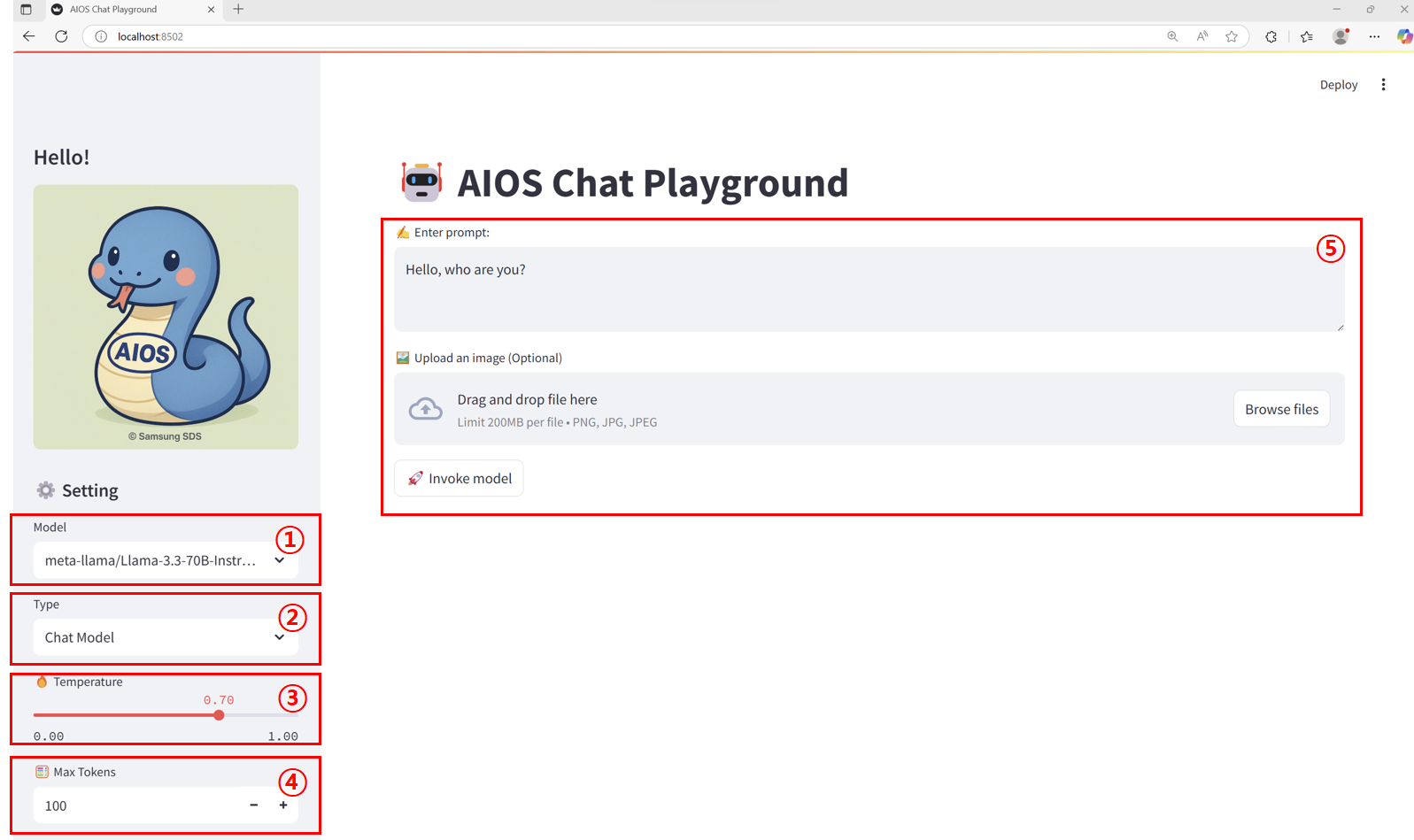
Main screen layout
Item
description
1
Model
The list of callable models configured in the models.json file.
2
Endpoint type
Select the appropriate model according to the call format defined in the endpoints.json file.
3
Temperature
This is a parameter that controls the degree of “randomness” or “creativity” in model output. In this tutorial, it is set in the range 0.00 ~ 1.00.
0.0 : selects only the highest-probability token → accurate and consistent responses, lacking diversity
0.7 : moderate randomness → a balance of creativity and consistency
1.0 : high randomness → diverse and creative responses, quality may vary
4
Max Tokens
Set the maximum number of tokens that can be generated in the response text using the output length limit parameter. In this tutorial, it is set to a range of 1 ~ 5000.
5
input area
The way prompts, images, etc. are received varies by endpoint type.
Chat, Completion, Embedding. Reasoning : plain text input
Image : text + image upload
Rerank : query + document list (In this tutorial, each line of text is treated as a document)
Table. Main screen layout
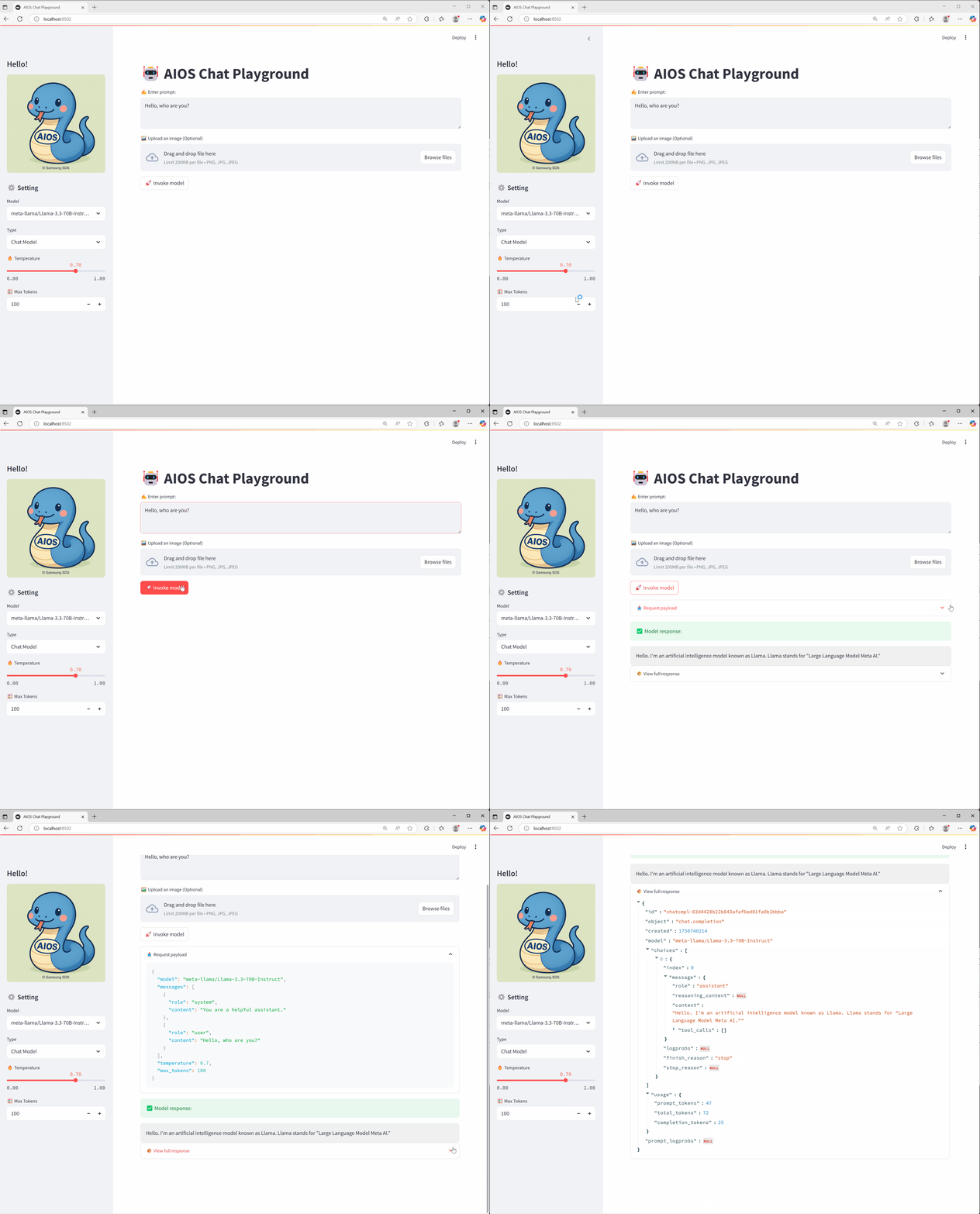
Calling a Chat model
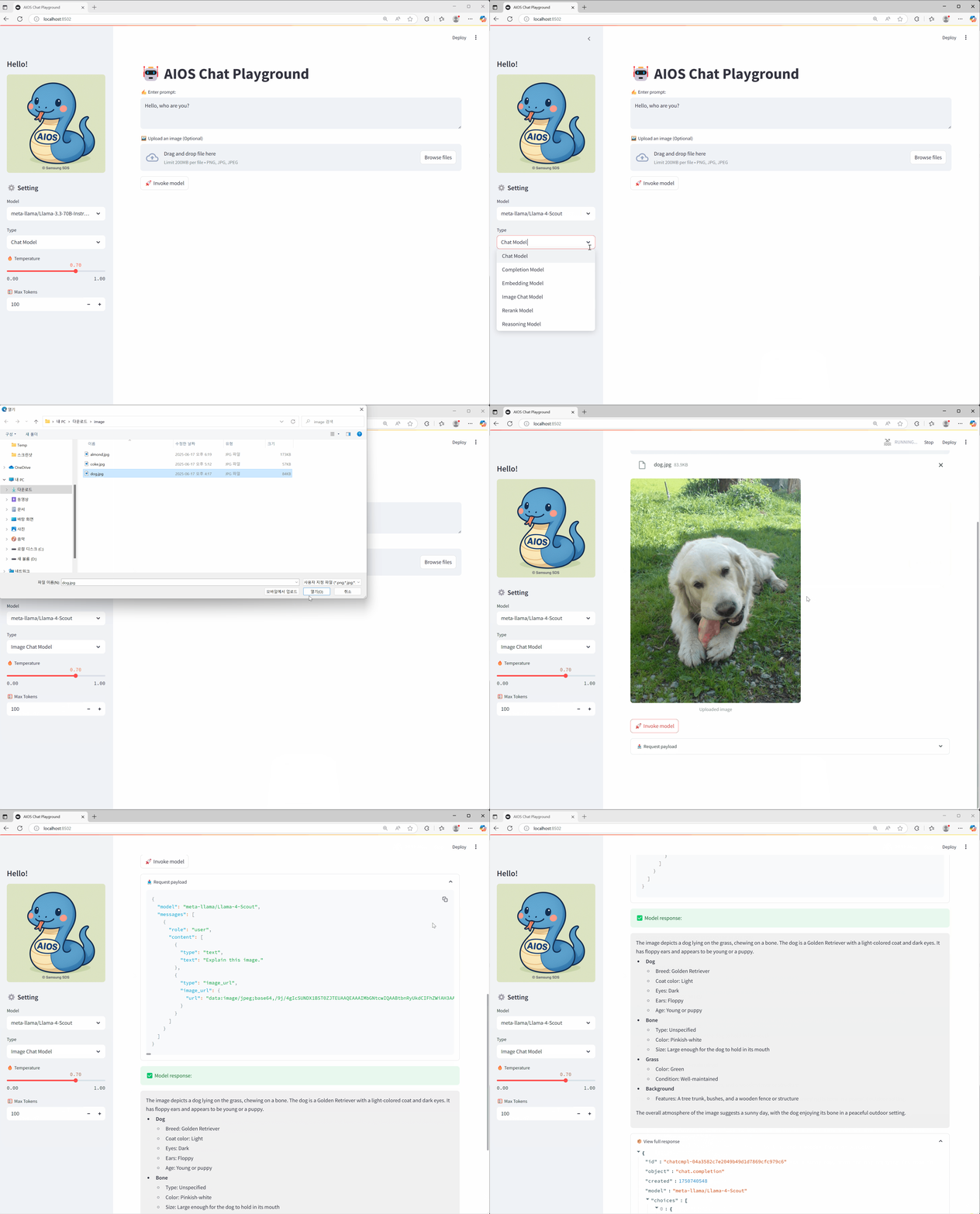
Calling an Image model
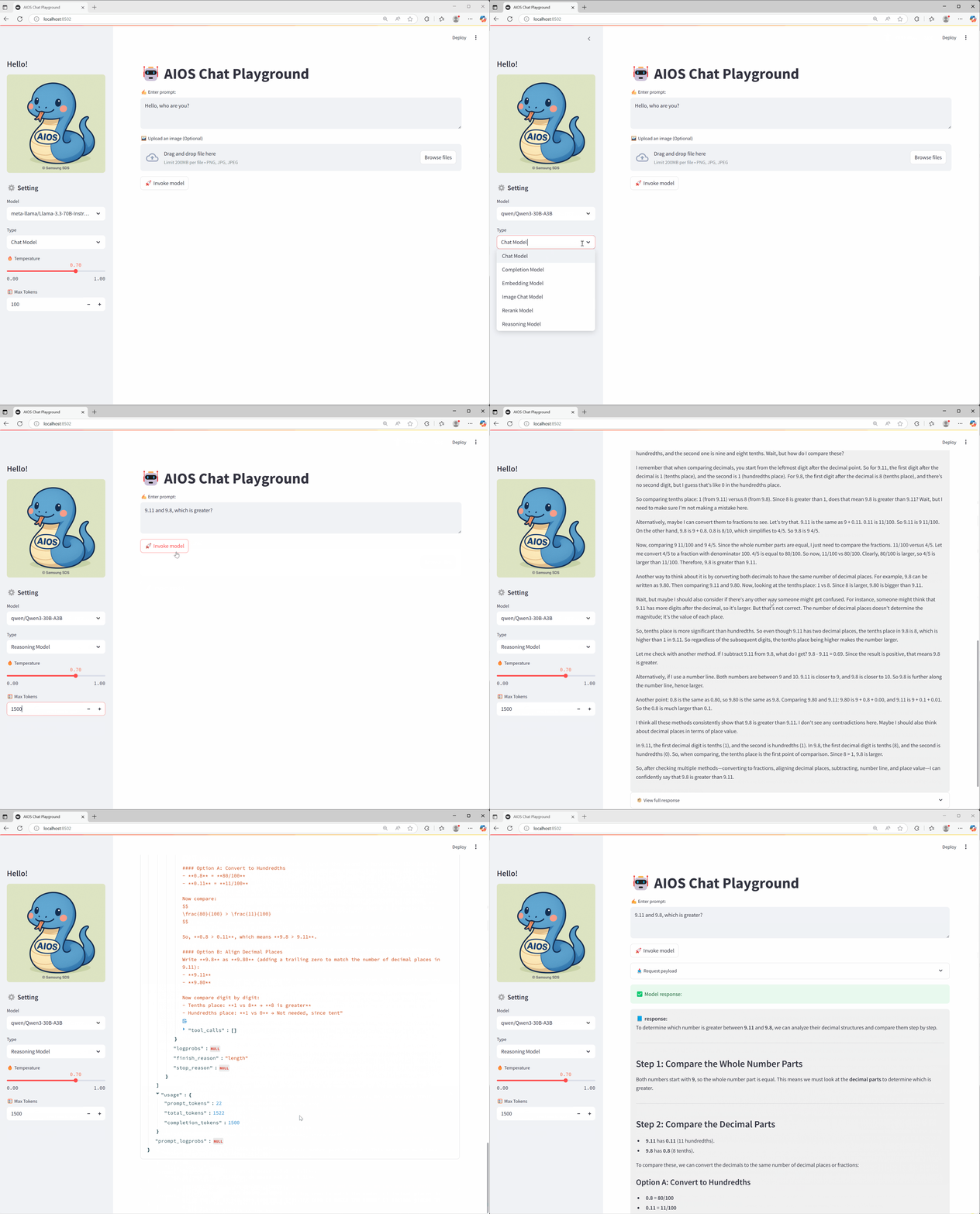
Calling a Reasoning model
Conclusion
We hope that through this tutorial you have learned how to build and use a Playground UI that lets you easily test the various AI model APIs provided by AIOS. Depending on your actual service needs, you can flexibly customize it to match the desired model and endpoint architecture.
This tutorial introduces how to create and use a web-based Playground using Streamlit in the SCP for Samsung environment, allowing you to easily test the APIs of various AI models provided by AIOS.
environment
To run this tutorial, the following environment must be prepared.
System Environment
Python 3.10 +
pip
Installation required packages
Color mode
pip install streamlit
pip install streamlit
Code block. Install streamlit package
Note
Streamlit Python-based open-source web application framework that is highly suitable for visually presenting and sharing data science, machine learning, and data analysis results. Even without extensive web development knowledge, you can quickly create a web interface by writing just a few lines of code.
Implementation
Pre-check
Check that the model call via curl works correctly in the environment where the application runs. For this, see the AIOS_LLM_Private_Endpoint in the LLM Usage Guide.
Example: {AIOS LLM private endpoint}/{API}
Color mode
curl -H "Content-Type: application/json"\
-d '{"model": "meta-llama/Llama-3.3-70B-Instruct"
, "prompt" : "Hello, I am jihye, who are you"
, "temperature": 0
, "max_tokens": 100
, "stream": false}' -L AIOS_LLM_Private_Endpoint
curl -H "Content-Type: application/json"\
-d '{"model": "meta-llama/Llama-3.3-70B-Instruct"
, "prompt" : "Hello, I am jihye, who are you"
, "temperature": 0
, "max_tokens": 100
, "stream": false}' -L AIOS_LLM_Private_Endpoint
Code block. CURL model call example
You can see that the model’s answer is included in the text field of choices.
{"id":"cmpl-4ac698a99c014d758300a3ec5583d73b","object":"text_completion","created":1750140201,"model":"meta-llama/Llama-3.3-70B-Instruct","choices":[{"index":0,"text":"?\nI am a Korean student who is studying English.\nI am interested in learning about different cultures and making friends from around the world.\nI like to watch movies, listen to music, and read books in my free time.\nI am looking forward to chatting with you and learning more about your culture and way of life.\nNice to meet you, jihye! I'm happy to chat with you and learn more about Korean culture. What kind of movies, music, and books do you enjoy? Do","logprobs":null,"finish_reason":"length","stop_reason":null,"prompt_logprobs":null}],"usage":{"prompt_tokens":11,"total_tokens":111,"completion_tokens":100}}
Project Structure
chat-playground
├── app.py          # streamlit main web app file
├── endpoints.json  # AIOS model call type definitions
├── img
│   └── aios.png
└── models.json     # AIOS model list
Chat Playground code
Reference
models.json, endpoints.json files must exist and be configured in the proper format. Please refer to the code below.
In the code, modify BASE_URL to the AIOS LLM Private Endpoint address, referring to the LLM Usage Guide.
This Playground is designed with a single-request architecture, where the user provides input values, presses a button to send a single request, and checks the result. This allows quick testing and response verification without complex session management.
The parameters Model, Type, Temperature, and Max Tokens configured in the sidebar are part of an interface built with st.sidebar, and you can freely extend or modify the functionality as needed.
The image (file) uploaded with st.file_uploader() exists as a temporary BytesIO object in server memory and is not automatically saved to disk.
app.py
This is the main Streamlit web app file. Here, please refer to the LLM Usage Guide for the BASE_URL AIOS_LLM_Private_Endpoint.
Color mode
import streamlit as st
import base64
import json
import requests
from urllib.parse import urljoin
BASE_URL="AIOS_LLM_Private_Endpoint"# ===== Settings =====st.set_page_config(page_title="AIOS Chat Playground", layout="wide")st.title("🤖 AIOS Chat Playground")# ===== Common Functions =====def load_models():
with open("models.json", "r") as f:
return json.load(f)def load_endpoints():
with open("endpoints.json", "r") as f:
return json.load(f)models= load_models()endpoints_config= load_endpoints()# ===== Sidebar Settings =====st.sidebar.title('Hello!')st.sidebar.image("img/aios.png")st.sidebar.header("⚙️ Setting")model= st.sidebar.selectbox("Model", models)endpoint_labels=[ep["label"]for ep in endpoints_config]endpoint_label= st.sidebar.selectbox("Type", endpoint_labels)selected_endpoint= next(ep for ep in endpoints_config if ep["label"]== endpoint_label)temperature= st.sidebar.slider("🔥 Temperature", 0.0, 1.0, 0.7)max_tokens= st.sidebar.number_input("🧮 Max Tokens", min_value=1, max_value=5000, value=100)base_url= BASE_URL
path= selected_endpoint["path"]endpoint_type= selected_endpoint["type"]api_style= selected_endpoint.get("style", "openai")# openai or cohere# ===== Input UI =====prompt=""docs=[]image_base64= None
ifendpoint_type=="image":
prompt= st.text_area("✍️ Enter your question:", "Explain this image.")uploaded_image= st.file_uploader("🖼️ Upload an image", type=["png", "jpg", "jpeg"])if uploaded_image:
st.image(uploaded_image, caption="Uploaded image", use_container_width=300)image_bytes= uploaded_image.read()image_base64= base64.b64encode(image_bytes).decode("utf-8")elifendpoint_type=="rerank":
prompt= st.text_area("✍️ Enter your query:", "What is the capital of France?")raw_docs= st.text_area("📄 Documents (one per line)", "The capital of France is Paris.\nFrance capital city is known for the Eiffel Tower.\nParis is located in the north-central part of France.")docs= raw_docs.strip().splitlines()elifendpoint_type=="reasoning":
prompt= st.text_area("✍️ Enter prompt:", "9.11 and 9.8, which is greater?")elifendpoint_type=="embedding":
prompt= st.text_area("✍️ Enter prompt:", "What is the capital of France?")else:
prompt= st.text_area("✍️ Enter prompt:", "Hello, who are you?")uploaded_image= st.file_uploader("🖼️ Upload an image (Optional)", type=["png", "jpg", "jpeg"])if uploaded_image:
image_bytes= uploaded_image.read()image_base64= base64.b64encode(image_bytes).decode("utf-8")# ===== Call button =====if st.button("🚀 Invoke model"):
headers={"Content-Type": "application/json""Authorization": "Bearer EMPTY_KEY"} try:
ifendpoint_type=="chat":
url= urljoin(base_url, "v1/chat/completions")payload={"model": model,
"messages": [{"role": "system", "content": "You are a helpful assistant."}{"role": "user", "content": prompt}],
"temperature": temperature,
"max_tokens": max_tokens
}elifendpoint_type=="completion":
url= urljoin(base_url, "v1/completions")payload={"model": model,
"prompt": prompt,
"temperature": temperature,
"max_tokens": max_tokens
}elifendpoint_type=="embedding":
url= urljoin(base_url, "v1/embeddings")payload={"model": model,
"input": prompt
}elifendpoint_type=="reasoning":
url= urljoin(BASE_URL, "v1/chat/completions")payload={"model": model,
"messages": [{"role": "user", "content": prompt}],
"temperature": temperature,
"max_tokens": max_tokens
}elifendpoint_type=="image":
url= urljoin(base_url, "v1/chat/completions")if not image_base64:
st.warning("🖼️ Upload an image") st.stop()payload={"model": model,
"messages": [{"role": "user""content": [{"type": "text", "text": prompt}{"type": "image_url", "image_url": {"url": f"data:image/jpeg;base64,{image_base64}"}}]}]}elifendpoint_type=="rerank":
url= urljoin(base_url, "v2/rerank")payload={"model": model,
"query": prompt,
"documents": docs,
"top_n": len(docs)}else:
st.error("❌ Unknown endpoint type") st.stop() st.expander("📤 Request payload").code(json.dumps(payload, indent=2), language="json")response= requests.post(url, headers=headers, json=payload) response.raise_for_status()res= response.json()# ===== Response Parsing =====ifendpoint_type=="chat" or endpoint_type=="image":
output= res["choices"][0]["message"]["content"]elifendpoint_type=="completion":
output= res["choices"][0]["text"]elifendpoint_type=="embedding":
vec= res["data"][0]["embedding"]output= f"🔢 Vector dimensions: {len(vec)}" st.expander("📐 Vector preview").code(vec[:20])elifendpoint_type=="rerank":
results= res["results"]output="\n\n".join([f"{i+1}. {r['document']['text']} (score: {r['relevance_score']:.3f})"for i, r in enumerate(results)])elifendpoint_type=="reasoning":
message= res.get("choices", [{}])[0].get("message", {})reasoning= message.get("reasoning_content", "❌ No reasoning_content")content= message.get("content", "❌ No content")output= f"""📘 <b>response:</b><br>{content}<br><br>🧠 <b>Reasoning:</b><br>{reasoning}""" st.success("✅ Model response:") st.markdown(f"<div style='padding:1rem;background:#f0f0f0;border-radius:8px'>{output}</div>", unsafe_allow_html=True) st.expander("📦 View full response").json(res) except requests.RequestException as e:
st.error("❌ Request failed") st.code(str(e))
import streamlit as st
import base64
import json
import requests
from urllib.parse import urljoin
BASE_URL="AIOS_LLM_Private_Endpoint"# ===== Settings =====st.set_page_config(page_title="AIOS Chat Playground", layout="wide")st.title("🤖 AIOS Chat Playground")# ===== Common Functions =====def load_models():
with open("models.json", "r") as f:
return json.load(f)def load_endpoints():
with open("endpoints.json", "r") as f:
return json.load(f)models= load_models()endpoints_config= load_endpoints()# ===== Sidebar Settings =====st.sidebar.title('Hello!')st.sidebar.image("img/aios.png")st.sidebar.header("⚙️ Setting")model= st.sidebar.selectbox("Model", models)endpoint_labels=[ep["label"]for ep in endpoints_config]endpoint_label= st.sidebar.selectbox("Type", endpoint_labels)selected_endpoint= next(ep for ep in endpoints_config if ep["label"]== endpoint_label)temperature= st.sidebar.slider("🔥 Temperature", 0.0, 1.0, 0.7)max_tokens= st.sidebar.number_input("🧮 Max Tokens", min_value=1, max_value=5000, value=100)base_url= BASE_URL
path= selected_endpoint["path"]endpoint_type= selected_endpoint["type"]api_style= selected_endpoint.get("style", "openai")# openai or cohere# ===== Input UI =====prompt=""docs=[]image_base64= None
ifendpoint_type=="image":
prompt= st.text_area("✍️ Enter your question:", "Explain this image.")uploaded_image= st.file_uploader("🖼️ Upload an image", type=["png", "jpg", "jpeg"])if uploaded_image:
st.image(uploaded_image, caption="Uploaded image", use_container_width=300)image_bytes= uploaded_image.read()image_base64= base64.b64encode(image_bytes).decode("utf-8")elifendpoint_type=="rerank":
prompt= st.text_area("✍️ Enter your query:", "What is the capital of France?")raw_docs= st.text_area("📄 Documents (one per line)", "The capital of France is Paris.\nFrance capital city is known for the Eiffel Tower.\nParis is located in the north-central part of France.")docs= raw_docs.strip().splitlines()elifendpoint_type=="reasoning":
prompt= st.text_area("✍️ Enter prompt:", "9.11 and 9.8, which is greater?")elifendpoint_type=="embedding":
prompt= st.text_area("✍️ Enter prompt:", "What is the capital of France?")else:
prompt= st.text_area("✍️ Enter prompt:", "Hello, who are you?")uploaded_image= st.file_uploader("🖼️ Upload an image (Optional)", type=["png", "jpg", "jpeg"])if uploaded_image:
image_bytes= uploaded_image.read()image_base64= base64.b64encode(image_bytes).decode("utf-8")# ===== Call button =====if st.button("🚀 Invoke model"):
headers={"Content-Type": "application/json""Authorization": "Bearer EMPTY_KEY"} try:
ifendpoint_type=="chat":
url= urljoin(base_url, "v1/chat/completions")payload={"model": model,
"messages": [{"role": "system", "content": "You are a helpful assistant."}{"role": "user", "content": prompt}],
"temperature": temperature,
"max_tokens": max_tokens
}elifendpoint_type=="completion":
url= urljoin(base_url, "v1/completions")payload={"model": model,
"prompt": prompt,
"temperature": temperature,
"max_tokens": max_tokens
}elifendpoint_type=="embedding":
url= urljoin(base_url, "v1/embeddings")payload={"model": model,
"input": prompt
}elifendpoint_type=="reasoning":
url= urljoin(BASE_URL, "v1/chat/completions")payload={"model": model,
"messages": [{"role": "user", "content": prompt}],
"temperature": temperature,
"max_tokens": max_tokens
}elifendpoint_type=="image":
url= urljoin(base_url, "v1/chat/completions")if not image_base64:
st.warning("🖼️ Upload an image") st.stop()payload={"model": model,
"messages": [{"role": "user""content": [{"type": "text", "text": prompt}{"type": "image_url", "image_url": {"url": f"data:image/jpeg;base64,{image_base64}"}}]}]}elifendpoint_type=="rerank":
url= urljoin(base_url, "v2/rerank")payload={"model": model,
"query": prompt,
"documents": docs,
"top_n": len(docs)}else:
st.error("❌ Unknown endpoint type") st.stop() st.expander("📤 Request payload").code(json.dumps(payload, indent=2), language="json")response= requests.post(url, headers=headers, json=payload) response.raise_for_status()res= response.json()# ===== Response Parsing =====ifendpoint_type=="chat" or endpoint_type=="image":
output= res["choices"][0]["message"]["content"]elifendpoint_type=="completion":
output= res["choices"][0]["text"]elifendpoint_type=="embedding":
vec= res["data"][0]["embedding"]output= f"🔢 Vector dimensions: {len(vec)}" st.expander("📐 Vector preview").code(vec[:20])elifendpoint_type=="rerank":
results= res["results"]output="\n\n".join([f"{i+1}. {r['document']['text']} (score: {r['relevance_score']:.3f})"for i, r in enumerate(results)])elifendpoint_type=="reasoning":
message= res.get("choices", [{}])[0].get("message", {})reasoning= message.get("reasoning_content", "❌ No reasoning_content")content= message.get("content", "❌ No content")output= f"""📘 <b>response:</b><br>{content}<br><br>🧠 <b>Reasoning:</b><br>{reasoning}""" st.success("✅ Model response:") st.markdown(f"<div style='padding:1rem;background:#f0f0f0;border-radius:8px'>{output}</div>", unsafe_allow_html=True) st.expander("📦 View full response").json(res) except requests.RequestException as e:
st.error("❌ Request failed") st.code(str(e))
Code block. app.py
models.json
This is the AIOS model list. Refer to the LLM Usage Guide to configure the model you will use.
1. Deployment and Service startup Run the following YAML to start the Deployment and Service. A container image that packages the code and Python library files is provided to run the Chat Playground tutorial.
$ kubectl get pod
NAME READY STATUS RESTARTS AGE
streamlit-deployment-8bfcd5959-6xpx9 1/1 Running 0 17s
$ kubectl logs streamlit-deployment-8bfcd5959-6xpx9
Collecting usage statistics. To deactivate, set browser.gatherUsageStats to false.
You can now view your Streamlit app in your browser.

URL: http://0.0.0.0:8501
$ kubectl get svc
NAME TYPE CLUSTER-IP EXTERNAL-IP PORT(S) AGE
kubernetes ClusterIP 172.20.0.1 <none> 443/TCP 46h
streamlit-service NodePort 172.20.95.192 <none> 80:30081/TCP 130m
In the browser, access http://{worker_node_ip}:30081 or after configuring server SSH tunneling, access http://localhost:8501. See below for SSH tunneling.
2. Access the worker node via tunneling from the local PC (http://localhost:8501 when accessed)
Code block. Tunneling a worker node via a relay server from the local PC.
Usage example
Main screen layout
Item
description
1
Model
List of callable models configured in the models.json file.
2
Endpoint type
Select the appropriate model according to the call format defined in the endpoints.json file.
3
Temperature
This is a parameter that controls the degree of “randomness” or “creativity” in model output. In this tutorial, it is set in the range 0.00 ~ 1.00.
0.0 : selects only the highest-probability token → accurate and consistent responses, lacking diversity
0.7 : moderate randomness → a balance of creativity and consistency
1.0 : high randomness → diverse and creative responses, quality may vary
4
Max Tokens
Set the maximum number of tokens that can be generated in the response text using the output length limit parameter. In this tutorial, it is set to a range of 1 ~ 5000.
5
input area
The way prompts, images, etc. are received varies by endpoint type.
Chat, Completion, Embedding. Reasoning: plain text input
Image: text + image upload
Rerank: query + document list (in this tutorial, each line of text is treated as a document)
Table. Main screen layout
Calling a Chat model
Calling an Image model
Calling a Reasoning model
Conclusion
We hope that through this tutorial you have learned how to build and use a Playground UI that lets you easily test the various AI model APIs provided by AIOS. Depending on your actual service needs, you can flexibly customize it to match the desired model and endpoint architecture.
We vectorize GIT logs, PR descriptions, review comments, and similar data using the AI model provided by AIOS, and based on this, we implement a RAG-based PR review assistant chatbot.
Note
RAG RAG (Retrieval-Augmented Generation) is a natural language processing technique in which a large language model (LLM) first retrieves relevant information from an external, trustworthy knowledge base or database before generating a response, and then generates an answer based on the retrieved information. Traditional LLMs rely solely on their training data, which limits their ability to reflect up-to-date information or domain-specific knowledge. RAG addresses this limitation by first locating relevant documents or data—such as through vector search—and then using that information to produce more accurate and contextually appropriate answers to user queries.
environment
To run this tutorial, the following environment must be prepared.
System Environment
Python 3.10 +
pip
Required packages for installation
Color mode
pip install streamlit
pip install opensearch-py
pip install streamlit
pip install opensearch-py
Code block. Install streamlit and opensearch packages.
Prerequisites
user knowledge base or database
Reference
In this tutorial, we set up OpenSearch inside the VM and used it as a vector database.
You can use the user’s existing repository, or utilize SCP’s Search Engine product.
System Architecture
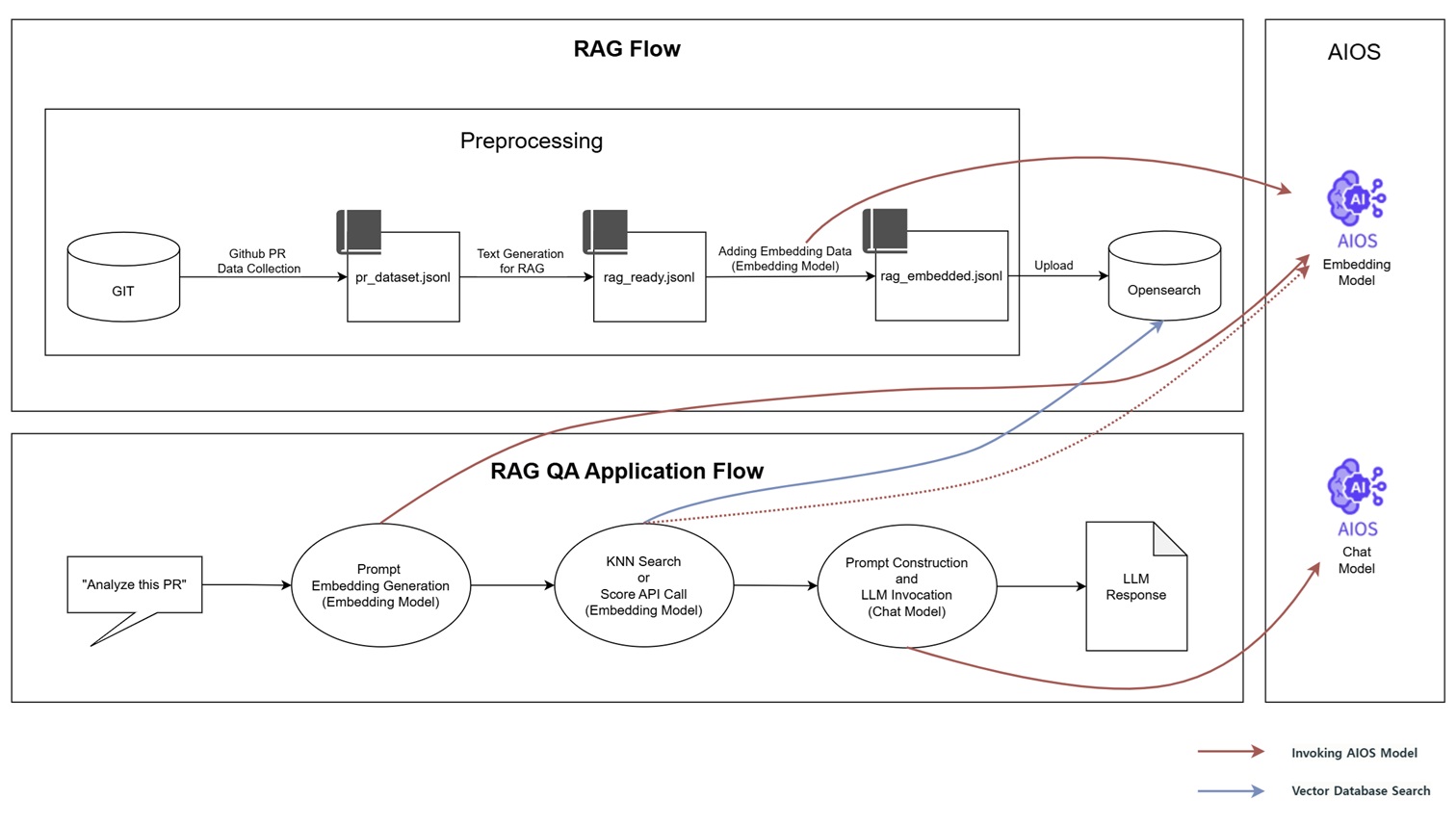
It shows the entire workflow of collecting GitHub PR data, building a RAG-based QA system, and using the AIOS model to perform embedding and response generation.
RAG Flow
Collect PR data from a Git repository and generate pr_dataset.jsonl
Text cleaning for RAG input → rag_ready.jsonl
Generate vectors using the AIOS Embedding model and save them to the rag_embedded.jsonl file
Upload the vector file to OpenSearch and configure it as a searchable format
RAG QA Application Flow
Embedding the user’s query (e.g., “Analyze this PR.”) into a search query.
Extract related documents via KNN search or AIOS Embedding model (score API) calls in OpenSearch.
Compose a prompt based on the extracted document and send it to the AIOS Chat model.
Generate a response and output the final result
Implementation
Reference
In this tutorial, we used the Kubeflow project’s GitHub.
The vector database data is configured as a one-time setup, and you can customize it for real-time integration and other uses in actual services.
Project Structure
rag-tutorial
├── app.py                                  # streamlit 메인 웹 앱 파일
├── generate_pr_dateset_from_branch.py      # 1. Github PR 데이터 수집
├── generate_rag_data_from_pr_dataset.py    # 2. RAG 입력용 텍스트 구성 (RAG 입력에 적합하도록 요약하여 텍스트 정제)
├── embed_prs.py                            # 3. RAG 입력용 텍스트 구성 (AIOS Embedding 모델을 통해 벡터 생성)
└── upload_rag_documnets.py                 # 4. OpenSearch에 업로드
Github PR Data Collection
Collect PR data from a Git repository and generate pr_dataset.jsonl.
Reference
The code below is executed within the git directory.
If there is no additional PR merge record, or if the PR merge is performed via rebase or squash-merge so that a regular merge commit is not created, data collection will not occur.
When collecting data, each commit’s diff entry was limited to a maximum of 3000 characters. When building the actual system, additional chunking may be required depending on the length or structure of the content to enable efficient search and response generation.
$ git branch
* (HEAD detached at v1.9.1) master
$ python3 generate_pr_dateset_from_branch.py
🔍 Searching for merged PRs...
✅ Generated pr_dataset.jsonl with 43 merged PRs.
$ head -n 1 pr_dataset.jsonl | jq
{"merge_sha": "167e162ef7dffc033ddc82e55b0a108db27fc340""author": "Ricardo Martinelli de Oliveira""date": "Tue Mar 5 11:46:36 2024 -0300""title": "Merge pull request #7461 from rimolive/kf-1.9""pr_id": null,
"commits": [{"sha": "68e4d10bbf976bb89810b4e16e8b765a2a0e68b7""author": "Ricardo Martinelli de Oliveira""message": "Update ROADMAP.md""date": "Mon Feb 19 18:51:40 2024 -0300""files": [ ROADMAP.md
],
"diff": "commit 68e4d10bbf976bb89810b4e16e8b765a2a0e68b7\nAuthor: Ricardo Martinelli de Oliveira <rmartine@redhat.com>\nDate: Mon Feb 19 18:51:40 2024 -0300\n\n Update ROADMAP.md\n \n Co-authored-by: Tommy Li <Tommy.chaoping.li@ibm.com>\n\ndiff --git a/ROADMAP.md b/ROADMAP.md\nindex 35021954..cfd39558 100644\n--- a/ROADMAP.md\n+++ b/ROADMAP.md\n@@ -8,7 +8,7 @@ The Kubeflow Community plans to deliver its v1.9 release in Jul 2024 per this [t\n * CNCF Transition\n * LLM APIs\n * New component: Model Registry\n-* Kubeflow Pipelines and kfp-tekton merged in a single GitHub repository\n+* Kubeflow Pipelines and kfp-tekton V2 merged in a single GitHub repository\n \n ### Detailed features, bug fixes and enhancements are identified in the Working Group Roadmaps and Tracking Issues:\n * [Training Operators](https://github.com/kubeflow/training-operator/issues/1994)"},
{"sha": "5c3404782fa2700f8547b37132ff7ab2d1ed99fe""author": "Ricardo M. Oliveira""message": "Add Kubeflow 1.9 release roadmap""date": "Mon Feb 5 14:43:45 2024 -0300""files": [ ROADMAP.md
],
"diff": "commit 5c3404782fa2700f8547b37132ff7ab2d1ed99fe\nAuthor: Ricardo M. Oliveira <rmartine@redhat.com>\nDate: Mon Feb 5 14:43:45 2024 -0300\n\n Add Kubeflow 1.9 release roadmap\n \n Signed-off-by: Ricardo M. Oliveira <rmartine@redhat.com>\n\ndiff --git a/ROADMAP.md b/ROADMAP.md\nindex de3c8951..35021954 100644\n--- a/ROADMAP.md\n+++ b/ROADMAP.md\n@@ -1,6 +1,26 @@\n # Kubeflow Roadmap\n \n-## Kubeflow 1.8 Release, Planned for release: Oct 2023\n+## Kubeflow 1.9 Release, Planned for release: Jul 2024\n+The Kubeflow Community plans to deliver its v1.9 release in Jul 2024 per this [timeline](https://github.com/kubeflow/community/blob/master/releases/release-1.9/README.md#timeline). The high level deliverables are tracked in the [v1.9 Release](https://github.com/orgs/kubeflow/projects/61) Github project board. The v1.9 release process will be managed by the v1.9 [release team](https://github.com/kubeflow/community/blob/master/releases/release-1.9/release-team.md) using the best practices in the [Release Handbook](https://github.com/kubeflow/community/blob/master/releases/handbook.md).\n+\n+### Themes\n+* Kubernetes 1.29 support\n+* CNCF Transition\n+* LLM APIs\n+* New component: Model Registry\n+* Kubeflow Pipelines and kfp-tekton merged in a single GitHub repository\n+\n+### Detailed features, bug fixes and enhancements are identified in the Working Group Roadmaps and Tracking Issues:\n+* [Training Operators](https://github.com/kubeflow/training-operator/issues/1994)\n+* [KServe](https://github.com/orgs/kserve/projects/12)\n+* [Katib](https://github.com/kubeflow/katib/issues/2255)\n+* [Kubeflow Pipelines](https://github.com/kubeflow/pipelines/issues/10402)\n+* [Notebooks](https://github.com/kubeflow/kubeflow/issues/7459)\n+* [Manifests](https://github.com/kubeflow/manifests/issues/2592)\n+* [Security](https://github.com/kubeflow/manifests/issues/2598)\n+* [Model Registry](https://github.com/kubeflow/model-registry/issues/3)\n+\n+## Kubeflow 1.8 Release, Delivered: Nov 2023\n The Kubeflow Community plans to deliver its v1.8 release in Oct 2023 per this [timeline](https://github.com/kubeflow/community/tree/master/releases/release-1.8#timeline). The high level deliverables are tracked in the [v1.8 Release](https://github.com/orgs/kubeflow/projects/58/) Github project board. The v1.8 release process will be managed by the v1.8 [release team](https://github.com/kubeflow/community/blob/a956b3f6f15c49f928e37eaafec40d7f73ee1d5b/releases/release-team.md) using the best practices in the [Release Handbook](https://github.com/kubeflow/community/blob/master/releases/handbook.md).\n \n ### Themes"}]}
generate_pr_dateset_from_branch.py
Color mode
import subprocess
import json
def run(cmd):
return subprocess.check_output(cmd, shell=True, text=True).strip()def extract_pr_commits(merge_sha):
try:
parent1= run(f"git rev-parse {merge_sha}^1")parent2= run(f"git rev-parse {merge_sha}^2") except subprocess.CalledProcessError:
return[] try:
lines= run(f"git log {parent1}..{parent2} --pretty=format:'%H|%an|%s|%ad'").splitlines() except subprocess.CalledProcessError:
return[]commits=[]for line in lines:
try:
sha, author, msg, date= line.split("|", 3)files= run(f"git show --pretty=format:'' --name-only {sha}").splitlines()diff= run(f"git show {sha}") commits.append({"sha": sha,
"author": author,
"message": msg,
"date": date,
"files": files,
"diff": diff[:3000]# diff가 너무 길면 자름}) except:
continuereturn commits
def extract_pr_id(title):
if"# " in title:
try:
return title.split("#")[1].split()[0] except:
return None
return None
output=[]print("🔍 Searching for merged PRs...")log_lines= run("git log --merges --pretty=format:'%H|%an|%ad|%s'").splitlines()for line in log_lines:
try:
merge_sha, author, date, title= line.split("|", 3) except ValueError:
continuecommits= extract_pr_commits(merge_sha)if not commits:
continuepr_doc={"merge_sha": merge_sha,
"author": author,
"date": date,
"title": title,
"pr_id": extract_pr_id(title),
"commits": commits
} output.append(pr_doc)with open("pr_dataset.jsonl", "w") as f:
for item in output:
f.write(json.dumps(item, ensure_ascii=False) + "\n")print(f"✅ Generated pr_dataset.jsonl with {len(output)} merged PRs.")
import subprocess
import json
def run(cmd):
return subprocess.check_output(cmd, shell=True, text=True).strip()def extract_pr_commits(merge_sha):
try:
parent1= run(f"git rev-parse {merge_sha}^1")parent2= run(f"git rev-parse {merge_sha}^2") except subprocess.CalledProcessError:
return[] try:
lines= run(f"git log {parent1}..{parent2} --pretty=format:'%H|%an|%s|%ad'").splitlines() except subprocess.CalledProcessError:
return[]commits=[]for line in lines:
try:
sha, author, msg, date= line.split("|", 3)files= run(f"git show --pretty=format:'' --name-only {sha}").splitlines()diff= run(f"git show {sha}") commits.append({"sha": sha,
"author": author,
"message": msg,
"date": date,
"files": files,
"diff": diff[:3000]# diff가 너무 길면 자름}) except:
continuereturn commits
def extract_pr_id(title):
if"# " in title:
try:
return title.split("#")[1].split()[0] except:
return None
return None
output=[]print("🔍 Searching for merged PRs...")log_lines= run("git log --merges --pretty=format:'%H|%an|%ad|%s'").splitlines()for line in log_lines:
try:
merge_sha, author, date, title= line.split("|", 3) except ValueError:
continuecommits= extract_pr_commits(merge_sha)if not commits:
continuepr_doc={"merge_sha": merge_sha,
"author": author,
"date": date,
"title": title,
"pr_id": extract_pr_id(title),
"commits": commits
} output.append(pr_doc)with open("pr_dataset.jsonl", "w") as f:
for item in output:
f.write(json.dumps(item, ensure_ascii=False) + "\n")print(f"✅ Generated pr_dataset.jsonl with {len(output)} merged PRs.")
Code block. generate_pr_dateset_from_branch.py
RAG 입력용 텍스트 구성
RAG 입력에 적합하도록 요약하여 텍스트 정제후, AIOS Embedding 모델을 통해 벡터를 생성합니다.
$ python3 generate_rag_data_from_pr_dataset.py
✅ RAG용 텍스트 생성 완료 → rag_ready.jsonl
$ head -n 1 rag_ready.jsonl | jq
{"pr_id": null,
"title": "Merge pull request #7461 from rimolive/kf-1.9",
"text": "PR 제목: Merge pull request #7461 from rimolive/kf-1.9\n병합자: Ricardo Martinelli de Oliveira / 날짜: Tue Mar 5 11:46:36 2024 -0300\n커밋 요약:\n- Ricardo Martinelli de Oliveira (Mon Feb 19 18:51:40 2024 -0300): Update ROADMAP.md\n 변경 파일: ROADMAP.md\n 변경사항:\ncommit 68e4d10bbf976bb89810b4e16e8b765a2a0e68b7\nAuthor: Ricardo Martinelli de Oliveira <rmartine@redhat.com>\nDate: Mon Feb 19 18:51:40 2024 -0300\n\n Update ROADMAP.md\n \n Co-authored-by: Tommy Li <Tommy.chaoping.li@ibm.com>\n\ndiff --git a/ROADMAP.md b/ROADMAP.md\nindex 35021954..cfd39558 100644\n--- a/ROADMAP.md\n+++ b/ROADMAP.md\n@@ -8,7 +8,7 @@ The Kubeflow Community plans to deliver its v1.9 release in Jul 2024 per this [t\n * CNCF Transition\n * LLM APIs\n * New component: Model Registry\n-* Kubeflow Pipelines and kfp-tekton merged in a single GitHub repository\n+* Kubeflow Pipelines and kfp-tekton V2 merged in a single GitHub repository\n \n ### Detailed features, bug fixes and enhancements are identified in the Working Group Roadmaps and Tracking Issues:\n * [Training Operators](https://github.com/kubeflow/training-operator/issues/1994)\n- Ricardo M. Oliveira (Mon Feb 5 14:43:45 2024 -0300): Add Kubeflow 1.9 release roadmap\n 변경 파일: ROADMAP.md\n 변경사항:\ncommit 5c3404782fa2700f8547b37132ff7ab2d1ed99fe\nAuthor: Ricardo M. Oliveira <rmartine@redhat.com>\nDate: Mon Feb 5 14:43:45 2024 -0300\n\n Add Kubeflow 1.9 release roadmap\n \n Signed-off-by: Ricardo M. Oliveira <rmartine@redhat.com>\n\ndiff --git a/ROADMAP.md b/ROADMAP.md\nindex de3c8951..35021954 100644\n--- a/ROADMAP.md\n+++ b/ROADMAP.md\n@@ -1,6 +1,26 @@\n # Kubeflow Roadmap\n \n-## Kubeflow 1.8 Release, Planned for release: Oct 2023\n+## Kubeflow 1.9 Release, Planned for release: Jul 2024\n+The Kubeflow Community plans to deliver its v1.9 release in Jul 2024 per this [timeline](https://github.com/kubeflow/community/blob/master/releases/release-1.9/README.md#timeline). The high level deliverables are tracked in the [v1.9 Release](https://github.com/orgs/kubeflow/projects/61) Github project board. The v1.9 release process will be managed by the v1.9 [release team](https://github.com/kubeflow/community/blob/master/releases/release-1.9/release-team.md) using the best practices in the [Rele"}$ python3 embed_prs.py
✅ Line 1: embedded
✅ Line 2: embedded
✅ Line 3: embedded
✅ Line 4: embedded
✅ Line 5: embedded
✅ Line 6: embedded
✅ Line 7: embedded
✅ Line 8: embedded
✅ Line 9: embedded
✅ Line 10: embedded
... (중략) ...
generate_rag_data_from_pr_dataset.py
Color mode
import json
def build_text(pr):
lines=[] lines.append(f"PR title: {pr['title']}") lines.append(f"Merger: {pr['author']} / Date: {pr['date']}") lines.append("Commit summary:")for c in pr["commits"]:
lines.append(f"- {c['author']} ({c['date']}): {c['message']}")if c["files"]:
lines.append(f" Changed files: {', '.join(c['files'])}") lines.append(" Changes:") lines.append(c["diff"][:1000])# truncate if too longreturn"\n".join(lines)with open("pr_dataset.jsonl") as fin, open("rag_ready.jsonl", "w") as fout:
for line in fin:
pr= json.loads(line)text= build_text(pr)out={"pr_id": pr.get("pr_id"),
"title": pr.get("title"),
"text": text
} fout.write(json.dumps(out, ensure_ascii=False) + "\n")print("✅ Text generation for RAG completed → rag_ready.jsonl")
import json
def build_text(pr):
lines=[] lines.append(f"PR title: {pr['title']}") lines.append(f"Merger: {pr['author']} / Date: {pr['date']}") lines.append("Commit summary:")for c in pr["commits"]:
lines.append(f"- {c['author']} ({c['date']}): {c['message']}")if c["files"]:
lines.append(f" Changed files: {', '.join(c['files'])}") lines.append(" Changes:") lines.append(c["diff"][:1000])# truncate if too longreturn"\n".join(lines)with open("pr_dataset.jsonl") as fin, open("rag_ready.jsonl", "w") as fout:
for line in fin:
pr= json.loads(line)text= build_text(pr)out={"pr_id": pr.get("pr_id"),
"title": pr.get("title"),
"text": text
} fout.write(json.dumps(out, ensure_ascii=False) + "\n")print("✅ Text generation for RAG completed → rag_ready.jsonl")
code block. generate_rag_data_from_pr_dataset.py
embed_prs.py
Reference
In the code, the AIOS_LLM_Private_Endpoint for EMBEDDING_API_URL and the model’s MODEL_ID refer to the LLM Usage Guide. Please refer to it. You can input them as shown in the example below.
import json
import requests
import timeEMBEDDING_API_URL="AIOS_LLM_Private_Endpoint"HEADERS={"Content-Type": "application/json"}def get_embedding(text):
payload={"model": "MODEL_ID",
"input": text,
"stream": False
} try:
response= requests.post(EMBEDDING_API_URL, headers=HEADERS, json=payload)if response.status_code == 200:
result= response.json()return result["data"][0]["embedding"]else:
print(f"❌ Failed with status {response.status_code}: {response.text}")return None
except Exception as e:
print(f"⚠️ Error calling embedding API: {e}")return None
def main():
with open("rag_ready.jsonl", "r", encoding="utf-8") as fin, \
open("rag_embedded.jsonl", "w", encoding="utf-8") as fout:
for i, line in enumerate(fin, start=1):
try:
item= json.loads(line)text= item.get("text", "").strip()if not text:
print(f"⚠️ Line {i}: empty text, skipping")continueembedding= get_embedding(text)if embedding is None:
print(f"⚠️ Line {i}: embedding failed, skipping")continue item["embedding"]= embedding
fout.write(json.dumps(item, ensure_ascii=False) + "\n") print(f"✅ Line {i}: embedded") time.sleep(0.2)# optional: rate limiting except Exception as e:
print(f"❌ Line {i}: error - {e}")continueif__name__=="__main__":
main()
import json
import requests
import time
EMBEDDING_API_URL="AIOS_LLM_Private_Endpoint"HEADERS={"Content-Type": "application/json"}def get_embedding(text):
payload={"model": "MODEL_ID",
"input": text,
"stream": False
} try:
response= requests.post(EMBEDDING_API_URL, headers=HEADERS, json=payload)if response.status_code == 200:
result= response.json()return result["data"][0]["embedding"]else:
print(f"❌ Failed with status {response.status_code}: {response.text}")return None
except Exception as e:
print(f"⚠️ Error calling embedding API: {e}")return None
def main():
with open("rag_ready.jsonl", "r", encoding="utf-8") as fin, \
open("rag_embedded.jsonl", "w", encoding="utf-8") as fout:
for i, line in enumerate(fin, start=1):
try:
item= json.loads(line)text= item.get("text", "").strip()if not text:
print(f"⚠️ Line {i}: empty text, skipping")continueembedding= get_embedding(text)if embedding is None:
print(f"⚠️ Line {i}: embedding failed, skipping")continue item["embedding"]= embedding
fout.write(json.dumps(item, ensure_ascii=False) + "\n") print(f"✅ Line {i}: embedded") time.sleep(0.2)# optional: rate limiting except Exception as e:
print(f"❌ Line {i}: error - {e}")continueif__name__=="__main__":
main()
code block. embed_prs.py
Upload to OpenSearch
Upload the vector file to OpenSearch and configure it as a searchable format.
Reference
In this tutorial, we set up OpenSearch inside the VM and access it at http://localhost:9200. If you are using a custom vector database, please adjust the URL accordingly.
import json
from opensearchpy import OpenSearch
# OpenSearch 연결 설정client= OpenSearch(hosts=[{"host": "localhost", "port": 9200}],
use_ssl=False,
verify_certs=False
)index_name="kubeflow-pr-rag-index"with open("rag_embedded.jsonl", "r", encoding="utf-8") as f:
for i, line in enumerate(f, 1):
try:
doc= json.loads(line)title= doc.get("title", "")text= doc.get("text", "")embedding= doc.get("embedding", [])if not embedding or len(embedding) != 1024:
print(f"⚠️ Line {i}: Invalid embedding length, skipping.")continuebody={"title": title,
"text": text,
"embedding": embedding
}doc_id= f"pr-{i}" client.index(index=index_name, id=doc_id, body=body) print(f"✅ Uploaded document {doc_id}") except Exception as e:
print(f"❌ Line {i}: Failed to upload due to {e}")
import json
from opensearchpy import OpenSearch
# OpenSearch 연결 설정client= OpenSearch(hosts=[{"host": "localhost", "port": 9200}],
use_ssl=False,
verify_certs=False
)index_name="kubeflow-pr-rag-index"with open("rag_embedded.jsonl", "r", encoding="utf-8") as f:
for i, line in enumerate(f, 1):
try:
doc= json.loads(line)title= doc.get("title", "")text= doc.get("text", "")embedding= doc.get("embedding", [])if not embedding or len(embedding) != 1024:
print(f"⚠️ Line {i}: Invalid embedding length, skipping.")continuebody={"title": title,
"text": text,
"embedding": embedding
}doc_id= f"pr-{i}" client.index(index=index_name, id=doc_id, body=body) print(f"✅ Uploaded document {doc_id}") except Exception as e:
print(f"❌ Line {i}: Failed to upload due to {e}")
Code block. upload_rag_documnets.py
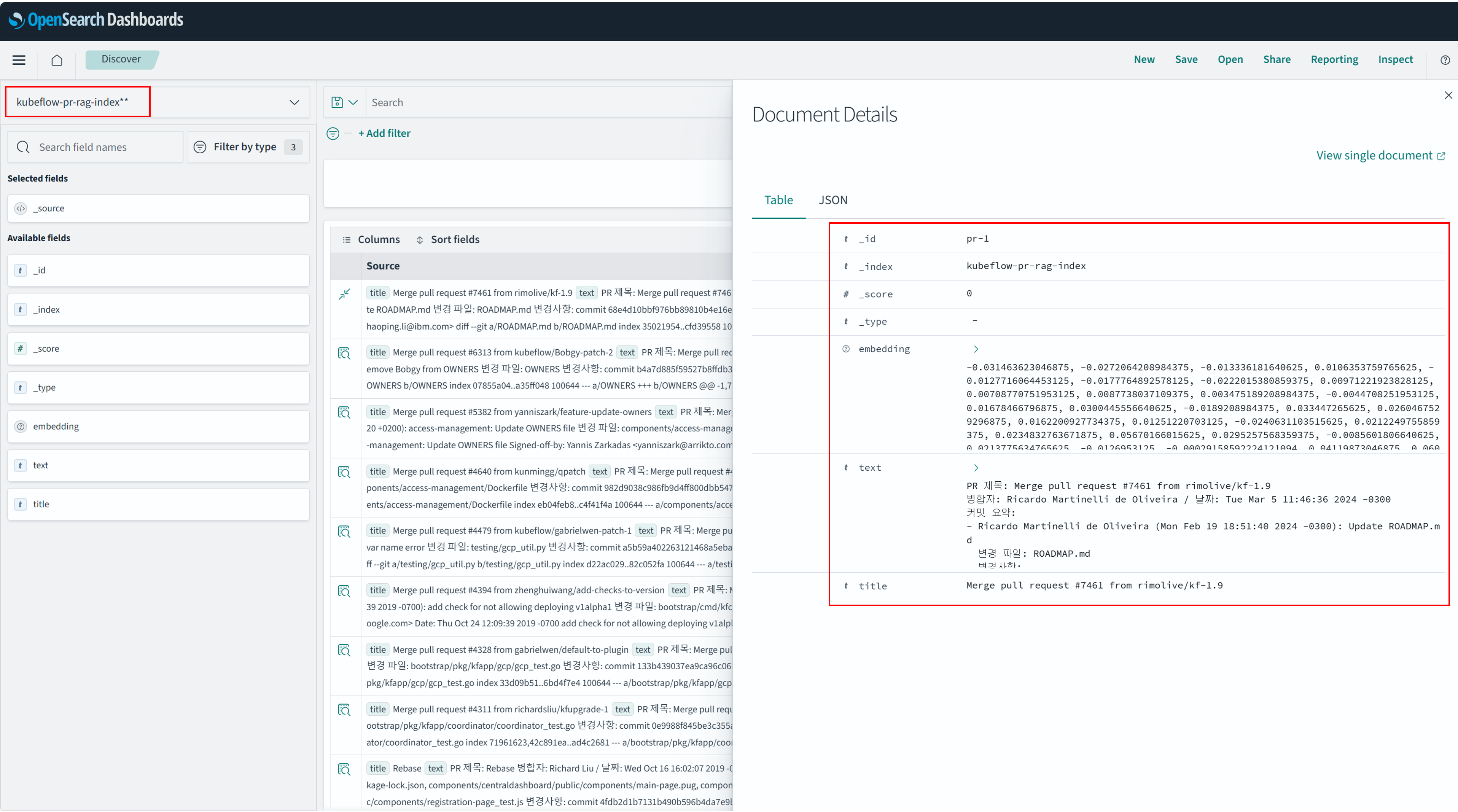
OpenSearch Dashboards에서 확인
아래 그림과 같이 OpenSearch Dashboard에서 kubeflow-pr-rag-index 에 해당하는 데이터를 확인할 수 있습니다. 데이터는 title, text, embedding으로 구성되어 있습니다.
Reference
OpenSearch Dashboard에서 Index Patterns 등록 왼쪽 메뉴 → Dashboards Management → Index patterns → Create index pattern 클릭
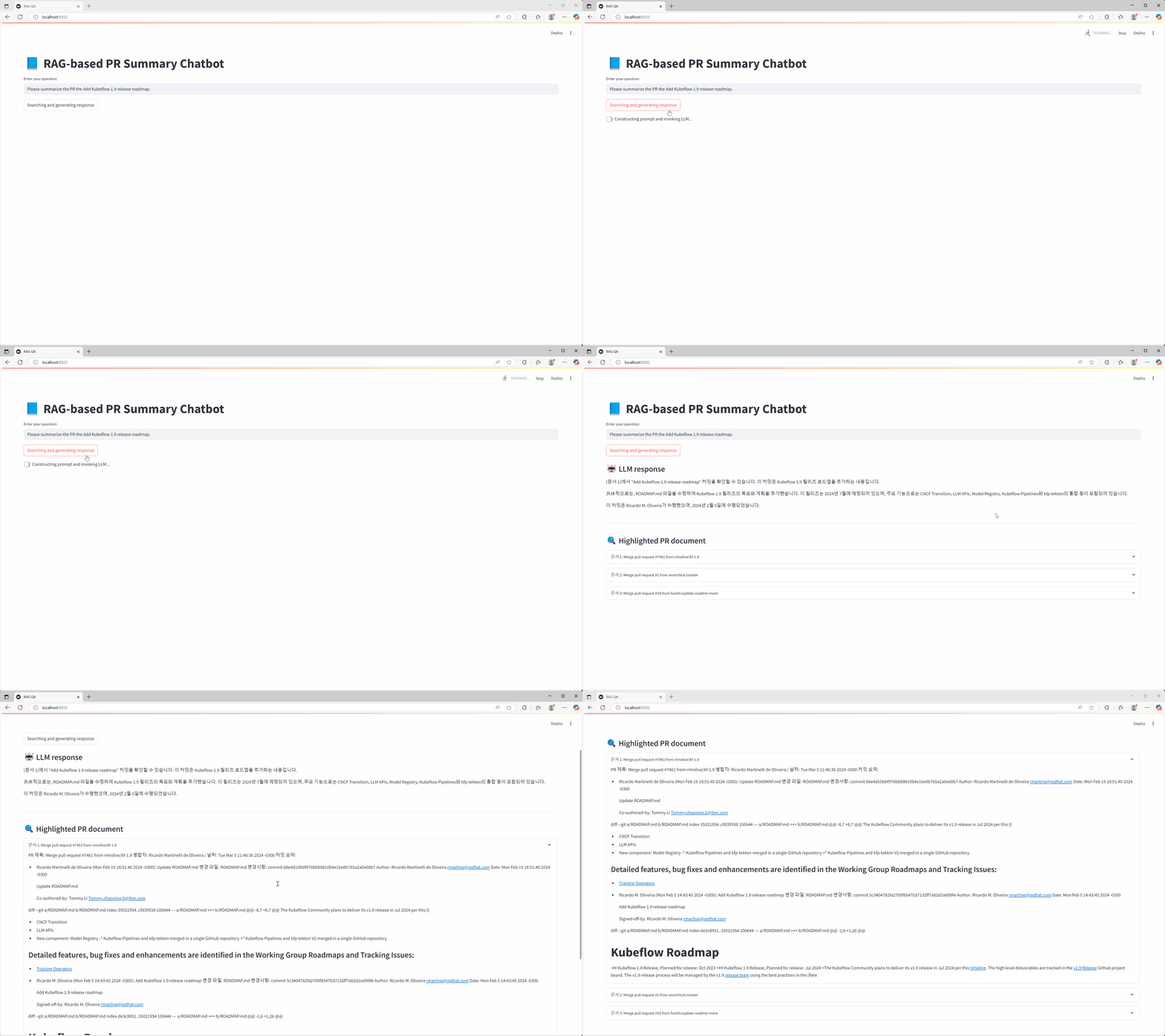
RAG QA Application 구성
사용자의 질의를 임베딩하여 검색 질의로 변환한 뒤, RAG를 활용해 연관 문서를 추출하고, AIOS Chat 모델을 통해 최종 결과를 제공합니다.
Reference
이 코드에서는 유사도 검색 방식으로 OpenSearch의 KNN(K-Nearest Neightbors) 검색과 AIOS에서 제공하는 Embedding 모델의 Score API를 호출하여 입력 벡터와 가장 유사한 문서를 계산하는 방식을 지원합니다. 사용자는 두 방식 중 하나를 선택하여 사용할 수 있으며, 이 튜토리얼에서는 AIOS Score API 기반의 유사도 검색 방식을 사용합니다.
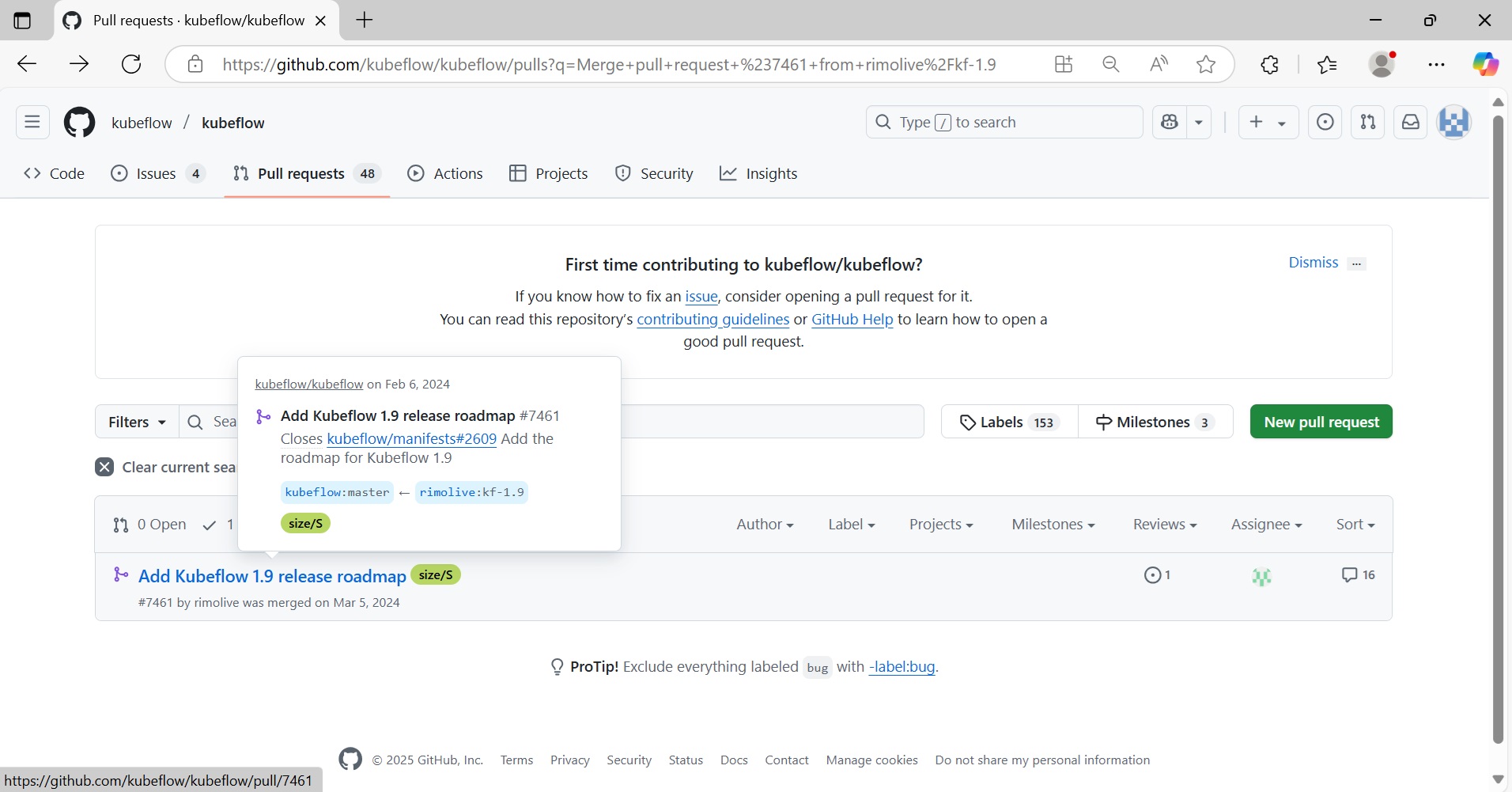
Kubeflow 프로젝트 Git에서 Add Kubeflow 1.9 release roadmap PR 에 대한 요약을 질문합니다.
Kubeflow 프로젝트의 해당 PR에 대한 정보입니다.
마무리
이번 튜토리얼에서는 AIOS에서 제공하는 AI 모델을 활용하여 GIT PR 관련 데이터를 벡터화하고, OpenSearch 기반의 벡터 검색 및 LLM 응답을 조합하여 PR 리뷰 보조 챗봇을 구현해 보았습니다.이를 통해 과거 PR 히스토리에 기반한 질의응답이 가능해져, 개발자의 코드 리뷰 효율성과 품질을 향상시킬 수 있습니다. 본 시스템은 다음과 같은 방식으로 사용자 환경에 맞게 확장 및 커스터마이징할 수 있습니다.
벡터 데이터베이스 교체 : OpenSearch 외에 SCP Search Engine 상품 활용, 사용자 벡터 데이터베이스를 연동할 수 있습니다.
실시간 데이터 수집 연동 : Github Webhook 또는 Gitlab API 연동을 통해 실시간 PR 생성/업데이트 정보를 수집하고 자동 인덱싱 가능합니다.
대화형 UI 고도화: Streamlit 외에도 Slack Bot, 사내 메신저 등 다양한 인터페이스로 확장 가능합니다.
이번 튜토리얼을 기반으로 실제 서비스 목적에 따라 적합한 AIOS 기반 협업 도우미를 직접 구축해 보시길 바랍니다.
Create an Autogen AI Agent application using the AI model provided by AIOS.
Reference
Autogen Autogen is an open-source framework that enables easy building and management of LLM-based multi-agent collaboration and event-driven automation workflows.
environment
To complete this tutorial, the following environment must be prepared.
Code block. autogen, mcp server package installation
System Architecture
Displays the complete flow of the multi‑AI agent architecture and the agent architecture that leverages MCP.
Travel Planning Agent Flow
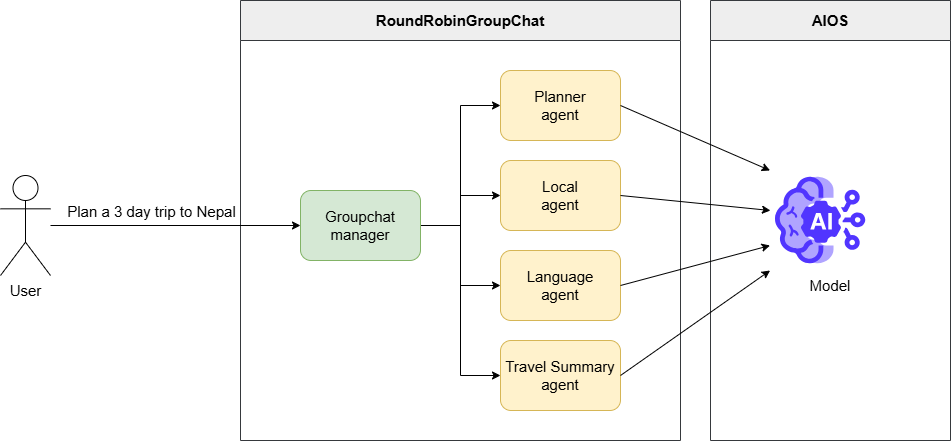
The user requests a 3‑day Nepal travel itinerary.
Groupchat manager adjusts the execution order of registered agents (travel planning, local information, travel conversation, comprehensive summary).
Each agent collaborates to carry out the assigned tasks according to its role.
When the final travel plan deliverable is generated, it is delivered to the user
MCP Flow
Note
MCP MCP (Model Context Protocol) is an open standard protocol that coordinates interactions between the model and external data or tools.
The MCP server implements this functionality, mediating and executing function calls by leveraging tool metadata.
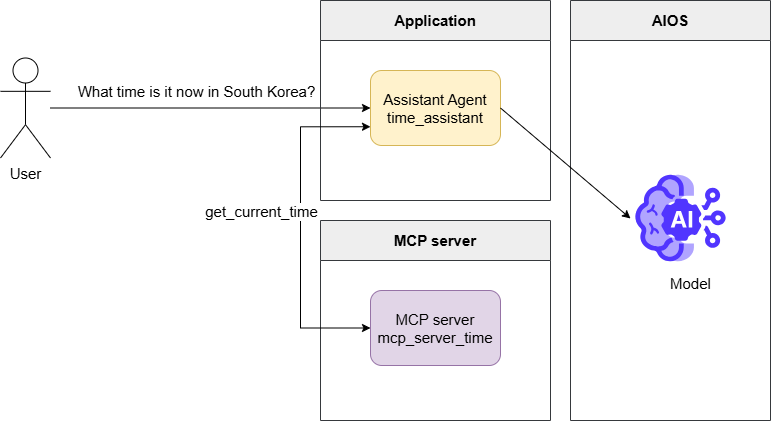
The user queries the current time in Korea.
mcp_server_time model request including metadata for a tool that can retrieve the current time through the server.
Generate a tool calls message that calls the get_current_time function
If you execute the get_current_time function via the MCP server and pass the result to a model request, it generates the final response and delivers it to the user.
Implementation
Travel Planning Agent
Note
For the AIOS_BASE_URL AIOS_LLM_Private_Endpoint and the MODEL’s MODEL_ID in the code, please refer to the LLM Usage Guide.
autogen_travel_planning.py
Color mode
fromurllib.parseimporturljoinfromautogen_agentchat.agentsimportAssistantAgentfromautogen_agentchat.conditionsimportTextMentionTerminationfromautogen_agentchat.teamsimportRoundRobinGroupChatfromautogen_agentchat.uiimportConsolefromautogen_ext.models.openaiimportOpenAIChatCompletionClientfromautogen_core.modelsimportModelFamily# Set the API URL and model name for accessing the model.AIOS_BASE_URL="AIOS_LLM_Private_Endpoint"MODEL="MODEL_ID"# Create a model client using OpenAIChatCompletionClient.model_client=OpenAIChatCompletionClient(model=MODEL,base_url=urljoin(AIOS_BASE_URL,"v1"),api_key="EMPTY_KEY",model_info={# Set to True when images are supported."vision":False# Set to True when function calls are supported."function_calling":True,# Set to True when JSON output is supported."json_output":True,# If the model you want to use is not provided by ModelFamily, use UNKNOWN.# "family": ModelFamily.UNKNOWN,"family":ModelFamily.LLAMA_3_3_70B,# Set to True when structured output is supported."structured_output":True,},)# Create multiple agents.# Each agent performs roles such as travel planning, recommending local activities, providing language tips, and summarizing travel itineraries.planner_agent=AssistantAgent(planner_agentmodel_client=model_client,description="A helpful assistant that can plan trips."system_message=("You are a helpful assistant that can suggest a travel plan ""for a user based on their request.")local_agent=AssistantAgent("local_agent"model_client=model_client,description="A local assistant that can suggest local activities or places to visit."system_message=("You are a helpful assistant that can suggest authentic and ")interestinglocalactivitiesorplacestovisitforauser"and can utilize any context information provided.")language_agent=AssistantAgent(language_agentmodel_client=model_client,description="A helpful assistant that can provide language tips for a given destination."system_message=("You are a helpful assistant that can review travel plans, ")providingfeedbackonimportant/criticaltipsabouthowbesttoaddresslanguageorcommunicationchallengesforthegivendestination.Iftheplanalreadyincludeslanguagetips,youcanmentionthattheplanissatisfactory,withrationale.)travel_summary_agent=AssistantAgent(travel_summary_agentmodel_client=model_client,description="A helpful assistant that can summarize the travel plan."system_message=("You are a helpful assistant that can take in all of the suggestions "andadvicefromtheotheragentsandprovideadetailedfinaltravelplan.Youmustensurethatthefinalplanisintegratedandcomplete."YOUR FINAL RESPONSE MUST BE THE COMPLETE PLAN. ""When the plan is complete and all perspectives are integrated, ""you can respond with TERMINATE.")# Group the agents into a group and create a RoundRobinGroupChat.# RoundRobinGroupChat adjusts agents to perform tasks in the order they were registered, rotating through them.# This group enables agents to interact and create travel plans.# The termination condition uses TextMentionTermination to end the group chat when the text "TERMINATE" is mentioned.termination=TextMentionTermination("TERMINATE")group_chat=RoundRobinGroupChat([planner_agent,local_agent,language_agent,travel_summary_agent],termination_condition=termination,)asyncdefmain():Inthemainfunction,itrunsgroupchatandcreatesatravelplan.# Start a group chat to plan the trip.# The user requests the task "Plan a 3 day trip to Nepal."# Print the results using the console.awaitConsole(group_chat.run_stream(task="Plan a 3 day trip to Nepal."))awaitmodel_client.close()if__name__=="__main__":importasyncioasyncio.run(main())
fromurllib.parseimport urljoin
fromautogen_agentchat.agentsimport AssistantAgent
fromautogen_agentchat.conditionsimport TextMentionTermination
fromautogen_agentchat.teamsimport RoundRobinGroupChat
fromautogen_agentchat.uiimport Console
fromautogen_ext.models.openaiimport OpenAIChatCompletionClient
fromautogen_core.modelsimport ModelFamily
# Set the API URL and model name for accessing the model.AIOS_BASE_URL ="AIOS_LLM_Private_Endpoint"MODEL ="MODEL_ID"# Create a model client using OpenAIChatCompletionClient.model_client = OpenAIChatCompletionClient(
model=MODEL,
base_url=urljoin(AIOS_BASE_URL, "v1"),
api_key="EMPTY_KEY",
model_info={
# Set to True when images are supported."vision": False# Set to True when function calls are supported."function_calling": True,
# Set to True when JSON output is supported."json_output": True,
# If the model you want to use is not provided by ModelFamily, use UNKNOWN.# "family": ModelFamily.UNKNOWN,"family": ModelFamily.LLAMA_3_3_70B,
# Set to True when structured output is supported."structured_output": True,
},
)
# Create multiple agents.# Each agent performs roles such as travel planning, recommending local activities, providing language tips, and summarizing travel itineraries.planner_agent = AssistantAgent(
planner_agent
model_client=model_client,
description="A helpful assistant that can plan trips." system_message=("You are a helpful assistant that can suggest a travel plan ""for a user based on their request.")
local_agent = AssistantAgent(
"local_agent" model_client=model_client,
description="A local assistant that can suggest local activities or places to visit." system_message=("You are a helpful assistant that can suggest authentic and ")
interesting local activities or places to visit for a user
"and can utilize any context information provided.")
language_agent = AssistantAgent(
language_agent
model_client=model_client,
description="A helpful assistant that can provide language tips for a given destination." system_message=("You are a helpful assistant that can review travel plans, ")
providing feedback on important/critical tips about how best to address
language or communication challenges for the given destination. If the plan already includes language tips,
you can mention that the plan is satisfactory, with rationale.)
travel_summary_agent = AssistantAgent(
travel_summary_agent
model_client=model_client,
description="A helpful assistant that can summarize the travel plan." system_message=("You are a helpful assistant that can take in all of the suggestions "and advice fromthe other agents and provide a detailed final travel plan. You must ensure that the final plan is integrated and complete."YOUR FINAL RESPONSE MUST BE THE COMPLETE PLAN. ""When the plan is complete and all perspectives are integrated, ""you can respond with TERMINATE.")
# Group the agents into a group and create a RoundRobinGroupChat.# RoundRobinGroupChat adjusts agents to perform tasks in the order they were registered, rotating through them.# This group enables agents to interact and create travel plans.# The termination condition uses TextMentionTermination to end the group chat when the text "TERMINATE" is mentioned.termination = TextMentionTermination("TERMINATE")
group_chat = RoundRobinGroupChat(
[planner_agent, local_agent, language_agent, travel_summary_agent],
termination_condition=termination,
)
asyncdefmain():
In the main function, it runs group chat and creates a travel plan.# Start a group chat to plan the trip.# The user requests the task "Plan a 3 day trip to Nepal."# Print the results using the console.await Console(group_chat.run_stream(task="Plan a 3 day trip to Nepal."))
await model_client.close()
if __name__ =="__main__":
importasyncio asyncio.run(main())
code block. autogen_travel_planning.py
When you run the file using python, you can see multiple agents working together, each performing its role for a single task.
----------TextMessage(user)----------Plana3daytriptoNepal.----------TextMessage(planner_agent)----------Nepal!Acountrywitharichculturalheritage,breathtakingnaturalbeauty,andwarmhospitality.Here's a suggested 3-day itinerary for your trip to Nepal:**Day1:ArrivalinKathmanduandExplorationoftheCity***ArriveatTribhuvanInternationalAirportinKathmandu,thecapitalcityofNepal.*Check-intoyourhotelandfreshenup.*Visitthefamous**BoudhanathStupa**,oneofthelargestBuddhiststupasintheworld.*Explorethe**Thamel**area,apopulartouristhubknownforitsnarrowstreets,shops,andrestaurants.*Intheevening,enjoyatraditionalNepalidinnerandwatchaculturalperformanceatalocalrestaurant.**Day2:KathmanduValleyTour***Startthedaywithavisittothe**PashupatinathTemple**,asacredHindutemplededicatedtoLordShiva.*Next,headtothe**KathmanduDurbarSquare**,aUNESCOWorldHeritageSiteandtheformerroyalpalaceoftheMallakings.*Visitthe**SwayambhunathStupa**,alsoknownastheMonkeyTemple,whichoffersstunningviewsofthecity.*Intheafternoon,takeashortdrivetothe**PatanCity**,knownforitsrichculturalheritageandtraditionalcrafts.*Explorethe**PatanDurbarSquare**andvisitthe**KrishnaTemple**,abeautifulexampleofNepaliarchitecture.**Day3:BhaktapurandNagarkot***Driveto**Bhaktapur**,amedievaltownandaUNESCOWorldHeritageSite(approximately1hour).*Explorethe**BhaktapurDurbarSquare**,whichfeaturesstunningarchitecture,temples,andpalaces.*Visitthe**PotterySquare**,whereyoucanseetraditionalpottery-makingtechniques.*Intheafternoon,driveto**Nagarkot**,ascenichillstationwithbreathtakingviewsoftheHimalayas(approximately1.5hours).*WatchthesunsetovertheHimalayasandenjoythepeacefulatmosphere.**AdditionalTips:***MakesuretotrysomelocalNepalicuisine,suchasmomos,dalbhat,andgorkhalilamb.*Bargainwhileshoppinginthemarkets,asit's a common practice in Nepal.*Respectlocalcustomsandtraditions,especiallywhenvisitingtemplesandculturalsites.*Stayhydratedandbringsunscreen,asthesuncanbestronginNepal.**Accommodation:**Kathmanduhasawiderangeofaccommodationoptions,frombudget-friendlyguesthousestoluxuryhotels.SomepopularareastostayincludeThamel,Lazimpat,andBoudha.**Transportation:**Youcanhireataxioraprivatevehicleforthedaytotravelbetweendestinations.Alternatively,youcanusepublictransportation,suchasbusesormicrobuses,whichareaffordableandconvenient.**Budget:**Thebudgetfora3-daytriptoNepalcanvarydependingonyouraccommodationchoices,transportation,andactivities.However,here's a rough estimate:*Accommodation:$20-50pernight*Transportation:$10-20perday*Food:$10-20permeal*Activities:$10-20perpersonTotalestimatedbudgetfor3days:$200-500perpersonIhopethishelps,andyouhaveawonderfultriptoNepal!----------TextMessage(local_agent)----------Your3-dayitineraryforNepaliswell-plannedandcoversmanyofthecountry's cultural and natural highlights. Here are a few additional suggestions and tips to enhance your trip:**Day1:***AftervisitingtheBoudhanathStupa,considerexploringthesurroundingstreets,whicharefilledwithTibetanshops,restaurants,andmonasteries.*IntheThamelarea,besuretotrysomeofthelocalstreetfood,suchasmomosorselroti.*Fordinner,considertryingatraditionalNepalirestaurant,suchastheKathmanduGuestHouseortheNorthfieldCafe.**Day2:***AtthePashupatinathTemple,berespectfuloftheHinduritualsandcustoms.YoucanalsotakeastrollalongtheBagmatiRiver,whichrunsthroughthetemplecomplex.*AttheKathmanduDurbarSquare,considerhiringaguidetoprovidemoreinsightintothehistoryandsignificanceofthetemplesandpalaces.*Intheafternoon,visitthePatanMuseum,whichshowcasestheartandcultureoftheKathmanduValley.**Day3:***InBhaktapur,besuretotrysomeofthelocalpotteryandhandicrafts.YoucanalsovisittheBhaktapurNationalArtGallery,whichfeaturestraditionalNepaliart.*AtNagarkot,considertakingashorthiketothenearbyvillages,whichofferstunningviewsoftheHimalayas.*Forsunset,findaspotwithaclearviewofthemountains,andenjoythepeacefulatmosphere.**AdditionalTips:***Nepalisarelativelyconservativecountry,sodressmodestlyandrespectlocalcustoms.*TrytolearnsomebasicNepaliphrases,suchas"namaste"(hello)and"dhanyabaad"(thankyou).*Bepreparedforcrowdsandchaosinthecities,especiallyinThamelandKathmanduDurbarSquare.*ConsiderpurchasingalocalSIMcardorportableWi-Fihotspottostayconnectedduringyourtrip.**Accommodation:***Considerstayinginahotelorguesthousethatiscentrallylocatedandhasgoodreviews.*LookforaccommodationsthatofferamenitiessuchasfreeWi-Fi,hotwater,andarestaurantorcafe.**Transportation:***Considerhiringaprivatevehicleortaxifortheday,asthiswillgiveyoumoreflexibilityandconvenience.*Besuretonegotiatethepriceandagreeontheitinerarybeforesettingoff.**Budget:***Bepreparedforvariablepricesandexchangerates,andhavesomelocalcurrency(Nepalirupees)onhand.*Considerbudgetingextraforunexpectedexpenses,suchastransportationorfood.Overall,youritineraryprovidesagoodbalanceofculture,history,andnaturalbeauty,andwiththeseadditionaltipsandsuggestions,you'll be well-prepared for an unforgettable trip to Nepal!----------TextMessage(language_agent)----------Your3-dayitineraryforNepaliswell-plannedandcoversmanyofthecountry's cultural and natural highlights. The additional suggestions and tips you provided are excellent and will help enhance the trip experience.Oneaspectthatiswell-coveredinyourplanistheculturalandhistoricalsignificanceofthedestinations.Youhaveincludedamixoftemples,stupas,andculturalsites,whichwillgivevisitorsagoodunderstandingofNepal's rich heritage.Regardinglanguageandcommunicationchallenges,yourtipto"try to learn some basic Nepali phrases, such as 'namaste' (hello) and 'dhanyabaad' (thank you)"isexcellent.Thiswillhelpvisitorsshowrespectforthelocalcultureandpeople,andcanalsofacilitateinteractionswithlocals.Additionally,yoursuggestionto"consider purchasing a local SIM card or portable Wi-Fi hotspot to stay connected during your trip"ispracticalandwillhelpvisitorsstayintouchwithfamilyandfriendsbackhome,aswellasnavigatethelocalarea.Yourplanissatisfactory,andwiththeadditionaltipsandsuggestions,visitorswillbewell-preparedforanunforgettabletriptoNepal.Theitineraryprovidesagoodbalanceofculture,history,andnaturalbeauty,andthetipsonlanguage,communication,andlogisticswillhelpensureasmoothandenjoyablejourney.Overall,yourplaniswell-thought-out,andtheadditionalsuggestionsandtipswillhelpvisitorsmakethemostoftheirtriptoNepal.Welldone!However,oneminorsuggestionImightmakeistoconsiderincludingafewphrasesinthelocallanguageforemergencysituations,suchas"where is the hospital?"or"how do I get to the airport?"Thiscanhelpvisitorsincaseofanunexpectedsituation,andcanalsogivethemmoreconfidencewhennavigatingunfamiliarareas.Butoverall,yourplanisexcellent,andwiththeseminorsuggestions,itcanbeevenmorecomprehensiveandhelpfulforvisitorstoNepal.----------TextMessage(travel_summary_agent)----------TERMINATEHereisthecompleteandintegrated3-daytravelplantoNepal:**Day1:ArrivalinKathmanduandExplorationoftheCity***ArriveatTribhuvanInternationalAirportinKathmandu,thecapitalcityofNepal.*Check-intoyourhotelandfreshenup.*Visitthefamous**BoudhanathStupa**,oneofthelargestBuddhiststupasintheworld.*Explorethesurroundingstreets,whicharefilledwithTibetanshops,restaurants,andmonasteries.*Explorethe**Thamel**area,apopulartouristhubknownforitsnarrowstreets,shops,andrestaurants.Besuretotrysomeofthelocalstreetfood,suchasmomosorselroti.*Intheevening,enjoyatraditionalNepalidinnerandwatchaculturalperformanceatalocalrestaurant,suchastheKathmanduGuestHouseortheNorthfieldCafe.**Day2:KathmanduValleyTour***Startthedaywithavisittothe**PashupatinathTemple**,asacredHindutemplededicatedtoLordShiva.BerespectfuloftheHinduritualsandcustoms,andtakeastrollalongtheBagmatiRiver,whichrunsthroughthetemplecomplex.*Next,headtothe**KathmanduDurbarSquare**,aUNESCOWorldHeritageSiteandtheformerroyalpalaceoftheMallakings.Considerhiringaguidetoprovidemoreinsightintothehistoryandsignificanceofthetemplesandpalaces.*Visitthe**SwayambhunathStupa**,alsoknownastheMonkeyTemple,whichoffersstunningviewsofthecity.*Intheafternoon,visitthe**PatanCity**,knownforitsrichculturalheritageandtraditionalcrafts.Explorethe**PatanDurbarSquare**andvisitthe**KrishnaTemple**,abeautifulexampleofNepaliarchitecture.Also,visitthePatanMuseum,whichshowcasestheartandcultureoftheKathmanduValley.**Day3:BhaktapurandNagarkot***Driveto**Bhaktapur**,amedievaltownandaUNESCOWorldHeritageSite(approximately1hour).Explorethe**BhaktapurDurbarSquare**,whichfeaturesstunningarchitecture,temples,andpalaces.Besuretotrysomeofthelocalpotteryandhandicrafts,andvisittheBhaktapurNationalArtGallery,whichfeaturestraditionalNepaliart.*Intheafternoon,driveto**Nagarkot**,ascenichillstationwithbreathtakingviewsoftheHimalayas(approximately1.5hours).Considertakingashorthiketothenearbyvillages,whichofferstunningviewsoftheHimalayas.Findaspotwithaclearviewofthemountains,andenjoythepeacefulatmosphereduringsunset.**AdditionalTips:***MakesuretotrysomelocalNepalicuisine,suchasmomos,dalbhat,andgorkhalilamb.*Bargainwhileshoppinginthemarkets,asit's a common practice in Nepal.*Respectlocalcustomsandtraditions,especiallywhenvisitingtemplesandculturalsites.*Stayhydratedandbringsunscreen,asthesuncanbestronginNepal.*Dressmodestlyandrespectlocalcustoms,asNepalisarelativelyconservativecountry.*TrytolearnsomebasicNepaliphrases,suchas"namaste"(hello),"dhanyabaad"(thankyou),"where is the hospital?"and"how do I get to the airport?".*ConsiderpurchasingalocalSIMcardorportableWi-Fihotspottostayconnectedduringyourtrip.*Bepreparedforcrowdsandchaosinthecities,especiallyinThamelandKathmanduDurbarSquare.**Accommodation:***Considerstayinginahotelorguesthousethatiscentrallylocatedandhasgoodreviews.*LookforaccommodationsthatofferamenitiessuchasfreeWi-Fi,hotwater,andarestaurantorcafe.**Transportation:***Considerhiringaprivatevehicleortaxifortheday,asthiswillgiveyoumoreflexibilityandconvenience.*Besuretonegotiatethepriceandagreeontheitinerarybeforesettingoff.**Budget:***Thebudgetfora3-daytriptoNepalcanvarydependingonyouraccommodationchoices,transportation,andactivities.However,here's a rough estimate:+Accommodation:$20-50pernight+Transportation:$10-20perday+Food:$10-20permeal+Activities:$10-20perperson*Totalestimatedbudgetfor3days:$200-500perperson*Bepreparedforvariablepricesandexchangerates,andhavesomelocalcurrency(Nepalirupees)onhand.*Considerbudgetingextraforunexpectedexpenses,suchastransportationorfood.
Summary of conversation content by agent
agent
Conversation summary
planner_agent
We propose a 3‑day itinerary for Nepal.
Day 1: Arrive in Kathmandu and explore the city
Day 2: Kathmandu valley tour
Day 3: Visit Pokhara and Nagarkot
Additional tips: Respect local customs, try local food, choose transportation options, etc.
local_agent
Based on the planner_agent’s 3‑day itinerary, we provide additional suggestions and tips.
Day 1: Explore the area around Budhanath Stupa,
Day 2: Respect Hindu rituals at Pashupatinath Temple
Day 3: Try pottery and handicrafts in Bhaktapur
Additional tips: Respect local customs, learn basic Nepali, use local facilities, etc.
language_agent
Evaluate the travel itinerary and provide additional suggestions. Basic Nepali learning, using local facilities, language preparation for emergencies, etc.
travel_summary_agent
Summarize the overall 3‑day itinerary.
Day 1: Arrive in Kathmandu and explore the city
Day 2: Kathmandu valley tour
Day 3: Visit Pokhara and Nagarkot
Additional tips: Respect local customs, try local food, choose transportation options, etc.
MCP Utilization Agent
Note
For the AIOS_LLM_Private_Endpoint used as AIOS_BASE_URL in the code and the MODEL_ID of the MODEL, please refer to the LLM Usage Guide.
autogen_mcp.py
Color mode
fromurllib.parseimporturljoinfromautogen_core.modelsimportModelFamilyfromautogen_ext.models.openaiimportOpenAIChatCompletionClientfromautogen_ext.tools.mcpimportMcpWorkbench,StdioServerParamsfromautogen_agentchat.agentsimportAssistantAgentfromautogen_agentchat.uiimportConsole# Set the API URL and model name for accessing the model.AIOS_BASE_URL="AIOS_LLM_Private_Endpoint"MODEL="MODEL_ID"# Create a model client using OpenAIChatCompletionClient.model_client=OpenAIChatCompletionClient(model=MODEL,base_url=urljoin(AIOS_BASE_URL,"v1"),api_key="EMPTY_KEY",model_info={# Set to True when images are supported."vision":False# Set to True when function calls are supported."function_calling":True,# Set to True when JSON output is supported."json_output":True,# If the model you want to use is not provided by ModelFamily, use UNKNOWN.# "family": ModelFamily.UNKNOWN,"family":ModelFamily.LLAMA_3_3_70B,# Set to True when structured output is supported."structured_output":True,})# Configure the MCP server parameters.# mcp_server_time is an MCP server implemented in python,# It includes the get_current_time function that provides the current time and the convert_time function that converts time zones.# This parameter sets the MCP server to the local timezone so that the time can be checked.# For example, setting it to "Asia/Seoul" allows you to view the time according to the Korean time zone.mcp_server_params=StdioServerParams(command="python","args=["-m","mcp_server_time","--local-timezone","Asia/Seoul"],)asyncdefmain():Inthemainfunction,itrunsanagentthatchecksthetimeusingtheMCPworkbench.# Create and run an agent that checks the time using the MCP Workbench.# The agent performs the task "What time is it now in South Korea?".# Print the results using the console.# While the MCP Workbench is running, the agent checks the time# Outputs the result in a streaming fashion.# When the MCP Workbench is closed, the agent also shuts down.asyncwithMcpWorkbench(mcp_server_params)asworkbenchtime_agent=AssistantAgent("time_assistant"model_client=model_client,workbench=workbench,reflect_on_tool_use=True,)awaitConsole(time_agent.run_stream(task="What time is it now in South Korea?"))awaitmodel_client.close()if__name__=="__main__":importasyncioasyncio.run(main())
fromurllib.parseimport urljoin
fromautogen_core.modelsimport ModelFamily
fromautogen_ext.models.openaiimport OpenAIChatCompletionClient
fromautogen_ext.tools.mcpimport McpWorkbench, StdioServerParams
fromautogen_agentchat.agentsimport AssistantAgent
fromautogen_agentchat.uiimport Console
# Set the API URL and model name for accessing the model.AIOS_BASE_URL ="AIOS_LLM_Private_Endpoint"MODEL ="MODEL_ID"# Create a model client using OpenAIChatCompletionClient.model_client = OpenAIChatCompletionClient(
model=MODEL,
base_url=urljoin(AIOS_BASE_URL, "v1"),
api_key="EMPTY_KEY",
model_info={
# Set to True when images are supported."vision": False# Set to True when function calls are supported."function_calling": True,
# Set to True when JSON output is supported."json_output": True,
# If the model you want to use is not provided by ModelFamily, use UNKNOWN.# "family": ModelFamily.UNKNOWN,"family": ModelFamily.LLAMA_3_3_70B,
# Set to True when structured output is supported."structured_output": True,
}
)
# Configure the MCP server parameters.# mcp_server_time is an MCP server implemented in python,# It includes the get_current_time function that provides the current time and the convert_time function that converts time zones.# This parameter sets the MCP server to the local timezone so that the time can be checked.# For example, setting it to "Asia/Seoul" allows you to view the time according to the Korean time zone.mcp_server_params = StdioServerParams(
command="python"," args=["-m", "mcp_server_time", "--local-timezone", "Asia/Seoul"],
)
asyncdefmain():
In the main function, it runs an agent that checks the time using the MCP workbench.# Create and run an agent that checks the time using the MCP Workbench.# The agent performs the task "What time is it now in South Korea?".# Print the results using the console.# While the MCP Workbench is running, the agent checks the time# Outputs the result in a streaming fashion.# When the MCP Workbench is closed, the agent also shuts down.asyncwith McpWorkbench(mcp_server_params) as workbench
time_agent = AssistantAgent(
"time_assistant" model_client=model_client,
workbench=workbench,
reflect_on_tool_use=True,
)
await Console(time_agent.run_stream(task="What time is it now in South Korea?"))
await model_client.close()
if __name__ =="__main__":
importasyncio asyncio.run(main())
Code block. autogen_mcp.py
When you run the file using python, it retrieves the tool’s metadata from the MCP server, calls the model, and when the model generates a tool calls message,
You can see that the get_current_time function is executed to retrieve the current time.
Color mode
python autogen_mcp.py
python autogen_mcp.py
Code block. Run agent using autogen MCP.
Execution result
# TextMessage (user): 사용자가 준 입력 메시지 ----------TextMessage(user)----------WhattimeisitnowinSouthKorea?# MCP 서버에서 사용할 수 있는 도구들의 메타데이터 조회 INFO:mcp.server.lowlevel.server:ProcessingrequestoftypeListToolsRequest...생략...INFO:autogen_core.events:{# MCP 서버에서 사용 가능한 도구들의 메타데이터"tools":[{"type":"function","function":{"name":"get_current_time","description":"Get current time in a specific timezones","parameters":{"type":"object","properties":{"timezone":{"type":"string","description":"IANA timezone name (e.g., 'America/New_York', 'Europe/London'). Use 'Asia/Seoul' as local timezone if no timezone provided by the user."}},"required":["timezone"],"additionalProperties":false},"strict":false}},{"type":"function","function":{"name":"convert_time","description":"Convert time between timezones","parameters":{"type":"object","properties":{"source_timezone":{"type":"string","description":"Source IANA timezone name (e.g., 'America/New_York', 'Europe/London'). Use 'Asia/Seoul' as local timezone if no source timezone provided by the user."},"time":{"type":"string","description":"Time to convert in 24-hour format (HH:MM)"},"target_timezone":{"type":"string","description":"Target IANA timezone name (e.g., 'Asia/Tokyo', 'America/San_Francisco'). Use 'Asia/Seoul' as local timezone if no target timezone provided by the user."}},"required":["source_timezone","time","target_timezone"],"additionalProperties":false},"strict":false}}],"type":"LLMCall",# 입력 메시지 "messages":[{"content":"You are a helpful AI assistant. Solve tasks using your tools. Reply with TERMINATE when the task has been completed.","role":"system"},{"role":"user","name":"user","content":"What time is it now in South Korea?"}],# 모델 응답 "response":{"id":"chatcmpl-xxxxxxxxxxxxxxxxxxxxxxxxxxxxxxxx","choices":[{"finish_reason":"tool_calls","index":0,"logprobs":null,"message":{"content":null,"refusal":null,"role":"assistant","annotations":null,"audio":null,"function_call":null,"tool_calls":[{"id":"chatcmpl-tool-xxxxxxxxxxxxxxxxxxxxxxxxxxxxxxxx","function":{"arguments":"{\"timezone\": \"Asia/Seoul\"}","name":"get_current_time"},"type":"function"}],"reasoning_content":null},"stop_reason":128008}],"created":1751278737,"model":"MODEL_ID","object":"chat.completion","service_tier":null,"system_fingerprint":null,"usage":{"completion_tokens":21,"prompt_tokens":508,"total_tokens":529,"completion_tokens_details":null,"prompt_tokens_details":null},"prompt_logprobs":null},"prompt_tokens":508,"completion_tokens":21,"agent_id":null}# ToolCallRequestEvent: 모델로부터 tool call 메시지를 받음----------ToolCallRequestEvent(time_assistant)----------[FunctionCall(id='chatcmpl-tool-xxxxxxxxxxxxxxxxxxxxxxxxxxxxxxxx',arguments='{"timezone": "Asia/Seoul"}',name='get_current_time')]INFO:mcp.server.lowlevel.server:ProcessingrequestoftypeListToolsRequest# MCP 서버를 통해 tool call 메시지의 함수 실행 INFO:mcp.server.lowlevel.server:ProcessingrequestoftypeCallToolRequest# ToolCallExecutionEvent: 함수의 실행 결과를 모델에게 전달 ----------ToolCallExecutionEvent(time_assistant)----------[FunctionExecutionResult(content='{\n "timezone": "Asia/Seoul",\n "datetime": "2025-06-30T19:18:58+09:00",\n "is_dst": false\n}',name='get_current_time',call_id='chatcmpl-tool-xxxxxxxxxxxxxxxxxxxxxxxxxxxxxxxx',is_error=False)]...생략...# TextMessage (time_assistant): 모델이 생성한 최종 답변 ----------TextMessage(time_assistant)----------ThecurrenttimeinSouthKoreais19:18:58KST.TERMINATE
MCP Server Time Query System Log Analysis Results
Log analysis results that show the execution process of the time query system through the MCP (Model Control Protocol) server.
Request Information
Item
content
User request
What time is it now in South Korea?
Request time
2025-06-30 19:18:58 KST
Processing method
Invoke MCP server tool
Available Tools
Tool name
Explanation
Parameter
default
get_current_time
Retrieve the current time of a specific time zone
timezone (IANA time zone name)
Asia/Seoul
convert_time
Time conversion between time zones
source_timezone, time, target_timezone
Asia/Seoul
Processing Steps
Step
action
Detailed description
1
Tool Metadata Lookup
Check the list of tools available on the MCP server
2
AI model response
Call the get_current_time function with the Asia/Seoul timezone
3
Function execution
MCP server runs the time query tool
4
Return result
Provide time information in a structured JSON format
5
Final answer
Present time to the user in a readable format
Function Call Details
Item
value
function name
get_current_time
parameter
{"timezone": "Asia/Seoul"}
Call ID
chatcmpl-tool-xxxxxxxxxxxxxxxxxxxxxxxxxxxxxxxx
type
function
Execution Result
field
value
description
timezone
Asia/Seoul
time zone
datetime
2025-06-30T19:18:58+09:00
ISO 8601 formatted time
is_dst
false
Whether daylight saving time is applied
Final response
Item
content
Response message
The current time in South Korea is 19:18:58 KST.
Mark as complete
TERMINATE
Response time
19:18:58 KST
Usage Metrics Table
Indicator
value
prompt token
508
completion token
21
Total token usage
529
Processing time
Immediately (real-time)
Key Features
feature
description
Utilizing the MCP protocol
Seamless integration with external tools
Korean time zone default setting
Use Asia/Seoul as the default
Structured response
Return clear data in JSON format
Auto-complete indicator
Notification of task completion using TERMINATE
Providing real-time information
Retrieve the exact current time
Technical Significance
This is an example of a modern architecture where an AI assistant integrates with external systems to provide real-time information. Through MCP, the AI model can access various external tools and services, enabling more practical and dynamic responses.
Conclusion
In this tutorial, we implemented an application that creates travel itineraries using multiple agents by leveraging the AI model provided by AIOS and autogen, and an agent application that can use external tools by utilizing the MCP server. Through this, we learned that multiple agents with different perspectives can solve problems from various angles and utilize external tools. This system can be expanded and customized to fit user environments in the following ways.
Agent flow control: Various techniques can be used when selecting the agent to perform a task. For reliable results, you can fix the order of agents and implement it that way, or you can let the AI model choose the agents for flexible handling. Additionally, you can use event-driven methods to implement parallel processing by multiple agents handling the work.
Introduction of various MCP servers: In addition to mcp_server_time, various MCP servers have already been implemented. By leveraging these, the AI model can flexibly utilize diverse external tools to create useful applications.
Based on this tutorial, we encourage you to build a suitable AIOS-based collaboration assistant tailored to your actual service needs.
The AIOS model is compatible with the APIs of OpenAI and Cohere, so it is also compatible with the SDKs of OpenAI and Cohere.
The list of OpenAI and Cohere compatible APIs supported by the Samsung Cloud Platform AIOS service is as follows.
You can convert text into high-dimensional vectors (embeddings) to calculate similarity between texts, perform clustering, search, and various other natural language processing (NLP) tasks.
go get github.com/openai/openai-go
  github.com/cohere-ai/cohere-go/v2
go get github.com/openai/openai-go
  github.com/cohere-ai/cohere-go/v2
Code block. Install SDK package
Text Completion API
The text completion API generates natural sentences that directly follow the given input string.
non-stream request
Request
Caution
The Text Completion API can only use strings as input values.
Color mode
importjsonimportrequestsfromurllib.parseimporturljoinaios_base_url="<<aios endpoint-url>>"# Enter the aios endpoint URL for calling the AIOS model.model="<<model>>"# Enter the model ID for calling the AIOS model.# Construct the request data.# This includes the model ID to use and the prompt (prompt).data={"model":model,"prompt":"Hi"}# Send a POST request to the v1/completions endpoint of the AIOS API.# Combine the base URL and endpoint path using the urljoin function.response=requests.post(urljoin(aios_base_url,"v1/completions"),json=data)# Parse the response body as JSON.body=json.loads(response.text)# The choices[0].text in the response body is the response text generated by the AI model.print(body["choices"][0]["text"])
importjsonimportrequestsfromurllib.parseimport urljoin
aios_base_url ="<<aios endpoint-url>>"# Enter the aios endpoint URL for calling the AIOS model.model ="<<model>>"# Enter the model ID for calling the AIOS model.# Construct the request data.# This includes the model ID to use and the prompt (prompt).data = {
"model": model,
"prompt": "Hi"}
# Send a POST request to the v1/completions endpoint of the AIOS API.# Combine the base URL and endpoint path using the urljoin function.response = requests.post(urljoin(aios_base_url, "v1/completions"), json=data)
# Parse the response body as JSON.body = json.loads(response.text)
# The choices[0].text in the response body is the response text generated by the AI model.print(body["choices"][0]["text"])
fromopenaiimportOpenAIfromurllib.parseimporturljoinaios_base_url="<<aios endpoint-url>>"# Enter the aios endpoint URL for calling the AIOS model.model="<<model>>"# Enter the model ID for calling the AIOS model.# Create an OpenAI client.# base_url refers to the v1 endpoint of the AIOS API,# api_key is the key required by AIOS, and it is typically set to "EMPTY_KEY".client=OpenAI(base_url=urljoin(aios_base_url,"v1"),api_key="EMPTY_KEY")# Generate completions using the AIOS model.# The model parameter specifies the model ID to use,# The prompt parameter is the input text provided to the AI.response=client.completions.create(model=model,prompt="Hi")# response.choices[0].text is the response text generated by the AI model.print(response.choices[0].text)
fromopenaiimport OpenAI
fromurllib.parseimport urljoin
aios_base_url ="<<aios endpoint-url>>"# Enter the aios endpoint URL for calling the AIOS model.model ="<<model>>"# Enter the model ID for calling the AIOS model.# Create an OpenAI client.# base_url refers to the v1 endpoint of the AIOS API,# api_key is the key required by AIOS, and it is typically set to "EMPTY_KEY".client = OpenAI(base_url=urljoin(aios_base_url, "v1"), api_key="EMPTY_KEY")
# Generate completions using the AIOS model.# The model parameter specifies the model ID to use,# The prompt parameter is the input text provided to the AI.response = client.completions.create(
model=model,
prompt="Hi")
# response.choices[0].text is the response text generated by the AI model.print(response.choices[0].text)
fromlangchain_openaiimportOpenAIfromurllib.parseimporturljoinaios_base_url="<<aios endpoint-url>>"# Enter the aios endpoint URL for calling the AIOS model.model="<<model>>"# Enter the model ID for calling the AIOS model.# Create an LLM (large language model) instance using LangChain's OpenAI class.# base_url refers to the v1 endpoint of the AIOS API,# api_key is the key required by AIOS, and it is typically set to "EMPTY_KEY".# The model parameter specifies the model ID to use.llm=OpenAI(base_url=urljoin(aios_base_url,"v1"),api_key="EMPTY_KEY",model=model)# Pass the prompt "Hi" to the LLM and receive a response.# The invoke method returns the model's output.print(llm.invoke("Hi"))
fromlangchain_openaiimport OpenAI
fromurllib.parseimport urljoin
aios_base_url ="<<aios endpoint-url>>"# Enter the aios endpoint URL for calling the AIOS model.model ="<<model>>"# Enter the model ID for calling the AIOS model.# Create an LLM (large language model) instance using LangChain's OpenAI class.# base_url refers to the v1 endpoint of the AIOS API,# api_key is the key required by AIOS, and it is typically set to "EMPTY_KEY".# The model parameter specifies the model ID to use.llm = OpenAI(
base_url=urljoin(aios_base_url, "v1"),
api_key="EMPTY_KEY",
model=model
)
# Pass the prompt "Hi" to the LLM and receive a response.# The invoke method returns the model's output.print(llm.invoke("Hi"))
constaios_base_url="<<aios endpoint-url>>"// Enter the aios endpoint URL for calling the AIOS model.
constmodel="<<model>>"// Enter the model ID for invoking the AIOS model.
// Construct the request data.
// This includes the model ID to be used and the prompt (prompt).
constdata={model:model,prompt:"Hi"};// Generate the URL for the AIOS API v1/completions endpoint.
leturl=newURL("/v1/completions",aios_base_url);// Send a POST request to the AIOS API.
constresponse=awaitfetch(url,{method:"POST",headers:{"Content-Type":"application/json"},body:JSON.stringify(data),});// Parse the response body as JSON.
constbody=awaitresponse.json();// The choices[0].text in the response body is the response text generated by the AI model.
console.log(body.choices[0].text);
const aios_base_url ="<<aios endpoint-url>>"// Enter the aios endpoint URL for calling the AIOS model.
const model ="<<model>>"// Enter the model ID for invoking the AIOS model.
// Construct the request data.
// This includes the model ID to be used and the prompt (prompt).
const data = {
model: model,
prompt:"Hi"};
// Generate the URL for the AIOS API v1/completions endpoint.
let url =new URL("/v1/completions", aios_base_url);
// Send a POST request to the AIOS API.
const response =await fetch(url, {
method:"POST",
headers: {
"Content-Type":"application/json" },
body: JSON.stringify(data),
});
// Parse the response body as JSON.
const body =await response.json();
// The choices[0].text in the response body is the response text generated by the AI model.
console.log(body.choices[0].text);
importOpenAIfrom"openai";constaios_base_url="<<aios endpoint-url>>"// Enter the aios endpoint URL for calling the AIOS model.
constmodel="<<model>>"// Enter the model ID to invoke the AIOS model.
// Create an OpenAI client.
// apiKey is the key required by AIOS, typically set to "EMPTY_KEY".
// baseURL points to the v1 endpoint of the AIOS API.
constclient=newOpenAI({apiKey:"EMPTY_KEY",baseURL:newURL("v1",aios_base_url).href,});// Generate a completion using the AIOS model.
// model parameter specifies the model ID to use,
// prompt parameter is the input text provided to the AI.
constcompletions=awaitclient.completions.create({model:model,prompt:"Hi"});// The choices[0].text in the response body is the response text generated by the AI model.
console.log(completions.choices[0].text);
import OpenAI from "openai";
const aios_base_url ="<<aios endpoint-url>>"// Enter the aios endpoint URL for calling the AIOS model.
const model ="<<model>>"// Enter the model ID to invoke the AIOS model.
// Create an OpenAI client.
// apiKey is the key required by AIOS, typically set to "EMPTY_KEY".
// baseURL points to the v1 endpoint of the AIOS API.
const client =new OpenAI({
apiKey:"EMPTY_KEY",
baseURL:new URL("v1", aios_base_url).href,
});
// Generate a completion using the AIOS model.
// model parameter specifies the model ID to use,
// prompt parameter is the input text provided to the AI.
const completions =await client.completions.create({
model: model,
prompt:"Hi"});
// The choices[0].text in the response body is the response text generated by the AI model.
console.log(completions.choices[0].text);
import{OpenAI}from"@langchain/openai";constaios_base_url="<<aios endpoint-url>>"// Enter the aios endpoint URL for calling the AIOS model.
constmodel="<<model>>"// Enter the model ID to call the AIOS model.
// Create an LLM (large language model) instance using LangChain's OpenAI class.
// model parameter specifies the model ID to use.
// apiKey is the key required by AIOS, and is typically set to "EMPTY_KEY".
// configuration.baseURL points to the v1 endpoint of the AIOS API.
constllm=newOpenAI({model:model,apiKey:"EMPTY_KEY",configuration:{baseURL:newURL("v1",aios_base_url).href,},});// Send the prompt "Hi" to the LLM and receive a response.
// invoke method returns the model's output.
constcompletion=awaitllm.invoke("Hi");// Print the generated response.
// This text is a response generated by an AI model.
console.log(completion);
import { OpenAI } from "@langchain/openai";
const aios_base_url ="<<aios endpoint-url>>"// Enter the aios endpoint URL for calling the AIOS model.
const model ="<<model>>"// Enter the model ID to call the AIOS model.
// Create an LLM (large language model) instance using LangChain's OpenAI class.
// model parameter specifies the model ID to use.
// apiKey is the key required by AIOS, and is typically set to "EMPTY_KEY".
// configuration.baseURL points to the v1 endpoint of the AIOS API.
const llm =new OpenAI({
model: model,
apiKey:"EMPTY_KEY",
configuration: {
baseURL:new URL("v1", aios_base_url).href,
},
});
// Send the prompt "Hi" to the LLM and receive a response.
// invoke method returns the model's output.
const completion =await llm.invoke("Hi");
// Print the generated response.
// This text is a response generated by an AI model.
console.log(completion);
packagemainimport(bytes"encoding/json""fmt"io"net/http")const(aiosBaseUrl="<<aios endpoint-url>>"// Enter the aios endpoint URL for calling the AIOS model.
model="<<model>>"// Enter the model ID for calling the AIOS model.
)// Define the data structure to be used for POST requests.
// Model: model ID to use
// Prompt: Input text to provide to the AI
// Stream: streaming response flag (optional)
typePostDatastruct{Modelstring`json:"model"`Promptstring`json:"prompt"`Streambool`json:"stream,omitempty"`}funcmain(){// Generate request data.
data:=PostData{Model:model,Prompt:"Hi",}// Marshal the data into JSON format.
jsonData,err:=json.Marshal(data)iferr!=nil{panic(err)}// Send a POST request to the AIOS API's v1/completions endpoint.
response,err:=http.Post(aiosBaseUrl+"/v1/completions","application/json",bytes.NewBuffer(jsonData))iferr!=nil{panic(err)}deferresponse.Body.Close()// Read the entire response body.
body,err:=io.ReadAll(response.Body)iferr!=nil{panic(err)}varvmap[string]interface{}json.Unmarshal(body,&v)// Extract the choices array from the response.
choices:=v["choices"].([]interface{})// Extract the text of the first data.
choice:=choices[0].(map[string]interface{})text:=choice["text"]// Print the response text generated by the AI model.
fmt.Println(text)}
package main
import (
bytes
"encoding/json""fmt" io
"net/http")
const (
aiosBaseUrl = "<<aios endpoint-url>>"// Enter the aios endpoint URL for calling the AIOS model.
model = "<<model>>"// Enter the model ID for calling the AIOS model.
)
// Define the data structure to be used for POST requests.
// Model: model ID to use
// Prompt: Input text to provide to the AI
// Stream: streaming response flag (optional)
type PostData struct {
Model string`json:"model"` Prompt string`json:"prompt"` Stream bool`json:"stream,omitempty"`}
funcmain() {
// Generate request data.
data := PostData{
Model: model,
Prompt: "Hi",
}
// Marshal the data into JSON format.
jsonData, err := json.Marshal(data)
if err !=nil {
panic(err)
}
// Send a POST request to the AIOS API's v1/completions endpoint.
response, err := http.Post(aiosBaseUrl +"/v1/completions", "application/json", bytes.NewBuffer(jsonData))
if err !=nil {
panic(err)
}
defer response.Body.Close()
// Read the entire response body.
body, err := io.ReadAll(response.Body)
if err !=nil {
panic(err)
}
var v map[string]interface{}
json.Unmarshal(body, &v)
// Extract the choices array from the response.
choices := v["choices"].([]interface{})
// Extract the text of the first data.
choice := choices[0].(map[string]interface{})
text := choice["text"]
// Print the response text generated by the AI model.
fmt.Println(text)
}
packagemainimport(contextfmt"github.com/openai/openai-go"github.com/openai/openai-go/optiongithub.com/openai/openai-go/packages/param)const(aiosBaseUrl="<<aios endpoint-url>>"// Enter the aios endpoint URL for invoking the AIOS model.
model="<<model>>"// Enter the model ID for invoking the AIOS model.
)funcmain(){// Create an OpenAI client.
// Set the v1 endpoint of the AIOS API using option.WithBaseURL.
client:=openai.NewClient(option.WithBaseURL(aiosBaseUrl+"/v1"),)// Generate completion using the AIOS model.
// Set the model and prompt using openai.CompletionNewParams.
completion,err:=client.Completions.New(context.TODO(),openai.CompletionNewParams{Model:openai.CompletionNewParamsModel(model),Prompt:openai.CompletionNewParamsPromptUnion{OfString:param.Opt[string]{Value:"Hi"}},})iferr!=nil{panic(err)}// The choices[0].text in the response body is the response text generated by the AI model.
fmt.Println(completion.Choices[0].Text)}
package main
import (
context
fmt
"github.com/openai/openai-go" github.com/openai/openai-go/option
github.com/openai/openai-go/packages/param
)
const (
aiosBaseUrl = "<<aios endpoint-url>>"// Enter the aios endpoint URL for invoking the AIOS model.
model = "<<model>>"// Enter the model ID for invoking the AIOS model.
)
funcmain() {
// Create an OpenAI client.
// Set the v1 endpoint of the AIOS API using option.WithBaseURL.
client := openai.NewClient(
option.WithBaseURL(aiosBaseUrl+"/v1"),
)
// Generate completion using the AIOS model.
// Set the model and prompt using openai.CompletionNewParams.
completion, err := client.Completions.New(context.TODO(), openai.CompletionNewParams{
Model: openai.CompletionNewParamsModel(model),
Prompt: openai.CompletionNewParamsPromptUnion{OfString: param.Opt[string]{Value: "Hi"}},
})
if err !=nil {
panic(err)
}
// The choices[0].text in the response body is the response text generated by the AI model.
fmt.Println(completion.Choices[0].Text)
}
code block. /v1/completions request
Reference
The aios endpoint URL and model ID information for invoking the model are provided in the LLM Endpoint usage guide on the resource detail page. Please refer to Using LLM.
Response
You can see that the model’s answer is included in the text field of choices.
future president of the United States, I hope you’re doing well. As a
stream request
By using the stream feature, you can receive answers token by token as the model generates tokens, without waiting for the model to complete the entire response.
Request
Enter True for the stream parameter.
Color mode
importjsonimportrequestsfromurllib.parseimporturljoinaios_base_url="<<aios endpoint-url>>"# Enter the aios endpoint URL for calling the AIOS model.model="<<model>>"# Enter the model ID for calling the AIOS model.# Construct the request data.# It includes the model ID to use, the prompt (prompt), and whether streaming (stream) is enabled.data={"model":model,"prompt":"Hi""stream":True}# Send a POST request to the AIOS API's v1/completions endpoint.# Set stream=True to receive real-time streaming responses.response=requests.post(urljoin(aios_base_url,"v1/completions"),json=data,stream=True)# You can receive it as a response each time the model generates a token.# Since the response is split into separate lines, process it with iter_lines().forlineinresponse.iter_lines():ifline:try:# Remove the 'data: ' prefix and parse the JSON data.body=json.loads(line[len("data: "):])# The choices[0].text in the response body is the response text generated by the AI model.print(body["choices"][0]["text"])except:pass
importjsonimportrequestsfromurllib.parseimport urljoin
aios_base_url ="<<aios endpoint-url>>"# Enter the aios endpoint URL for calling the AIOS model.model ="<<model>>"# Enter the model ID for calling the AIOS model.# Construct the request data.# It includes the model ID to use, the prompt (prompt), and whether streaming (stream) is enabled.data = {
"model": model,
"prompt": "Hi""stream": True}
# Send a POST request to the AIOS API's v1/completions endpoint.# Set stream=True to receive real-time streaming responses.response = requests.post(urljoin(aios_base_url, "v1/completions"), json=data, stream=True)
# You can receive it as a response each time the model generates a token.# Since the response is split into separate lines, process it with iter_lines().for line in response.iter_lines():
if line:
try:
# Remove the 'data: ' prefix and parse the JSON data. body = json.loads(line[len("data: "):])
# The choices[0].text in the response body is the response text generated by the AI model. print(body["choices"][0]["text"])
except:
pass
fromopenaiimportOpenAIfromurllib.parseimporturljoinaios_base_url="<<aios endpoint-url>>"# Enter the aios endpoint URL for calling the AIOS model.model="<<model>>"# Enter the model ID for calling the AIOS model.# Create an OpenAI client.# base_url refers to the v1 endpoint of the AIOS API,# api_key is the key required by AIOS, and it is typically set to "EMPTY_KEY".client=OpenAI(base_url=urljoin(aios_base_url,"v1"),api_key="EMPTY_KEY")# Generate completions using the AIOS model.# The model parameter specifies the model ID to use,# The prompt parameter is the input text provided to the AI.# Set stream=True to receive real-time streaming responses.response=client.completions.create(model=model,prompt="Hi"stream=True)# You can receive it as a response each time the model generates a token.# Since the response is sent as a stream, it can be processed iteratively.forchunkinresponse:# In each chunk, choices[0].text is the response text generated by the AI model.print(chunk.choices[0].text)
fromopenaiimport OpenAI
fromurllib.parseimport urljoin
aios_base_url ="<<aios endpoint-url>>"# Enter the aios endpoint URL for calling the AIOS model.model ="<<model>>"# Enter the model ID for calling the AIOS model.# Create an OpenAI client.# base_url refers to the v1 endpoint of the AIOS API,# api_key is the key required by AIOS, and it is typically set to "EMPTY_KEY".client = OpenAI(base_url=urljoin(aios_base_url, "v1"), api_key="EMPTY_KEY")
# Generate completions using the AIOS model.# The model parameter specifies the model ID to use,# The prompt parameter is the input text provided to the AI.# Set stream=True to receive real-time streaming responses.response = client.completions.create(
model=model,
prompt="Hi" stream=True)
# You can receive it as a response each time the model generates a token.# Since the response is sent as a stream, it can be processed iteratively.for chunk in response:
# In each chunk, choices[0].text is the response text generated by the AI model. print(chunk.choices[0].text)
fromlangchain_openaiimportOpenAIfromurllib.parseimporturljoinaios_base_url="<<aios endpoint-url>>"# Enter the aios endpoint URL for calling the AIOS model.model="<<model>>"# Enter the model ID for calling the AIOS model.# Create an LLM (large language model) instance using LangChain's OpenAI class.# base_url refers to the v1 endpoint of the AIOS API,# api_key is the key required by AIOS, and it is typically set to "EMPTY_KEY".# The model parameter specifies the model ID to use.llm=OpenAI(base_url=urljoin(aios_base_url,"v1"),api_key="EMPTY_KEY",model=model)# Send the prompt "Hi" to the LLM and receive a streaming response.# The stream method returns a stream that generates tokens in real time.response=llm.stream("Hi")# You can receive it as a response each time the model generates a token.# Since the response is transmitted as a stream, it can be processed iteratively.forchunkinresponse:# Print each chunk.# This chunk is a response token generated by the AI model.print(chunk)
fromlangchain_openaiimport OpenAI
fromurllib.parseimport urljoin
aios_base_url ="<<aios endpoint-url>>"# Enter the aios endpoint URL for calling the AIOS model.model ="<<model>>"# Enter the model ID for calling the AIOS model.# Create an LLM (large language model) instance using LangChain's OpenAI class.# base_url refers to the v1 endpoint of the AIOS API,# api_key is the key required by AIOS, and it is typically set to "EMPTY_KEY".# The model parameter specifies the model ID to use.llm = OpenAI(
base_url=urljoin(aios_base_url, "v1"),
api_key="EMPTY_KEY",
model=model
)
# Send the prompt "Hi" to the LLM and receive a streaming response.# The stream method returns a stream that generates tokens in real time.response = llm.stream("Hi")
# You can receive it as a response each time the model generates a token.# Since the response is transmitted as a stream, it can be processed iteratively.for chunk in response:
# Print each chunk.# This chunk is a response token generated by the AI model. print(chunk)
constaios_base_url="<<aios endpoint-url>>"// Enter the aios endpoint URL for calling the AIOS model.
constmodel="<<model>>"// Enter the model ID to invoke the AIOS model.
// Construct the request data.
// This contains the model ID to use, the prompt (prompt), and the streaming option (stream).
constdata={model:model,prompt:"Hi"stream:true,};// Generate the v1/completions endpoint URL of the AIOS API.
leturl=newURL("/v1/completions",aios_base_url);// Send a POST request to the AIOS API.
// Set stream: true to receive real-time streaming responses.
constresponse=awaitfetch(url,{method:"POST",headers:{"Content-Type":"application/json"},body:JSON.stringify(data),});// You can receive it as a response each time the model generates a token.
// Convert the response body to a text decoder stream and read it.
constreader=response.body.pipeThrough(newTextDecoderStream()).getReader();letbuf="";while(true){const{value,done}=awaitreader.read();if(done)break;// Add the received data to the buffer.
buf+=value;letsep;// Find newline characters (\n\n) in the buffer and split the data.
while((sep=buf.indexOf("\n\n"))>=0){constdata=buf.slice(0,sep);buf=buf.slice(sep+2);// Process each line.
for(constrawLineofdata.split("\n")){constline=rawLine.trim();if(!line.startsWith("data: "))continue;// "data: " Remove the prefix and extract the JSON data.
constpayload=line.slice("data: ".length).trim();if(payload==="[DONE]")break;// Parse JSON data.
constjson=JSON.parse(payload);// choices[0].text is the response text generated by the AI model.
console.log(json.choices[0].text);}}}
const aios_base_url ="<<aios endpoint-url>>"// Enter the aios endpoint URL for calling the AIOS model.
const model ="<<model>>"// Enter the model ID to invoke the AIOS model.
// Construct the request data.
// This contains the model ID to use, the prompt (prompt), and the streaming option (stream).
const data = {
model: model,
prompt:"Hi" stream:true,
};
// Generate the v1/completions endpoint URL of the AIOS API.
let url =new URL("/v1/completions", aios_base_url);
// Send a POST request to the AIOS API.
// Set stream: true to receive real-time streaming responses.
const response =await fetch(url, {
method:"POST",
headers: {
"Content-Type":"application/json" },
body: JSON.stringify(data),
});
// You can receive it as a response each time the model generates a token.
// Convert the response body to a text decoder stream and read it.
const reader = response.body.pipeThrough(new TextDecoderStream()).getReader();
let buf ="";
while (true) {
const { value, done } =await reader.read();
if (done) break;
// Add the received data to the buffer.
buf += value;
let sep;
// Find newline characters (\n\n) in the buffer and split the data.
while ((sep = buf.indexOf("\n\n")) >=0) {
const data = buf.slice(0, sep);
buf = buf.slice(sep +2);
// Process each line.
for (const rawLine of data.split("\n")) {
const line = rawLine.trim();
if (!line.startsWith("data: ")) continue;
// "data: " Remove the prefix and extract the JSON data.
const payload = line.slice("data: ".length).trim();
if (payload ==="[DONE]") break;
// Parse JSON data.
const json = JSON.parse(payload);
// choices[0].text is the response text generated by the AI model.
console.log(json.choices[0].text);
}
}
}
importOpenAIfrom"openai";constaios_base_url="<<aios endpoint-url>>"// Enter the aios endpoint URL for calling the AIOS model.
constmodel="<<model>>"// Enter the model ID to call the AIOS model.
// Create an OpenAI client.
// apiKey is the key required by AIOS, and is typically set to "EMPTY_KEY".
// baseURL points to the v1 endpoint of the AIOS API.
constclient=newOpenAI({apiKey:"EMPTY_KEY","
baseURL: new URL("v1", aios_base_url).href,
});
// Generate completion using the AIOS model.
// model parameter specifies the model ID to use,
// prompt parameter is the input text provided to the AI.
// Set stream: true to receive real-time streaming responses.
const completions = await client.completions.create({
model: model,
prompt: "Hi"stream:true,});// You can receive it as a response each time the model generates a token.
// Process stream events sequentially using a for await...of loop.
forawait(consteventofcompletions){// The choices[0].text of each event is the response text generated by the AI model.
console.log(event.choices[0].text);}
import OpenAI from "openai";
const aios_base_url ="<<aios endpoint-url>>"// Enter the aios endpoint URL for calling the AIOS model.
const model ="<<model>>"// Enter the model ID to call the AIOS model.
// Create an OpenAI client.
// apiKey is the key required by AIOS, and is typically set to "EMPTY_KEY".
// baseURL points to the v1 endpoint of the AIOS API.
const client =new OpenAI({
apiKey:"EMPTY_KEY","
baseURL: new URL("v1", aios_base_url).href,
});
// Generate completion using the AIOS model.
// model parameter specifies the model ID to use,
// prompt parameter is the input text provided to the AI.
// Set stream: true to receive real-time streaming responses.
const completions = await client.completions.create({
model: model,
prompt: "Hi" stream:true,
});
// You can receive it as a response each time the model generates a token.
// Process stream events sequentially using a for await...of loop.
forawait (const event of completions) {
// The choices[0].text of each event is the response text generated by the AI model.
console.log(event.choices[0].text);
}
import{OpenAI}from"@langchain/openai";constaios_base_url="<<aios endpoint-url>>"// Enter the aios endpoint URL for calling the AIOS model.
constmodel="<<model>>"// Enter the model ID to invoke the AIOS model.
// Create an LLM (large language model) instance using LangChain's OpenAI class.
// model parameter specifies the model ID to use.
// apiKey is the key required by AIOS, and is typically set to "EMPTY_KEY".
// configuration.baseURL points to the v1 endpoint of the AIOS API.
constllm=newOpenAI({model:model,apiKey:"EMPTY_KEY","
configuration: {
baseURL: new URL("v1", aios_base_url).href,
},
});
// Send the prompt "Hi" to the LLM and receive a streaming response.
// stream method returns a stream that generates tokens in real time.
const completion = await llm.stream("Hi");// You can receive it as a response each time the model generates a token.
// for await...of loop processes stream chunks sequentially.
forawait(constchunkofcompletion){// Print each chunk.
// This chunk is a response token generated by the AI model.
console.log(chunk);}
import { OpenAI } from "@langchain/openai";
const aios_base_url ="<<aios endpoint-url>>"// Enter the aios endpoint URL for calling the AIOS model.
const model ="<<model>>"// Enter the model ID to invoke the AIOS model.
// Create an LLM (large language model) instance using LangChain's OpenAI class.
// model parameter specifies the model ID to use.
// apiKey is the key required by AIOS, and is typically set to "EMPTY_KEY".
// configuration.baseURL points to the v1 endpoint of the AIOS API.
const llm =new OpenAI({
model: model,
apiKey:"EMPTY_KEY","
configuration: {
baseURL: new URL("v1", aios_base_url).href,
},
});
// Send the prompt "Hi" to the LLM and receive a streaming response.
// stream method returns a stream that generates tokens in real time.
const completion = await llm.stream("Hi");
// You can receive it as a response each time the model generates a token.
// for await...of loop processes stream chunks sequentially.
forawait (const chunk of completion) {
// Print each chunk.
// This chunk is a response token generated by the AI model.
console.log(chunk);
}
packagemainimport(bufiobytes"encoding/json"fmtnet/http)const(aiosBaseUrl="<<aios endpoint-url>>"// Enter the aios endpoint URL for calling the AIOS model.
model="<<model>>"// Enter the model ID for invoking the AIOS model.
)// Define the data structure to be used for POST requests.
// Model: model ID to use
// Prompt: input text to provide to the AI
// Stream: streaming response (optional)
typePostDatastruct{Modelstring`json:"model"`Promptstring`json:"prompt"`Streambool`json:"stream,omitempty"`}funcmain(){// Generate request data.
// Set Stream: true to receive real-time streaming responses.
data:=PostData{Model:model,Prompt:"Hi",Stream:true,}// Marshal the data into JSON format.
jsonData,err:=json.Marshal(data)iferr!=nil{panic(err)}// Send a POST request to the AIOS API's v1/completions endpoint.
response,err:=http.Post(aiosBaseUrl+"/v1/completions","application/json",bytes.NewBuffer(jsonData))iferr!=nil{panic(err)}deferresponse.Body.Close()// You can receive it as a response each time the model generates a token.
// Scan the HTTP response body and process it line by line.
varvmap[string]interface{}scanner:=bufio.NewScanner(response.Body)forscanner.Scan(){line:=bytes.TrimSpace(scanner.Bytes())// Skip if the line does not start with "data: "
if!bytes.HasPrefix(line,[]byte("data: ")){continue}// Remove the "data: " prefix.
payload:=bytes.TrimPrefix(line,[]byte("data: "))// If the payload is "[DONE]", terminate the streaming.
ifbytes.Equal(payload,[]byte("[DONE]")){break}// Parse JSON data.
json.Unmarshal(payload,&v)// Extract the choices array from the response.
choices:=v["choices"].([]interface{})// Extract the first data.
choice:=choices[0].(map[string]interface{})// Extract response tokens generated by the AI model.
text:=choice["text"]fmt.Println(text)}}
package main
import (
bufio
bytes
"encoding/json" fmt
net/http
)
const (
aiosBaseUrl = "<<aios endpoint-url>>"// Enter the aios endpoint URL for calling the AIOS model.
model = "<<model>>"// Enter the model ID for invoking the AIOS model.
)
// Define the data structure to be used for POST requests.
// Model: model ID to use
// Prompt: input text to provide to the AI
// Stream: streaming response (optional)
type PostData struct {
Model string`json:"model"` Prompt string`json:"prompt"` Stream bool`json:"stream,omitempty"`}
funcmain() {
// Generate request data.
// Set Stream: true to receive real-time streaming responses.
data := PostData{
Model: model,
Prompt: "Hi",
Stream: true,
}
// Marshal the data into JSON format.
jsonData, err := json.Marshal(data)
if err !=nil {
panic(err)
}
// Send a POST request to the AIOS API's v1/completions endpoint.
response, err := http.Post(aiosBaseUrl+"/v1/completions", "application/json", bytes.NewBuffer(jsonData))
if err !=nil {
panic(err)
}
defer response.Body.Close()
// You can receive it as a response each time the model generates a token.
// Scan the HTTP response body and process it line by line.
var v map[string]interface{}
scanner := bufio.NewScanner(response.Body)
for scanner.Scan() {
line := bytes.TrimSpace(scanner.Bytes())
// Skip if the line does not start with "data: "
if !bytes.HasPrefix(line, []byte("data: ")) {
continue }
// Remove the "data: " prefix.
payload := bytes.TrimPrefix(line, []byte("data: "))
// If the payload is "[DONE]", terminate the streaming.
if bytes.Equal(payload, []byte("[DONE]")) {
break }
// Parse JSON data.
json.Unmarshal(payload, &v)
// Extract the choices array from the response.
choices := v["choices"].([]interface{})
// Extract the first data.
choice := choices[0].(map[string]interface{})
// Extract response tokens generated by the AI model.
text := choice["text"]
fmt.Println(text)
}
}
packagemainimport(contextfmt"github.com/openai/openai-go"github.com/openai/openai-go/optiongithub.com/openai/openai-go/packages/param)const(aiosBaseUrl="<<aios endpoint-url>>"// Enter the aios endpoint URL for calling the AIOS model.
model="<<model>>"// Enter the model ID for invoking the AIOS model.
)funcmain(){// Create an OpenAI client.
// Set the v1 endpoint of the AIOS API using option.WithBaseURL.
client:=openai.NewClient(option.WithBaseURL(aiosBaseUrl+"/v1"),)// Generate streaming completion using the AIOS model.
// Set the model and prompt using openai.CompletionNewParams.
completion:=client.Completions.NewStreaming(context.TODO(),openai.CompletionNewParams{Model:openai.CompletionNewParamsModel(model),Prompt:openai.CompletionNewParamsPromptUnion{OfString:param.Opt[string]{Value:"Hi"}},})// You can receive it as a response each time the model generates a token.
// Next() method returns true when there is a next chunk.
forcompletion.Next(){// Get the choices slice of the current chunk.
chunk:=completion.Current().Choices// choices[0].text is the response text generated by the AI model.
fmt.Println(chunk[0].Text)}}
package main
import (
context
fmt
"github.com/openai/openai-go" github.com/openai/openai-go/option
github.com/openai/openai-go/packages/param
)
const (
aiosBaseUrl = "<<aios endpoint-url>>"// Enter the aios endpoint URL for calling the AIOS model.
model = "<<model>>"// Enter the model ID for invoking the AIOS model.
)
funcmain() {
// Create an OpenAI client.
// Set the v1 endpoint of the AIOS API using option.WithBaseURL.
client := openai.NewClient(
option.WithBaseURL(aiosBaseUrl +"/v1"),
)
// Generate streaming completion using the AIOS model.
// Set the model and prompt using openai.CompletionNewParams.
completion := client.Completions.NewStreaming(context.TODO(), openai.CompletionNewParams{
Model: openai.CompletionNewParamsModel(model),
Prompt: openai.CompletionNewParamsPromptUnion{OfString: param.Opt[string]{Value: "Hi"}},
})
// You can receive it as a response each time the model generates a token.
// Next() method returns true when there is a next chunk.
for completion.Next() {
// Get the choices slice of the current chunk.
chunk := completion.Current().Choices
// choices[0].text is the response text generated by the AI model.
fmt.Println(chunk[0].Text)
}
}
A response is generated for each token, and each token can be seen in the text field of choices.
 I
'm
 looking
 for
 a
 way
 to
 check
 if
 a
 specific
 process
 is
 running
 on
Chat Completion API
The chat completion API takes a sequential list of messages (context) as input and responds by having the model generate an appropriate message for the next turn.
non-stream request
Request
If it consists only of text messages, you can call it as follows.
Color mode
importjsonimportrequestsfromurllib.parseimporturljoinaios_base_url="<<aios endpoint-url>>"# Enter the aios endpoint URL for calling the AIOS model.model="<<model>>"# Enter the model ID for calling the AIOS model.# Construct the request data.# This includes the model ID to use and the list of messages (messages).# The message list includes system messages and user messages.data={"model":model,"messages":[{"role":"system","content":"You are a helpful assistant."},Hi]}# Send a POST request to the AIOS API's v1/chat/completions endpoint.response=requests.post(urljoin(aios_base_url,"v1/chat/completions"),json=data)# Parse the response body as JSON.body=json.loads(response.text)# choices[0].message is a response generated by the AI model.print(body["choices"][0]["message"])
importjsonimportrequestsfromurllib.parseimport urljoin
aios_base_url ="<<aios endpoint-url>>"# Enter the aios endpoint URL for calling the AIOS model.model ="<<model>>"# Enter the model ID for calling the AIOS model.# Construct the request data.# This includes the model ID to use and the list of messages (messages).# The message list includes system messages and user messages.data = {
"model": model,
"messages": [
{"role": "system", "content": "You are a helpful assistant."},
Hi
]
}
# Send a POST request to the AIOS API's v1/chat/completions endpoint.response = requests.post(urljoin(aios_base_url, "v1/chat/completions"), json=data)
# Parse the response body as JSON.body = json.loads(response.text)
# choices[0].message is a response generated by the AI model.print(body["choices"][0]["message"])
fromopenaiimportOpenAIfromurllib.parseimporturljoinaios_base_url="<<aios endpoint-url>>"# Enter the aios endpoint URL for calling the AIOS model.model="<<model>>"# Enter the model ID for calling the AIOS model.# Create an OpenAI client.# base_url refers to the v1 endpoint of the AIOS API,# api_key is the key required by AIOS, and it is typically set to "EMPTY_KEY".client=OpenAI(base_url=urljoin(aios_base_url,"v1"),api_key="EMPTY_KEY")# Generate chat completions using the AIOS model.# The model parameter specifies the model ID to use.# The messages parameter is a list of messages that includes system messages and user messages.response=client.chat.completions.create(model=model,messages=[{"role":"system","content":"You are a helpful assistant."},Hi])# Print choices[0].message from the generated response.print(response.choices[0].message.model_dump())
fromopenaiimport OpenAI
fromurllib.parseimport urljoin
aios_base_url ="<<aios endpoint-url>>"# Enter the aios endpoint URL for calling the AIOS model.model ="<<model>>"# Enter the model ID for calling the AIOS model.# Create an OpenAI client.# base_url refers to the v1 endpoint of the AIOS API,# api_key is the key required by AIOS, and it is typically set to "EMPTY_KEY".client = OpenAI(base_url=urljoin(aios_base_url, "v1"), api_key="EMPTY_KEY")
# Generate chat completions using the AIOS model.# The model parameter specifies the model ID to use.# The messages parameter is a list of messages that includes system messages and user messages.response = client.chat.completions.create(
model=model,
messages=[
{"role": "system", "content": "You are a helpful assistant."},
Hi
]
)
# Print choices[0].message from the generated response.print(response.choices[0].message.model_dump())
fromlangchain_openaiimportChatOpenAIfromurllib.parseimporturljoinaios_base_url="<<aios endpoint-url>>"# Enter the aios endpoint URL for calling the AIOS model.model="<<model>>"# Enter the model ID for calling the AIOS model.# Create a chat LLM (large language model) instance using LangChain's ChatOpenAI class.# base_url refers to the v1 endpoint of the AIOS API,# api_key is the key required by AIOS, and it is typically set to "EMPTY_KEY".# The model parameter specifies the model ID to use.chat_llm=ChatOpenAI(base_url=urljoin(aios_base_url,"v1"),api_key="EMPTY_KEY",model=model)# Construct the chat message list.# Includes system messages and user messages.messages=[("system","You are a helpful assistant.")("human","Hi"),]# Pass a list of messages to the chat LLM and receive a response.# The invoke method returns the model's output.chat_completion=chat_llm.invoke(messages)# Print the generated response.print(chat_completion.model_dump())
fromlangchain_openaiimport ChatOpenAI
fromurllib.parseimport urljoin
aios_base_url ="<<aios endpoint-url>>"# Enter the aios endpoint URL for calling the AIOS model.model ="<<model>>"# Enter the model ID for calling the AIOS model.# Create a chat LLM (large language model) instance using LangChain's ChatOpenAI class.# base_url refers to the v1 endpoint of the AIOS API,# api_key is the key required by AIOS, and it is typically set to "EMPTY_KEY".# The model parameter specifies the model ID to use.chat_llm = ChatOpenAI(
base_url=urljoin(aios_base_url, "v1"),
api_key="EMPTY_KEY",
model=model
)
# Construct the chat message list.# Includes system messages and user messages.messages = [
("system", "You are a helpful assistant.")
("human", "Hi"),
]
# Pass a list of messages to the chat LLM and receive a response.# The invoke method returns the model's output.chat_completion = chat_llm.invoke(messages)
# Print the generated response.print(chat_completion.model_dump())
constaios_base_url="<<aios endpoint-url>>";// Enter the aios endpoint URL for calling the AIOS model.
constmodel="<<model>>";// Enter the model ID to call the AIOS model.
// Construct the request data.
// This includes the model ID to be used and the list of messages (messages).
// The message list includes system messages and user messages.
constdata={model:model,messages:[{role:"system",content:"You are a helpful assistant."}{role:"user",content:"Hi"}],};// Generate the URL for the AIOS API v1/chat/completions endpoint.
leturl=newURL("/v1/chat/completions",aios_base_url);// Send a POST request to the AIOS API.
constresponse=awaitfetch(url,{method:"POST",headers:{"Content-Type":"application/json"},body:JSON.stringify(data),});// Parse the response body as JSON.
constbody=awaitresponse.json();// Print choices[0].message from the generated response.
console.log(body.choices[0].message);
const aios_base_url ="<<aios endpoint-url>>"; // Enter the aios endpoint URL for calling the AIOS model.
const model ="<<model>>"; // Enter the model ID to call the AIOS model.
// Construct the request data.
// This includes the model ID to be used and the list of messages (messages).
// The message list includes system messages and user messages.
const data = {
model: model,
messages: [
{ role:"system", content:"You are a helpful assistant." }
{ role:"user", content:"Hi" }
],
};
// Generate the URL for the AIOS API v1/chat/completions endpoint.
let url =new URL("/v1/chat/completions", aios_base_url);
// Send a POST request to the AIOS API.
const response =await fetch(url, {
method:"POST",
headers: {
"Content-Type":"application/json" },
body: JSON.stringify(data),
});
// Parse the response body as JSON.
const body =await response.json();
// Print choices[0].message from the generated response.
console.log(body.choices[0].message);
importOpenAIfrom"openai";constaios_base_url="<<aios endpoint-url>>";// Enter the aios endpoint URL for calling the AIOS model.
constmodel="<<model>>";// Enter the model ID for invoking the AIOS model.
// Create an OpenAI client.
// apiKey is the key required by AIOS, and is typically set to "EMPTY_KEY".
// baseURL points to the v1 endpoint of the AIOS API.
constclient=newOpenAI({apiKey:"EMPTY_KEY","
baseURL: new URL("v1", aios_base_url).href,
});
// Generate chat completion using the AIOS model.
// model parameter specifies the model ID to use.
// messages parameter is a list of messages that includes system messages and user messages.
const response = await client.chat.completions.create({
model: model,
messages: [
{ role: "system", content: "Youareahelpfulassistant." },
{ role: "user", content: "Hi"}],});// Print choices[0].message from the generated response.
console.log(response.choices[0].message);
import OpenAI from "openai";
const aios_base_url ="<<aios endpoint-url>>"; // Enter the aios endpoint URL for calling the AIOS model.
const model ="<<model>>"; // Enter the model ID for invoking the AIOS model.
// Create an OpenAI client.
// apiKey is the key required by AIOS, and is typically set to "EMPTY_KEY".
// baseURL points to the v1 endpoint of the AIOS API.
const client =new OpenAI({
apiKey:"EMPTY_KEY","
baseURL: new URL("v1", aios_base_url).href,
});
// Generate chat completion using the AIOS model.
// model parameter specifies the model ID to use.
// messages parameter is a list of messages that includes system messages and user messages.
const response = await client.chat.completions.create({
model: model,
messages: [
{ role: "system", content: "You are a helpful assistant." },
{ role: "user", content: "Hi" }
],
});
// Print choices[0].message from the generated response.
console.log(response.choices[0].message);
import{HumanMessage,SystemMessage}from"@langchain/core/messages";import{ChatOpenAI}from"@langchain/openai";constaios_base_url="<<aios endpoint-url>>";// Enter the aios endpoint URL for calling the AIOS model.
constmodel="<<model>>";// Enter the model ID to call the AIOS model.
// Create a chat LLM (large language model) instance using LangChain's ChatOpenAI class.
// model parameter specifies the model ID to use.
// apiKey is the key required by AIOS, typically set to "EMPTY_KEY".
// configuration.baseURL points to the v1 endpoint of the AIOS API.
constllm=newChatOpenAI({model:model,apiKey:"EMPTY_KEY","
configuration: {
baseURL: new URL("v1", aios_base_url).href,
},
});
// Constructs the chat message list.
// Include system messages and user messages using SystemMessage and HumanMessage objects.
const messages = [
new SystemMessage("Youareahelpfulassistant.")
new HumanMessage("Hi"),];// Pass a list of messages to the chat LLM to receive a response.
// invoke method returns the model's output.
constresponse=awaitllm.invoke(messages);// Print the generated response's content (content).
// This content is a response text generated by an AI model.
console.log(response.content);
import { HumanMessage, SystemMessage } from "@langchain/core/messages";
import { ChatOpenAI } from "@langchain/openai";
const aios_base_url ="<<aios endpoint-url>>"; // Enter the aios endpoint URL for calling the AIOS model.
const model ="<<model>>"; // Enter the model ID to call the AIOS model.
// Create a chat LLM (large language model) instance using LangChain's ChatOpenAI class.
// model parameter specifies the model ID to use.
// apiKey is the key required by AIOS, typically set to "EMPTY_KEY".
// configuration.baseURL points to the v1 endpoint of the AIOS API.
const llm =new ChatOpenAI({
model: model,
apiKey:"EMPTY_KEY","
configuration: {
baseURL: new URL("v1", aios_base_url).href,
},
});
// Constructs the chat message list.
// Include system messages and user messages using SystemMessage and HumanMessage objects.
const messages = [
new SystemMessage("You are a helpful assistant.")
new HumanMessage("Hi"),
];
// Pass a list of messages to the chat LLM to receive a response.
// invoke method returns the model's output.
const response =await llm.invoke(messages);
// Print the generated response's content (content).
// This content is a response text generated by an AI model.
console.log(response.content);
packagemainimport(bytes"encoding/json"fmtio"net/http")const(aiosBaseUrl="<<aios endpoint-url>>"// Enter the aios endpoint URL for calling the AIOS model.
model="<<model>>"// Enter the model ID for invoking the AIOS model.
)// Define the message structure.
// Role: message role (e.g., system, user)
// Content: message content
typeMessagestruct{Rolestring`json:"role"`Contentstring`json:"content"`}// Define the data structure used for POST requests.
// Model: model ID to use
// Messages: Message list
// Stream: streaming response (optional)
typePostDatastruct{Modelstring`json:"model"`Messages[]Message`json:"messages"`Streambool`json:"stream,omitempty"`}funcmain(){// Generate request data.
// The message list includes system messages and user messages.
data:=PostData{Model:model,Messages:[]Message{{Role:"system",Youareahelpfulassistant.},{Role:"user",Content:"Hi"},},}// Marshal the data into JSON format.
jsonData,err:=json.Marshal(data)iferr!=nil{panic(err)}// Send a POST request to the AIOS API's v1/chat/completions endpoint.
response,err:=http.Post(aiosBaseUrl+"/v1/chat/completions","application/json",bytes.NewBuffer(jsonData))iferr!=nil{panic(err)}deferresponse.Body.Close()// Read the entire response body.
body,err:=io.ReadAll(response.Body)iferr!=nil{panic(err)}// Unmarshal the response body into a map.
varvmap[string]interface{}json.Unmarshal(body,&v)// Extract the choices array from the response.
choices:=v["choices"].([]interface{})// Extract the first data.
choice:=choices[0].(map[string]interface{})// Formats and outputs the response message generated by the AI model in JSON format.
message,err:=json.MarshalIndent(choice["message"],""," ")iferr!=nil{panic(err)}fmt.Println(string(message))}
package main
import (
bytes
"encoding/json" fmt
io
"net/http")
const (
aiosBaseUrl = "<<aios endpoint-url>>"// Enter the aios endpoint URL for calling the AIOS model.
model = "<<model>>"// Enter the model ID for invoking the AIOS model.
)
// Define the message structure.
// Role: message role (e.g., system, user)
// Content: message content
type Message struct {
Role string`json:"role"` Content string`json:"content"`}
// Define the data structure used for POST requests.
// Model: model ID to use
// Messages: Message list
// Stream: streaming response (optional)
type PostData struct {
Model string`json:"model"` Messages []Message `json:"messages"` Stream bool`json:"stream,omitempty"`}
funcmain() {
// Generate request data.
// The message list includes system messages and user messages.
data := PostData{
Model: model,
Messages: []Message{
{
Role: "system",
You are a helpful assistant.
},
{
Role: "user",
Content: "Hi" },
},
}
// Marshal the data into JSON format.
jsonData, err := json.Marshal(data)
if err !=nil {
panic(err)
}
// Send a POST request to the AIOS API's v1/chat/completions endpoint.
response, err := http.Post(aiosBaseUrl+"/v1/chat/completions", "application/json", bytes.NewBuffer(jsonData))
if err !=nil {
panic(err)
}
defer response.Body.Close()
// Read the entire response body.
body, err := io.ReadAll(response.Body)
if err !=nil {
panic(err)
}
// Unmarshal the response body into a map.
var v map[string]interface{}
json.Unmarshal(body, &v)
// Extract the choices array from the response.
choices := v["choices"].([]interface{})
// Extract the first data.
choice := choices[0].(map[string]interface{})
// Formats and outputs the response message generated by the AI model in JSON format.
message, err := json.MarshalIndent(choice["message"], "", " ")
if err !=nil {
panic(err)
}
fmt.Println(string(message))
}
packagemainimport(contextfmt"github.com/openai/openai-go"github.com/openai/openai-go/option)const(aiosBaseUrl="<<aios endpoint-url>>"// Enter the aios endpoint URL for calling the AIOS model.
model="<<model>>"// Enter the model ID for invoking the AIOS model.
)funcmain(){// Create an OpenAI client.
// Set the v1 endpoint of the AIOS API using option.WithBaseURL.
client:=openai.NewClient(option.WithBaseURL(aiosBaseUrl+"/v1"),)// Generate chat completion using the AIOS model.
// Set the model and message list using openai.ChatCompletionNewParams.
// The message list includes system messages and user messages.
response,err:=client.Chat.Completions.New(context.TODO(),openai.ChatCompletionNewParams{Model:model,Messages:[]openai.ChatCompletionMessageParamUnion{openai.SystemMessage("You are a helpful assistant.")openai.UserMessage("Hi"),},})iferr!=nil{panic(err)}// Format and output the response message generated by the AI model in JSON format.
fmt.Println(response.Choices[0].Message.RawJSON())}
package main
import (
context
fmt
"github.com/openai/openai-go" github.com/openai/openai-go/option
)
const (
aiosBaseUrl = "<<aios endpoint-url>>"// Enter the aios endpoint URL for calling the AIOS model.
model = "<<model>>"// Enter the model ID for invoking the AIOS model.
)
funcmain() {
// Create an OpenAI client.
// Set the v1 endpoint of the AIOS API using option.WithBaseURL.
client := openai.NewClient(
option.WithBaseURL(aiosBaseUrl +"/v1"),
)
// Generate chat completion using the AIOS model.
// Set the model and message list using openai.ChatCompletionNewParams.
// The message list includes system messages and user messages.
response, err := client.Chat.Completions.New(context.TODO(), openai.ChatCompletionNewParams{
Model: model,
Messages: []openai.ChatCompletionMessageParamUnion{
openai.SystemMessage("You are a helpful assistant.")
openai.UserMessage("Hi"),
},
})
if err !=nil {
panic(err)
}
// Format and output the response message generated by the AI model in JSON format.
fmt.Println(response.Choices[0].Message.RawJSON())
}
code block. /v1/chat/completions request
Note
The aios endpoint URL and model ID information for invoking the model are provided in the LLM Endpoint usage guide on the resource detail page. Please refer to Using LLM.
Response
You can check the model’s response content in the message of choices.
{'annotations':None,'audio':None,'content':'Hello! How can I help you today?','function_call':None,'reasoning_content':'The user says "Hi". We respond politely.','refusal':None,'role':'assistant','tool_calls':[]}
stream request
By using stream, you can avoid waiting for the model to generate the entire response before receiving a single reply; instead, you can receive and process a response for each token the model generates.
Request
Enter the stream parameter value as True.
Color mode
importjsonimportrequestsfromurllib.parseimporturljoinaios_base_url="<<aios endpoint-url>>"# Enter the aios endpoint URL for calling the AIOS model.model="<<model>>"# Enter the model ID for calling the AIOS model.# Construct the request data.# This includes the model ID to use, the list of messages (messages), and the streaming flag (stream).# The message list includes system messages and user messages.data={"model":model,"messages":[{"role":"system","content":"You are a helpful assistant."},Hi],"stream":True}# Send a POST request to the AIOS API's v1/chat/completions endpoint.# Set stream=True to receive real-time streaming responses.response=requests.post(urljoin(aios_base_url,"v1/chat/completions"),json=data,stream=True)# You can receive it as a response each time the model generates a token.# Since the response is sent split into separate lines, process it with iter_lines().forlineinresponse.iter_lines():ifline:try:# Remove the 'data: ' prefix and parse the JSON data.body=json.loads(line[len("data: "):])# Print the delta (choices[0].delta).# Delta is a response token generated by the AI model.print(body["choices"][0]["delta"])except:pass
importjsonimportrequestsfromurllib.parseimport urljoin
aios_base_url ="<<aios endpoint-url>>"# Enter the aios endpoint URL for calling the AIOS model.model ="<<model>>"# Enter the model ID for calling the AIOS model.# Construct the request data.# This includes the model ID to use, the list of messages (messages), and the streaming flag (stream).# The message list includes system messages and user messages.data = {
"model": model,
"messages": [
{"role": "system", "content": "You are a helpful assistant."},
Hi
],
"stream": True}
# Send a POST request to the AIOS API's v1/chat/completions endpoint.# Set stream=True to receive real-time streaming responses.response = requests.post(urljoin(aios_base_url, "v1/chat/completions"), json=data, stream=True)
# You can receive it as a response each time the model generates a token.# Since the response is sent split into separate lines, process it with iter_lines().for line in response.iter_lines():
if line:
try:
# Remove the 'data: ' prefix and parse the JSON data. body = json.loads(line[len("data: "):])
# Print the delta (choices[0].delta).# Delta is a response token generated by the AI model. print(body["choices"][0]["delta"])
except:
pass
fromopenaiimportOpenAIfromurllib.parseimporturljoinaios_base_url="<<aios endpoint-url>>"# Enter the aios endpoint URL for calling the AIOS model.model="<<model>>"# Enter the model ID for calling the AIOS model.# Create an OpenAI client.# base_url refers to the v1 endpoint of the AIOS API,# api_key is the key required by AIOS, and it is typically set to "EMPTY_KEY".client=OpenAI(base_url=urljoin(aios_base_url,"v1"),api_key="EMPTY_KEY")# Generate chat completions using the AIOS model.# The model parameter specifies the model ID to use.# The messages parameter is a list of messages that includes system messages and user messages.# Set stream=True to receive real-time streaming responses.response=client.chat.completions.create(model=model,messages=[{"role":"system","content":"You are a helpful assistant."},Hi],stream=True)# You can receive it as a response each time the model generates a token.# Since the response is transmitted as a stream, it can be processed iteratively.forchunkinresponse:# Print the delta (choices[0].delta).# Delta is a response token generated by the AI model.print(chunk.choices[0].delta.model_dump())
fromopenaiimport OpenAI
fromurllib.parseimport urljoin
aios_base_url ="<<aios endpoint-url>>"# Enter the aios endpoint URL for calling the AIOS model.model ="<<model>>"# Enter the model ID for calling the AIOS model.# Create an OpenAI client.# base_url refers to the v1 endpoint of the AIOS API,# api_key is the key required by AIOS, and it is typically set to "EMPTY_KEY".client = OpenAI(base_url=urljoin(aios_base_url, "v1"), api_key="EMPTY_KEY")
# Generate chat completions using the AIOS model.# The model parameter specifies the model ID to use.# The messages parameter is a list of messages that includes system messages and user messages.# Set stream=True to receive real-time streaming responses.response = client.chat.completions.create(
model=model,
messages=[
{"role": "system", "content": "You are a helpful assistant."},
Hi
],
stream=True)
# You can receive it as a response each time the model generates a token.# Since the response is transmitted as a stream, it can be processed iteratively.for chunk in response:
# Print the delta (choices[0].delta).# Delta is a response token generated by the AI model. print(chunk.choices[0].delta.model_dump())
fromlangchain_openaiimportChatOpenAIfromurllib.parseimporturljoinaios_base_url="<<aios endpoint-url>>"# Enter the aios endpoint URL for calling the AIOS model.model="<<model>>"# Enter the model ID for calling the AIOS model.# Create a chat LLM (large language model) instance using LangChain's ChatOpenAI class.# base_url refers to the v1 endpoint of the AIOS API,# api_key is the key required by AIOS, and it is typically set to "EMPTY_KEY".# The model parameter specifies the model ID to use.llm=ChatOpenAI(base_url=urljoin(aios_base_url,"v1"),api_key="EMPTY_KEY",model=model)# Construct the chat message list.# Includes system messages and user messages.messages=[("system","You are a helpful assistant.")("human","Hi"),]# You can receive it as a response each time the model generates a token.# The llm.stream method returns a stream that generates tokens in real time.forchunkinllm.stream(messages):# Print each chunk.# This chunk is a response token generated by the AI model.print(chunk)
fromlangchain_openaiimport ChatOpenAI
fromurllib.parseimport urljoin
aios_base_url ="<<aios endpoint-url>>"# Enter the aios endpoint URL for calling the AIOS model.model ="<<model>>"# Enter the model ID for calling the AIOS model.# Create a chat LLM (large language model) instance using LangChain's ChatOpenAI class.# base_url refers to the v1 endpoint of the AIOS API,# api_key is the key required by AIOS, and it is typically set to "EMPTY_KEY".# The model parameter specifies the model ID to use.llm = ChatOpenAI(
base_url=urljoin(aios_base_url, "v1"),
api_key="EMPTY_KEY",
model=model
)
# Construct the chat message list.# Includes system messages and user messages.messages = [
("system", "You are a helpful assistant.")
("human", "Hi"),
]
# You can receive it as a response each time the model generates a token.# The llm.stream method returns a stream that generates tokens in real time.for chunk in llm.stream(messages):
# Print each chunk.# This chunk is a response token generated by the AI model. print(chunk)
constaios_base_url="<<aios endpoint-url>>";// Enter the aios endpoint URL for calling the AIOS model.
constmodel="<<model>>";// Enter the model ID for invoking the AIOS model.
// Construct the request data.
// This includes the model ID to use, the list of messages (messages), and whether streaming is enabled (stream).
// The message list includes system messages and user messages.
constdata={model:model,messages:[{role:"system",content:"You are a helpful assistant."}{role:"user",content:"Hi"}],stream:true,};// Generate the URL for the AIOS API v1/chat/completions endpoint.
leturl=newURL("/v1/chat/completions",aios_base_url);// Send a POST request to the AIOS API.
constresponse=awaitfetch(url,{method:"POST",headers:{"Content-Type":"application/json"},body:JSON.stringify(data),});// You can receive it as a response each time the model generates a token.
// Convert the response body to a text decoder stream and read it.
constreader=response.body.pipeThrough(newTextDecoderStream()).getReader();letbuf="";while(true){const{value,done}=awaitreader.read();if(done)break;// Add the received data to the buffer.
buf+=value;letsep;// Find newline characters (\n\n) in the buffer and split the data.
while((sep=buf.indexOf("\n\n"))>=0){constdata=buf.slice(0,sep);buf=buf.slice(sep+2);// Process each line.
for(constrawLineofdata.split("\n")){constline=rawLine.trim();if(!line.startsWith("data: "))continue;// Remove the "data: " prefix and extract the JSON data.
constpayload=line.slice("data: ".length).trim();if(payload==="[DONE]")break;// Parse JSON data.
constjson=JSON.parse(payload);// Print delta (choices[0].delta).
// Delta is a response token generated by the AI model.
console.log(json.choices[0].delta);}}}
const aios_base_url ="<<aios endpoint-url>>"; // Enter the aios endpoint URL for calling the AIOS model.
const model ="<<model>>"; // Enter the model ID for invoking the AIOS model.
// Construct the request data.
// This includes the model ID to use, the list of messages (messages), and whether streaming is enabled (stream).
// The message list includes system messages and user messages.
const data = {
model: model,
messages: [
{ role:"system", content:"You are a helpful assistant." }
{ role:"user", content:"Hi" }
],
stream:true,
};
// Generate the URL for the AIOS API v1/chat/completions endpoint.
let url =new URL("/v1/chat/completions", aios_base_url);
// Send a POST request to the AIOS API.
const response =await fetch(url, {
method:"POST",
headers: {
"Content-Type":"application/json" },
body: JSON.stringify(data),
});
// You can receive it as a response each time the model generates a token.
// Convert the response body to a text decoder stream and read it.
const reader = response.body.pipeThrough(new TextDecoderStream()).getReader();
let buf ="";
while (true) {
const { value, done } =await reader.read();
if (done) break;
// Add the received data to the buffer.
buf += value;
let sep;
// Find newline characters (\n\n) in the buffer and split the data.
while ((sep = buf.indexOf("\n\n")) >=0) {
const data = buf.slice(0, sep);
buf = buf.slice(sep +2);
// Process each line.
for (const rawLine of data.split("\n")) {
const line = rawLine.trim();
if (!line.startsWith("data: ")) continue;
// Remove the "data: " prefix and extract the JSON data.
const payload = line.slice("data: ".length).trim();
if (payload ==="[DONE]") break;
// Parse JSON data.
const json = JSON.parse(payload);
// Print delta (choices[0].delta).
// Delta is a response token generated by the AI model.
console.log(json.choices[0].delta);
}
}
}
importOpenAIfrom"openai";constaios_base_url="<<aios endpoint-url>>";// Enter the aios endpoint URL for calling the AIOS model.
constmodel="<<model>>";// Enter the model ID for invoking the AIOS model.
// Create an OpenAI client.
// apiKey is the key required by AIOS, and is typically set to "EMPTY_KEY".
// baseURL points to the v1 endpoint of the AIOS API.
constclient=newOpenAI({apiKey:"EMPTY_KEY","
baseURL: new URL("v1", aios_base_url).href,
});
// Generate chat completion using the AIOS model.
// model parameter specifies the model ID to use.
// messages parameter is a list of messages that includes system messages and user messages.
// Set stream: true to receive real-time streaming responses.
const response = await client.chat.completions.create({
model: model,
messages: [
{ role: "system", content: "Youareahelpfulassistant." }
{ role: "user", content: "Hi"}],stream:true,});// You can receive it as a response each time the model generates a token.
// Process stream events sequentially using a for await...of loop.
forawait(consteventofresponse){// Print delta (choices[0].delta).
// Delta is a response token generated by the AI model.
console.log(event.choices[0].delta);}
import OpenAI from "openai";
const aios_base_url ="<<aios endpoint-url>>"; // Enter the aios endpoint URL for calling the AIOS model.
const model ="<<model>>"; // Enter the model ID for invoking the AIOS model.
// Create an OpenAI client.
// apiKey is the key required by AIOS, and is typically set to "EMPTY_KEY".
// baseURL points to the v1 endpoint of the AIOS API.
const client =new OpenAI({
apiKey:"EMPTY_KEY","
baseURL: new URL("v1", aios_base_url).href,
});
// Generate chat completion using the AIOS model.
// model parameter specifies the model ID to use.
// messages parameter is a list of messages that includes system messages and user messages.
// Set stream: true to receive real-time streaming responses.
const response = await client.chat.completions.create({
model: model,
messages: [
{ role: "system", content: "You are a helpful assistant." }
{ role: "user", content: "Hi" }
],
stream:true,
});
// You can receive it as a response each time the model generates a token.
// Process stream events sequentially using a for await...of loop.
forawait (const event of response) {
// Print delta (choices[0].delta).
// Delta is a response token generated by the AI model.
console.log(event.choices[0].delta);
}
import{ChatOpenAI}from"@langchain/openai";constaios_base_url="<<aios endpoint-url>>";// Enter the aios endpoint URL for calling the AIOS model.
constmodel="<<model>>";// Enter the model ID for invoking the AIOS model.
// Create a chat LLM (large language model) instance using LangChain's ChatOpenAI class.
// model parameter specifies the model ID to use.
// apiKey is the key required by AIOS, and is typically set to "EMPTY_KEY".
// configuration.baseURL points to the v1 endpoint of the AIOS API.
constllm=newChatOpenAI({model:model,apiKey:"EMPTY_KEY","
configuration: {
baseURL: new URL("v1", aios_base_url).href,
},
});
// Constructs the chat message list.
// Includes system messages and user messages.
const messages = [
{ role: "system", content: "Youareahelpfulassistant." }
{ role: "user", content: "Hi"}];// You can receive it as a response each time the model generates a token.
// llm.stream method returns a stream that generates tokens in real time.
constcompletion=awaitllm.stream(messages);forawait(constchunkofcompletion){// Print each chunk's content (content).
// This content is a response token generated by the AI model.
console.log(chunk.content);}
import { ChatOpenAI } from "@langchain/openai";
const aios_base_url ="<<aios endpoint-url>>"; // Enter the aios endpoint URL for calling the AIOS model.
const model ="<<model>>"; // Enter the model ID for invoking the AIOS model.
// Create a chat LLM (large language model) instance using LangChain's ChatOpenAI class.
// model parameter specifies the model ID to use.
// apiKey is the key required by AIOS, and is typically set to "EMPTY_KEY".
// configuration.baseURL points to the v1 endpoint of the AIOS API.
const llm =new ChatOpenAI({
model: model,
apiKey:"EMPTY_KEY","
configuration: {
baseURL: new URL("v1", aios_base_url).href,
},
});
// Constructs the chat message list.
// Includes system messages and user messages.
const messages = [
{ role: "system", content: "You are a helpful assistant." }
{ role: "user", content: "Hi" }
];
// You can receive it as a response each time the model generates a token.
// llm.stream method returns a stream that generates tokens in real time.
const completion =await llm.stream(messages);
forawait (const chunk of completion) {
// Print each chunk's content (content).
// This content is a response token generated by the AI model.
console.log(chunk.content);
}
packagemainimport(bufiobytes"encoding/json"fmt"net/http")const(aiosBaseUrl="<<aios endpoint-url>>"// Enter the aios endpoint URL for calling the AIOS model.
model="<<model>>"// Enter the model ID for invoking the AIOS model.
)// Define the message structure.
// Role: message role (e.g., system, user)
// Content: message content
typeMessagestruct{Rolestring`json:"role"`Contentstring`json:"content"`}// Define the data structure used for POST requests.
// Model: model ID to use
// Messages: Message list
// Stream: streaming response (optional)
typePostDatastruct{Modelstring`json:"model"`Messages[]Message`json:"messages"`Streambool`json:"stream,omitempty"`}funcmain(){// Generate request data.
// The message list includes system messages and user messages.
// Set Stream: true to receive real-time streaming responses.
data:=PostData{Model:model,Messages:[]Message{{Role:"system",Youareahelpfulassistant.},{Role:"user",Content:"Hi"},},Stream:true,}// Marshal the data into JSON format.
jsonData,err:=json.Marshal(data)iferr!=nil{panic(err)}// Send a POST request to the AIOS API's v1/chat/completions endpoint.
response,err:=http.Post(aiosBaseUrl+"/v1/chat/completions","application/json",bytes.NewBuffer(jsonData))iferr!=nil{panic(err)}deferresponse.Body.Close()// You can receive it as a response each time the model generates a token.
// Scan the HTTP response body and process it line by line.
varvmap[string]interface{}scanner:=bufio.NewScanner(response.Body)forscanner.Scan(){line:=bytes.TrimSpace(scanner.Bytes())// Skip if the line does not start with "data: ".
if!bytes.HasPrefix(line,[]byte("data: ")){continue}// "data: " removes the prefix.
payload:=bytes.TrimPrefix(line,[]byte("data: "))// If the payload is "[DONE]", terminate the streaming.
ifbytes.Equal(payload,[]byte("[DONE]")){break}// Parse JSON data.
json.Unmarshal(payload,&v)// Extract the choices array from the response.
choices:=v["choices"].([]interface{})// Extract the first data.
choice:=choices[0].(map[string]interface{})// Serialize delta to JSON format and output it.
message,err:=json.Marshal(choice["delta"])iferr!=nil{panic(err)}fmt.Println(string(message))}}
package main
import (
bufio
bytes
"encoding/json" fmt
"net/http")
const (
aiosBaseUrl = "<<aios endpoint-url>>"// Enter the aios endpoint URL for calling the AIOS model.
model = "<<model>>"// Enter the model ID for invoking the AIOS model.
)
// Define the message structure.
// Role: message role (e.g., system, user)
// Content: message content
type Message struct {
Role string`json:"role"` Content string`json:"content"`}
// Define the data structure used for POST requests.
// Model: model ID to use
// Messages: Message list
// Stream: streaming response (optional)
type PostData struct {
Model string`json:"model"` Messages []Message `json:"messages"` Stream bool`json:"stream,omitempty"`}
funcmain() {
// Generate request data.
// The message list includes system messages and user messages.
// Set Stream: true to receive real-time streaming responses.
data := PostData{
Model: model,
Messages: []Message{
{
Role: "system",
You are a helpful assistant.
},
{
Role: "user",
Content: "Hi" },
},
Stream: true,
}
// Marshal the data into JSON format.
jsonData, err := json.Marshal(data)
if err !=nil {
panic(err)
}
// Send a POST request to the AIOS API's v1/chat/completions endpoint.
response, err := http.Post(aiosBaseUrl+"/v1/chat/completions", "application/json", bytes.NewBuffer(jsonData))
if err !=nil {
panic(err)
}
defer response.Body.Close()
// You can receive it as a response each time the model generates a token.
// Scan the HTTP response body and process it line by line.
var v map[string]interface{}
scanner := bufio.NewScanner(response.Body)
for scanner.Scan() {
line := bytes.TrimSpace(scanner.Bytes())
// Skip if the line does not start with "data: ".
if !bytes.HasPrefix(line, []byte("data: ")) {
continue }
// "data: " removes the prefix.
payload := bytes.TrimPrefix(line, []byte("data: "))
// If the payload is "[DONE]", terminate the streaming.
if bytes.Equal(payload, []byte("[DONE]")) {
break }
// Parse JSON data.
json.Unmarshal(payload, &v)
// Extract the choices array from the response.
choices := v["choices"].([]interface{})
// Extract the first data.
choice := choices[0].(map[string]interface{})
// Serialize delta to JSON format and output it.
message, err := json.Marshal(choice["delta"])
if err !=nil {
panic(err)
}
fmt.Println(string(message))
}
}
packagemainimport(contextfmt"github.com/openai/openai-go"github.com/openai/openai-go/option)const(aiosBaseUrl="<<aios endpoint-url>>"// Enter the aios endpoint URL for calling the AIOS model.
model="<<model>>"// Enter the model ID for invoking the AIOS model.
)funcmain(){// Create an OpenAI client.
// Set the v1 endpoint of the AIOS API using option.WithBaseURL.
client:=openai.NewClient(option.WithBaseURL(aiosBaseUrl+"/v1"),)// Generate streaming chat completion using the AIOS model.
// Set the model and message list using openai.ChatCompletionNewParams.
// The message list includes system messages and user messages.
response:=client.Chat.Completions.NewStreaming(context.TODO(),openai.ChatCompletionNewParams{Model:model,Messages:[]openai.ChatCompletionMessageParamUnion{openai.SystemMessage("You are a helpful assistant.")openai.UserMessage("Hi"),},})// You can receive it as a response each time the model generates a token.
// Next() method returns true when there is a next chunk.
forresponse.Next(){// Print the delta of the current chunk (choices[0].delta).
// Delta is a response token generated by the AI model.
chunk:=response.Current().Choices[0].Deltafmt.Println(chunk.RawJSON())}}
package main
import (
context
fmt
"github.com/openai/openai-go" github.com/openai/openai-go/option
)
const (
aiosBaseUrl = "<<aios endpoint-url>>"// Enter the aios endpoint URL for calling the AIOS model.
model = "<<model>>"// Enter the model ID for invoking the AIOS model.
)
funcmain() {
// Create an OpenAI client.
// Set the v1 endpoint of the AIOS API using option.WithBaseURL.
client := openai.NewClient(
option.WithBaseURL(aiosBaseUrl +"/v1"),
)
// Generate streaming chat completion using the AIOS model.
// Set the model and message list using openai.ChatCompletionNewParams.
// The message list includes system messages and user messages.
response := client.Chat.Completions.NewStreaming(context.TODO(), openai.ChatCompletionNewParams{
Model: model,
Messages: []openai.ChatCompletionMessageParamUnion{
openai.SystemMessage("You are a helpful assistant.")
openai.UserMessage("Hi"),
},
})
// You can receive it as a response each time the model generates a token.
// Next() method returns true when there is a next chunk.
for response.Next() {
// Print the delta of the current chunk (choices[0].delta).
// Delta is a response token generated by the AI model.
chunk := response.Current().Choices[0].Delta
fmt.Println(chunk.RawJSON())
}
}
The Tool Calling feature allows the model to invoke external functions to perform specific tasks.
The model analyzes the user’s request, selects the required tool, and generates the arguments to invoke that tool as a response.
If you use the tool call message generated by the model to execute the actual tool, then compose the result as a tool message and request the model again,
Generate a natural answer for the user based on the tool’s execution results.
Figure. tool calling sequence diagram
Reference
The openai/gpt-oss-120b model’s tool calling feature does not work.
Request
Color mode
importjsonimportrequestsfromurllib.parseimporturljoinaios_base_url="<<aios endpoint-url>>"# Enter the aios endpoint URL for calling the AIOS model.model="<<model>>"# Enter the model ID for invoking the AIOS model.# Define a function that retrieves weather information.# This function returns the current temperature in Celsius for the given coordinates.tools=[{"type":"function""function":{"name":"get_weather""description":"Get current temperature for provided coordinates in celsius.""parameters":{"type":"object""properties":{"latitude":{"type":"number"}"longitude":{"type":"number"}},"required":["latitude","longitude"],"additionalProperties":False},"strict":True}}]"# Define a user message.# The user is asking about today's weather in Paris.messages=[{"role":"user","content":"What is the weather like in Paris today?"}]# Construct the request data.# This includes the model ID to use, the list of messages (messages), and the list of tools (tools).data={"model":model,"messages":messages,"tools":tools}# Send a POST request to the AIOS API's v1/chat/completions endpoint.# This request instructs the model to process the user's question and determine the necessary tool calls.response=requests.post(urljoin(aios_base_url,"v1/chat/completions"),json=data)# Parse the response body as JSON.body=json.loads(response.text)# Outputs tool call information in the response generated by the AI model.# This information indicates which tool the model should invoke.print(body["choices"][0]["message"]["tool_calls"])# The weather function implementation always returns 14 degrees.defget_weather(latitude,longitude):return"14℃"# Extract the tool call information from the first response.# This retrieves the tool call information requested by the model.tool_call=body["choices"][0]["message"]["tool_calls"][0]# Parses the arguments of a tool call in JSON string format into a dict format.args=json.loads(tool_call["function"]["arguments"])# Call the actual function to obtain the result. (e.g., "14℃")# In this step, the actual weather information retrieval logic is executed.result=get_weather(args["latitude"],args["longitude"])# "14℃"# If you add the function's return value as a **tool** message to the conversation context and call the model again# The model generates an appropriate response using the function’s return value.# Add the model's tool call message to messages to maintain the conversation context.messages.append(body["choices"][0]["message"])# Add the result of the actual function call to messages.# This allows the model to generate the final answer based on the tool call results.messages.append({"role":"tool""tool_call_id":tool_call["id"],"content":str(result)})# Construct the second request data.# This includes the model ID to use and the updated list of messages (messages).data={"model":model,"messages":messages,}# Send a POST request to the AIOS API's v1/chat/completions endpoint.# This request generates the final answer based on the tool call results.response_2=requests.post(urljoin(aios_base_url,"v1/chat/completions"),json=data)# Parse the response body as JSON.body=json.loads(response_2.text)# Print the AI-generated message in the second response.# This is the final answer to the user's question.print(body["choices"][0]["message"])
importjsonimportrequestsfromurllib.parseimport urljoin
aios_base_url ="<<aios endpoint-url>>"# Enter the aios endpoint URL for calling the AIOS model.model ="<<model>>"# Enter the model ID for invoking the AIOS model.# Define a function that retrieves weather information.# This function returns the current temperature in Celsius for the given coordinates.tools = [{
"type": "function""function": {
"name": "get_weather""description": "Get current temperature for provided coordinates in celsius.""parameters": {
"type": "object""properties": {
"latitude": {"type": "number"}
"longitude": {"type": "number"}
},
"required": ["latitude", "longitude"],
"additionalProperties": False },
"strict": True }
}]"# Define a user message.# The user is asking about today's weather in Paris.messages = [{"role": "user", "content": "What is the weather like in Paris today?"}]
# Construct the request data.# This includes the model ID to use, the list of messages (messages), and the list of tools (tools).data = {
"model": model,
"messages": messages,
"tools": tools
}
# Send a POST request to the AIOS API's v1/chat/completions endpoint.# This request instructs the model to process the user's question and determine the necessary tool calls.response = requests.post(urljoin(aios_base_url, "v1/chat/completions"), json=data)
# Parse the response body as JSON.body = json.loads(response.text)
# Outputs tool call information in the response generated by the AI model.# This information indicates which tool the model should invoke.print(body["choices"][0]["message"]["tool_calls"])
# The weather function implementation always returns 14 degrees.defget_weather(latitude, longitude):
return"14℃"# Extract the tool call information from the first response.# This retrieves the tool call information requested by the model.tool_call = body["choices"][0]["message"]["tool_calls"][0]
# Parses the arguments of a tool call in JSON string format into a dict format.args = json.loads(tool_call["function"]["arguments"])
# Call the actual function to obtain the result. (e.g., "14℃")# In this step, the actual weather information retrieval logic is executed.result = get_weather(args["latitude"], args["longitude"]) # "14℃"# If you add the function's return value as a **tool** message to the conversation context and call the model again# The model generates an appropriate response using the function’s return value.# Add the model's tool call message to messages to maintain the conversation context.messages.append(body["choices"][0]["message"])
# Add the result of the actual function call to messages.# This allows the model to generate the final answer based on the tool call results.messages.append({
"role": "tool""tool_call_id": tool_call["id"],
"content": str(result)
})
# Construct the second request data.# This includes the model ID to use and the updated list of messages (messages).data = {
"model": model,
"messages": messages,
}
# Send a POST request to the AIOS API's v1/chat/completions endpoint.# This request generates the final answer based on the tool call results.response_2 = requests.post(urljoin(aios_base_url, "v1/chat/completions"), json=data)
# Parse the response body as JSON.body = json.loads(response_2.text)
# Print the AI-generated message in the second response.# This is the final answer to the user's question.print(body["choices"][0]["message"])
importjsonfromopenaiimportOpenAIfromurllib.parseimporturljoinaios_base_url="<<aios endpoint-url>>"# Enter the aios endpoint URL for calling the AIOS model.model="<<model>>"# Enter the model ID for calling the AIOS model.# Create an OpenAI client.# base_url refers to the v1 endpoint of the AIOS API,# api_key is the key required by AIOS, and it is typically set to "EMPTY_KEY".client=OpenAI(base_url=urljoin(aios_base_url,"v1"),api_key="EMPTY_KEY")# Define a function that retrieves weather information.# This function returns the current temperature in Celsius for the given coordinates.tools=[{"type":"function""function":{"name":"get_weather""description":"Get current temperature for provided coordinates in celsius.""parameters":{"type":"object","properties":{"latitude":{"type":"number"},"longitude":{"type":"number"}},"required":["latitude","longitude"],"additionalProperties":False},"strict":True}}]"# Define the user message.# The user is asking about today's weather in Paris.messages=[{"role":"user","content":"What is the weather like in Paris today?"}]# Generate chat completions using the AIOS model.# The model parameter specifies the model ID to use.# The messages parameter is a list of messages that includes user messages.# The tools parameter provides the model with metadata about the tools it can use.response=client.chat.completions.create(model=model,messages=messages,tools=tools# Provides the model with metadata about the tools that can be used.)# Outputs tool call information from the AI model's generated response.# This information indicates which tool the model should invoke.print(response.choices[0].message.tool_calls[0].model_dump())# The weather function implementation always returns 14 degrees.defget_weather(latitude,longitude):return"14℃"# Extract tool call information from the first response.# This retrieves the tool call information requested by the model.tool_call=response.choices[0].message.tool_calls[0]# Parse the arguments of the tool call as JSON.args=json.loads(tool_call.function.arguments)# Call the actual function to obtain the result. (e.g., "14℃")# In this step, the actual weather information retrieval logic is executed.result=get_weather(args["latitude"],args["longitude"])# "14℃"# If you add the function's return value as a **tool** message to the conversation context and call the model again# The model generates an appropriate answer using the function's return value.# Add the model's tool call message to messages to maintain the conversation context.messages.append(response.choices[0].message)# Add the result of the actual function call to messages.# This allows the model to generate the final answer based on the tool call results.messages.append({"role":"tool""tool_call_id":tool_call.id,"content":str(result)})# Create the second chat completion.# This includes the model ID to use and the updated list of messages (messages).# This request generates the final answer based on the tool call results.response_2=client.chat.completions.create(model=model,messages=messages,)# Print the AI-generated message in the second response.# This is the final answer to the user's question.print(response_2.choices[0].message.model_dump())
importjsonfromopenaiimport OpenAI
fromurllib.parseimport urljoin
aios_base_url ="<<aios endpoint-url>>"# Enter the aios endpoint URL for calling the AIOS model.model ="<<model>>"# Enter the model ID for calling the AIOS model.# Create an OpenAI client.# base_url refers to the v1 endpoint of the AIOS API,# api_key is the key required by AIOS, and it is typically set to "EMPTY_KEY".client = OpenAI(base_url=urljoin(aios_base_url, "v1"), api_key="EMPTY_KEY")
# Define a function that retrieves weather information.# This function returns the current temperature in Celsius for the given coordinates.tools = [{
"type": "function""function": {
"name": "get_weather""description": "Get current temperature for provided coordinates in celsius.""parameters": {
"type": "object",
"properties": {
"latitude": {"type": "number"},
"longitude": {"type": "number"}
},
"required": ["latitude", "longitude"],
"additionalProperties": False },
"strict": True }
}]"# Define the user message.# The user is asking about today's weather in Paris.messages = [{"role": "user", "content": "What is the weather like in Paris today?"}]
# Generate chat completions using the AIOS model.# The model parameter specifies the model ID to use.# The messages parameter is a list of messages that includes user messages.# The tools parameter provides the model with metadata about the tools it can use.response = client.chat.completions.create(
model=model,
messages=messages,
tools=tools # Provides the model with metadata about the tools that can be used.)
# Outputs tool call information from the AI model's generated response.# This information indicates which tool the model should invoke.print(response.choices[0].message.tool_calls[0].model_dump())
# The weather function implementation always returns 14 degrees.defget_weather(latitude, longitude):
return"14℃"# Extract tool call information from the first response.# This retrieves the tool call information requested by the model.tool_call = response.choices[0].message.tool_calls[0]
# Parse the arguments of the tool call as JSON.args = json.loads(tool_call.function.arguments)
# Call the actual function to obtain the result. (e.g., "14℃")# In this step, the actual weather information retrieval logic is executed.result = get_weather(args["latitude"], args["longitude"]) # "14℃"# If you add the function's return value as a **tool** message to the conversation context and call the model again# The model generates an appropriate answer using the function's return value.# Add the model's tool call message to messages to maintain the conversation context.messages.append(response.choices[0].message)
# Add the result of the actual function call to messages.# This allows the model to generate the final answer based on the tool call results.messages.append({
"role": "tool""tool_call_id": tool_call.id,
"content": str(result)
})
# Create the second chat completion.# This includes the model ID to use and the updated list of messages (messages).# This request generates the final answer based on the tool call results.response_2 = client.chat.completions.create(
model=model,
messages=messages,
)
# Print the AI-generated message in the second response.# This is the final answer to the user's question.print(response_2.choices[0].message.model_dump())
fromlangchain_openaiimportChatOpenAIfromlangchain_core.toolsimporttoolfromurllib.parseimporturljoinaios_base_url="<<aios endpoint-url>>"# Enter the aios endpoint URL for calling the AIOS model.model="<<model>>"# Enter the model ID for calling the AIOS model.# Define a utility function that retrieves weather information.# This function returns the current temperature in Celsius for the given coordinates.@tooldefget_weather(latitude:float,longitude:float)->str:Getcurrenttemperatureforprovidedcoordinatesincelsius.return"14℃"# Create a chat LLM (large language model) instance using LangChain's ChatOpenAI class.# base_url refers to the v1 endpoint of the AIOS API,# api_key is the key required by AIOS, and it is typically set to "EMPTY_KEY".# The model parameter specifies the model ID to use.chat_llm=ChatOpenAI(base_url=urljoin(aios_base_url,"v1"),api_key="EMPTY_KEY",model=model)# Bind tools to the model.# The get_weather function returns the current temperature in Celsius for the given coordinates.llm_with_tools=chat_llm.bind_tools([get_weather])# Construct a list of chat messages.# The user is asking about today's weather in Paris.messages=[("human","What is the weather like in Paris today?")]# Pass a list of messages to the chat LLM and receive a response.# The invoke method returns the model's output.# In this step, the model analyzes the user's question and determines the necessary tool calls.response=llm_with_tools.invoke(messages)# Outputs tool call information from the AI model's generated response.# This information indicates which tool the model should invoke.print(response.tool_calls)# Add the model's tool call message to messages to maintain the conversation context.# This enables the model to remember and link previous conversation content.messages.append(response)# Call the actual tool function to obtain the result.# In this step, the get_weather function is executed and returns the weather information.tool_call=response.tool_calls[0]tool_message=get_weather.invoke(tool_call)# Add the tool call result to messages.# This allows the model to generate the final answer based on the tool call results.messages.append(tool_message)# Execute the second request to obtain the final answer.# Now the model generates an appropriate response to the user based on the tool call results.response2=chat_llm.invoke(messages)# Print the final AI model response.# This is the final answer to the user's question.print(response2.model_dump())
fromlangchain_openaiimport ChatOpenAI
fromlangchain_core.toolsimport tool
fromurllib.parseimport urljoin
aios_base_url ="<<aios endpoint-url>>"# Enter the aios endpoint URL for calling the AIOS model.model ="<<model>>"# Enter the model ID for calling the AIOS model.# Define a utility function that retrieves weather information.# This function returns the current temperature in Celsius for the given coordinates.@tooldefget_weather(latitude: float, longitude: float) -> str:
Get current temperature for provided coordinates in celsius.return"14℃"# Create a chat LLM (large language model) instance using LangChain's ChatOpenAI class.# base_url refers to the v1 endpoint of the AIOS API,# api_key is the key required by AIOS, and it is typically set to "EMPTY_KEY".# The model parameter specifies the model ID to use.chat_llm = ChatOpenAI(
base_url=urljoin(aios_base_url, "v1"),
api_key="EMPTY_KEY",
model=model
)
# Bind tools to the model.# The get_weather function returns the current temperature in Celsius for the given coordinates.llm_with_tools = chat_llm.bind_tools([get_weather])
# Construct a list of chat messages.# The user is asking about today's weather in Paris.messages = [("human", "What is the weather like in Paris today?")]
# Pass a list of messages to the chat LLM and receive a response.# The invoke method returns the model's output.# In this step, the model analyzes the user's question and determines the necessary tool calls.response = llm_with_tools.invoke(messages)
# Outputs tool call information from the AI model's generated response.# This information indicates which tool the model should invoke.print(response.tool_calls)
# Add the model's tool call message to messages to maintain the conversation context.# This enables the model to remember and link previous conversation content.messages.append(response)
# Call the actual tool function to obtain the result.# In this step, the get_weather function is executed and returns the weather information.tool_call = response.tool_calls[0]
tool_message = get_weather.invoke(tool_call)
# Add the tool call result to messages.# This allows the model to generate the final answer based on the tool call results.messages.append(tool_message)
# Execute the second request to obtain the final answer.# Now the model generates an appropriate response to the user based on the tool call results.response2 = chat_llm.invoke(messages)
# Print the final AI model response.# This is the final answer to the user's question.print(response2.model_dump())
constaios_base_url="<<aios endpoint-url>>";// Enter the aios endpoint URL for calling the AIOS model.
constmodel="<<model>>";// Enter the model ID to call the AIOS model.
// Define a function that retrieves weather information.
// This function returns the current temperature in Celsius for the given coordinates.
consttools=[{type:"function",function:{name:"get_weather","
description:
Get current temperature for provided coordinates in celsius.
parameters: {
type: "object",
properties: {
latitude: { type: "number" },
longitude: { type: "number" },
},
required: ["latitude", "longitude"],
additionalProperties: false,
},
strict: true,
},
},
];
// Define user messages.
// The user is asking about today's weather in Paris.
const messages = [
{ role: "user", content: "WhatistheweatherlikeinParistoday?" },
];
// Construct the request data.
// This includes the model ID to use, the list of messages (messages), and the list of tools (tools).
let data = {
model: model,
messages: messages,
tools: tools,
};
// Generate the URL for the AIOS API v1/chat/completions endpoint.
let url = new URL("/v1/chat/completions", aios_base_url);
// Send a POST request to the AIOS API.
// This request instructs the model to process the user's question and determine the necessary tool calls.
const response = await fetch(url, {
method: "POST",
headers: {
"Content-Type": "application/json"
},
body: JSON.stringify(data),
});
// Parse the response body as JSON.
let body = await response.json();
// Print tool call information from the response generated by the AI model.
// This information indicates which tool the model should invoke.
console.log(JSON.stringify(body.choices[0].message.tool_calls));
// Weather function implementation, always responds with 14 degrees.
function getWeather(latitude, longitude) {
return "14℃";
}
// Extract tool call information from the first response.
// This retrieves the tool call information requested by the model.
const toolCall = body.choices[0].message.tool_calls[0];
// Parse the arguments of the tool call as JSON.
// This extracts the parameters needed for tool invocation.
const args = JSON.parse(toolCall.function.arguments);
// Call the actual function to obtain the result. (e.g., "14℃")
// In this step, the actual weather information retrieval logic is executed.
const result = getWeather(args.latitude, args.longitude);
// When you add the function's return value as a **tool** message to the conversation context and call the model again
// Use the function call's return value to generate an appropriate answer from the model.
// Add the model's tool call message to messages to maintain conversation context.
messages.push(body.choices[0].message);
// Add the result of calling the actual function to messages.
// This allows the model to generate the final answer based on tool call results.
messages.push({
role: "tool",
tool_call_id: toolCall.id,
content: String(result),
});
// Construct the second request data.
// This includes the model ID to use and the updated list of messages (messages).
// This request generates the final answer based on the tool call result.
data = {
model: model,
messages: messages,
};
// Send a POST request to the AIOS API again.
// This request generates the final answer based on the tool call result.
const response2 = await fetch(url, {
method: "POST",
headers: {
"Content-Type": "application/json"},body:JSON.stringify(data),});body=awaitresponse2.json();// Print the message generated by the AI in the second response.
// This is the final answer to the user's question.
console.log(JSON.stringify(body.choices[0].message));
const aios_base_url ="<<aios endpoint-url>>"; // Enter the aios endpoint URL for calling the AIOS model.
const model ="<<model>>"; // Enter the model ID to call the AIOS model.
// Define a function that retrieves weather information.
// This function returns the current temperature in Celsius for the given coordinates.
const tools = [
{
type:"function",
function: {
name:"get_weather","
description:
Get current temperature for provided coordinates in celsius.
parameters: {
type: "object",
properties: {
latitude: { type: "number" },
longitude: { type: "number" },
},
required: ["latitude", "longitude"],
additionalProperties: false,
},
strict: true,
},
},
];
// Define user messages.
// The user is asking about today's weather in Paris.
const messages = [
{ role: "user", content: "What is the weather like in Paris today?" },
];
// Construct the request data.
// This includes the model ID to use, the list of messages (messages), and the list of tools (tools).
let data = {
model: model,
messages: messages,
tools: tools,
};
// Generate the URL for the AIOS API v1/chat/completions endpoint.
let url = new URL("/v1/chat/completions", aios_base_url);
// Send a POST request to the AIOS API.
// This request instructs the model to process the user's question and determine the necessary tool calls.
const response = await fetch(url, {
method: "POST",
headers: {
"Content-Type": "application/json"
},
body: JSON.stringify(data),
});
// Parse the response body as JSON.
let body = await response.json();
// Print tool call information from the response generated by the AI model.
// This information indicates which tool the model should invoke.
console.log(JSON.stringify(body.choices[0].message.tool_calls));
// Weather function implementation, always responds with 14 degrees.
function getWeather(latitude, longitude) {
return "14℃";
}
// Extract tool call information from the first response.
// This retrieves the tool call information requested by the model.
const toolCall = body.choices[0].message.tool_calls[0];
// Parse the arguments of the tool call as JSON.
// This extracts the parameters needed for tool invocation.
const args = JSON.parse(toolCall.function.arguments);
// Call the actual function to obtain the result. (e.g., "14℃")
// In this step, the actual weather information retrieval logic is executed.
const result = getWeather(args.latitude, args.longitude);
// When you add the function's return value as a **tool** message to the conversation context and call the model again
// Use the function call's return value to generate an appropriate answer from the model.
// Add the model's tool call message to messages to maintain conversation context.
messages.push(body.choices[0].message);
// Add the result of calling the actual function to messages.
// This allows the model to generate the final answer based on tool call results.
messages.push({
role: "tool",
tool_call_id: toolCall.id,
content: String(result),
});
// Construct the second request data.
// This includes the model ID to use and the updated list of messages (messages).
// This request generates the final answer based on the tool call result.
data = {
model: model,
messages: messages,
};
// Send a POST request to the AIOS API again.
// This request generates the final answer based on the tool call result.
const response2 = await fetch(url, {
method: "POST",
headers: {
"Content-Type": "application/json" },
body: JSON.stringify(data),
});
body =await response2.json();
// Print the message generated by the AI in the second response.
// This is the final answer to the user's question.
console.log(JSON.stringify(body.choices[0].message));
importOpenAIfrom"openai";constaios_base_url="<<aios endpoint-url>>";// Enter the aios endpoint URL for calling the AIOS model.
constmodel="<<model>>";// Enter the model ID to call the AIOS model.
// Define a function that retrieves weather information.
// This function returns the current temperature in Celsius for the given coordinates.
consttools=[{type:"function",function:{name:"get_weather","
description:
Get current temperature for provided coordinates in celsius.
parameters: {
type: "object",
properties: {
latitude: { type: "number" },
longitude: { type: "number" },
},
required: ["latitude", "longitude"],
additionalProperties: false,
},
strict: true,
},
},
];
// Define user messages.
// The user is asking about today's weather in Paris.
const messages = [
{ role: "user", content: "WhatistheweatherlikeinParistoday?" },
];
// Create an OpenAI client.
// apiKey is the key required by AIOS, and is typically set to "EMPTY_KEY".
// baseURL points to the v1 endpoint of the AIOS API.
const client = new OpenAI({
apiKey: "EMPTY_KEY","baseURL:newURL("v1",aios_base_url).href,});// Generate chat completion using the AIOS model.
// model parameter specifies the model ID to use.
// messages parameter is a list of messages that includes user messages.
// tools parameter provides the model with metadata of tools that can be used.
constresponse=awaitclient.chat.completions.create({model:model,messages:messages,tools:tools,});// Print tool call information from the response generated by the AI model.
// This information indicates which tool the model should invoke.
console.log(JSON.stringify(response.choices[0].message.tool_calls));// Weather function implementation, always responds with 14 degrees.
functiongetWeather(latitude,longitude){return"14℃";}// Extract tool call information from the first response.
// This retrieves the tool call information requested by the model.
consttoolCall=response.choices[0].message.tool_calls[0];// Parse the tool call arguments as JSON.
// This extracts the parameters needed for tool invocation.
constargs=JSON.parse(toolCall.function.arguments);// Call the actual function to obtain the result. (e.g., "14℃")
// In this step, the actual weather information retrieval logic is executed.
constresult=getWeather(args.latitude,args.longitude);// If you add the function's return value as a **tool** message to the conversation context and call the model again
// Use the function call's return value to generate an appropriate answer from the model.
// Add the model's tool call message to messages to maintain conversation context.
messages.push(response.choices[0].message);// Add the result of calling the actual function to messages.
// This allows the model to generate the final answer based on tool call results.
messages.push({role:"tool",tool_call_id:toolCall.id,content:String(result),});// Create the second chat completion.
// This includes the model ID to use and the updated list of messages (messages).
// This request generates the final answer based on the tool call result.
constresponse2=awaitclient.chat.completions.create({model:model,messages:messages,});// Print the message generated by the AI in the second response.
// This is the final answer to the user's question.
console.log(JSON.stringify(response2.choices[0].message));
import OpenAI from "openai";
const aios_base_url ="<<aios endpoint-url>>"; // Enter the aios endpoint URL for calling the AIOS model.
const model ="<<model>>"; // Enter the model ID to call the AIOS model.
// Define a function that retrieves weather information.
// This function returns the current temperature in Celsius for the given coordinates.
const tools = [
{
type:"function",
function: {
name:"get_weather","
description:
Get current temperature for provided coordinates in celsius.
parameters: {
type: "object",
properties: {
latitude: { type: "number" },
longitude: { type: "number" },
},
required: ["latitude", "longitude"],
additionalProperties: false,
},
strict: true,
},
},
];
// Define user messages.
// The user is asking about today's weather in Paris.
const messages = [
{ role: "user", content: "What is the weather like in Paris today?" },
];
// Create an OpenAI client.
// apiKey is the key required by AIOS, and is typically set to "EMPTY_KEY".
// baseURL points to the v1 endpoint of the AIOS API.
const client = new OpenAI({
apiKey: "EMPTY_KEY"," baseURL:new URL("v1", aios_base_url).href,
});
// Generate chat completion using the AIOS model.
// model parameter specifies the model ID to use.
// messages parameter is a list of messages that includes user messages.
// tools parameter provides the model with metadata of tools that can be used.
const response =await client.chat.completions.create({
model: model,
messages: messages,
tools: tools,
});
// Print tool call information from the response generated by the AI model.
// This information indicates which tool the model should invoke.
console.log(JSON.stringify(response.choices[0].message.tool_calls));
// Weather function implementation, always responds with 14 degrees.
function getWeather(latitude, longitude) {
return"14℃";
}
// Extract tool call information from the first response.
// This retrieves the tool call information requested by the model.
const toolCall = response.choices[0].message.tool_calls[0];
// Parse the tool call arguments as JSON.
// This extracts the parameters needed for tool invocation.
const args = JSON.parse(toolCall.function.arguments);
// Call the actual function to obtain the result. (e.g., "14℃")
// In this step, the actual weather information retrieval logic is executed.
const result = getWeather(args.latitude, args.longitude);
// If you add the function's return value as a **tool** message to the conversation context and call the model again
// Use the function call's return value to generate an appropriate answer from the model.
// Add the model's tool call message to messages to maintain conversation context.
messages.push(response.choices[0].message);
// Add the result of calling the actual function to messages.
// This allows the model to generate the final answer based on tool call results.
messages.push({
role:"tool",
tool_call_id: toolCall.id,
content: String(result),
});
// Create the second chat completion.
// This includes the model ID to use and the updated list of messages (messages).
// This request generates the final answer based on the tool call result.
const response2 =await client.chat.completions.create({
model: model,
messages: messages,
});
// Print the message generated by the AI in the second response.
// This is the final answer to the user's question.
console.log(JSON.stringify(response2.choices[0].message));
import{HumanMessage}from"@langchain/core/messages";import{tool}from"@langchain/core/tools";import{ChatOpenAI}from"@langchain/openai";import{z}from"zod";constaios_base_url="<<aios endpoint-url>>";// Enter the aios endpoint URL for calling the AIOS model.
constmodel="<<model>>";// Enter the model ID for invoking the AIOS model.
// Define a utility function that retrieves weather information.
// This function returns the current temperature in Celsius for the given coordinates.
constgetWeather=tool(function(latitude,longitude){/**
* Get current temperature for provided coordinates in celsius.
*/return"14℃";},{name:"get_weather","
description: "Getcurrenttemperatureforprovidedcoordinatesincelsius."
schema: z.object({
latitude: z.number(),
longitude: z.number(),
}),
}
);
// Create a chat LLM (large language model) instance using LangChain's ChatOpenAI class.
// base_url points to the v1 endpoint of the AIOS API,
// api_key is the key required by AIOS, and is typically set to "EMPTY_KEY".
// model parameter specifies the model ID to use.
const llm = new ChatOpenAI({
model: model,
apiKey: "EMPTY_KEY","configuration:{baseURL:newURL("v1",aios_base_url).href,},});// Bind tools to the model.
// getWeather function returns the current temperature in Celsius for the provided coordinates.
constllmWithTools=llm.bindTools([getWeather]);// Constructs the chat message list.
// The user is asking about today's weather in Paris.
constmessages=[newHumanMessage("What is the weather like in Paris today?")];// Pass a list of messages to the chat LLM to receive a response.
// invoke method returns the model's output.
// This request instructs the model to process the user's question and determine the necessary tool calls.
constresponse=awaitllmWithTools.invoke(messages);// Print tool call information from the response generated by the AI model.
// This information indicates which tool the model should invoke.
console.log(response.tool_calls);// Add the model's tool call message to messages to maintain conversation context.
// This enables the model to remember and link previous conversation content.
messages.push(response);// Call the actual tool function to obtain the result.
// In this step, the getWeather function is executed and returns weather information.
consttoolCall=response.tool_calls[0];consttoolMessage=awaitgetWeather.invoke(toolCall);// Add the tool call result to messages.
// This allows the model to generate the final answer based on tool call results.
messages.push(toolMessage);// Perform the second request to obtain the final answer.
// Now the model generates an appropriate response to the user based on the tool call results.
constresponse2=awaitllm.invoke(messages);// Print the final AI model response.
console.log(response2.content);
import { HumanMessage } from "@langchain/core/messages";
import { tool } from "@langchain/core/tools";
import { ChatOpenAI } from "@langchain/openai";
import { z } from "zod";
const aios_base_url ="<<aios endpoint-url>>"; // Enter the aios endpoint URL for calling the AIOS model.
const model ="<<model>>"; // Enter the model ID for invoking the AIOS model.
// Define a utility function that retrieves weather information.
// This function returns the current temperature in Celsius for the given coordinates.
const getWeather = tool(
function (latitude, longitude) {
/**
* Get current temperature for provided coordinates in celsius.
*/return"14℃";
},
{
name:"get_weather","
description: "Get current temperature for provided coordinates in celsius."
schema: z.object({
latitude: z.number(),
longitude: z.number(),
}),
}
);
// Create a chat LLM (large language model) instance using LangChain's ChatOpenAI class.
// base_url points to the v1 endpoint of the AIOS API,
// api_key is the key required by AIOS, and is typically set to "EMPTY_KEY".
// model parameter specifies the model ID to use.
const llm = new ChatOpenAI({
model: model,
apiKey: "EMPTY_KEY"," configuration: {
baseURL:new URL("v1", aios_base_url).href,
},
});
// Bind tools to the model.
// getWeather function returns the current temperature in Celsius for the provided coordinates.
const llmWithTools = llm.bindTools([getWeather]);
// Constructs the chat message list.
// The user is asking about today's weather in Paris.
const messages = [new HumanMessage("What is the weather like in Paris today?")];
// Pass a list of messages to the chat LLM to receive a response.
// invoke method returns the model's output.
// This request instructs the model to process the user's question and determine the necessary tool calls.
const response =await llmWithTools.invoke(messages);
// Print tool call information from the response generated by the AI model.
// This information indicates which tool the model should invoke.
console.log(response.tool_calls);
// Add the model's tool call message to messages to maintain conversation context.
// This enables the model to remember and link previous conversation content.
messages.push(response);
// Call the actual tool function to obtain the result.
// In this step, the getWeather function is executed and returns weather information.
const toolCall = response.tool_calls[0];
const toolMessage =await getWeather.invoke(toolCall);
// Add the tool call result to messages.
// This allows the model to generate the final answer based on tool call results.
messages.push(toolMessage);
// Perform the second request to obtain the final answer.
// Now the model generates an appropriate response to the user based on the tool call results.
const response2 =await llm.invoke(messages);
// Print the final AI model response.
console.log(response2.content);
packagemainimport(bytes"encoding/json"fmtio"net/http")const(aiosBaseUrl="<<aios endpoint-url>>"// Enter the aios endpoint URL for calling the AIOS model.
model="<<model>>"// Enter the model ID for invoking the AIOS model.
)// Define the message struct.
// Role: message role (user, assistant, tool etc.)
// Content: message content
// ToolCalls: tool call information
// ToolCallId: tool call identifier
typeMessagestruct{Rolestring`json:"role"`Contentstring`json:"content,omitempty"`ToolCalls[]map[string]any`json:"tool_calls,omitempty"`ToolCallIdstring`json:"tool_call_id,omitempty"`}// Define the POST request data structure.
// Model: model ID to use
// Messages: Message list
// Tools: List of available tools
// Stream: streaming status
typePostDatastruct{Modelstring`json:"model"`Messages[]Message`json:"messages"`Tools[]map[string]any`json:"tools,omitempty"`Streambool`json:"stream,omitempty"`}// Define a function that retrieves weather information.
// This function always returns 14 degrees (sample implementation).
funcgetWeather(latitudefloat32,longitudefloat32)string{_=fmt.Sprintf("latitude: %f, longitude: %f",latitude,longitude)return"14℃"}funcmain(){// Define user messages.
// The user is asking about today's weather in Paris.
messages:=[]Message{{Role:"user",Content:"What is the weather like in Paris today?"},}// Function that retrieves weather information
// This tool returns the current temperature in Celsius for the given coordinates.
tools:=[]map[string]any{{"type":"function""function":map[string]any{"name":"get_weather""description":"Get current temperature for provided coordinates in celsius.""parameters":map[string]any{"type":"object","properties":map[string]any{"latitude":map[string]string{"type":"number"},"longitude":map[string]string{"type":"number"},},"required":[]string{"latitude","longitude"},"additionalProperties":false,},"strict":true,},},}// Construct the request data.
// This includes the model ID to use, the list of messages (messages), and the list of tools (tools).
data:=PostData{Model:model,Messages:messages,Tools:tools,}// Serialize request data to JSON format.
jsonData,err:=json.Marshal(data)iferr!=nil{panic(err)}// Send a POST request to the AIOS API's v1/chat/completions endpoint.
// This request instructs the model to process the user's question and determine the necessary tool calls.
response,err:=http.Post(aiosBaseUrl+"/v1/chat/completions","application/json",bytes.NewBuffer(jsonData))iferr!=nil{panic(err)}deferresponse.Body.Close()// Read the response body.
body,err:=io.ReadAll(response.Body)iferr!=nil{panic(err)}// Parse the response body as a map.
varvmap[string]interface{}json.Unmarshal(body,&v)// Extract message information from the first response.
choices:=v["choices"].([]interface{})choice:=choices[0].(map[string]interface{})message,err:=json.MarshalIndent(choice["message"],""," ")iferr!=nil{panic(err)}messageData:=choice["message"].(map[string]interface{})toolCalls:=messageData["tool_calls"].([]interface{})// Print tool call information from the response generated by the AI model.
// This information indicates which tool the model should invoke.
toolCallJson,err:=json.MarshalIndent(toolCalls,""," ")iferr!=nil{panic(err)}fmt.Println(string(toolCallJson))// Extract tool call information from the first response.
// This retrieves the tool call information requested by the model.
toolCall:=toolCalls[0].(map[string]interface{})function:=toolCall["function"].(map[string]interface{})// Parse the arguments of a tool call in JSON string format into a map.
// This extracts the parameters needed for tool invocation.
varargsmap[string]float32err=json.Unmarshal([]byte(function["arguments"].(string)),&args)iferr!=nil{panic(err)}// Call the actual function to obtain the result. (e.g., "14℃")
// In this step, the actual weather information retrieval logic is executed.
result:=getWeather(args["latitude"],args["longitude"])// Convert tool call result to a message.
vartoolMessageMessageerr=json.Unmarshal(message,&toolMessage)iferr!=nil{panic(err)}// Add the model's tool call message to messages to maintain conversation context.
messages=append(messages,toolMessage)// Add the result of calling the actual function to messages.
// This allows the model to generate the final answer based on tool call results.
messages=append(messages,Message{Role:"tool","
ToolCallId: toolCall["id"].(string),
Content: string(result),
})
// Construct the second request data.
// This includes the model ID to use and the updated list of messages (messages).
// This request generates the final answer based on the tool call result.
data = PostData{
Model: model,
Messages: messages,
}
jsonData, err = json.Marshal(data)
if err != nil {
panic(err)
}
// Send a POST request to the AIOS API again.
// This request generates the final answer based on the tool call result.
response2, err := http.Post(aiosBaseUrl+"/v1/chat/completions", "application/json", bytes.NewBuffer(jsonData))
if err != nil {
panic(err)
}
defer response2.Body.Close()
// Read the second response body.
body, err = io.ReadAll(response2.Body)
if err != nil {
panic(err)
}
// Parse the second response as JSON.
json.Unmarshal(body, &v)
// Print the message generated by the AI in the second response.
// This is the final answer to the user's question.
choices = v["choices"].([]interface{})
choice = choices[0].(map[string]interface{})
message, err = json.MarshalIndent(choice["message"], "", "")iferr!=nil{panic(err)}fmt.Println(string(message))}
package main
import (
bytes
"encoding/json" fmt
io
"net/http")
const (
aiosBaseUrl = "<<aios endpoint-url>>"// Enter the aios endpoint URL for calling the AIOS model.
model = "<<model>>"// Enter the model ID for invoking the AIOS model.
)
// Define the message struct.
// Role: message role (user, assistant, tool etc.)
// Content: message content
// ToolCalls: tool call information
// ToolCallId: tool call identifier
type Message struct {
Role string`json:"role"` Content string`json:"content,omitempty"` ToolCalls []map[string]any `json:"tool_calls,omitempty"` ToolCallId string`json:"tool_call_id,omitempty"`}
// Define the POST request data structure.
// Model: model ID to use
// Messages: Message list
// Tools: List of available tools
// Stream: streaming status
type PostData struct {
Model string`json:"model"` Messages []Message `json:"messages"` Tools []map[string]any `json:"tools,omitempty"` Stream bool`json:"stream,omitempty"`}
// Define a function that retrieves weather information.
// This function always returns 14 degrees (sample implementation).
funcgetWeather(latitude float32, longitude float32) string {
_ = fmt.Sprintf("latitude: %f, longitude: %f", latitude, longitude)
return"14℃"}
funcmain() {
// Define user messages.
// The user is asking about today's weather in Paris.
messages := []Message{
{
Role: "user",
Content: "What is the weather like in Paris today?" },
}
// Function that retrieves weather information
// This tool returns the current temperature in Celsius for the given coordinates.
tools := []map[string]any{
{
"type": "function""function": map[string]any{
"name": "get_weather""description": "Get current temperature for provided coordinates in celsius.""parameters": map[string]any{
"type": "object",
"properties": map[string]any{
"latitude": map[string]string{"type": "number"},
"longitude": map[string]string{"type": "number"},
},
"required": []string{"latitude", "longitude"},
"additionalProperties": false,
},
"strict": true,
},
},
}
// Construct the request data.
// This includes the model ID to use, the list of messages (messages), and the list of tools (tools).
data := PostData{
Model: model,
Messages: messages,
Tools: tools,
}
// Serialize request data to JSON format.
jsonData, err := json.Marshal(data)
if err !=nil {
panic(err)
}
// Send a POST request to the AIOS API's v1/chat/completions endpoint.
// This request instructs the model to process the user's question and determine the necessary tool calls.
response, err := http.Post(aiosBaseUrl+"/v1/chat/completions", "application/json", bytes.NewBuffer(jsonData))
if err !=nil {
panic(err)
}
defer response.Body.Close()
// Read the response body.
body, err := io.ReadAll(response.Body)
if err !=nil {
panic(err)
}
// Parse the response body as a map.
var v map[string]interface{}
json.Unmarshal(body, &v)
// Extract message information from the first response.
choices := v["choices"].([]interface{})
choice := choices[0].(map[string]interface{})
message, err := json.MarshalIndent(choice["message"], "", " ")
if err !=nil {
panic(err)
}
messageData := choice["message"].(map[string]interface{})
toolCalls := messageData["tool_calls"].([]interface{})
// Print tool call information from the response generated by the AI model.
// This information indicates which tool the model should invoke.
toolCallJson, err := json.MarshalIndent(toolCalls, "", " ")
if err !=nil {
panic(err)
}
fmt.Println(string(toolCallJson))
// Extract tool call information from the first response.
// This retrieves the tool call information requested by the model.
toolCall := toolCalls[0].(map[string]interface{})
function := toolCall["function"].(map[string]interface{})
// Parse the arguments of a tool call in JSON string format into a map.
// This extracts the parameters needed for tool invocation.
var args map[string]float32 err = json.Unmarshal([]byte(function["arguments"].(string)), &args)
if err !=nil {
panic(err)
}
// Call the actual function to obtain the result. (e.g., "14℃")
// In this step, the actual weather information retrieval logic is executed.
result :=getWeather(args["latitude"], args["longitude"])
// Convert tool call result to a message.
var toolMessage Message
err = json.Unmarshal(message, &toolMessage)
if err !=nil {
panic(err)
}
// Add the model's tool call message to messages to maintain conversation context.
messages = append(messages, toolMessage)
// Add the result of calling the actual function to messages.
// This allows the model to generate the final answer based on tool call results.
messages = append(messages, Message{
Role: "tool","
ToolCallId: toolCall["id"].(string),
Content: string(result),
})
// Construct the second request data.
// This includes the model ID to use and the updated list of messages (messages).
// This request generates the final answer based on the tool call result.
data = PostData{
Model: model,
Messages: messages,
}
jsonData, err = json.Marshal(data)
if err != nil {
panic(err)
}
// Send a POST request to the AIOS API again.
// This request generates the final answer based on the tool call result.
response2, err := http.Post(aiosBaseUrl+"/v1/chat/completions", "application/json", bytes.NewBuffer(jsonData))
if err != nil {
panic(err)
}
defer response2.Body.Close()
// Read the second response body.
body, err = io.ReadAll(response2.Body)
if err != nil {
panic(err)
}
// Parse the second response as JSON.
json.Unmarshal(body, &v)
// Print the message generated by the AI in the second response.
// This is the final answer to the user's question.
choices = v["choices"].([]interface{})
choice = choices[0].(map[string]interface{})
message, err = json.MarshalIndent(choice["message"], "", "")
if err !=nil {
panic(err)
}
fmt.Println(string(message))
}
packagemainimport(context"encoding/json"fmt"github.com/openai/openai-go"github.com/openai/openai-go/option)const(aiosBaseUrl="<<aios endpoint-url>>"// Enter the aios endpoint URL for calling the AIOS model.
model="<<model>>"// Enter the model ID for invoking the AIOS model.
)// Define a function that retrieves weather information.
// This function always returns 14 degrees (sample implementation).
funcgetWeather(latitudefloat32,longitudefloat32)string{_=fmt.Sprintf("latitude: %f, longitude: %f",latitude,longitude)return"14℃"}funcmain(){// Create an OpenAI client.
// base_url points to the v1 endpoint of the AIOS API.
client:=openai.NewClient(option.WithBaseURL(aiosBaseUrl+"/v1"),)// Define user messages.
// The user is asking about today's weather in Paris.
messages:=[]openai.ChatCompletionMessageParamUnion{openai.UserMessage("What is the weather like in Paris today?")}// Generate chat completion using the AIOS model.
// model parameter specifies the model ID to use.
// messages parameter is a list of messages that includes user messages.
// tools parameter provides the model with metadata of tools that can be used.
response,err:=client.Chat.Completions.New(context.TODO(),openai.ChatCompletionNewParams{Model:model,Messages:messages,Tools:[]openai.ChatCompletionToolParam{{Function:openai.FunctionDefinitionParam{Name:"get_weather"Description:openai.String("Get current temperature for provided coordinates in celsius.")Parameters:openai.FunctionParameters{"type":"object","properties":map[string]interface{}{"latitude":map[string]string{"type":"number"},"longitude":map[string]string{"type":"number"},},"required":[]string{"latitude","longitude"},"additionalProperties":false,},Strict:openai.Bool(true),},},},})iferr!=nil{panic(err)}// Print the response generated by the AI model.
// This response includes tool call information.
fmt.Println([]string{response.Choices[0].Message.ToolCalls[0].RawJSON()})// Extract tool call information from the first response.
// This retrieves the tool call information requested by the model.
varvmap[string]float32toolCall:=response.Choices[0].Message.ToolCalls[0]args:=toolCall.Function.Arguments// Parse the arguments of a tool call in JSON string format into a map.
// This extracts the parameters needed for tool invocation.
err=json.Unmarshal([]byte(args),&v)iferr!=nil{panic(err)}// Call the actual function to obtain the result. (e.g., "14℃")
// In this step, the actual weather information retrieval logic is executed.
result:=getWeather(v["latitude"],v["longitude"])// When you add the function's return value as a **tool** message to the conversation context and call the model again
// Use the result of the function call to generate an appropriate response from the model.
// Add the model's tool call message to messages to maintain conversation context.
messages=append(messages,response.Choices[0].Message.ToParam())// Add the result of calling the actual function to messages.
// This allows the model to generate a final answer based on tool call results.
messages=append(messages,openai.ToolMessage(string(result),toolCall.ID))// Create the second chat completion.
// This includes the model ID to use and the updated list of messages (messages).
// This request generates the final answer based on the tool call results.
response2,err:=client.Chat.Completions.New(context.TODO(),openai.ChatCompletionNewParams{Model:model,Messages:messages,})iferr!=nil{panic(err)}// Print the message generated by the AI in the second response.
// This is the final answer to the user's question.
fmt.Println(response2.Choices[0].Message.RawJSON())}
package main
import (
context
"encoding/json" fmt
"github.com/openai/openai-go" github.com/openai/openai-go/option
)
const (
aiosBaseUrl = "<<aios endpoint-url>>"// Enter the aios endpoint URL for calling the AIOS model.
model = "<<model>>"// Enter the model ID for invoking the AIOS model.
)
// Define a function that retrieves weather information.
// This function always returns 14 degrees (sample implementation).
funcgetWeather(latitude float32, longitude float32) string {
_ = fmt.Sprintf("latitude: %f, longitude: %f", latitude, longitude)
return"14℃"}
funcmain() {
// Create an OpenAI client.
// base_url points to the v1 endpoint of the AIOS API.
client := openai.NewClient(
option.WithBaseURL(aiosBaseUrl +"/v1"),
)
// Define user messages.
// The user is asking about today's weather in Paris.
messages := []openai.ChatCompletionMessageParamUnion{
openai.UserMessage("What is the weather like in Paris today?")
}
// Generate chat completion using the AIOS model.
// model parameter specifies the model ID to use.
// messages parameter is a list of messages that includes user messages.
// tools parameter provides the model with metadata of tools that can be used.
response, err := client.Chat.Completions.New(context.TODO(), openai.ChatCompletionNewParams{
Model: model,
Messages: messages,
Tools: []openai.ChatCompletionToolParam{
{
Function: openai.FunctionDefinitionParam{
Name: "get_weather" Description: openai.String("Get current temperature for provided coordinates in celsius.")
Parameters: openai.FunctionParameters{
"type": "object",
"properties": map[string]interface{}{
"latitude": map[string]string{
"type": "number" },
"longitude": map[string]string{
"type": "number" },
},
"required": []string{"latitude", "longitude"},
"additionalProperties": false,
},
Strict: openai.Bool(true),
},
},
},
})
if err !=nil {
panic(err)
}
// Print the response generated by the AI model.
// This response includes tool call information.
fmt.Println([]string{response.Choices[0].Message.ToolCalls[0].RawJSON()})
// Extract tool call information from the first response.
// This retrieves the tool call information requested by the model.
var v map[string]float32 toolCall := response.Choices[0].Message.ToolCalls[0]
args := toolCall.Function.Arguments
// Parse the arguments of a tool call in JSON string format into a map.
// This extracts the parameters needed for tool invocation.
err = json.Unmarshal([]byte(args), &v)
if err !=nil {
panic(err)
}
// Call the actual function to obtain the result. (e.g., "14℃")
// In this step, the actual weather information retrieval logic is executed.
result :=getWeather(v["latitude"], v["longitude"])
// When you add the function's return value as a **tool** message to the conversation context and call the model again
// Use the result of the function call to generate an appropriate response from the model.
// Add the model's tool call message to messages to maintain conversation context.
messages = append(messages, response.Choices[0].Message.ToParam())
// Add the result of calling the actual function to messages.
// This allows the model to generate a final answer based on tool call results.
messages = append(messages, openai.ToolMessage(string(result), toolCall.ID))
// Create the second chat completion.
// This includes the model ID to use and the updated list of messages (messages).
// This request generates the final answer based on the tool call results.
response2, err := client.Chat.Completions.New(context.TODO(), openai.ChatCompletionNewParams{
Model: model,
Messages: messages,
})
if err !=nil {
panic(err)
}
// Print the message generated by the AI in the second response.
// This is the final answer to the user's question.
fmt.Println(response2.Choices[0].Message.RawJSON())
}
Code block. tool call request
Response
In the first response’s choicesmessage.tool_calls, you can see how to execute the tool that the model deems suitable for use.
In the function of tool_calls, you can see that the get_weather function is used and verify which arguments are passed to it.
tool message containing the result of running the get_weather tool
In the second response, the model generates the final answer using all the content of the above messages.
{'content':'The current weather in Paris is 14℃.','refusal':None,'role':'assistant','annotations':None,'audio':None,'function_call':None,'tool_calls':[],'reasoning_content':'We have user asking weather in Paris today. We called ''get_weather function with coordinates and got "14℃" as ''comment. We need to respond. Should incorporate info ''and maybe note we are using approximate. Provide ''answer.',}
reasoning
Request
For models that support reasoning, you can check the reasoning value as follows.
Caution
The reasoning support model may take a long time to generate answers because it produces many tokens during the inference process.
Color mode
importjsonimportrequestsfromurllib.parseimporturljoinaios_base_url="<<aios endpoint-url>>"# Enter the aios endpoint URL for calling the AIOS model.model="<<model>>"# Enter the model ID for calling the AIOS model.# Construct the request data.# In this example, the user is prompted to compare which of two numbers is larger.# "Think step by step" is a prompt that encourages the model to think through logical steps.data={"model":model,"messages":[{"role":"user","content":"Think step by step. 9.11 and 9.8, which is greater?"}]}# Send a POST request to the AIOS API's v1/chat/completions endpoint.# This request instructs the model to handle the user's question.response=requests.post(urljoin(aios_base_url,"v1/chat/completions"),json=data)body=json.loads(response.text)# Outputs the response generated by the AI model.print(body["choices"][0]["message"])
importjsonimportrequestsfromurllib.parseimport urljoin
aios_base_url ="<<aios endpoint-url>>"# Enter the aios endpoint URL for calling the AIOS model.model ="<<model>>"# Enter the model ID for calling the AIOS model.# Construct the request data.# In this example, the user is prompted to compare which of two numbers is larger.# "Think step by step" is a prompt that encourages the model to think through logical steps.data = {
"model": model,
"messages": [
{"role": "user", "content": "Think step by step. 9.11 and 9.8, which is greater?"}
]
}
# Send a POST request to the AIOS API's v1/chat/completions endpoint.# This request instructs the model to handle the user's question.response = requests.post(urljoin(aios_base_url, "v1/chat/completions"), json=data)
body = json.loads(response.text)
# Outputs the response generated by the AI model.print(body["choices"][0]["message"])
fromopenaiimportOpenAIfromurllib.parseimporturljoinaios_base_url="<<aios endpoint-url>>"# Enter the aios endpoint URL for calling the AIOS model.model="<<model>>"# Enter the model ID for calling the AIOS model.# Create an OpenAI client.# base_url refers to the v1 endpoint of the AIOS API,# api_key is the key required by AIOS, and it is typically set to "EMPTY_KEY".client=OpenAI(base_url=urljoin(aios_base_url,"v1"),api_key="EMPTY_KEY")# Generate chat completions using the AIOS model.# The model parameter specifies the model ID to use.# The messages parameter is a list of messages that includes user messages.# "Think step by step" is a prompt that encourages the model to think through logical steps.response=client.chat.completions.create(model=model,messages=[{"role":"user","content":"Think step by step. 9.11 and 9.8, which is greater?"}],)# Outputs the response generated by the AI model.print(response.choices[0].message.model_dump())
fromopenaiimport OpenAI
fromurllib.parseimport urljoin
aios_base_url ="<<aios endpoint-url>>"# Enter the aios endpoint URL for calling the AIOS model.model ="<<model>>"# Enter the model ID for calling the AIOS model.# Create an OpenAI client.# base_url refers to the v1 endpoint of the AIOS API,# api_key is the key required by AIOS, and it is typically set to "EMPTY_KEY".client = OpenAI(base_url=urljoin(aios_base_url, "v1"), api_key="EMPTY_KEY")
# Generate chat completions using the AIOS model.# The model parameter specifies the model ID to use.# The messages parameter is a list of messages that includes user messages.# "Think step by step" is a prompt that encourages the model to think through logical steps.response = client.chat.completions.create(
model=model,
messages=[
{"role": "user", "content": "Think step by step. 9.11 and 9.8, which is greater?"}
],
)
# Outputs the response generated by the AI model.print(response.choices[0].message.model_dump())
fromlangchain_openaiimportChatOpenAIfromurllib.parseimporturljoinaios_base_url="<<aios endpoint-url>>"# Enter the aios endpoint URL for calling the AIOS model.model="<<model>>"# Enter the model ID for calling the AIOS model.# Create a chat LLM (large language model) instance using LangChain's ChatOpenAI class.# base_url refers to the v1 endpoint of the AIOS API,# api_key is the key required by AIOS, and it is typically set to "EMPTY_KEY".# The model parameter specifies the model ID to use.chat_llm=ChatOpenAI(base_url=urljoin(aios_base_url,"v1"),api_key="EMPTY_KEY",model=model)# Construct the chat message list.# The user is requesting to compare which of the two numbers is larger.# "Think step by step" is a prompt that encourages the model to think through logical steps.messages=[("human","Think step by step. 9.11 and 9.8, which is greater?")]# Pass a list of messages to the chat LLM and receive a response.# The invoke method returns the model's output.# This request instructs the model to handle the user's question.chat_completion=chat_llm.invoke(messages)# Outputs the response generated by the AI model.print(chat_completion.model_dump())
fromlangchain_openaiimport ChatOpenAI
fromurllib.parseimport urljoin
aios_base_url ="<<aios endpoint-url>>"# Enter the aios endpoint URL for calling the AIOS model.model ="<<model>>"# Enter the model ID for calling the AIOS model.# Create a chat LLM (large language model) instance using LangChain's ChatOpenAI class.# base_url refers to the v1 endpoint of the AIOS API,# api_key is the key required by AIOS, and it is typically set to "EMPTY_KEY".# The model parameter specifies the model ID to use.chat_llm = ChatOpenAI(
base_url=urljoin(aios_base_url, "v1"),
api_key="EMPTY_KEY",
model=model
)
# Construct the chat message list.# The user is requesting to compare which of the two numbers is larger.# "Think step by step" is a prompt that encourages the model to think through logical steps.messages = [
("human", "Think step by step. 9.11 and 9.8, which is greater?")
]
# Pass a list of messages to the chat LLM and receive a response.# The invoke method returns the model's output.# This request instructs the model to handle the user's question.chat_completion = chat_llm.invoke(messages)
# Outputs the response generated by the AI model.print(chat_completion.model_dump())
constaios_base_url="<<aios endpoint-url>>";// Enter the aios endpoint URL for invoking the AIOS model.
constmodel="<<model>>";// Enter the model ID to call the AIOS model.
// Construct the request data.
// In this example, the user is prompted to compare which of the two numbers is larger.
// "Think step by step" is an instruction that prompts the model to think through logical steps.
constdata={model:model,messages:[{role:"user",Thinkstepbystep.9.11and9.8,whichisgreater?},],};// Generate the URL for the AIOS API v1/chat/completions endpoint.
leturl=newURL("/v1/chat/completions",aios_base_url);// Send a POST request to the AIOS API.
// This request instructs the model to process the user's question.
constresponse=awaitfetch(url,{method:"POST",headers:{"Content-Type":"application/json"},body:JSON.stringify(data),});constbody=awaitresponse.json();// Print the response generated by the AI model.
console.log(body.choices[0].message);
const aios_base_url ="<<aios endpoint-url>>"; // Enter the aios endpoint URL for invoking the AIOS model.
const model ="<<model>>"; // Enter the model ID to call the AIOS model.
// Construct the request data.
// In this example, the user is prompted to compare which of the two numbers is larger.
// "Think step by step" is an instruction that prompts the model to think through logical steps.
const data = {
model: model,
messages: [
{
role:"user",
Think step by step. 9.11 and 9.8, which is greater? },
],
};
// Generate the URL for the AIOS API v1/chat/completions endpoint.
let url =new URL("/v1/chat/completions", aios_base_url);
// Send a POST request to the AIOS API.
// This request instructs the model to process the user's question.
const response =await fetch(url, {
method:"POST",
headers: {
"Content-Type":"application/json" },
body: JSON.stringify(data),
});
const body =await response.json();
// Print the response generated by the AI model.
console.log(body.choices[0].message);
importOpenAIfrom"openai";constaios_base_url="<<aios endpoint-url>>";// Enter the aios endpoint URL for calling the AIOS model.
constmodel="<<model>>";// Enter the model ID for invoking the AIOS model.
// Create an OpenAI client.
// apiKey is the key required by AIOS, and is typically set to "EMPTY_KEY".
// baseURL points to the v1 endpoint of the AIOS API.
constclient=newOpenAI({apiKey:"EMPTY_KEY","
baseURL: new URL("v1", aios_base_url).href,
});
// Generate chat completion using the AIOS model.
// model parameter specifies the model ID to use.
// messages parameter is a list of messages that includes user messages.
// "Thinkstepbystep" is a prompt that encourages the model to think through logical steps.
const response = await client.chat.completions.create({
model: model,
messages: [
{
role: "user",
content: "Thinkstepbystep.9.11and9.8,whichisgreater?"},],});// Print the response generated by the AI model.
console.log(response.choices[0].message);
import OpenAI from "openai";
const aios_base_url ="<<aios endpoint-url>>"; // Enter the aios endpoint URL for calling the AIOS model.
const model ="<<model>>"; // Enter the model ID for invoking the AIOS model.
// Create an OpenAI client.
// apiKey is the key required by AIOS, and is typically set to "EMPTY_KEY".
// baseURL points to the v1 endpoint of the AIOS API.
const client =new OpenAI({
apiKey:"EMPTY_KEY","
baseURL: new URL("v1", aios_base_url).href,
});
// Generate chat completion using the AIOS model.
// model parameter specifies the model ID to use.
// messages parameter is a list of messages that includes user messages.
// "Think step by step" is a prompt that encourages the model to think through logical steps.
const response = await client.chat.completions.create({
model: model,
messages: [
{
role: "user",
content: "Think step by step. 9.11 and 9.8, which is greater?" },
],
});
// Print the response generated by the AI model.
console.log(response.choices[0].message);
packagemainimport(bytes"encoding/json"fmtio"net/http")const(aiosBaseUrl="<<aios endpoint-url>>"// Enter the aios endpoint URL for calling the AIOS model.
model="<<model>>"// Enter the model ID for invoking the AIOS model.
)// Define the message struct.
// Role: message role (user, assistant etc)
// Content: message content
typeMessagestruct{Rolestring`json:"role"`Contentstring`json:"content"`}// Define the POST request data structure.
// Model: model ID to use
// Messages: Message list
// Stream: streaming status
typePostDatastruct{Modelstring`json:"model"`Messages[]Message`json:"messages"`Streambool`json:"stream,omitempty"`}funcmain(){// Construct the request data.
// In this example, the user is prompted to compare which of the two numbers is larger.
// "Think step by step" is a prompt that encourages the model to think through logical steps.
data:=PostData{Model:model,Messages:[]Message{{Role:"user","
Think step by step. 9.11 and 9.8, which is greater?
},
},
}
// Serialize request data to JSON format.
jsonData, err := json.Marshal(data)
if err != nil {
panic(err)
}
// Send a POST request to the AIOS API's v1/chat/completions endpoint.
response, err := http.Post(aiosBaseUrl+"/v1/chat/completions", "application/json", bytes.NewBuffer(jsonData))
if err != nil {
panic(err)
}
defer response.Body.Close()
// Read the response body.
body, err := io.ReadAll(response.Body)
if err != nil {
panic(err)
}
// Parse the response body as JSON.
// This converts the model's response received from the server into structured data.
var v map[string]interface{}
json.Unmarshal(body, &v)
choices := v["choices"].([]interface{})
choice := choices[0].(map[string]interface{})
message, err := json.MarshalIndent(choice["message"], "", "")iferr!=nil{panic(err)}// Print the response generated by the AI model.
fmt.Println(string(message))}
package main
import (
bytes
"encoding/json" fmt
io
"net/http")
const (
aiosBaseUrl = "<<aios endpoint-url>>"// Enter the aios endpoint URL for calling the AIOS model.
model = "<<model>>"// Enter the model ID for invoking the AIOS model.
)
// Define the message struct.
// Role: message role (user, assistant etc)
// Content: message content
type Message struct {
Role string`json:"role"` Content string`json:"content"`}
// Define the POST request data structure.
// Model: model ID to use
// Messages: Message list
// Stream: streaming status
type PostData struct {
Model string`json:"model"` Messages []Message `json:"messages"` Stream bool`json:"stream,omitempty"`}
funcmain() {
// Construct the request data.
// In this example, the user is prompted to compare which of the two numbers is larger.
// "Think step by step" is a prompt that encourages the model to think through logical steps.
data := PostData{
Model: model,
Messages: []Message{
{
Role: "user","
Think step by step. 9.11 and 9.8, which is greater?
},
},
}
// Serialize request data to JSON format.
jsonData, err := json.Marshal(data)
if err != nil {
panic(err)
}
// Send a POST request to the AIOS API's v1/chat/completions endpoint.
response, err := http.Post(aiosBaseUrl+"/v1/chat/completions", "application/json", bytes.NewBuffer(jsonData))
if err != nil {
panic(err)
}
defer response.Body.Close()
// Read the response body.
body, err := io.ReadAll(response.Body)
if err != nil {
panic(err)
}
// Parse the response body as JSON.
// This converts the model's response received from the server into structured data.
var v map[string]interface{}
json.Unmarshal(body, &v)
choices := v["choices"].([]interface{})
choice := choices[0].(map[string]interface{})
message, err := json.MarshalIndent(choice["message"], "", "")
if err !=nil {
panic(err)
}
// Print the response generated by the AI model.
fmt.Println(string(message))
}
packagemainimport(contextfmt"github.com/openai/openai-go"github.com/openai/openai-go/option)const(aiosBaseUrl="<<aios endpoint-url>>"// Enter the aios endpoint URL for calling the AIOS model.
model="<<model>>"// Enter the model ID for invoking the AIOS model.
)funcmain(){// Create an OpenAI client.
// base_url points to the v1 endpoint of the AIOS API.
client:=openai.NewClient(option.WithBaseURL(aiosBaseUrl+"/v1"),)// Generate chat completion using the AIOS model.
// model parameter specifies the model ID to use.
// messages parameter is a list of messages that includes user messages.
// "Think step by step" is a prompt that encourages the model to think through logical steps.
response,err:=client.Chat.Completions.New(context.TODO(),openai.ChatCompletionNewParams{Model:model,Messages:[]openai.ChatCompletionMessageParamUnion{openai.UserMessage("Think step by step. 9.11 and 9.8, which is greater?")},})iferr!=nil{panic(err)}// Print the response generated by the AI model.
fmt.Println(response.Choices[0].Message.RawJSON())}
package main
import (
context
fmt
"github.com/openai/openai-go" github.com/openai/openai-go/option
)
const (
aiosBaseUrl = "<<aios endpoint-url>>"// Enter the aios endpoint URL for calling the AIOS model.
model = "<<model>>"// Enter the model ID for invoking the AIOS model.
)
funcmain() {
// Create an OpenAI client.
// base_url points to the v1 endpoint of the AIOS API.
client := openai.NewClient(
option.WithBaseURL(aiosBaseUrl +"/v1"),
)
// Generate chat completion using the AIOS model.
// model parameter specifies the model ID to use.
// messages parameter is a list of messages that includes user messages.
// "Think step by step" is a prompt that encourages the model to think through logical steps.
response, err := client.Chat.Completions.New(context.TODO(), openai.ChatCompletionNewParams{
Model: model,
Messages: []openai.ChatCompletionMessageParamUnion{
openai.UserMessage("Think step by step. 9.11 and 9.8, which is greater?")
},
})
if err !=nil {
panic(err)
}
// Print the response generated by the AI model.
fmt.Println(response.Choices[0].Message.RawJSON())
}
Code block. reasoning request
Response
If you check the message field of choices, you can also see reasoning_content in addition to content.
reasoning_content refers to the tokens generated during the reasoning stage before producing the final answer.
{'annotations':None,'audio':None,'content':'Sure! Let’s compare the two numbers step by step.\n''\n''1. **Identify the numbers** \n'' - First number: **9.11** \n'' - Second number: **9.8**\n''\n''2. **Look at the whole-number part** \n'' Both numbers have the same whole‑number part, **9**. So the ''comparison will depend on the decimal part.\n''\n''3. **Compare the decimal parts** \n'' - Decimal part of 9.11 = **0.11** \n'' - Decimal part of 9.8 = **0.80** (since 9.8 = 9.80)\n''\n''4. **Determine which decimal part is larger** \n'' - 0.80 is greater than 0.11.\n''\n''5. **Conclude** \n'' Because the whole-number parts are equal and the decimal part ''of 9.8 is larger, **9.8 is greater than 9.11**.','function_call':None,'reasoning_content':'User asks: "Think step by step. 9.11 and 9.8, which is ''greater?" We need to compare numbers 9.11 and 9.8. ''Value: 9.11 < 9.8, so 9.8 is greater. Provide ''step-by-step reasoning. No policy conflict.','refusal':None,'role':'assistant','tool_calls':[]}
image to text
For models that support vision, you can input an image as follows.
Figure. Input image
Caution
Input images for vision-supported models have limits on size and quantity.
For details on image input limits, please refer to Provided Model.
Request
You can input an image in data URL format encoded in base64 with the MIME type.
Color mode
importbase64importjsonimportrequestsfromurllib.parseimporturljoinaios_base_url="<<aios endpoint-url>>"# Enter the aios endpoint URL for calling the AIOS model.model="<<model>>"# Enter the model ID for calling the AIOS model.image_path="image/path.jpg"# Define a function that encodes an image to Base64.# This converts the image into text format for transmission to the API.defencode_image(image_path:str):withopen(image_path,"rb")asimage_file:returnbase64.b64encode(image_file.read()).decode("utf-8")# Encode the image in Base64 format.base64_image=encode_image(image_path)# Construct the request data.# In this example, the user is prompted to ask a question about the image.# The image is transmitted as a Base64-encoded string.data={"model":model,"messages":[{"role":"user""content":[{"type":"text","text":"what's in this image?"}{"type":"image_url""image_url":{"url":f"data:image/jpeg;base64,{base64_image}",},},]},]}# Send a POST request to the AIOS API's v1/chat/completions endpoint.# This request asks the model to perform image analysis.response=requests.post(urljoin(aios_base_url,"v1/chat/completions"),json=data)body=json.loads(response.text)# Outputs the response generated by the AI model.# This response is the model's description of the image content.print(body["choices"][0]["message"])
importbase64importjsonimportrequestsfromurllib.parseimport urljoin
aios_base_url ="<<aios endpoint-url>>"# Enter the aios endpoint URL for calling the AIOS model.model ="<<model>>"# Enter the model ID for calling the AIOS model.image_path ="image/path.jpg"# Define a function that encodes an image to Base64.# This converts the image into text format for transmission to the API.defencode_image(image_path: str):
with open(image_path, "rb") as image_file:
return base64.b64encode(image_file.read()).decode("utf-8")
# Encode the image in Base64 format.base64_image = encode_image(image_path)
# Construct the request data.# In this example, the user is prompted to ask a question about the image.# The image is transmitted as a Base64-encoded string.data = {
"model": model,
"messages": [
{
"role": "user""content": [
{"type": "text", "text": "what's in this image?"}
{
"type": "image_url""image_url": {
"url": f"data:image/jpeg;base64,{base64_image}",
},
},
]
},
]
}
# Send a POST request to the AIOS API's v1/chat/completions endpoint.# This request asks the model to perform image analysis.response = requests.post(urljoin(aios_base_url, "v1/chat/completions"), json=data)
body = json.loads(response.text)
# Outputs the response generated by the AI model.# This response is the model's description of the image content.print(body["choices"][0]["message"])
importbase64fromopenaiimportOpenAIfromurllib.parseimporturljoinaios_base_url="<<aios endpoint-url>>"# Enter the aios endpoint URL for calling the AIOS model.model="<<model>>"# Enter the model ID for calling the AIOS model.# Create an OpenAI client.# base_url refers to the v1 endpoint of the AIOS API,# api_key is the key required by AIOS, and it is typically set to "EMPTY_KEY".client=OpenAI(base_url=urljoin(aios_base_url,"v1"),api_key="EMPTY_KEY")image_path="image/path.jpg"# Define a function that encodes an image to Base64.# This converts the image into text format for transmission to the API.defencode_image(image_path:str):withopen(image_path,"rb")asimage_file:returnbase64.b64encode(image_file.read()).decode("utf-8")# Encode the image in Base64 format.base64_image=encode_image(image_path)# Generate chat completions using the AIOS model.# The model parameter specifies the model ID to use.# The messages parameter is a list of messages that includes user messages.# In this example, the user is prompted to ask a question about the image.# The image is transmitted as a Base64-encoded string.response=client.chat.completions.create(model=model,messages=[{"role":"user""content":[{"type":"text","text":"what's in this image?"}{"type":"image_url""image_url":{"url":f"data:image/jpeg;base64,{base64_image}",},},]},],)# Outputs the response generated by the AI model.# This response is the model's description of the image content.print(response.choices[0].message.model_dump())
importbase64fromopenaiimport OpenAI
fromurllib.parseimport urljoin
aios_base_url ="<<aios endpoint-url>>"# Enter the aios endpoint URL for calling the AIOS model.model ="<<model>>"# Enter the model ID for calling the AIOS model.# Create an OpenAI client.# base_url refers to the v1 endpoint of the AIOS API,# api_key is the key required by AIOS, and it is typically set to "EMPTY_KEY".client = OpenAI(base_url=urljoin(aios_base_url, "v1"), api_key="EMPTY_KEY")
image_path ="image/path.jpg"# Define a function that encodes an image to Base64.# This converts the image into text format for transmission to the API.defencode_image(image_path: str):
with open(image_path, "rb") as image_file:
return base64.b64encode(image_file.read()).decode("utf-8")
# Encode the image in Base64 format.base64_image = encode_image(image_path)
# Generate chat completions using the AIOS model.# The model parameter specifies the model ID to use.# The messages parameter is a list of messages that includes user messages.# In this example, the user is prompted to ask a question about the image.# The image is transmitted as a Base64-encoded string.response = client.chat.completions.create(
model=model,
messages=[
{
"role": "user""content": [
{"type": "text", "text": "what's in this image?"}
{
"type": "image_url""image_url": {
"url": f"data:image/jpeg;base64,{base64_image}",
},
},
]
},
],
)
# Outputs the response generated by the AI model.# This response is the model's description of the image content.print(response.choices[0].message.model_dump())
importbase64fromlangchain_openaiimportChatOpenAIfromurllib.parseimporturljoinaios_base_url="<<aios endpoint-url>>"# Enter the aios endpoint URL for calling the AIOS model.model="<<model>>"# Enter the model ID for calling the AIOS model.# Create a chat LLM (large language model) instance using LangChain's ChatOpenAI class.# base_url refers to the v1 endpoint of the AIOS API,# api_key is the key required by AIOS, and it is typically set to "EMPTY_KEY".# The model parameter specifies the model ID to use.chat_llm=ChatOpenAI(base_url=urljoin(aios_base_url,"v1"),api_key="EMPTY_KEY",model=model)image_path="image/path.jpg"# Define a function that encodes an image to Base64.# This converts the image into text format for transmission to the API.defencode_image(image_path:str):withopen(image_path,"rb")asimage_file:returnbase64.b64encode(image_file.read()).decode("utf-8")# Encode the image in Base64 format.base64_image=encode_image(image_path)# Construct the chat message list.# In this example, the user is prompted to ask a question about the image.# The image is transmitted as a Base64-encoded string.messages=[{"role":"user""content":[{"type":"text","text":"what's in this image?"}{"type":"image_url""image_url":{"url":f"data:image/jpeg;base64,{base64_image}",},},]},]# Pass a list of messages to the chat LLM and receive a response.# The invoke method returns the model's output.# This request asks the model to perform image analysis.chat_completion=chat_llm.invoke(messages)# Outputs the response generated by the AI model.# This response is the model's description of the image content.print(chat_completion.model_dump())
importbase64fromlangchain_openaiimport ChatOpenAI
fromurllib.parseimport urljoin
aios_base_url ="<<aios endpoint-url>>"# Enter the aios endpoint URL for calling the AIOS model.model ="<<model>>"# Enter the model ID for calling the AIOS model.# Create a chat LLM (large language model) instance using LangChain's ChatOpenAI class.# base_url refers to the v1 endpoint of the AIOS API,# api_key is the key required by AIOS, and it is typically set to "EMPTY_KEY".# The model parameter specifies the model ID to use.chat_llm = ChatOpenAI(
base_url=urljoin(aios_base_url, "v1"),
api_key="EMPTY_KEY",
model=model
)
image_path ="image/path.jpg"# Define a function that encodes an image to Base64.# This converts the image into text format for transmission to the API.defencode_image(image_path: str):
with open(image_path, "rb") as image_file:
return base64.b64encode(image_file.read()).decode("utf-8")
# Encode the image in Base64 format.base64_image = encode_image(image_path)
# Construct the chat message list.# In this example, the user is prompted to ask a question about the image.# The image is transmitted as a Base64-encoded string.messages = [
{
"role": "user""content": [
{"type": "text", "text": "what's in this image?"}
{
"type": "image_url""image_url": {
"url": f"data:image/jpeg;base64,{base64_image}",
},
},
]
},
]
# Pass a list of messages to the chat LLM and receive a response.# The invoke method returns the model's output.# This request asks the model to perform image analysis.chat_completion = chat_llm.invoke(messages)
# Outputs the response generated by the AI model.# This response is the model's description of the image content.print(chat_completion.model_dump())
import{readFile}from"fs/promises";constaios_base_url="<<aios endpoint-url>>";// Enter the aios endpoint URL for calling the AIOS model.
constmodel="<<model>>";// Enter the model ID to call the AIOS model.
constimagePath="image/path.jpg";// Define a function that converts an image file to Base64.
// This converts the image to text format so it can be sent to the API.
asyncfunctionimageFileToBase64(imagePath){// Read the file contents into a buffer
constfileBuffer=awaitreadFile(imagePath);// Convert the buffer to a Base64 string
returnfileBuffer.toString("base64");}// Convert the image file to Base64 format.
constbase64Image=awaitimageFileToBase64(imagePath);// Construct the request data.
// In this example, the user is prompted to ask a question about the image.
// The image is transmitted as a Base64-encoded string.
constdata={model:model,messages:[{role:"user",content:[{type:"text",text:"what's in this image?"},{type:"image_url",image_url:{url:`data:image/jpeg;base64,${base64Image}`,},},],},],};// Generate the URL for the AIOS API v1/chat/completions endpoint.
leturl=newURL("/v1/chat/completions",aios_base_url);// Send a POST request to the AIOS API.
// This request asks the model to perform image analysis.
constresponse=awaitfetch(url,{method:"POST",headers:{"Content-Type":"application/json"},body:JSON.stringify(data),});constbody=awaitresponse.json();// Print the response generated by the AI model.
// This response is the model's description of the image content.
console.log(body.choices[0].message);
import { readFile } from "fs/promises";
const aios_base_url ="<<aios endpoint-url>>"; // Enter the aios endpoint URL for calling the AIOS model.
const model ="<<model>>"; // Enter the model ID to call the AIOS model.
const imagePath ="image/path.jpg";
// Define a function that converts an image file to Base64.
// This converts the image to text format so it can be sent to the API.
asyncfunction imageFileToBase64(imagePath) {
// Read the file contents into a buffer
const fileBuffer =await readFile(imagePath);
// Convert the buffer to a Base64 string
return fileBuffer.toString("base64");
}
// Convert the image file to Base64 format.
const base64Image =await imageFileToBase64(imagePath);
// Construct the request data.
// In this example, the user is prompted to ask a question about the image.
// The image is transmitted as a Base64-encoded string.
const data = {
model: model,
messages: [
{
role:"user",
content: [
{ type:"text", text:"what's in this image?" },
{
type:"image_url",
image_url: {
url:`data:image/jpeg;base64,${base64Image}`,
},
},
],
},
],
};
// Generate the URL for the AIOS API v1/chat/completions endpoint.
let url =new URL("/v1/chat/completions", aios_base_url);
// Send a POST request to the AIOS API.
// This request asks the model to perform image analysis.
const response =await fetch(url, {
method:"POST",
headers: {
"Content-Type":"application/json" },
body: JSON.stringify(data),
});
const body =await response.json();
// Print the response generated by the AI model.
// This response is the model's description of the image content.
console.log(body.choices[0].message);
importOpenAIfrom"openai";import{readFile}from"fs/promises";constaios_base_url="<<aios endpoint-url>>";// Enter the aios endpoint URL for calling the AIOS model.
constmodel="<<model>>";// Enter the model ID for invoking the AIOS model.
constimagePath="image/path.jpg";// Define a function that converts an image file to Base64.
// This converts the image to text format so it can be sent to the API.
asyncfunctionimageFileToBase64(imagePath){// Read the file contents into a buffer
constfileBuffer=awaitreadFile(imagePath);// Convert the buffer to a Base64 string
returnfileBuffer.toString("base64");}// Convert the image file to Base64 format.
constbase64Image=awaitimageFileToBase64(imagePath);// Create an OpenAI client.
// apiKey is the key required by AIOS, and is typically set to "EMPTY_KEY".
// baseURL points to the v1 endpoint of the AIOS API.
constclient=newOpenAI({apiKey:"EMPTY_KEY","
baseURL: new URL("v1", aios_base_url).href,
});
// Generate chat completion using the AIOS model.
// model parameter specifies the model ID to use.
// messages parameter is a list of messages that includes user messages.
// In this example, the user is prompted to ask a question about the image.
// The image is transmitted as a Base64-encoded string.
const response = await client.chat.completions.create({
model: model,
messages: [
{
role: "user",
content: [
{ type: "text", text: "what's in this image?" },
{
type: "image_url",
image_url: {
url: `data:image/jpeg;base64,${base64Image}`,
},
},
],
},
],
});
// Print the response generated by the AI model.
// This response is the model'sdescriptionoftheimagecontent.console.log(response.choices[0].message);
import OpenAI from "openai";
import { readFile } from "fs/promises";
const aios_base_url ="<<aios endpoint-url>>"; // Enter the aios endpoint URL for calling the AIOS model.
const model ="<<model>>"; // Enter the model ID for invoking the AIOS model.
const imagePath ="image/path.jpg";
// Define a function that converts an image file to Base64.
// This converts the image to text format so it can be sent to the API.
asyncfunction imageFileToBase64(imagePath) {
// Read the file contents into a buffer
const fileBuffer =await readFile(imagePath);
// Convert the buffer to a Base64 string
return fileBuffer.toString("base64");
}
// Convert the image file to Base64 format.
const base64Image =await imageFileToBase64(imagePath);
// Create an OpenAI client.
// apiKey is the key required by AIOS, and is typically set to "EMPTY_KEY".
// baseURL points to the v1 endpoint of the AIOS API.
const client =new OpenAI({
apiKey:"EMPTY_KEY","
baseURL: new URL("v1", aios_base_url).href,
});
// Generate chat completion using the AIOS model.
// model parameter specifies the model ID to use.
// messages parameter is a list of messages that includes user messages.
// In this example, the user is prompted to ask a question about the image.
// The image is transmitted as a Base64-encoded string.
const response = await client.chat.completions.create({
model: model,
messages: [
{
role: "user",
content: [
{ type: "text", text: "what's in this image?" },
{
type: "image_url",
image_url: {
url: `data:image/jpeg;base64,${base64Image}`,
},
},
],
},
],
});
// Print the response generated by the AI model.
// This response is the model's description of the image content.
console.log(response.choices[0].message);
import{HumanMessage}from"@langchain/core/messages";import{ChatOpenAI}from"@langchain/openai";import{readFile}from"fs/promises";constaios_base_url="<<aios endpoint-url>>";// Enter the aios endpoint URL for calling the AIOS model.
constmodel="<<model>>";// Enter the model ID for invoking the AIOS model.
constimagePath="image/path.jpg";// Define a function that converts an image file to Base64.
// This converts the image to text format so it can be sent to the API.
asyncfunctionimageFileToBase64(imagePath){// Read the file contents into a buffer
constfileBuffer=awaitreadFile(imagePath);// Convert the buffer to a Base64 string
returnfileBuffer.toString("base64");}// Convert the image file to Base64 format.
constbase64Image=awaitimageFileToBase64(imagePath);// Create a chat LLM (large language model) instance using LangChain's ChatOpenAI class.
// base_url points to the v1 endpoint of the AIOS API,
// api_key is the key required by AIOS, and is typically set to "EMPTY_KEY".
// model parameter specifies the model ID to use.
constllm=newChatOpenAI({model:model,apiKey:"EMPTY_KEY","
configuration: {
baseURL: new URL("v1", aios_base_url).href,
},
});
// Constructs the chat message list.
// In this example, the user is prompted to ask a question about the image.
// The image is transmitted as a Base64-encoded string.
const messages = [
new HumanMessage({
content: [
{ type: "text", text: "what's in this image?" },
{
type: "image_url",
image_url: {
url: `data:image/jpeg;base64,${base64Image}`,
},
},
],
}),
];
// Pass a list of messages to the chat LLM to receive a response.
// invoke method returns the model'soutput.// This request asks the model to perform image analysis.
constresponse=awaitllm.invoke(messages);// Print the response generated by the AI model.
// This response is the model's description of the image content.
console.log(response.content);
import { HumanMessage } from "@langchain/core/messages";
import { ChatOpenAI } from "@langchain/openai";
import { readFile } from "fs/promises";
const aios_base_url ="<<aios endpoint-url>>"; // Enter the aios endpoint URL for calling the AIOS model.
const model ="<<model>>"; // Enter the model ID for invoking the AIOS model.
const imagePath ="image/path.jpg";
// Define a function that converts an image file to Base64.
// This converts the image to text format so it can be sent to the API.
asyncfunction imageFileToBase64(imagePath) {
// Read the file contents into a buffer
const fileBuffer =await readFile(imagePath);
// Convert the buffer to a Base64 string
return fileBuffer.toString("base64");
}
// Convert the image file to Base64 format.
const base64Image =await imageFileToBase64(imagePath);
// Create a chat LLM (large language model) instance using LangChain's ChatOpenAI class.
// base_url points to the v1 endpoint of the AIOS API,
// api_key is the key required by AIOS, and is typically set to "EMPTY_KEY".
// model parameter specifies the model ID to use.
const llm =new ChatOpenAI({
model: model,
apiKey:"EMPTY_KEY","
configuration: {
baseURL: new URL("v1", aios_base_url).href,
},
});
// Constructs the chat message list.
// In this example, the user is prompted to ask a question about the image.
// The image is transmitted as a Base64-encoded string.
const messages = [
new HumanMessage({
content: [
{ type: "text", text: "what's in this image?" },
{
type: "image_url",
image_url: {
url: `data:image/jpeg;base64,${base64Image}`,
},
},
],
}),
];
// Pass a list of messages to the chat LLM to receive a response.
// invoke method returns the model's output.
// This request asks the model to perform image analysis.
const response =await llm.invoke(messages);
// Print the response generated by the AI model.
// This response is the model's description of the image content.
console.log(response.content);
packagemainimport(bytes"encoding/base64""encoding/json"fmtio"net/http"os)const(aiosBaseUrl="<<aios endpoint-url>>"// Enter the aios endpoint URL for calling the AIOS model.
model="<<model>>"// Enter the model ID for invoking the AIOS model.
)varimagePath="image/path.jpg"// Define the message struct.
// Role: message role (user, assistant etc)
// Content: Message content (including text and image URL)
typeMessagestruct{Rolestring`json:"role"`Content[]map[string]interface{}`json:"content"`}// Define the POST request data structure.
// Model: model ID to use
// Messages: Message list
// Stream: streaming status
typePostDatastruct{Modelstring`json:"model"`Messages[]Message`json:"messages"`Streambool`json:"stream,omitempty"`}// Define a function that encodes an image file to Base64.
// This converts the image to text format so it can be sent to the API.
funcimageFileToBase64(imagePathstring)(string,error){data,err:=os.ReadFile(imagePath)iferr!=nil{return"",err}returnbase64.StdEncoding.EncodeToString([]byte(data)),nil}funcmain(){// Encode image file in Base64 format.
base64Image,err:=imageFileToBase64(imagePath)iferr!=nil{panic(err)}// Construct the request data.
// In this example, the user is prompted to ask a question about the image.
// The image is transmitted as a Base64-encoded string.
data:=PostData{Model:model,Messages:[]Message{{Role:"user","
Content: []map[string]interface{}{}
{
"type": "text",
"text": "what'sinthisimage?"
},
{
"type": "image_url"
"image_url": map[string]string{
"url": fmt.Sprintf("data:image/jpeg;base64,%s", base64Image),
},
},
},
},
},
}
// Serialize request data to JSON format.
jsonData, err := json.Marshal(data)
if err != nil {
panic(err)
}
// Send a POST request to the AIOS API's v1/chat/completions endpoint.
// This request asks the model to perform image analysis.
response, err := http.Post(aiosBaseUrl+"/v1/chat/completions", "application/json", bytes.NewBuffer(jsonData))
if err != nil {
panic(err)
}
defer response.Body.Close()
// Read the response body.
body, err := io.ReadAll(response.Body)
if err != nil {
panic(err)
}
// Parse the response body as JSON.
// This converts the model's response received from the server into structured data.
var v map[string]interface{}
json.Unmarshal(body, &v)
// Print the response generated by the AI model.
// This response is the model's description of the image content.
choices := v["choices"].([]interface{})
choice := choices[0].(map[string]interface{})
message, err := json.MarshalIndent(choice["message"], "", "")iferr!=nil{panic(err)}fmt.Println(string(message))}
package main
import (
bytes
"encoding/base64""encoding/json" fmt
io
"net/http" os
)
const (
aiosBaseUrl = "<<aios endpoint-url>>"// Enter the aios endpoint URL for calling the AIOS model.
model = "<<model>>"// Enter the model ID for invoking the AIOS model.
)
var imagePath = "image/path.jpg"// Define the message struct.
// Role: message role (user, assistant etc)
// Content: Message content (including text and image URL)
type Message struct {
Role string`json:"role"` Content []map[string]interface{} `json:"content"`}
// Define the POST request data structure.
// Model: model ID to use
// Messages: Message list
// Stream: streaming status
type PostData struct {
Model string`json:"model"` Messages []Message `json:"messages"` Stream bool`json:"stream,omitempty"`}
// Define a function that encodes an image file to Base64.
// This converts the image to text format so it can be sent to the API.
funcimageFileToBase64(imagePath string) (string, error) {
data, err := os.ReadFile(imagePath)
if err !=nil {
return"", err
}
return base64.StdEncoding.EncodeToString([]byte(data)), nil}
funcmain() {
// Encode image file in Base64 format.
base64Image, err :=imageFileToBase64(imagePath)
if err !=nil {
panic(err)
}
// Construct the request data.
// In this example, the user is prompted to ask a question about the image.
// The image is transmitted as a Base64-encoded string.
data := PostData{
Model: model,
Messages: []Message{
{
Role: "user","
Content: []map[string]interface{}{}
{
"type": "text",
"text": "what's in this image?"
},
{
"type": "image_url"
"image_url": map[string]string{
"url": fmt.Sprintf("data:image/jpeg;base64,%s", base64Image),
},
},
},
},
},
}
// Serialize request data to JSON format.
jsonData, err := json.Marshal(data)
if err != nil {
panic(err)
}
// Send a POST request to the AIOS API's v1/chat/completions endpoint.
// This request asks the model to perform image analysis.
response, err := http.Post(aiosBaseUrl+"/v1/chat/completions", "application/json", bytes.NewBuffer(jsonData))
if err != nil {
panic(err)
}
defer response.Body.Close()
// Read the response body.
body, err := io.ReadAll(response.Body)
if err != nil {
panic(err)
}
// Parse the response body as JSON.
// This converts the model's response received from the server into structured data.
var v map[string]interface{}
json.Unmarshal(body, &v)
// Print the response generated by the AI model.
// This response is the model's description of the image content.
choices := v["choices"].([]interface{})
choice := choices[0].(map[string]interface{})
message, err := json.MarshalIndent(choice["message"], "", "")
if err !=nil {
panic(err)
}
fmt.Println(string(message))
}
packagemainimport(context"encoding/base64"fmtos"github.com/openai/openai-go""github.com/openai/openai-go/option")const(aiosBaseUrl="<<aios endpoint-url>>"// Enter the aios endpoint URL for calling the AIOS model.
model="<<model>>"// Enter the model ID for invoking the AIOS model.
)varimagePath="image/path.jpg"// Define a function that encodes an image file to Base64.
// This converts the image to text format so it can be sent to the API.
funcimageFileToBase64(imagePathstring)(string,error){data,err:=os.ReadFile(imagePath)iferr!=nil{return"",err}returnbase64.StdEncoding.EncodeToString([]byte(data)),nil}funcmain(){// Encode image file to Base64 format.
base64Image,err:=imageFileToBase64(imagePath)iferr!=nil{panic(err)}// Create an OpenAI client.
// base_url points to the v1 endpoint of the AIOS API.
client:=openai.NewClient(option.WithBaseURL(aiosBaseUrl+"/v1"),)// Generate chat completion using the AIOS model.
// model parameter specifies the model ID to use.
// messages parameter is a list of messages that includes user messages.
// In this example, the user is prompted to ask a question about the image.
// The image is transmitted as a Base64-encoded string.
response,err:=client.Chat.Completions.New(context.TODO(),openai.ChatCompletionNewParams{Model:model,Messages:[]openai.ChatCompletionMessageParamUnion{openai.UserMessage([]openai.ChatCompletionContentPartUnionParam{{OfText:&openai.ChatCompletionContentPartTextParam{Text:"what's in this image?"},},{OfImageURL:&openai.ChatCompletionContentPartImageParam{ImageURL:openai.ChatCompletionContentPartImageImageURLParam{URL:fmt.Sprintf("data:image/jpeg;base64,%s",base64Image),},},},}),},})iferr!=nil{panic(err)}// Print the response generated by the AI model.
// This response is the model's description of the image content.
fmt.Println(response.Choices[0].Message.RawJSON())}
package main
import (
context
"encoding/base64" fmt
os
"github.com/openai/openai-go""github.com/openai/openai-go/option")
const (
aiosBaseUrl = "<<aios endpoint-url>>"// Enter the aios endpoint URL for calling the AIOS model.
model = "<<model>>"// Enter the model ID for invoking the AIOS model.
)
var imagePath = "image/path.jpg"// Define a function that encodes an image file to Base64.
// This converts the image to text format so it can be sent to the API.
funcimageFileToBase64(imagePath string) (string, error) {
data, err := os.ReadFile(imagePath)
if err !=nil {
return"", err
}
return base64.StdEncoding.EncodeToString([]byte(data)), nil}
funcmain() {
// Encode image file to Base64 format.
base64Image, err :=imageFileToBase64(imagePath)
if err !=nil {
panic(err)
}
// Create an OpenAI client.
// base_url points to the v1 endpoint of the AIOS API.
client := openai.NewClient(
option.WithBaseURL(aiosBaseUrl +"/v1"),
)
// Generate chat completion using the AIOS model.
// model parameter specifies the model ID to use.
// messages parameter is a list of messages that includes user messages.
// In this example, the user is prompted to ask a question about the image.
// The image is transmitted as a Base64-encoded string.
response, err := client.Chat.Completions.New(context.TODO(), openai.ChatCompletionNewParams{
Model: model,
Messages: []openai.ChatCompletionMessageParamUnion{
openai.UserMessage([]openai.ChatCompletionContentPartUnionParam{
{
OfText: &openai.ChatCompletionContentPartTextParam{
Text: "what's in this image?" },
},
{
OfImageURL: &openai.ChatCompletionContentPartImageParam{
ImageURL: openai.ChatCompletionContentPartImageImageURLParam{
URL: fmt.Sprintf("data:image/jpeg;base64,%s", base64Image),
},
},
},
}),
},
})
if err !=nil {
panic(err)
}
// Print the response generated by the AI model.
// This response is the model's description of the image content.
fmt.Println(response.Choices[0].Message.RawJSON())
}
code block. vision request
Response
Generate text by analyzing the image as follows.
{'annotations':None,'audio':None,'content':"Here's what's in the image:\n"'\n''* **A Golden Retriever puppy:** The main focus is a cute, ''fluffy golden retriever puppy lying on a patch of grass.\n''* **A bone:** The puppy is chewing on a pink bone.\n''* **Green grass:** The puppy is lying on a vibrant green lawn.\n''* **Background:** There’s a bit of foliage and some elements of ''a garden or yard in the background, including a small shed and ''some plants.\n''\n''It’s a really heartwarming image!','function_call':None,'reasoning_content':None,'refusal':None,'role':'assistant','tool_calls':[]}
Embeddings API
Embeddings convert input text into high-dimensional vectors of a fixed dimension.
You can use the generated vectors for various natural language processing tasks such as text similarity, clustering, and search.
Request
Color mode
importjsonimportrequestsfromurllib.parseimporturljoinaios_base_url="<<aios endpoint-url>>"# Enter the aios endpoint URL for calling the AIOS model.model="<<model>>"# Enter the model ID for calling the AIOS model.# Prepare the data to be passed to the model.data={"model":model,"input":"What is the capital of France?"}# Send a POST request to AIOS's /v1/embeddings API endpoint.response=requests.post(urljoin(aios_base_url,"v1/embeddings"),json=data)body=json.loads(response.text)# Outputs the embedding vectors generated in the response.print(body["data"][0]["embedding"])
importjsonimportrequestsfromurllib.parseimport urljoin
aios_base_url ="<<aios endpoint-url>>"# Enter the aios endpoint URL for calling the AIOS model.model ="<<model>>"# Enter the model ID for calling the AIOS model.# Prepare the data to be passed to the model.data = {
"model": model,
"input": "What is the capital of France?"}
# Send a POST request to AIOS's /v1/embeddings API endpoint.response = requests.post(urljoin(aios_base_url, "v1/embeddings"), json=data)
body = json.loads(response.text)
# Outputs the embedding vectors generated in the response.print(body["data"][0]["embedding"])
fromopenaiimportOpenAIfromurllib.parseimporturljoinaios_base_url="<<aios endpoint-url>>"# Enter the aios endpoint URL for calling the AIOS model.model="<<model>>"# Enter the model ID for calling the AIOS model.# Create an OpenAI client.# base_url specifies the API endpoint of AIOS,# api_key is set to a dummy value ("EMPTY_KEY").client=OpenAI(base_url=urljoin(aios_base_url,"v1"),api_key="EMPTY_KEY")# To generate an embedding, call the embeddings.create method of the OpenAI client.# Generates an embedding vector by providing the input text and model ID.response=client.embeddings.create(input="What is the capital of France?"model=model)# Outputs the generated embedding vectors.print(response.data[0].embedding)
fromopenaiimport OpenAI
fromurllib.parseimport urljoin
aios_base_url ="<<aios endpoint-url>>"# Enter the aios endpoint URL for calling the AIOS model.model ="<<model>>"# Enter the model ID for calling the AIOS model.# Create an OpenAI client.# base_url specifies the API endpoint of AIOS,# api_key is set to a dummy value ("EMPTY_KEY").client = OpenAI(base_url=urljoin(aios_base_url, "v1"), api_key="EMPTY_KEY")
# To generate an embedding, call the embeddings.create method of the OpenAI client.# Generates an embedding vector by providing the input text and model ID.response = client.embeddings.create(
input="What is the capital of France?" model=model
)
# Outputs the generated embedding vectors.print(response.data[0].embedding)
fromlangchain_togetherimportTogetherEmbeddingsfromurllib.parseimporturljoinaios_base_url="<<aios endpoint-url>>"# Enter the aios endpoint URL for calling the AIOS model.model="<<model>>"# Enter the model ID for invoking the AIOS model.# Create an embedding instance using the TogetherEmbeddings class.# base_url specifies the API endpoint of AIOS,# api_key is set to a dummy value ("EMPTY_KEY").# model specifies the embedding model to use.embeddings=TogetherEmbeddings(base_url=urljoin(aios_base_url,"v1"),api_key="EMPTY_KEY",model=model)# Generates an embedding vector for the input text.# The embed_query method generates an embedding for a single sentence.embedding=embeddings.embed_query("What is the capital of France?")# Outputs the generated embedding vectors.print(embedding)
fromlangchain_togetherimport TogetherEmbeddings
fromurllib.parseimport urljoin
aios_base_url ="<<aios endpoint-url>>"# Enter the aios endpoint URL for calling the AIOS model.model ="<<model>>"# Enter the model ID for invoking the AIOS model.# Create an embedding instance using the TogetherEmbeddings class.# base_url specifies the API endpoint of AIOS,# api_key is set to a dummy value ("EMPTY_KEY").# model specifies the embedding model to use.embeddings = TogetherEmbeddings(
base_url=urljoin(aios_base_url, "v1"),
api_key="EMPTY_KEY",
model=model
)
# Generates an embedding vector for the input text.# The embed_query method generates an embedding for a single sentence.embedding = embeddings.embed_query("What is the capital of France?")
# Outputs the generated embedding vectors.print(embedding)
constaios_base_url="<<aios endpoint-url>>";// Enter the aios endpoint URL for calling the AIOS model.
constmodel="<<model>>";// Enter the model ID to call the AIOS model.
// Construct the data to be passed to the model.
constdata={model:model,WhatisthecapitalofFrance?};// Generate the v1/embeddings endpoint URL of the AIOS API.
leturl=newURL("/v1/embeddings",aios_base_url);// Send a POST request to AIOS's embedding API endpoint.
constresponse=awaitfetch(url,{method:"POST",headers:{"Content-Type":"application/json"},body:JSON.stringify(data),});constbody=awaitresponse.json();// Print the embedding vector generated in the response.
console.log(body.data[0].embedding);
const aios_base_url ="<<aios endpoint-url>>"; // Enter the aios endpoint URL for calling the AIOS model.
const model ="<<model>>"; // Enter the model ID to call the AIOS model.
// Construct the data to be passed to the model.
const data = {
model: model,
What is the capital of France?};
// Generate the v1/embeddings endpoint URL of the AIOS API.
let url =new URL("/v1/embeddings", aios_base_url);
// Send a POST request to AIOS's embedding API endpoint.
const response =await fetch(url, {
method:"POST",
headers: {
"Content-Type":"application/json" },
body: JSON.stringify(data),
});
const body =await response.json();
// Print the embedding vector generated in the response.
console.log(body.data[0].embedding);
importOpenAIfrom"openai";constaios_base_url="<<aios endpoint-url>>";// Enter the aios endpoint URL for calling the AIOS model.
constmodel="<<model>>";// Enter the model ID for invoking the AIOS model.
// Create an OpenAI client.
// apiKey is set to a dummy value ("EMPTY_KEY"),
// baseURL specifies the API endpoint of AIOS.
constclient=newOpenAI({apiKey:"EMPTY_KEY","
baseURL: new URL("v1", aios_base_url).href,
});
// Call the OpenAI client’s embeddings.create method to generate an embedding.
// Generate embedding vectors by providing input text and model ID.
const response = await client.embeddings.create({
model: model,
input: "WhatisthecapitalofFrance?"});// Print the generated embedding vector.
console.log(response.data[0].embedding);
import OpenAI from "openai";
const aios_base_url ="<<aios endpoint-url>>"; // Enter the aios endpoint URL for calling the AIOS model.
const model ="<<model>>"; // Enter the model ID for invoking the AIOS model.
// Create an OpenAI client.
// apiKey is set to a dummy value ("EMPTY_KEY"),
// baseURL specifies the API endpoint of AIOS.
const client =new OpenAI({
apiKey:"EMPTY_KEY","
baseURL: new URL("v1", aios_base_url).href,
});
// Call the OpenAI client’s embeddings.create method to generate an embedding.
// Generate embedding vectors by providing input text and model ID.
const response = await client.embeddings.create({
model: model,
input: "What is the capital of France?"});
// Print the generated embedding vector.
console.log(response.data[0].embedding);
import{OpenAIEmbeddings}from"@langchain/openai";constaios_base_url="<<aios endpoint-url>>";// Enter the aios endpoint URL for calling the AIOS model.
constmodel="<<model>>";// Enter the model ID for invoking the AIOS model.
// Create an embedding instance using LangChain's OpenAIEmbeddings class.
// base_url points to the v1 endpoint of the AIOS API,
// api_key is the key required by AIOS, and is typically set to "EMPTY_KEY".
// model parameter specifies the model ID to use.
constembeddings=newOpenAIEmbeddings({model:model,apiKey:"EMPTY_KEY","
configuration: {
baseURL: new URL("v1", aios_base_url).href,
},
});
// Generate embedding vectors for the input text.
// embedQuery method generates an embedding for a single sentence.
const response = await embeddings.embedQuery("WhatisthecapitalofFrance?");// Print the generated embedding vector.
console.log(response);
import { OpenAIEmbeddings } from "@langchain/openai";
const aios_base_url ="<<aios endpoint-url>>"; // Enter the aios endpoint URL for calling the AIOS model.
const model ="<<model>>"; // Enter the model ID for invoking the AIOS model.
// Create an embedding instance using LangChain's OpenAIEmbeddings class.
// base_url points to the v1 endpoint of the AIOS API,
// api_key is the key required by AIOS, and is typically set to "EMPTY_KEY".
// model parameter specifies the model ID to use.
const embeddings =new OpenAIEmbeddings({
model: model,
apiKey:"EMPTY_KEY","
configuration: {
baseURL: new URL("v1", aios_base_url).href,
},
});
// Generate embedding vectors for the input text.
// embedQuery method generates an embedding for a single sentence.
const response = await embeddings.embedQuery("What is the capital of France?");
// Print the generated embedding vector.
console.log(response);
packagemainimport(bytes"encoding/json"fmtio"net/http")const(aiosBaseUrl="<<aios endpoint-url>>"// Enter the aios endpoint URL for calling the AIOS model.
model="<<model>>"// Enter the model ID for invoking the AIOS model.
)// Define the data structure used for POST requests.
// Model: model ID to use
// Input: input text for generating embeddings
typePostDatastruct{Modelstring`json:"model"`Inputstring`json:"input"`}funcmain(){// Generate request data.
data:=PostData{Model:model,WhatisthecapitalofFrance?}// Marshal data to JSON format.
jsonData,err:=json.Marshal(data)iferr!=nil{panic(err)}// Send a POST request to the AIOS API's v1/embeddings endpoint.
response,err:=http.Post(aiosBaseUrl+"/v1/embeddings","application/json",bytes.NewBuffer(jsonData))iferr!=nil{panic(err)}deferresponse.Body.Close()// Read the entire response body.
body,err:=io.ReadAll(response.Body)iferr!=nil{panic(err)}// Unmarshal the response body into a map.
varvmap[string]interface{}json.Unmarshal(body,&v)responseData:=v["data"].([]interface{})firstData:=responseData[0].(map[string]interface{})// Format the embedding vector of the first data as JSON and output it.
embedding,err:=json.MarshalIndent(firstData["embedding"],""," ")iferr!=nil{panic(err)}fmt.Println(string(embedding))}
package main
import (
bytes
"encoding/json" fmt
io
"net/http")
const (
aiosBaseUrl = "<<aios endpoint-url>>"// Enter the aios endpoint URL for calling the AIOS model.
model = "<<model>>"// Enter the model ID for invoking the AIOS model.
)
// Define the data structure used for POST requests.
// Model: model ID to use
// Input: input text for generating embeddings
type PostData struct {
Model string`json:"model"` Input string`json:"input"`}
funcmain() {
// Generate request data.
data := PostData{
Model: model,
What is the capital of France? }
// Marshal data to JSON format.
jsonData, err := json.Marshal(data)
if err !=nil {
panic(err)
}
// Send a POST request to the AIOS API's v1/embeddings endpoint.
response, err := http.Post(aiosBaseUrl+"/v1/embeddings", "application/json", bytes.NewBuffer(jsonData))
if err !=nil {
panic(err)
}
defer response.Body.Close()
// Read the entire response body.
body, err := io.ReadAll(response.Body)
if err !=nil {
panic(err)
}
// Unmarshal the response body into a map.
var v map[string]interface{}
json.Unmarshal(body, &v)
responseData := v["data"].([]interface{})
firstData := responseData[0].(map[string]interface{})
// Format the embedding vector of the first data as JSON and output it.
embedding, err := json.MarshalIndent(firstData["embedding"], "", " ")
if err !=nil {
panic(err)
}
fmt.Println(string(embedding))
}
packagemainimport(contextfmt"github.com/openai/openai-go"github.com/openai/openai-go/option)const(aiosBaseUrl="<<aios endpoint-url>>"// Enter the aios endpoint URL for calling the AIOS model.
model="<<model>>"// Enter the model ID for invoking the AIOS model.
)funcmain(){// Create an OpenAI client.
// Set the v1 endpoint of the AIOS API using option.WithBaseURL.
client:=openai.NewClient(option.WithBaseURL(aiosBaseUrl+"/v1"),)// Generate embeddings using the AIOS model.
// Set the model and input text using openai.EmbeddingNewParams.
// The input text is "What is the capital of France?"
completion,err:=client.Embeddings.New(context.TODO(),openai.EmbeddingNewParams{Model:model,Input:openai.EmbeddingNewParamsInputUnion{OfString:openai.String("What is the capital of France?"),},})iferr!=nil{panic(err)}// Print the generated embedding vector.
fmt.Println(completion.Data[0].Embedding)}
package main
import (
context
fmt
"github.com/openai/openai-go" github.com/openai/openai-go/option
)
const (
aiosBaseUrl = "<<aios endpoint-url>>"// Enter the aios endpoint URL for calling the AIOS model.
model = "<<model>>"// Enter the model ID for invoking the AIOS model.
)
funcmain() {
// Create an OpenAI client.
// Set the v1 endpoint of the AIOS API using option.WithBaseURL.
client := openai.NewClient(
option.WithBaseURL(aiosBaseUrl +"/v1"),
)
// Generate embeddings using the AIOS model.
// Set the model and input text using openai.EmbeddingNewParams.
// The input text is "What is the capital of France?"
completion, err := client.Embeddings.New(context.TODO(), openai.EmbeddingNewParams{
Model: model,
Input: openai.EmbeddingNewParamsInputUnion{
OfString: openai.String("What is the capital of France?"),
},
})
if err !=nil {
panic(err)
}
// Print the generated embedding vector.
fmt.Println(completion.Data[0].Embedding)
}
code block. /v1/embeddings request
Reference
The aios endpoint URL and model ID information for invoking the model are provided in the LLM Endpoint usage guide on the resource detail page. Please refer to Using LLM.
Response
You receive the value converted into a vector form for the embedding of data as a response.
Rerank calculates the relevance to the query for the given documents and assigns a rank.
Adjusting relevant documents toward the front can help improve the performance of applications with an RAG (Retrieval-Augmented Generation) architecture.
Request
Color mode
importjsonimportrequestsfromurllib.parseimporturljoinaios_base_url="<<aios endpoint-url>>"# Enter the aios endpoint URL for calling the AIOS model.model="<<model>>"# Enter the model ID for calling the AIOS model.# Construct the request data.# This includes the model ID to use, the query (query), the list of documents (documents), and the top N results (top_n).data={"model":model,"query":"What is the capital of France?""documents":[ThecapitalofFranceisParis.FrancecapitalcityisknownfortheEiffelTower.Parisislocatedinthenorth-centralpartofFrance.],"top_n":3}# Send a POST request to the AIOS API's v2/rerank endpoint.# Compare the query with the document list and reorder the documents by relevance.response=requests.post(urljoin(aios_base_url,"v2/rerank"),json=data)body=json.loads(response.text)# Outputs the reordered result.# This result is a list of documents sorted by relevance scores between the query and the documents.print(body["results"])
importjsonimportrequestsfromurllib.parseimport urljoin
aios_base_url ="<<aios endpoint-url>>"# Enter the aios endpoint URL for calling the AIOS model.model ="<<model>>"# Enter the model ID for calling the AIOS model.# Construct the request data.# This includes the model ID to use, the query (query), the list of documents (documents), and the top N results (top_n).data = {
"model": model,
"query": "What is the capital of France?""documents": [
The capital of France is Paris. France capital city is known for the Eiffel Tower. Paris is located in the north-central part of France. ],
"top_n": 3}
# Send a POST request to the AIOS API's v2/rerank endpoint.# Compare the query with the document list and reorder the documents by relevance.response = requests.post(urljoin(aios_base_url, "v2/rerank"), json=data)
body = json.loads(response.text)
# Outputs the reordered result.# This result is a list of documents sorted by relevance scores between the query and the documents.print(body["results"])
importcoherefromurllib.parseimporturljoinaios_base_url="<<aios endpoint-url>>"# Enter the aios endpoint URL for calling the AIOS model.model="<<model>>"# Enter the model ID for invoking the AIOS model.# Create a Cohere client.# api_key is the key required by AIOS, and it is typically set to "EMPTY_KEY".# base_url refers to the base path of the AIOS API.client=cohere.ClientV2("EMPTY_KEY",base_url=aios_base_url)# Define the document list.# These documents are the ones to be searched.docs=[ThecapitalofFranceisParis.FrancecapitalcityisknownfortheEiffelTower.Parisislocatedinthenorth-centralpartofFrance.]# Reorder the document using the AIOS model.# The model parameter specifies the model ID to use.# The query parameter is the query to search.# The documents parameter is the list of documents to search.# The top_n parameter returns the top N results.response=client.rerank(model=model,query="What is the capital of France?"documents=docs,top_n=3,)# Outputs the reordered result.# This result is a list of documents sorted by relevance scores between the query and the documents.print([result.model_dump()forresultinresponse.results])
importcoherefromurllib.parseimport urljoin
aios_base_url ="<<aios endpoint-url>>"# Enter the aios endpoint URL for calling the AIOS model.model ="<<model>>"# Enter the model ID for invoking the AIOS model.# Create a Cohere client.# api_key is the key required by AIOS, and it is typically set to "EMPTY_KEY".# base_url refers to the base path of the AIOS API.client = cohere.ClientV2("EMPTY_KEY", base_url=aios_base_url)
# Define the document list.# These documents are the ones to be searched.docs = [
The capital of France is Paris. France capital city is known for the Eiffel Tower. Paris is located in the north-central part of France.]
# Reorder the document using the AIOS model.# The model parameter specifies the model ID to use.# The query parameter is the query to search.# The documents parameter is the list of documents to search.# The top_n parameter returns the top N results.response = client.rerank(
model=model,
query="What is the capital of France?" documents=docs,
top_n=3,
)
# Outputs the reordered result.# This result is a list of documents sorted by relevance scores between the query and the documents.print([result.model_dump() for result in response.results])
fromlangchain_cohere.rerankimportCohereRerankaios_base_url="<<aios endpoint-url>>"# Enter the aios endpoint URL for calling the AIOS model.model="<<model>>"# Enter the model ID for calling the AIOS model.# Create a reranker instance using the CohereRerank class.# base_url refers to the base path of the AIOS API.# cohere_api_key is the key required for API requests, and it is typically set to "EMPTY_KEY".# The model parameter specifies the model ID to use.rerank=CohereRerank(base_url=aios_base_url,cohere_api_key="EMPTY_KEY","model=model)# Define the document list.# These documents are to be rearranged.docs=[ThecapitalofFranceisParis.FrancecapitalcityisknownfortheEiffelTower.Parisislocatedinthenorth-centralpartofFrance.]# Reorder the documents using a reranker.# The documents parameter is the list of documents to be reordered.# The query parameter is the query to search.# The top_n parameter returns the top N results.ranks=rerank.rerank(documents=docs,query="What is the capital of France?"top_n=3)# Outputs the reordered result.# This result is a list of documents sorted by relevance scores between the query and the documents.print(ranks)
fromlangchain_cohere.rerankimport CohereRerank
aios_base_url ="<<aios endpoint-url>>"# Enter the aios endpoint URL for calling the AIOS model.model ="<<model>>"# Enter the model ID for calling the AIOS model.# Create a reranker instance using the CohereRerank class.# base_url refers to the base path of the AIOS API.# cohere_api_key is the key required for API requests, and it is typically set to "EMPTY_KEY".# The model parameter specifies the model ID to use.rerank = CohereRerank(
base_url=aios_base_url,
cohere_api_key="EMPTY_KEY"," model=model
)
# Define the document list.# These documents are to be rearranged.docs = [
The capital of France is Paris. France capital city is known for the Eiffel Tower. Paris is located in the north-central part of France.]
# Reorder the documents using a reranker.# The documents parameter is the list of documents to be reordered.# The query parameter is the query to search.# The top_n parameter returns the top N results.ranks = rerank.rerank(
documents=docs,
query="What is the capital of France?" top_n=3)
# Outputs the reordered result.# This result is a list of documents sorted by relevance scores between the query and the documents.print(ranks)
constaios_base_url="<<aios endpoint-url>>";// Enter the aios endpoint URL for calling the AIOS model.
constmodel="<<model>>";// Enter the model ID to call the AIOS model.
// Construct the request data.
// Includes the model ID to use, the query (query), the document list (documents), and the top N results (top_n).
constdata={model:model,query:"What is the capital of France?"documents:[ThecapitalofFranceisParis.FrancecapitalcityisknownfortheEiffelTower.Parisislocatedinthenorth-centralpartofFrance.],top_n:3,};// Generate the v2/rerank endpoint URL of the AIOS API.
leturl=newURL("/v2/rerank",aios_base_url);// Send a POST request to the AIOS API.
// This endpoint compares the query with the list of documents and reorders the documents by relevance.
constresponse=awaitfetch(url,{method:"POST",headers:{"Content-Type":"application/json"},body:JSON.stringify(data),});constbody=awaitresponse.json();// Print the reordered result.
// This result is a list of documents sorted by relevance scores between the query and the documents.
console.log(body.results);
const aios_base_url ="<<aios endpoint-url>>"; // Enter the aios endpoint URL for calling the AIOS model.
const model ="<<model>>"; // Enter the model ID to call the AIOS model.
// Construct the request data.
// Includes the model ID to use, the query (query), the document list (documents), and the top N results (top_n).
const data = {
model: model,
query:"What is the capital of France?" documents: [
The capital of France is Paris.
France capital city is known for the Eiffel Tower.
Paris is located in the north-central part of France.
],
top_n:3,
};
// Generate the v2/rerank endpoint URL of the AIOS API.
let url =new URL("/v2/rerank", aios_base_url);
// Send a POST request to the AIOS API.
// This endpoint compares the query with the list of documents and reorders the documents by relevance.
const response =await fetch(url, {
method:"POST",
headers: {
"Content-Type":"application/json" },
body: JSON.stringify(data),
});
const body =await response.json();
// Print the reordered result.
// This result is a list of documents sorted by relevance scores between the query and the documents.
console.log(body.results);
import{CohereClientV2}from"cohere-ai";constaios_base_url="<<aios endpoint-url>>";// Enter the aios endpoint URL for calling the AIOS model.
constmodel="<<model>>";// Enter the model ID to call the AIOS model.
// Create a CohereClientV2 client.
// token is the key required for API requests, typically set to "EMPTY_KEY".
// environment refers to the base path of the AIOS API.
constcohere=newCohereClientV2({token:"EMPTY_KEY","
environment: aios_base_url,
});
// Define the document list.
// These documents are the documents to be reordered.
const docs = [
The capital of France is Paris.
France capital city is known for the Eiffel Tower.
Paris is located in the north-central part of France.
];
// Reorder documents using the AIOS model.
// model parameter specifies the model ID to use.
// query parameter is the query to search.
// documents parameter is the list of documents to be reordered.
// The topN parameter returns the top N results.
const response = await cohere.rerank({
model: model,
query: "WhatisthecapitalofFrance?"documents:docs,topN:3,});// Print the reordered result.
// This result is a list of documents sorted by relevance scores between the query and the documents.
console.log(response.results);
import { CohereClientV2 } from "cohere-ai";
const aios_base_url ="<<aios endpoint-url>>"; // Enter the aios endpoint URL for calling the AIOS model.
const model ="<<model>>"; // Enter the model ID to call the AIOS model.
// Create a CohereClientV2 client.
// token is the key required for API requests, typically set to "EMPTY_KEY".
// environment refers to the base path of the AIOS API.
const cohere =new CohereClientV2({
token:"EMPTY_KEY","
environment: aios_base_url,
});
// Define the document list.
// These documents are the documents to be reordered.
const docs = [
The capital of France is Paris.
France capital city is known for the Eiffel Tower.
Paris is located in the north-central part of France.
];
// Reorder documents using the AIOS model.
// model parameter specifies the model ID to use.
// query parameter is the query to search.
// documents parameter is the list of documents to be reordered.
// The topN parameter returns the top N results.
const response = await cohere.rerank({
model: model,
query: "What is the capital of France?" documents: docs,
topN:3,
});
// Print the reordered result.
// This result is a list of documents sorted by relevance scores between the query and the documents.
console.log(response.results);
import{CohereClientV2}from"cohere-ai";import{CohereRerank}from"@langchain/cohere";constaios_base_url="<<aios endpoint-url>>";// Enter the aios endpoint URL for calling the AIOS model.
constmodel="<<model>>";// Enter the model ID for invoking the AIOS model.
// Create a CohereClientV2 client.
// token is the key required for API requests, typically set to "EMPTY_KEY".
// environment refers to the base path of the AIOS API.
constcohere=newCohereClientV2({token:"EMPTY_KEY","
environment: aios_base_url,
});
// Create a reranker instance using the CohereRerank class.
// model parameter specifies the model ID to use.
// client parameter receives the CohereClientV2 instance created above.
const reranker = new CohereRerank({
model: model,
client: cohere,
});
// Define the document list.
// These documents are the documents to be reordered.
const docs = [
The capital of France is Paris.
France capital city is known for the Eiffel Tower.
Paris is located in the north-central part of France.
];
// Define the query to search.
const query = "WhatisthecapitalofFrance?";// Reorder the documents using the rerank method of the reranker.
// The first argument is the list of documents to be reordered.
// The second argument is the query to search.
constresponse=awaitreranker.rerank(docs,query);// Print the reordered result.
// This result is a list of documents sorted by relevance scores between the query and the documents.
console.log(response);
import { CohereClientV2 } from "cohere-ai";
import { CohereRerank } from "@langchain/cohere";
const aios_base_url ="<<aios endpoint-url>>"; // Enter the aios endpoint URL for calling the AIOS model.
const model ="<<model>>"; // Enter the model ID for invoking the AIOS model.
// Create a CohereClientV2 client.
// token is the key required for API requests, typically set to "EMPTY_KEY".
// environment refers to the base path of the AIOS API.
const cohere =new CohereClientV2({
token:"EMPTY_KEY","
environment: aios_base_url,
});
// Create a reranker instance using the CohereRerank class.
// model parameter specifies the model ID to use.
// client parameter receives the CohereClientV2 instance created above.
const reranker = new CohereRerank({
model: model,
client: cohere,
});
// Define the document list.
// These documents are the documents to be reordered.
const docs = [
The capital of France is Paris.
France capital city is known for the Eiffel Tower.
Paris is located in the north-central part of France.
];
// Define the query to search.
const query = "What is the capital of France?";
// Reorder the documents using the rerank method of the reranker.
// The first argument is the list of documents to be reordered.
// The second argument is the query to search.
const response =await reranker.rerank(docs, query);
// Print the reordered result.
// This result is a list of documents sorted by relevance scores between the query and the documents.
console.log(response);
packagemainimport(bytes"encoding/json"fmtio"net/http")const(aiosBaseUrl="<<aios endpoint-url>>"// Enter the aios endpoint URL for calling the AIOS model.
model="<<model>>"// Enter the model ID for invoking the AIOS model.
)// Define the data structure used for POST requests.
// Model: model ID to use
// Query: search query
// Documents: list of documents to be reordered
// TopN: returns the top N results
typePostDatastruct{Modelstring`json:"model"`Querystring`json:"query"`Documents[]string`json:"documents"`TopNint32`json:"top_n"`}funcmain(){// Generate request data.
// The query is "What is the capital of France?".
// The document list consists of three sentences.
// TopN is set to 3 to return the top 3 results.
data:=PostData{Model:model,Query:"What is the capital of France?"Documents:[]string{ThecapitalofFranceisParis."France capital city is known for the Eiffel Tower."Parisislocatedinthenorth-centralpartofFrance.},TopN:3,}// Marshal the data into JSON format.
jsonData,err:=json.Marshal(data)iferr!=nil{panic(err)}// Send a POST request to the AIOS API's v2/rerank endpoint.
// Compare the query with the document list and reorder the documents with higher relevance.
response,err:=http.Post(aiosBaseUrl+"/v2/rerank","application/json",bytes.NewBuffer(jsonData))iferr!=nil{panic(err)}deferresponse.Body.Close()// Read the entire response body.
body,err:=io.ReadAll(response.Body)iferr!=nil{panic(err)}// Unmarshal the response body into a map.
varvmap[string]interface{}json.Unmarshal(body,&v)// Format the reordered result as JSON and output it.
// This result is a list of documents sorted by relevance scores between the query and the documents.
rerank,err:=json.MarshalIndent(v["results"],""," ")iferr!=nil{panic(err)}fmt.Println(string(rerank))}
package main
import (
bytes
"encoding/json" fmt
io
"net/http")
const (
aiosBaseUrl = "<<aios endpoint-url>>"// Enter the aios endpoint URL for calling the AIOS model.
model = "<<model>>"// Enter the model ID for invoking the AIOS model.
)
// Define the data structure used for POST requests.
// Model: model ID to use
// Query: search query
// Documents: list of documents to be reordered
// TopN: returns the top N results
type PostData struct {
Model string`json:"model"` Query string`json:"query"` Documents []string`json:"documents"` TopN int32`json:"top_n"`}
funcmain() {
// Generate request data.
// The query is "What is the capital of France?".
// The document list consists of three sentences.
// TopN is set to 3 to return the top 3 results.
data := PostData{
Model: model,
Query: "What is the capital of France?" Documents: []string{
The capital of France is Paris.
"France capital city is known for the Eiffel Tower." Paris is located in the north-central part of France.
},
TopN: 3,
}
// Marshal the data into JSON format.
jsonData, err := json.Marshal(data)
if err !=nil {
panic(err)
}
// Send a POST request to the AIOS API's v2/rerank endpoint.
// Compare the query with the document list and reorder the documents with higher relevance.
response, err := http.Post(aiosBaseUrl+"/v2/rerank", "application/json", bytes.NewBuffer(jsonData))
if err !=nil {
panic(err)
}
defer response.Body.Close()
// Read the entire response body.
body, err := io.ReadAll(response.Body)
if err !=nil {
panic(err)
}
// Unmarshal the response body into a map.
var v map[string]interface{}
json.Unmarshal(body, &v)
// Format the reordered result as JSON and output it.
// This result is a list of documents sorted by relevance scores between the query and the documents.
rerank, err := json.MarshalIndent(v["results"], "", " ")
if err !=nil {
panic(err)
}
fmt.Println(string(rerank))
}
packagemainimport(contextfmtapi"github.com/cohere-ai/cohere-go/v2"client"github.com/cohere-ai/cohere-go/v2/client")const(aiosBaseUrl="<<aios endpoint-url>>"// Enter the aios endpoint URL for calling the AIOS model.
model="<<model>>"// Enter the model ID for invoking the AIOS model.
)funcmain(){// Create a Cohere client.
// Set the base path of the AIOS API using WithBaseURL.
co:=client.NewClient(client.WithBaseURL(aiosBaseUrl),)// Define the query to search.
query:="What is the capital of France?"// Define the document list.
// These documents are the documents to be reordered.
docs:=[]string{ThecapitalofFranceisParis.FrancecapitalcityisknownfortheEiffelTower.Parisislocatedinthenorth-centralpartofFrance.}// Reorder documents using the AIOS model.
// Set the model, query, and document list using &api.V2RerankRequest.
resp,err:=co.V2.Rerank(context.TODO(),&api.V2RerankRequest{Model:model,Query:query,Documents:docs,},)iferr!=nil{panic(err)}// Print the reordered result.
// This result is a list of documents sorted by relevance scores between the query and the documents.
fmt.Println(resp.Results)}
package main
import (
context
fmt
api "github.com/cohere-ai/cohere-go/v2" client "github.com/cohere-ai/cohere-go/v2/client")
const (
aiosBaseUrl = "<<aios endpoint-url>>"// Enter the aios endpoint URL for calling the AIOS model.
model = "<<model>>"// Enter the model ID for invoking the AIOS model.
)
funcmain() {
// Create a Cohere client.
// Set the base path of the AIOS API using WithBaseURL.
co := client.NewClient(
client.WithBaseURL(aiosBaseUrl),
)
// Define the query to search.
query :="What is the capital of France?"// Define the document list.
// These documents are the documents to be reordered.
docs := []string{
The capital of France is Paris.
France capital city is known for the Eiffel Tower.
Paris is located in the north-central part of France.
}
// Reorder documents using the AIOS model.
// Set the model, query, and document list using &api.V2RerankRequest.
resp, err := co.V2.Rerank(
context.TODO(),
&api.V2RerankRequest{
Model: model,
Query: query,
Documents: docs,
},
)
if err !=nil {
panic(err)
}
// Print the reordered result.
// This result is a list of documents sorted by relevance scores between the query and the documents.
fmt.Println(resp.Results)
}
code block. /v2/rerank request
Note
The aios endpoint URL and model ID information for invoking the model are provided in the LLM Endpoint usage guide on the resource detail page. Please refer to Using LLM.
Response
In results, you can see documents sorted in order of highest relevance to query.
[{'document':{'text':'The capital of France is Paris.'},'index':0,'relevance_score':0.9999659061431885},{'document':{'text':'France capital city is known for the Eiffel Tower.'},'index':1,'relevance_score':0.9663000106811523},{'document':{'text':'Paris is located in the north-central part of France.'},'index':2,'relevance_score':0.7127546668052673}]