This is the multi-page printable view of this section. Click here to print.
AIOS
- 1: Overview
- 2: How-to Guides
- 3: References
- 3.1: API Reference
- 3.2: SDK Reference
- 3.3: Tutorial
- 3.3.1: Chat Playground
- 3.3.2: RAG
- 3.3.3: Autogen
- 3.4:
- 4: Release Note
- 5: Licenses
- 5.1: Llama-4-Scout
- 5.2: Llama-Guard-4-12B
- 5.3: bge-m3
- 5.4: bge-reranker-v2-m3
- 5.5: Qwen3-30B-A3B
- 5.6: gpt-oss-120b
- 5.7: Qwen3-30B-A3B
1 - Overview
Service Overview
AIOS provides an environment where, after creating Virtual Server, GPU Server, and Kubernetes Engine resources on the Samsung Cloud Platform, you can develop AI applications using LLM on those resources without separate LLM service installation or configuration.
Features
- Convenient LLM usage Provides LLM Endpoint as a default, allowing you to use LLM directly from resources such as Virtual Server, GPU Server, Kubernetes Engine on Samsung Cloud Platform.
- AI Development Productivity Improvement : AI developers can use various models with the same API, and support compatibility with OpenAI and LangChain SDKs, allowing easy integration with existing development environments and frameworks.
Service Configuration Diagram
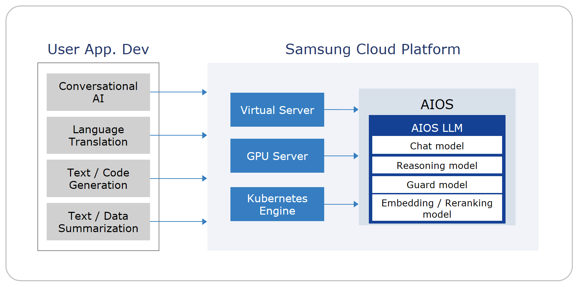
Provided Features
We provide the following features.
- AIOS LLM Endpoint provided: If you apply for Virtual Server, GPU Server, or Kubernetes Engine services, the detailed page of the created resource provides LLM Endpoint information and a usage guide, and according to the guide you can connect to the LLM from that resource and use it.
- AIOS Report provided: You can check the number of calls and token usage by type, resource, and model, as well as the total usage by LLM.
Provided Model
The LLM models provided by AIOS are as follows.
| Model Name | Model Type | Introduction | Main Uses | Features |
|---|---|---|---|---|
| gpt-oss-120b | Chat+Reasoning | ko) Open-source GPT series model based on 120 billion parameters, latest model | Research·experimentation, large-scale language understanding, AI services requiring complex reasoning/analysis, building agent-type systems |
|
| Qwen3-Coder-30B-A3B-Instruct | Code | ko) Qwen3 series code model optimized for code generation and debugging | Software development, AI code assistant, long document/repository analysis |
|
| Qwen3-30B-A3B-Thinking-2507 | Chat+Reasoning | ko) Qwen3 model enhanced for long-form reasoning and deep thinking (Thinking) | Research, analysis reports, logical writing, mathematics, science, coding |
|
| Llama-4-Scout | Chat+Vision | Latest Llama model with multimodal capability | Document analysis·summarization, customer support·chatbot |
|
| Llama-Guard-4-12B | moderation | Core security and moderation model to enhance reliability and safety in the latest large language models and multimodal AI services | Used for automatic filtering of harmful user inputs and model responses |
|
| bge-m3 | embedding | Core embedding model with three characteristics: multi-functionality, multilingual support, and large-scale input handling | Used in generative AI to retrieve external knowledge and provide answer evidence by combining dense and sparse retrieval to ensure both accuracy and generalization performance |
|
| bge-reranker-v2-m3 | rerank | A core component for various information retrieval, question answering, and chatbot systems that require fast and accurate re-ranking of search results in multilingual environments | Re-rank candidate answers or documents for a question in order of relevance |
|
Region-specific provision status
AIOS is available in the following environment.
| Region | Availability |
|---|---|
| Korea West (kr-west1) | Provided |
| Korea East (kr-east1) | Not provided |
| South Korea 1(kr-south1) | Not provided |
| South Korea South2(kr-south2) | Not provided |
| South Korea South 3(kr-south3) | Not provided |
Pre-service
This is a list of services that must be pre-configured before creating the service. For details, refer to the guide provided for each service and prepare in advance.
| Service Category | Service | Detailed Description |
|---|---|---|
| Compute | Virtual Server | Virtual server optimized for cloud computing |
| Compute | GPU Server | A virtual server suitable for tasks that require fast computation speed, such as AI model experiments, predictions, and inference in a cloud environment. |
| Compute | Cloud Functions | Serverless computing based Faas (Function as a Service) |
| Container | Kubernetes Engine | A service that provides lightweight virtual computing and containers, and Kubernetes clusters for managing them |
2 - How-to Guides
Using AIOS
AIOS provides an environment where LLM can be used by default within each resource when you create Virtual Server, GPU Server, Kubernetes Engine services.
For detailed information on each service creation, refer to the table below.
| Service | Guide |
|---|---|
| Virtual Server | Virtual Server Create |
| GPU Server | Create GPU Server |
| Cloud Functions | Cloud Functions Create |
| Kubernetes Engine | Create Cluster |
Using LLM
LLM can be used by utilizing the LLM Endpoint within the service resources such as Virtual Server, GPU Server, Cloud Functions, Kubernetes Engine created on Samsung Cloud Platform. The LLM Endpoint can be checked through the Usage Guide for the LLM Endpoint on the service’s detail page.
Check the LLM Endpoint of Virtual Server
You can check the usage guide for the LLM Endpoint on the Virtual Server Details page of the created Virtual Server.
To check the usage guide for the LLM Endpoint, follow the steps below.
- All Services > Compute > Virtual Server Click the menu. Go to the Service Home page of Virtual Server.
- Click the Virtual Server menu on the Service Home page. Navigate to the Virtual Server list page.
- Virtual Server List page, click the resource to connect to the LLM Endpoint. Navigate to the Virtual Server Details page.
- Virtual Server Details on the page, click the User Guide link of the LLM Endpoint item. It will navigate to the LLM User Guide popup window.
Check GPU Server’s LLM Endpoint
You can check the usage guide for the LLM Endpoint on the GPU Server Details page of the created GPU Server.
To view the usage guide for LLM Endpoint, follow the steps below.
- All Services > Compute > GPU Server Click the menu. Go to the Service Home page of GPU Server.
- Click the GPU Server menu on the Service Home page. It navigates to the GPU Server List page.
- GPU Server List page, click the resource to connect to the LLM Endpoint. GPU Server Details page, navigate.
- GPU Server Details on the page, click the LLM Endpoint item’s User Guide link. You will be taken to the LLM User Guide popup window.
Checking the LLM Endpoint of Cloud Functions
You can view the usage guide for the LLM Endpoint on the Cloud Functions Details page of the created Cloud Functions.
To view the usage guide for the LLM Endpoint, follow the steps below.
- All Services > Compute > Cloud Functions Click the menu. Go to the Service Home page of Cloud Functions.
- Click the Functions menu on the Service Home page. Go to the Functions list page.
- On the Functions list page, click the resource to connect to the LLM Endpoint. You will be taken to the Functions details page.
- Click the User Guide link of the LLM Endpoint item on the Functions Details page. It will open the LLM User Guide popup.
Check the LLM Endpoint of the Kubernetes Engine cluster
You can check the usage guide for the LLM Endpoint on the Cluster Details page of the created Kubernetes Engine cluster.
To view the usage guide for LLM Endpoint, follow the steps below.
- Click the All Services > Container > Kubernetes Engine menu. Navigate to the Service Home page of Kubernetes Engine.
- Click the Cluster menu from the Service Home page. Go to the Cluster List page.
- Click the resource to connect to the LLM Endpoint on the Cluster List page. You will be taken to the Cluster Details page.
- On the Cluster Details page, click the User Guide link of the LLM Endpoint item. It will open the LLM User Guide popup.
LLM Usage Guide
In the usage guide of LLM Endpoint, you can see AIOS LLM Private Endpoint, the provided model, and sample code examples.
AIOS LLM Private Endpoint
The URL of the AIOS LLM private endpoint is displayed. Check the URL to use it within the resources created for the Virtual Server, GPU Server, Kubernetes Engine services.
AIOS LLM Provided Model
The AIOS LLM provided models are as follows.
| Model Name | Model ID | Context Size | RPM (Request per minute) | TPM (Token per minute) | Purpose | License | Discontinuation Date |
|---|---|---|---|---|---|---|---|
| gpt-oss-120b | openai/gpt-oss-120b | 131,072 | 50 RPM | 200K | Research, Experiment, Advanced Language Understanding | Apache 2.0 | No plans |
| Qwen3-Coder-30B-A3B-Instruct | Qwen/Qwen3-Coder-30B-A3B-Instruct | 65,536 | 20 RPM | 30K | code generation, analysis, debugging support | Apache 2.0 | No plan |
| Qwen3-30B-A3B-Thinking-2507 | Qwen/Qwen3-30B-A3B-Thinking-2507 | 32,768 | 10 RPM | 30K | deep reasoning, long text analysis, essay writing | Apache 2.0 | no plan |
| Llama-4-Scout | meta-llama/Llama-4-Scout | 32,768 | 20 RPM | 35K | Latest Llama model with multimodal capability | llama4 | No plans |
| Llama-Guard-4-12B | meta-llama/Llama-Guard-4-12B | 32,768 | 20 RPM | 200K | Core security and moderation model to enhance reliability and safety in the latest large language models and multimodal AI services | llama4 | No plan |
| bge-m3 | sds/bge-m3 | 8,192 | 100 RPM | 200K | It is a multilingual embedding model that supports multiple languages. | Samsung SDS | No plan |
| bge-reranker-v2-m3 | sds/bge-reranker-v2-m3 | 8,192 | 100 RPM | 200K | Provides fast computation and high performance as a lightweight multilingual reranker. | Samsung SDS | No plans |
Sample code
Refer to the following for AIOS LLM sample code examples.
curl -H "Content-Type: application/json" \
  -d '{
        "model": "openai/gpt-oss-120b"
      , "prompt" : "Write a haiku about recursion in programming."
      , "temperature": 0
      , "max_tokens": 100
      , "stream": false
      }' \
{AIOS LLM private endpoint}/{API}
curl -H "Content-Type: application/json" \
-d '{
"model": "openai/gpt-oss-120b"
, "prompt" : "Write a haiku about recursion in programming."
, "temperature": 0
, "max_tokens": 100
, "stream": false
}' \
{AIOS LLM private endpoint}/{API}Check usage per LLM model
You can view the list of LLMs and token usage per model on the Service Home page of AIOS.
- All Services > AI-ML > AIOS Click the menu. Navigate to AIOS’s Service Home page.
- LLM usage by model In the list, check the LLM’s model name, model type, and usage token amount (1 week).
Category Detailed description Model Name LLM Name - Click the name to go to the model’s Report page
Model Type LLM Type - chat, reasoning, vision, moderation, embedding, rerank
- Model-specific information is Provided Model see
Token usage (1 Week) Token usage for one week as of today Table. AIOS LLM list items
Report Check
You can check the daily LLM call count and token usage on AIOS’s Report page.
The service types can be selected as Virtual Server, GPU Server, Kubernetes Engine, and you can query by selecting resource names among the resources actually created in the service, and you can also query by the LLM model used.
- All Services > AI-ML > AIOS Click the menu. Navigate to AIOS’s Service Home page.
- Click the Report menu on the Service Home page. Navigate to the Report page of AIOS.
- LLM usage by model In the list, clicking the LLM model name will take you directly to that LLM’s Report page.
- Report page, after selecting the LLM model to view the Report, click the Query button. The Report information for that LLM model will be displayed.
Category Detailed description Service Type Select service type using LLM - Virtual Server, GPU Server, Kubernetes Engine
Resource Name Select Service Name - If you do not select a service type, only All can be selected, and if you select a specific product in the service type, a specific resource name can be selected
Model Select LLM model type - For information per model, see Provided Models
Query Period Select the period to view the Report - Selectable in weekly units
- Previous periods can be queried up to a maximum of 3 months
- The data retrieved is provided up to a maximum of 30 minutes prior to the current time
Call Count Daily call count during the query period - Displayed per day as total count, success count, and failure count
- Total call count: Provides the total number of calls during the period by model
Token usage Daily Token input and output amounts during the query period - Total number of Tokens: Total Token usage during the query period
- Average number of Tokens per Request: Average Token amount used when calling the LLM during the query period
Table. AIOS Report items
3 - References
References
In AIOS, you can check the API, SDK reference, and tutorials to help you get started.
| Category | Description |
|---|---|
| API Reference | List of APIs supported by AIOS
|
| SDK Reference | Information on SDKs compatible with AIOS, including OpenAI’s SDK
|
| Tutorial | Tutorials to help you get started with AIOS
|
3.1 - API Reference
API Reference Overview
The API Reference supported by AIOS is as follows.
| API Name | API | Detailed Description |
|---|---|---|
| Rerank API | POST /rerank, /v1/rerank, /v2/rerank | Applies an embedding model or cross-encoder model to predict the relevance between a single query and each item in a document list. |
| Score API | POST /score, /v1/score | Predicts the similarity between two sentences. |
| Chat Completions API | POST /v1/chat/completions | Compatible with OpenAI’s Completions API and can be used with the OpenAI Python client. |
| Completions API | POST /v1/completions | Compatible with OpenAI’s Completions API and can be used with the OpenAI Python client. |
| Embedding API | POST /v1/embeddings | Converts text into a high-dimensional vector (embedding) that can be used for various natural language processing (NLP) tasks, such as calculating text similarity, clustering, and searching. |
Rerank API
POST /rerank, /v1/rerank, /v2/rerank
Overview
The Rerank API applies an embedding model or cross-encoder model to predict the relevance between a single query and each item in a document list. Generally, the score of a sentence pair represents the similarity between the two sentences on a scale of 0 to 1.
- Embedding-based model: Converts the query and document into vectors and measures the similarity between the vectors (e.g., cosine similarity) to calculate the score.
- Reranker (Cross-Encoder) based model: Evaluates the query and document as a pair.
Request
Context
| Key | Type | Description | Example |
|---|---|---|---|
| Base URL | string | AIOS URL for API requests | application/json |
| Request Method | string | HTTP method used for API requests | POST |
| Headers | object | Header information required for requests | { “accept”: “application/json”, “Content-Type”: “application/json” } |
| Body Parameters | object | Parameters included in the request body | { “model”: “sds/bge-m3”, “query”: …, “documents”: […] } |
Path Parameters
| Name | type | Required | Description | Default value | Boundary value | Example |
|---|---|---|---|---|---|---|
| None |
Query Parameters
| Name | type | Required | Description | Default value | Boundary value | Example |
|---|---|---|---|---|---|---|
| None |
Body Parameters
| Name | Name Sub | type | Required | Description | Default value | Boundary value | Example |
|---|---|---|---|---|---|---|---|
| model | - | string | ✅ | Model used for response generation | “sds/bge-reranker-v2-m3” | ||
| query | - | string | ✅ | User’s search query or question | “What is the capital of France?" | ||
| documents | - | array | ✅ | List of documents to be re-ranked | Maximum model input length limit | [“The capital of France is Paris.”] | |
| top_n | - | integer | ❌ | Number of top documents to return (0 returns all) | 0 | > 0 | 5 |
| truncate_prompt_tokens | - | integer | ❌ | Limits the number of input tokens | > 0 | 100 |
Example
curl -X 'POST' \
   'https://aios.private.kr-west1.e.samsungsdscloud.com/rerank' \
  -H 'accept: application/json' \
  -H 'Content-Type: application/json' \
  -d '{
    "model": "sds/bge-reranker-v2-m3",
Here is the translation of the given text:
"query": "What is the capital of France?",
"documents": [
  "The capital of France is Paris.",
  "France capital city is known for the Eiffel Tower.",
  "Paris is located in the north-central part of France."
],
"top_n": 2,
"truncate_prompt_tokens": 512
}
Response
200 OK
| Name | Type | Description |
|---|---|---|
| id | string | API response’s unique identifier (UUID format) |
| model | string | Name of the model that generated the result |
| usage | integer | Object containing information about the resources used in the request |
| usage.total_tokens | integer | Total number of tokens used in processing the request |
| result | string | Array containing the results of the query-related documents |
| results[].index | integer | Order number in the result array |
| results[].document | object | Object containing the content of the searched document |
| results[].document.text | string | Actual text content of the searched document |
| results[].relevance_score | float | Score indicating the relevance between the query and the document (0 ~ 1) |
Error Code
| HTTP status code | Error Code Description |
|---|---|
| 400 | Bad Request |
| 422 | Validation Error |
| 500 | Internal Server Error |
Example
{
  "id": "rerank-scp-aios-rerank",
  "model": "sds/sds/bge-m3",
  "usage": {
    "total_tokens": 65
  },
  "results": [
    {
      "index": 0,
      "document": {
        "text": "The capital of France is Paris."
      },
      "relevance_score": 0.8291233777999878
    },
    {
      "index": 1,
      "document": {
        "text": "France capital city is known for the Eiffel Tower."
      },
      "relevance_score": 0.6996355652809143
    }
  ]
}
Reference
Score API
POST /score, /v1/score
Overview
The Score API predicts the similarity between two sentences. This API uses one of two models to calculate the score:
- Reranker (Cross-Encoder) model: Takes a pair of sentences as input and directly predicts the similarity score.
- Embedding model: Generates embedding vectors for each sentence and calculates the cosine similarity to derive the score.
Request
Context
| Key | Type | Description | Example |
|---|---|---|---|
| Base URL | string | AIOS URL for API requests | application/json |
| Request Method | string | HTTP method used for API requests | POST |
| Headers | object | Header information required for requests | { “accept”: “application/json”, “Content-Type”: “application/json” } |
| Body Parameters | object | Parameters included in the request body | { “model”: “sds/bge-reranker-v2-m3”, “text_1”: […], “text_2”: […] } |
Path Parameters
| Name | type | Required | Description | Default value | Boundary value | Example |
|---|---|---|---|---|---|---|
| None |
Query Parameters
| Name | type | Required | Description | Default value | Boundary value | Example |
|---|---|---|---|---|---|---|
| None |
Body Parameters
| Name | Name Sub | type | Required | Description | Default value | Boundary value | Example |
|---|---|---|---|---|---|---|---|
| model | - | string | ✅ | Specify the model to use for response generation | “sds/bge-reranker-v2-m3” | ||
| encoding_format | - | string | ❌ | Score return format | “float” |
| “float” |
| text_1 | - | string, array | ✅ | First text to compare |
| “What is the capital of France?" | |
| text_2 | - | string, array | ✅ | Second text to compare |
| [“The capital of France is Paris.”, ] | |
| truncate_prompt_tokens | - | integer | ❌ | Limit input token count | > 0 | 100 |
Example
curl -X 'POST' \
  'https://aios.private.kr-west1.e.samsungsdscloud.com/score' \
  -H 'accept: application/json' \
  -H 'Content-Type: application/json' \
  -d '{
  "model": "sds/bge-reranker-v2-m3",
  "encoding_format": "float",
"text_1": [
  "What is the largest planet in the solar system?",
  "What is the chemical symbol for water?"
],
"text_2": [
  "Jupiter is the largest planet in the solar system.",
  "The chemical symbol for water is H₂O."
]
}'
Response
200 OK
| Name | Type | Description |
|---|---|---|
| id | string | Unique identifier for the response |
| object | string | Type of response object (e.g., “list” ) |
| created | integer | Creation time (Unix timestamp, seconds) |
| model | string | Name of the model used |
| data | array | List of score calculation results |
| data.index | integer | Index of the item in the data array |
| data.object | string | Type of data item (e.g., “score”) |
| data.score | number | Calculated score value, normalized to 0 ~ 1 |
| usage | object | Token usage statistics |
| usage.prompt_tokens | integer | Number of tokens used in the input prompt |
| usage.total_tokens | integer | Total number of tokens (input + output) |
| usage.completion_tokens | integer | Number of tokens used in the generated response |
| usage.prompt_tokens_details | null | Detailed information about prompt tokens |
Error Code
| HTTP status code | Error Code Description |
|---|---|
| 400 | Bad Request |
| 422 | Validation Error |
| 500 | Internal Server Error |
Example
{
  "id": "score-scp-aios-score",
  "object": "list",
  "created": 1748574112,
  "model": "sds/bge-reranker-v2-m3",
  "data": [
    {
Here is the translated text:
  "index": 0,
  "object": "score",
  "score": 1.0
},
{
  "index": 1,
  "object": "score",
  "score": 1.0
}
], “usage”: { “prompt_tokens”: 53, “total_tokens”: 53, “completion_tokens”: 0, “prompt_tokens_details”: null } }
## Reference
* [Score API vLLM documentation](https://docs.vllm.ai/en/latest/serving/openai_compatible_server.html#score-api_1)


# Chat Completions API

```python
POST /v1/chat/completions
Overview
Chat Completions API is compatible with OpenAI’s Completions API and can be used with the OpenAI Python client.
Request
Context
| Key | Type | Description | Example |
|---|---|---|---|
| Content-Type | string | application/json |
Path Parameters
| Name | type | Required | Description | Default value | Boundary value | Example |
|---|---|---|---|---|---|---|
| None |
Query Parameters
| Name | type | Required | Description | Default value | Boundary value | Example |
|---|---|---|---|---|---|---|
| None |
Body Parameters
| Name | Name Sub | type | Required | Description | Default value | Boundary value | Example |
|---|---|---|---|---|---|---|---|
| model | - | string | ✅ | Specifies the model to use for generating responses | “meta-llama/Llama-3.3-70B-Instruct” | ||
| messages | role | string | ✅ | List of messages containing conversation history | [ { “role” : “user” , “content” : “message” }] | ||
| frequency_penalty | - | number | ❌ | Adjusts the penalty for repeating tokens | 0 | -2.0 ~ 2.0 | 0.5 |
| logit_bias | - | object | ❌ | Adjusts the probability of specific tokens (e.g., { “100”: 2.0 }) | null | Key: token ID, Value: -100 ~ 100 | { “100”: 2.0 } |
| logprobs | - | boolean | ❌ | Returns the probabilities of the top logprobs number of tokens | false | true, false | true |
| max_completion_tokens | - | integer | ❌ | Limits the maximum number of generated tokens | None | 0 ~ model maximum | 100 |
| max_tokens (Deprecated) | - | integer | ❌ | Limits the maximum number of generated tokens | None | 0 ~ model maximum | 100 |
| n | - | integer | ❌ | Specifies the number of responses to generate | 1 | 3 | |
| presence_penalty | - | number | ❌ | Adjusts the penalty for tokens already present in the text | 0 | -2.0 ~ 2.0 | 1.0 |
| seed | - | integer | ❌ | Specifies the seed value for controlling randomness | None | ||
| stop | - | string / array / null | ❌ | Stops generating when a specific string is encountered | null | "\n" | |
| stream | - | boolean | ❌ | Returns the result in streaming mode | false | true/false | true |
| stream_options | include_usage, continuous_usage_stats | object | ❌ | Controls streaming options (e.g., including usage statistics) | null | { “include_usage”: true } | |
| temperature | - | number | ❌ | Adjusts the creativity of the generated response (higher means more random) | 1 | 0.0 ~ 1.0 | 0.7 |
| tool_choice | - | string | ❌ | Specifies which tool to call
|
| ||
| tools | - | array | ❌ | List of tools that the model can call
| None | ||
| top_logprobs | - | integer | ❌ | Specifies the number of top logprobs tokens to return (between 0 and 20)
| None | 0 ~ 20 | 3 |
| top_p | - | number | ❌ | Limits the sampling probability of tokens (higher means more tokens are considered) | 1 | 0.0 ~ 1.0 | 0.9 |
Example
curl -X 'POST' \
   'https://aios.private.kr-west1.e.samsungsdscloud.com/v1/chat/completions' \
  -H 'accept: application/json' \
200 OK
| Name | Type | Description |
|---|---|---|
| id | string | Response’s unique identifier |
| object | string | Type of response object (e.g., “chat.completion”) |
| created | integer | Creation time (Unix timestamp, in seconds) |
| model | string | Name of the model used |
| choices | array | List of generated response choices |
| choices[].index | integer | Index of the choice |
| choices[].message | object | Generated message object |
| choices[].message.role | string | Role of the message author (e.g., “assistant”) |
| choices[].message.content | string | Actual content of the generated message |
| choices[].message.reasoning_content | string | Actual content of the generated reasoning message |
| choices[].message.tool_calls | array (optional) | Tool call information (may be included depending on the model/settings) |
| choices[].finish_reason | string or null | Reason why the response was terminated (e.g., “stop”, “length”, etc.) |
| choices[].stop_reason | object or null | Additional termination reason details |
| choices[].logprobs | object or null | Token-wise log probability information (may be included depending on the settings) |
| usage | object | Token usage statistics |
| usage.prompt_tokens | integer | Number of tokens used in the input prompt |
| usage.completion_tokens | integer | Number of tokens used in the generated response |
| usage.total_tokens | integer | Total number of tokens (input + output) |
Error Code
| HTTP status code | Error Code Description |
|---|---|
| 400 | Bad Request |
| 422 | Validation Error |
| 500 | Internal Server Error |
Example
{
  "id": "chatcmpl-scp-aios-chat-completions",
  "object": "chat.completion",
  "created": 1749702816,
  "model": "meta-llama/Meta-Llama-3.3-70B-Instruct",
  "choices": [
    {
      "index": 0,
      "message": {
        "role": "assistant",
        "reasoning_content": null,
        "content": "The capital of Korea is Seoul.",
        "tool_calls": []
      },
      "logprobs": null,
      "finish_reason": "stop",
      "stop_reason": null
    }
  ],
  "usage": {
    "prompt_tokens": 54,
    "total_tokens": 62,
    "completion_tokens": 8,
    "prompt_tokens_details": null
  },
  "prompt_logprobs": null
}
Reference
- Chat Completions API vLLM documentation
- Chat Completions API OpenAI documentation POST /v1/completions
## Overview

Completions API is compatible with OpenAI's Completions API and can be used with the OpenAI Python client.


## Request

### Context


Key
Type
Description
Example


Base URL
string
API request URL for AIOS
application/json


Request Method
string
HTTP method used for the API request
POST


Headers
object
Header information required for the request
{ “accept”: “application/json”, “Content-Type”: “application/json” }


Body Parameters
object
Parameters included in the request body
’{“model”: “meta-llama/Llama-3.3-70B-Instruct”, “prompt” : “hello”, “stream”: “true”}’


  Table. Completions API - Context


### Path Parameters


Name
type
Required
Description
Default value
Boundary value
Example


None


  Table. Completions API - Path Parameters


### Query Parameters


Name
type
Required
Description
Default value
Boundary value
Example


None


  Table. Completions API - Query Parameters


### Body Parameters


Name
Name Sub
type
Required
Description
Default value
Boundary value
Example


model
-
string
✅
Model used to generate the response


“meta-llama/Llama-3.3-70B-Instruct”


prompt
-
array, string
✅
User input text


""


echo
-
boolean
❌
Whether to include the input text in the output
false
true/false
true


frequency_penalty
-
number
❌
Adjust the penalty for repeating tokens
0
-2.0 ~ 2.0
0.5


logit_bias
-
object
❌
Adjust the probability of specific tokens (e.g., { “100”: 2.0 })
null
Key: token ID, Value: -100~100
{ “100”: 2.0 }


logprobs
-
integer
❌
Return the probabilities of the top logprobs tokens
null
1 ~ 5
5


max_completion_tokens
-
integer
❌
Limit the maximum number of generated tokens
None
0~model maximum value
100


max_tokens (Deprecated)
-
integer
❌
Limit the maximum number of generated tokens
None
0~model maximum value
100


n
-
integer
❌
Specify the number of responses to generate
1

3


presence_penalty
-
number
❌
Adjust the penalty for tokens already present in the text
0
-2.0 ~ 2.0
1.0


seed
-
integer
❌
Specify a seed value for randomness control
None


stop
-
string / array / null
❌
Stop generating when a specific string is encountered
null

"\n"


stream
-
boolean
❌
Whether to return the results in a streaming manner
false
true/false
true


stream_options
include_usage, continuous_usage_stats
object
❌
Control streaming options (e.g., include usage statistics)
null

{ “include_usage”: true }


temperature
-
number
❌
Control the creativity of the generated response (higher means more random)
1
0.0 ~ 1.0
0.7


top_p
-
number
❌
Limit the sampling probability of tokens (higher means more tokens considered)
1
0.0 ~ 1.0
0.9


  Table. Completions API - Body Parameters


### Example

```python
curl -X 'POST' \
   'https://aios.private.kr-west1.e.samsungsdscloud.com/v1/completions' \
  -H 'accept: application/json' \
  -H 'Content-Type: application/json' \
  -d '{
    "model": "meta-llama/Meta-Llama-3.3-70B-Instruct",
    "prompt": "What is the capital of Korea?",
    "temperature": 0.7
  }'
Response
200 OK
| Name | Type | Description |
|---|---|---|
| id | string | Unique identifier of the response |
| object | string | Type of the response object (e.g., “text_completion”) |
| created | integer | Creation time (Unix timestamp, seconds) |
| model | string | Name of the model used |
| choices | array | List of generated response choices |
| choices[].index | number | Index of the choice |
| choices[].text | string | Generated text object |
| choices[].logprobs | object | Token-wise log probability information (included based on settings) |
| choices[].finish_reason | string or null | Reason why the response was terminated (e.g., “stop”, “length” etc.) |
| choices[].stop_reason | object or null | Additional termination reason details |
| choices[].prompt_logprobs | object or null | Log probability of input prompt tokens (may be null) |
| usage | object | Token usage statistics |
| usage.prompt_tokens | number | Number of tokens used in the input prompt |
| usage.total_tokens | number | Total number of tokens (input + output) |
| usage.completion_tokens	| number		| Number of tokens used in the generated response |
| usage.prompt_tokens_details	| object		| Details of prompt token usage |
<div class="figure-caption">
  Table. Completions API - 200 OK
</div>
Error Code
| HTTP status code | Error Code Description |
|---|---|
| 400 | Bad Request |
| 422 | Validation Error |
| 500 | Internal Server Error |
Example
{
  "id": "cmpl-scp-aios-completions",
  "object": "text_completion",
  "created": 1749702612,
  "model": "meta-llama/Meta-Llama-3.3-70B-Instruct",
  "choices": [
    {
      "index": 0,
      "text": " \nOur capital city is Seoul. \n\nA. 1\nB. ",
      "logprobs": null,
      "finish_reason": "length",
      "stop_reason": null,
      "prompt_logprobs": null
    }
  ],
  "usage": {
    "prompt_tokens": 9,
    "total_tokens": 25,
    "completion_tokens": 16,
    "prompt_tokens_details": null
  }
}
Reference
Embedding API
POST /v1/embeddings
Overview
The Embedding API converts text into high-dimensional vectors (embeddings) that can be used for various natural language processing (NLP) tasks, such as calculating text similarity, clustering, and search.
Request
Context
| Key | Type | Description | Example |
|---|---|---|---|
| Base URL | string | URL for AIOS API requests | application/json |
| Request Method | string | HTTP method used for API requests | POST |
| Headers | object | Header information required for requests | { “accept”: “application/json”, “Content-Type”: “application/json” } |
| Body Parameters | object | Parameters included in the request body | { “model”: “sds/bge-m3”, “input”: “What is the capital of France?”} |
Path Parameters
| Name | type | Required | Description | Default value | Boundary value | Example |
|---|---|---|---|---|---|---|
| None |
Query Parameters
| Name | type | Required | Description | Default value | Boundary value | Example |
|---|---|---|---|---|---|---|
| None |
Body Parameters
| Name | Name Sub | type | Required | Description | Default value | Boundary value | Example |
|---|---|---|---|---|---|---|---|
| model | - | string | ✅ | Specify the model to use for generating responses | “sds/bge-reranker-v2-m3” | ||
| input | - | array<string | ✅ | User’s search query or question | “What is the capital of France?" | ||
| encoding_format | - | string | ❌ | Specify the format to return the embedding | “float” | “float”, “base64” | [0.01319122314453125,0.057220458984375, … (omitted) |
| truncate_prompt_tokens | - | integer | ❌ | Limit the number of input tokens | > 0 | 100 |
Example
curl -X 'POST' \
   'https://aios.private.kr-west1.e.samsungsdscloud.com/v1/embedding' \
  -H 'accept: application/json' \
  -H 'Content-Type: application/json' \
  -d '{
    "model": "sds/bge-m3",
    "input": "What is the capital of France?",
	"encoding_format": "float"
  }'
Response
200 OK
| Name | Type | Description |
|---|---|---|
| id | string | Unique identifier of the response |
| object | string | Type of the response object (e.g., “list”) |
| created | number | Creation time (Unix timestamp, seconds) |
| model | string | Name of the model used |
| data | array | Array of objects containing embedding results |
| data.index | number | Index of the input text (e.g., order of input texts) |
| data.object | string | Type of data item |
| data.embedding | array | Embedding vector values of the input text (sds-bge-m3 is a 1024-dimensional float array) |
| usage | object | Token usage statistics |
| usage.prompt_tokens | number | Number of tokens used in the input prompt |
| usage.total_tokens | number | Total number of tokens (input + output) |
| usage.completion_tokens | number | Number of tokens used in the generated response |
| usage.prompt_tokens_details | object | Detailed information about prompt tokens |
Error Code
| HTTP status code | Error Code Description |
|---|---|
| 400 | Bad Request |
| 422 | Validation Error |
| 500 | Internal Server Error |
Example
{
  "id":"embd-scp-aios-embeddings",
  "object":"list","created":1749035024,
  "model":"sds/bge-m3",
  "data":[
    {
      "index":0,
      "object":"embedding",
      "embedding":
      [0.01319122314453125,0.057220458984375,-0.028533935546875,-0.0008697509765625,-0.01422119140625,0.033416748046875,-0.0062408447265625,-0.04364013671875,-0.004497528076171875,0.0008072853088378906,-0.0193328857421875,0.041168212890625,-0.019317626953125,-0.0188751220703125,-0.047088623046875,
      -0 ....(omitted)

      -0.05706787109375,-0.0147705078125]
    }
  ],
  "usage":
  {
    "prompt_tokens":9,
    "total_tokens":9,
    "completion_tokens":0,
    "prompt_tokens_details":null
  }
}
Reference
3.2 - SDK Reference
SDK Reference Overview
AIOS models are compatible with OpenAI’s API, so they are also compatible with OpenAI’s SDK. The following is a list of OpenAI and Cohere compatible APIs supported by Samsung Cloud Platform AIOS service.
| API Name | API | Detailed Description | Supported SDK |
|---|---|---|---|
| Text Completion API | Generates a natural sentence that follows the given input string. |
| |
| Conversation Completion API | Generates a response that follows the conversation content. |
| |
| Embeddings API | Converts text into a high-dimensional vector (embedding) that can be used for various natural language processing (NLP) tasks such as text similarity calculation, clustering, and search. |
| |
| Rerank API | Applies an embedding model or a cross-encoder model to predict the relevance between a single query and each item in a document list. |
|
- The SDK Reference guide is based on a Virtual Server environment with Python installed.
- The actual execution may differ from the example in terms of token count and message content.
OpenAI SDK
Installing the openai Package
Install the OpenAI package.
pip install openai
Text Completion API
The Text Completion API generates a natural sentence that follows the given input string.
/v1/completions
Request
from openai import OpenAI
from urllib.parse import urljoin

aios_base_url = "<<aios endpoint-url>>" # Enter the aios endpoint-url for AIOS model calls.
model = "<<model>>"                     # Enter the model ID for AIOS model calls.

client = OpenAI(base_url=urljoin(aios_base_url, "v1"), api_key="EMPTY_KEY")


response = client.completions.create(
  model=model,
  prompt="Hi"
)
Response
The text field in choices contains the model’s response.
Completion(
  id='cmpl-xxxxxxxxxxxxxxxxxxxxxxxxxxxxx',
  choices=[
    CompletionChoice(
      finish_reason='length',
      index=0,
      logprobs=None,
      text=' future president of the United States, I hope you’re doing well. As a',
      stop_reason=None,
      prompt_logprobs=None
    )
  ],
  created=1750000000,
  model='<<model>>',
  object='text_completion',
stream request
stream can be used to receive the completed answer one by one, rather than receiving the entire answer at once, as the model generates tokens.
Request
Set the stream parameter value to True.
from openai import OpenAI
from urllib.parse import urljoin

aios_base_url = "<<aios endpoint-url>>" # AIOS model call endpoint-url to be input for AIOS model call
model = "<<model>>"                     # AIOS model call model ID to be input for AIOS model call

client = OpenAI(base_url=urljoin(aios_base_url, "v1"), api_key="EMPTY_KEY")

response = client.completions.create(
  model=model,
  prompt="Hi",
  stream=True
)

# Receive the response as the model generates tokens.
for chunk in response:
  print(chunk)
Response
Each token generates an answer, and each token can be checked in the choices’s text field.
Completion(
  id='cmpl-xxxxxxxxxxxxxxxxxxxxxxxxxxxxxxxx',
  choices=[
    CompletionChoice(
      finish_reason=None,
      index=0,
      logprobs=None,
      text='.',
      stop_reason=None
    )
  ],
  created=1750000000,
  model='<<model>>',
  object='text_completion',
  system_fingerprint=None,
  usage=None
)
Completion(..., choices=[CompletionChoice(..., text=' I', ...)], ...)
Completion(..., choices=[CompletionChoice(..., text="'m", ...)], ...)
Completion(..., choices=[CompletionChoice(..., text=' looking', ...)], ...)
Completion(..., choices=[CompletionChoice(..., text=' for', ...)], ...)
Completion(..., choices=[CompletionChoice(..., text=' a', ...)], ...)
Completion(..., choices=[CompletionChoice(..., text=' way', ...)], ...)
Completion(..., choices=[CompletionChoice(..., text=' to', ...)], ...)
Completion(..., choices=[CompletionChoice(..., text=' check', ...)], ...)
Completion(..., choices=[CompletionChoice(..., text=' if', ...)], ...)
Completion(..., choices=[CompletionChoice(..., text=' a', ...)], ...)
Completion(..., choices=[CompletionChoice(..., text=' specific', ...)], ...)
Completion(..., choices=[CompletionChoice(..., text=' process', ...)], ...)
Completion(..., choices=[CompletionChoice(..., text=' is', ...)], ...)
Completion(..., choices=[CompletionChoice(..., text=' running', ...)], ...)
Completion(..., choices=[CompletionChoice(..., text=' on', ...)], ...)
Completion(..., choices=[], ...,
  usage=CompletionUsage(
    completion_tokens=16,
    prompt_tokens=2,
    total_tokens=18,
    completion_tokens_details=None,
    prompt_tokens_details=None
  )
)
conversation completion API
The conversation completion API takes a list of messages in order as input and responds with a message that is suitable for the current context as the next order.
/v1/chat/completions
Request
Text message only, you can call as follows:
from openai import OpenAI
from urllib.parse import urljoin

aios_base_url = "<<aios endpoint-url>>" # AIOS model call for aios endpoint-url to enter.
model = "<<model>>"                     # AIOS model call for model ID to enter.

client = OpenAI(base_url=urljoin(aios_base_url, "v1"), api_key="EMPTY_KEY")

response = client.chat.completions.create(
  model=model,
  messages=[
    {"role": "system", "content": "You are a helpful assistant."},
    {"role": "user", "content": "Hi"}
  ]
)
Response
You can check the model’s answer in the choices’s message.
ChatCompletion(
  id='chatcmpl-xxxxxxxxxxxxxxxxxxxxxxxxxxxxxxxx',
  choices=[
    Choice(
      finish_reason='stop',
      index=0,
      logprobs=None,
      message=ChatCompletionMessage(
        content='Hello. How can I assist you today?',
        refusal=None,
        role='assistant',
        annotations=None,
        audio=None,
        function_call=None,
        tool_calls=[],
        reasoning_content=None
      ),
      stop_reason=None
    )
  ],
  created=1750000000,
  model='<<model>>',
  object='chat.completion',
  service_tier=None,
  system_fingerprint=None,
  usage=CompletionUsage(
    completion_tokens=10,
    prompt_tokens=42,
    total_tokens=52,
    completion_tokens_details=None,
    prompt_tokens_details=None
  ),
  prompt_logprobs=None
)
Stream Request
Using stream, you can wait for the model to generate all answers and receive the response at once, or receive and process the response for each token generated by the model.
Request
Enter True as the value of the stream parameter.
from openai import OpenAI
from urllib.parse import urljoin

aios_base_url = "<<aios endpoint-url>>" # AIOS model call for aios endpoint-url to enter.
model = "<<model>>"                     # AIOS model call for model ID to enter.

client = OpenAI(base_url=urljoin(aios_base_url, "v1"), api_key="EMPTY_KEY")

response = client.chat.completions.create(
  model="meta-llama/Llama-3.3-70B-Instruct",
  messages=[
    {"role": "system", "content": "You are a helpful assistant."},
    {"role": "user", "content": "Hi"}
  ],
  stream=True
)

# You can receive a response each time the model generates a token.
for chunk in response:
  print(chunk)
Response
Each token generates a response, and each token can be checked in the choices field of the delta field.
ChatCompletionChunk(
  id='chatcmpl-xxxxxxxxxxxxxxxxxxxxxxxxxxxxxxxx',
  choices=[
    Choice(
      delta=ChoiceDelta(
        content='',
        function_call=None,
        refusal=None,
        role='assistant',
        tool_calls=None
      ),
      finish_reason=None,
      index=0,
      logprobs=None
    )
  ],
  created=1750000000,
  model='<<model>>',
  object='chat.completion.chunk',
  service_tier=None,
  system_fingerprint=None,
  usage=None
)
ChatCompletionChunk(..., choices=[Choice(delta=ChoiceDelta(content='It', ...), ...)], ...)
ChatCompletionChunk(..., choices=[Choice(delta=ChoiceDelta(content="'s", ...), ...)], ...)
ChatCompletionChunk(..., choices=[Choice(delta=ChoiceDelta(content=' nice', ...), ...)], ...)
ChatCompletionChunk(..., choices=[Choice(delta=ChoiceDelta(content=' to', ...), ...)], ...)
ChatCompletionChunk(..., choices=[Choice(delta=ChoiceDelta(content='meet', ...), ...)], ...)
ChatCompletionChunk(..., choices=[Choice(delta=ChoiceDelta(content=' you', ...), ...)], ...)
ChatCompletionChunk(..., choices=[Choice(delta=ChoiceDelta(content='.', ...), ...)], ...)
ChatCompletionChunk(..., choices=[Choice(delta=ChoiceDelta(content=' Is', ...), ...)], ...)
ChatCompletionChunk(..., choices=[Choice(delta=ChoiceDelta(content=' there', ...), ...)], ...)
ChatCompletionChunk(..., choices=[Choice(delta=ChoiceDelta(content=' something', ...), ...)], ...)
ChatCompletionChunk(..., choices=[Choice(delta=ChoiceDelta(content=' I', ...), ...)], ...)
ChatCompletionChunk(..., choices=[Choice(delta=ChoiceDelta(content=' can', ...), ...)], ...)
ChatCompletionChunk(..., choices=[Choice(delta=ChoiceDelta(content=' help', ...), ...)], ...)
ChatCompletionChunk(..., choices=[Choice(delta=ChoiceDelta(content=' you', ...), ...)], ...)
ChatCompletionChunk(..., choices=[Choice(delta=ChoiceDelta(content=' with', ...), ...)], ...)
ChatCompletionChunk(..., choices=[Choice(delta=ChoiceDelta(content=' or', ...), ...)], ...)
ChatCompletionChunk(..., choices=[Choice(delta=ChoiceDelta(content=' would', ...), ...)], ...)
ChatCompletionChunk(..., choices=[Choice(delta=ChoiceDelta(content=' you', ...), ...)], ...)
ChatCompletionChunk(..., choices=[Choice(delta=ChoiceDelta(content=' like', ...), ...)], ...)
ChatCompletionChunk(..., choices=[Choice(delta=ChoiceDelta(content=' to', ...), ...)], ...)
ChatCompletionChunk(..., choices=[Choice(delta=ChoiceDelta(content=' chat', ...), ...)], ...)
ChatCompletionChunk(..., choices=[Choice(delta=ChoiceDelta(content='?', ...), ...)], ...)
ChatCompletionChunk(..., choices=[Choice(delta=ChoiceDelta(content='', ...), ...)], ...)
ChatCompletionChunk(..., choices=[], ...,
  usage=CompletionUsage(
    completion_tokens=23,
    prompt_tokens=42,
    total_tokens=65,
    completion_tokens_details=None,
    prompt_tokens_details=None
  )
)
Tool Calling
Tool calling refers to the interface of external tools defined outside the model, allowing the model to generate answers that can perform suitable tools in the current context.
Using tool call, you can define metadata for functions that the model can execute and utilize them to generate answers.
Request
from openai import OpenAI
from urllib.parse import urljoin

aios_base_url = "<<aios endpoint-url>>" # AIOS model call endpoint URL
model = "<<model>>"                     # AIOS model ID

client = OpenAI(base_url=urljoin(aios_base_url, "v1"), api_key="EMPTY_KEY")

# Function to get weather information
tools = [{
    "type": "function",
    "function": {
        "name": "get_weather",
        "description": "Get current temperature for provided coordinates in celsius.",
        "parameters": {
            "type": "object",
            "properties": {
                "latitude": {"type": "number"},
                "longitude": {"type": "number"}
            },
            "required": ["latitude", "longitude"],
            "additionalProperties": False
        },
        "strict": True
    }
}]
messages = [{“role”: “user”, “content”: “What is the weather like in Paris today?”}]
response = client.chat.completions.create( model=model, messages=messages, tools=tools # Inform the model of the metadata of the tools that can be used. )
Response
choices’s message.tool_calls can be used to check how the model determines the execution method of the tool.
In the following example, you can see that the tool_calls’s function uses the get_weather function and checks what arguments should be inserted.
ChatCompletion(
  id='chatcmpl-xxxxxxxxxxxxxxxxxxxxxxxxxxxxxxxx',
  choices=[
    Choice(
      finish_reason='tool_calls',
      index=0,
      logprobs=None,
      message=ChatCompletionMessage(
        content=None,
        refusal=None,
        role='assistant',
        annotations=None,
        audio=None,
        function_call=None,
        tool_calls=[
          ChatCompletionMessageToolCall(
            id='chatcmpl-tool-xxxxxxxxxxxxxxxxxxxxxxxxxxxxxxxx',
            function=Function(
              arguments='{"latitude": 48.8566, "longitude": 2.3522}',
              name='get_weather'
            ),
            type='function'
          )
        ],
        reasoning_content=None
      ),
      stop_reason=None
    )
  ],
  created=1750000000,
  model='<<model>>',
  object='chat.completion',
  service_tier=None,
  system_fingerprint=None,
  usage=CompletionUsage(
    completion_tokens=19,
    prompt_tokens=194,
    total_tokens=213,
    completion_tokens_details=None,
    prompt_tokens_details=None
  ),
  prompt_logprobs=None
)
tool message
After adding the result value of the function as a tool message and generating the model’s response again, you can create an answer using the result value.
Request
Based on tool_calls’s function.arguments in the response data, you can actually call the function.
import json

# example function, always responds with 14 degrees.
def get_weather(latitude, longitude):
    return "14℃"

tool_call = response.choices[0].message.tool_calls[0]
args = json.loads(tool_call.function.arguments)

result = get_weather(args["latitude"], args["longitude"]) # "14℃"
After adding the result value of the function as a tool message to the conversation context and calling the model again,
the model can create an appropriate answer using the result value of the function.
# Add the model's tool call message to messages
messages.append(response.choices[0].message)
# Add the result of the actual function call to messages
messages.append({
  "role": "tool",
  "tool_call_id": tool_call.id,
  "content": str(result)
})

response_2 = client.chat.completions.create(
    model=model,
    messages=messages,
    # tools=tools
Response
ChatCompletion(
  id='chatcmpl-xxxxxxxxxxxxxxxxxxxxxxxxxxxxxxxx',
  choices=[
    Choice(
      finish_reason='stop',
      index=0,
      logprobs=None,
      message=ChatCompletionMessage(
        content='The current weather in Paris is 14℃.',
        refusal=None,
        role='assistant',
        annotations=None,
        audio=None,
        function_call=None,
        tool_calls=[],
        reasoning_content=None
      ),
      stop_reason=None
    )
  ],
  created=1750000000,
  model='<<model>>',
  object='chat.completion',
  service_tier=None,
  system_fingerprint=None,
  usage=CompletionUsage(
    completion_tokens=11,
    prompt_tokens=74,
    total_tokens=85,
    completion_tokens_details=None,
    prompt_tokens_details=None
  ),
  prompt_logprobs=None
)
Reasoning
Request
Reasoning is supported in models that provide a reasoning value, which can be checked as follows:
from openai import OpenAI
from urllib.parse import urljoin

aios_base_url = "<<aios endpoint-url>>" # Enter the aios endpoint-url for AIOS model calls.
model = "<<model>>"                     # Enter the model ID for AIOS model calls.

client = OpenAI(base_url=urljoin(aios_base_url, "v1"), api_key="EMPTY_KEY")

response = client.chat.completions.create(
  model=model,
  messages=[
    {"role": "user", "content": "9.11 and 9.8, which is greater?"}
  ],
)
Response
The choices of the message field can be checked to see the content and also the reasoning_content, which provides the reasoning tokens.
ChatCompletion(
  id='chatcmpl-xxxxxxxxxxxxxxxxxxxxxxxxxxxxxxxx',
  choices=[
    Choice(
      finish_reason='stop',
      index=0,
      logprobs=None,
      message=ChatCompletionMessage(
        content='''
        To determine whether 9.11 or 9.8 is larger, we compare the decimal parts since both numbers have the same whole number part (9).
        1. Convert both numbers to the same decimal places for easier comparison:
           - 9.11 remains as is.
           - 9.8 can be written as 9.80.
        2. Compare the tenths place:
           - The tenths place of 9.11 is 1.
           - The tenths place of 9.80 is 8.
        3. Since 8 (from 9.80) is greater than 1 (from 9.11), 9.80 (or 9.8) is larger.
        4. Verification by subtraction:
           - Subtracting 9.11 from 9.8 gives \(9.80 - 9.11 = 0.69\), which is positive, confirming 9.8 is larger.
        Thus, the larger number is \(\boxed{9.8}\).
        ''',
        refusal=None,
        role='assistant',
        annotations=None,
        audio=None,
        function_call=None,
        tool_calls=[],
        reasoning_content="""Okay, so I need to figure out whether 9.11 is bigger than 9.8 or vice versa.
        Hmm, let me think. Both numbers start with 9, so the whole number part is the same.
Here is the translation of the given text:
    That means the difference must be in the decimal parts.
    First, I remember that when comparing decimals, you look at the digits one by one after the decimal point.
    The first digit after the decimal is the tenths place, then hundredths, and so on.
    Since both numbers have 9 in the units place, I can focus on the decimal parts: 0.11 versus 0.08.
    Wait, let me write them out to be clear. 9.11 is 9 and 11 hundredths, and 9.8 is 9 and 8 tenths.
    Wait a second, maybe I should convert them to the same decimal places to make it easier.
    So, 9.8 is the same as 9.80, right? Because adding a zero at the end of a decimal doesn't change its value.
    That way, both numbers have two decimal places. Now comparing 9.11 and 9.80.
    Looking at the tenths place first: 9.11 has 1 tenth, and 9.80 has 8 tenths.
    Since 8 is more than 1, that means 9.80 is larger than 9.11. Wait, but hold on, the original numbers were 9.11 and 9.8. Did I make a mistake here?
    Let me double-check. 9.8 is indeed equal to 9.80.
    So when comparing tenths, 8 tenths (from 9.80) is definitely more than 1 tenth (from 9.11). So that would mean 9.8 is bigger.
    But wait, maybe I confused the decimal places. Let me think again.
    The first number after the decimal is tenths, so in 9.11, the first digit is 1 (tenths place) and the second is 1 (hundredths).
    In 9.8, the first digit is 8 (tenths place), and there's no hundredths, which is equivalent to 0.
    So comparing the tenths place first: 1 vs 8. Since 8 is greater than 1, 9.8 is larger.
    But why did I initially think maybe 9.11 was bigger? Maybe because 11 is a two-digit number?
    But no, in decimals, each position is a different place value.
    The tenths place is more significant than the hundredths. So even though 11 hundredths is 0.11, that's still less than 0.8 (which is 8 tenths).
    Another way to think about it: Convert both to fractions.
    9.11 is 9 + 11/100, and 9.8 is 9 + 8/10.
    Converting 8/10 to hundredths, that's 80/100.
    So 9.8 is 9 + 80/100, whereas 9.11 is 9 + 11/100. Comparing the fractions: 80/100 is more than 11/100, so 9.8 is bigger.
    Alternatively, maybe subtract them to see the difference. 9.8 minus 9.11 is 0.69, which is positive, so 9.8 is larger.
    Wait, let me do the subtraction step by step.
    9.8 minus 9.11:
    First, write them aligned by decimal:
     9.80
    -9.11
    -------
     0.69
    Yes, so the result is positive, so 9.8 is bigger.
    Alternatively, if I had to do it without converting, maybe I can think in terms of money.
    If these were dollars, 9.11 is $9.11 and 9.8 is $9.80.
    Clearly, $9.80 is more than $9.11.
    Hmm, so all these methods point to 9.8 being larger.
     Maybe my initial confusion was because I saw 11 as a two, but
    ...omitted...
    **Final Answer**
    The number 9.8 is larger than 9.11. This is because when comparing the decimal parts, 0.8 (from 9.8) is greater than 0.11 (from 9.11).
    Specifically, 9.8 can be written as 9.80, and comparing the tenths place (8 vs. 1) shows that 9.8 is larger.
    The difference between them is 0.69, confirming that 9.8 is indeed the larger number.
    **Final Answer**
    \\boxed{9.8}"""
  ),
  stop_reason=None
)
], created=1750000000, model=’«model»’, object=‘chat.completion’, service_tier=None, system_fingerprint=None, usage=CompletionUsage( completion_tokens=4167, prompt_tokens=27, total_tokens=4194, completion_tokens_details=None, prompt_tokens_details=None ), prompt_logprobs=None, kv_transfer_params=None )
### image to text
**vision**을 지원하는 모델의 경우, 다음과 같이 이미지를 입력할 수 있습니다.

<div class="scp-textbox scp-textbox-type-error">
<div class="scp-textbox-title">Note</div>
<div class="scp-textbox-contents">
<p>For models that support <strong>vision</strong>, there are limitations on the size and number of input images.</p>
<p>Please refer to <a href="/en/userguide/ai_ml/aios/overview/#provided-models">Provided Models</a> for more information on image input limitations.</p>
</div>
</div>
#### Request
You can input an image with **MIME type** and **base64**.
```python
import base64
from openai import OpenAI
from urllib.parse import urljoin
aios_base_url = "<<aios endpoint-url>>" # AIOS endpoint-url for model calls
model = "<<model>>" # Model ID for AIOS model calls
client = OpenAI(base_url=urljoin(aios_base_url, "v1"), api_key="EMPTY_KEY")
image_path = "image/path.jpg"
def encode_image(image_path: str):
with open(image_path, "rb") as image_file:
return base64.b64encode(image_file.read()).decode("utf-8")
base64_image = encode_image(image_path)
response = client.chat.completions.create( model=model, messages=[ { “role”: “user”, “content”: [ {“type”: “text”, “text”: “what’s in this image?”}, { “type”: “image_url”, “image_url”: { “url”: f"data:image/jpeg;base64,{base64_image}", }, }, ] }, ], )
Response
The following is an analysis of the image to generate text.
ChatCompletion(
  id='chatcmpl-xxxxxxxxxxxxxxxxxxxxxxxxxxxxxxxx',
  choices=[
    Choice(
      finish_reason='stop',
      index=0,
      logprobs=None,
      message=ChatCompletionMessage(
        content="""Here's what's in the image:
        *   **A golden retriever puppy:** The main subject is a light-colored golden retriever puppy lying on green grass.
        *   **A bone:** The puppy is holding a large bone in its paws and appears to be enjoying chewing on it.
        *   **Grass:** The puppy is lying on a well-maintained lawn.
        *   **Vegetation:** Behind the puppy, there are some shrubs and other greenery.
        *   **Outdoor setting:** The scene is outdoors, likely a backyard.""",
        refusal=None,
        role='assistant',
        annotations=None,
        audio=None,
        function_call=None,
        tool_calls=[],
        reasoning_content=None
      ),
      stop_reason=106
    )
  ],
  created=1750000000,
  model='<<model>>',
  object='chat.completion',
  service_tier=None,
  system_fingerprint=None,
  usage=CompletionUsage(
    completion_tokens=114,
    prompt_tokens=276,
    total_tokens=390,
    completion_tokens_details=None,
    prompt_tokens_details=None
  ),
  prompt_logprobs=None,
  kv_transfer_params=None
)
Embeddings API
Embeddings converts input text into a high-dimensional vector of a fixed dimension. The generated vector can be used for various natural language processing tasks such as text similarity, clustering, and search.
/v1/embeddings
Request
from openai import OpenAI
from urllib.parse import urljoin

aios_base_url = "<<aios endpoint-url>>" # AIOS endpoint-url for model calls
model = "<<model>>"                     # Model ID for AIOS model calls

client = OpenAI(base_url=urljoin(aios_base_url, "v1"), api_key="EMPTY_KEY")

response = client.embeddings.create(
    input="What is the capital of France?",
    model=model
)
Response
data receives the converted value in vector form as a response.
CreateEmbeddingResponse(
  data=[
    Embedding(
      embedding=[
        0.01319122314453125,
        0.057220458984375,
        -0.028533935546875,
        -0.0008697509765625,
        -0.01422119140625,
        ...omitted...
      ],
      index=0,
      object='embedding'
    )
  ],
  model='<<model>>',
  object='list',
  usage=Usage(
    prompt_tokens=9,
    total_tokens=9,
    completion_tokens=0,
    prompt_tokens_details=None
  ),
  id='embd-xxxxxxxxxxxxxxxxxxxxxxxxxxxxxxxx',
  created=1750000000
)
Cohere SDK
The Rerank API is compatible with the Cohere SDK.
Installing the Cohere Package
The Cohere SDK can be used by installing the Cohere package.
pip install cohere
Rerank API
Rerank calculates the relevance between the given query and documents, and ranks them. It can help improve the performance of RAG (Retrieval-Augmented Generation) structure applications by adjusting relevant documents to the front.
/v2/rerank
Request
import cohere
from urllib.parse import urljoin

aios_base_url = "<<aios endpoint-url>>" # Enter the aios endpoint-url for AIOS model calls.
model = "<<model>>"                     # Enter the model ID for AIOS model calls.

client = cohere.ClientV2("EMPTY_KEY", base_url=aios_base_url)

docs = [
  "The capital of France is Paris.",
  "France capital city is known for the Eiffel Tower.",
  "Paris is located in the north-central part of France."
]

response = client.rerank(
    model=model,
    query="What is the capital of France?",
    documents=docs,
    top_n=3,
)
Response
In results, you can check the documents sorted in order of relevance to the query.
V2RerankResponse(
  id='rerank-xxxxxxxxxxxxxxxxxxxxxxxxxxxxxxxx',
  results=[
    V2RerankResponseResultsItem(
      document=V2RerankResponseResultsItemDocument(
        text='The capital of France is Paris.'
      ),
      index=0,
      relevance_score=1.0
    ),
    V2RerankResponseResultsItem(
Here is the translated text:
  document=V2RerankResponseResultsItemDocument(
    text='France capital city is known for the Eiffel Tower.'
  ),
  index=1,
  relevance_score=1.0
),
V2RerankResponseResultsItem(
  document=V2RerankResponseResultsItemDocument(
    text='Paris is located in the north-central part of France.'
  ),
  index=2,
  relevance_score=0.982421875
)
], meta=None, model=’«model»’, usage={ ’total_tokens’: 62 } )
Langchain SDK
Langchain’s SDK is also composed of OpenAI and Cohere SDKs, so you can use the Langchain SDK.
langchain package installation
The Langchain SDK can be used with the AIOS model after installing the langchain package.
pip install langchain langchain-openai langchain-cohere langchain-together
The langchain-openai package can be used to utilize the text completion API and conversation completion API.
langchain_openai.OpenAI
When the text completion model (langchain_openai.OpenAI) is invoked, the result value is generated as text.
Request
from langchain_openai import OpenAI
from urllib.parse import urljoin

aios_base_url = "<<aios endpoint-url>>" # Enter the aios endpoint-url for AIOS model calls.
model = "<<model>>"                     # Enter the model ID for AIOS model calls.

llm = OpenAI(
  base_url=urljoin(aios_base_url, "v1"),
  api_key="EMPTY_KEY",
  model=model
)

llm.invoke("Can you introduce yourself in 5 words?")
Response
"""Hi, I'm a fun artist!
...omitted..."""
langchain_openai.ChatOpenAI
When the conversation completion model (langchain_openai.ChatOpenAI) is invoked, the result value is generated as an AIMessage or Message object.
Request
from langchain_openai import ChatOpenAI
from urllib.parse import urljoin

aios_base_url = "<<aios endpoint-url>>" # Enter the aios endpoint-url for AIOS model calls.
model = "<<model>>"                     # Enter the model ID for AIOS model calls.

chat_llm = ChatOpenAI(
  base_url=urljoin(aios_base_url, "v1"),
  api_key="EMPTY_KEY",
  model=model
)

chat_completion = chat_llm.invoke("Can you introduce yourself in 5 words?")

chat_completion.pretty_print()
Response
================================== Ai Message ==================================

I am an AI assistant.
embeddings
Embeddings models such as langchain-together, langchain-fireworks can be used.
Request
from langchain_together import TogetherEmbeddings
from urllib.parse import urljoin

aios_base_url = "<<aios endpoint-url>>" # Enter the aios endpoint-url for AIOS model invocation.
model = "<<model>>"                     # Enter the model ID for AIOS model invocation.

embedding = TogetherEmbeddings(
  base_url=urljoin(aios_base_url, "v1"),
  api_key="EMPTY_KEY",
  model=model
)

embedding.embed_query("What is the capital of France?")
Response
[
  0.01319122314453125,
  0.057220458984375,
  -0.028533935546875,
  -0.0008697509765625,
  -0.01422119140625,
  ...omitted...
]
rerank
Rerank models can utilize langchain-cohere’s CohereRerank.
Request
from langchain_cohere.rerank import CohereRerank

aios_base_url = "<<aios endpoint-url>>" # Enter the aios endpoint-url for AIOS model invocation.
model = "<<model>>"                     # Enter the model ID for AIOS model invocation.

rerank = CohereRerank(
  base_url=aios_base_url,
  cohere_api_key="EMPTY_KEY",
  model=model
)

docs = [
  "The capital of France is Paris.",
  "France capital city is known for the Eiffel Tower.",
  "Paris is located in the north-central part of France."
]

rerank.rerank(
  documents=docs,
  query="What is the capital of France?",
  top_n=3
)
Response
[
  {'index': 0, 'relevance_score': 1.0},
  {'index': 1, 'relevance_score': 1.0},
  {'index': 2, 'relevance_score': 0.982421875}
]
3.3 - Tutorial
Tutorial
We provide a tutorial that can be used with AIOS.
| Category | Description |
|---|---|
| Chat Playground | 웹 기반 Playground을 만들고 활용하는 방법
|
| RAG | Creating a RAG-based PR review assistance chatbot
|
| Autogen | Creating an agent application using Autogen
|
3.3.1 - Chat Playground
Goal
This tutorial introduces how to create and utilize a web-based Playground to easily test the APIs of various AI models provided by AIOS using Streamlit in an SCP for Enterprise environment.
Environment
To proceed with this tutorial, the following environment must be prepared:
System Environment
- Python 3.10 +
- pip
Required installation packages
pip install streamlitpip install streamlitPython-based open-source web application framework, it is a very suitable tool for visually expressing and sharing data science, machine learning, and data analysis results. Without complex web development knowledge, you can quickly create a web interface by writing just a few lines of code.
Implementation
Pre-check
The application checks if the model call is normal with curl in the environment where it is running. Here, AIOS_LLM_Private_Endpoint refers to the LLM usage guide please refer to it.
- Example: {AIOS LLM Private Endpoint}/{API}
curl -H "Content-Type: application/json" \
-d '{"model": "meta-llama/Llama-3.3-70B-Instruct"
, "prompt" : "Hello, I am jihye, who are you"
, "temperature": 0
, "max_tokens": 100
, "stream": false}' -L AIOS_LLM_Private_Endpoint
curl -H "Content-Type: application/json" \
-d '{"model": "meta-llama/Llama-3.3-70B-Instruct"
, "prompt" : "Hello, I am jihye, who are you"
, "temperature": 0
, "max_tokens": 100
, "stream": false}' -L AIOS_LLM_Private_Endpointchoices’s text field contains the model’s answer, which can be confirmed.
{"id":"cmpl-4ac698a99c014d758300a3ec5583d73b","object":"text_completion","created":1750140201,"model":"meta-llama/Llama-3.3-70B-Instruct","choices":[{"index":0,"text":"?\nI am a student who is studying English.\nI am interested in learning about different cultures and making friends from around the world.\nI like to watch movies, listen to music, and read books in my free time.\nI am looking forward to chatting with you and learning more about your culture and way of life.\nNice to meet you, jihye! I'm happy to chat with you and learn more about culture. What kind of movies, music, and books do you enjoy? Do","logprobs":null,"finish_reason":"length","stop_reason":null,"prompt_logprobs":null}],"usage":{"prompt_tokens":11,"total_tokens":111,"completion_tokens":100}}
Project Structure
chat-playground
├── app.py          # streamlit main web app file
├── endpoints.json  # AIOS model's call type definition
├── img
│   └── aios.png
└── models.json     # AIOS model list
Chat Playground code
- models.json, endpoints.json files must exist and be configured in the appropriate format, please refer to the code below.
- 코드 내 BASE_URL 은 LLM 이용 가이드를 참고하여 AIOS LLM Private Endpoint 주소로 수정해야 합니다 should be translated to: - The BASE_URL in the code must be modified to the AIOS LLM Private Endpoint address, referring to the LLM usage guide.
- This Playground is designed with a one-time request-based structure, so users can provide input values, press a button, send a request once, and check the result in this way, which allows for quick testing and response verification without complex session management.
- The parameters of Model, Type, Temperature, Max Tokens configured in the sidebar are an interface configured through st.sidebar, and can be freely extended or modified as needed.
- st.file_uploader() uploaded images (files) exist as temporary BytesIO objects on the server memory and are not automatically saved to disk.
app.py
streamlit main web app file. here, the BASE_URL, AIOS_LLM_Private_Endpoint, please refer to the LLM usage guide
import streamlit as st
import base64
import json
import requests
from urllib.parse import urljoin

BASE_URL = "AIOS_LLM_Private_Endpoint"

# ===== Setting =====
st.set_page_config(page_title="AIOS Chat Playground", layout="wide")
st.title("🤖 AIOS Chat Playground")

# ===== Common Functions =====
def load_models():
    with open("models.json", "r") as f:
        return json.load(f)

def load_endpoints():
    with open("endpoints.json", "r") as f:
        return json.load(f)

models = load_models()
endpoints_config = load_endpoints()

# ===== Sidebar Settings =====
st.sidebar.title('Hello!')
st.sidebar.image("img/aios.png")
st.sidebar.header("⚙️ Setting")
model = st.sidebar.selectbox("Model", models)
endpoint_labels = [ep["label"] for ep in endpoints_config]
endpoint_label = st.sidebar.selectbox("Type", endpoint_labels)
selected_endpoint = next(ep for ep in endpoints_config if ep["label"] == endpoint_label)

temperature = st.sidebar.slider("🔥 Temperature", 0.0, 1.0, 0.7)
max_tokens = st.sidebar.number_input("🧮 Max Tokens", min_value=1, max_value=5000, value=100)

base_url = BASE_URL
path = selected_endpoint["path"]
endpoint_type = selected_endpoint["type"]
api_style = selected_endpoint.get("style", "openai")  # openai or cohere

# ===== Input UI =====
prompt = ""
docs = []
image_base64 = None

if endpoint_type == "image":
    prompt = st.text_area("✍️ Enter your question:", "Explain this image.")
    uploaded_image = st.file_uploader("🖼️ Upload an image", type=["png", "jpg", "jpeg"])
    if uploaded_image:
        st.image(uploaded_image, caption="Uploaded image", use_container_width=300)
        image_bytes = uploaded_image.read()
        image_base64 = base64.b64encode(image_bytes).decode("utf-8")

elif endpoint_type == "rerank":
    prompt = st.text_area("✍️ Enter your query:", "What is the capital of France?")
    raw_docs = st.text_area("📄 Documents (one per line)", "The capital of France is Paris.\nFrance capital city is known for the Eiffel Tower.\nParis is located in the north-central part of France.")
    docs = raw_docs.strip().splitlines()

elif endpoint_type == "reasoning":
    prompt = st.text_area("✍️ Enter prompt:", "9.11 and 9.8, which is greater?")

elif endpoint_type == "embedding":
    prompt = st.text_area("✍️ Enter prompt:", "What is the capital of France?")

else:
    prompt = st.text_area("✍️ Enter prompt:", "Hello, who are you?")
    uploaded_image = st.file_uploader("🖼️ Upload an image (Optional)", type=["png", "jpg", "jpeg"])
    if uploaded_image:
        image_bytes = uploaded_image.read()
        image_base64 = base64.b64encode(image_bytes).decode("utf-8")

# ===== Call Button =====
if st.button("🚀 Invoke model"):
    headers = {
        "Content-Type": "application/json",
        "Authorization": "Bearer EMPTY_KEY"
    }

    try:
        if endpoint_type == "chat":
            url = urljoin(base_url, "v1/chat/completions")
            payload = {
                "model": model,
                "messages": [
                    {"role": "system", "content": "You are a helpful assistant."},
                    {"role": "user", "content": prompt}
                ],
                "temperature": temperature,
                "max_tokens": max_tokens
            }

        elif endpoint_type == "completion":
            url = urljoin(base_url, "v1/completions")
            payload = {
                "model": model,
                "prompt": prompt,
                "temperature": temperature,
                "max_tokens": max_tokens
            }

        elif endpoint_type == "embedding":
            url = urljoin(base_url, "v1/embeddings")
            payload = {
                "model": model,
                "input": prompt
            }

        elif endpoint_type == "reasoning":
            url = urljoin(BASE_URL, "v1/chat/completions")
            payload = {
                "model": model,
                "messages": [
                    {"role": "user", "content": prompt}
                ],
                "temperature": temperature,
                "max_tokens": max_tokens
            }

        elif endpoint_type == "image":
            url = urljoin(base_url, "v1/chat/completions")
            if not image_base64:
                st.warning("🖼️ Upload an image")
                st.stop()

            payload = {
                "model": model,
                "messages": [
                    {
                        "role": "user",
                        "content": [
                            {"type": "text", "text": prompt},
                            {"type": "image_url", "image_url": {"url": f"data:image/jpeg;base64,{image_base64}"}}
                        ]
                    }
                ]
            }

        elif endpoint_type == "rerank":
            url = urljoin(base_url, "v2/rerank")
            payload = {
                "model": model,
                "query": prompt,
                "documents": docs,
                "top_n": len(docs)
            }

        else:
            st.error("❌ Unknown endpoint type")
            st.stop()

        st.expander("📤 Request payload").code(json.dumps(payload, indent=2), language="json")
        response = requests.post(url, headers=headers, json=payload)
        response.raise_for_status()
        res = response.json()

# ===== Response Parsing =====
        if endpoint_type == "chat" or endpoint_type == "image":
            output = res["choices"][0]["message"]["content"]

        elif endpoint_type == "completion":
            output = res["choices"][0]["text"]

        elif endpoint_type == "embedding":
            vec = res["data"][0]["embedding"]
            output = f"🔢 Vector dimensions: {len(vec)}"
            st.expander("📐 Vector preview").code(vec[:20])

        elif endpoint_type == "rerank":
            results = res["results"]
            output = "\n\n".join(
[f"{i+1}. The document text (score: {r['relevance_score']:.3f})" for i, r in enumerate(results)]
)

        elif endpoint_type == "reasoning":
            message = res.get("choices", [{}])[0].get("message", {})
reasoning = message.get("reasoning_content", "❌ No reasoning_content")
content = message.get("content", "❌ No content")
            output = f"""📘 <b>response:</b><br>{content}<br><br>🧠 <b>Reasoning:</b><br>{reasoning}"""

        st.success("✅ Model response:")
        st.markdown(f"<div style='padding:1rem;background:#f0f0f0;border-radius:8px'>{output}</div>", unsafe_allow_html=True)

        st.expander("📦 View full response").json(res)

    except requests.RequestException as e:
        st.error("❌ Request failed")
        st.code(str(e))
import streamlit as st
import base64
import json
import requests
from urllib.parse import urljoin
BASE_URL = "AIOS_LLM_Private_Endpoint"
# ===== Setting =====
st.set_page_config(page_title="AIOS Chat Playground", layout="wide")
st.title("🤖 AIOS Chat Playground")
# ===== Common Functions =====
def load_models():
with open("models.json", "r") as f:
return json.load(f)
def load_endpoints():
with open("endpoints.json", "r") as f:
return json.load(f)
models = load_models()
endpoints_config = load_endpoints()
# ===== Sidebar Settings =====
st.sidebar.title('Hello!')
st.sidebar.image("img/aios.png")
st.sidebar.header("⚙️ Setting")
model = st.sidebar.selectbox("Model", models)
endpoint_labels = [ep["label"] for ep in endpoints_config]
endpoint_label = st.sidebar.selectbox("Type", endpoint_labels)
selected_endpoint = next(ep for ep in endpoints_config if ep["label"] == endpoint_label)
temperature = st.sidebar.slider("🔥 Temperature", 0.0, 1.0, 0.7)
max_tokens = st.sidebar.number_input("🧮 Max Tokens", min_value=1, max_value=5000, value=100)
base_url = BASE_URL
path = selected_endpoint["path"]
endpoint_type = selected_endpoint["type"]
api_style = selected_endpoint.get("style", "openai") # openai or cohere
# ===== Input UI =====
prompt = ""
docs = []
image_base64 = None
if endpoint_type == "image":
prompt = st.text_area("✍️ Enter your question:", "Explain this image.")
uploaded_image = st.file_uploader("🖼️ Upload an image", type=["png", "jpg", "jpeg"])
if uploaded_image:
st.image(uploaded_image, caption="Uploaded image", use_container_width=300)
image_bytes = uploaded_image.read()
image_base64 = base64.b64encode(image_bytes).decode("utf-8")
elif endpoint_type == "rerank":
prompt = st.text_area("✍️ Enter your query:", "What is the capital of France?")
raw_docs = st.text_area("📄 Documents (one per line)", "The capital of France is Paris.\nFrance capital city is known for the Eiffel Tower.\nParis is located in the north-central part of France.")
docs = raw_docs.strip().splitlines()
elif endpoint_type == "reasoning":
prompt = st.text_area("✍️ Enter prompt:", "9.11 and 9.8, which is greater?")
elif endpoint_type == "embedding":
prompt = st.text_area("✍️ Enter prompt:", "What is the capital of France?")
else:
prompt = st.text_area("✍️ Enter prompt:", "Hello, who are you?")
uploaded_image = st.file_uploader("🖼️ Upload an image (Optional)", type=["png", "jpg", "jpeg"])
if uploaded_image:
image_bytes = uploaded_image.read()
image_base64 = base64.b64encode(image_bytes).decode("utf-8")
# ===== Call Button =====
if st.button("🚀 Invoke model"):
headers = {
"Content-Type": "application/json",
"Authorization": "Bearer EMPTY_KEY"
}
try:
if endpoint_type == "chat":
url = urljoin(base_url, "v1/chat/completions")
payload = {
"model": model,
"messages": [
{"role": "system", "content": "You are a helpful assistant."},
{"role": "user", "content": prompt}
],
"temperature": temperature,
"max_tokens": max_tokens
}
elif endpoint_type == "completion":
url = urljoin(base_url, "v1/completions")
payload = {
"model": model,
"prompt": prompt,
"temperature": temperature,
"max_tokens": max_tokens
}
elif endpoint_type == "embedding":
url = urljoin(base_url, "v1/embeddings")
payload = {
"model": model,
"input": prompt
}
elif endpoint_type == "reasoning":
url = urljoin(BASE_URL, "v1/chat/completions")
payload = {
"model": model,
"messages": [
{"role": "user", "content": prompt}
],
"temperature": temperature,
"max_tokens": max_tokens
}
elif endpoint_type == "image":
url = urljoin(base_url, "v1/chat/completions")
if not image_base64:
st.warning("🖼️ Upload an image")
st.stop()
payload = {
"model": model,
"messages": [
{
"role": "user",
"content": [
{"type": "text", "text": prompt},
{"type": "image_url", "image_url": {"url": f"data:image/jpeg;base64,{image_base64}"}}
]
}
]
}
elif endpoint_type == "rerank":
url = urljoin(base_url, "v2/rerank")
payload = {
"model": model,
"query": prompt,
"documents": docs,
"top_n": len(docs)
}
else:
st.error("❌ Unknown endpoint type")
st.stop()
st.expander("📤 Request payload").code(json.dumps(payload, indent=2), language="json")
response = requests.post(url, headers=headers, json=payload)
response.raise_for_status()
res = response.json()
# ===== Response Parsing =====
if endpoint_type == "chat" or endpoint_type == "image":
output = res["choices"][0]["message"]["content"]
elif endpoint_type == "completion":
output = res["choices"][0]["text"]
elif endpoint_type == "embedding":
vec = res["data"][0]["embedding"]
output = f"🔢 Vector dimensions: {len(vec)}"
st.expander("📐 Vector preview").code(vec[:20])
elif endpoint_type == "rerank":
results = res["results"]
output = "\n\n".join(
[f"{i+1}. The document text (score: {r['relevance_score']:.3f})" for i, r in enumerate(results)]
)
elif endpoint_type == "reasoning":
message = res.get("choices", [{}])[0].get("message", {})
reasoning = message.get("reasoning_content", "❌ No reasoning_content")
content = message.get("content", "❌ No content")
output = f"""📘 <b>response:</b><br>{content}<br><br>🧠 <b>Reasoning:</b><br>{reasoning}"""
st.success("✅ Model response:")
st.markdown(f"<div style='padding:1rem;background:#f0f0f0;border-radius:8px'>{output}</div>", unsafe_allow_html=True)
st.expander("📦 View full response").json(res)
except requests.RequestException as e:
st.error("❌ Request failed")
st.code(str(e))models.json
AIOS model list. Refer to the LLM usage guide to set the model to be used.
[
  "meta-llama/Llama-3.3-70B-Instruct",
  "qwen/Qwen3-30B-A3B",
  "qwen/QwQ-32B",
  "google/gemma-3-27b-it",
  "meta-llama/Llama-4-Scout",
  "meta-llama/Llama-Guard-4-12B",
  "sds/bge-m3",
  "sds/bge-reranker-v2-m3"
There is no Korean text to translate.
[
"meta-llama/Llama-3.3-70B-Instruct",
"qwen/Qwen3-30B-A3B",
"qwen/QwQ-32B",
"google/gemma-3-27b-it",
"meta-llama/Llama-4-Scout",
"meta-llama/Llama-Guard-4-12B",
"sds/bge-m3",
"sds/bge-reranker-v2-m3"
There is no Korean text to translate.endpoints.json
The call type of the AIOS model is defined, and the input screen and result are output differently according to the type.
[
  {
    "label": "Chat Model",
    "path": "/v1/chat/completions",
    "type": "chat"
  },
  {
    "label": "Completion Model",
    "path": "/v1/completions",
    "type": "completion"
  },
  {
    "label": "Embedding Model",
    "path": "/v1/embeddings",
    "type": "embedding"
  },
  {
    "label": "Image Chat Model",
    "path": "/v1/chat/completions",
    "type": "image"
  },
  {
    "label": "Rerank Model",
    "path": "/v2/rerank",
    "type": "rerank"
  },
  {
    "label": "Reasoning Model",
    "path": "/v1/chat/completions",
    "type": "reasoning"
}
There is no Korean text to translate.
[
{
"label": "Chat Model",
"path": "/v1/chat/completions",
"type": "chat"
},
{
"label": "Completion Model",
"path": "/v1/completions",
"type": "completion"
},
{
"label": "Embedding Model",
"path": "/v1/embeddings",
"type": "embedding"
},
{
"label": "Image Chat Model",
"path": "/v1/chat/completions",
"type": "image"
},
{
"label": "Rerank Model",
"path": "/v2/rerank",
"type": "rerank"
},
{
"label": "Reasoning Model",
"path": "/v1/chat/completions",
"type": "reasoning"
}
There is no Korean text to translate.Playground usage method
This document covers two ways to run Playground.
Run on Virtual Server
1. Running Streamlit on a Virtual Server
streamlit run app.py --server.port 8501 --server.address 0.0.0.0streamlit run app.py --server.port 8501 --server.address 0.0.0.0You can now view your Streamlit app in your browser.
URL: http://0.0.0.0:8501
Access from http://{your_server_ip}:8501 in the browser or after setting up server SSH tunneling http://localhost:8501. Refer to the following for SSH tunneling:
2. Accessing Virtual Server through tunneling on a local PC (when accessing http://localhost:8501)
ssh -i {your_pemkey.pem} -L 8501:localhost:8501 ubuntu@{your_server_ip}ssh -i {your_pemkey.pem} -L 8501:localhost:8501 ubuntu@{your_server_ip}Running on SCP Kubernetes Engine
1. Deployment and Service startup
The following YAML is executed to start the Deployment and Service. It provides a container image packaged with code and Python library files to run the Chat Playground tutorial.
apiVersion: apps/v1
kind: Deployment
metadata:
name: streamlit-deployment
spec:
replicas: 1
selector:
matchLabels:
app: streamlit
template:
metadata:
labels:
app: streamlit
spec:
containers:
- name: streamlit-app
image: aios-zcavifox.scr.private.kr-west1.e.samsungsdscloud.com/tutorial/chat-playground:v1.0
ports:
- containerPort: 8501
---
apiVersion: v1
kind: Service
metadata:
name: streamlit-service
spec:
type: NodePort
selector:
app: streamlit
ports:
- protocol: TCP
port: 80
targetPort: 8501
nodePort: 30081apiVersion: apps/v1
kind: Deployment
metadata:
name: streamlit-deployment
spec:
replicas: 1
selector:
matchLabels:
app: streamlit
template:
metadata:
labels:
app: streamlit
spec:
containers:
- name: streamlit-app
image: aios-zcavifox.scr.private.kr-west1.e.samsungsdscloud.com/tutorial/chat-playground:v1.0
ports:
- containerPort: 8501
---
apiVersion: v1
kind: Service
metadata:
name: streamlit-service
spec:
type: NodePort
selector:
app: streamlit
ports:
- protocol: TCP
port: 80
targetPort: 8501
nodePort: 30081kubectl apply -f run.yamlkubectl apply -f run.yaml$ kubectl get pod
NAME READY STATUS RESTARTS AGE
streamlit-deployment-8bfcd5959-6xpx9 1/1 Running 0 17s
$ kubectl logs streamlit-deployment-8bfcd5959-6xpx9
Collecting usage statistics. To deactivate, set browser.gatherUsageStats to false.
You can now view your Streamlit app in your browser.

URL: http://0.0.0.0:8501
$ kubectl get svc
NAME TYPE CLUSTER-IP EXTERNAL-IP PORT(S) AGE
kubernetes ClusterIP 172.20.0.1 <none> 443/TCP 46h
streamlit-service NodePort 172.20.95.192 <none> 80:30081/TCP 130m
You can access it from the browser at http://{worker_node_ip}:30081 or after setting up the server SSH tunneling at http://localhost:8501. Please refer to the following for SSH tunneling.
2. Accessing worker nodes through tunneling on a local PC (when accessing http://localhost:8501)
ssh -i {your_pemkey.pem} -L 8501:{worker_node_ip}:30081 ubuntu@{worker_node_ip}ssh -i {your_pemkey.pem} -L 8501:{worker_node_ip}:30081 ubuntu@{worker_node_ip}3. Accessing worker nodes through a relay server by tunneling from a local PC (when accessing http://localhost:8501)
ssh -i {your_pemkey.pem} -L 8501:{worker_node_ip}:30081 ubuntu@{your_server_ip}ssh -i {your_pemkey.pem} -L 8501:{worker_node_ip}:30081 ubuntu@{your_server_ip}Usage example
Main screen composition
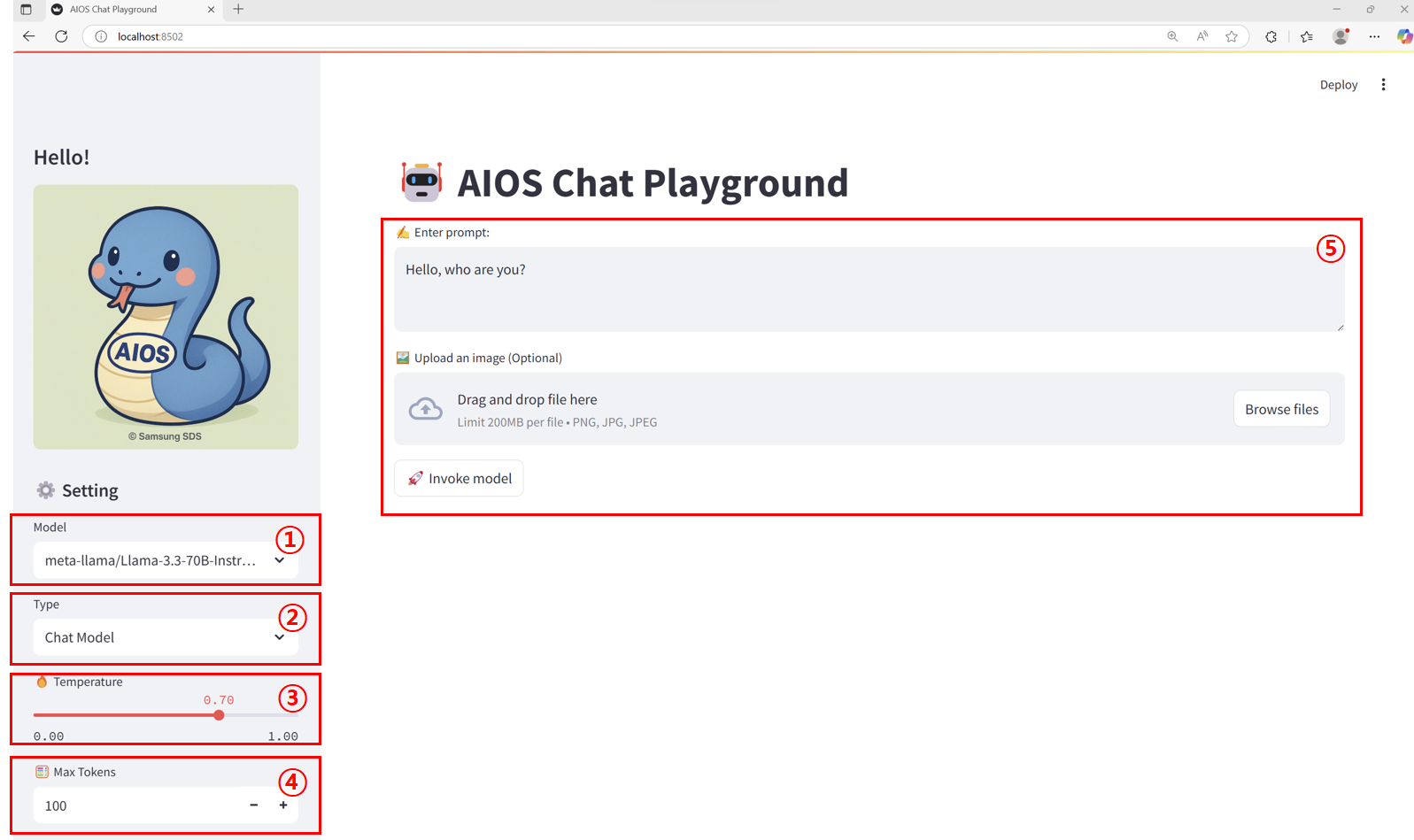
| Item | Description | |
|---|---|---|
| 1 | Model | This is a list of callable models set in the models.json file. |
| 2 | Endpoint type | must be selected according to the model call type set in the endpoints.json file to match the model |
| 3 | Temperature | The parameter that controls the degree of “randomness” or “creativity” of the model output. In this tutorial, it is specified in the range of 0.00 ~ 1.00.
|
| 4 | Max Tokens | Sets the maximum number of tokens that can be generated in the response text as an output length limit parameter. In this tutorial, it is specified in the range of 1 to 5000. |
| 5 | Input Area | The way to receive prompts, images, etc. varies depending on the endpoint type.
|
Calling the Chat Model
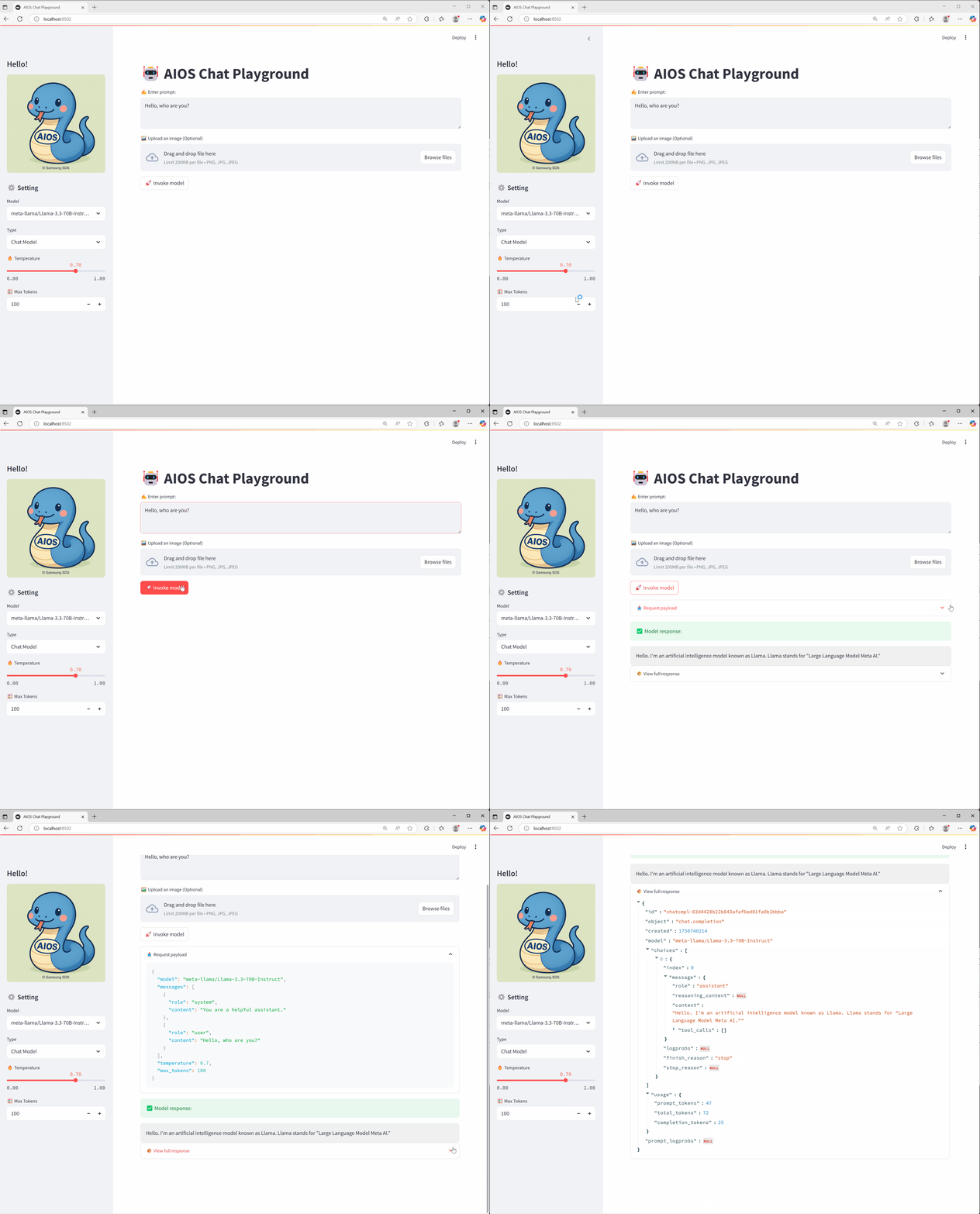
Image model calling
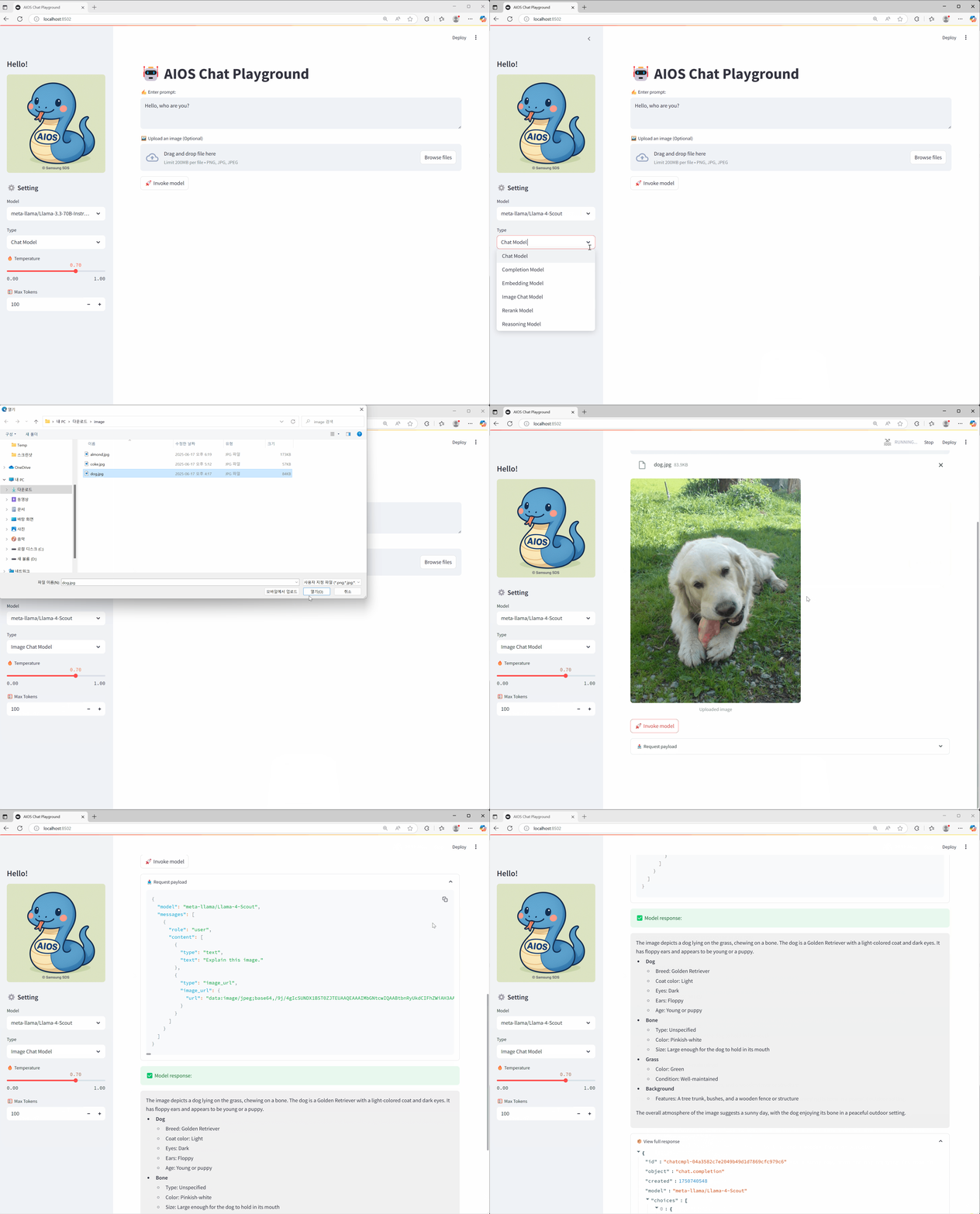
Reasoning model calling
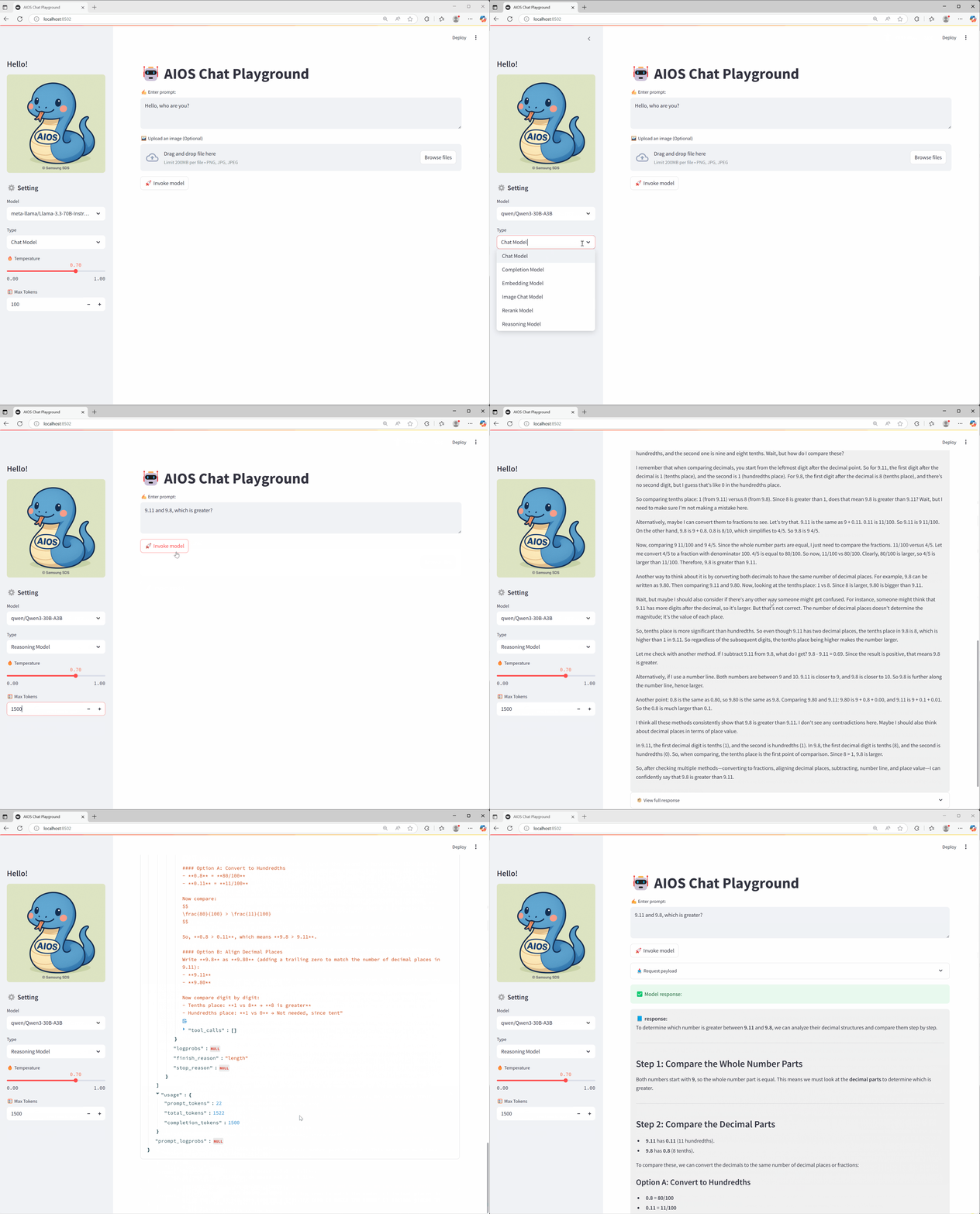
Conclusion
Through this tutorial, I hope you have learned how to build and utilize a Playground UI that can easily test various AI model APIs provided by AIOS, and you can flexibly customize it to fit your desired model and endpoint structure for actual service purposes.
Reference link
3.3.3 - Autogen
Goal
Using the AI model provided by AIOS, create an Autogen AI Agent application.
Autogen is an open-source framework that can easily build and manage LLM-based multi-agent collaboration and event-driven automation workflows.
environment
To proceed with this tutorial, the following environment must be prepared.
System Environment
- Python 3.10 +
- pip
Required packages for installation
pip install autogen-agentchat==0.6.1 autogen-ext[openai,mcp]==0.6.1 mcp-server-time==0.6.2pip install autogen-agentchat==0.6.1 autogen-ext[openai,mcp]==0.6.1 mcp-server-time==0.6.2System Architecture
Shows the entire flow of the agent architecture using multi AI agent architecture and MCP.
Travel Planning Agent Flow
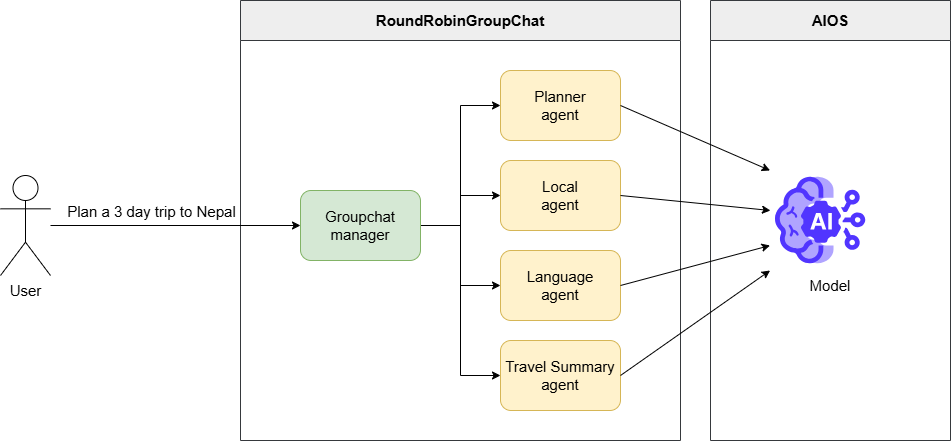
- The user requests to set up a 3-day Nepal travel plan
- Groupchat manger adjusts the execution order of registered agents (travel plan, local information, travel conversation, comprehensive summary)
- Each agent performs the given tasks collaboratively according to its respective role
- Once the final travel plan result is derived, deliver it to the user
MCP Flow
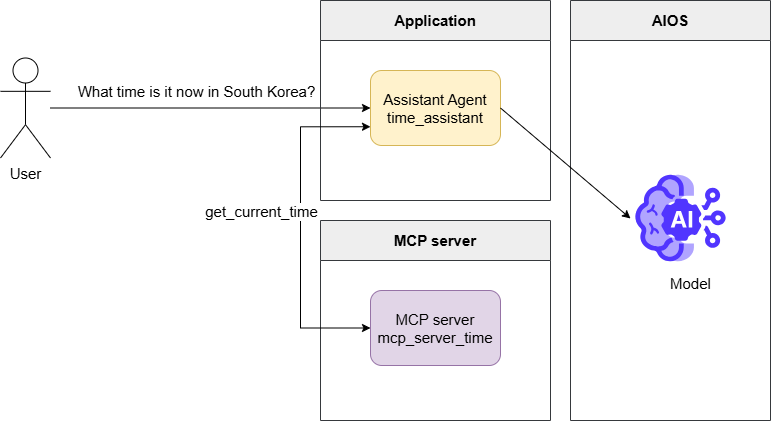
MCP
MCP(Model Context Protocol) is an open standard protocol that coordinates interactions between the model and external data or tools.
The MCP server is a server that implements this, using tool metadata to mediate and execute function calls.
- User queries about the current time in Korea
- mcp_server_time model request including metadata of a tool that can retrieve the current time via the server
get_current_timecalling the function tool calls message generation- Through the MCP server, by executing the
get_current_timefunction and passing the result to the model request, generate the final response and deliver it to the user.
Implementation
Travel Planning Agent
- Please refer to the LLM usage guide for the AIOS_BASE_URL AIOS_LLM_Private_Endpoint and the MODEL_ID of the MODEL.
autogen_travel_planning.py
from urllib.parse import urljoin

from autogen_agentchat.agents import AssistantAgent
from autogen_agentchat.conditions import TextMentionTermination
from autogen_agentchat.teams import RoundRobinGroupChat
from autogen_agentchat.ui import Console
from autogen_ext.models.openai import OpenAIChatCompletionClient
from autogen_core.models import ModelFamily


# Set the API URL and model name for model access.
AIOS_BASE_URL = "AIOS_LLM_Private_Endpoint"
MODEL = "MODEL_ID"

# Create a model client using OpenAIChatCompletionClient.
model_client = OpenAIChatCompletionClient(
    model=MODEL,
    base_url=urljoin(AIOS_BASE_URL, "v1"),
    api_key="EMPTY_KEY",
    model_info={
        # Set to True if images are supported.
        "vision": False,
        # Set to True if function calls are supported.
        "function_calling": True,
        # Set to True if JSON output is supported.
        "json_output": True,
        # If the model you want to use is not provided by ModelFamily, use UNKNOWN.
        # "family": ModelFamily.UNKNOWN,
        "family": ModelFamily.LLAMA_3_3_70B,
        # Set to True if supporting structured output.
        "structured_output": True,
    },
)

# Create multiple agents.
# Each agent performs roles such as travel planning, local activity recommendations, providing language tips, and summarizing travel plans.
planner_agent = AssistantAgent(
    "planner_agent",
    model_client=model_client,
    description="A helpful assistant that can plan trips.",
    system_message=("You are a helpful assistant that can suggest a travel plan "
                    "for a user based on their request."),
)

local_agent = AssistantAgent(
    "local_agent",
    model_client=model_client,
    description="A local assistant that can suggest local activities or places to visit.",
    system_message=("You are a helpful assistant that can suggest authentic and ""
                    "interesting local activities or places to visit for a user "
                    "and can utilize any context information provided."),
)

language_agent = AssistantAgent(
    "language_agent",
    model_client=model_client,
    description="A helpful assistant that can provide language tips for a given destination.",
    system_message=("You are a helpful assistant that can review travel plans, "
                    "providing feedback on important/critical tips about how best to address ""
                    "language or communication challenges for the given destination. ""
                    "If the plan already includes language tips, "
                    "you can mention that the plan is satisfactory, with rationale."),
)

travel_summary_agent = AssistantAgent(
    "travel_summary_agent",
    model_client=model_client,
    description="A helpful assistant that can summarize the travel plan.",
    system_message=("You are a helpful assistant that can take in all of the suggestions "
                    "and advice from the other agents and provide a detailed final travel plan. ""
                    "You must ensure that the final plan is integrated and complete. "
                    "YOUR FINAL RESPONSE MUST BE THE COMPLETE PLAN. "
                    "When the plan is complete and all perspectives are integrated, "
                    "you can respond with TERMINATE."),
)

# Group the agents and create a RoundRobinGroupChat.
# RoundRobinGroupChat adjusts so that agents perform tasks in the order they are registered, taking turns.
# This group enables agents to interact and make travel plans.
# The termination condition uses TextMentionTermination to end the group chat when the text "TERMINATE" is mentioned.
termination = TextMentionTermination("TERMINATE")
group_chat = RoundRobinGroupChat(
    [planner_agent, local_agent, language_agent, travel_summary_agent],
    termination_condition=termination,
)

async def main():
    """Main function, runs group chat and makes travel plans."""
    # Run a group chat to make travel plans.
    # User requests the task "Plan a 3 day trip to Nepal."
    # Print the results using the console.
    await Console(group_chat.run_stream(task="Plan a 3 day trip to Nepal."))
    await model_client.close()


if __name__ == "__main__":
    import asyncio

    asyncio.run(main())
from urllib.parse import urljoin
from autogen_agentchat.agents import AssistantAgent
from autogen_agentchat.conditions import TextMentionTermination
from autogen_agentchat.teams import RoundRobinGroupChat
from autogen_agentchat.ui import Console
from autogen_ext.models.openai import OpenAIChatCompletionClient
from autogen_core.models import ModelFamily
# Set the API URL and model name for model access.
AIOS_BASE_URL = "AIOS_LLM_Private_Endpoint"
MODEL = "MODEL_ID"
# Create a model client using OpenAIChatCompletionClient.
model_client = OpenAIChatCompletionClient(
model=MODEL,
base_url=urljoin(AIOS_BASE_URL, "v1"),
api_key="EMPTY_KEY",
model_info={
# Set to True if images are supported.
"vision": False,
# Set to True if function calls are supported.
"function_calling": True,
# Set to True if JSON output is supported.
"json_output": True,
# If the model you want to use is not provided by ModelFamily, use UNKNOWN.
# "family": ModelFamily.UNKNOWN,
"family": ModelFamily.LLAMA_3_3_70B,
# Set to True if supporting structured output.
"structured_output": True,
},
)
# Create multiple agents.
# Each agent performs roles such as travel planning, local activity recommendations, providing language tips, and summarizing travel plans.
planner_agent = AssistantAgent(
"planner_agent",
model_client=model_client,
description="A helpful assistant that can plan trips.",
system_message=("You are a helpful assistant that can suggest a travel plan "
"for a user based on their request."),
)
local_agent = AssistantAgent(
"local_agent",
model_client=model_client,
description="A local assistant that can suggest local activities or places to visit.",
system_message=("You are a helpful assistant that can suggest authentic and ""
"interesting local activities or places to visit for a user "
"and can utilize any context information provided."),
)
language_agent = AssistantAgent(
"language_agent",
model_client=model_client,
description="A helpful assistant that can provide language tips for a given destination.",
system_message=("You are a helpful assistant that can review travel plans, "
"providing feedback on important/critical tips about how best to address ""
"language or communication challenges for the given destination. ""
"If the plan already includes language tips, "
"you can mention that the plan is satisfactory, with rationale."),
)
travel_summary_agent = AssistantAgent(
"travel_summary_agent",
model_client=model_client,
description="A helpful assistant that can summarize the travel plan.",
system_message=("You are a helpful assistant that can take in all of the suggestions "
"and advice from the other agents and provide a detailed final travel plan. ""
"You must ensure that the final plan is integrated and complete. "
"YOUR FINAL RESPONSE MUST BE THE COMPLETE PLAN. "
"When the plan is complete and all perspectives are integrated, "
"you can respond with TERMINATE."),
)
# Group the agents and create a RoundRobinGroupChat.
# RoundRobinGroupChat adjusts so that agents perform tasks in the order they are registered, taking turns.
# This group enables agents to interact and make travel plans.
# The termination condition uses TextMentionTermination to end the group chat when the text "TERMINATE" is mentioned.
termination = TextMentionTermination("TERMINATE")
group_chat = RoundRobinGroupChat(
[planner_agent, local_agent, language_agent, travel_summary_agent],
termination_condition=termination,
)
async def main():
"""Main function, runs group chat and makes travel plans."""
# Run a group chat to make travel plans.
# User requests the task "Plan a 3 day trip to Nepal."
# Print the results using the console.
await Console(group_chat.run_stream(task="Plan a 3 day trip to Nepal."))
await model_client.close()
if __name__ == "__main__":
import asyncio
asyncio.run(main())When you run a file using python, you can see multiple agents working together, each performing its role for a single task.
python autogen_travel_planning.pypython autogen_travel_planning.pyExecution Result
---------- TextMessage (user) ----------
Plan a 3 day trip to Nepal.
---------- TextMessage (planner_agent) ----------
Nepal! A country with a rich cultural heritage, breathtaking natural beauty, and warm hospitality. Here's a suggested 3-day itinerary for your trip to Nepal:

**Day 1: Arrival in Kathmandu and Exploration of the City**

* Arrive at Tribhuvan International Airport in Kathmandu, the capital city of Nepal.
* Check-in to your hotel and freshen up.
* Visit the famous **Boudhanath Stupa**, one of the largest Buddhist stupas in the world.
* Explore the **Thamel** area, a popular tourist hub known for its narrow streets, shops, and restaurants.
* In the evening, enjoy a traditional Nepali dinner and watch a cultural performance at a local restaurant.

**Day 2: Kathmandu Valley Tour**

* Start the day with a visit to the **Pashupatinath Temple**, a sacred Hindu temple dedicated to Lord Shiva.
* Next, head to the **Kathmandu Durbar Square**, a UNESCO World Heritage Site and the former royal palace of the Malla kings.
* Visit the **Swayambhunath Stupa**, also known as the Monkey Temple, which offers stunning views of the city.
* In the afternoon, take a short drive to the **Patan City**, known for its rich cultural heritage and traditional crafts.
* Explore the **Patan Durbar Square** and visit the **Krishna Temple**, a beautiful example of Nepali architecture.

**Day 3: Bhaktapur and Nagarkot**

* Drive to **Bhaktapur**, a medieval town and a UNESCO World Heritage Site (approximately 1 hour).
* Explore the **Bhaktapur Durbar Square**, which features stunning architecture, temples, and palaces.
* Visit the **Pottery Square**, where you can see traditional pottery-making techniques.
* In the afternoon, drive to **Nagarkot**, a scenic hill station with breathtaking views of the Himalayas (approximately 1.5 hours).
* Watch the sunset over the Himalayas and enjoy the peaceful atmosphere.

**Additional Tips:**

* Make sure to try some local Nepali cuisine, such as momos, dal bhat, and gorkhali lamb.
* Bargain while shopping in the markets, as it's a common practice in Nepal.
* Respect local customs and traditions, especially when visiting temples and cultural sites.
* Stay hydrated and bring sunscreen, as the sun can be strong in Nepal.

**Accommodation:**

Kathmandu has a wide range of accommodation options, from budget-friendly guesthouses to luxury hotels. Some popular areas to stay include Thamel, Lazimpat, and Boudha.

**Transportation:**

You can hire a taxi or a private vehicle for the day to travel between destinations. Alternatively, you can use public transportation, such as buses or microbuses, which are affordable and convenient.

**Budget:**

The budget for a 3-day trip to Nepal can vary depending on your accommodation choices, transportation, and activities. However, here's a rough estimate:

* Accommodation: $20-50 per night
* Transportation: $10-20 per day
* Food: $10-20 per meal
* Activities: $10-20 per person

Total estimated budget for 3 days: $200-500 per person

I hope this helps, and you have a wonderful trip to Nepal!
---------- TextMessage (local_agent) ----------
Your 3-day itinerary for Nepal is well-planned and covers many of the country's cultural and natural highlights. Here are a few additional suggestions and tips to enhance your trip:

**Day 1:**

* After visiting the Boudhanath Stupa, consider exploring the surrounding streets, which are filled with Tibetan shops, restaurants, and monasteries.
* In the Thamel area, be sure to try some of the local street food, such as momos or sel roti.
* For dinner, consider trying a traditional Nepali restaurant, such as the Kathmandu Guest House or the Northfield Cafe.

**Day 2:**

* At the Pashupatinath Temple, be respectful of the Hindu rituals and customs. You can also take a stroll along the Bagmati River, which runs through the temple complex.
* At the Kathmandu Durbar Square, consider hiring a guide to provide more insight into the history and significance of the temples and palaces.
* In the afternoon, visit the Patan Museum, which showcases the art and culture of the Kathmandu Valley.

**Day 3:**

* In Bhaktapur, be sure to try some of the local pottery and handicrafts. You can also visit the Bhaktapur National Art Gallery, which features traditional Nepali art.
* At Nagarkot, consider taking a short hike to the nearby villages, which offer stunning views of the Himalayas.
* For sunset, find a spot with a clear view of the mountains, and enjoy the peaceful atmosphere.

**Additional Tips:**

* Nepal is a relatively conservative country, so dress modestly and respect local customs.
* Try to learn some basic Nepali phrases, such as "namaste" (hello) and "dhanyabaad" (thank you).
* Be prepared for crowds and chaos in the cities, especially in Thamel and Kathmandu Durbar Square.
* Consider purchasing a local SIM card or portable Wi-Fi hotspot to stay connected during your trip.

**Accommodation:**

* Consider staying in a hotel or guesthouse that is centrally located and has good reviews.
* Look for accommodations that offer amenities such as free Wi-Fi, hot water, and a restaurant or cafe.

**Transportation:**

* Consider hiring a private vehicle or taxi for the day, as this will give you more flexibility and convenience.
* Be sure to negotiate the price and agree on the itinerary before setting off.

**Budget:**

* Be prepared for variable prices and exchange rates, and have some local currency (Nepali rupees) on hand.
* Consider budgeting extra for unexpected expenses, such as transportation or food.

Overall, your itinerary provides a good balance of culture, history, and natural beauty, and with these additional tips and suggestions, you'll be well-prepared for an unforgettable trip to Nepal!
---------- TextMessage (language_agent) ----------
Your 3-day itinerary for Nepal is well-planned and covers many of the country's cultural and natural highlights. The additional suggestions and tips you provided are excellent and will help enhance the trip experience.

One aspect that is well-covered in your plan is the cultural and historical significance of the destinations. You have included a mix of temples, stupas, and cultural sites, which will give visitors a good understanding of Nepal's rich heritage.

Regarding language and communication challenges, your tip to "try to learn some basic Nepali phrases, such as 'namaste' (hello) and 'dhanyabaad' (thank you)" is excellent. This will help visitors show respect for the local culture and people, and can also facilitate interactions with locals.

Additionally, your suggestion to "consider purchasing a local SIM card or portable Wi-Fi hotspot to stay connected during your trip" is practical and will help visitors stay in touch with family and friends back home, as well as navigate the local area.

Your plan is satisfactory, and with the additional tips and suggestions, visitors will be well-prepared for an unforgettable trip to Nepal. The itinerary provides a good balance of culture, history, and natural beauty, and the tips on language, communication, and logistics will help ensure a smooth and enjoyable journey.

Overall, your plan is well-thought-out, and the additional suggestions and tips will help visitors make the most of their trip to Nepal. Well done!

However, one minor suggestion I might make is to consider including a few phrases in the local language for emergency situations, such as "where is the hospital?" or "how do I get to the airport?" This can help visitors in case of an unexpected situation, and can also give them more confidence when navigating unfamiliar areas.

But overall, your plan is excellent, and with these minor suggestions, it can be even more comprehensive and helpful for visitors to Nepal.
---------- TextMessage (travel_summary_agent) ----------
TERMINATE

Here is the complete and integrated 3-day travel plan to Nepal:

**Day 1: Arrival in Kathmandu and Exploration of the City**

* Arrive at Tribhuvan International Airport in Kathmandu, the capital city of Nepal.
* Check-in to your hotel and freshen up.
* Visit the famous **Boudhanath Stupa**, one of the largest Buddhist stupas in the world.
* Explore the surrounding streets, which are filled with Tibetan shops, restaurants, and monasteries.
* Explore the **Thamel** area, a popular tourist hub known for its narrow streets, shops, and restaurants. Be sure to try some of the local street food, such as momos or sel roti.
* In the evening, enjoy a traditional Nepali dinner and watch a cultural performance at a local restaurant, such as the Kathmandu Guest House or the Northfield Cafe.

**Day 2: Kathmandu Valley Tour**

* Start the day with a visit to the **Pashupatinath Temple**, a sacred Hindu temple dedicated to Lord Shiva. Be respectful of the Hindu rituals and customs, and take a stroll along the Bagmati River, which runs through the temple complex.
* Next, head to the **Kathmandu Durbar Square**, a UNESCO World Heritage Site and the former royal palace of the Malla kings. Consider hiring a guide to provide more insight into the history and significance of the temples and palaces.
* Visit the **Swayambhunath Stupa**, also known as the Monkey Temple, which offers stunning views of the city.
* In the afternoon, visit the **Patan City**, known for its rich cultural heritage and traditional crafts. Explore the **Patan Durbar Square** and visit the **Krishna Temple**, a beautiful example of Nepali architecture. Also, visit the Patan Museum, which showcases the art and culture of the Kathmandu Valley.

**Day 3: Bhaktapur and Nagarkot**

* Drive to **Bhaktapur**, a medieval town and a UNESCO World Heritage Site (approximately 1 hour). Explore the **Bhaktapur Durbar Square**, which features stunning architecture, temples, and palaces. Be sure to try some of the local pottery and handicrafts, and visit the Bhaktapur National Art Gallery, which features traditional Nepali art.
* In the afternoon, drive to **Nagarkot**, a scenic hill station with breathtaking views of the Himalayas (approximately 1.5 hours). Consider taking a short hike to the nearby villages, which offer stunning views of the Himalayas. Find a spot with a clear view of the mountains, and enjoy the peaceful atmosphere during sunset.

**Additional Tips:**

* Make sure to try some local Nepali cuisine, such as momos, dal bhat, and gorkhali lamb.
* Bargain while shopping in the markets, as it's a common practice in Nepal.
* Respect local customs and traditions, especially when visiting temples and cultural sites.
* Stay hydrated and bring sunscreen, as the sun can be strong in Nepal.
* Dress modestly and respect local customs, as Nepal is a relatively conservative country.
* Try to learn some basic Nepali phrases, such as "namaste" (hello), "dhanyabaad" (thank you), "where is the hospital?" and "how do I get to the airport?".
* Consider purchasing a local SIM card or portable Wi-Fi hotspot to stay connected during your trip.
* Be prepared for crowds and chaos in the cities, especially in Thamel and Kathmandu Durbar Square.

**Accommodation:**

* Consider staying in a hotel or guesthouse that is centrally located and has good reviews.
* Look for accommodations that offer amenities such as free Wi-Fi, hot water, and a restaurant or cafe.

**Transportation:**

* Consider hiring a private vehicle or taxi for the day, as this will give you more flexibility and convenience.
* Be sure to negotiate the price and agree on the itinerary before setting off.

**Budget:**

* The budget for a 3-day trip to Nepal can vary depending on your accommodation choices, transportation, and activities. However, here's a rough estimate:
        + Accommodation: $20-50 per night
        + Transportation: $10-20 per day
        + Food: $10-20 per meal
        + Activities: $10-20 per person
* Total estimated budget for 3 days: $200-500 per person
* Be prepared for variable prices and exchange rates, and have some local currency (Nepali rupees) on hand.
* Consider budgeting extra for unexpected expenses, such as transportation or food.
Agent-specific conversation summary
| Agent | Conversation summary |
|---|---|
| planner_agent | I propose a 3-day travel itinerary for Nepal. Additional tips: Respect local customs, try local food, choose transportation options, etc |
| local_agent | Based on planner_agent’s 3-day travel itinerary, we provide additional suggestions and tips. Additional tips: Respect local customs, learn basic Nepali, use local facilities, etc |
| language_agent | Travel itinerary evaluation and provide additional suggestions. Basic Nepali learning, use of local facilities, language preparation for emergency situations, etc. |
| travel_summary_agent | Summarizes the overall 3-day travel plan. Additional tips: Respect local customs, try local food, choose transportation options, etc. |
MCP Utilization Agent
- Please refer to the LLM usage guide for the AIOS_BASE_URL AIOS_LLM_Private_Endpoint and the MODEL_ID of the MODEL.
autogen_mcp.py
from urllib.parse import urljoin

from autogen_core.models import ModelFamily
from autogen_ext.models.openai import OpenAIChatCompletionClient
from autogen_ext.tools.mcp import McpWorkbench, StdioServerParams
from autogen_agentchat.agents import AssistantAgent
from autogen_agentchat.ui import Console

# Set the API URL and model name for model access.
AIOS_BASE_URL = "AIOS_LLM_Private_Endpoint"
MODEL = "MODEL_ID"

# Create a model client using OpenAIChatCompletionClient.
model_client = OpenAIChatCompletionClient(
    model=MODEL,
    base_url=urljoin(AIOS_BASE_URL, "v1"),
    api_key="EMPTY_KEY",
    model_info={
        # Set to True if images are supported.
        "vision": False,
        # Set to True if function calls are supported.
        "function_calling": True,
        # Set to True if JSON output is supported.
        "json_output": True,
        # If the model you want to use is not provided by ModelFamily, use UNKNOWN.
        # "family": ModelFamily.UNKNOWN,
        "family": ModelFamily.LLAMA_3_3_70B,
        # Set to True if supporting structured output.
        "structured_output": True,
    }
")"


# Set MCP server parameters.
# mcp_server_time is an MCP server implemented in python,
# It includes the get_current_time function that provides the current time internally, and the convert_time function that converts time zones.
# This parameter sets the MCP server to the local timezone so that the time can be checked.
# For example, if you set it to "Asia/Seoul", you can check the time according to the Korean time zone.
mcp_server_params = StdioServerParams(
    command="python",
    args=["-m", "mcp_server_time", "--local-timezone", "Asia/Seoul"],
)

async def main():
    """Runs the agent that checks the time using the MCP workbench as the main function."""
    # Create and run an agent that checks the time using the MCP workbench.
    # The agent performs the task "What time is it now in South Korea?"
    # Print the results using the console.
    # while the MCP Workbench is running, the agent checks the time
    # Output the results in streaming mode.
    # If MCP Workbench terminates, the agent also terminates.
    async with McpWorkbench(mcp_server_params) as workbench:
        time_agent = AssistantAgent(
            "time_assistant",
            model_client=model_client,
            workbench=workbench,
            reflect_on_tool_use=True,
        )
        await Console(time_agent.run_stream(task="What time is it now in South Korea?"))
    await model_client.close()


if __name__ == "__main__":
    import asyncio
    asyncio.run(main())
from urllib.parse import urljoin
from autogen_core.models import ModelFamily
from autogen_ext.models.openai import OpenAIChatCompletionClient
from autogen_ext.tools.mcp import McpWorkbench, StdioServerParams
from autogen_agentchat.agents import AssistantAgent
from autogen_agentchat.ui import Console
# Set the API URL and model name for model access.
AIOS_BASE_URL = "AIOS_LLM_Private_Endpoint"
MODEL = "MODEL_ID"
# Create a model client using OpenAIChatCompletionClient.
model_client = OpenAIChatCompletionClient(
model=MODEL,
base_url=urljoin(AIOS_BASE_URL, "v1"),
api_key="EMPTY_KEY",
model_info={
# Set to True if images are supported.
"vision": False,
# Set to True if function calls are supported.
"function_calling": True,
# Set to True if JSON output is supported.
"json_output": True,
# If the model you want to use is not provided by ModelFamily, use UNKNOWN.
# "family": ModelFamily.UNKNOWN,
"family": ModelFamily.LLAMA_3_3_70B,
# Set to True if supporting structured output.
"structured_output": True,
}
")"
# Set MCP server parameters.
# mcp_server_time is an MCP server implemented in python,
# It includes the get_current_time function that provides the current time internally, and the convert_time function that converts time zones.
# This parameter sets the MCP server to the local timezone so that the time can be checked.
# For example, if you set it to "Asia/Seoul", you can check the time according to the Korean time zone.
mcp_server_params = StdioServerParams(
command="python",
args=["-m", "mcp_server_time", "--local-timezone", "Asia/Seoul"],
)
async def main():
"""Runs the agent that checks the time using the MCP workbench as the main function."""
# Create and run an agent that checks the time using the MCP workbench.
# The agent performs the task "What time is it now in South Korea?"
# Print the results using the console.
# while the MCP Workbench is running, the agent checks the time
# Output the results in streaming mode.
# If MCP Workbench terminates, the agent also terminates.
async with McpWorkbench(mcp_server_params) as workbench:
time_agent = AssistantAgent(
"time_assistant",
model_client=model_client,
workbench=workbench,
reflect_on_tool_use=True,
)
await Console(time_agent.run_stream(task="What time is it now in South Korea?"))
await model_client.close()
if __name__ == "__main__":
import asyncio
asyncio.run(main())When you run the file using python, it fetches the tool’s metadata from the MCP server, calls the model, and when the model generates a tool calls message
You can see that the get_current_time function is executed to retrieve the current time.
python autogen_mcp.pypython autogen_mcp.pyExecution result
# TextMessage (user): Input message given by the user
---------- TextMessage (user) ----------
What time is it now in South Korea?
# Query metadata of tools that can be used on the MCP server
INFO:mcp.server.lowlevel.server:Processing request of type ListToolsRequest
...omission...
INFO:autogen_core.events:{
  # Metadata of tools available on the MCP server
  "tools": [
    {
      "type": "function",
      "function": {
        "name": "get_current_time",
        "description": "Get current time in a specific timezones",
        "parameters": {
          "type": "object",
          "properties": {
            "timezone": {
              "type": "string",
              "description": "IANA timezone name (e.g., 'America/New_York', 'Europe/London'). Use 'Asia/Seoul' as local timezone if no timezone provided by the user."
            }
          },
          "required": ["

            "timezone
          ],
          "additionalProperties": false
        },
        "strict": false
      }
    },
    {
      "type": "function",
      "function": {
        "name": "convert_time",
        "description": "Convert time between timezones",
        "parameters": {
          "type": "object",
          "properties": {
            "source_timezone": {
              "type": "string",
              "description": "Source IANA timezone name (e.g., 'America/New_York', 'Europe/London'). Use 'Asia/Seoul' as local timezone if no source timezone provided by the user."
            },
            "time": {
              "type": "string",
              "description": "Time to convert in 24-hour format (HH:MM)"
            },
            "target_timezone": {
              "type": "string",
              "description": "Target IANA timezone name (e.g., 'Asia/Tokyo', 'America/San_Francisco'). Use 'Asia/Seoul' as local timezone if no target timezone provided by the user."
            }
          },
          "required": [
            "source_timezone",
            "time",
            "target_timezone"
          ],
          "additionalProperties": false
        },
        "strict": false
      }
    }
  ],
  "type": "LLMCall",
  # input message
  "messages": [
    {
      "content": "You are a helpful AI assistant. Solve tasks using your tools. Reply with TERMINATE when the task has been completed.",
      "role": "system"
    },
    {
      "role": "user",
      "name": "user",
      "content": "What time is it now in South Korea?"
    }
  ],
  # Model Response
  "response": {
    "id": "chatcmpl-xxxxxxxxxxxxxxxxxxxxxxxxxxxxxxxx",
    "choices": [
      {
        "finish_reason": "tool_calls",
        "index": 0,
        "logprobs": null,
        "message": {
          "content": null,
          "refusal": null,
          "role": "assistant",
          "annotations": null,
          "audio": null,
          "function_call": null,
          "tool_calls": ["

            {
              "id": "chatcmpl-tool-xxxxxxxxxxxxxxxxxxxxxxxxxxxxxxxx",
              "function": {
                "arguments": "{\"timezone\": \"Asia/Seoul\"}",
                "name": "get_current_time"
              },
              "type": "function"
            }
          ],
          "reasoning_content": null
        },
        "stop_reason": 128008
      }
    ],
    "created": 1751278737,
    "model": "MODEL_ID",
    "object": "chat.completion",
    "service_tier": null,
    "system_fingerprint": null,
    "usage": {
      "completion_tokens": 21,
      "prompt_tokens": 508,
      "total_tokens": 529,
      "completion_tokens_details": null,
      "prompt_tokens_details": null
    },
    "prompt_logprobs": null
  },
  "prompt_tokens": 508,
  "completion_tokens": 21,
  "agent_id": null
}
# ToolCallRequestEvent: Receiving a tool call message from the model
---------- ToolCallRequestEvent (time_assistant) ----------
[FunctionCall(id='chatcmpl-tool-xxxxxxxxxxxxxxxxxxxxxxxxxxxxxxxx', arguments='{"timezone": "Asia/Seoul"}', name='get_current_time')]
INFO:mcp.server.lowlevel.server:Processing request of type ListToolsRequest
# Execute function of tool call message via MCP server
INFO:mcp.server.lowlevel.server:Processing request of type CallToolRequest
# ToolCallExecutionEvent: Deliver the function execution result to the model
---------- ToolCallExecutionEvent (time_assistant) ----------
[FunctionExecutionResult(content='{
  "timezone": "Asia/Seoul",
  "datetime": "2025-06-30T19:18:58+09:00",
  "is_dst": false
}', name='get_current_time', call_id='chatcmpl-tool-xxxxxxxxxxxxxxxxxxxxxxxxxxxxxxxx', is_error=False)]
...omission...
# TextMessage (time_assistant): Final answer generated by the model
---------- TextMessage (time_assistant) ----------
The current time in South Korea is 19:18:58 KST.
TERMINATE
MCP Server Time Query System Log Analysis Result
MCP(Model Control Protocol) server-based time query system execution process log analysis result.
Request Information
| Item | Content |
|---|---|
| User request | What time is it now in South Korea? |
| Request Time | 2025-06-30 19:18:58 KST |
| Processing method | MCP server tool call |
Available tools
| Tool Name | Description | Parameter | Default Value |
|---|---|---|---|
get_current_time | Retrieve current time of a specific timezone | timezone (IANA timezone name) | Asia/Seoul |
convert_time | Time conversion between time zones | source_timezone, time, target_timezone | Asia/Seoul |
Processing steps
| Step | Action | Details |
|---|---|---|
| 1 | Tool metadata lookup | Verify the list of tools available on the MCP server |
| 2 | AI model response | get_current_time function called in the Asia/Seoul timezone |
| 3 | Function execution | MCP server runs time lookup tool |
| 4 | Return result | Provide time information in structured JSON format |
| 5 | Final Answer | Deliver time to the user in an easy-to-read format |
Function Call Details
| Item | Value |
|---|---|
| function name | get_current_time |
| Parameter | {"timezone": "Asia/Seoul"} |
| Call ID | chatcmpl-tool-xxxxxxxxxxxxxxxxxxxxxxxxxxxxxxxx |
| type | function |
Execution result
| Field | Value | Description |
|---|---|---|
timezone | Asia/Seoul | Time zone |
datetime | 2025-06-30T19:18:58+09:00 | ISO 8601 format time |
is_dst | false | Daylight saving time applied |
final response
| Item | Content |
|---|---|
| Response Message | The current time in South Korea is 19:18:58 KST. |
| Completion mark | TERMINATE |
| Response Time | 19:18:58 KST |
Usage metric table
| indicator | value |
|---|---|
| Prompt Token | 508 |
| completion token | 21 |
| Total token usage | 529 |
| Processing time | Immediate (real-time) |
Main features
| Feature | Description |
|---|---|
| MCP protocol utilization | Smooth integration with external tools |
| Korean time zone default setting | Asia/Seoul used as default |
| Structured response | Clear data return in JSON format |
| Auto-complete display | Work completion notification with TERMINATE |
| Real-time information provision | Accurate current time lookup |
Technical significance
This is an example of a modern architecture where an AI assistant integrates with external systems to provide real-time information. Through MCP, the AI model can access various external tools and services, enabling more practical and dynamic responses.
Conclusion
In this tutorial, we implemented an application that creates travel itineraries using multiple agents by leveraging the AI model provided by AIOS and autogen, and an agent application that can use external tools by utilizing the MCP server. Through this, we learned that problems can be solved from multiple angles using several agents with different perspectives, and external tools can be utilized. This system can be expanded and customized to fit user environments in the following ways.
- Agent flow control: Various techniques can be used when selecting the agent to perform the task. For reliable results, you can fix the order of agents and implement it, or you can let the AI model choose the agents for flexible processing. Additionally, you can use event techniques to implement multiple agents processing tasks in parallel.
- Introduction of various MCP servers: In addition to mcp_server_time, various MCP servers that have already been implemented exist. By utilizing these, the AI model can flexibly use various external tools to implement useful applications.
Based on this tutorial, we hope you will directly build a suitable AIOS-based collaborative assistant according to the actual service purpose.
Reference link
https://microsoft.github.io/autogen
https://modelcontextprotocol.io/
https://github.com/modelcontextprotocol/servers
3.4 -
4 - Release Note
- The AIOS service has been officially launched.
- On Samsung Cloud Platform, you can create Virtual Server, GPU Server, Kubernetes Engine resources and use LLM on those resources.
5 - Licenses
AIOS Licenses
The license information for each AIOS provided model is as follows.
| Model | License |
|---|---|
| openai/gpt-oss-120b | Apache 2.0 |
| Qwen/Qwen3-Coder-30B-A3B-Instruct | Apache 2.0 |
| Qwen/Qwen3-30B-A3B-Thinking-2507 | Apache 2.0 |
| meta-llama/Llama-4-Scout | llama4 |
| meta-llama/Llama-Guard-4-12B | llama4 |
| sds/bge-m3 | Samsung SDS |
| sds/bge-reranker-v2-m3 | Samsung SDS |
5.1 - Llama-4-Scout
LLAMA 4 COMMUNITY LICENSE AGREEMENT
Llama 4 Version Effective Date: April 5, 2025
“Agreement” means the terms and conditions for use, reproduction, distribution and modification of the Llama Materials set forth herein.
Documentation" means the specifications, manuals and documentation accompanying Llama 4 distributed by Meta at https://www.llama.com/docs/overview.
“Licensee” or “you” means you, or your employer or any other person or entity (if you are entering into this Agreement on such person or entity’s behalf), of the age required under applicable laws, rules or regulations to provide legal consent and that has legal authority to bind your employer or such other person or entity if you are entering in this Agreement on their behalf.
Llama 4" means the foundational large language models and software and algorithms, including machine-learning model code, trained model weights, inference-enabling code, training-enabling code, fine-tuning enabling code and other elements of the foregoing distributed by Meta at https://www.llama.com/llama-downloads.
Llama Materials" means, collectively, Meta’s proprietary Llama 4 and Documentation (and any portion thereof) made available under this Agreement.
Meta" or “we” means Meta Platforms Ireland Limited (if you are located in or, if you are an entity, your principal place of business is in the EEA or Switzerland) and Meta Platforms, Inc. (if you are located outside of the EEA or Switzerland).
By clicking “I Accept” below or by using or distributing any portion or element of the Llama Materials, you agree to be bound by this Agreement.
1. License Rights and Redistribution.
a. Grant of Rights. You are granted a non-exclusive, worldwide, non-transferable and royalty-free limited license under Meta’s intellectual property or other rights owned by Meta embodied in the Llama Materials to use, reproduce, distribute, copy, create derivative works of, and make modifications to the Llama Materials.

b. Redistribution and Use.

    i. If you distribute or make available the Llama Materials (or any derivative works thereof), or a product or service (including another AI model) that contains any of them, you shall (A) provide a copy of this Agreement with any such Llama Materials; and (B) prominently display "Built with Llama" on a related website, user interface, blogpost, about page, or product documentation. If you use the Llama Materials or any outputs or results of the Llama Materials to create, train, fine tune, or otherwise improve an AI model, which is distributed or made available, you shall also include "Llama" at the beginning of any such AI model name.

    ii. If you receive Llama Materials, or any derivative works thereof, from a Licensee as part of an integrated end user product, then Section 2 of this Agreement will not apply to you.

    iii. You must retain in all copies of the Llama Materials that you distribute the following attribution notice within a "Notice" text file distributed as a part of such copies: "Llama 4 is licensed under the Llama 4 Community License, Copyright © Meta Platforms, Inc. All Rights Reserved."

    iv. Your use of the Llama Materials must comply with applicable laws and regulations (including trade compliance laws and regulations) and adhere to the Acceptable Use Policy for the Llama Materials (available at [https://www.llama.com/llama4/use-policy](https://www.llama.com/llama4/use-policy)), which is hereby incorporated by reference into this Agreement.
2. Additional Commercial Terms. If, on the Llama 4 version release date, the monthly active users of the products or services made available by or for Licensee, or Licensee’s affiliates, is greater than 700 million monthly active users in the preceding calendar month, you must request a license from Meta, which Meta may grant to you in its sole discretion, and you are not authorized to exercise any of the rights under this Agreement unless or until Meta otherwise expressly grants you such rights.
3. Disclaimer of Warranty. UNLESS REQUIRED BY APPLICABLE LAW, THE LLAMA MATERIALS AND ANY OUTPUT AND RESULTS THEREFROM ARE PROVIDED ON AN “AS IS” BASIS, WITHOUT WARRANTIES OF ANY KIND, AND META DISCLAIMS ALL WARRANTIES OF ANY KIND, BOTH EXPRESS AND IMPLIED, INCLUDING, WITHOUT LIMITATION, ANY WARRANTIES OF TITLE, NON-INFRINGEMENT, MERCHANTABILITY, OR FITNESS FOR A PARTICULAR PURPOSE. YOU ARE SOLELY RESPONSIBLE FOR DETERMINING THE APPROPRIATENESS OF USING OR REDISTRIBUTING THE LLAMA MATERIALS AND ASSUME ANY RISKS ASSOCIATED WITH YOUR USE OF THE LLAMA MATERIALS AND ANY OUTPUT AND RESULTS.
4. Limitation of Liability. IN NO EVENT WILL META OR ITS AFFILIATES BE LIABLE UNDER ANY THEORY OF LIABILITY, WHETHER IN CONTRACT, TORT, NEGLIGENCE, PRODUCTS LIABILITY, OR OTHERWISE, ARISING OUT OF THIS AGREEMENT, FOR ANY LOST PROFITS OR ANY INDIRECT, SPECIAL, CONSEQUENTIAL, INCIDENTAL, EXEMPLARY OR PUNITIVE DAMAGES, EVEN IF META OR ITS AFFILIATES HAVE BEEN ADVISED OF THE POSSIBILITY OF ANY OF THE FOREGOING.
5. Intellectual Property.
a. No trademark licenses are granted under this Agreement, and in connection with the Llama Materials, neither Meta nor Licensee may use any name or mark owned by or associated with the other or any of its affiliates, except as required for reasonable and customary use in describing and redistributing the Llama Materials or as set forth in this Section 5(a). Meta hereby grants you a license to use "Llama" (the "Mark") solely as required to comply with the last sentence of Section 1.b.i. You will comply with Meta’s brand guidelines (currently accessible at [https://about.meta.com/brand/resources/meta/company-brand/](https://about.meta.com/brand/resources/meta/company-brand/)[)](https://en.facebookbrand.com/)). All goodwill arising out of your use of the Mark will inure to the benefit of Meta.

b. Subject to Meta’s ownership of Llama Materials and derivatives made by or for Meta, with respect to any derivative works and modifications of the Llama Materials that are made by you, as between you and Meta, you are and will be the owner of such derivative works and modifications.

c. If you institute litigation or other proceedings against Meta or any entity (including a cross-claim or counterclaim in a lawsuit) alleging that the Llama Materials or Llama 4 outputs or results, or any portion of any of the foregoing, constitutes infringement of intellectual property or other rights owned or licensable by you, then any licenses granted to you under this Agreement shall terminate as of the date such litigation or claim is filed or instituted. You will indemnify and hold harmless Meta from and against any claim by any third party arising out of or related to your use or distribution of the Llama Materials.
6. Term and Termination. The term of this Agreement will commence upon your acceptance of this Agreement or access to the Llama Materials and will continue in full force and effect until terminated in accordance with the terms and conditions herein. Meta may terminate this Agreement if you are in breach of any term or condition of this Agreement. Upon termination of this Agreement, you shall delete and cease use of the Llama Materials. Sections 3, 4 and 7 shall survive the termination of this Agreement.
7. Governing Law and Jurisdiction. This Agreement will be governed and construed under the laws of the State of California without regard to choice of law principles, and the UN Convention on Contracts for the International Sale of Goods does not apply to this Agreement. The courts of California shall have exclusive jurisdiction of any dispute arising out of this Agreement.
5.2 - Llama-Guard-4-12B
LLAMA 4 COMMUNITY LICENSE AGREEMENT
Llama 4 Version Effective Date: April 5, 2025

“Agreement” means the terms and conditions for use, reproduction, distribution and modification of the Llama Materials set forth herein.
“Documentation” means the specifications, manuals and documentation accompanying Llama 4 distributed by Meta at https://www.llama.com/docs/overview.
“Licensee” or “you” means you, or your employer or any other person or entity (if you are entering into this Agreement on such person or entity’s behalf), of the age required under applicable laws, rules or regulations to provide legal consent and that has legal authority to bind your employer or such other person or entity if you are entering in this Agreement on their behalf.
“Llama 4” means the foundational large language models and software and algorithms, including machine-learning model code, trained model weights, inference-enabling code, training-enabling code, fine-tuning enabling code and other elements of the foregoing distributed by Meta at https://www.llama.com/llama-downloads.
“Llama Materials” means, collectively, Meta’s proprietary Llama 4 and Documentation (and any portion thereof) made available under this Agreement.
“Meta” or “we” means Meta Platforms Ireland Limited (if you are located in or, if you are an entity, your principal place of business is in the EEA or Switzerland) and Meta Platforms, Inc. (if you are located outside of the EEA or Switzerland).
By clicking “I Accept” below or by using or distributing any portion or element of the Llama Materials, you agree to be bound by this Agreement.

1. License Rights and Redistribution.
a. Grant of Rights. You are granted a non-exclusive, worldwide, non-transferable and royalty- free limited license under Meta’s intellectual property or other rights owned by Meta embodied in the Llama Materials to use, reproduce, distribute, copy, create derivative works of, and make modifications to the Llama Materials.
    b. Redistribution and Use.
        i. If you distribute or make available the Llama Materials (or any derivative works thereof), or a product or service (including another AI model) that contains any of them, you shall (A) provide a copy of this Agreement with any such Llama Materials; and (B) prominently display “Built with Llama” on a related website, user interface, blogpost, about page, or product documentation. If you use the Llama Materials or any outputs or results of the Llama Materials to create, train, fine tune, or otherwise improve an AI model, which is distributed or made available, you shall also include “Llama” at the beginning of any such AI model name.

        ii. If you receive Llama Materials, or any derivative works thereof, from a Licensee as part of an integrated end user product, then Section 2 of this Agreement will not apply to you.

        iii. You must retain in all copies of the Llama Materials that you distribute the following attribution notice within a “Notice” text file distributed as a part of such copies: “Llama 4 is licensed under the Llama 4 Community License, Copyright © Meta Platforms, Inc. All Rights Reserved.”

        iv. Your use of the Llama Materials must comply with applicable laws and regulations (including trade compliance laws and regulations) and adhere to the Acceptable Use Policy for the Llama Materials (available at https://llama.com/llama4/use-policy), which is hereby incorporated by reference into this Agreement.
2. Additional Commercial Terms. If, on the Llama 4 version release date, the monthly active users of the products or services made available by or for Licensee, or Licensee’s affiliates, is greater than 700 million monthly active users in the preceding calendar month, you must request a license from Meta, which Meta may grant to you in its sole discretion, and you are not authorized to exercise any of the rights under this Agreement unless or until Meta otherwise expressly grants you such rights.
3. Disclaimer of Warranty. UNLESS REQUIRED BY APPLICABLE LAW, THE LLAMA MATERIALS AND ANY OUTPUT AND RESULTS THEREFROM ARE PROVIDED ON AN “AS IS” BASIS, WITHOUT WARRANTIES OF ANY KIND, AND META DISCLAIMS ALL WARRANTIES OF ANY KIND, BOTH EXPRESS AND IMPLIED, INCLUDING, WITHOUT LIMITATION, ANY WARRANTIES OF TITLE, NON-INFRINGEMENT, MERCHANTABILITY, OR FITNESS FOR A PARTICULAR PURPOSE. YOU ARE SOLELY RESPONSIBLE FOR DETERMINING THE APPROPRIATENESS OF USING OR REDISTRIBUTING THE LLAMA MATERIALS AND ASSUME ANY RISKS ASSOCIATED WITH YOUR USE OF THE LLAMA MATERIALS AND ANY OUTPUT AND RESULTS.
4. Limitation of Liability. IN NO EVENT WILL META OR ITS AFFILIATES BE LIABLE UNDER ANY THEORY OF LIABILITY, WHETHER IN CONTRACT, TORT, NEGLIGENCE, PRODUCTS LIABILITY, OR OTHERWISE, ARISING OUT OF THIS AGREEMENT, FOR ANY LOST PROFITS OR ANY INDIRECT, SPECIAL, CONSEQUENTIAL, INCIDENTAL, EXEMPLARY OR PUNITIVE DAMAGES, EVEN IF META OR ITS AFFILIATES HAVE BEEN ADVISED OF THE POSSIBILITY OF ANY OF THE FOREGOING.
5. Intellectual Property.
a. No trademark licenses are granted under this Agreement, and in connection with the Llama Materials, neither Meta nor Licensee may use any name or mark owned by or associated with the other or any of its affiliates, except as required for reasonable and customary use in describing and redistributing the Llama Materials or as set forth in this Section 5(a). Meta hereby grants you a license to use “Llama” (the “Mark”) solely as required to comply with the last sentence of Section 1.b.i. You will comply with Meta’s brand guidelines (currently accessible at https://about.meta.com/brand/resources/meta/company-brand/). All goodwill arising out of your use of the Mark will inure to the benefit of Meta.
b. Subject to Meta’s ownership of Llama Materials and derivatives made by or for Meta, with respect to any derivative works and modifications of the Llama Materials that are made by you, as between you and Meta, you are and will be the owner of such derivative works and modifications.
c. If you institute litigation or other proceedings against Meta or any entity (including a cross- claim or counterclaim in a lawsuit) alleging that the Llama Materials or Llama 4 outputs or results, or any portion of any of the foregoing, constitutes infringement of intellectual property or other rights owned or licensable by you, then any licenses granted to you under this Agreement shall terminate as of the date such litigation or claim is filed or instituted. You will indemnify and hold harmless Meta from and against any claim by any third party arising out of or related to your use or distribution of the Llama Materials.
6. Term and Termination. The term of this Agreement will commence upon your acceptance of this Agreement or access to the Llama Materials and will continue in full force and effect until terminated in accordance with the terms and conditions herein. Meta may terminate this Agreement if you are in breach of any term or condition of this Agreement. Upon termination of this Agreement, you shall delete and cease use of the Llama Materials. Sections 3, 4 and 7 shall survive the termination of this Agreement.
7. Governing Law and Jurisdiction. This Agreement will be governed and construed under the laws of the State of California without regard to choice of law principles, and the UN Convention on Contracts for the International Sale of Goods does not apply to this Agreement. The courts of California shall have exclusive jurisdiction of any dispute arising out of this Agreement.
5.3 - bge-m3
MIT License

Copyright (c) [year] [fullname]

Permission is hereby granted, free of charge, to any person obtaining a copy
of this software and associated documentation files (the "Software"), to deal
in the Software without restriction, including without limitation the rights
to use, copy, modify, merge, publish, distribute, sublicense, and/or sell
copies of the Software, and to permit persons to whom the Software is
furnished to do so, subject to the following conditions:

The above copyright notice and this permission notice shall be included in all
copies or substantial portions of the Software.

THE SOFTWARE IS PROVIDED "AS IS", WITHOUT WARRANTY OF ANY KIND, EXPRESS OR
IMPLIED, INCLUDING BUT NOT LIMITED TO THE WARRANTIES OF MERCHANTABILITY,
FITNESS FOR A PARTICULAR PURPOSE AND NONINFRINGEMENT. IN NO EVENT SHALL THE
AUTHORS OR COPYRIGHT HOLDERS BE LIABLE FOR ANY CLAIM, DAMAGES OR OTHER
LIABILITY, WHETHER IN AN ACTION OF CONTRACT, TORT OR OTHERWISE, ARISING FROM,
OUT OF OR IN CONNECTION WITH THE SOFTWARE OR THE USE OR OTHER DEALINGS IN THE
SOFTWARE.
5.4 - bge-reranker-v2-m3
Model Overview
To strengthen Korean search ability based on BGE Reranker, using public dataset aihub 016(administration), 021(books), 151(law/finance), and 1.1 million general knowledge (Query-Passage Pair) to enhance Korean-based re‑ranking ability
- Model type: Reranker
- Main usage: Vector Search (RAG)
- Vocab.size: 250,002
- Version info: v1.0.0
- Base model license: apache-2.0
Technical features
- Structure: based on XLMRobertaModel
- Max Input Token : 1024(Max 8K, but fine-tune at 1024)
- Size: ~568M parameters (2.27GB, FP32)
Training data: aihub 016(administration), 021(books), 151(law/finance) , general knowledge 1.1 million items to strengthen Korean-based re-ranking capability
                                 Apache License
                           Version 2.0, January 2004
                        http://www.apache.org/licenses/

   TERMS AND CONDITIONS FOR USE, REPRODUCTION, AND DISTRIBUTION

   1. Definitions.

      "License" shall mean the terms and conditions for use, reproduction,
      and distribution as defined by Sections 1 through 9 of this document.

      "Licensor" shall mean the copyright owner or entity authorized by
      the copyright owner that is granting the License.

      "Legal Entity" shall mean the union of the acting entity and all
      other entities that control, are controlled by, or are under common
      control with that entity. For the purposes of this definition,
      "control" means (i) the power, direct or indirect, to cause the
      direction or management of such entity, whether by contract or
      otherwise, or (ii) ownership of fifty percent (50%) or more of the
      outstanding shares, or (iii) beneficial ownership of such entity.

      "You" (or "Your") shall mean an individual or Legal Entity
      exercising permissions granted by this License.

      "Source" form shall mean the preferred form for making modifications,
      including but not limited to software source code, documentation
      source, and configuration files.

      "Object" form shall mean any form resulting from mechanical
      transformation or translation of a Source form, including but
      not limited to compiled object code, generated documentation,
      and conversions to other media types.

      "Work" shall mean the work of authorship, whether in Source or
      Object form, made available under the License, as indicated by a
      copyright notice that is included in or attached to the work
      (an example is provided in the Appendix below).

      "Derivative Works" shall mean any work, whether in Source or Object
      form, that is based on (or derived from) the Work and for which the
      editorial revisions, annotations, elaborations, or other modifications
      represent, as a whole, an original work of authorship. For the purposes
      of this License, Derivative Works shall not include works that remain
      separable from, or merely link (or bind by name) to the interfaces of,
      the Work and Derivative Works thereof.

      "Contribution" shall mean any work of authorship, including
      the original version of the Work and any modifications or additions
      to that Work or Derivative Works thereof, that is intentionally
      submitted to Licensor for inclusion in the Work by the copyright owner
      or by an individual or Legal Entity authorized to submit on behalf of
      the copyright owner. For the purposes of this definition, "submitted"
      means any form of electronic, verbal, or written communication sent
      to the Licensor or its representatives, including but not limited to
      communication on electronic mailing lists, source code control systems,
      and issue tracking systems that are managed by, or on behalf of, the
      Licensor for the purpose of discussing and improving the Work, but
      excluding communication that is conspicuously marked or otherwise
      designated in writing by the copyright owner as "Not a Contribution."

      "Contributor" shall mean Licensor and any individual or Legal Entity
      on behalf of whom a Contribution has been received by Licensor and
      subsequently incorporated within the Work.

   2. Grant of Copyright License. Subject to the terms and conditions of
      this License, each Contributor hereby grants to You a perpetual,
      worldwide, non-exclusive, no-charge, royalty-free, irrevocable
      copyright license to reproduce, prepare Derivative Works of,
      publicly display, publicly perform, sublicense, and distribute the
      Work and such Derivative Works in Source or Object form.

   3. Grant of Patent License. Subject to the terms and conditions of
      this License, each Contributor hereby grants to You a perpetual,
      worldwide, non-exclusive, no-charge, royalty-free, irrevocable
      (except as stated in this section) patent license to make, have made,
      use, offer to sell, sell, import, and otherwise transfer the Work,
      where such license applies only to those patent claims licensable
      by such Contributor that are necessarily infringed by their
      Contribution(s) alone or by combination of their Contribution(s)
      with the Work to which such Contribution(s) was submitted. If You
      institute patent litigation against any entity (including a
      cross-claim or counterclaim in a lawsuit) alleging that the Work
      or a Contribution incorporated within the Work constitutes direct
      or contributory patent infringement, then any patent licenses
      granted to You under this License for that Work shall terminate
      as of the date such litigation is filed.

   4. Redistribution. You may reproduce and distribute copies of the
      Work or Derivative Works thereof in any medium, with or without
      modifications, and in Source or Object form, provided that You
      meet the following conditions:

      (a) You must give any other recipients of the Work or
          Derivative Works a copy of this License; and

      (b) You must cause any modified files to carry prominent notices
          stating that You changed the files; and

      (c) You must retain, in the Source form of any Derivative Works
          that You distribute, all copyright, patent, trademark, and
          attribution notices from the Source form of the Work,
          excluding those notices that do not pertain to any part of
          the Derivative Works; and

      (d) If the Work includes a "NOTICE" text file as part of its
          distribution, then any Derivative Works that You distribute must
          include a readable copy of the attribution notices contained
          within such NOTICE file, excluding those notices that do not
          pertain to any part of the Derivative Works, in at least one
          of the following places: within a NOTICE text file distributed
          as part of the Derivative Works; within the Source form or
          documentation, if provided along with the Derivative Works; or,
          within a display generated by the Derivative Works, if and
          wherever such third-party notices normally appear. The contents
          of the NOTICE file are for informational purposes only and
          do not modify the License. You may add Your own attribution
          notices within Derivative Works that You distribute, alongside
          or as an addendum to the NOTICE text from the Work, provided
          that such additional attribution notices cannot be construed
          as modifying the License.

      You may add Your own copyright statement to Your modifications and
      may provide additional or different license terms and conditions
      for use, reproduction, or distribution of Your modifications, or
      for any such Derivative Works as a whole, provided Your use,
      reproduction, and distribution of the Work otherwise complies with
      the conditions stated in this License.

   5. Submission of Contributions. Unless You explicitly state otherwise,
      any Contribution intentionally submitted for inclusion in the Work
      by You to the Licensor shall be under the terms and conditions of
      this License, without any additional terms or conditions.
      Notwithstanding the above, nothing herein shall supersede or modify
      the terms of any separate license agreement you may have executed
      with Licensor regarding such Contributions.

   6. Trademarks. This License does not grant permission to use the trade
      names, trademarks, service marks, or product names of the Licensor,
      except as required for reasonable and customary use in describing the
      origin of the Work and reproducing the content of the NOTICE file.

   7. Disclaimer of Warranty. Unless required by applicable law or
      agreed to in writing, Licensor provides the Work (and each
      Contributor provides its Contributions) on an "AS IS" BASIS,
      WITHOUT WARRANTIES OR CONDITIONS OF ANY KIND, either express or
      implied, including, without limitation, any warranties or conditions
      of TITLE, NON-INFRINGEMENT, MERCHANTABILITY, or FITNESS FOR A
      PARTICULAR PURPOSE. You are solely responsible for determining the
      appropriateness of using or redistributing the Work and assume any
      risks associated with Your exercise of permissions under this License.

   8. Limitation of Liability. In no event and under no legal theory,
      whether in tort (including negligence), contract, or otherwise,
      unless required by applicable law (such as deliberate and grossly
      negligent acts) or agreed to in writing, shall any Contributor be
      liable to You for damages, including any direct, indirect, special,
      incidental, or consequential damages of any character arising as a
      result of this License or out of the use or inability to use the
      Work (including but not limited to damages for loss of goodwill,
      work stoppage, computer failure or malfunction, or any and all
      other commercial damages or losses), even if such Contributor
      has been advised of the possibility of such damages.

   9. Accepting Warranty or Additional Liability. While redistributing
      the Work or Derivative Works thereof, You may choose to offer,
      and charge a fee for, acceptance of support, warranty, indemnity,
      or other liability obligations and/or rights consistent with this
      License. However, in accepting such obligations, You may act only
      on Your own behalf and on Your sole responsibility, not on behalf
      of any other Contributor, and only if You agree to indemnify,
      defend, and hold each Contributor harmless for any liability
      incurred by, or claims asserted against, such Contributor by reason
      of your accepting any such warranty or additional liability.

   END OF TERMS AND CONDITIONS

   APPENDIX: How to apply the Apache License to your work.

      To apply the Apache License to your work, attach the following
      boilerplate notice, with the fields enclosed by brackets "[]"
      replaced with your own identifying information. (Don't include
      the brackets!)  The text should be enclosed in the appropriate
      comment syntax for the file format. We also recommend that a
      file or class name and description of purpose be included on the
      same "printed page" as the copyright notice for easier
      identification within third-party archives.

   Copyright 2023 The k8sgpt Authors

   Licensed under the Apache License, Version 2.0 (the "License");
   you may not use this file except in compliance with the License.
   You may obtain a copy of the License at

       http://www.apache.org/licenses/LICENSE-2.0

   Unless required by applicable law or agreed to in writing, software
   distributed under the License is distributed on an "AS IS" BASIS,
   WITHOUT WARRANTIES OR CONDITIONS OF ANY KIND, either express or implied.
   See the License for the specific language governing permissions and
   limitations under the License.
5.5 - Qwen3-30B-A3B
                                 Apache License
                           Version 2.0, January 2004
                        http://www.apache.org/licenses/

   TERMS AND CONDITIONS FOR USE, REPRODUCTION, AND DISTRIBUTION

   1. Definitions.

      "License" shall mean the terms and conditions for use, reproduction,
      and distribution as defined by Sections 1 through 9 of this document.

      "Licensor" shall mean the copyright owner or entity authorized by
      the copyright owner that is granting the License.

      "Legal Entity" shall mean the union of the acting entity and all
      other entities that control, are controlled by, or are under common
      control with that entity. For the purposes of this definition,
      "control" means (i) the power, direct or indirect, to cause the
      direction or management of such entity, whether by contract or
      otherwise, or (ii) ownership of fifty percent (50%) or more of the
      outstanding shares, or (iii) beneficial ownership of such entity.

      "You" (or "Your") shall mean an individual or Legal Entity
      exercising permissions granted by this License.

      "Source" form shall mean the preferred form for making modifications,
      including but not limited to software source code, documentation
      source, and configuration files.

      "Object" form shall mean any form resulting from mechanical
      transformation or translation of a Source form, including but
      not limited to compiled object code, generated documentation,
      and conversions to other media types.

      "Work" shall mean the work of authorship, whether in Source or
      Object form, made available under the License, as indicated by a
      copyright notice that is included in or attached to the work
      (an example is provided in the Appendix below).

      "Derivative Works" shall mean any work, whether in Source or Object
      form, that is based on (or derived from) the Work and for which the
      editorial revisions, annotations, elaborations, or other modifications
      represent, as a whole, an original work of authorship. For the purposes
      of this License, Derivative Works shall not include works that remain
      separable from, or merely link (or bind by name) to the interfaces of,
      the Work and Derivative Works thereof.

      "Contribution" shall mean any work of authorship, including
      the original version of the Work and any modifications or additions
      to that Work or Derivative Works thereof, that is intentionally
      submitted to Licensor for inclusion in the Work by the copyright owner
      or by an individual or Legal Entity authorized to submit on behalf of
      the copyright owner. For the purposes of this definition, "submitted"
      means any form of electronic, verbal, or written communication sent
      to the Licensor or its representatives, including but not limited to
      communication on electronic mailing lists, source code control systems,
      and issue tracking systems that are managed by, or on behalf of, the
      Licensor for the purpose of discussing and improving the Work, but
      excluding communication that is conspicuously marked or otherwise
      designated in writing by the copyright owner as "Not a Contribution."

      "Contributor" shall mean Licensor and any individual or Legal Entity
      on behalf of whom a Contribution has been received by Licensor and
      subsequently incorporated within the Work.

   2. Grant of Copyright License. Subject to the terms and conditions of
      this License, each Contributor hereby grants to You a perpetual,
      worldwide, non-exclusive, no-charge, royalty-free, irrevocable
      copyright license to reproduce, prepare Derivative Works of,
      publicly display, publicly perform, sublicense, and distribute the
      Work and such Derivative Works in Source or Object form.

   3. Grant of Patent License. Subject to the terms and conditions of
      this License, each Contributor hereby grants to You a perpetual,
      worldwide, non-exclusive, no-charge, royalty-free, irrevocable
      (except as stated in this section) patent license to make, have made,
      use, offer to sell, sell, import, and otherwise transfer the Work,
      where such license applies only to those patent claims licensable
      by such Contributor that are necessarily infringed by their
      Contribution(s) alone or by combination of their Contribution(s)
      with the Work to which such Contribution(s) was submitted. If You
      institute patent litigation against any entity (including a
      cross-claim or counterclaim in a lawsuit) alleging that the Work
      or a Contribution incorporated within the Work constitutes direct
      or contributory patent infringement, then any patent licenses
      granted to You under this License for that Work shall terminate
      as of the date such litigation is filed.

   4. Redistribution. You may reproduce and distribute copies of the
      Work or Derivative Works thereof in any medium, with or without
      modifications, and in Source or Object form, provided that You
      meet the following conditions:

      (a) You must give any other recipients of the Work or
          Derivative Works a copy of this License; and

      (b) You must cause any modified files to carry prominent notices
          stating that You changed the files; and

      (c) You must retain, in the Source form of any Derivative Works
          that You distribute, all copyright, patent, trademark, and
          attribution notices from the Source form of the Work,
          excluding those notices that do not pertain to any part of
          the Derivative Works; and

      (d) If the Work includes a "NOTICE" text file as part of its
          distribution, then any Derivative Works that You distribute must
          include a readable copy of the attribution notices contained
          within such NOTICE file, excluding those notices that do not
          pertain to any part of the Derivative Works, in at least one
          of the following places: within a NOTICE text file distributed
          as part of the Derivative Works; within the Source form or
          documentation, if provided along with the Derivative Works; or,
          within a display generated by the Derivative Works, if and
          wherever such third-party notices normally appear. The contents
          of the NOTICE file are for informational purposes only and
          do not modify the License. You may add Your own attribution
          notices within Derivative Works that You distribute, alongside
          or as an addendum to the NOTICE text from the Work, provided
          that such additional attribution notices cannot be construed
          as modifying the License.

      You may add Your own copyright statement to Your modifications and
      may provide additional or different license terms and conditions
      for use, reproduction, or distribution of Your modifications, or
      for any such Derivative Works as a whole, provided Your use,
      reproduction, and distribution of the Work otherwise complies with
      the conditions stated in this License.

   5. Submission of Contributions. Unless You explicitly state otherwise,
      any Contribution intentionally submitted for inclusion in the Work
      by You to the Licensor shall be under the terms and conditions of
      this License, without any additional terms or conditions.
      Notwithstanding the above, nothing herein shall supersede or modify
      the terms of any separate license agreement you may have executed
      with Licensor regarding such Contributions.

   6. Trademarks. This License does not grant permission to use the trade
      names, trademarks, service marks, or product names of the Licensor,
      except as required for reasonable and customary use in describing the
      origin of the Work and reproducing the content of the NOTICE file.

   7. Disclaimer of Warranty. Unless required by applicable law or
      agreed to in writing, Licensor provides the Work (and each
      Contributor provides its Contributions) on an "AS IS" BASIS,
      WITHOUT WARRANTIES OR CONDITIONS OF ANY KIND, either express or
      implied, including, without limitation, any warranties or conditions
      of TITLE, NON-INFRINGEMENT, MERCHANTABILITY, or FITNESS FOR A
      PARTICULAR PURPOSE. You are solely responsible for determining the
      appropriateness of using or redistributing the Work and assume any
      risks associated with Your exercise of permissions under this License.

   8. Limitation of Liability. In no event and under no legal theory,
      whether in tort (including negligence), contract, or otherwise,
      unless required by applicable law (such as deliberate and grossly
      negligent acts) or agreed to in writing, shall any Contributor be
      liable to You for damages, including any direct, indirect, special,
      incidental, or consequential damages of any character arising as a
      result of this License or out of the use or inability to use the
      Work (including but not limited to damages for loss of goodwill,
      work stoppage, computer failure or malfunction, or any and all
      other commercial damages or losses), even if such Contributor
      has been advised of the possibility of such damages.

   9. Accepting Warranty or Additional Liability. While redistributing
      the Work or Derivative Works thereof, You may choose to offer,
      and charge a fee for, acceptance of support, warranty, indemnity,
      or other liability obligations and/or rights consistent with this
      License. However, in accepting such obligations, You may act only
      on Your own behalf and on Your sole responsibility, not on behalf
      of any other Contributor, and only if You agree to indemnify,
      defend, and hold each Contributor harmless for any liability
      incurred by, or claims asserted against, such Contributor by reason
      of your accepting any such warranty or additional liability.

   END OF TERMS AND CONDITIONS

   APPENDIX: How to apply the Apache License to your work.

      To apply the Apache License to your work, attach the following
      boilerplate notice, with the fields enclosed by brackets "[]"
      replaced with your own identifying information. (Don't include
      the brackets!)  The text should be enclosed in the appropriate
      comment syntax for the file format. We also recommend that a
      file or class name and description of purpose be included on the
      same "printed page" as the copyright notice for easier
      identification within third-party archives.

   Copyright 2020 The k8sgpt Authors

   Licensed under the Apache License, Version 2.0 (the "License");
   you may not use this file except in compliance with the License.
   You may obtain a copy of the License at

       http://www.apache.org/licenses/LICENSE-2.0

   Unless required by applicable law or agreed to in writing, software
   distributed under the License is distributed on an "AS IS" BASIS,
   WITHOUT WARRANTIES OR CONDITIONS OF ANY KIND, either express or implied.
   See the License for the specific language governing permissions and
   limitations under the License.
5.6 - gpt-oss-120b
                             Apache License
                       Version 2.0, January 2004
                    http://www.apache.org/licenses/
TERMS AND CONDITIONS FOR USE, REPRODUCTION, AND DISTRIBUTION
Definitions.
“License” shall mean the terms and conditions for use, reproduction, and distribution as defined by Sections 1 through 9 of this document.
“Licensor” shall mean the copyright owner or entity authorized by the copyright owner that is granting the License.
“Legal Entity” shall mean the union of the acting entity and all other entities that control, are controlled by, or are under common control with that entity. For the purposes of this definition, “control” means (i) the power, direct or indirect, to cause the direction or management of such entity, whether by contract or otherwise, or (ii) ownership of fifty percent (50%) or more of the outstanding shares, or (iii) beneficial ownership of such entity.
“You” (or “Your”) shall mean an individual or Legal Entity exercising permissions granted by this License.
“Source” form shall mean the preferred form for making modifications, including but not limited to software source code, documentation source, and configuration files.
“Object” form shall mean any form resulting from mechanical transformation or translation of a Source form, including but not limited to compiled object code, generated documentation, and conversions to other media types.
“Work” shall mean the work of authorship, whether in Source or Object form, made available under the License, as indicated by a copyright notice that is included in or attached to the work (an example is provided in the Appendix below).
“Derivative Works” shall mean any work, whether in Source or Object form, that is based on (or derived from) the Work and for which the editorial revisions, annotations, elaborations, or other modifications represent, as a whole, an original work of authorship. For the purposes of this License, Derivative Works shall not include works that remain separable from, or merely link (or bind by name) to the interfaces of, the Work and Derivative Works thereof.
“Contribution” shall mean any work of authorship, including the original version of the Work and any modifications or additions to that Work or Derivative Works thereof, that is intentionally submitted to Licensor for inclusion in the Work by the copyright owner or by an individual or Legal Entity authorized to submit on behalf of the copyright owner. For the purposes of this definition, “submitted” means any form of electronic, verbal, or written communication sent to the Licensor or its representatives, including but not limited to communication on electronic mailing lists, source code control systems, and issue tracking systems that are managed by, or on behalf of, the Licensor for the purpose of discussing and improving the Work, but excluding communication that is conspicuously marked or otherwise designated in writing by the copyright owner as “Not a Contribution.”
“Contributor” shall mean Licensor and any individual or Legal Entity on behalf of whom a Contribution has been received by Licensor and subsequently incorporated within the Work.
Grant of Copyright License. Subject to the terms and conditions of this License, each Contributor hereby grants to You a perpetual, worldwide, non-exclusive, no-charge, royalty-free, irrevocable copyright license to reproduce, prepare Derivative Works of, publicly display, publicly perform, sublicense, and distribute the Work and such Derivative Works in Source or Object form.
Grant of Patent License. Subject to the terms and conditions of this License, each Contributor hereby grants to You a perpetual, worldwide, non-exclusive, no-charge, royalty-free, irrevocable (except as stated in this section) patent license to make, have made, use, offer to sell, sell, import, and otherwise transfer the Work, where such license applies only to those patent claims licensable by such Contributor that are necessarily infringed by their Contribution(s) alone or by combination of their Contribution(s) with the Work to which such Contribution(s) was submitted. If You institute patent litigation against any entity (including a cross-claim or counterclaim in a lawsuit) alleging that the Work or a Contribution incorporated within the Work constitutes direct or contributory patent infringement, then any patent licenses granted to You under this License for that Work shall terminate as of the date such litigation is filed.
Redistribution. You may reproduce and distribute copies of the Work or Derivative Works thereof in any medium, with or without modifications, and in Source or Object form, provided that You meet the following conditions:
(a) You must give any other recipients of the Work or Derivative Works a copy of this License; and
(b) You must cause any modified files to carry prominent notices stating that You changed the files; and
(c) You must retain, in the Source form of any Derivative Works that You distribute, all copyright, patent, trademark, and attribution notices from the Source form of the Work, excluding those notices that do not pertain to any part of the Derivative Works; and
(d) If the Work includes a “NOTICE” text file as part of its distribution, then any Derivative Works that You distribute must include a readable copy of the attribution notices contained within such NOTICE file, excluding those notices that do not pertain to any part of the Derivative Works, in at least one of the following places: within a NOTICE text file distributed as part of the Derivative Works; within the Source form or documentation, if provided along with the Derivative Works; or, within a display generated by the Derivative Works, if and wherever such third-party notices normally appear. The contents of the NOTICE file are for informational purposes only and do not modify the License. You may add Your own attribution notices within Derivative Works that You distribute, alongside or as an addendum to the NOTICE text from the Work, provided that such additional attribution notices cannot be construed as modifying the License.
You may add Your own copyright statement to Your modifications and may provide additional or different license terms and conditions for use, reproduction, or distribution of Your modifications, or for any such Derivative Works as a whole, provided Your use, reproduction, and distribution of the Work otherwise complies with the conditions stated in this License.
Submission of Contributions. Unless You explicitly state otherwise, any Contribution intentionally submitted for inclusion in the Work by You to the Licensor shall be under the terms and conditions of this License, without any additional terms or conditions. Notwithstanding the above, nothing herein shall supersede or modify the terms of any separate license agreement you may have executed with Licensor regarding such Contributions.
Trademarks. This License does not grant permission to use the trade names, trademarks, service marks, or product names of the Licensor, except as required for reasonable and customary use in describing the origin of the Work and reproducing the content of the NOTICE file.
Disclaimer of Warranty. Unless required by applicable law or agreed to in writing, Licensor provides the Work (and each Contributor provides its Contributions) on an “AS IS” BASIS, WITHOUT WARRANTIES OR CONDITIONS OF ANY KIND, either express or implied, including, without limitation, any warranties or conditions of TITLE, NON-INFRINGEMENT, MERCHANTABILITY, or FITNESS FOR A PARTICULAR PURPOSE. You are solely responsible for determining the appropriateness of using or redistributing the Work and assume any risks associated with Your exercise of permissions under this License.
Limitation of Liability. In no event and under no legal theory, whether in tort (including negligence), contract, or otherwise, unless required by applicable law (such as deliberate and grossly negligent acts) or agreed to in writing, shall any Contributor be liable to You for damages, including any direct, indirect, special, incidental, or consequential damages of any character arising as a result of this License or out of the use or inability to use the Work (including but not limited to damages for loss of goodwill, work stoppage, computer failure or malfunction, or any and all other commercial damages or losses), even if such Contributor has been advised of the possibility of such damages.
Accepting Warranty or Additional Liability. While redistributing the Work or Derivative Works thereof, You may choose to offer, and charge a fee for, acceptance of support, warranty, indemnity, or other liability obligations and/or rights consistent with this License. However, in accepting such obligations, You may act only on Your own behalf and on Your sole responsibility, not on behalf of any other Contributor, and only if You agree to indemnify, defend, and hold each Contributor harmless for any liability incurred by, or claims asserted against, such Contributor by reason of your accepting any such warranty or additional liability.
END OF TERMS AND CONDITIONS
APPENDIX: How to apply the Apache License to your work.
  To apply the Apache License to your work, attach the following
  boilerplate notice, with the fields enclosed by brackets "[]"
  replaced with your own identifying information. (Don't include
  the brackets!)  The text should be enclosed in the appropriate
  comment syntax for the file format. We also recommend that a
  file or class name and description of purpose be included on the
  same "printed page" as the copyright notice for easier
  identification within third-party archives.
Copyright 2023 The k8sgpt Authors
Licensed under the Apache License, Version 2.0 (the “License”); you may not use this file except in compliance with the License. You may obtain a copy of the License at
http://www.apache.org/licenses/LICENSE-2.0
Unless required by applicable law or agreed to in writing, software distributed under the License is distributed on an “AS IS” BASIS, WITHOUT WARRANTIES OR CONDITIONS OF ANY KIND, either express or implied. See the License for the specific language governing permissions and limitations under the License.
5.7 - Qwen3-30B-A3B
                                 Apache License
                           Version 2.0, January 2004
                        http://www.apache.org/licenses/

   TERMS AND CONDITIONS FOR USE, REPRODUCTION, AND DISTRIBUTION

   1. Definitions.

      "License" shall mean the terms and conditions for use, reproduction,
      and distribution as defined by Sections 1 through 9 of this document.

      "Licensor" shall mean the copyright owner or entity authorized by
      the copyright owner that is granting the License.

      "Legal Entity" shall mean the union of the acting entity and all
      other entities that control, are controlled by, or are under common
      control with that entity. For the purposes of this definition,
      "control" means (i) the power, direct or indirect, to cause the
      direction or management of such entity, whether by contract or
      otherwise, or (ii) ownership of fifty percent (50%) or more of the
      outstanding shares, or (iii) beneficial ownership of such entity.

      "You" (or "Your") shall mean an individual or Legal Entity
      exercising permissions granted by this License.

      "Source" form shall mean the preferred form for making modifications,
      including but not limited to software source code, documentation
      source, and configuration files.

      "Object" form shall mean any form resulting from mechanical
      transformation or translation of a Source form, including but
      not limited to compiled object code, generated documentation,
      and conversions to other media types.

      "Work" shall mean the work of authorship, whether in Source or
      Object form, made available under the License, as indicated by a
      copyright notice that is included in or attached to the work
      (an example is provided in the Appendix below).

      "Derivative Works" shall mean any work, whether in Source or Object
      form, that is based on (or derived from) the Work and for which the
      editorial revisions, annotations, elaborations, or other modifications
      represent, as a whole, an original work of authorship. For the purposes
      of this License, Derivative Works shall not include works that remain
      separable from, or merely link (or bind by name) to the interfaces of,
      the Work and Derivative Works thereof.

      "Contribution" shall mean any work of authorship, including
      the original version of the Work and any modifications or additions
      to that Work or Derivative Works thereof, that is intentionally
      submitted to Licensor for inclusion in the Work by the copyright owner
      or by an individual or Legal Entity authorized to submit on behalf of
      the copyright owner. For the purposes of this definition, "submitted"
      means any form of electronic, verbal, or written communication sent
      to the Licensor or its representatives, including but not limited to
      communication on electronic mailing lists, source code control systems,
      and issue tracking systems that are managed by, or on behalf of, the
      Licensor for the purpose of discussing and improving the Work, but
      excluding communication that is conspicuously marked or otherwise
      designated in writing by the copyright owner as "Not a Contribution."

      "Contributor" shall mean Licensor and any individual or Legal Entity
      on behalf of whom a Contribution has been received by Licensor and
      subsequently incorporated within the Work.

   2. Grant of Copyright License. Subject to the terms and conditions of
      this License, each Contributor hereby grants to You a perpetual,
      worldwide, non-exclusive, no-charge, royalty-free, irrevocable
      copyright license to reproduce, prepare Derivative Works of,
      publicly display, publicly perform, sublicense, and distribute the
      Work and such Derivative Works in Source or Object form.

   3. Grant of Patent License. Subject to the terms and conditions of
      this License, each Contributor hereby grants to You a perpetual,
      worldwide, non-exclusive, no-charge, royalty-free, irrevocable
      (except as stated in this section) patent license to make, have made,
      use, offer to sell, sell, import, and otherwise transfer the Work,
      where such license applies only to those patent claims licensable
      by such Contributor that are necessarily infringed by their
      Contribution(s) alone or by combination of their Contribution(s)
      with the Work to which such Contribution(s) was submitted. If You
      institute patent litigation against any entity (including a
      cross-claim or counterclaim in a lawsuit) alleging that the Work
      or a Contribution incorporated within the Work constitutes direct
      or contributory patent infringement, then any patent licenses
      granted to You under this License for that Work shall terminate
      as of the date such litigation is filed.

   4. Redistribution. You may reproduce and distribute copies of the
      Work or Derivative Works thereof in any medium, with or without
      modifications, and in Source or Object form, provided that You
      meet the following conditions:

      (a) You must give any other recipients of the Work or
          Derivative Works a copy of this License; and

      (b) You must cause any modified files to carry prominent notices
          stating that You changed the files; and

      (c) You must retain, in the Source form of any Derivative Works
          that You distribute, all copyright, patent, trademark, and
          attribution notices from the Source form of the Work,
          excluding those notices that do not pertain to any part of
          the Derivative Works; and

      (d) If the Work includes a "NOTICE" text file as part of its
          distribution, then any Derivative Works that You distribute must
          include a readable copy of the attribution notices contained
          within such NOTICE file, excluding those notices that do not
          pertain to any part of the Derivative Works, in at least one
          of the following places: within a NOTICE text file distributed
          as part of the Derivative Works; within the Source form or
          documentation, if provided along with the Derivative Works; or,
          within a display generated by the Derivative Works, if and
          wherever such third-party notices normally appear. The contents
          of the NOTICE file are for informational purposes only and
          do not modify the License. You may add Your own attribution
          notices within Derivative Works that You distribute, alongside
          or as an addendum to the NOTICE text from the Work, provided
          that such additional attribution notices cannot be construed
          as modifying the License.

      You may add Your own copyright statement to Your modifications and
      may provide additional or different license terms and conditions
      for use, reproduction, or distribution of Your modifications, or
      for any such Derivative Works as a whole, provided Your use,
      reproduction, and distribution of the Work otherwise complies with
      the conditions stated in this License.

   5. Submission of Contributions. Unless You explicitly state otherwise,
      any Contribution intentionally submitted for inclusion in the Work
      by You to the Licensor shall be under the terms and conditions of
      this License, without any additional terms or conditions.
      Notwithstanding the above, nothing herein shall supersede or modify
      the terms of any separate license agreement you may have executed
      with Licensor regarding such Contributions.

   6. Trademarks. This License does not grant permission to use the trade
      names, trademarks, service marks, or product names of the Licensor,
      except as required for reasonable and customary use in describing the
      origin of the Work and reproducing the content of the NOTICE file.

   7. Disclaimer of Warranty. Unless required by applicable law or
      agreed to in writing, Licensor provides the Work (and each
      Contributor provides its Contributions) on an "AS IS" BASIS,
      WITHOUT WARRANTIES OR CONDITIONS OF ANY KIND, either express or
      implied, including, without limitation, any warranties or conditions
      of TITLE, NON-INFRINGEMENT, MERCHANTABILITY, or FITNESS FOR A
      PARTICULAR PURPOSE. You are solely responsible for determining the
      appropriateness of using or redistributing the Work and assume any
      risks associated with Your exercise of permissions under this License.

   8. Limitation of Liability. In no event and under no legal theory,
      whether in tort (including negligence), contract, or otherwise,
      unless required by applicable law (such as deliberate and grossly
      negligent acts) or agreed to in writing, shall any Contributor be
      liable to You for damages, including any direct, indirect, special,
      incidental, or consequential damages of any character arising as a
      result of this License or out of the use or inability to use the
      Work (including but not limited to damages for loss of goodwill,
      work stoppage, computer failure or malfunction, or any and all
      other commercial damages or losses), even if such Contributor
      has been advised of the possibility of such damages.

   9. Accepting Warranty or Additional Liability. While redistributing
      the Work or Derivative Works thereof, You may choose to offer,
      and charge a fee for, acceptance of support, warranty, indemnity,
      or other liability obligations and/or rights consistent with this
      License. However, in accepting such obligations, You may act only
      on Your own behalf and on Your sole responsibility, not on behalf
      of any other Contributor, and only if You agree to indemnify,
      defend, and hold each Contributor harmless for any liability
      incurred by, or claims asserted against, such Contributor by reason
      of your accepting any such warranty or additional liability.

   END OF TERMS AND CONDITIONS

   APPENDIX: How to apply the Apache License to your work.

      To apply the Apache License to your work, attach the following
      boilerplate notice, with the fields enclosed by brackets "[]"
      replaced with your own identifying information. (Don't include
      the brackets!)  The text should be enclosed in the appropriate
      comment syntax for the file format. We also recommend that a
      file or class name and description of purpose be included on the
      same "printed page" as the copyright notice for easier
      identification within third-party archives.

   Copyright 2023 The k8sgpt Authors

   Licensed under the Apache License, Version 2.0 (the "License");
   you may not use this file except in compliance with the License.
   You may obtain a copy of the License at

       http://www.apache.org/licenses/LICENSE-2.0

   Unless required by applicable law or agreed to in writing, software
   distributed under the License is distributed on an "AS IS" BASIS,
   WITHOUT WARRANTIES OR CONDITIONS OF ANY KIND, either express or implied.
   See the License for the specific language governing permissions and
   limitations under the License.