Infrastructure Security
Network Security
Network security is considered a core component of overall security not only in cloud environments but also in existing IT environments.
This is because the network controls access to all hosts and is the only technical means that allows unrestricted individuals to access the system and data.
When configuring network control, you must establish precise access policies to block attackers and allow legitimate users to operate normally.
Moreover, because the cloud exists outside the user’s network, i.e., on the Internet, it must be built and operated assuming an Internet connection.
Furthermore, most modern applications are developed based on an internet connection, so the internet connection cannot be excluded.
When you design a network architecture and set policies in the cloud, you must deliberately segment the network spaces and access permissions of each component of the information system you build, and establish clear boundaries.
This segmentation strategy includes networks, users, and resource access, among others.
Network Layering
- All servers are grouped by function, placed in separate subnets, and, except when necessary, are deployed in private subnets.
- Minimize points of access to the VPC from the internet to enhance security.
- (where important data is stored) the repository is configured to allow access only to the necessary parties.
Areas with high security requirements, such as personal information or confidential data, must be isolated from external and other components and access must be restricted.
Through this, even if unauthorized intrusion occurs in part of the information system, the impact should be minimized as much as possible.
Separate components are grouped by the same security type, and boundaries are set to restrict network access.
Typically, they are grouped into a three-tier architecture of web, application, and database, and the entry point accessed by external networks is configured as a separate boundary.
The following diagram illustrates this three-tier web service architecture.
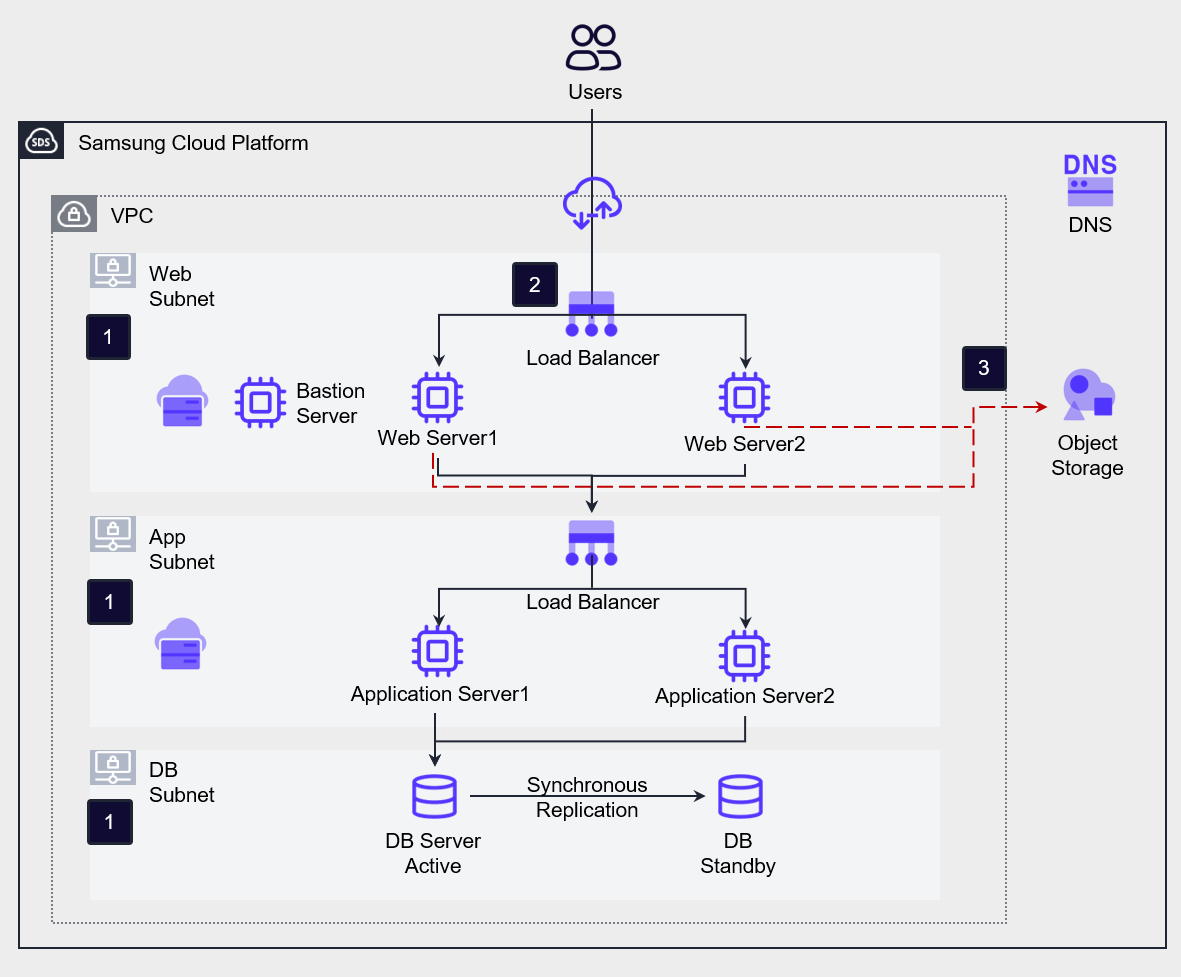
Workload Internet Isolation and Layering In the figure above, subnets were created for Web, Application, and DB. In this architecture, only a Private IP is attached to the entire server for the web service (no Public IP is attached), allowing only private communication without an Internet connection. Each server is grouped as Web Server, Application Server, and DB Server, and placed in separate independent subnets. Create a Bastion Server that can be accessed from outside and perform server management. The administrator establishes a private connection to the Bastion Server via VPN and, through it, performs management tasks on each server.
Minimizing the external attack surface To minimize servers exposed to the Internet, the architecture only opens the Load Balancer to the Internet. Users can access the service only through the Load Balancer’s Public IP.
Repository Access Control The database should be accessible only to applications that require access. According to compliance requirements, if necessary, the Application Server may need to be configured to access the database via an access control server rather than directly. For example, the ISMS (Information Security Management System) regulations require such database access control management as a mandatory condition. Storage manages accessible objects using a White List, thereby constructing an access control list (ACL). The repositories that manage access control lists are File Storage, Object Storage, and Container Registry. (Although not a storage, Kubernetes Cluster also manages access control lists.) The access control list targets include public IP addresses, servers within the account, and VPC endpoints.
Network Traffic Control
Apply strict control rules to traffic transmitted to and from the Samsung Cloud Platform to block security intrusions. To this end, we analyze the connection requirements of each service component, design the network architecture, and establish corresponding traffic control policies.
Network communication control policies may vary depending on the characteristics of the service. Through analysis of service requirements, we identify the network flow and set the criteria for control policies accordingly.
- Establish network communication control policies for all resources within the VPC.
- Control inbound and outbound traffic through finely (Fine Grained) configured communication control policies.
- Configure deep defense that restricts traffic to the necessary ports between components, thereby strengthening the security of the overall traffic flow.
Network Flow Requirements Analysis
When analyzing a service’s connection requirements, you can identify the network flow according to the following categories.
External Internet Accessibility Public Subnet: A subnet where Virtual Servers with a Public IP are deployed. As an arbitrary classification, the Virtual Servers in this subnet handle traffic management with the Internet. Private Subnet: A subnet where Virtual Servers are deployed without a Public IP connection. As an arbitrary classification, the Virtual Servers in this subnet are isolated from the Internet.
Traffic Direction Constructs traffic direction information based on source IP address, destination IP address, port. Inbound: Traffic entering this component. The recipient IP address becomes the IP address (range) of the server(s) that control the traffic. Outbound: Traffic that leaves this component. The sender IP address becomes the IP address (range) of the server (group) that is intended to control the traffic.
Impact Scope North-South: Traffic that flows between the VPC’s external and internal sides, primarily between service users outside the VPC and workloads inside. This zone houses security services (devices) such as firewalls, WAFs, and IPS, which block external attacks and intrusions. East-West: Traffic that flows between components inside a VPC, for example, traffic between the Web Server, Application Server, and DB Server in a three-tier web service. This zone includes devices (Load Balancer, Message Queue Service, etc.) deployed to improve service performance, and a distributed firewall (Security Group) is configured to secure communication between each server group. The Load Balancer of Samsung Cloud Platform can be connected to a Firewall to control communication in this zone.
In Samsung Cloud Platform, the services you can use to control traffic within a VPC are Firewall and Security Group.
A firewall is used to control traffic at the network boundary (North-South), while a security group is used to control server traffic (East-West).
The figure below shows an architecture that implements traffic control for a three-tier web service using a firewall and security groups.
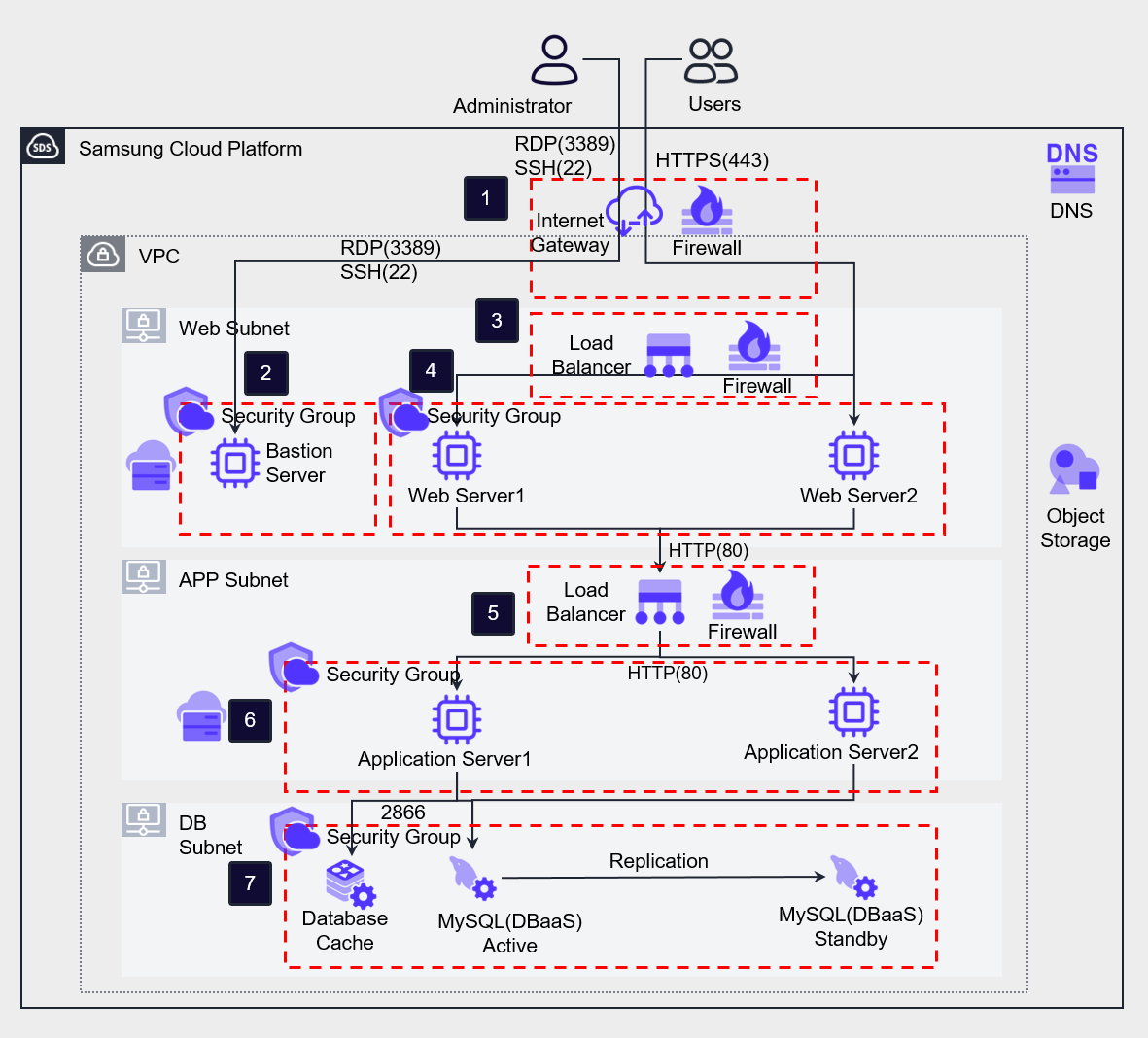
The frontmost boundary of North-South traffic is the Internet Gateway, and traffic is controlled by connecting a Firewall. Communications from end users or administrators on the Internet enter the VPC by passing through the Internet Gateway. You can refer to the firewall rules that can be configured on the Intertnet Gateway in the table below. The end user on the Internet accesses the Load Balancer via HTTPS (443) and defines rules as shown in Table 1-1 below. The administrator accesses the Bastion Server via the Internet Gateway Firewall, and this is permitted as described in rule 1-2.
Add a Security Group rule (2-1) on the Bastion server that allows inbound remote access only from the administrator workstation’s IP address, and add an outbound rule (2-2) that applies to all Security Groups attached to servers within the VPC. In the Web Server Security Group (4-3) and Application Server Security Group (6-3), add rules targeting this Bastion server’s Security Group to permit server access for management.
The Web Load Balancer receives user requests from the Internet and distributes them across the back-end Web Servers. The Load Balancer’s public NAT IP acts as a single external entry point on behalf of the back-end servers, preventing unnecessary internet exposure of the Web Server. You can configure network control of outbound traffic by setting up firewall rules on the Load Balancer. If you configure the inbound and outbound ports differently on the Load Balancer, you create a more stringent policy from a network protection standpoint. For example, receive front‑end traffic as HTTPS(443) (3-1) and, after performing SSL Termination on the Load Balancer, send HTTP(80) traffic to the back‑end Application Server (3-2) to change the service flow port. In this case, besides strengthening security by assigning different inbound and outbound ports, you can also expect the benefit of reducing the SSL encryption/decryption processing load on the back-end Web Server. SSL certificates are registered separately in the Certificate Manager for management.
The Web Security Group allows inbound HTTP (80) traffic from the front Load Balancer and outbound traffic sent to the back App Load Balancer (4-1, 4-2).
In the App Load Balancer, configure a firewall rule (5-1) that uses the Web Server address as the source address, the Service IP as the destination address, and allows inbound HTTP (80). Also, change the transmission port to HTTP (8080), add an outbound allow rule directed to the Application Server, and then change the port again. (5-2)
In the Application Server Security Group, a rule (6-1) that allows inbound HTTP (8080) traffic received from the App Load Balancer and Configure rule (6-2) that allows outbound traffic on port 2866 to the DB server. At this point, port 2866 is the default port used by the Samsung Cloud Platform Database service, and the service flow’s port was also changed here.
The Database is configured with rules that allow inbound and outbound traffic on port 2866 targeting the preceding Application Server Security Group, and permit communication between databases. (7-1, 7-2)
Deep defense is a concept that creates multiple layers of security controls so that even if defense fails at one layer, attackers are blocked by other layers positioned behind it.
Efforts to construct defense layers in a nested fashion ultimately begin with acknowledging that we cannot know which vulnerability an attacker will exploit and that we may fail in our defense.
The purpose of defense in depth is to use firewalls and security groups to assign different inbound and outbound ports for each layer, ultimately preventing intruders from reaching the database that stores critical information.
The Security Group of Samsung Cloud Platform can include not only specific address ranges (such as CIDR) but also other Security Groups as allowed targets.
When you set a Security Group as an allowed target, you can designate all Virtual Servers attached to that Security Group as allowed communication targets, which eliminates the need to specify address ranges when applying Auto-Scaling or similar to a tier.
The following table is a diagram summarizing the rules described above.
| Number | service | direction | Origin address/remote | Destination address/remote | Protocol/Port | Operation |
|---|---|---|---|---|---|---|
| 1-1 | Internet Gateway Firewall | Inbound | 0.0.0.0/0 (Internet) | Web Load Balancer Service IP | HTTPS(443) | Allow |
| 1-2 | Internet Gateway Firewall | Inbound | Administrator’s Public IP | Bastion Server IP | RDP/SSH(3389/22) | Allow |
| 2-1 | Bastion Server Security Group | Inbound | Administrator’s Public IP | - | RDP/SSH(3389/22) | - |
| 2-2 | Bastion Server Security Group | Outbound | - | All Security Groups | RDP/SSH(3389/22) | - |
| 3-1 | Web Load Balancer Firewall | Inbound | 0.0.0.0/0 (Internet) | Web LB Service IP | HTTPS(443) | Allow |
| 3-2 | Web Load Balancer Firewall | Outbound | Web LB Service IP | Web VM IP(band) | HTTP(80) | Allow |
| 4-1 | Web Server Security Group | Inbound | Web LB Source NAT IP | - | HTTP(80) | - |
| 4-2 | Web Server Security Group | Outbound | - | App LB Service IP | HTTP(8080) | - |
| 4-3 | Web Server Security Group | Inbound | Bastion Server Security Group | - | RDP/SSH(3389/22) | - |
| 5-1 | App Load Balancer Firewall | Inbound | Web VM IP(band) | App LB Service IP | HTTP(80) | Allow |
| 5-2 | App Load Balancer Firewall | Outbound | App LB Service IP | Application VM IP(band) | HTTP(8080) | Allow |
| 6-1 | Application Server Security Group | Inbound | App LB Source NAT IP | - | HTTP(8080) | - |
| 6-2 | Application Server Security Group | Outbound | - | DB Security Group | 2866 | - |
| 6-3 | Application Server Security Group | Inbound | Bastion Server Security Group | - | RDP/SSH(3389/22) | - |
| 7-1 | DB Server Security Group | Inbound | Application Server Security Group, DB Security Group | - | 2866 | - |
| 7-2 | DB Server Security Group | Outbound | - | Application Server Security Group, DB Security Group | 2866 | - |
*In this configuration, the rule setting for health checks of Load Balancer server group members is not included.
Network Traffic Filtering
Samsung Cloud Platform provides a variety of managed security services.
The user only needs to request the service through SR.
When using a managed security service, you can delegate equipment management tasks and inspections, allowing you to protect workloads easily and securely.
- Deploy the Secure Internet Gateway and request a managed security service.
- Use appropriate security services in accordance with compliance requirements.
The following diagram shows a three-tier web service architecture that strengthens security by deploying managed security services.
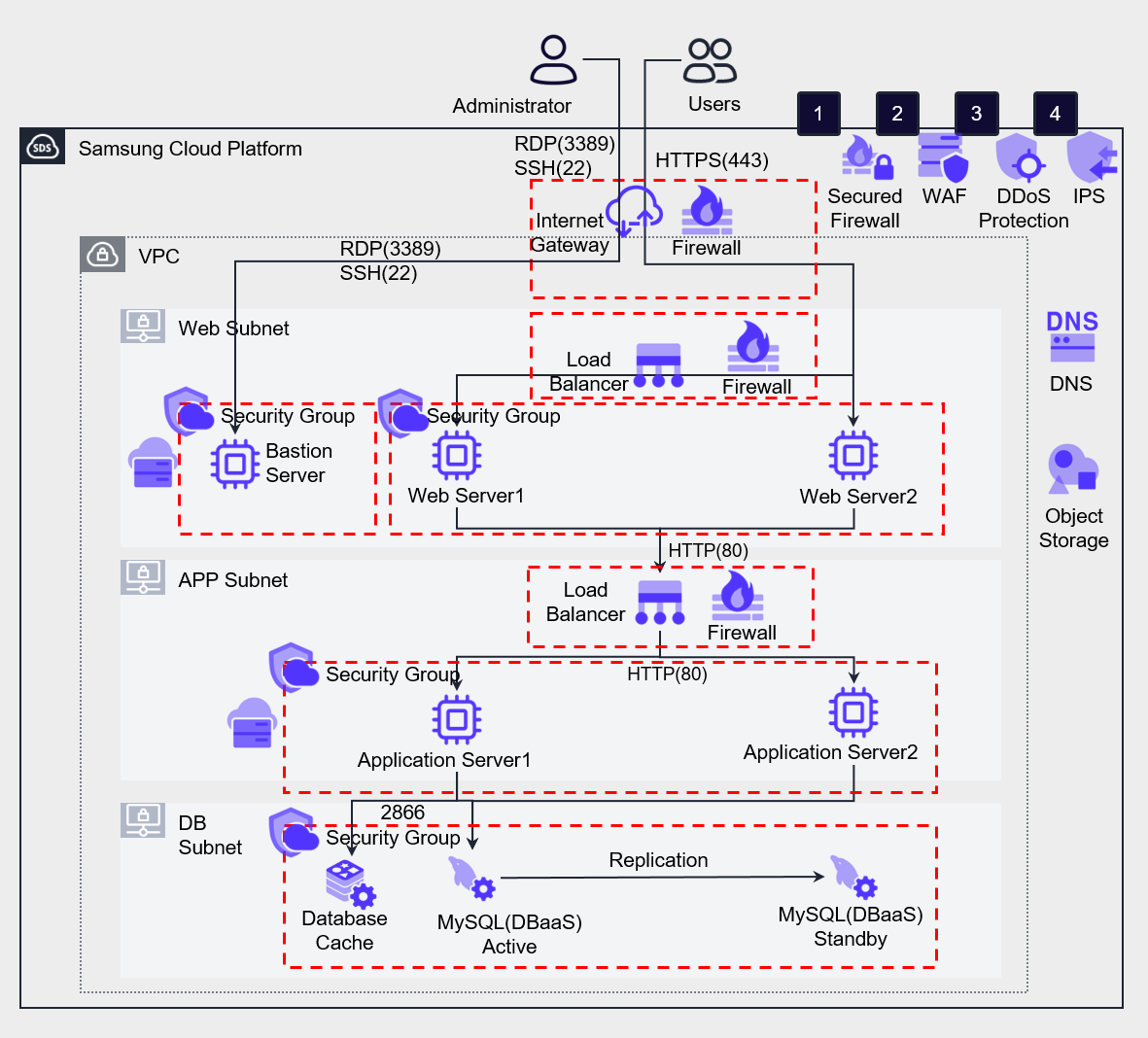
The following table describes the features of the managed security services provided by Samsung Cloud Platform and the types of attacks they can defend against.
| Security Service | function | Related infringement types | |
|---|---|---|---|
| ❶ | Secured Firewall | Layer 4 traffic control | Unauthorized access, IP scanning, etc. |
| ❷ | WAF | Defending against HTTP/HTTPS-based security threats targeting website vulnerabilities and automated bot attacks | Injection, XSS (Cross-Site Scripting), Web Scan, etc. |
| ❸ | DDoS Protection | Detection/defense of DDoS attacks that generate massive traffic intensively, causing service disruptions | DDoS attack |
| ❹ | IPS | Monitor traffic suspected of being malicious and application manipulation patterns. | Hacking attack detection |
Server Security
Vulnerability Assessment and Remediation
A vulnerability refers to a weakness in a system that an attacker can exploit to lower the security level of an information system.
An attacker exploits a vulnerability to gain system privileges or exfiltrate sensitive information.
Server vulnerability assessment is the process of verifying whether the security settings of a virtual server’s operating system have been properly applied.
Samsung Cloud Platform offers five Linux variants and the Windows Server operating system.
The vulnerabilities of the application cannot be completely eliminated, but strengthening the security of the operating system, file system, and other components can limit system attacks.
Strengthening directory access and imposing restrictions at the process level to prevent attacks, setting file and folder permissions, creating separate directories for required access only, avoiding shared access, and automating application restarts are necessary.
Applying the latest security patches is important, and following OWASP’s secure coding best practices is recommended.
When needed, we support applying security patches and monitoring via tools, and we use automation tools.
The following are the server security management items that need to be checked regularly.
| Management items | Management details |
|---|---|
| Operating system name, version | Management of operating system vendor’s technical support period (End of Support) |
| Platform, middleware SW name, version | Web servers, database servers, queues, and other software for vulnerability management purposes. |
| User Application code | All custom Application code running in the organization |
| IP address, subnet, and other network information | Server IP address, VPC, subnet, and other network asset information |
| User, authentication Key Pair | users authorized to access the operating system, Key Pair, users authorized to access the platform/middleware/application |
In a container environment, the Container Registry provides a tool that can assess vulnerabilities in stored container images.
Container Registry provides a tool that can scan for vulnerabilities in stored Container Images.
Provisioning Management
When provisioning a virtual server or container, you must deploy using a secure image that has had security vulnerabilities addressed.
Since a Virtual Server can be redeployed using an image, you need to manage server images with the latest updates separately.
Also, when launching a server using an image, ensure that the latest patches are applied automatically.
By provisioning with hardened standard images in a computing environment, you can provide a more secure baseline environment.
Through this, resources can be operated without unnecessary software packages or potential vulnerabilities, minimizing the risk of unintended intrusion from external sources.
In particular, the process of retrieving external dependencies such as container images and Application libraries only from trusted registries and verifying their signatures is extremely important.
This signature verification process is an effective way to ensure that software obtained from external sources has not been tampered with or contains malicious code.
Additionally, building your own private registry and storing trusted images and libraries is also one of the important security procedures.
A private registry provides an environment where secure images can be referenced during the build and deployment processes, acting as a barrier that prevents unintended access from external sources.
In a private registry, you can respond to new vulnerabilities through regular scans and updates, thereby continuously maintaining a secure environment.
- Manage the latest operating system images with the latest security updates applied, and automate the execution of the latest updates when the server starts after provisioning.
- When deploying containers, automate vulnerability scanning in the CI/CD pipeline.
However, even if you pull images from a trusted registry, security risks still exist if you do not verify signatures or perform vulnerability scans before using them.
Also, even if you harden the image, failing to regularly test for new vulnerabilities or update to the latest version can cause the security of the hardened image to gradually degrade.
Relying solely on patches to keep computing resources up to date can also be problematic.
Over time, relying solely on patches may deviate from the hardened baseline, or situations may arise where malware installed by threat actors during security events cannot be removed.
Therefore, regular image hardening, signature verification, vulnerability scanning, and updates are essential.
Access Control
The Virtual Server of Samsung Cloud Platform is accessed via a Key Pair.
A key pair can be downloaded only once when it is created.