Infrastructure Security
Infrastructure Security
Network Security
In cloud environments as well as existing IT environments, network security is considered a core element of overall security.
This is because the network controls access to all hosts, and it is the only technical means that allows access to systems and data for an unspecified number of people.
When configuring network control, a precise access policy must be established to block attackers and allow legitimate users to use it normally.
Moreover, since the cloud exists outside the user’s network, i.e., on the Internet, it must be built and operated on the premise of an Internet connection.
Also, since most modern applications are developed based on Internet connections, Internet connections cannot be excluded.
When configuring network architecture and establishing policies in the cloud, the network space and access rights where each component of the information system built by the user is located must be intentionally subdivided and boundaries set.
These subdivision strategies include network, user, and resource access.
Network Layering
- Group all servers by function and place them in separate subnets, and place them in private subnets except when necessary.
- Minimize access points from the Internet to VPC to strengthen security.
- Set up storage (where important data is stored) to only allow access to necessary targets.
Areas with high security requirements, such as personal information or confidential data, should be isolated from the outside and other components, and access should be restricted.
This allows the scope of the breach to be minimized as much as possible even if unauthorized access occurs in part of the information system.
Subdivided components are grouped according to the same security type and boundaries are set to restrict network access.
In general, they are grouped into a three-tier structure of web, application, and database, and the entry point that external networks access is configured as a separate boundary.
The following figure shows a three-tier web service architecture.
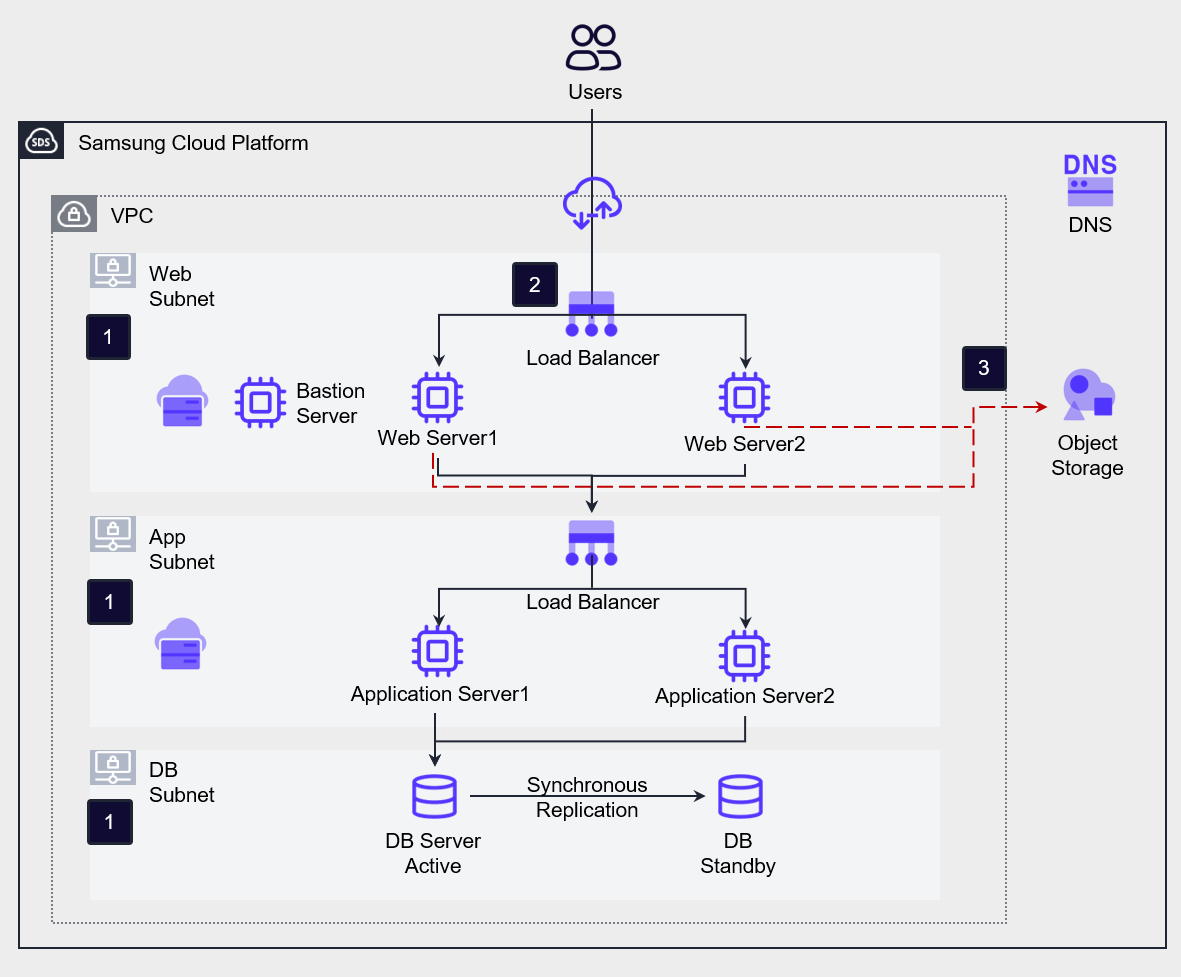
Placement and layering of workloads in private subnets
In the figure, Web, App, and DB Subnet are placed.
In this architecture, all servers for services are placed in private subnets, and each server is grouped into Web, App, and DB and placed in separate subnets.
This allows direct access from the external Internet to internal resources to be blocked, and the service flow is layered to make it difficult to access important data. A Bastion Server is created for server management and placed in a separate private subnet, allowing administrators to connect to each server.
Administrators connect to the Bastion Server through a VPN and then connect to the internal servers for management.Minimizing the external attack surface
To minimize the services exposed to the Internet, only the Load Balancer is open to the external Internet in the architecture of the figure.Storage access control
The database is configured to only allow access from applications that need access.
If necessary, according to compliance requirements, the application may need to be configured to access the database through an access control server.
For example, the ISMS regulation requires database access control management as a mandatory requirement.
Storage manages accessible targets with a White List and configures an access control list (ACL).
The storage that manages the access control list includes File Storage, Object Storage, and Container Registry. (Not storage, but Kubernetes Cluster also manages access control lists.)
The targets of access control lists include public IP addresses, servers within projects, and VPC Endpoints.
Network Traffic Control
Strict control rules are applied to traffic transmitted to and from Samsung Cloud Platform to block security intrusions. To do this, the network structure is designed by analyzing the connection requirements of each component of the service, and a traffic control policy is established accordingly.
Network communication control policies may vary depending on the characteristics of the service. Through service requirement analysis, network flows are identified, and the criteria for control policies are established.
- Establish network communication control policies for all resources within the VPC.
- Control send and receive traffic with finely configured communication control policies.
- Configure in-depth defense by limiting traffic to necessary ports between components, strengthening the security of the entire traffic flow.
[Network Flow Requirement Analysis]
When analyzing the connection requirements of the service, network flows can be identified according to the following classification.
External Internet Accessibility
Public Subnet: A subnet where a Virtual Server with a connected Public IP is deployed. This is an arbitrary classification, and the Virtual Server in this subnet manages traffic with the internet.
Private Subnet: A subnet where a Virtual Server without a connected Public IP is deployed. This is an arbitrary classification, and the Virtual Server in this subnet is isolated from the internet.Traffic Direction
Sender IP address, Receiver IP address, Port are used to construct information about traffic direction.
Receiving (Inbound): Traffic coming into the component. The receiver IP address is the IP address (range) of the server (set) controlling the traffic.
Sending (Outbound): Traffic going out from the component. The sender IP address is the IP address (range) of the server (set) to be controlled.Impact Range
North-South: Traffic flowing between the outside and inside of a VPC, mainly service traffic flowing between external service users and workloads.
East-West: Traffic flowing between components within a VPC, such as traffic flowing between an application server and a database server in a 3-tier web service.
Samsung Cloud Platform provides services that can be used to control traffic within a VPC, namely Firewall and Security Group.
Firewall is used for traffic control at the network boundary, while Security Group is used for traffic control at the server level.
The figure below shows the implementation of Firewall and Security Group traffic control in a 3-tier web service architecture.
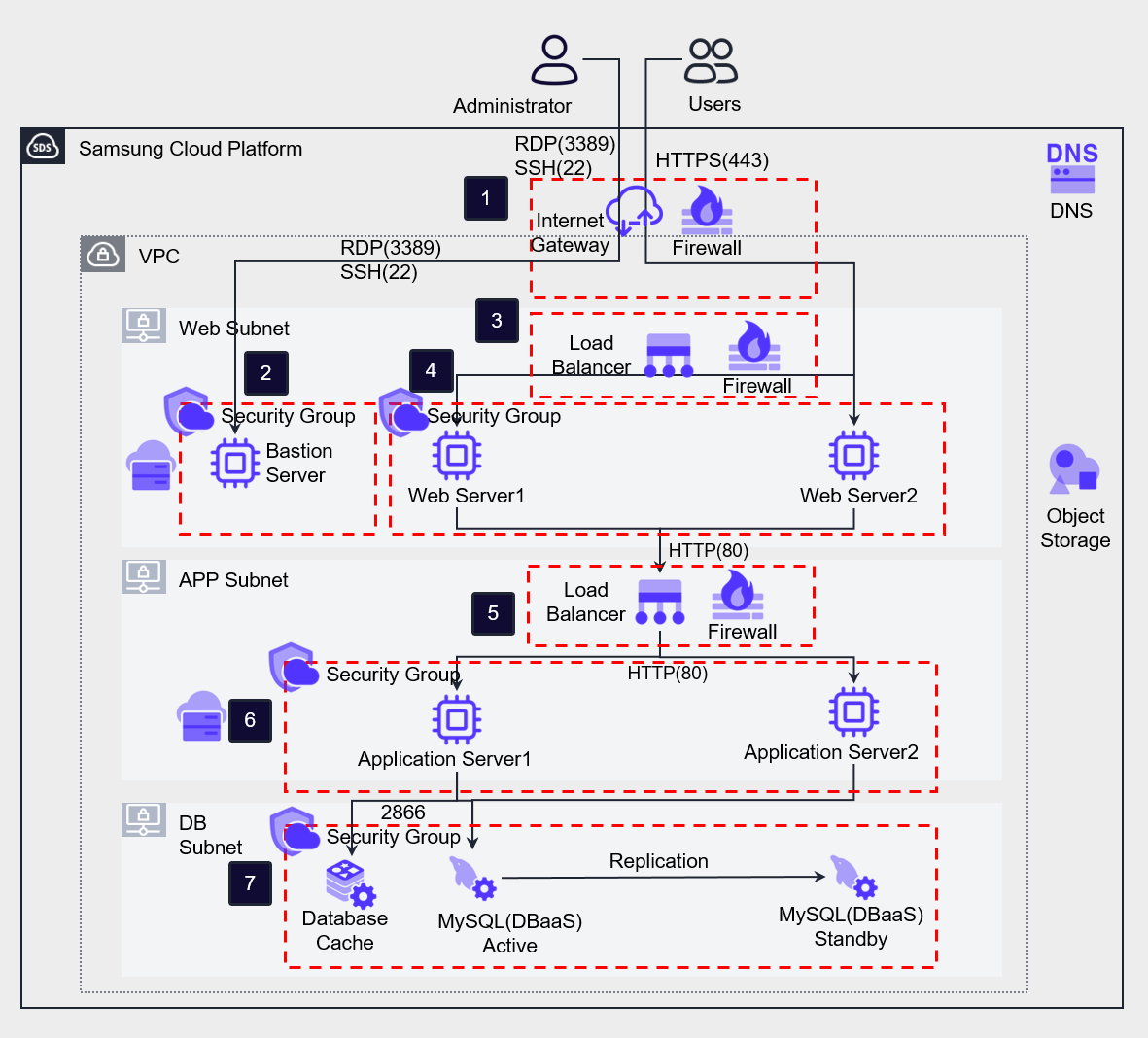
The first boundary for North-South traffic is the Internet Gateway, which is connected to a Firewall to control traffic.
Internet users or administrators access the VPC through the Internet Gateway.
At this time, an example of a configurable Firewall rule is as follows.
Internet users access the Load Balancer via HTTPS (443), and the rule is specified as shown in 1-1.
Administrators are allowed to access the Bastion Server through the Internet Gateway Firewall, as shown in rule 1-2.In the Bastion server, a Security Group rule (2-1) is added to allow inbound remote access only from the administrator’s terminal IP address, and an outbound rule (2-2) is added to target all Security Groups connected to servers within the VPC.
The Web server Security Group (4-3) and App server Security Group (6-3) add the Bastion server’s Security Group as a target to allow server access for management.The Web Load Balancer receives user requests from the internet and distributes them to the Web servers.
The Public NAT IP of the Load Balancer serves as a single exposed access point, preventing unnecessary internet exposure of the Web servers.
Firewall rules can be configured for the Load Balancer to control transmitted traffic.
Configuring different receive and transmit ports for the Load Balancer allows for a more robust policy.
For example, receiving front-end traffic via HTTPS (443) and transmitting it to the App Server as HTTP (80) traffic allows for a change in the service flow port.
This not only enhances security by specifying different receive and transmit ports but also reduces the SSL encryption and decryption processing load on the Web server.
SSL certificates are managed separately through the Certificate Manager.The Web Security Group allows inbound HTTP (80) traffic from the front-end Load Balancer and outbound traffic to the App Load Balancer (4-1, 4-2).
The App Load Balancer configures a Firewall rule (5-1) to allow inbound HTTP (80) traffic with the Web server address as the source IP and the Service IP as the destination IP.
It also adds an outbound rule to change the transmit port to HTTP (8080) and allow it (5-2).The App server Security Group configures a rule (6-1) to allow inbound HTTP (8080) traffic from the App Load Balancer and a rule (6-2) to allow outbound traffic to the DB server on port 2866.
At this point, the service flow port is changed again.The Database allows inbound and outbound traffic on port 2866, targeting the App server Security Group and DB Security Group (7-1, 7-2).
Deep defense is a concept where multiple layers of security controls are created to block attackers, even if one layer fails.
This effort to create layered defenses starts from acknowledging that attackers may exploit any weakness and that defense may fail.
Using Firewall and Security Group to change the send and receive ports at each layer, the ultimate goal of deep defense is to prevent intruders from reaching the database where critical information is stored.
Samsung Cloud Platform’s Security Group can include not only specific address ranges (CIDR, etc.) but also other Security Groups as allowed targets.
By specifying a Security Group as an allowed target, all Virtual Servers connected to that Security Group can be specified as communication allowed targets, which is useful when applying Auto-Scaling to layers.
The following table summarizes the rules described above.
| Number | Service | Direction | Source IP/Remote | Destination IP/Remote | Protocol/Port | Action |
|---|---|---|---|---|---|---|
| 1-1 | Internet Gateway Firewall | Inbound | 0.0.0.0/0 (Internet) | Web Load Balancer Service IP | HTTPS(443) | Allow |
| 1-2 | Internet Gateway Firewall | Inbound | Administrator’s Public IP | Bastion Server IP | RDP/SSH(3389/22) | Allow |
| 2-1 | Bastion Server Security Group | Inbound | Administrator’s Public IP | - | RDP/SSH(3389/22) | - |
| 2-2 | Bastion Server Security Group | Outbound | - | All Security Groups | RDP/SSH(3389/22) | - |
| 3-1 | Web Load Balancer Firewall | Inbound | 0.0.0.0/0 (Internet) | Web LB Service IP | HTTPS(443) | Allow |
| 3-2 | Web Load Balancer Firewall | Outbound | Web LB Service IP | Web VM IP(band) | HTTP(80) | Allow |
| 4-1 | Web Server Security Group | Inbound | Web LB Source NAT IP | - | HTTP(80) | - |
| 4-2 | Web Server Security Group | Outbound | - | App LB Service IP | HTTP(8080) | - |
| 4-3 | Web Server Security Group | Inbound | Bastion Server Security Group | - | RDP/SSH(3389/22) | - |
| 5-1 | App Load Balancer Firewall | Inbound | Web VM IP(band) | App LB Service IP | HTTP(80) | Allow |
| 5-2 | App Load Balancer Firewall | Outbound | App LB Service IP | App VM IP(band) | HTTP(8080) | Allow |
| 6-1 | App Server Security Group | Inbound | App LB Source NAT IP | - | HTTP(8080) | - |
| 6-2 | App Server Security Group | Outbound | - | DB Security Group | 2866 | - |
| 6-3 | App Server Security Group | Inbound | Bastion Server Security Group | - | RDP/SSH(3389/22) | - |
| 7-1 | DB Server Security Group | Inbound | App Security Group, DB Security Group | - | 2866 | - |
| 7-2 | DB Server Security Group | Outbound | - | App Security Group, DB Security Group | 2866 | - |
*This configuration does not include rule settings for health checks of Load Balancer server group members.
Network Traffic Filtering
Samsung Cloud Platform provides various managed security services.
Users can apply for services through SR.
Note: SR is assumed to be a service request or support request system, but its full meaning is not explicitly defined in the provided text. When using managed security services, you can delegate management tasks and inspections for equipment, allowing you to protect your workload safely and easily.
- Deploy and manage a Secure Internet Gateway and apply for managed security services.
- Use appropriate security services according to compliance requirements.
The following figure shows a 3-tier web service architecture with enhanced security by deploying managed security services.
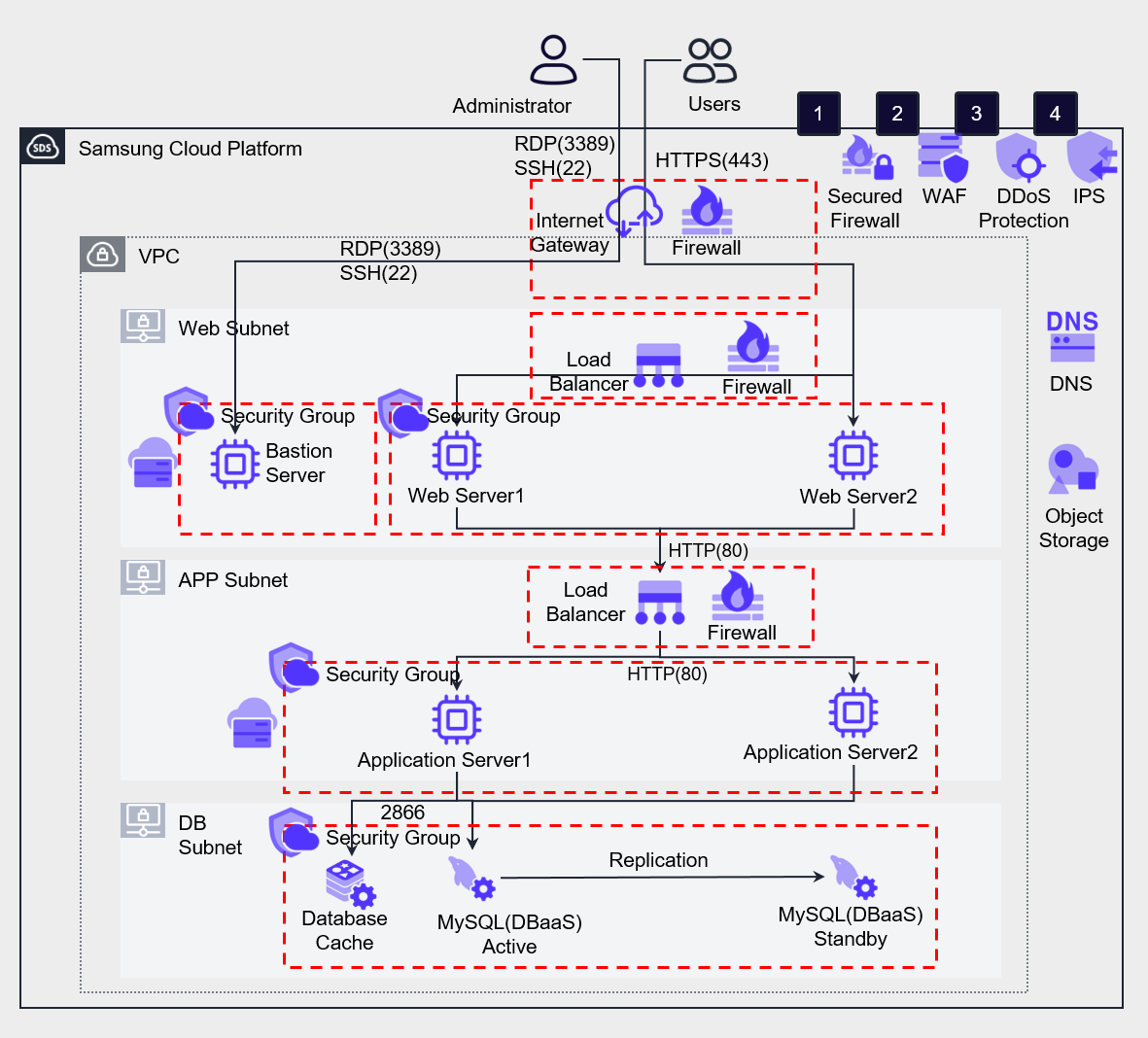
The following table describes the features and types of attacks that can be defended by the managed security services provided by Samsung Cloud Platform.
| Security Service | Feature | Related Invasion Type | |
|---|---|---|---|
| ❶ | WAF (Web Application Firewall) | Defense against HTTP, HTTPS-based security threats and automated bot attacks that target website vulnerabilities | Injection, XSS (Cross-Site Scripting), Web Scan, etc. |
| ❷ | DDoS (Distributed Denial of Service) Protection | Detection and defense against DDoS attacks that cause service failures by generating massive traffic | DDoS attacks |
| ❸ | IPS (Intrusion Prevention System) | Monitoring of maliciously suspected traffic and application manipulation patterns | Hacking attack detection |
| ❹ | Secured Firewall | 4-layer traffic control | Unauthorized access, IP scanning, etc. |
Server Security
Vulnerability Inspection and Measures
Vulnerabilities refer to weaknesses in the system that attackers can exploit to lower the security level of the information system.
Attackers can attack vulnerabilities to gain system privileges or leak important information outside.
Server vulnerability inspection is the process of checking if the security settings of the virtual server operating system are properly applied.
Samsung Cloud Platform provides Linux 5 species and Windows Server operating systems.
Although application vulnerabilities cannot be completely eliminated, system attacks can be limited by strengthening the security of operating systems, file systems, and others.
Directory access reinforcement and process-level restrictions can prevent attacks, and file and folder permission settings, separate directory creation for necessary access, avoidance of common access, and application restart automation are required.
Applying the latest security patches is crucial, and following OWASP’s safe coding best practices is recommended.
If necessary, tools can be used to support security patch application and monitoring, and automation tools can be used.
The following are server security management items that should be inspected regularly.
| Management Item | Management Content |
|---|---|
| Operating System Name, Version | Management of the technical support period (End Of Support) provided by the operating system vendor |
| Platform, Middleware SW Name, Version | Web server, database server, queue, etc. SW for vulnerability management purposes |
| User Application Code | All user-specified application codes operated by the organization |
| IP Address, Subnet, etc. Network Information | Server IP address, VPC, subnet, etc. network asset information |
| User, Authentication Key Pair | Users allowed to access the operating system, key pairs, and users allowed to access platforms/middleware/applications |
In a container environment, the container registry provides a tool that can inspect vulnerabilities in stored container images.
The container registry provides a tool that can inspect vulnerabilities in stored container images.
Provisioning Management
When provisioning a virtual server or container, a secure image with improved security vulnerabilities should be used for deployment.
Virtual servers can be redeployed through images, so a separate management of server images with the latest updates is necessary.
Additionally, when using an image to operate a server, it should be automated to apply the latest patches.
Using a reinforced standard image in a computing environment can provide a safer basic environment.
This allows operating resources without unnecessary software packages or potential vulnerabilities, minimizing the risk of unintended invasion from outside.
In particular, searching and verifying signatures for external dependencies such as container images and application libraries from trusted registries is crucial.
This signature verification process is an effective way to check if the software acquired from outside has been tampered with or contains malicious code.
Building and storing trusted images and libraries in a private registry is also an important security procedure.
The private registry provides an environment where safe images can be referenced in the build and deployment process, acting as a defense against unintended access from outside.
In the private registry, regular scanning and updates can respond to new vulnerabilities, maintaining a safe environment continuously.
- Manage the latest operating system images with security updates and automate the latest updates when provisioning and starting servers.
- Automate vulnerability inspection in the CI/CD pipeline when deploying containers.
However, even if you retrieve an image from a trusted registry, security risks still exist if you don’t verify the signature or perform a vulnerability scan before using it.
Additionally, even if you’ve hardened an image, its security can gradually weaken if you don’t regularly test for new vulnerabilities or update to the latest version.
Relying solely on patches to keep computing resources up-to-date can also be problematic.
Over time, relying only on patches can lead to a situation where the enhanced baseline is compromised, or malware installed by a threat actor during a security event is not removed.
Therefore, regular image hardening, signature validation, vulnerability scanning, and updates are essential.
Access Control
Samsung Cloud Platform’s Virtual Server accesses through Key Pairs.
Key Pairs can only be downloaded once at creation.