Credential and Access Rights Management
Credential and Access Rights Management
Credential Management
Authentication Method Management
Samsung Cloud Platform provides strong user authentication by default for console access security.
Users must perform multi-factor authentication (MFA), and when using an authentication key, they can specify the allowable IP range to fundamentally block unauthorized external access.
Administrators can limit users’ access permissions to the scope required for their work through IAM policy management.
Additionally, by establishing detailed access control policies for control items, actions, resource types, authentication methods, IP, etc., you can apply a least privilege policy to users or groups.
Samsung Cloud Platform provides administrators with the authority to take actions on specific resources, and offers a permission management dashboard that allows centralized, focused management.
Through this, you can efficiently perform permission management even in complex organizational structures.
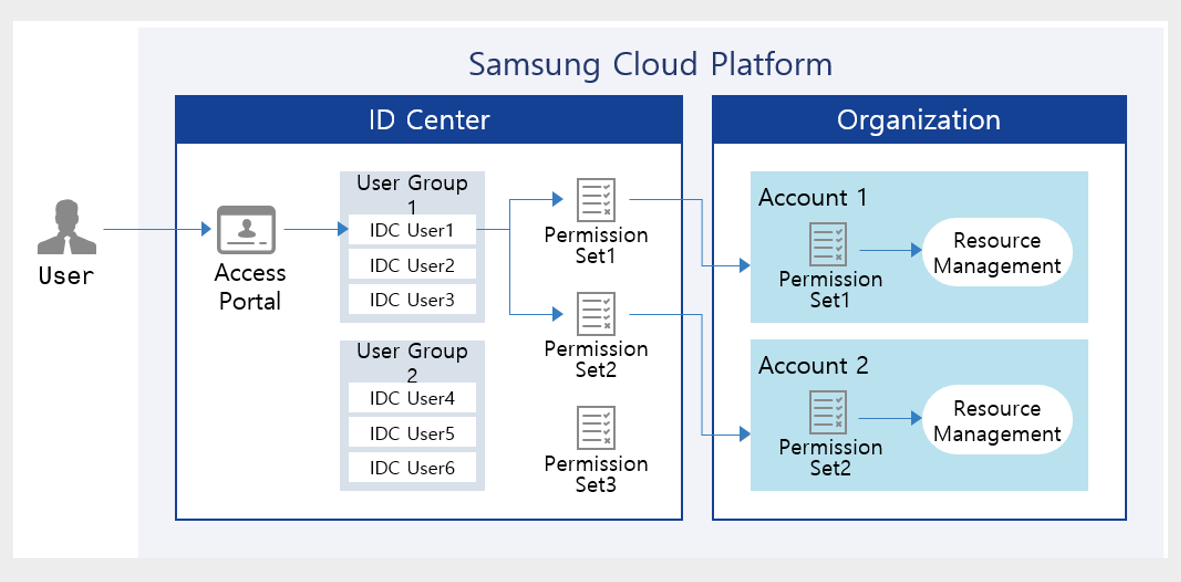
Samsung Cloud Platform’s ID Center is a service that allows you to easily manage access permissions for resources per account centrally.
After creating permission policies per service, you can manage so that users perform tasks appropriate to their permissions by assigning them accounts and policies linked to the Organization service.
Temporary Authentication Utilization
All cloud services, including Samsung Cloud Platform, operate on a REST API basis.
This means that regardless of whether it’s a console or CLI, an API call is made to run the service, and accordingly the service performs the necessary tasks.
You can perform tasks using the most basic tool, the Console, and tasks using the CLI and Open API are also possible, but in this case an authentication key is required.
When accessing the console, multi-factor authentication is performed for access security, but because the authentication key cannot be managed identically, separate management and caution regarding the authentication key are required.
- Strengthen access security by specifying the authentication key expiration period and the connection IP address.
- Strengthen security by using a temporary key.
To mitigate the risk of leakage, it is advisable to avoid using permanent authentication keys and to specify the key’s validity period.
Also, restricting the IP addresses that can connect is a way to strengthen security.
Instead of using an authentication key, you can further strengthen security by issuing a token through Secret Vault and performing authentication using a temporary key.
The following is the implementation architecture of Secret Vault.
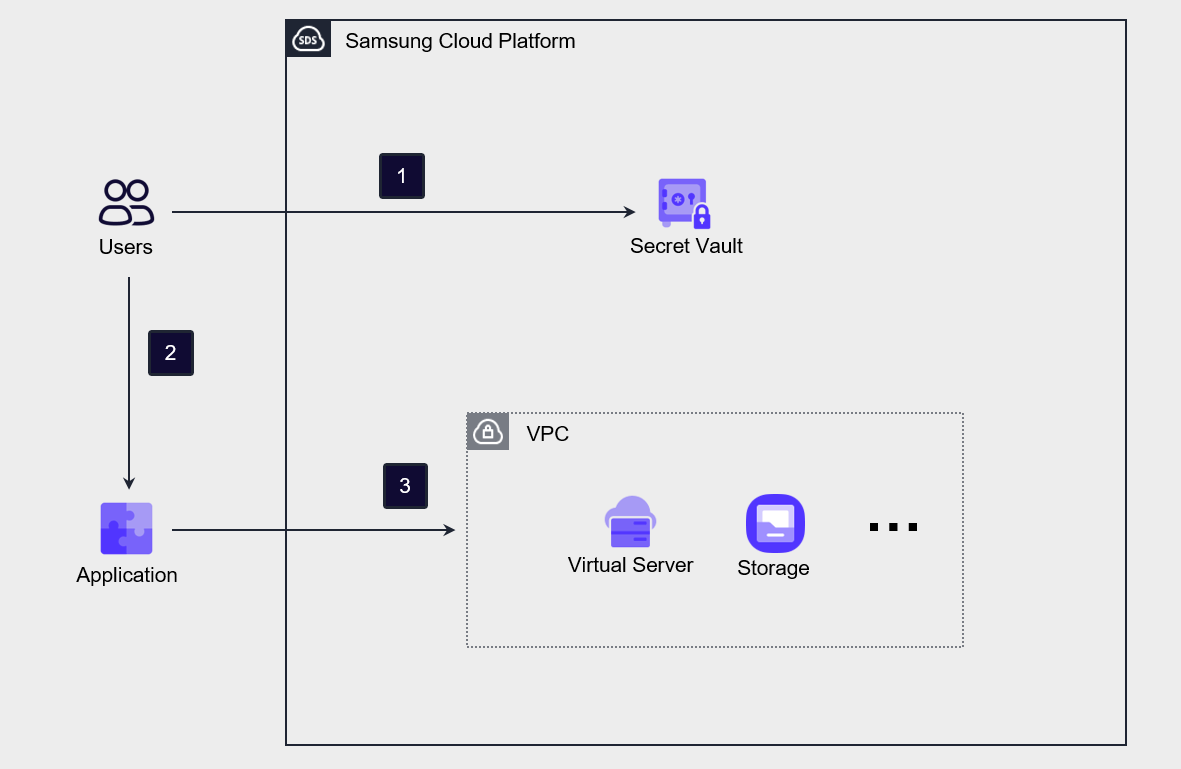
The user requests a token from the Secret Vault using the authentication key information obtained in advance from the Console. The Secret Vault generates and issues a token according to the request.
The user sets the issued Token in the Application.
Obtain an OpenAPI token using the API with token information. Afterwards, you can use this token to access or use services and resources of the Samsung Cloud Platform.
Credential integration via credential provider
By using Samsung Cloud Platform’s credential provider (Identity Provider, IdP), you can integrate third-party IdPs with Samsung Cloud Platform’s IAM.
By using this method, after the user authenticates through a third‑party credential provider, they can access the Samsung Cloud Platform Console.
If the organization already has an existing authentication service, using that authentication service is efficient because it allows you to reflect user changes quickly without separately managing user information.
Through the authentication information (SAML, OIDC, etc.) of third‑party IdPs pre‑registered in Samsung Cloud Platform, the user’s authentication information is passed to the Console, where credential verification is performed.
At this time, if you use SSO (Single Sign-On), the user can access multiple services with a single authentication.
If you implement this IdP-based authentication method, you can enhance security and increase management efficiency by centrally protecting user credentials and managing users.
Process for Allowing Emergency Access
In Samsung Cloud Platform, the top-level resource management authority is Account, and the highest authority within the Account is the AdministratorAccess policy.
If the only user linked to AdministratorAccess, or the only user in a group linked to AdministratorAccess, experiences a situation where authentication for administrator access is impossible due to loss, damage, or loss of a mobile phone, such a situation may occur.
In preparation for this, a process that allows emergency access must be established.
The most effective response plan is to request the account administrator within the organization to add a new user to the group to which AdministratorAccess will be attached.
Another approach is to designate both the primary administrator and the secondary administrator in the user group linked with AdministratorAccess.
Through this, if an incident occurs with the primary administrator, the secondary administrator can be made to perform that role instead.
Application of the principle of minimum allowance and continuous review
In Samsung Cloud Platform, permission policies can be linked to users or user groups.
A user can perform activities within the attached permission policy, and if the user is included in a user group, they may inherit permissions through the permission policy attached to that group.
The personnel within an organization can change due to reasons such as hiring, resignation, department transfers, and role changes, and situations requiring changes to user permissions frequently occur.
If user permission change tasks are frequent, not only will management work become overloaded, but the possibility of missing user account deletions or permission change tasks also increases.
Therefore, it is advisable to minimize directly attaching permission policies to users, and instead manage by attaching the necessary permissions to a permission group and then registering or deregistering users.
By doing this, you can simplify user and permission policy management tasks, and also minimize errors such as missing user changes or permission change operations.
Also, it is more efficient to verify whether appropriate users are registered in the permission group rather than reviewing the permission policy on a per-user basis.
This approach helps ensure that only users who need to perform actual tasks can access the permissions.
By predefining the IP addresses of devices that access the Console and API, you can block credential leaks or prevent non‑compliant actions from being performed outside.
- Regularly review users to check whether the users required for the task are included.
- Regularly review the group’s users to check whether the necessary users are included in the group.
- Specify the user access IP address to block unauthorized external access.
Access Permission Management
Role-based Group Management
Permissions can be granted to both users and groups in Samsung Cloud Platform.
And, if you add a user to a group, you can add the permissions associated with the group to the user’s permissions.
Groups are generally formed on a department or project team basis.
This is because departments or project teams generally have the same security requirements.
If various personnel need to perform tasks in the cloud, you must configure groups that meet security requirements according to the group management plan, assign users, and implement groups based on RBAC (Role-Based Access Control).
We need to establish a mechanism to place users with common security requirements into planned groups and verify that the attributes that can be used for access control are updated correctly.
If you want to change a user’s permissions through this, you need to review which method is appropriate among adding the user to a group, moving them to another group, or modifying the group plan.
If you manage permissions by group according to roles as shown, the policy becomes simpler and user permission management becomes easier.
In Samsung Cloud Platform, by default, permissions are not granted to users, but to groups.
You can perform permission management by creating groups according to the roles of departments or project teams and adding users to the groups.
You can create a group and, depending on the nature of the project or department, configure a (minimal) permission policy and attach it to the group.
RBAC-based group management simplifies permission management, allowing security to be strengthened.
Application of the principle of minimum allowance and continuous review
To grant the necessary access permissions to the group, a review process based on the principle of least privilege must be established.
Also, unused credentials and permissions should be removed through continuous monitoring and regular review processes.
There are cases where, for the sake of convenience of management, administrator privileges are granted to all users during the information system construction period.
In fact, at the beginning of the project, all users need to manage and operate the entire system, but after the project is completed, the scope of work is reduced and the required permissions also decrease.
Nevertheless, if credentials and permissions are not reduced according to the scope of work, the damage range can increase in the event of a security incident.
Therefore, it is important to periodically review the user’s scope of work and, by adjusting permissions accordingly, continuously practice the principle of least privilege.