Governance
Principle of Least Privilege
The principle of least privilege means allowing access only within the scope necessary to perform the work.
To apply this principle in practice, you must implement a policy that denies all access by default when a user attempts to access a resource.
In other words, users are granted no permissions by default, and resources must also have all access blocked.
If a particular user needs to access a specific resource, they should request the necessary permissions and obtain approval through the appropriate process before being granted access.
In cloud environments, there are cases where AdministratorAccess permissions are granted to a user when creating the initial user.
In this case, the user will have permission to perform all operations on the Samsung Cloud Platform.
If this authorization continues, it can grant excessive privileges beyond the tasks actually performed, creating a risk of widespread damage if a user makes a mistake or user information is leaked.
Therefore, the default user and resource permission policies must maintain a deny-all stance and adhere to the principle of least privilege by granting only the permissions that are necessary.
Security management area reduction
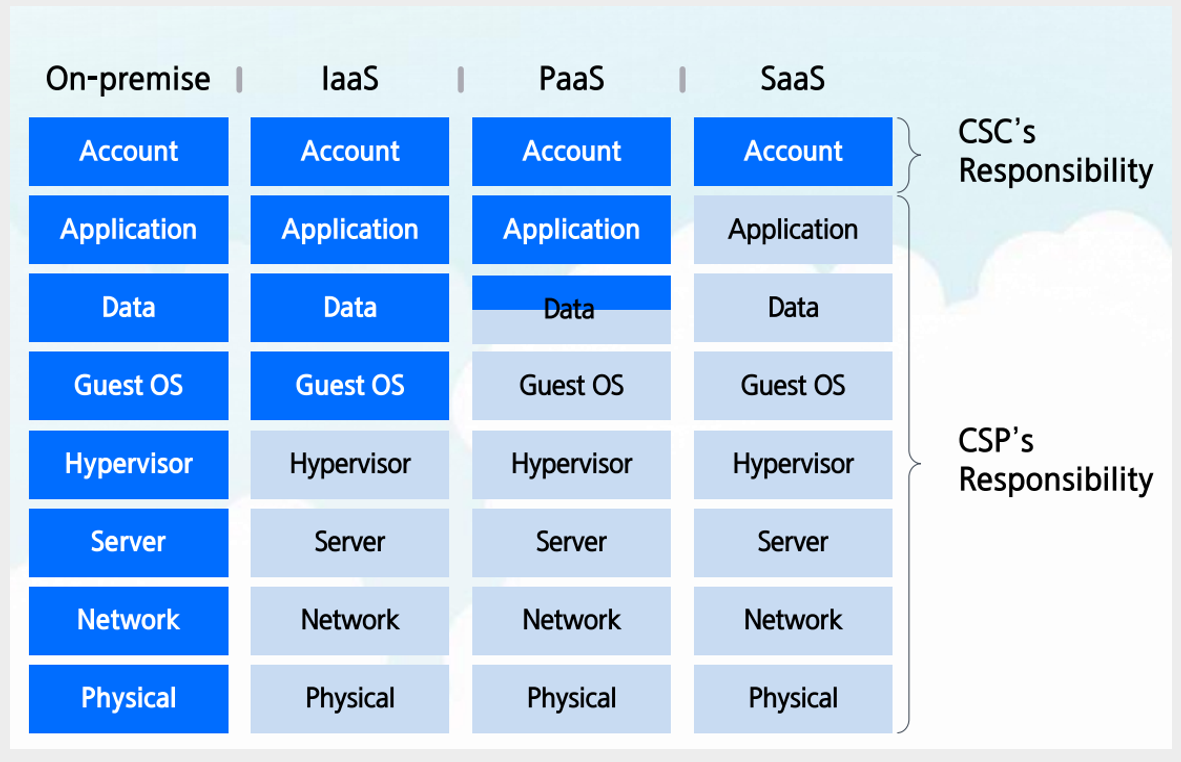
In a cloud environment, the cloud service provider and the cloud service user must share and manage security responsibilities.
The shared responsibility model of Samsung Cloud Platform is a core principle of cloud security.
The cloud service provider and the user cannot access each other’s domains, and they must not attempt to do so, so security roles and responsibilities are clearly separated.
Cloud service providers are responsible for performing security activities for the physical areas, hardware, and software that users share publicly, and they provide security services, features, and guides so that users can independently carry out security activities to protect their own domains.
Cloud service users assume security roles and responsibilities for their leased cloud resources from the cloud service provider, and they fulfill their security roles by using the provided security services, features, or 3rd Party security solutions.
From the perspective of cloud service users, reducing the security management scope can be a strategy to strengthen security.
Because as the scope of security management expands, the organization must allocate more resources, and the burden of addressing security threats that are difficult to predict or manage increases.
One effective way to reduce the security management scope is to leverage managed services.
The managed services provided by Samsung Cloud Platform are performed by the service provider for security management of the platform area, thereby reducing the security management burden for cloud service users.
Samsung Cloud Platform offers various server services, and selecting a managed server among them minimizes the management burden of tasks such as operating system patches and security settings, enabling more efficient security management.
Typical examples include Database Service, Kubernetes Engine, and Cloud Functions.
Additionally, instead of directly installing and configuring 3rd Party security software on the Virtual Server, you can reduce management overhead by leveraging Security services (WAF, DDoS Protection, etc.).
Workload Isolation Plan
When building multiple information systems within an organization, a strategy must be established early on for how to implement isolation between the systems.
Account is the highest-level configuration unit that can manage users, groups, and permission policies, and it is also the smallest unit that can separate costs.
You can establish isolation between environments and workloads using a multi‑account configuration strategy.
By configuring workloads and environments that do not require private connections on a per‑Account basis, you can overall strengthen cloud infrastructure security.
When multiple workloads with different data sensitivity levels are placed in a single account, security management can become difficult because each requires distinct permission and access control policies.
Also, in Samsung Cloud Platform, the number of VPCs that can be created per account is limited to a maximum of five, so if the number of workloads exceeds that, there may be constraints on separating them.
If you separate information systems by account, you can maintain consistency in service, region, and access permission management, thereby strengthening security.
Periodic cloud security assessment
The cloud is inherently complex, and because various services and resources are constantly changing, regular security assessments are essential.
Regular security assessments are an essential process for early detection of security vulnerabilities and protecting assets from potential threats.
The first step of a cloud security assessment is reviewing the infrastructure configuration.
Cloud infrastructure consists of various elements such as network configuration, access control, and data protection, and misconfiguring it can lead to serious security threats.
For example, you need to verify that network control rules such as Firewall or Security Group are configured correctly.
Because if the network is indiscriminately exposed to the outside or unnecessary access permissions are open, the likelihood of an attacker infiltrating through it increases.
It is also important to ensure that users and services receive only the minimum permissions through IAM(Identity and Access Management) policies.
By applying the principle of least privilege, you can reduce unnecessary access rights and minimize damage in the event of a security incident.
When using certificates, you must also ensure proper management of the certificate’s validity period and access IP addresses.
Regular penetration testing and vulnerability scanning are important methods for practically assessing the security posture of cloud environments.
Penetration testing simulates hacking attacks to identify security vulnerabilities, allowing you to verify how the system responds in real attack scenarios.
In contrast, vulnerability scanning can quickly identify and remediate potential security vulnerabilities using automated tools.
By regularly conducting these tests in a cloud environment, security vulnerabilities can be detected early and the system can be improved.
Another important aspect of cloud security assessment is compliance and security policy review.
In cloud environments, enterprises must comply with various legal regulations and industry standards. Through information security management certifications such as ISMS-P, you can verify that security management is being performed in accordance with regulations.
Also, you need to verify that the organization’s security policies are kept up to date in line with the evolving threat landscape.
To enable rapid detection when a security incident occurs, a well‑established log collection and monitoring system is required.
By using the Trail of Logging&Audit and the event settings of Cloud Monitoring, you can record cloud activities and analyze them in real time to detect anomalies.
Backup and recovery plans to prepare for security incidents are also important.
You need to verify that backups are performed regularly and that data can be quickly restored in a disaster situation.
This enables you to maintain business continuity even in the worst-case scenario.
In rapidly changing cloud environments, regular security assessments should be conducted at least quarterly, ideally on a monthly basis.
By leveraging automated security tools, continuous monitoring and rapid response become possible, and the frequency and thoroughness of such assessments determine the success of cloud security.
Ensuring Cloud Security Visibility
Cloud security visibility is a key element for understanding and managing the security posture of cloud environments.
Visibility means not only monitoring the system’s security status, but also transparently understanding all cloud assets and their interactions.
Through this, you can develop the ability to identify and respond to security threats in advance.
Cloud security visibility enables the identification of resource status and activity tracking.
The cloud infrastructure consists of resources and services that change dynamically.
For example, tasks such as creating a new Virtual Server, deploying containers, or modifying network configurations occur frequently, and these elements can be changed or scaled often.
If you fail to monitor these changes in real time, unexpected security vulnerabilities may arise, or the system may be exposed to threats due to misconfigurations.
If cloud security visibility is lacking, companies can be exposed to various risks. The greatest risk is undetected security threats.
In constantly evolving cloud infrastructure, resources are created and deleted frequently, making it essential for administrators to identify assets in real time.
If visibility is not ensured, it becomes difficult to quickly identify issues when a security incident occurs, allowing attackers to remain hidden in the system for extended periods and cause greater damage.
Additionally, problems such as over-provisioning (Over-Provisioning) of resources and permission management failures can also occur.
If visibility is lacking, resources unnecessarily left in the cloud are more likely to be exposed to security threats.
Additionally, unnecessary open network ports or user privileges with excessive access rights can cause security incidents.
To ensure cloud security visibility, you can use not only the tools provided by Samsung Cloud Platform but also tools from 3rd Party.
These tools provide the ability to track all events occurring in the cloud, collect logs, and analyze anomalies.
For example, the Trail of Logging&Audit records all API calls to a resource, allowing you to track user access history.
By providing an audit trail capability, which is one of the core elements of cloud security visibility, it enables rapid cause analysis and response when a security incident occurs.
Additionally, using a cloud security information and event management (SIEM) solution, you can centrally manage data collected from various cloud environments and build a protection framework capable of real-time security threat detection.
Automated Cloud Security Diagnosis Tool
In a cloud environment where multiple accounts, resources, and networks are intricately connected, the likelihood of security vulnerabilities increases.
In such an environment, continuous security management is essential to prevent security incidents.
Cloud security assessment tools play a crucial role in addressing these issues and keeping cloud environments secure.
The biggest advantage of a security assessment tool is that it can systematically check security settings and promptly deliver the results.
If errors or vulnerabilities arise in security settings, they must be identified and addressed promptly.
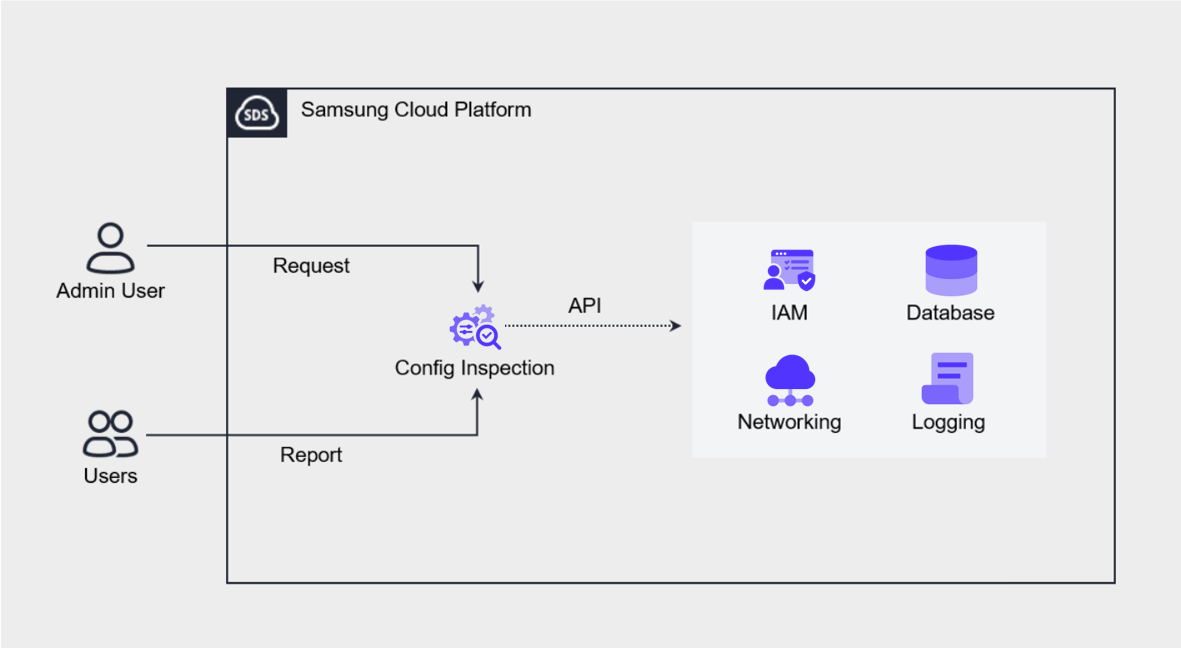
Config Inspection of Samsung Cloud Platform is an automated cloud security assessment tool designed to diagnose and manage the security posture of cloud environments based on best practices.
This tool performs security checks across cloud resources such as IAM, Networking, Compute, Storage, and Database, and allows the diagnostic results to be managed on an Account basis.
These checks can be executed periodically according to a pre-configured schedule, or performed immediately upon user request.
Through this, administrators can assess and respond to the security status of the cloud environment at any time.