Governance
Governance
Principle of Least Privilege
The principle of least privilege means allowing access only within the scope necessary for the task.
To apply this principle in practice, a policy that denies all access by default should be applied when a user accesses a resource.
That is, no privileges are granted to the user by default, and all access to resources is blocked.
If a specific user needs to access a specific resource, the necessary privileges should be requested and approved through a proper approval process.
In a cloud environment, when creating an initial user, Administrator Access privileges are sometimes granted to the user.
In this case, the user has the privileges to perform all tasks on the Samsung Cloud Platform.
If this privilege granting continues, the user may have excessive privileges beyond what is actually required for the task, which can lead to widespread damage if the user makes a mistake or if user information is leaked.
Therefore, the default user and resource privilege policy should maintain a state of denying all access and granting only the necessary privileges, following the principle of least privilege.
Reducing Security Management Scope
In a cloud environment, cloud service providers and cloud service users should share security responsibilities and manage them.
The responsibility sharing model of Samsung Cloud Platform is a core principle of cloud security.
Cloud service providers and users cannot access each other’s areas and should not do so, thus clearly distinguishing security roles and responsibilities.
Cloud service providers are responsible for security activities related to physical areas, hardware, and software used by users, and provide security services, features, and guides to help users perform security activities.
Cloud service users are responsible for the security of their cloud resources leased from cloud service providers and use the provided security services, features, or third-party security solutions to perform their security roles.
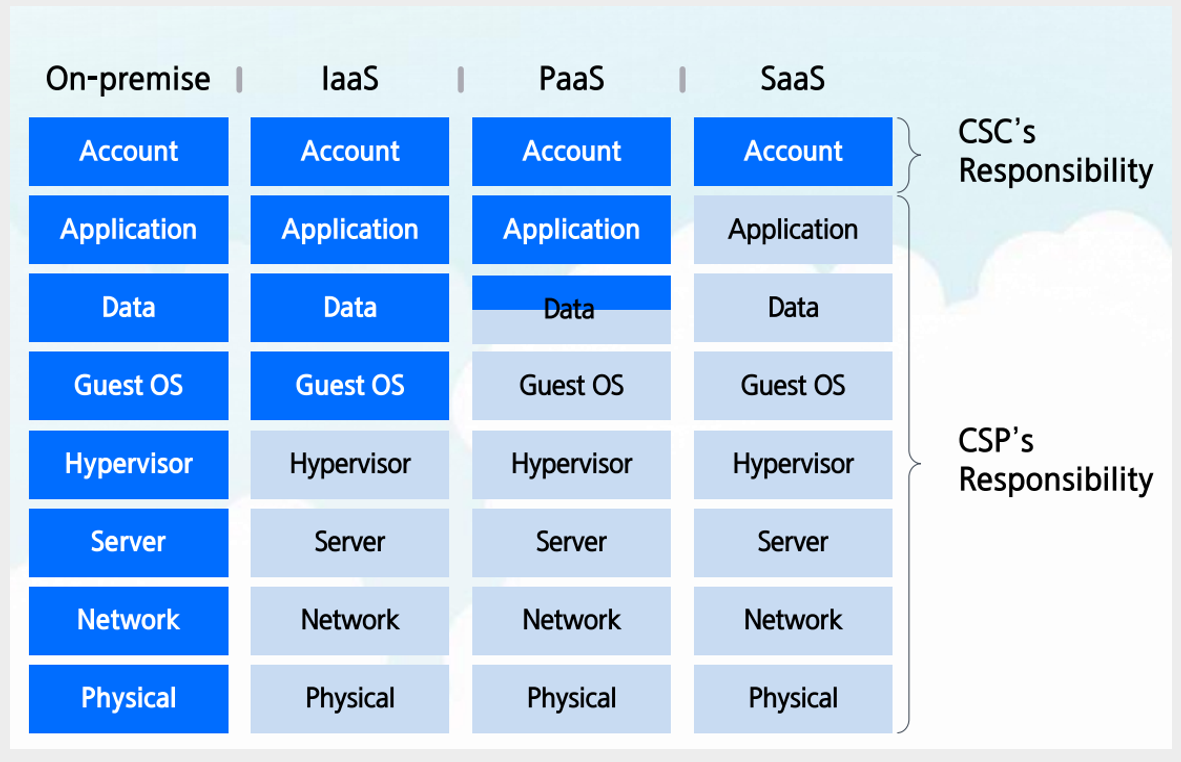
From the perspective of cloud service users, reducing the security management scope can be a strategy to strengthen security.
As the security management scope expands, the organization’s resource investment increases, and the burden of responding to unpredictable or unmanageable security threats grows.
One effective way to reduce the security management scope is to use managed services.
Samsung Cloud Platform’s managed services allow the service provider to perform security management for the platform area, thereby reducing the cloud service user’s security management burden.
Samsung Cloud Platform provides various server services, and among them, choosing managed servers can minimize management burdens such as operating system patches and security settings, allowing for more efficient security management.
Examples include DBaaS services, Kubernetes Engine, and Cloud Functions.
Additionally, using Security services (WAF, DDoS Protection, etc.) instead of directly installing and configuring third-party security services on Virtual Servers can also reduce management burdens.
Workload Isolation Measures
When building multiple information systems within an organization, a strategy for isolating the systems from each other should be established from the initial stage.
An Account is the highest-level configuration unit that can manage users, groups, and privilege policies, and at the same time, it is the minimum unit that can separate costs.
Through a multi-Account configuration strategy, isolation can be set between environments and workloads.
By configuring workloads and environments that do not require private connections on an Account basis, overall cloud infrastructure security can be strengthened.
If multiple workloads with different data sensitivity levels are placed in a single Account, security management can become more difficult because different privilege policies and access control policies need to be applied.
Additionally, since Samsung Cloud Platform limits the number of VPCs that can be created per Account to a maximum of 5, there may be restrictions on separating workloads if there are more than that number.
By separating information systems by Account, service, Region, and access authority management consistency can be maintained, thereby strengthening security.
Regular Cloud Security Diagnostics
Regular security diagnostics are essential because the cloud is inherently complex and diverse services and resources are constantly changing.
Regular security diagnostics are an important process for discovering security vulnerabilities early and protecting assets from potential threats.
The first step in cloud security diagnostics is reviewing infrastructure configurations.
Cloud infrastructure consists of various elements such as network configuration, access control, and data protection, and incorrect settings can lead to serious security threats.
For example, you need to check if network control rules such as Firewall or Security Group are set up correctly.
If the network is excessively exposed to the outside or unnecessary access permissions are open, the possibility of an attacker infiltrating through it increases.
It is also important to grant users and services only the minimum privileges through IAM (Identity and Access Management) policies.
Through the principle of least privilege, you can reduce unnecessary access permissions and minimize damage in the event of a security incident.
If you are using a certificate, you must also check the validity period of the certificate and the proper management of the access IP address.
Regular penetration testing and vulnerability scanning are important ways to evaluate the security status of the cloud environment in practice.
Penetration testing is a way to simulate hacking attacks to find security vulnerabilities, allowing you to see how the system responds in a real attack situation.
On the other hand, vulnerability scanning uses automated tools to quickly identify and fix potential security vulnerabilities.
By performing these tests regularly in the cloud environment, you can identify security flaws early and improve the system.
Another important part of cloud security diagnosis is compliance and security policy review.
In the cloud environment, companies must comply with various legal regulations and industry standards.
Through information protection management certifications such as ISMS-P, you can check if security management is being performed in accordance with regulations.
You should also check if your organization’s security policies are up-to-date to match the changing threat environment.
To detect security incidents quickly, a log collection and monitoring system must be well-established.
Through Logging & Audit Trail and Cloud Monitoring event settings, you can record and analyze cloud activities in real-time to detect signs of anomalies.
Backup and recovery plans for security incidents are also important.
You need to check if backups are performed regularly and if data can be quickly recovered in the event of a disaster.
This allows you to maintain business continuity even in the worst-case scenario.
In a rapidly changing cloud environment, regular security diagnoses should be performed at least quarterly, ideally on a monthly basis.
Using automated security tools enables continuous monitoring and rapid response, and the frequency and thoroughness of these diagnoses determine the success of cloud security.
Cloud Security Visibility
Cloud security visibility is a key element in understanding and managing the security status of the cloud environment.
Visibility means not only monitoring the security status of the system but also transparently grasping all cloud assets and their interactions.
This enables you to identify and respond to security threats in advance.
Cloud security visibility enables you to track resources and activities.
Cloud infrastructure consists of dynamically changing resources and services.
For example, creating a new Virtual Server, deploying containers, or changing network configurations are frequent tasks, and these elements can change or expand frequently.
If you don’t keep track of these changes in real-time, unexpected security vulnerabilities can occur, or the system can be exposed to threats due to incorrect settings.
If cloud security visibility is lacking, companies can be exposed to various risks.
The biggest risk is undetected security threats.
In a constantly changing cloud infrastructure, resource creation and deletion occur frequently, so it’s essential for administrators to keep track of assets in real-time.
If visibility is not secured, it can be difficult to immediately identify problems when a security incident occurs, allowing attackers to stay in the system for a longer period and cause more damage.
Additionally, issues such as over-provisioning and failure to manage permissions can occur.
If visibility is lacking, resources that are unnecessarily left in the cloud can be exposed to security threats.
Also, unnecessarily open network ports or user permissions with excessive access rights can cause security incidents.
To secure cloud security visibility, you can use tools provided by Samsung Cloud Platform as well as third-party tools.
These tools provide features to track all events in the cloud, collect logs, and analyze signs of anomalies.
For example, Logging & Audit Trail can record all API calls for resources, allowing you to track user access history.
This provides audit trail functionality, a key element of cloud security visibility, enabling rapid analysis and response in the event of a security incident.
Additionally, you can configure a protection system that enables real-time security threat detection by integrating data collected from various cloud environments through Cloud Security Information and Event Management (SIEM) solutions.
Automated Cloud Security Diagnosis Tools
In a cloud environment where multiple accounts, resources, and networks are complexly connected, the possibility of security vulnerabilities occurring increases.
To prevent security incidents in such an environment, continuous security management is essential.
Cloud security diagnosis tools play a crucial role in solving these problems and keeping the cloud environment safe.
The biggest advantage of security diagnosis tools is that they can systematically check security settings and provide results quickly.
If there are errors or vulnerabilities in security settings, they must be identified and responded to quickly.
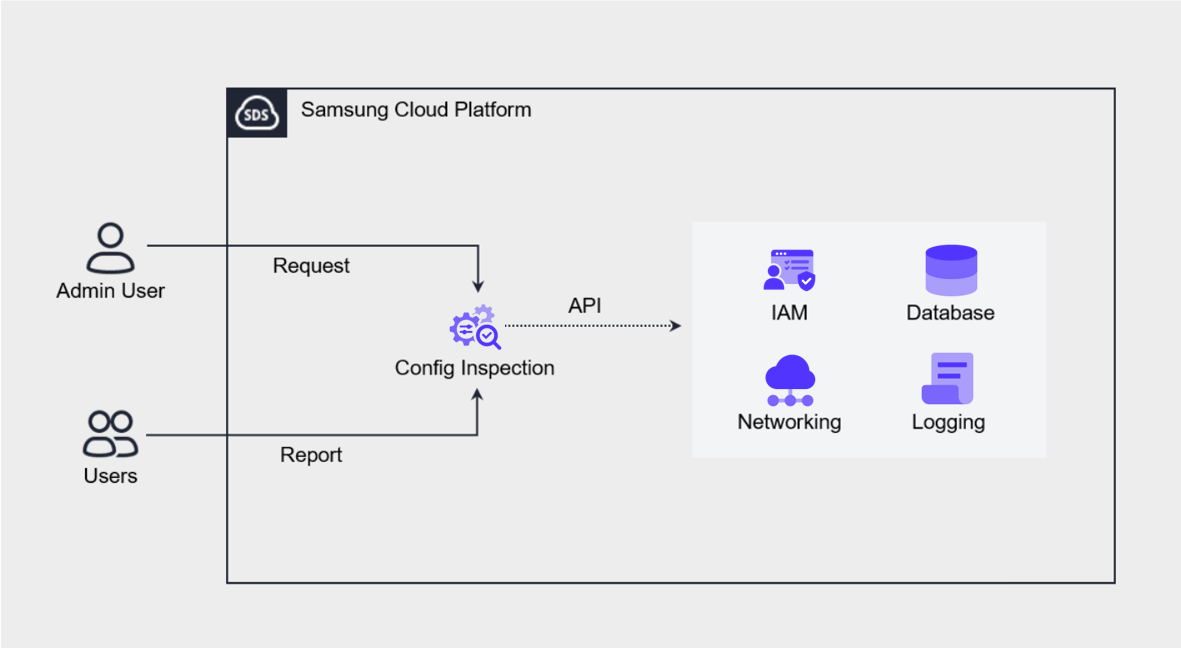
Samsung Cloud Platform’s Config Inspection is an automated cloud security diagnosis tool designed to diagnose and manage the security status of the cloud environment based on best practices.
This tool performs security checks across all cloud resources, including IAM, Networking, Compute, Storage, and Database, and manages the diagnosis results by account.
These checks can be performed periodically according to a preset schedule or immediately upon the user’s request. Through this, administrators can understand and respond to the security status of the cloud environment at any time.