Detection
Enable network logging
You can collect and store information about traffic that traverses the VPC internally and externally.
In Network Logging, you can specify the storage for Firewall, Security Group, and NAT Logging, and view the saved list.
You can view detailed log data in the specified Object Storage and use it as material for future analysis.
The bucket in Object Storage where logs are stored is configured so that only authorized entities can access it through access list management. Additionally, encryption and versioning are applied to ensure that log data cannot be altered.
Security event log collection/transmission/storage
Log Transmission is a service that collects and stores logs in real time from security devices such as firewalls, IPS, and DDoS, and transmits them to a region specified by the user.
We support users in conducting security monitoring within their own domain by utilizing the logs.
Collect logs in real time from various sources such as firewalls, IPS, and DDoS security devices, and you can configure it to filter out unnecessary logs or extract only the logs requested by the user.
Collected logs can be sent to the user’s own security monitoring equipment or solution for real-time security monitoring.
It also securely stores logs in a separate redundant repository and can perform backup and recovery when needed.
All data is transmitted securely over VPN.
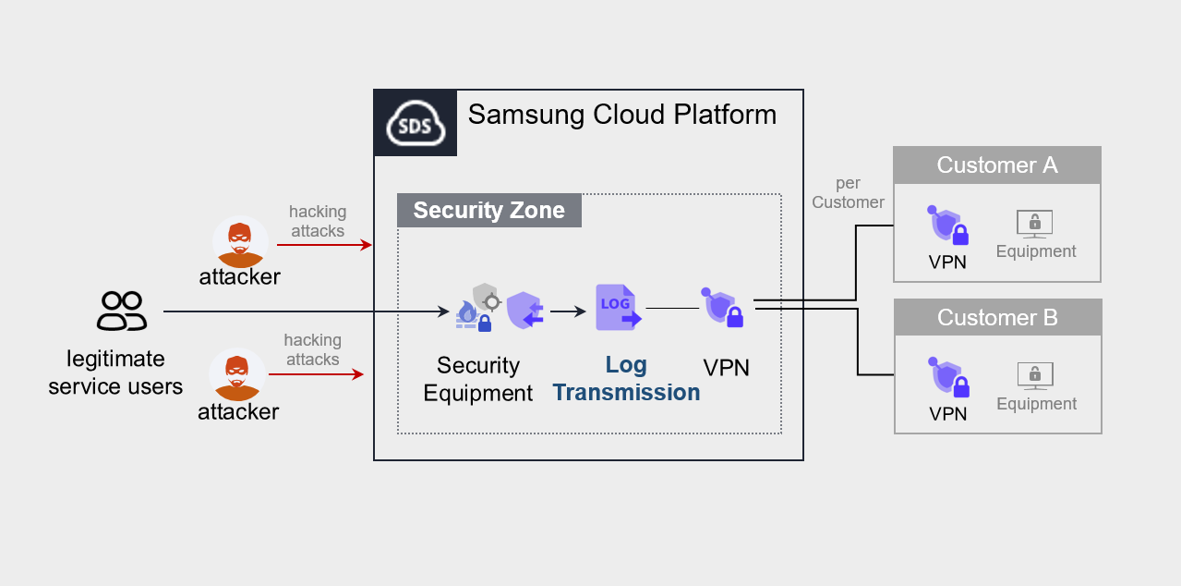
User Activity Log Check
In the Logging & Audit trail, the actions of users active in the project are recorded.
This access log is classified as a critical management document in accordance with the Personal Information Protection Act and other compliance regulations, and is used as essential material to review whether users granted cloud information asset permissions have performed tasks according to the prescribed procedures.
By reviewing activity logs during regular security audits or when a security event occurs, you can track security violations or breach activities.
Additionally, by periodically analyzing this data and comparing it with the permissions granted to users, you can perform permission adjustment tasks.
Even if the user’s activity does not violate security policies, it is necessary to compare the cloud resources the user has worked on over a certain period with the currently granted permissions, in accordance with the principle of least privilege.
This allows you to assess whether permissions are overly granted relative to the current role and to adjust them to align with job responsibilities.
To verify whether log files have been modified or deleted, enable the log file verification feature, and a digest file will be stored in the same bucket.
Log file validation can be performed via the Open API or CLI.