Outage Planning
The reliability design principle focuses on minimizing data loss and enabling the ability to restore services as quickly as possible in abnormal system operation situations such as failures or disasters.
If the availability design principle focuses on preparing automatic fault‑handling functions (Fail‑Over) in advance through high‑availability designs such as redundancy to address a failure of a single component, the reliability design principle deals with post‑incident response strategies for faults or disasters that have already occurred.
This reliability design primarily targets unplanned service interruptions and focuses on securing resiliency (Resiliency) when some or all components of an information system reach a failure or outage state that is difficult to recover from.
Depending on the type of cause for a service interruption, the corresponding recovery measures inevitably differ.
In this document, we categorize the causes of service interruption as ‘Failure’ and ‘Disaster’, and provide detailed response measures for each.
First, failure is a concept that focuses on controllable factors from the perspective of information technology service management.
This does not include uncontrollable factors such as natural disasters or human-caused disasters.
In other words, it refers to the degradation, errors, and failures of an information system caused by controllable factors that have a direct impact, such as human failures, system failures, and infrastructure failures (including operational failures, equipment failures, etc.).
In contrast, disaster refers to the interruption of information technology services caused by events occurring outside of information technology that are difficult to prevent or control.
Additionally, damage caused by an information system failure that results in an expected recovery time exceeding the acceptable limit and impeding normal business operations is also considered a disaster. (TTA, Information System Disaster Recovery Guidelines)
| Category | Disaster | Disability |
|---|---|---|
| Location of the cause | IT-based external | IT-based internal |
| Prevention and Control | Impossible | Possible |
| IT-based damage scale | the entire site | Partial within the site |
| Level of the response organization | enterprise-wide level | Information Systems Management Department level |
| Estimated system recovery time | Medium, long-term (several days or more) | Short-term (a few hours) |
Among the various types of failures, some can be restored to normal condition within a relatively short time, and when they occur in low‑priority tasks, immediate recovery may not be required.
However, some failures not only directly affect core operations such as customer service, but if they persist for a long time, they can cause not only financial losses but also serious damage to the organization’s external image.
For this reason, high‑priority incidents require a more focused management and response system in addition to the standard incident management procedures.
In incident management, Emergency Situation refers to a scenario where a failure occurs in a system that has a broad impact on operations and requires rapid recovery, and where recovery within the allowed time is difficult, potentially leading to an uncontrolled disaster.
To effectively respond to such emergencies, it is most important to establish a response plan in advance for when an emergency occurs.
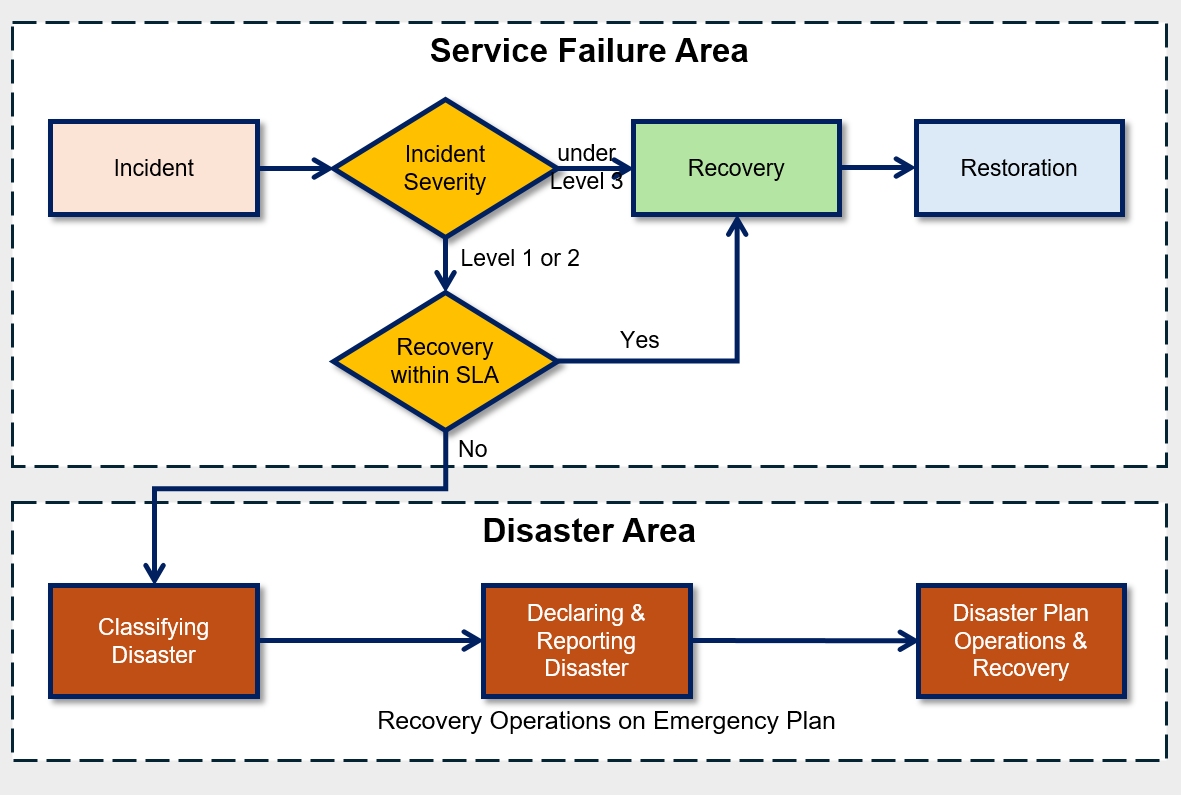
When a failure occurs, the first thing to do is to quickly assess its severity.
The severity of a failure is expressed as a failure grade, which is determined based on the impact of the failure on core operations and the urgency of recovery.
At this stage, you should pre-estimate the recoverability and expected recovery time for each fault grade, and use this information to decide whether to declare an emergency.
The classification of these incident severity levels must be derived from objective criteria to clearly share the incident situation with stakeholders and respond appropriately.
If it is determined that recovery cannot be completed within the allowed time, declare a ‘disaster’ and follow the procedures outlined in the pre‑established disaster recovery plan.
At this point, the allowable recovery time can vary depending on the organization’s characteristics, and in certain industry sectors, the higher supervisory authority may also set standards.
For example, the Financial Supervisory Service recommends the total recoverable time (recovery target time), including disaster recovery, for each financial institution as follows.
Major financial institutions are being advised to achieve full recovery within three hours after a disaster.
| institution | Recovery time | Remarks |
|---|---|---|
| Banking and securities | within 3 hours | |
| Financial Shared Network Operating Institution, Public Certification Center | within 3 hours | Korea Financial Telecommunications & Clearings Institute, Securities IT |
| Securities-affiliated institution, integrated system operating agency | Within 3 hours | Stock Exchange, Futures Exchange, KOSDAQ Market Securities, Securities Depository, Treasury Association |
| insurance | within 24 hours | including foreign insurance companies |
| foreign financial institution | Autonomy | Disclose recovery time, submit emergency response plan |
| Other financial institutions | Autonomy | Emergency Response Plan Submission |
Backup Policy Configuration and Automation
Backup is the most common data protection measure, meaning copying data to a secure separate storage device to guard against damage or loss of original data caused by server failures, power outages, earthquakes, other disaster situations, external attacks, and tampering.
Backup is a critical component of an organization’s data protection and recovery strategy, performed regularly to minimize data loss.
Backup intervals are designed based on the allowable data loss period according to business importance.
Backups should be configured to be created automatically based on a regular schedule or changes to the data set, enabling the organization to minimize data loss and optimize the recovery point.
Important data sets have a small tolerance for loss, so they should be automatically backed up frequently.
Conversely, data of low importance that can tolerate some loss can be backed up at a lower frequency.
When designing a backup policy, you must always consider the backup window.
Backup window refers to the time during which a backup can actually be performed, and when determining it, you should consider the following two factors.
Minimize business impact during backup time Generally, for a daily backup policy, backups are performed from the end of the workday until the period before the start of work the next day. This is to prevent server load generated during backups from affecting actual business operations. For a weekly backup policy, configure it to perform backups using weekend time.
Validity during recovery of backed-up data Depending on the point in time when the data was backed up, the validity of that backup data during recovery may vary. For example, when performing a batch job, whether the backup point is taken before or after the batch job can affect whether additional steps are required during recovery. This also affects the time required for full recovery. Therefore, you should set an appropriate backup schedule considering the nature of the work.
- Back up the Virtual Server using the Backup service.
- Back up the database using the built-in backup feature of the Database service.
- Enable snapshots and versioning to protect Storage data.
The Backup services and features provided by Samsung Cloud Platform are shown in the table below.
When designing the Recovery Point Objective (RPO), you can choose a storage based on the RPO or review the RPO by considering the storage’s backup schedule.
| Backup target service | Backup function | Backup method | Backup schedule | Backup retention period | Backup Repository |
|---|---|---|---|---|---|
| Virtual Server | Backup service | Full or incremental backup of VM snapshots | day/week/month | 2 weeks ~ 1 year | Samsung Cloud Platform Management Repository |
| Bare Metal Server | Backup service | File System Agent Backup | day/week/month | 2 weeks ~ 1 year | Samsung Cloud Platform Management Repository |
| DBaaS | Built-in function | DB-based backup | Data: 1 day Archive: 5 minutes~1 hour | 7–35 days | User Management Object Storage |
| File Storage | Built-in function | snapshot | day/week | Automatic:128 items Manual:800 items | File Storage internal |
| Object Storage | Built-in function | Version control | Immediately upon change | No restrictions | Inside the bucket |
Server Backup Architecture
The architecture below is a server backup and backup DR architecture implemented on the Samsung Cloud Platform.
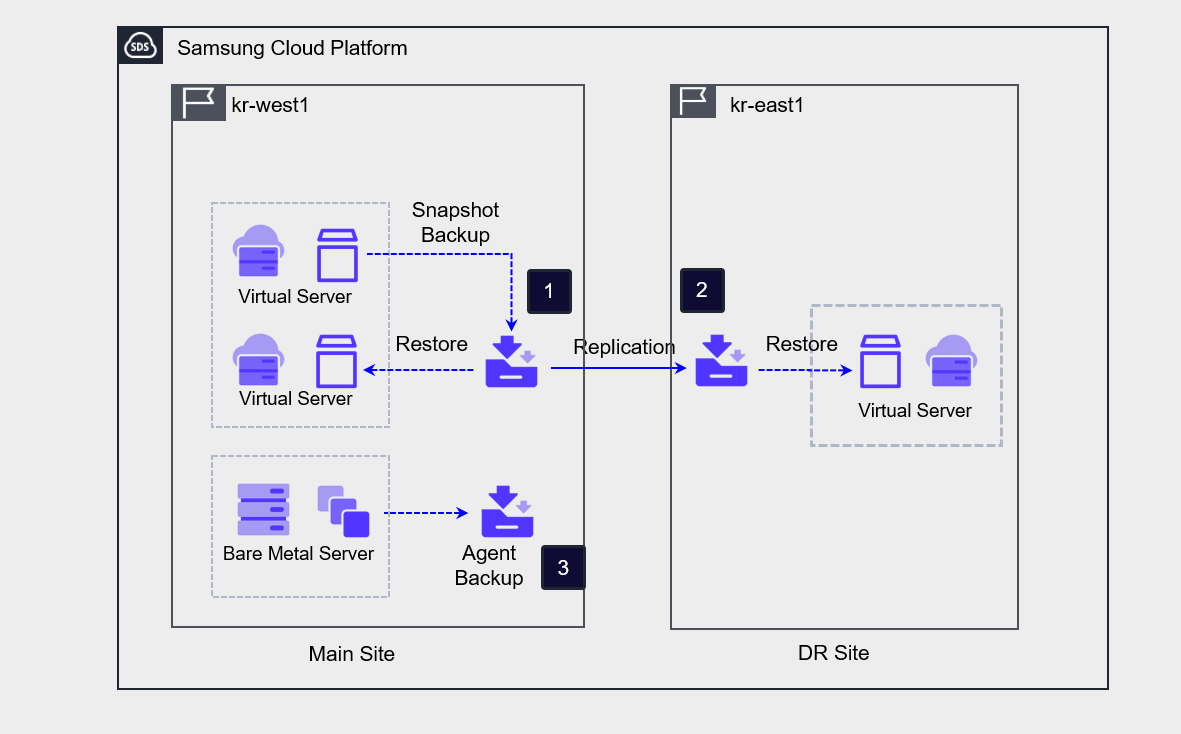
To back up a Virtual Server, create a Backup service; the Backup service snapshots the Virtual Server, stores the image as a backup, and can also distribute the backup to a remote location. Recovery is performed by creating a new Virtual Server from a backup copy at a specific point in time.
When you enable the DR option during backup creation, a backup copy is replicated to the DR site when the backup is performed on the primary site. The DR option cannot be enabled on an already created Backup service; to configure DR, you must create a new Backup service.
Bare Metal Server can be configured for agent-based backup.
Database Backup Architecture
The Database service provides database backup functionality by default.
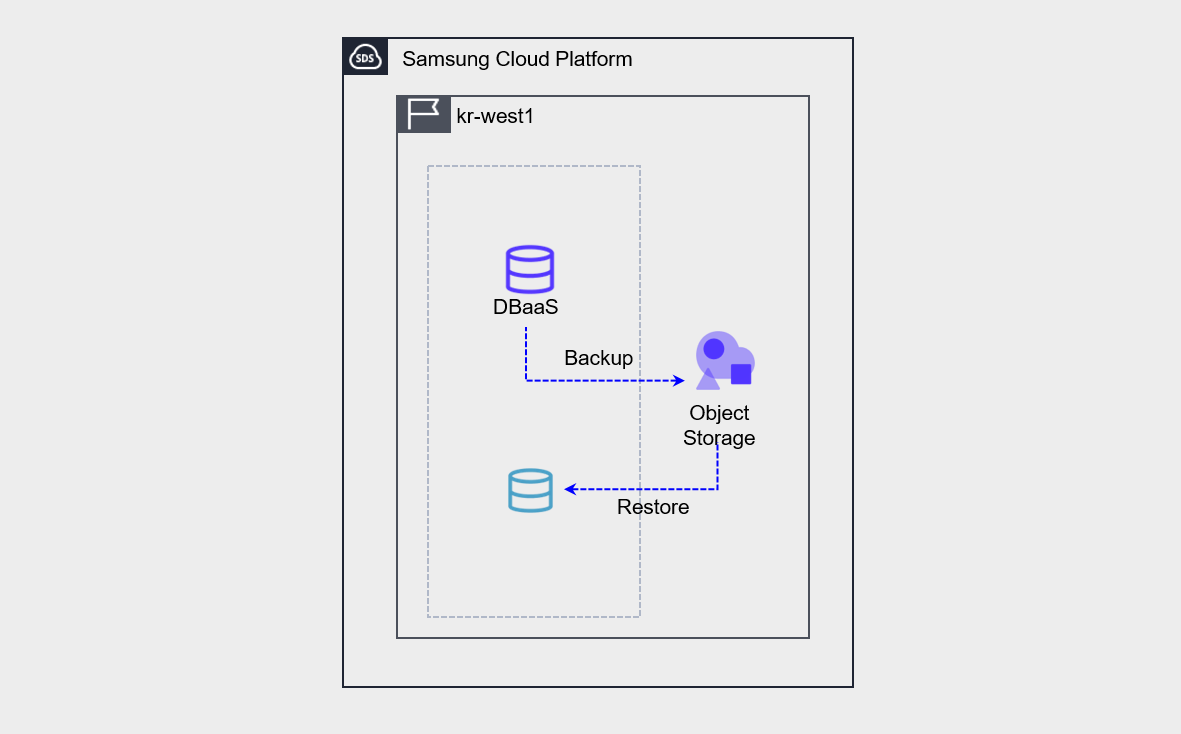
Database backup performs both data backup and archive backup.
- The backup must be stored in an Object Storage bucket that the user creates and designates as the storage location. When restoring a backup, do not restore the backup directly onto the existing server.
- Create a new database from the backup. Convert the created database to the Master database.
Storage backup
Samsung Cloud Platform File Storage protects data using two methods: snapshots and disk backups.
Both methods use the File Storage repository as the source for backup copies and can generate backup copies through scheduling.
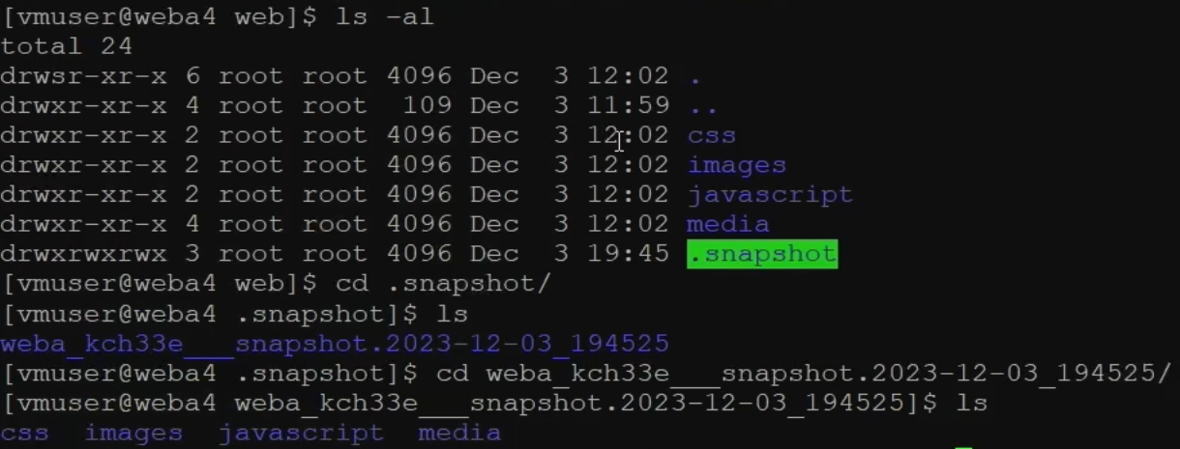
As shown in the figure, you can check the snapshot (/.snapshot) of the File Storage mounted on the server.
By checking the snapshot path, you can view the directories and files as they existed at the time the snapshot was taken, and you can locate and restore any directories or files that require recovery.
Object Storage provides a versioning approach that stores changed copies of objects instead of using backup methods to protect data.
When version control is enabled, all previous versions of an object are saved each time the object changes, allowing you to review the change history when needed.
Backup protection and encryption
The primary purpose of backup is to protect an organization’s critical data from loss.
Critical data is determined by the organization based on business impact, primarily associated with tasks directly linked to the organization’s core services, and sometimes includes data that must be retained mandatorily by law.
The following table shows examples of the records that must be retained by corporations, public institutions, and medical institutions, along with their corresponding retention periods.
| organization | Data | Shelf life | Evidence |
|---|---|---|---|
| company | Commercial ledgers and key business documents | 10 years | Article 33 of the Commercial Code |
| company | Voucher | 5 years | Commercial Code Article 33 |
| company | Employee roster and employment contract documents | 3 years | Labor Standards Act Articles 42 and 91 |
| company | Corporate transaction ledgers and transaction documents | 5 years | National Tax Basic Act Article 85-3 |
| company | Dealer Agreement | 3 years after the transaction ends | Act on the Fairness of Agency Transactions, Article 5 |
| company | Documents related to subcontracting transactions | 3 years after the transaction ends | Act on the Fairness of Subcontracting Transactions, Article 3 |
| company | Industrial safety documents | 3 years | Industrial Safety and Health Act |
| company | Personal information | Destroy immediately when unnecessary. | Personal Information Protection Act Article 21 |
| Public institution | All types of recorded information materials—including documents, books, registers, cards, drawings, audiovisual materials, electronic documents, and the like—produced or received by public institutions in the course of their duties, as well as administrative artifacts. | permanent/semi-permanent/30 years/10 years/5 years/3 years/1 year | Act on the Management of Public Records and Its Enforcement Decree |
| medical institution | Medical record book / Surgical record | 10 years | Medical Service Act Enforcement Rules Article 15 |
| medical institution | patient register, radiographic images, test records, nursing records, etc | 5 years | Medical Service Act Enforcement Rules Article 15 |
| medical institution | prescription | 2 years | Medical Service Act Enforcement Rules Article 15 |
In on-premises environments, backup copies are stored (distributed) in a secure remote location to prepare for site disasters.
In the cloud, to securely manage backup copies, configure access controls for the backup copies, maintain integrity by implementing encryption of the backup copies, and prepare for site disasters through backup DR(disaster recovery).
- Archive Storage, Multi-AZ, DR configurations prevent loss of backup copies due to failures or disasters at a single point/site.
- Ensures the integrity of backup data through access control and encryption of the backup repository.
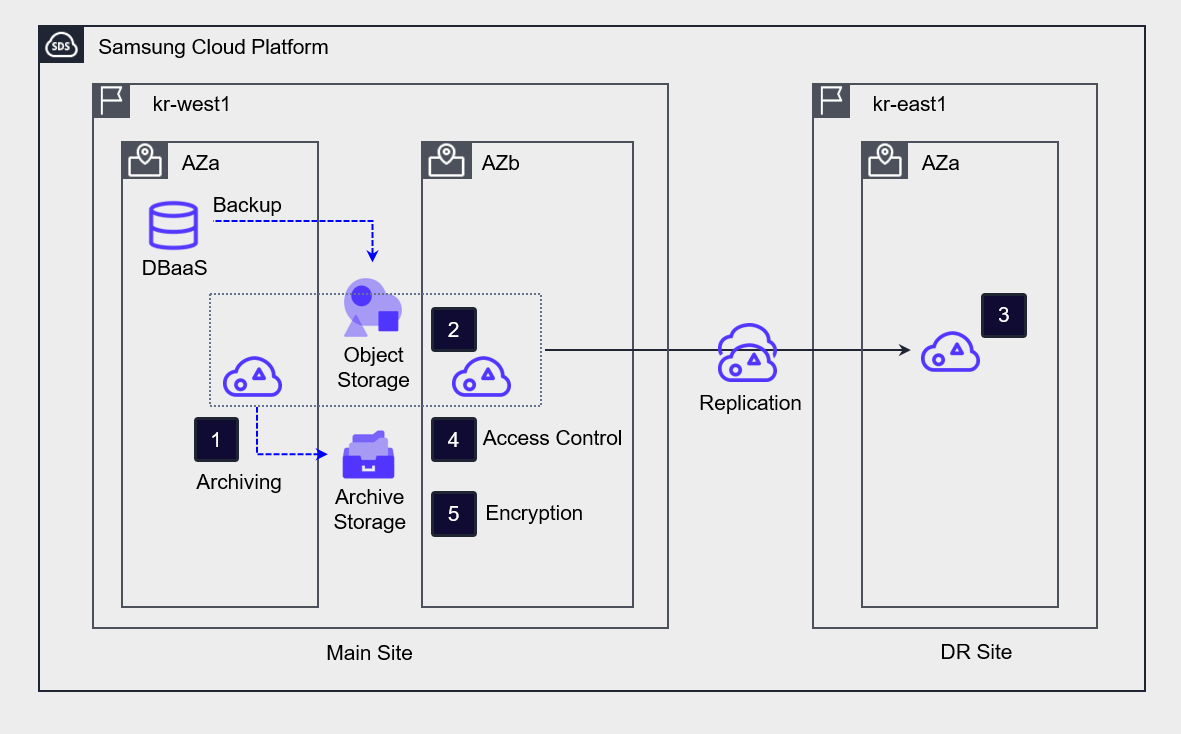
Archive the bucket in Object Storage where the backup is stored to Archive Storage for long-term retention.
Deploy Object Storage across multiple AZs to prepare for failures in a single availability zone.
Implement DR replication to prevent data loss in the event of a regional disaster.
To prevent unauthorized access to backup copies, set access controls by specifying the access server, IP address, and endpoint, or
Enable bucket encryption to ensure data integrity.
Develop a recovery plan for failures
To prepare for server and data loss due to failures, you can establish the following recovery plan.
| Step | Main activities |
|---|---|
| Step 1 Situation Assessment |
|
| Step 2 Prepare to execute recovery plan |
|
| Step 3 Perform Recovery |
|
| Step 4 Testing and Validation |
|
| Step 5 Normalization Report |
|
Data backup recovery test
Data backup and recovery testing is an important process to verify that recovery is performed correctly.
Even if backups are performed in accordance with information security regulations, without regular checks, it may be difficult to recover data as planned in the event of a failure.
Therefore, you should regularly perform recovery tests on backups to verify that the restored system operates correctly.
- Check the original backup data and its replica to confirm that the automated backup was executed correctly, and verify data validity.
- Set up an environment for recovery testing and conduct recovery drills.
- If data recovery fails or does not meet the target RTO and RPO, perform backup verification tasks and improvements.