Disaster Recovery Plan
Disaster Recovery Plan
The principle of safety design deals with minimizing data loss in abnormal system operation situations such as failures or disasters, and focuses on the ability to restore services as quickly as possible.
If the availability design principle focuses on preparing automatic fault response functions (Fail-Over) in advance through high-availability designs such as redundancy when a single component failure occurs, the reliability design principle deals with post-response strategies for faults or disasters that have already occurred.
This stability design focuses primarily on unplanned service interruption scenarios, and emphasizes securing resiliency when some or all components of an information system reach a failure or interruption state that is difficult to recover from.
Depending on the type of cause for service interruption, the recovery response measures must also differ.
In this document, the causes of service interruption are classified as ‘disruptions’ and ‘disasters’, and specific response measures for each are explained in detail.
First, ‘disability’ is a concept that focuses on controllable factors from the perspective of information technology service management.
This does not include uncontrollable factors such as natural disasters or human-made disasters.
In other words, it refers to the degradation, errors, and failures of an information system caused by controllable factors that have a direct impact, such as human faults, system faults, and infrastructure faults (including operational faults and equipment faults).
In contrast, ‘disaster’ refers to the interruption of information technology services due to events occurring outside of information technology that are difficult to prevent or control.
Also, damage that interferes with normal business operations because the expected recovery time due to an information system failure exceeds the allowable range is considered a disaster. (TTA, Information System Disaster Recovery Guidelines)
| Category | Disaster | Disability |
|---|---|---|
| Location of cause occurrence | IT-based external | IT-based internal |
| Prevention and control | Impossible | Possible |
| IT-based damage scale | Entire site | Partial within site |
| Response organization level | Enterprise level | Information system management department level |
| Estimated system recovery time | Medium, long-term (several days or more) | Short-term (several hours) |
Among various types of failures, some can be restored to normal condition within a relatively short time, and if they occur in low‑priority tasks, immediate recovery may not be required.
However, some failures not only directly affect core tasks such as customer service, but if they persist for a long time, they can cause not only financial losses but also serious damage to the organization’s external image.
For this reason, for high-priority failures, in addition to the usual failure management procedures, a more focused management and response system is required.
In incident management, emergency situation refers to a situation where, when a failure occurs in a system that has a wide impact on business and requires rapid recovery, it is difficult to recover within the allowed time, potentially leading to an uncontrolled disaster.
To effectively respond to such emergencies, it is most important to have a response plan prepared in advance for when an emergency occurs.
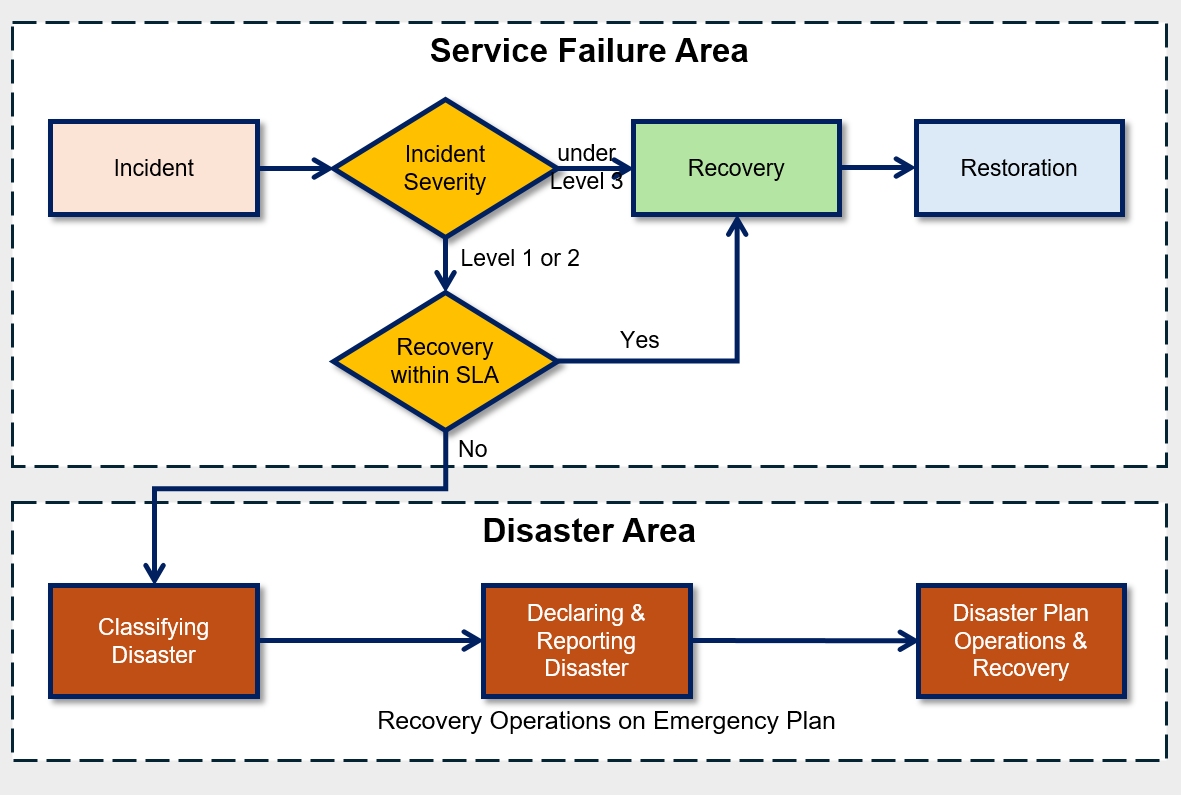
If a failure occurs, the first thing to do is to quickly assess the severity of the failure.
The severity of a disability is expressed as a disability grade, and the disability grade is determined based on the impact of the disability on core tasks and the urgency of recovery.
At this time, for each fault grade, you must pre-estimate the recoverability and expected recovery time, and based on this, you will determine whether to declare an emergency situation.
The classification of such disability grades must be derived based on objective criteria to clearly share the disability situation with stakeholders and respond appropriately.
If it is judged that recovery is impossible within the allowed time, declare a ‘disaster’ and follow the procedures according to the pre-established disaster recovery plan.
At this time, the allowed recovery time can vary depending on the characteristics of the organization, and in certain industry sectors, a higher supervisory authority may set standards.
For example, the Financial Supervisory Service recommends the total recovery time (recovery target time) including disaster recovery for each financial institution as follows.
Major financial institutions are being recommended to achieve full recovery within three hours after a disaster.
| Organization | Recovery Time | Remarks |
|---|---|---|
| Banking and securities | within 3 hours | |
| Financial Shared Network Operator, Certified Authentication Center | within 3 hours | Financial Settlement Institute, Securities Computing |
| Securities affiliated institutions, Integrated system operating institution | Within 3 hours | Securities Exchange, Futures Exchange, KOSDAQ market securities, Securities Depository, Treasury Association |
| Insurance | Within 24 hours | Including foreign insurance companies |
| Foreign financial institution | Voluntary | Disclosure of recovery time, submission of emergency response plan |
| Other financial institutions | Autonomous | Submission of emergency response plan |
Backup Policy Configuration and Automation
Backup is the most common data protection measure, meaning copying data to a safe separate storage device to prepare for damage or loss of original data due to server failures, power outages, earthquakes, other disaster situations, external attacks, and tampering.
Backup is an important element in an organization’s data protection and recovery strategy, and is performed regularly to minimize data loss.
Backup cycles are designed considering the period during which loss can be tolerated according to the importance of the work.
Backups should be configured to be created automatically according to a regular schedule or changes to the data set, allowing organizations to minimize data loss and optimize the recovery point.
Important data sets need to be automatically backed up frequently because the loss tolerance is small.
On the other hand, data of low importance that can tolerate some loss can be backed up at a lower frequency.
When designing a backup policy, you must consider the backup window.
Backup available time actually means the time when a backup can be performed, and when determining it, you must consider the following two factors.
Minimize business impact during backup time
Generally, for daily backup policies, backups are performed from the end of work to the time before the start of work the next day. This is to ensure that server load generated during backup does not affect actual work. For weekly backup policies, set it to perform backups using weekend time.Validity when restoring backed-up data
Depending on the time of data backup, the validity of the backup data may vary during recovery. For example, when performing a batch job, whether additional work is required during recovery can vary depending on whether the backup point is before or after the batch job execution. This also affects the time required for full recovery. Therefore, you should set an appropriate backup time considering the nature of the work.
- Use the Backup service to back up the Virtual Server.
- Database service’s built-in backup feature backs up the database.
- Enable snapshot and version management to perform Storage data protection.
The Backup services and features provided by Samsung Cloud Platform are as follows.
When designing the recovery point objective (RPO), you can select a storage considering the RPO, or review the RPO considering the storage’s backup schedule.
| Backup Target Service | Backup Function | Backup Method | Backup Schedule | Backup Copy Retention Period | Backup Copy Storage |
|---|---|---|---|---|---|
| Virtual Server | Backup Service | VM snapshot full or incremental backup | Daily/Weekly/Monthly | 2 weeks~1 year | Samsung Cloud Platform managed storage |
| Bare Metal Server | Backup Service | File System Agent Backup | Daily/Weekly/Monthly | 2 weeks~1 year | Samsung Cloud Platform Managed Storage |
| DBaaS | Built-in features | DB-based backup | Data: 1 day Archive: 5 minutes~1 hour | 7 days~35 days | User management Object Storage |
| File Storage | Built-in feature | Snapshot | Day/Week | Auto:128 Manual:800 | File Storage internal |
| Object Storage | Built-in feature | Version control | Immediately upon change | No restrictions | Inside bucket |
Server Backup Architecture
The architecture below is the server backup and backup DR architecture implemented on the Samsung Cloud Platform.
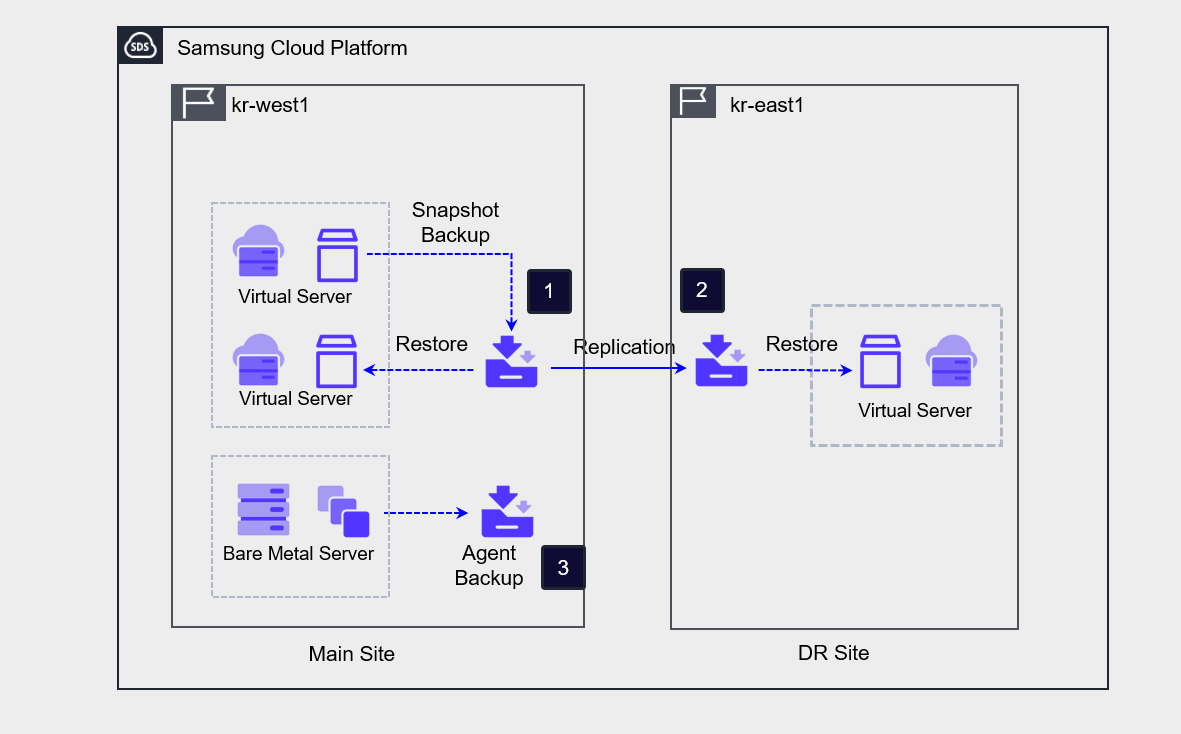
If you create a Backup service to back up a Virtual Server, the Backup service snapshots the Virtual Server, stores the image as a backup copy, and can also distribute the backup copy to a remote location.
Recovery is performed by creating a new Virtual Server using a backup copy from a specific point in time.When the DR option is enabled during backup creation, a backup copy is replicated to the DR site when performing a backup on the primary site. The DR option cannot be enabled on an already created Backup service, and to configure DR you must create a new Backup service.
Bare Metal Server can configure backup using the Agent method.
Database Backup Architecture
Database service provides database backup functionality by default.
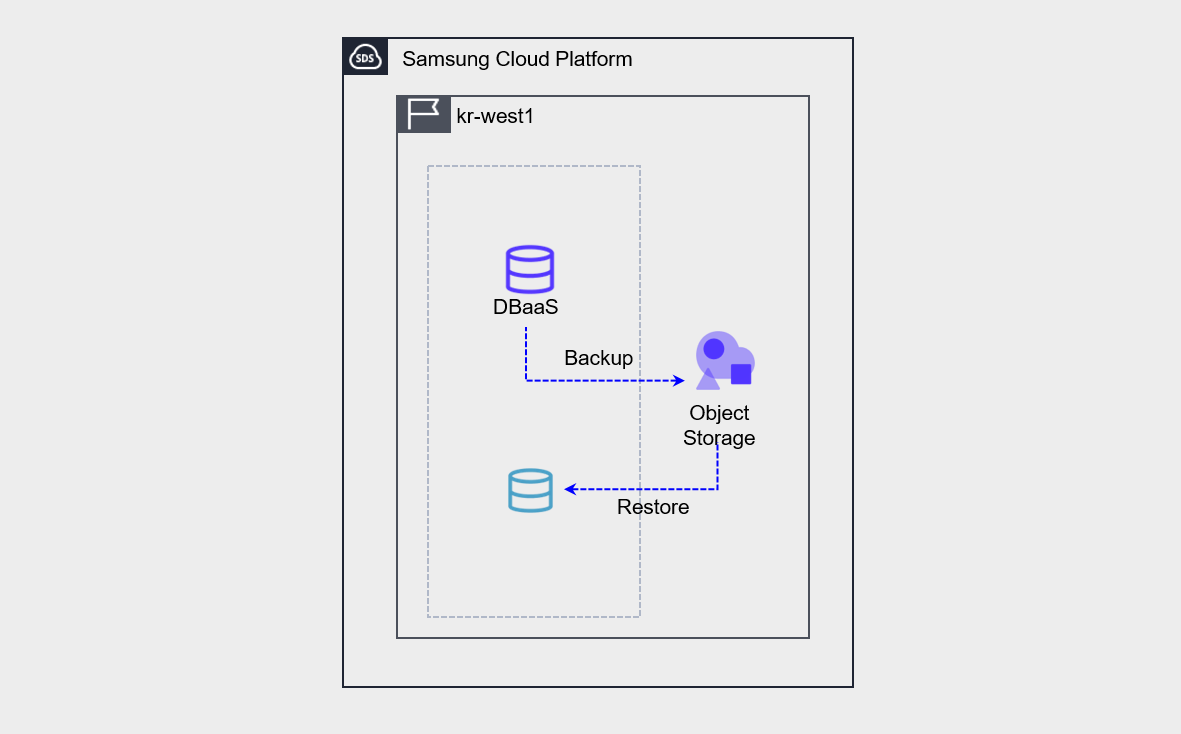
Database backup performs both data backup and archive backup.
- The backup must be stored by the user creating an Object Storage bucket and designating it as storage. When restoring a backup, the backup is not restored directly to the existing server.
- Create a new database from the backup. Convert the created database to the Master database.
Storage Backup
Samsung Cloud Platform File Storage uses snapshots and disk backup methods to protect data.
Both methods use the File Storage repository as the source of the backup copy, and can generate backup copies through scheduling.
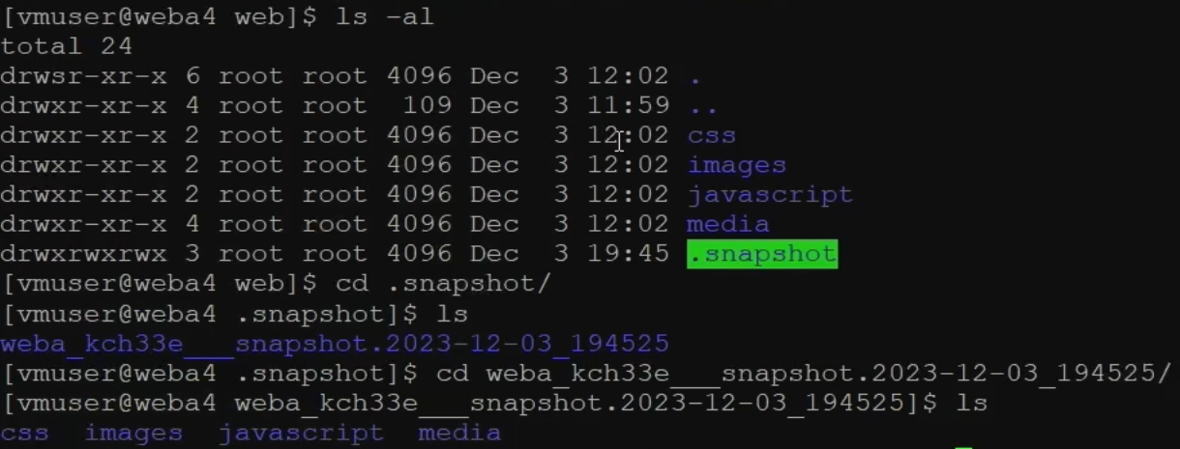
You can check the snapshot (/ .snapshot) of the File Storage mounted on the server as shown in the picture.
If you check the snapshot path, you can see the directories and files at the time the snapshot was taken, and you can find the directories or files that need recovery and perform the recovery.
Object Storage provides a versioning method that stores changed copies of objects instead of using backup methods to protect data.
If you enable version control, every time an object changes, all previous versions of the object are saved, allowing you to check the change history when needed.
Backup Protection and Encryption
The main purpose of backup is to protect an organization’s important data from being lost.
Important data is defined by the organization based on business impact, is mainly associated with tasks directly linked to the organization’s core services, and sometimes includes data that must be mandatorily retained by law.
The following table shows examples of the materials that must be retained and the corresponding retention periods in corporations, public institutions, and medical institutions.
| Organization | Data | Retention Period | Basis |
|---|---|---|---|
| Company | Commercial books and main business documents | 10 years | Commercial Law Article 33 |
| enterprise | voucher | 5 years | Article 33 of the Commercial Code |
| Company | Employee roster and employment contract documents | 3 years | Labor Standards Act Articles 42, 91 |
| enterprise | corporate transaction ledger and transaction documents | 5 years | National Tax Basic Act Article 85 Paragraph 3 |
| Company | Agency contract | 3 years after transaction termination | Article 5 of the Act on the Fair Trade of Agency Transactions |
| Company | Subcontracting transaction related documents | 3 years after transaction termination | Article 3 of the Subcontracting Transaction Fairness Act |
| Company | Industrial safety related documents | 3 years | Industrial Safety and Health Act |
| Company | Personal Information | Immediate destruction if unnecessary | Personal Information Protection Act Article 21 |
| Public institution | All forms of recorded information materials and administrative artifacts such as documents, books, registers, cards, drawings, audiovisual materials, electronic documents, etc., produced or received by public institutions in relation to their work | permanent/quasi-permanent/30 years/10 years/5 years/3 years/1 year | Public Records Management Act and Enforcement Decree |
| medical institution | medical record / surgery record | 10 years | Medical Act Enforcement Rules Article 15 |
| Medical institution | patient registers, radiographic images, test records, nursing records, etc. | 5 years | Medical Service Act Enforcement Rules Article 15 |
| Medical institution | Prescription | 2 years | Medical Law Enforcement Rules Article 15 |
In an on-premises environment, backup copies are kept (distributed) in a secure remote location to prepare for site disasters.
In the cloud, to safely manage backup copies, configure access control for the backup copies, maintain integrity through implementing encryption of the backup copies, and prepare for site disasters through backup DR (disaster recovery).
- Archive Storage, Multi-AZ, DR configuration prevents loss of backup copies due to failures or disasters at a single point/site.
- Ensure the integrity of backup data through access control and encryption of backup storage.
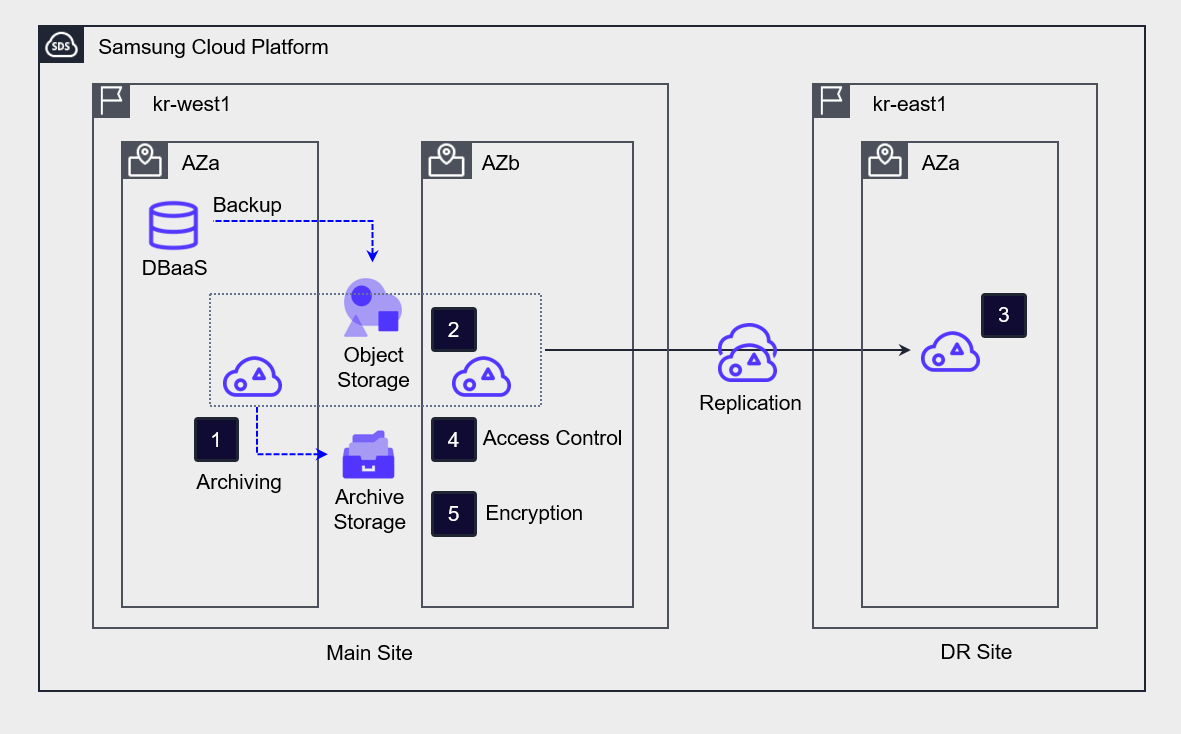
Archive the bucket of Object Storage where the backup is stored to Archive Storage for long-term preservation.
Deploy Object Storage to Multi-AZ to prepare for a failure of a single availability zone.
Implement DR replication to prepare for data loss in case of a region disaster.
To prevent unauthorized access to backup copies, set access control by specifying the access server, IP address, and endpoint,
Enable bucket encryption to ensure data integrity.
Establish a recovery plan in case of failure
To prepare for server and data loss due to failures, a recovery plan can be established as follows.
| Stage | Main activities |
|---|---|
| Step 1 Situation Assessment | - Problem Identification: Identify the cause of system downtime or data loss - Scope Determination: Assess the range of systems and data affected |
| Step 2 Recovery Plan Execution Preparation | - Assemble recovery team: Secure specialized personnel to perform recovery tasks - Verify recovery data: Check backup policies, backup tools, and recent copy status of the target service - Prepare recovery environment: Determine network environment for recovery (existing network, new network) |
| Step 3 Recovery Execution | - Configure cloud infrastructure for recovery: VPC, server net, Security Group, storage - Perform recovery: execute recovery using selected backup copy |
| Step 4 Testing and Verification | - Test restored data and system normal operation: data integrity, Application functionality, network connectivity, etc. - Confirm whether normal work is possible by actual users |
| Step 5 Normalization Report | - After confirming normal operation of all systems and data, normalize the system - Prepare recovery procedures and result report - Record problem resolution methods during recovery work and future improvement measures, etc. |
Data backup recovery test
Data backup recovery test is an important process to check whether recovery is performed normally.
Even if backups are performed according to information security regulations, if regular checks are not carried out, it may be difficult to recover data as planned in the event of a failure.
Therefore, regular recovery tests for backups should be conducted to verify that the restored system operates normally.
- Verify the backup data source and data replica to ensure that the automated backup was performed correctly, and validate data integrity.
- Set up an environment for recovery testing and conduct recovery training.
- If data recovery fails or does not meet the target RTO and RPO, perform backup verification tasks and improvements.