Disaster Recovery Plan
Disaster Recovery Plan
Architecture Design According to Disaster Recovery Objectives
After deriving the required levels of Recovery Time Objective (RTO) and Recovery Point Objective (RPO) for each business, you must decide on the disaster recovery type and design and implement it based on this.
Disaster recovery design can be built based on RTO and RPO, and can be divided into three main types: Cold, Warm, and Hot.
| DR configuration level | RTO | RPO | Availability (Main↔DR) | Recovery | Cost | Target |
|---|---|---|---|---|---|---|
| Cold Level | Order | Days | Active-Backup | Resource Allocation and Backup Recovery | Low | Non-critical System |
| Warm Level | Days | Hours | Active-Replica | Manual Fail-over resource allocation and expansion | Medium | General system |
| Hot Level | several hours | 0 | Active-Standby | manual Fail-over | high | critical system |
Cold Level
The Cold Level method stores only the backup data of core services in the DR center and restores services based on this backup data in the event of a disaster.
This method has the advantage of the lowest initial investment and maintenance costs, but has the disadvantage that the possibility of data loss is high depending on the backup interval.
Also, the Cold Level approach requires allocating and configuring new system resources at the DR center during disaster recovery, which can take a considerable amount of time to recover, making it suitable for low‑priority workloads.
The figure below is an example of the Cold Level architecture.
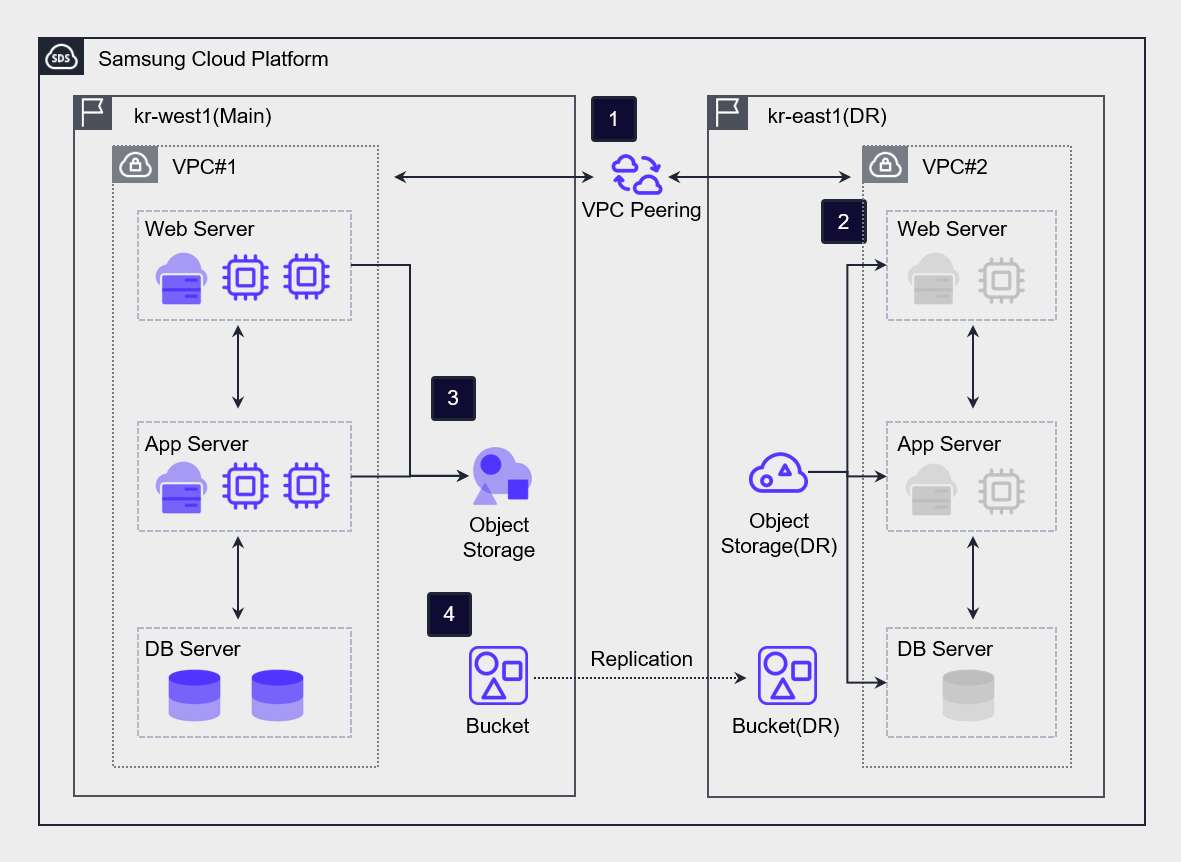
Connect kr-west1 Region (primary center) and kr-east1 Region (DR center) via VPC Peering.
After creating a DR Virtual Server in the kr-east1 Region (DR Center), keep the power off under normal conditions.
Periodically back up the data of the Virtual Server in the kr-west1 Region (main center) to Object Storage.
Using the DR synchronization feature, perform asynchronous bucket-level replication from the Object Storage of the kr-west1 Region (main center) to the Object Storage (DR) of the kr-east1 Region (DR center).
In the event of a disaster, recover the data of Object Storage (DR) in the kr-east1 Region (DR center) and resume the service.
Warm Level
The Warm Level method is a way of building in the DR center centered on systems with high service importance.
Because real-time replication between the primary center and the DR center does not occur, a periodic synchronization process is required.
In the event of a disaster, resources from the remaining systems are allocated and expanded before restoring the service, so data loss may occur and it may take a considerable amount of time to recover the service.
However, compared to the Hot Site method, it has the advantage of relatively lower initial investment and maintenance costs.
Hot Level
The Hot Level method is a way of building a system in an Active-Standby state based on real-time replication.
This method is suitable for high‑priority systems because when a disaster occurs, it stops replication and switches operations to the DR center, allowing services to be quickly resumed.
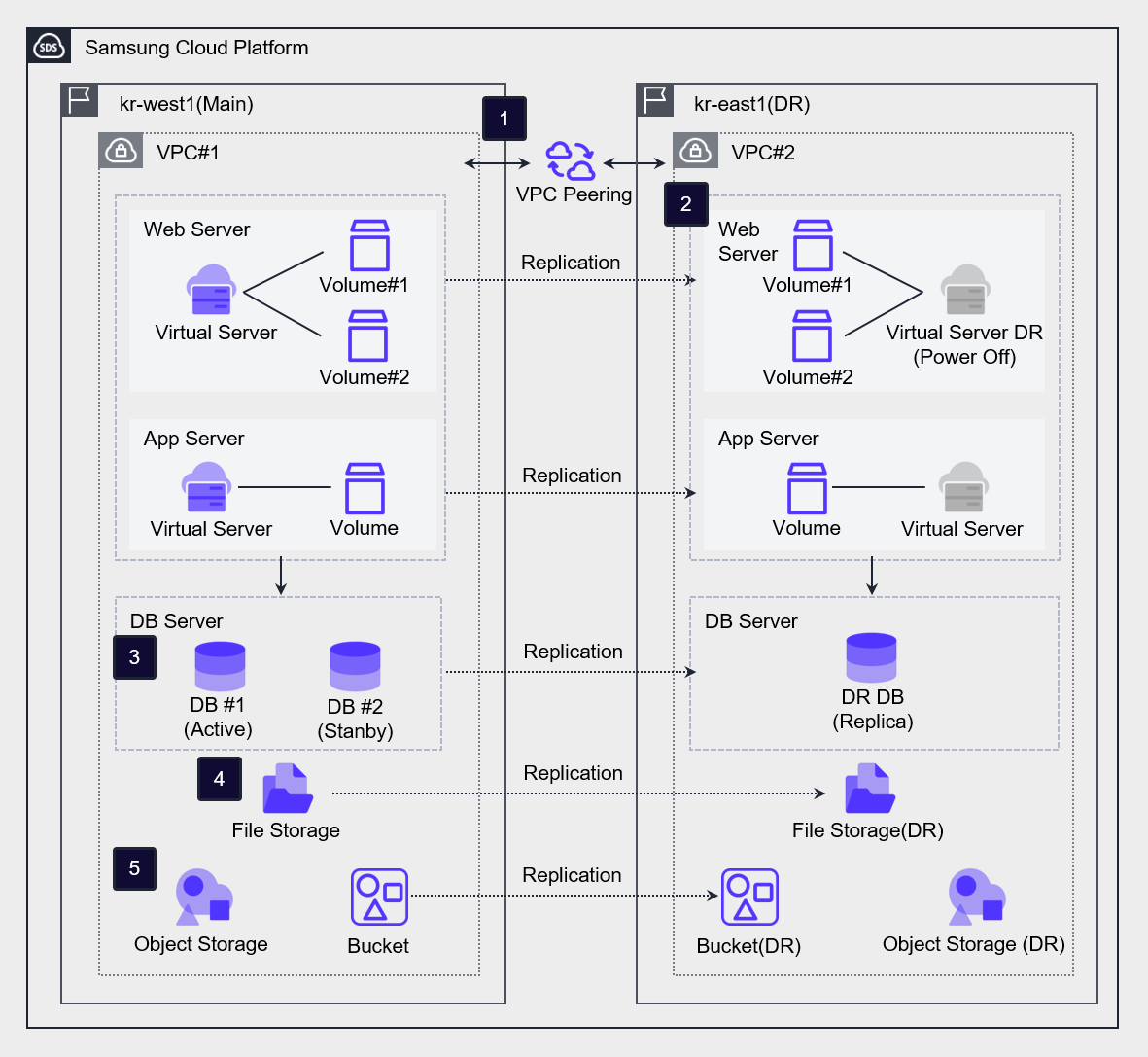
Connect kr-west1 Region (main center) and kr-east1 Region (DR center) via VPC Peering.
For Virtual Servers used for WEB/APP, a DR Virtual Server is created in the kr-east1 Region (DR center) through the Virtual Server DR service. In disaster situations or during mock drills, the DR Virtual Server is used as the primary Virtual Server.
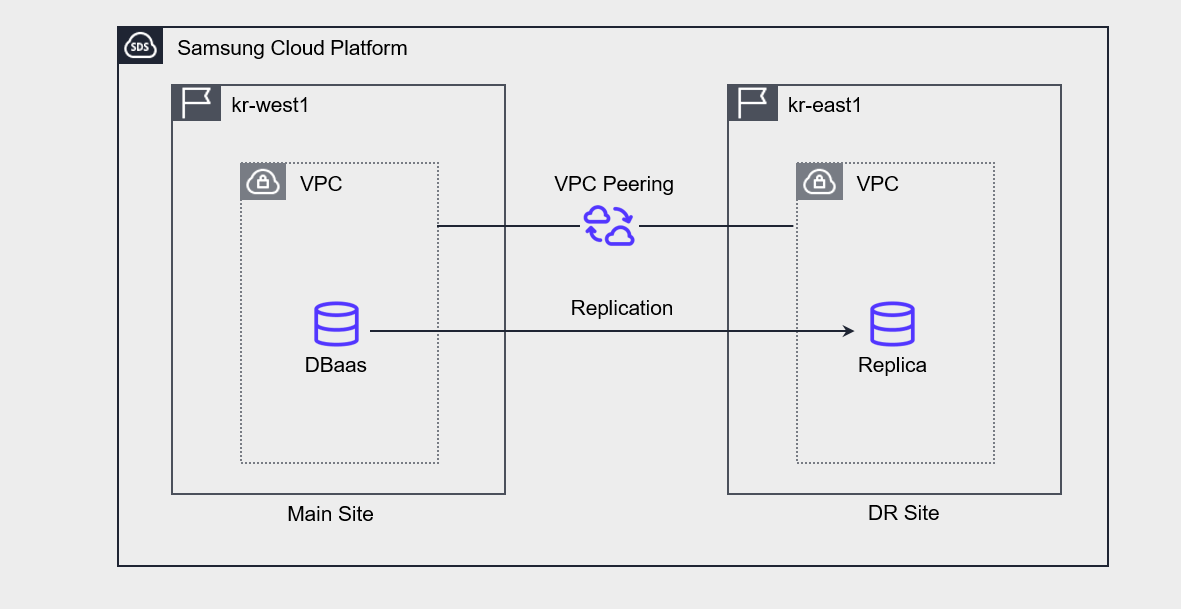
In case of DBaaS, data is asynchronously replicated through a cross‑region replica configuration, and in disaster situations the DR replica is promoted to master and used as the primary database.
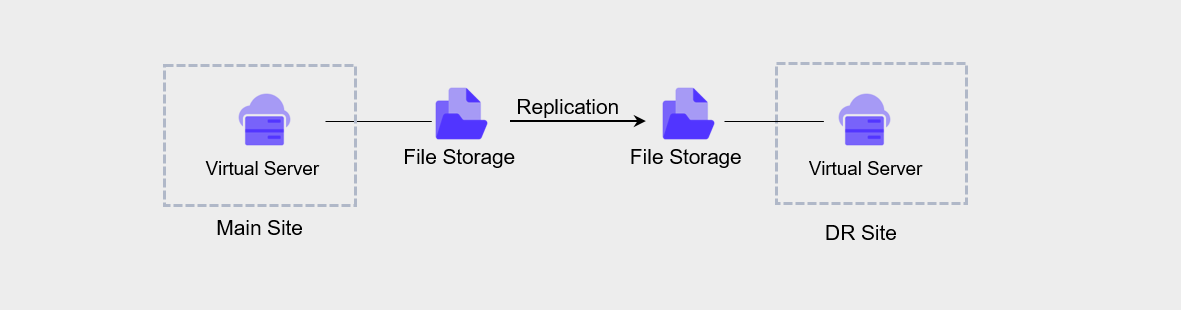
In the case of File Storage, using the DR replication feature in the File Storage of the kr-west1 Region (main center), a replicated volume is configured in the kr-east1 Region (DR center). After setting the replication cycle and synchronization policy, the volume is replicated, and in a disaster situation, synchronization is stopped and the replicated volume is changed to R/W mode for use.
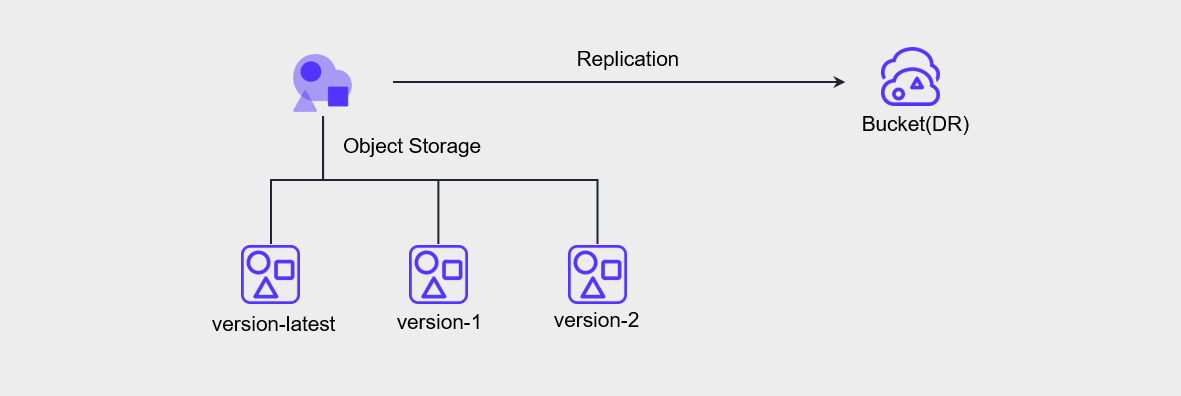
In the case of Object Storage, using the DR synchronization function from the Object Storage in the kr-west1 Region (main center), we perform bucket-level asynchronous replication to the Object Storage (DR) in the kr-east1 Region (DR center). In disaster situations, access the Object Storage(DR) Bucket(DR) as an End Point and use it.
Data replication between regions for disaster recovery
Samsung Cloud Platform supports DR through various levels of storage replication.
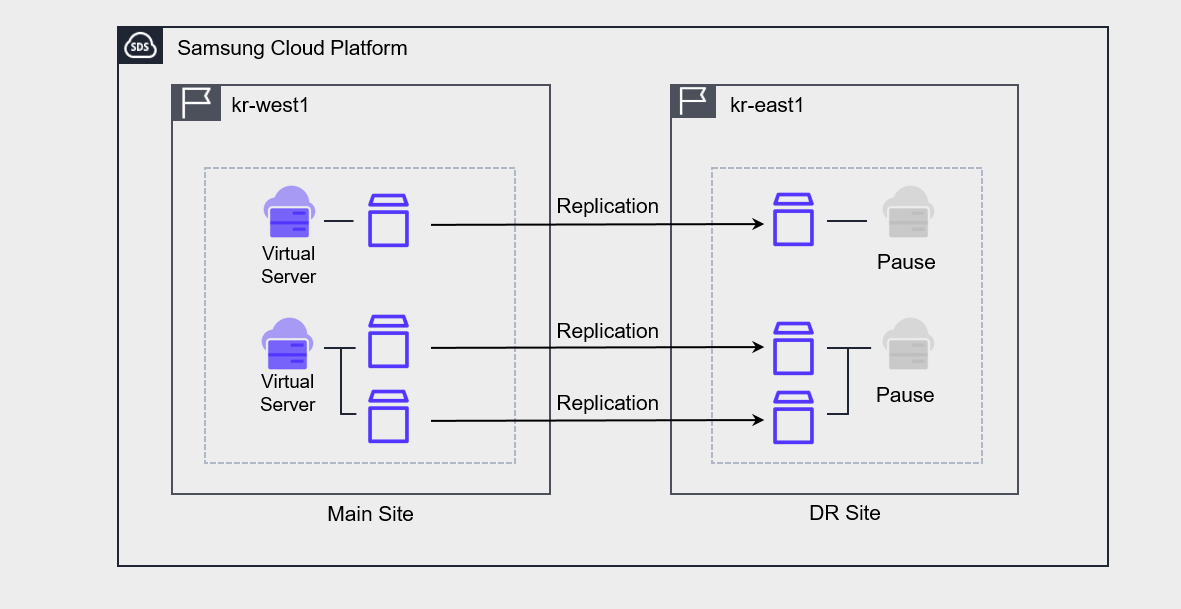
Virtual Server DR
Virtual Server DR is a service that replicates Virtual Server and its associated Block Storage to a Region different from the currently used Region, and provides planning and testing for disaster preparedness, as well as recovery functions when an actual disaster occurs.
In practice, what is replicated is Block Storage, and the Virtual Server at the DR site is kept in a stopped state.
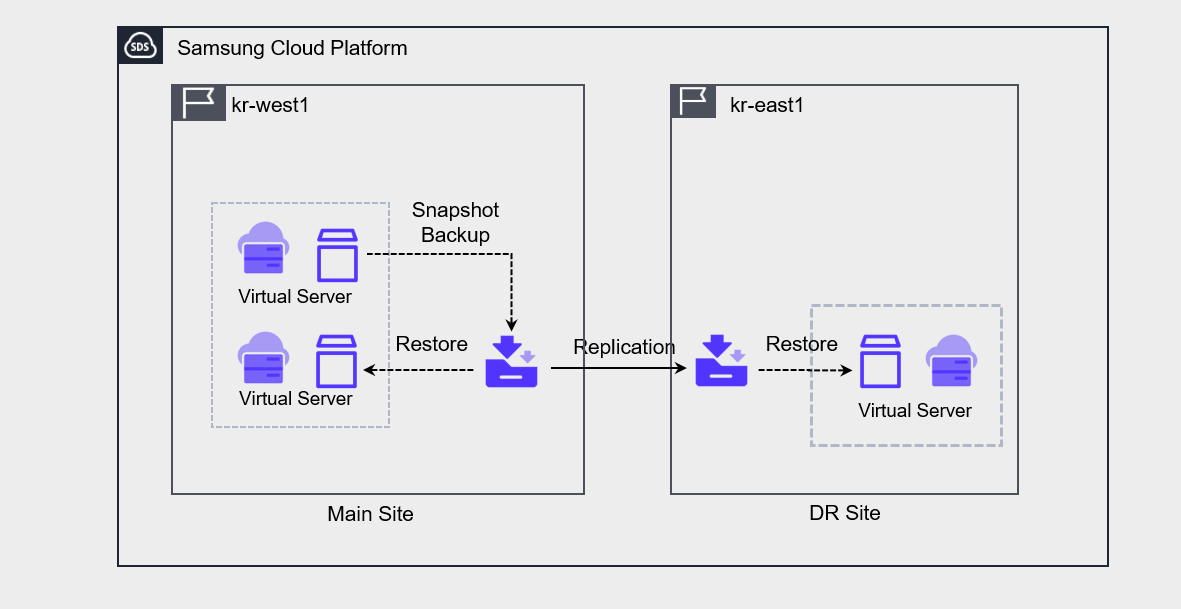
Backup DR
Backup DR is a feature that can be enabled when creating a service. When Backup DR is enabled, when a backup is performed on the primary site, the backup copy is replicated and stored at the DR site.
Object Storage DR
Object Storage DR is configured through synchronization settings between the primary site’s bucket and the DR site’s bucket. To set up DR, versioning must be enabled on the primary site’s bucket.
File Storage DR
File Storage DR can be configured from the primary site File Storage using DR Region, DR Volume name, and replication interval settings.
The replication cycle can be selected from 5 minutes, 1 hour, daily, weekly, or monthly, with daily replication performed at 23:59:00, weekly replication on Sunday at 23:59:00, and monthly replication on the 1st at 23:59:00.
Database Service DR
In Database service DR, you can create a replica of the primary site master DB at the DR site and configure it.
If you configure the Replica, changes on the primary site are synchronized and reflected in the Replica.
To configure the Replica, peering must be established between the primary site’s VPC and the DR site’s VPC.
In case of a disaster, manually switch the DR site’s replica to master and operate it.
Container Registry DR
Using Container Registry DR, the DR registry and Object Storage bucket are replicated to a different region.
This allows you to replicate a Kubernetes cluster’s image from one region to another region and configure an identical Kubernetes cluster.
When configured together with File Storage DR, you can implement Kubernetes Cluster DR.
※ Inter-region Container Registry feature is scheduled for future release (‘26)
Establish a transition plan for disaster
If a service interruption occurs and, based on the assessment of the incident severity level and the determination of recoverable time, it is not possible to recover within the predefined time, a disaster is declared and disaster recovery procedures are performed.
The steps of disaster recovery are as follows.
| Stage | Activity | Member task |
|---|---|---|
| Disaster Declaration | Assess Disaster Status | - Establish Countermeasure Headquarters - Emergency Notification - Operation of Situation Room - Current Disaster Status Assessment - Estimate Recovery Time (Main Center) - Prepare Report for Chief Executive |
| Disaster Declaration | Disaster Recovery System Transition Decision | - Decide transition considering estimated recovery time and return time - Control the disaster recovery system transition procedure |
| Disaster Recovery Activities | to the Disaster Recovery Center Service Transition | - Verify Service Restart - Prepare for Long-term Operation at the Disaster Recovery Center |
| Disaster recovery activities | Main center recovery | - H/W, S/W supply support companies urged to recover - If recovery impossible, establish procurement plan (procurement approval after preliminary action) - Disaster recovery transition control and final service verification report - Internal and external reporting, preparation of presentation materials - Estimate main center recovery timing and prepare recovery center operation plan |
| Main Center Recovery | Decision to Return to Main Center | - Prepare return plan and decide timing - Verify stabilization of main center - Confirm service transition due to return - Identify service details and issues after transition - Control return procedures of disaster recovery system |
Service Change Management
Maintaining consistency between primary site and DR site
If you perform updates, patches, etc. on the primary site, the infrastructure and application configuration state of the DR environment may change.
Due to this, the system may not function properly when performing disaster recovery.
Therefore, you should set up a test/staging environment to verify changes first, and then reflect them to the primary site and DR site to improve the consistency and reliability of deployment.
- Do not make changes directly on the main site; instead, make changes through the test/staging environment.
- Use the deployment environment for software updates, security patches, infrastructure configuration changes, etc., and reflect them in the primary site and DR site.
Change Management Through Automation
If you perform service change tasks manually, various variables may arise.
As a result, if there is a difference in configuration between the primary site and the DR site, the primary site’s functions may not operate as intended on the DR site during disaster recovery.
Therefore, we need to automate the deployment process to minimize the impact of such potential errors.
- Manage and deploy infrastructure templates through automation tools.
- Manage the code in a secure central repository.
- Manage the process from development to deployment through continuous integration and continuous delivery (CI/CD).
Failure/Disaster Response Test
When a disaster occurs, we establish procedures for switching to the DR site and returning to the main center, and regularly verify that these procedures are functioning properly.
In a drill, we assume a fault or disaster situation and test the system and response procedures.
The main items to check in a disaster recovery drill are as follows.
- Whether the disaster recovery system’s data is properly restored
- Command and coordination system of the recovery team
- Whether internal/external communication
- Performance of disaster recovery system
- Main center return validity
- Notification procedures and other related matters
- By assuming a failure or disaster occurs and having the team actually perform the required tasks, we enhance response capability and derive improvements.
- Perform the transition procedure according to the transition plan in case of disaster and check whether the automatic transition procedure is functioning properly.
The disaster recovery drill plan must detail the schedule, organization and participants, training scope and scenario, and must be written in detail down to the level of system commands.
Also, a checklist for each task and the related personnel and emergency contact network must be specified.
The table below is an example of the disaster recovery training procedures and execution details.
| Order | Training Method | Execution Content | Responsible Department |
|---|---|---|---|
| 1 | Preparation | - Assess work impact - Discuss schedule and method - Prepare and approve related detailed work plan - Check disaster recovery system and address pending issues | Related operations Person in charge |
| 2 | Disaster Declaration | - Disaster proclamation and notification (Main Center, Disaster Recovery Center) | Emergency Response Team |
| 3 | Disaster Recovery System Operation | - Perform disaster recovery system operation work : includes DB, Server, APP, N/W | System, Network, Task Owner |
| 4 | Work test | - Conduct self-test, assess normality | Person in charge |
| 5 | Disaster Recovery System Real Work Transition | - No real work transition during simulation transition training | System, Network, Task Owner |
| 6 | Normal status Monitoring | - Monitoring whether the disaster recovery center performs its tasks | System, network, Task responsible |
| 7 | Disaster Recovery System Interruption | - Disaster Recovery System Shutdown | System, Network, Task Owner |
| 8 | Work Resumption | - Conduct main center return operation | System, Network, Work in charge |
| 9 | Result Summary | - Schedule, procedure, training result summary - Check and address pending items | Related staff Person in charge |